Feed server and yoe deploy
The dev loop for installing in-progress builds onto a running yoe device. Three commands, layered:
yoe serve— long-lived HTTP feed for the project’s package repo, advertised via mDNS so devices andyoe deployfind it without configuration.yoe device repo {add,remove,list}— configure the target’s package sources (/etc/apk/repositorieson Alpine,/etc/apt/sources.list.d/on Debian/Ubuntu) so an install from the device pulls from your dev feed.yoe deploy <unit> <host>— build, ship, and install a unit on a running device in one command. Pulls the unit and all its transitive deps via the device’s package manager (apk or apt), so dependency resolution mirrors production OTA.
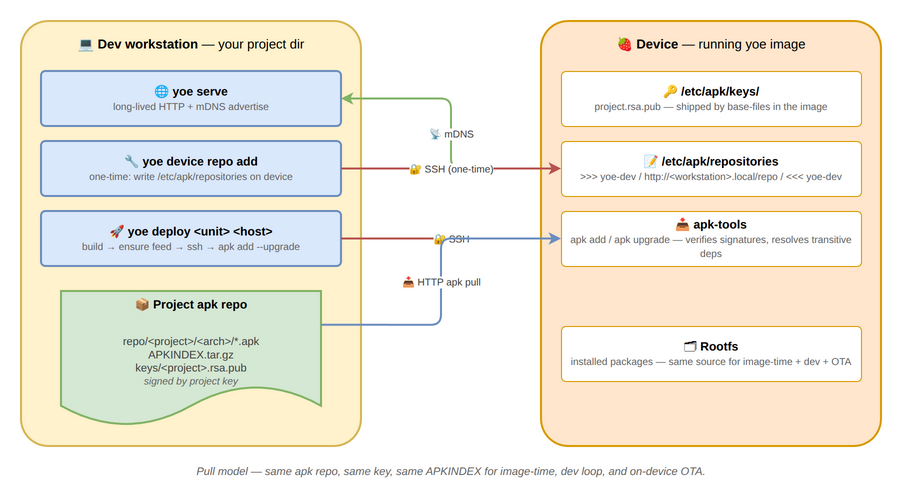
The model is pull, not push. Every install — image-time, on-device OTA, and
the dev loop — uses the same package repo, the same repo index
(APKINDEX.tar.gz for apk, the Packages/Release files for apt), and the
same signing key. Adding a new runtime dep to a unit doesn’t require updating
deploy machinery; the package manager on the device resolves it.
Trust
Packages and the repo index are signed by the project key (docs/signing.md).
Every yoe device has the matching public key in its trusted-key store
(/etc/apk/keys/ on Alpine, an apt keyring on Debian/Ubuntu) via base-files.
The package manager verifies signatures unconditionally, so the HTTP transport
is plain — package integrity is enforced at the package layer, not the network
layer.
For production OTA, layer HTTPS via reverse proxy (docs/on-device-apk.md).
Common workflows
One-time setup on a fresh device
A device that was just flashed with an image built by your project needs nothing
— the public key is already in the device’s trusted-key store (/etc/apk/keys/
on Alpine, the apt keyring on Debian/Ubuntu). Configure the repo:
# Dev host, in your project dir
yoe serve &

# In another terminal — autodiscovers the running serve via mDNS
yoe device repo add dev-pi.local
After this, on the device (Alpine shown; on Debian/Ubuntu use
apt update && apt install):
apk update
apk add htop strace gdb         # any unit your project builds is now installable
If the device was flashed from someone else’s image (no project key), pass
--push-key:
yoe device repo add dev-pi.local --push-key
Iterating on a single unit
yoe deploy myapp dev-pi.local
Builds myapp, starts an ephemeral feed (or reuses your running yoe serve if
it’s advertising the same project), ssh’s to the device, and installs myapp
with the device’s package manager (apk add --upgrade myapp on Alpine,
apt install myapp on Debian/Ubuntu). Transitive deps are resolved on the
device.
A marker block in the target’s package sources (# >>> yoe-dev …
# <<< yoe-dev in /etc/apk/repositories on Alpine, the equivalent under
/etc/apt/sources.list.d/ on Debian/Ubuntu) is left in place after deploy —
same entry yoe device repo add would have written. So the first deploy to a
fresh device doubles as the persistent feed config.
Multiple devices on a LAN
Run yoe serve once on the dev host. Each device runs yoe device repo add
once. After that, the device’s index-refresh-then-upgrade
(apk update && apk upgrade on Alpine, apt update && apt upgrade on
Debian/Ubuntu) on each device picks up new builds.
Tearing it down
yoe device repo remove dev-pi.local
Strips the yoe-dev marker block from the target’s package sources
(/etc/apk/repositories on Alpine, the corresponding file under
/etc/apt/sources.list.d/ on Debian/Ubuntu). The device falls back to whatever
else is configured (typically nothing, in dev).
Inspecting the device’s repo config
yoe device repo list dev-pi.local
Prints the device’s configured package sources, prefixed with the source
filename. On Alpine this is /etc/apk/repositories (and any
/etc/apk/repositories.d/*.list, though apk-tools 2.x does not read those
itself — they’re informational only); on Debian/Ubuntu it is the files under
/etc/apt/sources.list.d/.
Command reference
yoe serve
yoe serve [--port PORT] [--bind ADDR] [--no-mdns] [--service-name NAME]
--port— TCP port. Default8765. Pinned (not random) so the URL written byyoe device repo addstays valid acrossyoe serverestarts.--bind— listen address. Default0.0.0.0(LAN-visible).--no-mdns— skip the mDNS advertisement (multicast-hostile networks).--service-name— mDNS instance name. Defaultyoe-<project>.
yoe device repo add
yoe device repo add <[user@]host[:port]> [--feed URL] [--name NAME]
                                          [--push-key] [--user USER]
<[user@]host[:port]>— ssh destination. Examples:dev-pi.local,pi@dev-pi.local,localhost:2222(QEMU),pi@dev-pi.local:2200.--feed URL— explicit URL. If omitted, browses mDNS for_yoe-feed._tcpon the LAN; errors clearly on 0 or >1 matches.--name NAME— name suffix for the marker block written into the target’s package sources (# >>> yoe-<name>…# <<< yoe-<name>in/etc/apk/repositorieson Alpine, the equivalent under/etc/apt/sources.list.d/on Debian/Ubuntu). Defaultyoe-dev.--push-key— copy the project signing pubkey to the target’s trusted-key store (/etc/apk/keys/on Alpine, the apt keyring on Debian/Ubuntu) before configuring.--user USER— default ssh user when the target spec has nouser@prefix. Defaultroot. ssh shells out to the user’ssshso~/.ssh/config, ssh-agent, known_hosts, and jump hosts all work.
yoe device repo remove
yoe device repo remove <[user@]host[:port]> [--name NAME] [--user USER]
Idempotent — missing file is success.
yoe device repo list
yoe device repo list <[user@]host[:port]> [--user USER]
yoe deploy
yoe deploy <unit> <[user@]host[:port]> [--user U] [--port P]
                                        [--host-ip IP] [--machine M]
<unit>— must resolve to a non-image unit. Image targets error with a pointer toyoe flash.<[user@]host[:port]>— ssh destination, same syntax asdevice repo add.--port— feed port (default8765, same asyoe serve).--host-ip— advertise this IP to the device instead of<hostname>.local. Use when mDNS resolution fails on the device.--machine— target machine override.
Constraints
- mDNS doesn’t cross subnets. Cross-subnet deploys need
--feed URLor--host-ip. - A pinned port
8765collides if something else on the dev host is using it — pass--porttoyoe serveandyoe deployto override. - The dev host needs avahi / systemd-resolved running for
<hostname>.localto resolve from the device. Most Linux distros ship this. - Concurrent deploys against the same project: one runs the ephemeral feed (or
reuses
yoe serve), the other will see the same URL via mDNS reuse. Truly parallel ephemeral feeds for the same project on the same dev host collide on port8765.