[yoe] next generation
Fast tooling and builds. No cross-compiling headaches. Easy to customize/upgrade/debug. One tool for both system engineers and application developers to ship products faster.
[yoe] next generation is a build system (focused on Embedded Linux for now)
for teams shipping modern edge products. Components in Go, Rust, Zig, Python,
JS/TS, and C/C++ are supported. [yoe] releases often and tracks upstream
closely. The configuration language is easily processed by humans and AI. Build
on your laptop, on native hardware, or in cloud CI — one integrated tool, same
config, same results.
We took what we learned from many years of maintaining and building products
with the Yoe Distribution, started over, and began
building the tool we always wanted. [yoe] next generation is an experiment
in progress — we’re sharing the work in the open as it takes shape.
Note: Not everything in the documentation has been implemented yet as this project is in the early stages.
🎯 Goals
Three north stars guide the experiment — everything else is in service of these:
- Drastically improve developer productivity. Shrink the loop between an idea and a running image. Fewer rebuilds, fewer context switches, fewer tools to learn — so engineers spend their time on the product, not on the build.
- Easily integrate complex workloads. Modern edge devices ship Go services, Rust agents, Python ML, container workloads, and kernel drivers side by side. Pulling these together should be straightforward, not a custom integration project each time.
- Scale to build anything. From tiny Zephyr images to complex AI workloads. From one application to a complete distributed system. One tool, one mental model — the same workflow on a laptop, a build farm, or cloud CI, with caching that keeps up as projects grow.
Is [yoe] Right for You?
[yoe] build is not for everyone. If you are building a mission-critical system
that requires bit-for-bit reproducible builds, long-term release freezes, or
extensive compliance certification, use the current generation [Yoe
Distribution](https://yoedistro.org/ based on
Yocto - it is battle-tested for those
requirements.
[yoe] build is designed for edge systems that behave more like cloud systems —
AI workloads and modern-language applications — and for teams that track
upstream closely and prioritize fast iteration over strict reproducibility. If
your product ships frequent updates, runs containerized services, or depends
heavily on Go/Rust/Python ecosystems, [yoe] may be a better fit.
More fundamentally, [yoe] assumes a small-team problem set, not a scaled-down
enterprise one. A startup or ten-person product team doesn’t have smaller
versions of an enterprise’s problems — it often has different problems entirely,
and adopting tooling built for scale you don’t have imports its operational cost
without the payoff (the
You Are Not Google
point. [yoe] is calibrated for the problems small teams and startups actually
have.
🚀 Getting Started
Prerequisites: Linux or macOS with Git and Docker installed. Windows users: install WSL2 and use the Linux binary (Linux x86_64/Docker is the most tested configuration). Claude Code is highly recommended, but not required.
To run a built image you also need QEMU. On Debian/Ubuntu:
sudo apt-get install qemu-system-x86
For KVM acceleration, your user must be in the kvm group. If yoe run reports
failed to initialize kvm: Permission denied, add yourself and pick up the new
group membership:
sudo usermod -aG kvm $(whoami)
newgrp kvm   # or log out and back in
# Download the yoe binary (Linux x86_64)
curl -L https://github.com/yoebuild/yoe/releases/latest/download/yoe-Linux-x86_64 -o yoe
# For other platforms, download from https://github.com/yoebuild/yoe/releases/latest

chmod +x yoe
mkdir -p ~/bin
mv yoe ~/bin/
# Make sure ~/bin is in your PATH (add to ~/.bashrc or ~/.zshrc if needed)
export PATH="$HOME/bin:$PATH"

# Create a new project
yoe init yoe-test
cd yoe-test

# Start the TUI (see screenshot below)
yoe

# Navigate to the base-image and press 'b' to build

# When build is complete, press 'r' to run (requires `qemu-system-x86_64` installed on your host)

# Log in a user: root, no password

# Power off when finished (inside running image)
poweroff
The TUI user interface:

dev-image is another included image with a few more things in it. Press the
s key to navigate to the setup menu and select the image.
The / key modifies the unit query to change what units are displayed.
The tab key shifts between the unit, modules, and diagnostics pages.
For more information on the TUI, see the
[yoe] tool documentation.
There are also CLI variants of the above commands (build, run, etc.).
What just happened:
yoe initcreated a project with aPROJECT.starconfig and a default x86_64 QEMU machine.- On first build,
yoeautomatically built a Docker container with the toolchain (gcc, make, etc.) and fetched the default unit modules from GitHub. - It built ~10 packages from source (busybox, linux kernel, openssl, etc.) inside the container, each isolated in its own bubblewrap sandbox.
- It assembled a bootable disk image from those packages.
yoe runlaunched the image in QEMU with KVM acceleration.
Everything is in the project directory — no global state, no hidden caches outside the tree.
🔧 Why This Is Possible Now
A decade ago, this combination wasn’t realistic. Several things have changed:
- ARM and RISC-V hardware is fast enough to build natively. Modern ARM boards and cloud instances (AWS Graviton, Hetzner CAX) build at full speed. For development, QEMU user-mode emulation runs ARM containers on x86 — no cross-toolchain needed.
- Modern languages bring their own package managers. Go, Rust, Zig, and
Python already handle dependency resolution, reproducible builds, and
caching.
[yoe]doesn’t reinvent any of that — application developers use the same Cargo, Go modules, or pip they already know. - AI can guide developers through the system. The hardest part of embedded
Linux is knowing what to configure and why.
[yoe]’s metadata is structured Starlark — queryable, not buried in shell scripts — so an AI assistant can create units, diagnose build failures, and audit security without the developer memorizing the build system’s quirks.
🧭 Values
- The product developer experience is the top priority. Other solutions are often not optimized for developers building products. This includes application developers as well as system engineers. Clear and concise communication is essential when things go wrong. Unintelligible stacktraces are unacceptable.
- Be Pragmatic. Leverage what already exists where it makes sense. We don’t have any religion that everything needs to be built from source, or that we all need to build our own toolchains.
- Optimized for small teams.
[yoe]is a tool for small teams to do big things. There are plenty of enterprise tools (Bazel, Buck2, Maven, etc.); we will use ideas from these tools, but[yoe]aims to be something different. - Scope is not limited to Embedded Linux. Although Embedded Linux is our
current focus, a tool like
[yoe]could be used for any problem where you pull a lot of pieces together. At its heart,[yoe]is a tool for building complex systems. - Track upstream closely. Modern edge systems are more like the cloud than
traditional embedded systems — they are connected, updated regularly, and
expected to receive security patches throughout their lifetime.
[yoe]assumes you will track upstream releases closely rather than freezing on a version for years. Updating a package should be easy and routine, not a high-risk event that requires a dedicated engineering effort. - Vendor Neutral.
[yoe]is a vendor neutral project and welcomes BSPs and other units from any vendor. The goal is to build an integrated ecosystem like Zephyr.
🤖 Why AI-Native
Embedded Linux is hard not because the concepts are complex, but because there are many concepts that interact in non-obvious ways: toolchain flags, dependency ordering, kernel configuration, package splitting, module composition, image assembly, device trees, bootloaders. Traditional build systems manage this complexity through complexity.
[yoe] takes a different approach: Simplify things as much as possible.
Starlark units are readable by both humans and AI. The dependency graph is
queryable. Build logs are structured. An AI assistant that understands all of
this can:
- Create units from a URL or description —
/new-unit https://github.com/example/myapp - Diagnose build failures by reading logs and the dependency graph —
/diagnose openssh - Trace why a package is in your image —
/why libssl - Simulate changes before building —
/what-if remove networkmanager - Audit for CVEs and license compliance —
/cve-check,/license-audit - Generate machine definitions from board names —
/new-machine "Raspberry Pi 5"
Add these skills to your project with yoe skills install (or as a Claude Code
plugin via /plugin marketplace add yoebuild/yoe). See
AI Skills for installation details and the full catalog of
AI-driven workflows.
💡 Inspirations
[yoe] draws selectively from existing systems, taking the best ideas from each
while avoiding their respective pain points:
- Yocto — machine abstraction, image composition, module architecture, OTA integration. Leave behind BitBake, sstate, cross-compilation complexity.
- Buildroot — the principle that simpler is better. Leave behind monolithic images and full-rebuild-on-config-change.
- Arch — rolling release, minimal base, PKGBUILD-style simplicity, documentation culture. Leave behind x86-centrism and manual administration.
- Alpine — apk package manager, busybox, minimal footprint, security defaults. Leave behind lack of BSP support.
- Nix — content-addressed caching, declarative configuration, hermetic builds, atomic rollback. Leave behind the Nix language and store-path complexity.
- Google GN — two-phase resolve-then-build model, config propagation through the dependency graph, build introspection commands, label-based target references for composability. Leave behind the C++-specific build model and Ninja generation.
- Bazel — Starlark as a build configuration language, hermetic sandboxed actions, content-addressed action caching, and remote build execution. Leave behind the monorepo bias, JVM runtime, and BUILD-file verbosity that make Bazel heavy for small teams.
See Comparisons for detailed analysis of how [yoe]
relates to each of these (and other) systems, including when you should use them
instead.
⚙️ Design
🏗️ A Single Tool
At its heart, [yoe] is a single tool — one Go binary that handles the entire
build flow, from fetching sources to assembling bootable images. It exposes
three interfaces: AI conversation, an interactive TUI, and a traditional CLI.
All three do the same things; use whichever fits the moment.
The tool handles:
- TUI — run
yoewith no arguments for an interactive unit list with inline build status, background builds, search, and quick actions (edit, diagnose, clean). - Build orchestration — invoke language-native build tools in the right
order, manage caching, assemble outputs. Multiple images and targets live in a
single build tree (like Yocto). No global lock or global resource: concurrent
yoeinvocations run in parallel, which is essential for rapid AI-driven development. - Machine/distro configuration — define target boards and distribution profiles in Starlark — Python-like, deterministic, sandboxed.
See The yoe Tool for the full CLI reference,
Unit & Configuration Format for the unit and config
spec, and Build Languages for the Starlark rationale.
Why Go: single static binary with no runtime dependencies, fast compilation, excellent cross-compilation support (useful for shipping the tool itself), and a strong standard library for file manipulation, process execution, and networking.
🖥️ Workstation-Centric Development
[yoe] is designed first for the developer’s workstation. While yoe runs
equally well on an embedded dev kit, an ARM cloud instance, or a CI runner, the
development loop is centered on the machine where developers already have their
editor, shell, browser, debugger, and Git workflow set up. You should not need
to SSH into a Raspberry Pi to get real work done.
That said, the option is there. The selfhost-image for the Raspberry Pi 5
bundles yoe, Go, Docker, git, and the dev-image tool set (helix, yazi, zellij)
— flash, boot, and a freshly-imaged RPi5 is a complete native ARM64 build host.
See Self-Host on RPi5.
When a build runs much faster on a different native architecture — for example, building ARM64 packages from an x86_64 workstation — those build steps can be dispatched to a native builder (a local ARM board on the network, an AWS Graviton instance, a Hetzner ARM box) without changing the developer’s workflow. This is similar to how CI systems dispatch jobs to remote runners: the developer’s workstation plays the role of the orchestrator, and remote machines act as architecture-specific runners. Orchestration, source edits, project state, the TUI, and the CLI stay on the workstation; only the per-unit build steps that benefit from native execution run elsewhere.
If a remote builder isn’t available — offline, on a plane, or the cloud runner is down — QEMU user-mode emulation is the fallback so builds can always continue locally. It’s slower, but the workflow doesn’t break.
The result: developers stay in the environment they already have tuned, and
[yoe] puts the right machine behind each build step.
🚫 No Cross Compilation
Instead of maintaining cross-toolchains, [yoe] targets native builds:
- QEMU user-mode emulation — build ARM64 or RISC-V images on any x86_64
workstation. The build runs inside a genuine foreign-arch Docker container,
transparently emulated via binfmt_misc. One command to set up
(
yoe container binfmt), then--machine qemu-arm64just works. ~5-20x slower than native, but fine for iterating on a few packages. - Native hardware — build on the target architecture directly (ARM64 dev boards, RISC-V boards).
- Cloud CI — use native architecture runners (e.g., ARM64 GitHub Actions runners, AWS Graviton, Hetzner ARM boxes) for full-speed CI builds.
- Per-unit build environment — each unit runs in its own Docker container with bubblewrap sandboxing. Architecture is determined per unit, not globally, and build dependencies don’t pollute the host or leak between units.
This eliminates an entire class of build issues (cross-sysroot management, host contamination, cross-pkg-config, etc.).
* Note, we are not opposed to cross compilation where it makes sense. Go applications cross-compile very easily. The Linux kernel is generally easy to cross-compile, so we may do that. But, cross-compilation of C/C++ components is not required.
📦 Native Language Package Managers
Each language ecosystem manages its own dependencies:
| Language | Package Manager | Lock File |
|---|---|---|
| Go | Go modules | go.sum |
| Rust | Cargo | Cargo.lock |
| Python | pip / uv | requirements.lock |
| JavaScript | npm / pnpm | package-lock.json |
| Zig | Zig build | build.zig.zon |
[yoe] plays nicely with existing language caching infrastructure so builds are
fast and repeatable without re-downloading the internet.
🖥️ Kernel and System Image Tooling
While application builds use native language tooling, the system-level pieces still need orchestration:
- Kernel builds — configure, build, and package kernels for target boards.
- Root filesystem assembly — combine built artifacts into a bootable image (ext4, squashfs, etc.).
- Device tree / bootloader management — board-specific configuration.
- OTA / update support — image-based device management (full image updates, OSTree, BDiff) integrated with update frameworks (RAUC, SWUpdate, etc.). Container workloads on the target device are on the roadmap.
This is where [yoe] tooling (written in Go and Starlark) provides value —
similar to what bitbake and wic do in Yocto, but simpler and more
opinionated.
📋 Package Management
[yoe] uses the target distro’s native package manager —
apk (Alpine Package
Keeper) on the default Alpine base, and apt/dpkg on the Debian/Ubuntu bases. It
is important to distinguish between units and packages — these are
separate concepts:
- Units are build-time definitions (Starlark
.starfiles in the project tree) that describe how to build software. See Unit & Configuration Format. - Packages are installable artifacts (
.apkor.debfiles) that units produce. They are what gets installed into root filesystem images and onto devices.
This separation means units are a development/CI concern, while packages are a deployment/device concern. You can build packages once and install them on many devices without needing the unit tree. Rebuilding from source is first class but not required — every package is fully traceable to its unit, with no golden images.
The [yoe] build tooling invokes units to produce packages — .apk on the
default Alpine base, .deb on the experimental Debian/Ubuntu bases — which are
published to a repository. Image assembly then installs those packages into a
root filesystem with the base’s native tool (apk on Alpine, mmdebstrap/apt
on Debian/Ubuntu).
🧱 Base System
The base userspace depends on the image’s distro. The default — and most
mature — base is Alpine-derived: busybox on a musl C library, with
busybox’s built-in init as PID 1. [yoe] also builds experimental Debian
and Ubuntu bases, which are glibc worlds running systemd as PID 1
(see Yoe and distributions). The choice is per image:
- C library — musl on the Alpine base (inherited from Alpine’s toolchain); glibc on the Debian/Ubuntu bases, for maximum compatibility with pre-built binaries, vendor blobs, language runtimes (Go, Rust, Python, Node.js), and third-party libraries that assume glibc.
- busybox (Alpine base) — provides the core userspace utilities (sh, coreutils, etc.) and init in a single small binary, keeping the image minimal while still giving a functional shell environment for debugging and scripting. The Debian/Ubuntu bases ship the full GNU coreutils instead.
- Init — busybox’s built-in init handles PID 1 on the Alpine base; the Debian/Ubuntu bases run systemd, with its rich service management, integrated journal logging, network management, and device management (udev). The trade-off is size and complexity — which is why the lean busybox path stays the default.
This combination gives a small but fully functional base system that can run real-world services without surprises.
🔒 Reproducibility
[yoe] targets functional equivalence, not bit-for-bit reproducibility.
Same inputs produce functionally identical outputs — same behavior, same files,
same permissions — but the bytes may differ due to embedded timestamps, archive
member ordering, or compiler non-determinism.
This is a deliberate trade-off:
- Bit-for-bit reproducibility (what Nix aspires to) requires patching
upstream build systems to eliminate timestamps (
__DATE__,.pycmtime), enforce file ordering in archives, and strip or fix build IDs. This is enormous effort — Nix still hasn’t fully achieved it after 20 years — and the primary benefit (verifying a binary matches its source by rebuilding) is relevant mainly for high-assurance supply-chain contexts. - Functional equivalence gets the practical benefits — reliable caching, hermetic builds, provenance tracking — without the patching burden. Bubblewrap isolation prevents host contamination. Content-addressed input hashing — combining hashes of the unit, its source, and its dependencies — ensures cache hits are reliable. Starlark evaluation is deterministic by design. The remaining non-determinism (timestamps, ordering within packages) doesn’t affect functionality or caching.
The caching model does not depend on output determinism. Cache keys are computed from inputs (unit content, source hash, dependency package hashes, build flags), not outputs. If inputs haven’t changed, the cached output is used regardless of whether a fresh build would produce identical bytes.
📚 Documentation
See the main documentation site for more information. New to the project’s vocabulary? Start with the Glossary.
🤝 Contributing
Contributions are welcome — especially BSPs for new boards and units for new packages. AI-assisted contributions are fine; just make sure the result actually works, and keep PRs small and reviewable. Please discuss architectural or significant UI changes before implementing.
💚 Sponsors
[yoe] is supported by:

📄 License
[yoe] is licensed under the Apache License 2.0.
The [yoe] Tool
yoe is the single CLI tool that drives all [yoe] workflows — building
packages and images from units, managing caches and source downloads, and
flashing devices. It is a statically-linked Go binary with no runtime
dependencies.
Installation
Prerequisites: Linux or macOS with Git and Docker installed. Windows users: install WSL2 and use the Linux binary (Linux x86_64/Docker is the most tested configuration). Claude Code is highly recommended, but not required.
# Download the yoe binary (Linux x86_64)
curl -L https://github.com/yoebuild/yoe/releases/latest/download/yoe-Linux-x86_64 -o yoe
# For other platforms, download from https://github.com/yoebuild/yoe/releases/latest

chmod +x yoe
mkdir -p ~/bin
mv yoe ~/bin/
# Make sure ~/bin is in your PATH (add to ~/.bashrc or ~/.zshrc if needed)
export PATH="$HOME/bin:$PATH"
Since yoe is a Go binary, it cross-compiles trivially — build on your x86
workstation, run on an ARM build server.
Command Overview
yoe                 Launch the interactive TUI
yoe init            Create a new `[yoe]` project
yoe build           Build units (packages and images)
yoe shell           Open an interactive shell in a unit's build sandbox  [planned]
yoe dev             Manage source modifications (extract, diff, status)
yoe flash           Write an image to a device/SD card
yoe run             Run an image in QEMU
yoe serve           Serve the project's package repo over HTTP+mDNS
yoe deploy          Build and install a unit on a running yoe device
yoe device          Manage repo configuration on a target device
yoe module          Manage external modules (fetch, sync, list)
yoe repo            Manage the local package repository
yoe cache           Manage the build cache (local and remote)  [planned]
yoe bundle          Export/import content-addressed bundles (air-gapped)  [planned]
yoe source          Download and manage source archives/repos
yoe config          View and edit project configuration
yoe desc            Describe a unit, package, or target
yoe refs            Show reverse dependencies
yoe graph           Visualize the dependency DAG
yoe log             Show build log (most recent or specific unit)
yoe diagnose        Launch Claude Code to diagnose a build failure
yoe skills          Install/update yoe's Claude Code skills in this project
yoe clean           Remove build artifacts
yoe container       Manage the build container (build, binfmt, status)
All commands except init, version, skills, and container run inside an
Alpine build container automatically. The container is built on first use from
containers/Dockerfile.build. See
Build Environment
for details.
Commands
yoe init
Scaffolds a new [yoe] project directory with the standard layout.
yoe init my-project
Creates:
my-project/
├── PROJECT.star
├── .gitignore          # ignores build/, cache/, repo/, local.star
├── .claude/skills/     # yoe's Claude Code skills (committed)
├── machines/
├── units/
├── classes/
└── overlays/
Optionally specify a machine to start with:
yoe init my-project --machine beaglebone-black
yoe init also installs [yoe]’s Claude Code skills into the new project’s
.claude/skills directory (the same set yoe skills install provides), so
Claude Code is ready to help the moment you open the project. See
yoe skills.
yoe build
Builds one or more units. Package units (unit(), autotools(), etc.) produce
packages (.apk for Alpine/musl targets, .deb for Debian/Ubuntu/glibc
targets) and publish them to the local repository. Image units (image())
assemble a root filesystem and produce a disk image. The class function used in
the .star file determines the behavior — the command is the same for both.
# Build a single package unit
yoe build openssh

# Build multiple units
yoe build openssh zlib openssl

# Build an image unit (assembles rootfs, produces disk image)
yoe build base-image

# Build an image for a specific machine
yoe build base-image --machine raspberrypi4

# Build for ARM64 on an x86_64 host (uses QEMU user-mode emulation)
yoe build base-image --machine qemu-arm64

# Build all units (packages and images)
yoe build --all

# Build all image units for all machines (full matrix)
yoe build --all --class image             # planned: --class filter

# Build a unit and all its dependencies
yoe build --with-deps myapp               # planned: --with-deps flag

# Build up to 8 units in parallel (saved to local.star for next time)
yoe build -j 8 --all

# Rebuild even if the cache is fresh
yoe build --force openssh

# Skip remote cache — only check local cache
yoe build --no-remote-cache openssh       # planned: remote cache

# Skip all caches — force build from source
yoe build --no-cache openssh

# Dry run — show what would be built and why
yoe build --dry-run --all

# List available image/machine combinations
yoe build --list-targets                  # planned
What happens during a build:
Inspired by Google’s GN, yoe build uses a two-phase resolve-then-build
model. The entire dependency graph is resolved and validated before any build
work starts. This catches missing dependencies, cycles, and configuration errors
up front rather than mid-build.
- Sync modules — fetch or update external modules declared in
PROJECT.star(skipped if already up to date). Seeyoe module sync. - Evaluate Starlark — load and evaluate all
.starunit files (including those from modules) to produce the set of build targets. Each class function call (unit(),autotools(),image(), etc.) registers a target. - Resolve dependencies — topologically sort the build order from declared dependencies. Validate that all referenced units exist and the graph is acyclic. If any errors are found, stop here — no partial builds.
- Check cache — compute a content hash of the unit + source + build
dependencies. If a cached package (
.apkor.deb) with that hash exists (locally or in a remote cache), skip the build. - Fetch source — download the source archive or clone the git repo (see
yoe sourcebelow). Sources are cached in$YOE_CACHE/sources/. - Prepare build environment — set up an isolated build root with only
declared build dependencies installed via the target’s package manager (
apkfor Alpine,aptfor Debian/Ubuntu). This ensures hermetic builds. - Execute build steps — run the build commands defined by the class
function in the build root. The environment provides:
$PREFIX— install prefix (typically/usr)$DESTDIR— staging directory for installed files$NPROC— number of available CPU cores$ARCH— target architecture
- Package — collect files from
$DESTDIR, generate the package metadata from the unit fields, and create the package archive (.apkfor Alpine/musl targets,.debfor Debian/Ubuntu/glibc targets). - Publish — add the package to the local repository and update the repo index.
For image units (image() class), steps 5-9 are replaced with image
assembly:
- Sync modules — same as above.
- Evaluate Starlark — same as above.
- Resolve dependencies — same as above.
- Check cache — same as above.
- Read machine definition — evaluate
machines/<name>.starfor architecture, kernel, bootloader, and partition layout. - Create empty rootfs — set up a temporary directory.
- Install packages — install all declared packages into
<rootfs>from the[yoe]repository using the target’s package manager (apk add --rootfor Alpine,apt/dpkgfor Debian/Ubuntu). The package manager handles dependency resolution. - Apply configuration — set hostname, timezone, locale, and enable services per the image unit’s configuration (via the active init system — busybox init today, systemd a possible future option).
- Apply overlays — copy files from
overlays/into the rootfs. - Install kernel + bootloader — build (or fetch from cache) the kernel and bootloader per the machine definition, install into the rootfs/boot partition.
- Generate disk image — partition the output image per the partition layout and populate each partition.
Output format can be specified with --format:
yoe build base-image --format sdcard    # raw disk image with partitions
yoe build base-image --format rootfs    # tar.gz of the rootfs only
yoe build base-image --format squashfs  # squashfs for read-only roots
Parallel builds: yoe build walks the dependency DAG and builds units
concurrently — as soon as a unit’s dependencies are all built (or cached), it
can start, so independent branches of the graph build at the same time. The
concurrency limit defaults to 5 units at once. Set it however suits your
machine:
yoe build -j 12 --all                 # this run, and remembered afterward
yoe config set parallel-builds 12     # set it without starting a build
Either form writes parallel_builds to local.star, so the setting is
per-developer and persists across builds (including builds started from the
TUI). The TUI Setup page (s) also exposes it: select Parallel builds and
press ←/→ (or h/l) to adjust the count, which writes the same local.star
value. yoe config show prints the value currently in effect. -j 1 forces a
fully sequential build, which is handy when reading interleaved verbose output.
Precedence is -j flag → local.star → the built-in default of 5.
When a build fails: the failing unit’s build log is the record of what its
build steps actually did. yoe prints the tail of that log inline at the point of
failure, so the underlying error (a configure rejection, a compiler message, a
missing header) is visible directly in the output — including when the build ran
somewhere ephemeral like CI, where the log file does not survive the run. The
full log path is printed alongside the tail; yoe log <unit> reprints it, and
yoe log <unit> -e opens it in $EDITOR. In verbose mode (-v) the log is
streamed to the terminal as the build runs, so only the path is noted on
failure.
yoe flash
Writes a built image to a block device or SD card.
# Flash to SD card (auto-detects the most recent image build)
yoe flash /dev/sdX

# Flash a specific image unit's output
yoe flash base-image /dev/sdX

# Flash for a specific machine
yoe flash base-image --machine beaglebone-black /dev/sdX

# Dry run — show what would happen
yoe flash --dry-run /dev/sdX
Safety: yoe flash requires explicit confirmation before writing and refuses to
write to mounted devices or devices that look like system disks. The TUI’s flash
page adds a per-developer do-not-use list on top of that, described under
Flash page.
yoe run
Launches a built image in QEMU for development and testing. When the host and target architecture match, QEMU uses KVM hardware virtualization for near-native speed. For cross-architecture images (e.g., ARM64 on x86_64), QEMU runs in software emulation mode automatically.
# Run the most recently built image (auto-detects machine/image)
yoe run

# Run a specific image unit
yoe run dev-image --machine qemu-x86_64

# Run an ARM64 image on an x86_64 host (software emulation)
yoe run base-image --machine qemu-arm64

# Forward an extra host port (default qemu machines already forward 2222→22,
# 8080→80, and 8118→8118 — `--port` adds to that list)
yoe run --port 9000:9000

# Allocate more memory — also saved to local.star and reused next time
yoe run --memory 8G

# Run with graphical output (default is serial console). Opens QEMU's
# native window with a virtio-vga adapter; serial stays multiplexed onto
# this terminal via `-serial mon:stdio`, so kernel logs are still
# visible alongside the framebuffer.
yoe run qt-image --display

# Run headless in the background
yoe run --daemon

# Run the Debian build of an image that exists in several distros
yoe run dev-image --distro debian

# Boot smoke test: boot headless, wait for the login prompt, SSH in and run
# a health check, then power off — exits non-zero on any failure
yoe run --boot-test dev-image
yoe run --boot-test --timeout 90s --machine qemu-arm64 dev-image
When an image name exists in more than one distro (e.g. dev-image ships in
both the Alpine and Debian modules), --distro selects which built image to
run, mirroring yoe build --distro. Without it the project’s effective distro
(the local.star override, then defaults.distro) decides.
What happens:
- Detect architecture — read the machine definition to determine the target architecture (x86_64, aarch64, riscv64).
- Select QEMU binary — map to the correct
qemu-system-*binary. - Configure machine — for x86_64, use the
q35machine type with UEFI firmware (OVMF). For aarch64, usevirtwith UEFI (AAVMF). For riscv64, usevirtwith OpenSBI. - Enable KVM — hardware virtualization is always used since host and guest architectures match.
- Attach image — use the built disk image as a virtio block device.
- Route console — by default, connect the serial console to the terminal
(
-nographic). The guest kernel must haveconsole=ttyS0(x86) orconsole=ttyAMA0(aarch64) in its command line. - Set up networking — use QEMU user-mode networking with port forwarding.
The qemu-x86_64 and qemu-arm64 machines forward
2222:22(SSH),8080:80, and8118:8118by default, so SSH to the guest works without any extra flags.--portadds to that list.
QEMU machine definitions:
Projects can define QEMU-specific machines alongside hardware ones:
# machines/qemu-x86_64.star
machine(
    name = "qemu-x86_64",
    arch = "x86_64",
    kernel = kernel(
        unit = "linux-qemu",
        cmdline = "console=ttyS0 root=/dev/vda2 rw",
    ),
    qemu = qemu_config(
        machine = "q35",
        cpu = "host",
        memory = "4G",
        firmware = "ovmf",
        display = "none",
    ),
)
When yoe run is given a machine with a qemu configuration, it uses those
settings directly. When given a hardware machine without qemu configuration,
it falls back to a reasonable default QEMU configuration for the machine’s
architecture.
Guest memory follows this precedence: the --memory flag, then
qemu_memory in local.star, then the machine’s own qemu memory. Passing
--memory also writes the value to local.star, so later runs (and the TUI)
reuse it without re-passing the flag — the same persistence -j uses for
parallel-builds. Set it without a run via yoe config set qemu-memory 8G, or
clear it with yoe config set qemu-memory "" to fall back to the machine
default. The TUI Setup page (s) exposes it under QEMU settings (see
below).
Graphical display follows the precedence: the --display flag, then
qemu_display in local.star ("on" / "off"), then off. The TUI sub-screen
is the editor for the persisted value.
Port forwards layer over the machine’s declared qemu.ports like this:
local-overrides (qemu_ports in local.star) come first, then --port flags
on the command line. In both lists, an entry whose guest port matches one in the
machine’s defaults replaces that default instead of adding a duplicate — the
same rule --port already follows for qemu-in-qemu.
Boot smoke test (--boot-test). This turns yoe run into a non-interactive
pass/fail check, for CI or a quick local sanity test. yoe boots the image
headless, watches the serial console until it reaches the login prompt, then
SSHes into the guest over the 2222→22 forward (as root, which dev images
leave passwordless), runs a health command, and powers the guest off. It exits
0 only if every stage succeeds; a boot that never reaches the prompt, a guest
that exits early, or an unreachable SSH all fail the run. --timeout bounds the
whole sequence (default 5 minutes — generous so an unaccelerated TCG boot still
finishes); the boot uses KVM when /dev/kvm is available and falls back to TCG
otherwise. The test requires qemu-system-* on the host PATH: it runs QEMU on
the host so the guest’s SSH forward lands on the host loopback where the probe
can reach it, rather than inside the build container.
QEMU settings sub-screen. Open Setup with s, move to QEMU settings,
press Enter. The sub-screen lays out three sections:
- Memory — ←/→ steps a preset ladder (machine default, then 128M doubling up to 16G).
- Display — ←/→ cycles
default (off)/off/on. - Ports — each row is an effective forward (the machine’s declarations with
any
local.staroverrides already merged in), taggedmachineorlocal. Press Enter on a row to edit itshost:guestmapping — including a machine-declared forward like8080:8080, which the edit moves off a busy host port by writing alocal.staroverride for that guest port. Pressa/+to add a brand-new forward, andd(or-) to revert an overridden forward to its machine default (or remove a purely local one). A machine forward with no override can’t be removed — edit its host port instead. Every change writes through tolocal.star.
yoe serve
Runs an HTTP server rooted at the project’s repo/ tree and advertises it on
mDNS as _yoe-feed._tcp.local. so devices and yoe deploy discover it
automatically.
# Serve at the default port (8765) with mDNS advertisement
yoe serve

# Bind to a specific interface or change the port
yoe serve --bind 192.168.1.10 --port 9000

# Skip mDNS (e.g., inside a container without host networking)
yoe serve --no-mdns
The default port is pinned (8765) so the URL written by yoe device repo add
on a target survives yoe serve restarts. Packages and the repo index
(APKINDEX.tar.gz for apk, the Packages/Release files for apt) are already
signed by the project key, so plain HTTP transport is fine for development. See
feed-server.md for the full dev-loop guide.
yoe deploy
Builds a unit, exposes the project’s repo as a feed (reusing a running
yoe serve if one is up, otherwise spinning up an ephemeral feed on the same
pinned port), then ssh’s to the device and installs the unit with the device’s
package manager (apk add --upgrade <unit> on Alpine, apt install on
Debian/Ubuntu). Transitive dependencies resolve on the device against the same
repo index production OTA uses.
# Build myapp and install it on dev-pi over the LAN
yoe deploy myapp dev-pi.local

# Deploy to a QEMU vm started with `yoe run` (default 2222→22 forward)
yoe deploy myapp localhost:2222

# Non-root ssh user
yoe deploy myapp pi@dev-pi.local

# Cross-subnet or mDNS-hostile network — advertise an explicit IP
yoe deploy myapp 10.0.5.42 --host-ip 10.0.5.1
The dev-feed repo entry (under /etc/apk/repositories.d/ on Alpine,
/etc/apt/sources.list.d/ on Debian/Ubuntu) is left in place after deploy, so
the device stays configured to pull from the dev host on any future install from
the device. Use yoe device repo remove <host> to tear it down. Image targets
error with a pointer to yoe flash.
yoe device
Configures the device’s package sources (/etc/apk/repositories.d/ on Alpine,
/etc/apt/sources.list.d/ on Debian/Ubuntu) so an install from the device pulls
from your dev feed. Useful standalone (without an immediate yoe deploy) to set
up a fresh device, configure several devices for a multi-device QA bench, or
inspect what’s currently configured.
# Auto-discover the running yoe serve on the LAN, configure dev-pi
yoe device repo add dev-pi.local

# Same, plus push the project signing pubkey to the device's trusted-key
# store — needed if the device was flashed before the project key existed
yoe device repo add dev-pi.local --push-key

# Configure a QEMU vm started with `yoe run` (default 2222→22 forward)
yoe device repo add localhost:2222

# Explicit feed URL (colleague's serve, or non-mDNS network)
yoe device repo add 192.168.4.30 --feed http://laptop.local:8765/myproj

# Tear down
yoe device repo remove dev-pi.local

# Inspect the device's configured package sources
yoe device repo list dev-pi.local
After yoe device repo add, run the device’s index-refresh-then-install
(apk update && apk add htop on Alpine, apt update && apt install htop on
Debian/Ubuntu — or any unit your project builds) directly on the device.
yoe deploy writes the same dev-feed entry by default, so the first deploy
doubles as the persistent feed config.
yoe module
Manages external modules — the Git repositories declared in PROJECT.star that
provide units, classes, and machine definitions.
Status:
yoe module syncandyoe module listare implemented.yoe module info,yoe module check-updates, andyoe module list --tree(transitive tree output) are planned — the CLI dispatches them today with a “not yet implemented” stub message.
# Fetch/update all modules to the refs declared in PROJECT.star
yoe module sync

# List all modules with status (fetched, local override, version)
yoe module list

# Show the full resolved module tree (including transitive deps from MODULE.star)
yoe module list --tree        # planned

# Show details for a specific module
yoe module info @vendor-bsp   # planned

# Check for updates — show if upstream has newer tags
yoe module check-updates      # planned
What happens during yoe module sync:
- Read PROJECT.star — parse the
moduleslist. - Read MODULE.star from each module — discover transitive dependencies.
- Resolve versions — PROJECT.star versions override transitive deps. If a required transitive dep is missing, error with an actionable message.
- Fetch/update — clone or update each module’s Git repo into
$YOE_CACHE/modules/. Checkout the declared ref, or fast-forward the module’s own branch when it is in dev mode (see below). - Verify — confirm that each module’s
MODULE.star(if present) is valid Starlark.
Module caching: Modules are cached in $YOE_CACHE/modules/ as bare Git
repositories with worktree checkouts at the pinned ref. yoe module sync
performs incremental fetches — only downloading new objects.
Automatic sync: yoe build automatically runs module sync if any module is
missing or if PROJECT.star has changed since the last sync. You rarely need to
run yoe module sync manually.
Dev mode: Switching a module to dev mode turns its cache clone into one you
can work in directly. yoe sets origin to whichever of HTTPS or SSH you pick,
converting from whichever the clone uses now, so a clone left on SSH by an
earlier session returns to HTTPS when you ask for it. It also downloads the
history git log and git blame need, and configures the clone to track every
branch on the remote rather than only the pinned one, so a branch you push shows
up as origin/<branch> on the next fetch. From there the clone is yours: yoe
sets up the connectivity and leaves your working tree alone.
yoe module sync respects that. A module in dev mode is fast-forwarded along
the branch it is on — the equivalent of git pull --ff-only — instead of being
checked out onto the declared ref, and the sync listing names each module it
handled this way. When the pull cannot fast-forward because you have commits of
your own or edits in the tree, yoe reports the reason and leaves the clone
untouched; sync continues with the remaining modules. To go back to the declared
ref, switch the module out of dev mode, which prompts before discarding
anything.
Local overrides: Modules with local = "..." in PROJECT.star skip fetching
entirely and use the local directory. yoe module list shows these as
(local: ../path).
Example output of yoe module list:
Module                             Ref        Status
@module-core                      v1.0.0     up to date
@vendor-bsp-imx8                   v2.1.0     up to date
  └─ @hal-common                   v1.3.0     up to date (transitive)
  └─ @firmware-imx                 v5.4       up to date (transitive)
@my-local-module                   main       (local: ../my-module)
yoe repo
Manages the local package repository.
Status:
yoe repo list,yoe repo info, andyoe repo removeare implemented.yoe repo pushandyoe repo pull(S3-compatible remote repository sync) are planned — there is no S3 backend yet.
# List all packages in the repository
yoe repo list

# Show details of a specific package
yoe repo info openssh

# Remove a package from the repository
yoe repo remove openssh-9.5p1-r0

# Push local repository to a remote (S3-compatible)
yoe repo push                 # planned

# Pull packages from a remote repository
yoe repo pull                 # planned
The local repository lives at repo/<project-name>/ within the project
directory. It’s a standard distro-native repository (apk-format for Alpine,
apt-format for Debian/Ubuntu) — you can point the matching package manager on a
running device at it directly.
yoe cache (planned)
Status: Not implemented.
cmd/yoe/main.gohas nocachecase in its command switch — invokingyoe cacheprints “Unknown command”. Content addressing and a local build cache exist inside the build executor, but there is no user-facing cache subcommand, no remote/S3 cache, no signing, and noyoe cache stats/gc/push/pull. The surface below describes the planned design.
Manages the local and remote build caches.
# Show cache status — local size, remote config, hit rate
yoe cache status

# List cached packages (local)
yoe cache list

# Show what's cached for a specific unit
yoe cache list openssh

# Push locally-built packages to the remote cache
yoe cache push

# Push specific packages
yoe cache push openssh zlib

# Pull packages from the remote cache into local
yoe cache pull

# Remove local cache entries older than retention period
yoe cache gc

# Remove all local cache entries
yoe cache gc --all

# Verify integrity of cached packages (check hashes and signatures)
yoe cache verify

# Show cache hit/miss statistics for the last build
yoe cache stats
Cache push/pull vs. repo push/pull: yoe repo manages the package
repository (the repo index the device’s package manager consumes during image
assembly). yoe cache manages the build cache (content-addressed build
outputs keyed by input hash). In practice, both store package files (.apk or
.deb), but the cache is keyed by build inputs while the repo is indexed by
package name/version. Pushing to the cache shares build avoidance with
CI/team. Pushing to the repo shares installable packages with devices.
yoe source
Manages source downloads. Sources are cached locally to avoid repeated downloads.
# Download sources for a unit
yoe source fetch openssh

# Download sources for all units
yoe source fetch --all

# List cached sources
yoe source list

# Verify source integrity (check sha256)
yoe source verify

# Clean stale sources
yoe source clean
Sources are stored in $YOE_CACHE/sources/ with content-addressed naming. For
git sources, bare clones are cached and updated incrementally.
yoe config
View project configuration and set the per-developer settings stored in
local.star.
# Show current configuration (includes parallel-builds and qemu-memory)
yoe config show

# Set how many units build in parallel (written to local.star)
yoe config set parallel-builds 12

# Set the RAM `yoe run` gives the QEMU guest (written to local.star)
yoe config set qemu-memory 8G

# Clear it so the machine's own qemu memory applies again
yoe config set qemu-memory ""
yoe config show reads PROJECT.star and reports the project name, default
machine and image, cache path, the parallel-build concurrency in effect, and the
QEMU guest memory in effect (each annotated default, machine default, or
local.star).
yoe config set only writes settings that live in the yoe-generated
local.star: parallel-builds and qemu-memory. Project configuration
(defaults.machine, defaults.image, etc.) lives in hand-authored
PROJECT.star and is edited there directly — config set does not patch
Starlark.
yoe config set defaults.* / yoe config resolve (planned)
Status: Not implemented.
yoe config setcurrently accepts onlyparallel-builds <n>;defaults.machine/defaults.imageare edited inPROJECT.starby hand, andyoe config resolvedoes not exist yet. Useyoe desc <unit> --configto inspect resolved configuration in the meantime.yoe config set defaults.machine raspberrypi4 # planned yoe config set defaults.image dev # planned yoe config resolve --machine beaglebone-black --image base # planned
yoe desc
Describes a unit, showing its resolved configuration, dependencies, build inputs
hash, and package output. Inspired by GN’s gn desc.
# Show full details of a unit
yoe desc openssh

# Example output:
#   Unit:       openssh
#   Version:      9.6p1
#   Source:       https://cdn.openbsd.org/.../openssh-9.6p1.tar.gz
#   Build deps:   zlib, openssl
#   Runtime deps: zlib, openssl
#   Input hash:   a3f8c2...
#   Cached .apk:  yes (openssh-9.6p1-r0.apk)
#   Config:       CFLAGS=-O2 -march=armv8-a (propagated from machine)

# Show only the resolved config for a unit
yoe desc openssh --config

# Show the build inputs that contribute to the hash
yoe desc openssh --inputs
For an image the selected machine’s kernel cannot boot, desc says so and
qualifies the hash — nothing was resolved, so the value is not a build key and
must not be compared against a real one:
#   Buildable:    no — machine "arduino-uno-q", whose kernel supports: debian
#   Input hash:   4c1e90... (not a build key — nothing was resolved)
#   Artifacts:    (not resolved for machine "arduino-uno-q")
yoe refs
Shows reverse dependencies — what units or images depend on a given unit.
Inspired by GN’s gn refs.
# What depends on openssl?
yoe refs openssl

# Example output:
#   Build deps:
#     openssh (build + runtime)
#     curl (build + runtime)
#     python (build)
#   Images:
#     base (via openssh, curl)
#     dev (via openssh, curl, python)

# Show only direct dependents
yoe refs openssl --direct

# Show the full transitive tree
yoe refs openssl --tree
This is essential for answering “if I update openssl, what needs to rebuild?”
yoe graph
Visualizes the dependency DAG.
# Print the dependency graph as text
yoe graph

# Output DOT format for graphviz
yoe graph --format dot | dot -Tpng -o deps.png

# Show graph for a single unit and its deps
yoe graph openssh

# Show only units that need rebuilding
yoe graph --stale
yoe TUI (no args)
Running yoe with no arguments launches an interactive terminal UI showing all
units with their build status. The home screen has three tabs (tab /
shift+tab to cycle): Units, Modules, and Diagnostics.
  `[yoe]`  Machine: qemu-x86_64  Image: base-image

  Query: in:base-image                            Units: 9/142

  NAME           CLASS      MODULE     VERSION    SRC         SIZE  DEPS  STATUS
→ base-files     unit       core       1.0.0                12 KiB    0  ● cached
  busybox        unit       core       1.37.0    pin        1.2 MiB    2  ● cached
  linux          unit       core       6.6.87    dev       42.1 MiB    1  ▌building...
  musl           unit       core       1.2.5     dev-mod    650 KiB    0  ● waiting
  openssl        autotools  core       3.4.1     dev-dirty  5.4 MiB    2  ● cached
  zlib           autotools  core       1.3.1                120 KiB    0  ● cached

  b build  $ shell  e edit  l log  s setup  / search  \ home  S save  q quit
Status indicators
| Indicator | Color | Meaning |
|---|---|---|
| (none) | — | Never built |
● cached | dim/gray | Built and cached |
● waiting | yellow | Queued, deps building first |
▌building... | flashing green | Actively compiling |
● failed | red | Last build failed |
⊘ n/a | gray | Image the selected machine’s kernel can’t boot |
When you build a unit, its dependencies appear as “waiting” (yellow), then transition to “building” (flashing green) as the executor reaches them. Multiple deps can flash green simultaneously.
⊘ n/a marks an image whose distro the selected machine cannot boot — the
machine’s kernel names a different set of distros, so the image was never
resolved and has no build status to report. Its detail view opens with a NOT
BUILDABLE block naming the machine and the distros it does support. Such images
are marked rather than hidden, so the unit list doesn’t appear to shrink when a
single-distro machine is selected. See
distro.md.
Source state (SRC column)
The SRC column on the units and modules tabs shows whether the on-disk source
checkout is yoe-managed or under your control. The same vocabulary applies to
both units (build/<unit>/src/) and modules (<cache>/modules/<name>/).
| Token | Color | Meaning |
|---|---|---|
| (blank) | — | Never built / no source dir / image or container unit |
pin | blue | Yoe-managed clone at the .star’s declared ref |
dev | green | Tracking upstream, work tree clean, at the dev anchor |
dev-mod | yellow | Tracking upstream + commits beyond the dev anchor (clean) |
dev-dirty | red | Tracking upstream + uncommitted edits in the work tree |
local | dim | Module overridden via module(local = "...") |
Toggle a unit’s source between pin and dev with u on its detail page (or
on the cursor row in the modules tab). When a dev or dev-mod checkout is
ready to ship, P rewrites the unit’s .star tag field — to HEAD’s tag name
when one exists, otherwise to the 40-char SHA. P never writes the branch
field; branch tracking is declared by the unit author. The SRC column flips back
to dev the next time the row renders.
On the modules tab, p pulls the module under the cursor forward along the
branch its clone is on, the same fast-forward yoe module sync performs. It
applies to modules in a dev state only; a pinned module says so and points you
at u. When your own commits or uncommitted edits mean the pull cannot
fast-forward, yoe reports why and leaves the clone untouched.
While a unit is in any dev* state, yoe build reuses your working tree
without re-fetching, re-extracting, or re-applying patches. A warning is logged
so you know .star source/tag/patches edits won’t apply until you toggle the
unit back to pin.
Tracking an upstream branch in dev mode
Units can opt into automatic branch tracking by declaring a branch field
alongside tag:
unit(
    name = "busybox",
    source = "https://git.busybox.net/busybox",
    tag = "1_36_1",      # the pin — what `pin` mode builds
    branch = "master",    # dev-mode tracking ref
)
tag and branch are orthogonal. Without branch, pin and dev build the same
commit (today’s behavior). With branch set, toggling pin → dev fetches
upstream and checks out origin/<branch> HEAD — the working tree advances to
whatever branch HEAD has accumulated past the pinned tag. The detail-page SOURCE
line shows tracking origin/<branch> (N commits past <tag>) so the move is
visible. Press P to capture the new HEAD as the new pin.
Key bindings (unit list)
| Key | Action |
|---|---|
b | Build selected unit in background |
B | Build all visible units in background |
x | Cancel an in-progress build for the selected unit |
r | Run an image unit (boot in QEMU) |
f | Flash a built image to a removable device |
D | Deploy a non-image unit to a host over SSH |
e | Open unit’s .star file in $EDITOR (hidden for feed units) |
$ | Open $SHELL in the unit’s checked-out source dir |
u | Toggle the unit’s source between pin and dev mode |
l | Open unit’s build log in $EDITOR |
d | Launch claude diagnose for the unit |
a | Launch claude /new-unit |
s | Open Setup (machine / image / parallel builds / QEMU settings) |
/ | Edit the active query (substring + type: module: in:) |
\ | Snap query back to the saved default in local.star |
S | Save the current query as the new default |
o / O | Cycle sort column / toggle direction |
tab | Switch to the next home-screen tab (Units → Modules → …) |
Enter | Open detail view for the selected unit |
j/k ↑/↓ | Navigate up/down |
g/G | Jump to top / bottom |
? | Show the keyboard cheat sheet for this page |
q | Quit |
The cursor auto-follows whatever unit is actively building, but only when you’ve
been idle for a couple of seconds — pressing j/k or typing into the query bar
suppresses the follow so the cursor stays where you put it. Pressing b or B
re-arms the follow so the build cascade is visible.
Leaving the Setup page returns the cursor to the target image, whether you
changed a setting or just looked around — the same place it sits when the TUI
starts. The target image is the one recorded in local.star (the Setup page’s
Image picker writes it there), and it stays selected as you switch machines
and distros.
Flash page
Pressing f on a built image unit opens the flash page, which lists the
removable devices yoe considers safe to write. Move with ↑/↓, press Enter
to reach the confirmation step, and Esc to go back.
| Key | Action |
|---|---|
j/k ↑/↓ | Choose a device |
Enter | Continue to the confirm step |
i | Mark the device do-not-use, or allow it again |
Esc · q | Back to the unit list |
Some devices are worth excluding for good — an internal eMMC, a card reader that
holds a permanent card, a USB drive used for backups. Press i on such a device
to mark it do-not-use. It stays in the list, greyed out and labelled
(do not use), and Enter declines to select it. Press i again to allow it.
Keeping the device visible rather than hiding it means an excluded disk reads as
a deliberate choice, and lets you reverse the choice from the same page. The
marks are per developer: they are saved as ignored_flash_devices in
local.star, which is not checked in, so each person’s machine keeps its own
list.
A mark identifies the physical device, not the path it happened to get this
boot, so it holds when /dev/sdb and /dev/sdc trade places or a drive moves
to another port. The identity comes from what the kernel exposes: a WWID, a
serial number, or the vendor, product, and serial of the enclosing USB device.
Entries in local.star look like this:
local(
    ignored_flash_devices = [
        "wwid:naa.5000c500b07a66d1",
        "serial:0x1234abcd",
        "usb:0781:5575:04017711101522123217:0",
    ],
)
A few devices expose nothing identifying — some USB bridges report no serial at
all. Those fall back to matching on the path, and their entries read /dev/sdb.
A path can move between boots, so a mark on one of these devices is worth a
glance at the size, vendor, and model on the confirmation step.
Detail view
Pressing Enter on a unit opens a detail view with two tabs (tab / shift+tab
to cycle): Info and Files.
A summary line under the unit name reports the unit’s build status along with its build-directory and installed sizes. While the unit is building, that line shows a timer counting up from the moment the build started, so a long compile is visibly making progress; once the build finishes the timer is replaced by the total wall-clock time it took.
The Info tab shows the unit’s place in the project plus its build streams:
- USED BY (upstream) — which explicit picks in the default image pull this unit in, and the runtime-dep chain that bridges them
- PULLS IN (downstream) — what this unit pulls in transitively
- BUILD OUTPUT — executor progress: dependency resolution, cache hits, build status for each dep
- BUILD LOG — tail of the unit’s
build.log, updated in real time during a build
The Files tab lists every file the unit installed into its destdir (what
gets packaged into the unit’s .apk or .deb) with its on-disk size. Sortable
by path or size — handy for spotting the biggest payloads or confirming a binary
actually landed where you expected. Symlinks are dimmed; directories are
omitted. Empty until the unit has been built at least once.
For image units the tab walks destdir/rootfs/ rather than destdir/, so the
listing reflects the same content that drives the units-page SIZE column
(BuildMeta.InstalledBytes) and the on-target install footprint. The assembled
<image>.img artifact is intentionally not shown — its apparent size is the
machine’s partition size (e.g. 600 M of reserved free space for qemu-x86_64),
so including it would dwarf every other row without describing anything the user
installed.
| Key | Action |
|---|---|
tab | Switch between Info and Files tabs |
Esc | Return to unit list |
b | Build this unit in background (Info tab) |
r | Run (image units) — boot in QEMU (Info tab) |
$ | Open $SHELL in the unit’s checked-out source |
u | Toggle source between pin and dev mode |
P | Pin current HEAD into the unit’s .star tag |
d | Launch claude diagnose (Info tab) |
l | Open build log in $EDITOR (Info tab) |
/ | Search the build log (Info tab) |
o / O | Cycle sort column / toggle direction (Files tab) |
j/k ↑/↓ | Scroll the log / file list |
g/G | Jump to top / bottom |
? | Show the keyboard cheat sheet for this page |
Help overlay
Press ? on any page — the unit list, a detail tab, Setup, Flash, Deploy, the
Modules and Diagnostics tabs, or a dev-mode prompt — to open a centered box
listing every shortcut that page accepts, grouped by purpose (navigation, build,
inspect, filter, …) with a plain-language description for each. The overlay is
page-aware: it shows exactly the keys the current page handles. When the list is
taller than the terminal it scrolls — ↑/↓ j/k, PgUp/PgDn Ctrl+B/Ctrl+F,
and g/G for the ends — with the page title and footer pinned and a
lines a–b of N position indicator. Any other key closes it. ? is suppressed
only while you’re typing into the Deploy host field, where it would be a literal
character.
Search
Press / to edit the active query. The query bar accepts plain substrings plus
field filters: type:image, module:rpi, status:failed, and in:<unit> —
the last expands to the runtime closure of that unit, so in:dev-image shows
only what your image needs. When the active query is non-empty, / opens the
bar with a trailing space so you can immediately type an additional term. Tab
completes field names and values; when there are multiple equally-good matches
the candidate list renders as a vertical column directly under the query bar so
you can see the next character to type. Press Ctrl+U to clear the input back
to a blank bar in one keystroke. Press Enter to accept, Esc to revert. The TUI
starts filtered to your default image’s closure; press \ to snap back to the
saved default and S to save the current query as the new default.
Builds call build.BuildUnits() directly (in-process, no subprocess). The
executor sends events to the TUI as each unit starts and finishes building.
The TUI is built with Bubble Tea.
Restarting after edits
The TUI loads the project once at startup and holds the resolved unit catalog in
memory for the lifetime of the process. There is no in-process reload — if you
change something that affects what the catalog contains, exit (q) and
re-launch.
Restart is fast. Module-cache clones, build outputs, source tarballs, and
APKINDEX / Packages files all stay on disk between runs — only the in-memory
structures rebuild. A typical project’s TUI launches in well under a second; a
large multi-feed project might take a second or two on the first launch (cold OS
file-cache), warming up to a fraction of a second afterward. The exit/relaunch
loop is a routine workflow step, not something to dread.
| What changed | Restart needed? |
|---|---|
A .star file: unit, image, class, MODULE.star, PROJECT.star | Yes |
local.star (default-distro override, QEMU settings) | Yes |
prefer_modules pin in PROJECT.star | Yes |
Synced module repo (git pull in a cache/modules/<mod>/) | Yes |
Refreshed feed index (yoe update-feeds ran in another shell) | Yes |
| A unit’s upstream source (the tarball or git repo it points at) | No — next build re-fetches if the unit’s ref changes |
A unit’s build output (you ran yoe build in another shell) | No — TUI sees new build state on next refresh |
The “no in-process reload” stance is deliberate: making the in-memory catalog authoritative for the process lifetime avoids races between “what the resolver thinks” and “what’s on disk.” If a long build were partway through a closure when the catalog mutated under it, names could resolve differently mid-walk than at the start — a class of bug worth avoiding structurally rather than handling explicitly. For the architectural shape of what gets loaded and when, see Catalog and Materialization.
One-shot commands (yoe build, yoe deploy, yoe dry-run, …) sidestep this
entirely: every invocation is a fresh process, so any edit to any .star or
feed index is picked up on the next command automatically.
yoe log
Shows a build log. With no arguments, shows the most recently modified build log. Specify a unit name to view that unit’s log.
yoe log                  # show most recent build log
yoe log openssl          # show openssl build log
yoe log openssl -e       # open openssl build log in $EDITOR
The -e / --edit flag opens the log in your editor (defaults to vi).
The log is located under the project’s effective distro (the same cascade
yoe build uses — an image’s own distro, then your local.star selection, then
the project default), so it finds the right log in a multi-distro project. It
also works for images and other machine-specific units, not just architecture-
wide libraries and tools.
yoe diagnose
Launches Claude Code to diagnose a build failure. With no arguments, diagnoses the most recent build failure. Specify a unit name to diagnose that unit.
yoe diagnose             # diagnose most recent failure
yoe diagnose util-linux  # diagnose util-linux build failure
Requires claude to be in your PATH. Claude Code reads the build log and
iteratively identifies root causes, applies fixes, and rebuilds until the unit
succeeds.
yoe skills
Installs [yoe]’s Claude Code skills — the workflows behind /new-unit,
/diagnose, /audit-unit, /update-unit, and /pull-alpine — into your
project’s .claude/skills directory, where Claude Code discovers them.
The skills are baked into the yoe binary, so installing them needs no network
access and the versions always match the tool you’re running.
# Copy the skills into ./.claude/skills (run from anywhere in the project)
yoe skills install

# List the skills embedded in this binary
yoe skills list

# Refresh the yoe-managed skills to this binary's versions after `yoe update`
yoe skills update
install is conservative: a skill whose directory already exists is left
untouched so your local edits survive, and the command reports it as skipped.
Pass --force to overwrite, or use update, which always refreshes the
yoe-managed skills to the binary’s versions. Either way, only the skills [yoe]
ships are touched — any skills you authored under .claude/skills are never
read or modified.
The installed copies are plain Markdown files that belong to your project. Edit
them to fit your workflow; the next yoe skills update will overwrite your
changes to the yoe-managed skills, so keep heavily customized variants under a
different name. When run inside a project (a directory with PROJECT.star,
found by walking up from the current directory), the skills land at the project
root; otherwise they land in the current directory.
Custom Commands
Projects can define custom commands in commands/*.star that become first-class
yoe subcommands. This is similar to Zephyr’s west extensions but uses
Starlark instead of Python classes.
# commands/deploy.star
command(
    name = "deploy",
    description = "Deploy image to target device via SSH",
    args = [
        arg("target", required=True, help="Target device hostname/IP"),
        arg("--image", default="base-image", help="Image to deploy"),
        arg("--reboot", type="bool", help="Reboot after install"),
    ],
)

def run(ctx):
    img = ctx.args.image
    target = ctx.args.target
    ctx.log("Deploying", img, "to", target)
    ctx.shell("scp", "build/output/" + img + ".img", "root@" + target + ":/tmp/update.img")
    ctx.shell("ssh", "root@" + target, "rauc", "install", "/tmp/update.img")
    if ctx.args.reboot == "true":
        ctx.shell("ssh", "root@" + target, "reboot")
Usage:
yoe deploy 192.168.1.100 --image production-image --reboot
Custom commands show up alongside built-in commands. If yoe doesn’t recognize
a command, it checks commands/*.star before printing “unknown command”.
The context object provides:
| Method | Description |
|---|---|
ctx.args.<name> | Parsed command-line arguments |
ctx.shell(cmd, ...) | Execute a shell command (returns output) |
ctx.log(msg, ...) | Print a message |
ctx.project_root | Path to the project root |
Commands from modules:
Vendor BSP modules can ship custom commands (e.g., flash-emmc, enter-dfu)
that become available when the module is added to the project.
Key difference from unit evaluation: Unit .star files are sandboxed — no
I/O, deterministic. Command .star files have full I/O access via ctx.shell()
because they are actions, not build definitions.
yoe dev
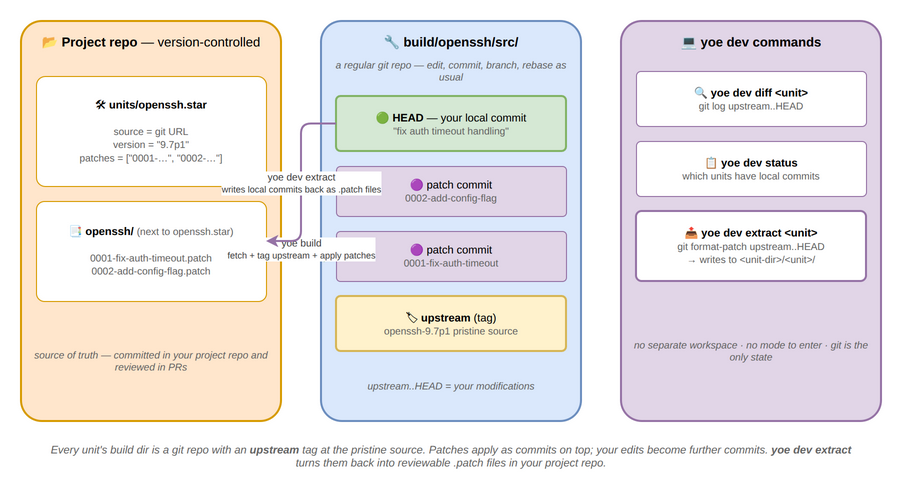
Work with unit source code directly. Every unit’s build directory is a git repo
— upstream source is committed with an upstream tag, and existing patches are
applied as commits on top. Local edits are just git commits.
There is no “dev mode” to enter or exit. If the build directory has commits
beyond upstream, yoe build uses them directly instead of re-fetching source.
# After building, edit source in place
yoe build openssh
cd build/openssh/src
vim auth.c
git commit -am "fix auth timeout handling"

# Rebuild uses your local commits
yoe build openssh

# See what you've changed
yoe dev diff openssh

# Extract commits as patch files
yoe dev extract openssh
# Writes <unit-dir>/openssh/0001-fix-auth-timeout-handling.patch
# (alongside openssh.star, so the patches ship with the module that defines it)
# Prints updated patches list for your unit

# Check which units have local modifications
yoe dev status
Subcommands:
| Subcommand | Description |
|---|---|
yoe dev extract <unit> | Run git format-patch upstream..HEAD, write to <unit-dir>/<unit>/ next to the unit’s .star file, print updated patches list |
yoe dev diff <unit> | Show git log upstream..HEAD — your local commits |
yoe dev status | List all units with commits beyond upstream |
Rebasing on upstream updates:
# Update unit version
$EDITOR units/openssh.star   # bump version to 9.7p1

# Rebuild fetches new source, applies patches via rebase
yoe build openssh

# If patches conflict, resolve in the git repo
cd build/openssh/src
git rebase --continue
yoe dev extract openssh         # re-extract clean patches
Why this is simpler than Yocto’s devtool:
- No separate workspace — the build directory is the workspace
- No mode to enter/exit — local commits are automatically detected
- No state files — git is the only state
- Extracting patches is
git format-patch— a command developers already know - Each patch = one git commit, so the patch series is the git log
yoe shell (planned)
Status: Not implemented. The command below describes the intended interactive entry point into a unit’s build sandbox — the piece that makes the no-SDK model (see Development Environments) complete.
Opens an interactive shell inside the build sandbox for a unit. The shell
attaches to the same container, environment variables, and mounted sysroot that
yoe build uses — but with a TTY and no automatic build steps.
# Shell into the sandbox for a unit (uses the unit's container + default machine)
yoe shell myapp

# For a specific machine (cross-arch via QEMU)
yoe shell myapp --machine raspberrypi4

# Shell without targeting a unit — uses the machine's default toolchain container
yoe shell --machine beaglebone-black
Inside the shell, $SRCDIR, $DESTDIR, $PREFIX, $ARCH, and $NPROC are
set exactly as yoe build would set them, and the unit’s resolved -dev
dependencies are already installed into the sandbox via the target’s package
manager (apk or apt). Exiting the shell tears down the sandbox — it is not
persistent, so probing with apk add <pkg> / apt install <pkg> for
exploration does not pollute subsequent builds.
This replaces the traditional SDK shell (Yocto’s environment-setup-*). See
Development Environments for the full model.
yoe bundle (planned)
Status: Not implemented. The
yoe bundlesubcommand below is the air-gapped distribution story described in Development Environments. Today there is no export/import path, no bundle format, and no signing.
Exports and imports content-addressed bundles — the subset of the build cache, source cache, module checkouts, and container images needed to reproduce a set of targets without network access.
# Export a bundle for a specific image (includes all transitive deps)
yoe bundle export base-image --out bundle-base-v1.0.tar

# Export everything reachable from PROJECT.star
yoe bundle export --all --out bundle-full.tar

# Sign the bundle with the project's cache signing key
yoe bundle export base-image --sign keys/bundle.key --out bundle.tar

# Import on an air-gapped machine (verifies signatures if present)
yoe bundle import bundle-base-v1.0.tar --verify keys/bundle.pub

# Show the contents of a bundle without importing
yoe bundle inspect bundle.tar
A bundle contains built packages (.apk or .deb), source archives, module
checkouts, and toolchain container OCI archives — all keyed by content hash.
After yoe bundle import, subsequent yoe build runs resolve everything from
the local cache with no network access required.
yoe clean
Removes build artifacts.
# Remove build intermediates (keep cached packages)
yoe clean

# Remove everything (build dirs, packages, sources)
yoe clean --all

# Remove only packages for a specific unit
yoe clean openssh
Image rootfs builds deliberately leave per-file ownership (e.g.
/var/lib/navidrome:navidrome:navidrome) on disk so that
build/<image>.<arch>/destdir/rootfs/ inspects with the same uid/gid the booted
system sees — see Security and Threat Model. A plain shell
rm -rf build/ will fail with permission errors on those files. yoe clean
handles the cleanup correctly: it tries a host-side rm first and, on EACCES,
falls back to running the rm inside the build container where it has the
privilege to remove root- and service-user-owned files. You don’t need sudo.
Environment Variables
| Variable | Default | Description |
|---|---|---|
YOE_PROJECT | . (cwd) | Path to the [yoe] project root |
YOE_CACHE | cache/ | Cache directory for sources, builds, packages |
YOE_JOBS | nproc | Parallel build jobs |
YOE_LOG | info | Log level (debug, info, warn, error) |
YOE_CACHE_SIGNING_KEY | (none) | Path to private key for signing cached packages |
YOE_NO_REMOTE_CACHE | false | Disable remote cache lookups |
AWS_ACCESS_KEY_ID | (none) | S3 credentials for remote cache |
AWS_SECRET_ACCESS_KEY | (none) | S3 credentials for remote cache |
AWS_ENDPOINT_URL | (none) | S3 endpoint override (for MinIO / non-AWS) |
Dependency Resolution
yoe resolves dependencies at two levels:
-
Build-time — unit
depsentries form a DAG.yoe build --with-depstopologically sorts this graph and builds in order, parallelizing where the DAG allows. -
Install-time — unit
runtime_depsentries are written into the package’s metadata (.PKGINFOfor.apk, the control file for.deb). When the package manager (apkorapt) runs during image assembly, it pulls in runtime dependencies automatically.
This means:
- Build dependencies are resolved by
yoe(it knows the unit graph). - Runtime dependencies are resolved by the package manager (
apkorapt, which knows the package graph). - The unit author declares both; the tools handle the rest.
Config Propagation (planned)
Status: Not implemented. There is no
public_configfield on units, no machine-to-unit CFLAGS/optimization propagation, and no resolved-config view inyoe desc. Units today receive architecture via the build environment and nothing else is automatically propagated through the DAG. The section below describes the planned GN-inspired design.
Inspired by GN’s public_configs, machine-level configuration automatically
propagates through the dependency graph. When you build for a specific machine,
settings like architecture flags, optimization level, and kernel headers path
flow to every unit without each unit declaring them:
machine (beaglebone-black)
  → arch = "arm64"
  → CFLAGS = "-O2 -march=armv8-a"
  → KERNEL_HEADERS = "/usr/src/linux-6.6/include"
      ↓ propagates to
  unit (zlib)        → builds with arm64 flags
  unit (openssl)     → builds with arm64 flags
  unit (openssh)     → builds with arm64 flags + sees kernel headers
Units can also declare public_config settings that propagate to their
dependents. For example, a zlib unit might export its include path so that
openssh (which depends on zlib) automatically gets -I/usr/include without
the unit author specifying it.
This is resolved during the graph resolution phase (phase 1) so the full
resolved config for every unit is known before any build starts. Use
yoe desc <unit> --config to inspect the resolved configuration.
Design note: unit-level, not task-level dependencies. Unlike BitBake, which
models dependencies between individual tasks across units (e.g.,
B:do_configure depends on A:do_install), yoe treats each unit as an atomic
unit — unit A depends on unit B means B must be fully built before A starts.
This is a deliberate simplicity trade-off. BitBake’s task-level graph enables
fine-grained parallelism (start fetching C while B is still compiling) and
per-task caching (sstate), but it is also the primary source of Yocto’s
debugging complexity. Unit-level dependencies are easier to reason about, and
the parallelism loss is minor since independent units still build concurrently
across the DAG. Per-unit caching via content-addressed package hashes (.apk or
.deb) provides sufficient granularity for fast incremental rebuilds.
Caching Strategy
Builds are cached at multiple levels:
- Source cache — downloaded tarballs and git clones in
$YOE_CACHE/sources/. Keyed by URL + hash. - Build cache — content-addressed by hashing the unit, source, and all
build dependency package hashes. If the combined hash matches, the build is
skipped and the cached package (
.apkor.deb) is used. - Package repository — built package files (
.apkor.deb) in the local repo. Once published, packages are available for image assembly and on-device updates. - Remote cache (planned — optional) — push/pull packages to an S3-compatible store so CI and team members share build results. Not yet implemented: there is no remote cache backend, no S3 integration, and no cache signing today. See Caching for the object store, the planned S3 configuration, cache signing, and the multi-level fallback chain.
Cache invalidation is hash-based, not timestamp-based. Changing a unit, updating
a source, or rebuilding a dependency all produce a new hash and trigger a
rebuild. Use yoe build --dry-run to see what would be rebuilt and why, or
yoe cache stats to review hit/miss rates from the last build.
Example Workflow
# Start a new project
yoe init my-product --machine beaglebone-black

# Add a unit for your application
$EDITOR units/myapp.star

# Build everything (packages and images)
yoe build --all

# Flash to an SD card
yoe flash base-image /dev/sdX

# Later, update just your app and rebuild the image
$EDITOR units/myapp.star  # bump version
yoe build myapp
yoe build base-image         # only myapp's package changed, fast rebuild

# Or update the device directly (Alpine target shown; on Debian/Ubuntu copy the
# .deb and `dpkg -i` / `apt install` it instead)
scp repo/myapp-1.3.0-r0.apk device:/tmp/
ssh device apk add /tmp/myapp-1.3.0-r0.apk
AI-First Tooling for [yoe]
[yoe] is designed as an AI-first build system. While every operation has a
CLI equivalent, the primary interface for many workflows is a conversation with
an AI assistant that understands the build system deeply. This document defines
the skills (AI-driven workflows) that ship with [yoe].
Installing the skills
The skills ship two ways — pick whichever fits how you like to work.
Bundled with yoe (editable copies you own). The skills are baked into the
yoe binary; install them into your project’s .claude/skills directory, where
Claude Code discovers them:
yoe skills install   # copy the skills into ./.claude/skills
yoe skills list      # list the skills embedded in this binary
yoe skills update    # refresh them after upgrading yoe
yoe init does this automatically for new projects. The installed files are
plain Markdown that belong to your project — yours to read, tweak, and commit.
install won’t clobber a skill you’ve already edited (it skips and tells you);
yoe skills update refreshes the yoe-managed skills to the running binary’s
versions, so keep heavily customized variants under a different name.
As a Claude Code plugin (managed, auto-updating). If you’d rather let Claude Code manage updates, add the marketplace and install the plugin from inside Claude Code:
/plugin marketplace add yoebuild/yoe
/plugin install yoe@yoe
Both paths come from one source — .claude/skills in the
yoebuild/yoe repository — so they deliver
identical skills. Choose yoe skills install when you want to edit the skills,
and the plugin when you want Claude Code to keep them updated for you. See
yoe skills for the full command behavior.
Why AI-First
Embedded Linux development has a steep learning curve — not because the concepts are hard, but because there are many concepts and they interact in non-obvious ways. An AI assistant that understands units, dependencies, machine definitions, build isolation, and packaging can:
- Lower the barrier to entry. A developer can describe what they want in natural language and get working units, machine definitions, and image configurations.
- Reduce debugging time. Build failures in embedded systems often involve subtle interactions between toolchain flags, dependency ordering, and cross-module overrides. An AI that can read the full dependency graph and build logs can diagnose issues faster than manual investigation.
- Automate routine maintenance. Version bumps, security patches, license audits, and dependency updates are tedious but critical. AI skills can automate these with human review.
- Make the build system self-documenting. Instead of reading docs, ask the assistant “how does openssh get into my image?” and get a traced answer through the actual dependency graph.
Skill Categories
Unit Development
/new-unit
Create a new unit from a description or upstream URL. The AI determines the
build system (autotools, cmake, meson, etc.), fetches the source to inspect it,
identifies dependencies, and generates a complete .star file.
/new-unit https://github.com/example/myapp
/new-unit "I need an MQTT broker for IoT devices"
/new-unit "add libcurl with HTTP/2 support"
/update-unit <name>
Bump a unit to the latest upstream version. Checks for new releases, updates the version and sha256, runs a test build, and reports any patch conflicts or dependency changes.
/update-unit openssl
/update-unit --all --dry-run
/audit-unit <name>
Review a unit for common issues: missing runtime dependencies, incorrect license, unnecessary build dependencies, suboptimal configure flags, missing sub-package splits.
/audit-unit openssh
Image & Machine Configuration
/new-machine
Generate a machine definition from a board name or SoC. Looks up kernel defconfig, device trees, bootloader configuration, and QEMU settings (if applicable).
/new-machine beagleplay
/new-machine "Raspberry Pi 5"
/new-machine "custom board with i.MX8M Plus"
/new-image
Design an image unit interactively. Asks about the use case (gateway, HMI,
headless sensor, development), suggests appropriate packages, configures
services, and generates the .star file.
/new-image "industrial gateway with MQTT and OPC-UA"
/new-image "minimal headless sensor node"
/image-size
Analyze an image unit and estimate the installed size. Break down by package, identify the largest contributors, and suggest ways to reduce size (remove debug packages, switch to smaller alternatives, strip unnecessary features).
/image-size base-image
/image-size dev-image --compare base-image
Dependency Analysis
/why <package>
Trace why a package is included in an image. Shows the full dependency chain from image unit to the specific package, including which packages pull it in as a runtime dependency.
/why libssl
/why dbus --image dev-image
/what-if
Simulate the impact of a change without building. “What if I remove networkmanager from the image?” “What if I update glibc to 2.40?”
/what-if remove networkmanager from base-image
/what-if update glibc to 2.40
/what-if add python3 to dev-image
Build Debugging
/diagnose
Analyze a build failure. Reads the build log, identifies the root cause (missing dependency, configure flag issue, patch conflict, toolchain mismatch), and suggests a fix.
/diagnose openssh
/diagnose  # diagnose the most recent failure
/build-log <unit>
Summarize a build log — highlight warnings, errors, and anything unusual. Filter out noise (compiler progress, make output) and surface what matters.
/build-log linux
/build-log openssl --warnings-only
Security & Maintenance
/cve-check
Scan units against known CVEs. Reports which packages have outstanding vulnerabilities, their severity, and whether newer upstream versions fix them.
/cve-check
/cve-check openssl
/cve-check --image base-image
/license-audit
Audit all packages in an image for license compliance. Flag incompatible license combinations, missing license declarations, and packages that need special handling (GPL with linking exceptions, etc.).
/license-audit base-image
/license-audit --format spdx
/security-review
Review an image configuration for security issues: services running as root, unnecessary packages, missing hardening flags (ASLR, stack protector, fortify), world-readable sensitive files, default passwords.
/security-review base-image
Module Management
/new-module
Scaffold a new module with MODULE.star, directory structure, and example units.
/new-module vendor-bsp "BSP module for our custom board"
/new-module product "Product-specific units and images"
/module-diff
Compare two versions of a module. Show what units changed, what versions bumped, what new units were added, and what was removed.
/module-diff @module-core v1.0.0 v1.1.0
Development Environment
[yoe] does not ship a separate SDK — yoe itself is the dev environment. See
Development Environments for the full model.
/dev-setup
Guide a developer through getting yoe + Docker installed and their editor
configured for Starlark (syntax highlighting, language server, formatters).
Verify the toolchain works by building a small unit end to end.
/dev-setup
/dev-setup --for rust  # also install Rust-native tooling on the workstation
/devshell <unit>
Wrapper over yoe shell — drops into the unit’s build sandbox with the same env
vars, container, and mounted sysroot that yoe build uses. Useful for debugging
configure issues, probing deps, or testing build commands manually.
/devshell openssh
/devshell linux --machine beaglebone-black
Documentation & Learning
/explain <concept>
Explain a [yoe] concept in context. Not just documentation — the AI reads the
project’s actual configuration and explains how the concept applies to this
specific project.
/explain "how does caching work for my project"
/explain "what happens when I run yoe build base-image"
/explain "how do modules compose in my project"
/diff-from-yocto
For developers coming from Yocto, explain how a Yocto concept maps to [yoe].
References the actual Yocto documentation and provides side-by-side comparisons.
/diff-from-yocto bbappend
/diff-from-yocto "MACHINE_FEATURES"
/diff-from-yocto sstate-cache
Implementation Notes
Each skill:
- Has access to the full project state via
yoe desc,yoe refs,yoe graph, and direct Starlark file reading - Can invoke
yoeCLI commands to gather information (build logs, dependency graphs, cache status) - Can create and modify
.starfiles with the user’s approval - Runs in the context of the current project directory
Skills that modify files (like /new-unit or /update-unit) always show the
proposed changes and ask for confirmation before writing. Skills that only read
and analyze (like /why or /diagnose) run without confirmation.
Go Workflows
This page covers Go-related workflows in [yoe]: building Go binaries as units,
where the Go module/build cache lives, and how to recover from common pitfalls.
Building a Go binary as a unit
The go_binary class in module-core/classes/go.star wraps the standard build
pattern: clone the source, run go build, install the resulting binary into
$DESTDIR$PREFIX/bin. A minimal unit looks like:
load("//classes/go.star", "go_binary")

go_binary(
    name = "siot",
    version = "0.18.5",
    source = "https://github.com/simpleiot/simpleiot.git",
    tag = "v0.18.5",
    go_package = "./cmd/siot",   # optional, defaults to ./cmd/<name>
    binary = "siot",             # optional, defaults to <name>
    license = "Apache-2.0",
)
Cross-compilation is automatic: yoe sets GOARCH from the target machine’s arch
(x86_64 → amd64, arm64 → arm64, riscv64 → riscv64) and forces
CGO_ENABLED=0 GOOS=linux so the result is a statically-linked Linux binary.
The build runs inside the upstream golang:1.26 container by default. Override
with container = "golang:1.23" (or any pullable Go image) when a unit needs a
specific toolchain version.
Cache layout
Go-class units share a project-scoped cache mounted into the build container at
/go/cache:
| Inside container | On host | Purpose |
|---|---|---|
/go/cache/mod | <project>/cache/go/mod | GOMODCACHE — downloaded modules (go.bug.st/serial@v1.6.4/...) |
/go/cache/build | <project>/cache/go/build | GOCACHE — compiled package artifacts |
The cache survives across builds, so the second build of any Go unit is much
faster than the first. It also survives across different Go units in the same
project — simpleiot and a hypothetical second Go unit will share downloaded
modules and built artifacts.
Cleaning the cache
go mod download writes module files with mode 0444 and their parent
directories with mode 0555 — read-only by design, so you can’t accidentally
edit a cached module. As a side effect, rm -rf against the cache fails with
“Permission denied” even though every file is owned by your user: unlink needs
the write bit on the parent directory, and Go has stripped it.
Recover with one of these:
# Option 1: chmod first, then rm — fastest
chmod -R u+w <project>/cache/go && rm -rf <project>/cache/go

# Option 2: let Go do it (this is what `go clean` is for)
GOMODCACHE=<project>/cache/go/mod go clean -modcache
GOCACHE=<project>/cache/go/build go clean -cache
Symptom you’d see if you skip the chmod:
rm: cannot remove 'yoe-test/cache/go/mod/go.bug.st/serial@v1.6.4/serial.go': Permission denied
This is a permission-bit issue, not an ownership issue. stat -c '%U:%G' on the
file will show your username, not root.
Build sandbox notes
Go builds run inside the build container as --user $(id -u):$(id -g), so all
cache writes land on the host as your user. The golang:1.26 upstream image has
/go owned by root, but the bind mount overlays that with the project cache
directory before any build step runs.
Cross-arch Go builds (e.g. building a riscv64 binary on x86_64) use QEMU
user-mode emulation via binfmt_misc. Run yoe container binfmt once to
register the QEMU handlers if you haven’t yet — the TUI surfaces a warning
banner when this is missing.
Customising the build
Common knobs on go_binary:
| Field | Default | Notes |
|---|---|---|
go_package | ./cmd/<name> | Path passed as the final arg to go build. |
binary | <name> | Installed filename when it differs from the unit name (e.g. simpleiot → siot). |
container | golang:1.26 | Override to pin a different toolchain. |
tasks | empty | Extra tasks (e.g. installing init scripts) merged after the default build task. |
runtime_deps | empty | Packages installed alongside the binary on the device (e.g. openrc for the service). |
For anything more involved than a go build — multi-binary repos, code
generation, embedded assets — drop down to the plain unit() class and write
the task("build", steps=[...]) directly. go_binary is just a thin wrapper
around that pattern.
Python Workflows
This page covers how to ship Python apps with their pip dependencies on a yoe
image. yoe doesn’t use pip as a package manager — pip-installed packages live in
a per-app virtualenv baked into a regular package (.apk or .deb), so the
on-device package manager stays the system one and rebuilding the image rebuilds
the venv from a declared list of pins.
Packaging a Python app with pip dependencies
The python_venv class in module-core/classes/python.star creates a
virtualenv under /usr/lib/python-venvs/<name> on the target and pip-installs
the listed packages into it. The result is packaged as a regular package (.apk
or .deb), gets the same caching and signing as any other unit, and brings in
python3 automatically via runtime_deps.
A minimal app:
load("//classes/python.star", "python_venv")

python_venv(
    name = "python-hello",
    version = "1.0.0",
    description = "Greeter that renders ASCII art via pyfiglet",
    pip_packages = ["pyfiglet==1.0.2"],
    entry_points = {
        # /usr/bin/figlet runs `python -m pyfiglet "$@"` inside the venv
        "figlet": "pyfiglet",
    },
)
After yoe build python-hello, the resulting apk installs:
/usr/lib/python-venvs/python-hello/— the venv (pip, pyfiglet, etc.)/usr/bin/figlet— a one-line/bin/shwrapper that execs the venv’spython -m pyfiglet
On the device, figlet "hi" works without the user knowing a venv is involved.
Bundling app code alongside the venv
python_venv only manages the venv itself. For apps that have their own source
files, add an extra task that ships them via install_file() and points a
wrapper at the bundled script:
load("//classes/python.star", "python_venv")

python_venv(
    name = "python-hello",
    version = "1.0.0",
    description = "Example Python app: ASCII-art greeting via pyfiglet",
    pip_packages = ["pyfiglet==1.0.2"],
    runtime_deps = ["busybox"],  # /bin/sh for the wrapper
    tasks = [
        task("install-app", steps = [
            "mkdir -p $DESTDIR/usr/lib/python-hello $DESTDIR/usr/bin",
            install_file("hello.py", "$DESTDIR/usr/lib/python-hello/hello.py",
                         mode = 0o644),
            "cat > $DESTDIR/usr/bin/python-hello <<'__WRAP__'\n" +
            "#!/bin/sh\n" +
            "exec /usr/lib/python-venvs/python-hello/bin/python " +
            "/usr/lib/python-hello/hello.py \"$@\"\n" +
            "__WRAP__",
            "chmod 0755 $DESTDIR/usr/bin/python-hello",
        ]),
    ],
)
install_file() resolves the source path relative to a sibling directory named
after the .star file — units/python/python-hello.star looks for hello.py
under units/python/python-hello/. See the
python-hello example
for the complete unit.
How the venv stays runnable on the target
python_venv builds the venv inside $DESTDIR during the unit build, which
means every script the venv created has a build-time $DESTDIR-prefixed path
baked into its shebang or config. Before packaging, the class:
- Strips every
__pycache__so the apk doesn’t ship stale bytecode that pip will regenerate on first import anyway. - Runs
grep -rIlF "$VENV_BUILD" | xargs sed -ito rewrite every reference from the build-time$DESTDIR/usr/lib/python-venvs/<name>prefix back to the on-target/usr/lib/python-venvs/<name>prefix. - Re-creates
bin/pythonandbin/python3as symlinks to/usr/bin/python3so the venv works against whatever python3 is installed on the target.
The toolchain container (toolchain-musl) ships the same Alpine python3 the
target rootfs gets via py3-pip’s runtime-dep chain. Because the python version
(3.12.x) and its absolute path (/usr/bin/python3) match on both sides, the
venv carries over cleanly.
Pure-Python wheels vs C extensions
Pure-Python wheels (pyfiglet, flask, click, requests and its
dependencies, etc.) install out of the box. Wheels with C extensions — numpy,
cryptography, pydantic-core, anything with cffi — need their build-time
libraries and headers in the toolchain container. Add them as deps:
python_venv(
    name = "python-crypto-app",
    version = "1.0.0",
    pip_packages = ["cryptography==43.0.3"],
    deps = ["openssl", "libffi"],  # cryptography links these
)
If a wheel is published as musllinux_* (most popular packages now are), pip
will install the prebuilt binary and you can skip the headers.
Customising the install path
By default the venv lives at /usr/lib/python-venvs/<name>. Override with
install_path when an app needs a different location — for example, when an
upstream config file points at a fixed path:
python_venv(
    name = "myapp",
    version = "1.0.0",
    pip_packages = ["myapp==1.0.0"],
    install_path = "/opt/myapp/venv",
)
The wrapper script(s) emitted by entry_points follow the install path
automatically.
python-image
module-alpine/images/python-image.star boots into a userland with python3,
pip, the dev-image diagnostic tools, and the python-hello demo
pre-installed. Run yoe build python-image && yoe run python-image to get a
QEMU VM where python-hello "..." renders an ASCII-art banner — useful as a
smoke test that python_venv works end-to-end on your machine before you spend
pip’s download budget on a real app.
Node.js Workflows
This page covers how to ship Node.js apps with their npm dependencies on a yoe
image. yoe doesn’t use npm as a package manager — npm-installed packages live in
a per-app node_modules tree baked into a regular package (.apk or .deb),
so the on-device package manager stays the system one and rebuilding the image
rebuilds node_modules from your package.json (and package-lock.json if
present).
Packaging a Node.js app with npm dependencies
The nodejs_app class in module-core/classes/nodejs.star creates an app
directory under /usr/lib/node-apps/<name> on the target, runs npm install
against your package.json so the listed packages land in node_modules/ next
to your code, and ships the whole tree as a regular package (.apk or .deb).
It gets the same caching and signing as any other unit and brings in nodejs
automatically via runtime_deps.
Each app lives in its own source directory next to the unit’s .star file and
uses a normal Node.js project layout — package.json is the source of truth for
deps, exactly like a developer would use locally.
A minimal app:
load("//classes/nodejs.star", "nodejs_app")

nodejs_app(
    name = "nodejs-hello",
    version = "1.0.0",
    description = "Greeter that renders ASCII art via figlet",
    runtime_deps = ["busybox"],  # /bin/sh for the wrapper
    tasks = [
        task("install-app", steps = [
            install_file("package.json",
                         "$DESTDIR/usr/lib/node-apps/nodejs-hello/package.json",
                         mode = 0o644),
            install_file("hello.js",
                         "$DESTDIR/usr/lib/node-apps/nodejs-hello/hello.js",
                         mode = 0o644),
            "cat > $DESTDIR/usr/bin/nodejs-hello <<'__WRAP__'\n" +
            "#!/bin/sh\n" +
            "exec node /usr/lib/node-apps/nodejs-hello/hello.js \"$@\"\n" +
            "__WRAP__",
            "chmod 0755 $DESTDIR/usr/bin/nodejs-hello",
        ]),
    ],
)
With a package.json like this next to the unit:
{
  "name": "nodejs-hello",
  "version": "1.0.0",
  "private": true,
  "dependencies": {
    "figlet": "1.7.0"
  }
}
After yoe build nodejs-hello, the resulting apk installs:
/usr/lib/node-apps/nodejs-hello/—package.json,hello.js, andnode_modules/(figlet and its transitive deps)/usr/bin/nodejs-hello— a one-line/bin/shwrapper that runs the app vianode
On the device, nodejs-hello "hi" works without the user knowing node_modules
is involved.
How the task order works
nodejs_app wraps the user-supplied tasks between two class-owned tasks:
nodejs-setup— creates$DESTDIR/<install_path>so install_file steps have a target directory.- (your tasks) — copy
package.json(and optionallypackage-lock.json), then any JS/asset files, into$APP_BUILDusinginstall_file(). Emit your/usr/binwrapper here too. nodejs-install— runsnpm ciif a lockfile is present, otherwisenpm install, against the stagedpackage.json. Then rewrites any build-time path baked intonode_modulesback to the on-target absolute path and writes theentry_pointswrappers.
If you ship a package-lock.json alongside package.json, npm ci makes the
install fully reproducible — recommended for production units. Without a
lockfile you get whatever satisfies the version ranges in dependencies{} at
build time.
entry_points shortcut
For apps whose main entry point is just “run a binary from node_modules/.bin”
or “run a script from a package,” skip the manual wrapper script and use
entry_points:
nodejs_app(
    name = "myapp",
    version = "1.0.0",
    entry_points = {
        # /usr/bin/myapp runs `node_modules/.bin/myapp`
        "myapp": "myapp",
        # /usr/bin/lint runs `node node_modules/eslint/bin/eslint.js`
        "lint": "eslint:bin/eslint.js",
    },
    tasks = [
        task("install-app", steps = [
            install_file("package.json",
                         "$DESTDIR/usr/lib/node-apps/myapp/package.json"),
        ]),
    ],
)
"pkg" resolves to node_modules/.bin/pkg. "pkg:script" resolves to
node node_modules/pkg/script.
Pure-JS packages vs native bindings
Pure-JavaScript packages (figlet, commander, chalk, express and its
deps, etc.) install out of the box. Packages with native bindings (anything
using node-gyp, prebuild, or a binding.gyp) need their build-time
libraries and headers in the toolchain container. Add them as deps:
nodejs_app(
    name = "sqlite-app",
    version = "1.0.0",
    deps = ["sqlite"],  # better-sqlite3 links libsqlite
    tasks = [
        task("install-app", steps = [
            install_file("package.json",
                         "$DESTDIR/usr/lib/node-apps/sqlite-app/package.json"),
        ]),
    ],
)
When a package ships musl-compatible prebuilt binaries, npm will use those and you can skip the headers.
Customising the install path
By default the app lives at /usr/lib/node-apps/<name>. Override with
install_path when an app needs a different location — for example, when an
upstream config or service file points at a fixed path:
nodejs_app(
    name = "myapp",
    version = "1.0.0",
    install_path = "/opt/myapp",
    tasks = [
        task("install-app", steps = [
            install_file("package.json", "$DESTDIR/opt/myapp/package.json"),
        ]),
    ],
)
The wrapper script(s) emitted by entry_points follow the install path
automatically.
nodejs-image
module-alpine/images/nodejs-image.star boots into a userland with node,
npm, the dev-image diagnostic tools, and the nodejs-hello demo
pre-installed. Run yoe build nodejs-image && yoe run nodejs-image to get a
QEMU VM where nodejs-hello "..." renders an ASCII-art banner — useful as a
smoke test that nodejs_app works end-to-end on your machine before you spend
npm’s download budget on a real app.
Bun Workflows
This page covers how to ship Bun apps with their npm
dependencies on a yoe image. yoe doesn’t use bun (or npm) as a system package
manager — bun-installed packages live in a per-app node_modules tree baked
into a regular package (.apk or .deb), so the on-device package manager
stays the system one and rebuilding the image rebuilds node_modules from your
package.json (and bun.lockb if present).
Bun is a single binary that bundles a JavaScript runtime, a package manager, and
a bundler. It runs TypeScript directly with no separate compile step, so the
entry point of a bun app can be a plain .ts file.
Packaging a Bun app with npm dependencies
The bun_app class in module-core/classes/bun.star creates an app directory
under /usr/lib/bun-apps/<name> on the target, runs bun install --production
against your package.json so the listed packages land in node_modules/ next
to your code, and ships the whole tree as a regular package (.apk or .deb).
It gets the same caching and signing as any other unit and brings in bun
automatically via runtime_deps.
Each app lives in its own source directory next to the unit’s .star file and
uses a normal Bun project layout — package.json is the source of truth for
deps, exactly like a developer would use locally.
A minimal app:
load("//classes/bun.star", "bun_app")

bun_app(
    name = "bun-hello",
    version = "1.0.0",
    description = "Greeter that renders ASCII art via figlet",
    runtime_deps = ["busybox"],  # /bin/sh for the wrapper
    tasks = [
        task("install-app", steps = [
            install_file("package.json",
                         "$DESTDIR/usr/lib/bun-apps/bun-hello/package.json",
                         mode = 0o644),
            install_file("hello.ts",
                         "$DESTDIR/usr/lib/bun-apps/bun-hello/hello.ts",
                         mode = 0o644),
            "cat > $DESTDIR/usr/bin/bun-hello <<'__WRAP__'\n" +
            "#!/bin/sh\n" +
            "exec bun /usr/lib/bun-apps/bun-hello/hello.ts \"$@\"\n" +
            "__WRAP__",
            "chmod 0755 $DESTDIR/usr/bin/bun-hello",
        ]),
    ],
)
With a package.json like this next to the unit:
{
  "name": "bun-hello",
  "version": "1.0.0",
  "private": true,
  "type": "module",
  "dependencies": {
    "figlet": "1.7.0"
  }
}
And hello.ts:
import figlet from "figlet";

const argv = process.argv.slice(2);
const text = argv.length > 0 ? argv.join(" ") : "Hello, yoe!";
console.log(figlet.textSync(text, { font: "Slant" }));
console.log(`(bun ${Bun.version})`);
After yoe build bun-hello, the resulting apk installs:
/usr/lib/bun-apps/bun-hello/—package.json,hello.ts, andnode_modules/(figlet and its transitive deps)/usr/bin/bun-hello— a one-line/bin/shwrapper that runs the app viabun
On the device, bun-hello "hi" works without the user knowing node_modules is
involved.
How the task order works
bun_app wraps the user-supplied tasks between two class-owned tasks:
bun-setup— creates$DESTDIR/<install_path>so install_file steps have a target directory.- (your tasks) — copy
package.json(and optionallybun.lockb), then any JS/TS/asset files, into$APP_BUILDusinginstall_file(). Emit your/usr/binwrapper here too. bun-install— runsbun install --productionagainst the stagedpackage.json, then rewrites any build-time path baked intonode_modulesback to the on-target absolute path and writes theentry_pointswrappers.
If you ship a bun.lockb alongside package.json, bun resolves dependencies
from the lockfile — recommended for production units. Without a lockfile you get
whatever satisfies the version ranges in dependencies{} at build time.
entry_points shortcut
For apps whose main entry point is a single script or a binary from
node_modules/.bin, skip the manual wrapper and use entry_points:
bun_app(
    name = "myapp",
    version = "1.0.0",
    entry_points = {
        # /usr/bin/myapp runs `bun /usr/lib/bun-apps/myapp/main.ts`
        "myapp": "main.ts",
        # /usr/bin/serve runs `node_modules/.bin/serve`
        "serve": "serve",
        # /usr/bin/lint runs `bun node_modules/eslint/bin/eslint.js`
        "lint": "eslint:bin/eslint.js",
    },
    tasks = [
        task("install-app", steps = [
            install_file("package.json",
                         "$DESTDIR/usr/lib/bun-apps/myapp/package.json"),
            install_file("main.ts",
                         "$DESTDIR/usr/lib/bun-apps/myapp/main.ts"),
        ]),
    ],
)
Entry forms:
"file.ts"/"file.js"/"file.mjs"— execbun <install_path>/<file>."pkg"— execnode_modules/.bin/pkgdirectly."pkg:script"— execbun node_modules/pkg/script.
Why Bun is a useful default for new JS/TS apps
A few practical differences from Node:
- TypeScript runs as-is. No
tsc, nots-node, no separate build step. The entry point of abun_appcan be a.tsfile and it works. bun installis fast. The install task in a typical app build is much shorter than thenpm installequivalent.- Single binary. The runtime, package manager, test runner, and bundler are
all the same
bunexecutable, so the toolchain footprint is one apk.
Node is still available via module-alpine’s nodejs unit if you have an
existing Node app or a dep that depends on Node-specific behavior.
Customising the install path
By default the app lives at /usr/lib/bun-apps/<name>. Override with
install_path when an app needs a different location:
bun_app(
    name = "myapp",
    version = "1.0.0",
    install_path = "/opt/myapp",
    tasks = [
        task("install-app", steps = [
            install_file("package.json", "$DESTDIR/opt/myapp/package.json"),
        ]),
    ],
)
The wrapper script(s) emitted by entry_points follow the install path
automatically.
bun-image
module-alpine/images/bun-image.star boots into a userland with bun, bunx,
the dev-image diagnostic tools, and the bun-hello demo pre-installed. Run
yoe build bun-image && yoe run bun-image to get a QEMU VM where
bun-hello "..." renders an ASCII-art banner — useful as a smoke test that
bun_app works end-to-end on your machine before you spend bun’s download
budget on a real app.
Monitoring and Telemetry
Units in module-core cover the common shape of a connected-product gateway:
something that collects and manages device data, something that stores the time
series it produces, and something that draws them — plus two small units that
wire the three together so a device comes up working.
| Unit | Provides | Default port | Data directory |
|---|---|---|---|
simpleiot-bin | Simple IoT | 8118 | /var/lib/simpleiot |
victoria-metrics | VictoriaMetrics | 8428 | /var/lib/victoria-metrics |
grafana | Grafana | 3000 | /var/lib/grafana |
simpleiot-config | Simple IoT node configuration | — | — |
grafana-config | Grafana data source for VictoriaMetrics | — | — |
The first three install a program that upstream publishes as a release asset rather than building it from source, so adding them to an image costs a download rather than a compile. The last two ship configuration only.
Add them to an image the same way as anything else:
image(
    name = "gateway-image",
    artifacts = [
        "simpleiot-bin",
        "victoria-metrics",
        "grafana",
    ],
)
Services
Each unit declares its own service, so installing the package is what enables it — there is no separate step to run at image-assembly time. Each works on the Alpine base and on the Debian and Ubuntu bases, and the package that reaches a device carries only the half its init reads:
| Alpine | Debian / Ubuntu | |
|---|---|---|
| service | /etc/init.d/<name> | /lib/systemd/system/<name>.service |
| settings | /etc/conf.d/<name> | /etc/default/<name> |
The settings file is the same either way — plain KEY=VALUE lines, only the
path differs — so a device behaves the same whichever init is running it. It is
declared as a configuration file, so a copy edited on a device survives a
package upgrade. For how the split is done, see
Shipping a service on both bases.
VictoriaMetrics and Grafana run under their own service accounts rather than as
root. Under systemd the account is declared to systemd-sysusers; under OpenRC
the init script creates it on first start, which is where a package can add an
account given that an image writes /etc/passwd as a whole from its users
list. Simple IoT runs as root.
Provisioning — making the three work together
Installing the three services gives you three services. simpleiot-config and
grafana-config are what make them a stack: with both in the image, a device
comes up already collecting metrics, storing them, and able to draw them, with
nothing to click through.
artifacts = [
    "simpleiot-bin", "victoria-metrics", "grafana",
    "simpleiot-config", "grafana-config",
]
simpleiot-config ships /etc/simpleiot/provisioning/10-config.yml, which
Simple IoT applies at start-up and again whenever the file changes. It declares
a Database node writing to http://localhost:8428 and the metrics nodes that
collect host, application, and per-process data for grafana and
victoria-metrics-prod. Nodes are matched by description, so the same file
serves any number of devices — but renaming a node in the portal detaches it
from its entry here, and the next apply creates a second node beside it. Rename
in two steps: delete the old description in the same edit that introduces the
new one.
Simple IoT looks for provisioning files under $SIOT_DATA/provisioning, which
is runtime state and so cannot carry anything an image laid down. The unit
therefore also ships a drop-in naming its own directory: 10-provisioning.conf,
placed under /etc/conf.d/simpleiot.d/ on Alpine and under
simpleiot.service.d/ on the apt bases. It arrives as a drop-in rather than an
edit to the settings file so that the package adds a setting without owning the
file an operator edits.
The shipped configuration creates an administrative account with the password
admin. Change it on first login, or ship your own configuration in a
project-level unit instead of this one.
grafana-config ships
/etc/grafana/provisioning/datasources/10-victoria-metrics.yml, pointing
Grafana’s bundled Prometheus data source at the local VictoriaMetrics and
marking it the default. It is editable: false, since the portal would
otherwise let you save a change that the next start-up overwrites from the file
anyway — edit the file to point somewhere else.
The image must carry exactly one of simpleiot or simpleiot-bin alongside
simpleiot-config. The config unit names neither, because naming one would drag
it into the closure of a project that chose the other, and both own
/usr/bin/siot.
Connecting the three
VictoriaMetrics answers Prometheus queries, so Grafana reads it through the
bundled Prometheus data source with no extra plugin. grafana-config above does
this wiring for you; to do it by hand instead, point a data source at
http://localhost:8428 through the Grafana UI, or drop your own YAML into
/etc/grafana/provisioning/datasources/, which Grafana applies at start-up. The
provisioning tree ships with the package:
/etc/grafana/provisioning/
    access-control/
    alerting/
    dashboards/
    datasources/
    notifiers/
    plugins/
Simple IoT writes to VictoriaMetrics through a Database node, which
simpleiot-config declares. To set one up by hand instead, add it in the Simple
IoT portal on port 8118. Either way the points arrive as the points_value and
points_text series, which is what a dashboard queries.
Storage
The three data directories sit under /var/lib, so they survive a reboot and
grow into whatever space grow-rootfs claims at first boot. To keep them across
a rootfs update, point each service’s data setting at a separate partition —
SIOT_DATA, VM_STORAGE_DATA_PATH, and DATA_DIR respectively.
Choosing between simpleiot and simpleiot-bin
module-core carries two Simple IoT units. simpleiot builds from source with
the Go toolchain, which is the one to use when you want to carry a patch or
track a branch. simpleiot-bin installs the executable upstream publishes,
which is the one to use when you want the release as shipped and a shorter
build.
Both install /usr/bin/siot and enable the same simpleiot service, so put one
or the other in an image’s artifacts list, not both. simpleiot-bin records
that it takes ownership of those paths, so it can also replace the source-built
package on a device that already has it.
Grafana’s size
Grafana is large: roughly 930 MB installed, most of it the server program and the thirteen bundled data sources, each of which carries its own backend. It has been growing steadily — the 13.x releases are more than twice the size of 11.x. The unit already removes what only someone developing Grafana would read: JavaScript source maps, the Swagger UI, the bundled documentation, and the packaging and container helper scripts.
If that is still too much for the device, the next place to look is
/usr/share/grafana/data/plugins-bundled, where each data source you never
query costs 25–50 MB. Removing some of them is a per-image decision, which means
the resulting package is no longer the one every other image shares — worth it
on a space-constrained board, not worth it by default.
Feed server and yoe deploy
The dev loop for installing in-progress builds onto a running yoe device. Three commands, layered:
yoe serve— long-lived HTTP feed for the project’s package repo, advertised via mDNS so devices andyoe deployfind it without configuration.yoe device repo {add,remove,list}— configure the target’s package sources (/etc/apk/repositorieson Alpine,/etc/apt/sources.list.d/on Debian/Ubuntu) so an install from the device pulls from your dev feed.yoe deploy <unit> <host>— build, ship, and install a unit on a running device in one command. Pulls the unit and all its transitive deps via the device’s package manager (apk or apt), so dependency resolution mirrors production OTA.
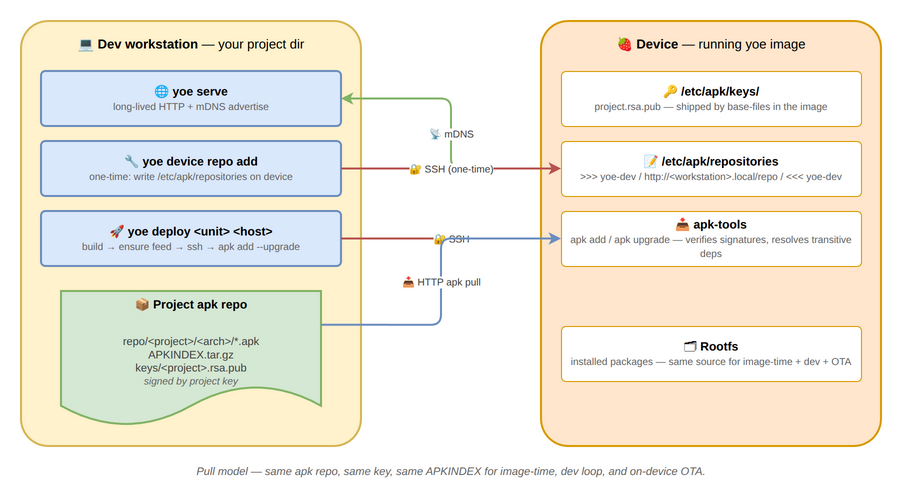
The model is pull, not push. Every install — image-time, on-device OTA, and
the dev loop — uses the same package repo, the same repo index
(APKINDEX.tar.gz for apk, the Packages/Release files for apt), and the
same signing key. Adding a new runtime dep to a unit doesn’t require updating
deploy machinery; the package manager on the device resolves it.
Trust
Packages and the repo index are signed by the project key (docs/signing.md).
Every yoe device has the matching public key in its trusted-key store
(/etc/apk/keys/ on Alpine, an apt keyring on Debian/Ubuntu) via base-files.
The package manager verifies signatures unconditionally, so the HTTP transport
is plain — package integrity is enforced at the package layer, not the network
layer.
For production OTA, layer HTTPS via reverse proxy (docs/on-device-apk.md).
Common workflows
One-time setup on a fresh device
A device that was just flashed with an image built by your project needs nothing
— the public key is already in the device’s trusted-key store (/etc/apk/keys/
on Alpine, the apt keyring on Debian/Ubuntu). Configure the repo:
# Dev host, in your project dir
yoe serve &

# In another terminal — autodiscovers the running serve via mDNS
yoe device repo add dev-pi.local
After this, on the device (Alpine shown; on Debian/Ubuntu use
apt update && apt install):
apk update
apk add htop strace gdb         # any unit your project builds is now installable
If the device was flashed from someone else’s image (no project key), pass
--push-key:
yoe device repo add dev-pi.local --push-key
Iterating on a single unit
yoe deploy myapp dev-pi.local
Builds myapp, starts an ephemeral feed (or reuses your running yoe serve if
it’s advertising the same project), ssh’s to the device, and installs myapp
with the device’s package manager (apk add --upgrade myapp on Alpine,
apt install myapp on Debian/Ubuntu). Transitive deps are resolved on the
device.
A marker block in the target’s package sources (# >>> yoe-dev …
# <<< yoe-dev in /etc/apk/repositories on Alpine, the equivalent under
/etc/apt/sources.list.d/ on Debian/Ubuntu) is left in place after deploy —
same entry yoe device repo add would have written. So the first deploy to a
fresh device doubles as the persistent feed config.
Multiple devices on a LAN
Run yoe serve once on the dev host. Each device runs yoe device repo add
once. After that, the device’s index-refresh-then-upgrade
(apk update && apk upgrade on Alpine, apt update && apt upgrade on
Debian/Ubuntu) on each device picks up new builds.
Tearing it down
yoe device repo remove dev-pi.local
Strips the yoe-dev marker block from the target’s package sources
(/etc/apk/repositories on Alpine, the corresponding file under
/etc/apt/sources.list.d/ on Debian/Ubuntu). The device falls back to whatever
else is configured (typically nothing, in dev).
Inspecting the device’s repo config
yoe device repo list dev-pi.local
Prints the device’s configured package sources, prefixed with the source
filename. On Alpine this is /etc/apk/repositories (and any
/etc/apk/repositories.d/*.list, though apk-tools 2.x does not read those
itself — they’re informational only); on Debian/Ubuntu it is the files under
/etc/apt/sources.list.d/.
Command reference
yoe serve
yoe serve [--port PORT] [--bind ADDR] [--no-mdns] [--service-name NAME]
--port— TCP port. Default8765. Pinned (not random) so the URL written byyoe device repo addstays valid acrossyoe serverestarts.--bind— listen address. Default0.0.0.0(LAN-visible).--no-mdns— skip the mDNS advertisement (multicast-hostile networks).--service-name— mDNS instance name. Defaultyoe-<project>.
yoe device repo add
yoe device repo add <[user@]host[:port]> [--feed URL] [--name NAME]
                                          [--push-key] [--user USER]
<[user@]host[:port]>— ssh destination. Examples:dev-pi.local,pi@dev-pi.local,localhost:2222(QEMU),pi@dev-pi.local:2200.--feed URL— explicit URL. If omitted, browses mDNS for_yoe-feed._tcpon the LAN; errors clearly on 0 or >1 matches.--name NAME— name suffix for the marker block written into the target’s package sources (# >>> yoe-<name>…# <<< yoe-<name>in/etc/apk/repositorieson Alpine, the equivalent under/etc/apt/sources.list.d/on Debian/Ubuntu). Defaultyoe-dev.--push-key— copy the project signing pubkey to the target’s trusted-key store (/etc/apk/keys/on Alpine, the apt keyring on Debian/Ubuntu) before configuring.--user USER— default ssh user when the target spec has nouser@prefix. Defaultroot. ssh shells out to the user’ssshso~/.ssh/config, ssh-agent, known_hosts, and jump hosts all work.
yoe device repo remove
yoe device repo remove <[user@]host[:port]> [--name NAME] [--user USER]
Idempotent — missing file is success.
yoe device repo list
yoe device repo list <[user@]host[:port]> [--user USER]
yoe deploy
yoe deploy <unit> <[user@]host[:port]> [--user U] [--port P]
                                        [--host-ip IP] [--machine M]
<unit>— must resolve to a non-image unit. Image targets error with a pointer toyoe flash.<[user@]host[:port]>— ssh destination, same syntax asdevice repo add.--port— feed port (default8765, same asyoe serve).--host-ip— advertise this IP to the device instead of<hostname>.local. Use when mDNS resolution fails on the device.--machine— target machine override.
Constraints
- mDNS doesn’t cross subnets. Cross-subnet deploys need
--feed URLor--host-ip. - A pinned port
8765collides if something else on the dev host is using it — pass--porttoyoe serveandyoe deployto override. - The dev host needs avahi / systemd-resolved running for
<hostname>.localto resolve from the device. Most Linux distros ship this. - Concurrent deploys against the same project: one runs the ephemeral feed (or
reuses
yoe serve), the other will see the same URL via mDNS reuse. Truly parallel ephemeral feeds for the same project on the same dev host collide on port8765.
On-Device Package Management (apk / Alpine)
apk-tools ships in dev-image and any other image that includes it, so booted
yoe systems can install, upgrade, and inspect packages against the project’s
signed repo using stock Alpine apk commands.
This page covers the apk path used by Alpine/musl images. yoe also produces
.deb packages for Debian/Ubuntu/glibc images, where the on-device flow is the
same shape (point at the signed project repo, refresh the index,
install/upgrade) but driven by apt/dpkg against an apt-format repository.
The concepts below — signed repo, index refresh, OTA rebuild-publish-upgrade,
non-atomic in-place upgrades — carry over; the commands and on-disk paths
differ.
What’s already on the device
After a successful yoe build dev-image && yoe run dev-image:
/sbin/apk— the apk-tools binary./lib/apk/db/— the installed-package database, populated at image assembly time viaapk add./etc/apk/keys/<keyname>.rsa.pub— the project’s signing public key, shipped bybase-files. apk uses it to verify signatures on everyadd/upgrade/updatewithout any flag-passing on your part./etc/apk/repositories— a commented-out template. You override this with your project’s repo URL before doing anything live.
Pointing at a repository
Edit /etc/apk/repositories and add a single line — one repo per line. A few
common shapes:
# Project repo served over HTTPS by an nginx behind your CA
https://repo.example.com/myproj

# Project repo served by a plain HTTP server on the LAN
http://10.0.0.1/repo/myproj

# Local filesystem path (e.g., bind-mounted USB stick or sshfs)
/var/cache/yoe/repo
Then update the index cache:
$ apk update
Yoe-built repos use Alpine’s standard <repo-root>/<arch>/APKINDEX.tar.gz
layout, so apk picks the right arch automatically — point the repositories
file at the root, not at the per-arch subdirectory.
Pointing at a yoe-served feed
For development, run yoe serve on your build host and configure the device
with yoe device repo add <host>. See feed-server.md for the
full dev-loop walkthrough.
Pulling a package from the upstream distro
To grab a package the project never built — straight from the upstream Alpine or Debian/Ubuntu mirror, for experimentation on a dev image — see on-device-upstream-feeds.md.
Installing and upgrading
Once a repository is wired up:
$ apk add htop          # install one package
$ apk add --update vim  # refresh index, then install
$ apk upgrade           # upgrade everything to the latest available
$ apk del strace        # remove a package
$ apk info -vv | head   # list installed packages
$ apk verify            # re-verify every installed package's hashes
All of these run with signature verification on. If apk reports “BAD signature”
or “untrusted”, the public key under /etc/apk/keys/ doesn’t match the key the
repo’s apks were signed with. See docs/signing.md for the key-rotation flow.
OTA flow (rebuild → publish → upgrade)
The recommended OTA path for yoe-built devices:
- Bump versions. Edit one or more units’
version =(orrelease =if just rebuilding the same source) on your dev host. - Build the new apks.
yoe build <unit>produces the new.apkfiles in<projectDir>/repo/<project>/<arch>/and refreshesAPKINDEX.tar.gz. Both are signed with the project key. - Sync to your hosting. Copy the entire
<projectDir>/repo/<project>subtree to wherever you serve it from — e.g., a static-site bucket, an nginx vhost, or a release server. The on-disk layout is already correct; no transformation needed. - On-device upgrade.
apk update && apk upgrade.
Hosting the repo over HTTP/HTTPS
Any static file server works. nginx example:
server {
    listen 443 ssl;
    server_name repo.example.com;
    ssl_certificate     /etc/letsencrypt/live/repo.example.com/fullchain.pem;
    ssl_certificate_key /etc/letsencrypt/live/repo.example.com/privkey.pem;

    root /srv/yoe-repos;
    autoindex off;

    # Tighten cache headers — APKINDEX.tar.gz changes on every publish,
    # but individual .apk files are content-addressed by version+release
    # and never change once published.
    location ~ /APKINDEX\.tar\.gz$ {
        add_header Cache-Control "no-cache";
    }
    location ~ \.apk$ {
        add_header Cache-Control "public, max-age=31536000, immutable";
    }
}
Drop your project’s repo subtree under /srv/yoe-repos/myproj/ and point
/etc/apk/repositories at https://repo.example.com/myproj.
Constraints worth knowing
- Kernel upgrades need a reboot. apk doesn’t restart anything; a new
linux-*apk replaces files in/bootand the running kernel keeps running until you reboot. - No automatic rollback. If an upgrade leaves the system unbootable, there’s no built-in A/B rollback in this layer. For atomic-rootfs workflows (RAUC-style A/B partitioning, or btrfs-snapshot rollback), layer them above the apk repo — apk handles the package contents, the rootfs strategy handles atomicity.
- In-place upgrade is non-atomic. apk extracts each package’s files
individually. A power loss during
apk upgradecan leave the rootfs in a half-upgraded state. For deployments where that’s not OK, ship upgrades as full image artifacts via flash/A-B and use the apk repo for development iteration only. - No remote network at install time during image build. Image assembly runs
apk add --no-networkagainst the local repo. This is intentional: build artifacts must be reproducible from the project tree alone.
On-Device Upstream Feeds (experimentation)
A booted yoe device installs from its project repo — the signed feed yoe
publishes (see on-device-apk.md). During development you
often want a package the project never built — htop, strace, a stray library
— without adding a unit and rebuilding. dev-image ships a dormant enabler that
lets you pull such a package straight from the upstream distro mirror
(dl-cdn.alpinelinux.org for Alpine, deb.debian.org / Ubuntu for the apt
distros).
This is an experimentation / one-off mechanism, not a production update path. Production devices keep updating from the signed project repo and full-image A/B. Mixing upstream prebuilt packages into yoe’s source-built userland has sharp edges (see Limitations); the feature is scoped accordingly.
How it ships
dev-image includes a small upstream-feeds package that lands two things on
the device, both dormant:
/usr/sbin/yoe-enable-upstream-feeds— the enabler script./usr/share/yoe/upstream-keys/— the upstream distro’s signing key(s), in a non-trust location. Nothing trusts them until you opt in.
Until you run the script, the device has no upstream source configured and no
active upstream trust anchor — the package just sits there. An image that omits
upstream-feeds (any base or production image) carries neither the script nor
the keys.
Enabling
Run the enabler, then install by explicit reference:
# Alpine
$ yoe-enable-upstream-feeds
$ apk update && apk add htop@upstream

# Debian / Ubuntu
$ yoe-enable-upstream-feeds
$ apt update && apt install -t <suite> htop
yoe-enable-upstream-feeds --disable reverses it: the upstream source and pin
are removed, and the keys return to untrusted.
Held back by default
The enabler adds the upstream feed held back, so it can never replace a package in yoe’s source-built base. The base is what makes a yoe image reproducible; a blanket upgrade pulling newer upstream builds over it would defeat that. Each backend enforces this natively:
- Alpine — the upstream repo is added with an apk tag (
@upstream). A plainapk add/apk upgradeignores tagged repos entirely; only an explicitapk add <pkg>@upstreamreaches upstream. - Debian / Ubuntu — the source is written to
/etc/apt/sources.list.d/yoe-upstream.list(key scoped to that one source viasigned-by, so no global trust anchor) and pinned toPin-Priority: 100in/etc/apt/preferences.d/. Priority below the default 500 means it is installable when named (apt install -t <suite> <pkg>) but never auto-selected and never used byapt upgrade. The project repo always wins.
So apk add <pkg>@upstream / apt install -t <suite> <pkg> pulls exactly the
named package; nothing else on the device changes.
Branch matches the build
The enabler points at the same release the image was built against — Alpine
v3.21, Debian trixie, Ubuntu resolute — never “latest”. A device pointed
at a newer release than its musl/glibc was built for could pull a package
needing libc symbols the running system lacks. The values are baked into the
script to match the module’s feed, so there is no release knob to get wrong.
What apk update / apt update do once enabled
The held-back tag/pin governs which package is selected, not which indexes
are fetched. Once the upstream feed is enabled, an apk update / apt update
refreshes every configured source — project repo and upstream both:
- The upstream index is large and lives on the network, so the refresh now needs
upstream connectivity and pulls more data. On apt an unreachable upstream
prints
Failed to fetch … Some index files failed to downloadand exits non-zero while still updating the sources it could reach; apk treats a failed repo as a warning. - A device that never runs the enabler has only the project repo, so its routine update stays small and offline-friendly. This is why the feed is opt-in rather than always present.
- To refresh only the project repo when both are configured, target a single
source list — e.g.
apt update -o Dir::Etc::SourceParts=/dev/null.
Signature verification succeeds because the enabler activated the upstream key
(apt via signed-by, apk by copying it into /etc/apk/keys/).
The apt feeds (Debian/Ubuntu) are fetched over plain http: apt derives
trust from the GPG-signed InRelease, not from the transport, so http is the
standard way to consume a signed repo — it gives up only confidentiality (an
observer can see which package names you fetch) and avoids depending on the
device having a working TLS CA store for apt’s HTTPS method. This matches
Ubuntu’s own default of http://archive.ubuntu.com. The apk (Alpine) feed
uses https — apk’s TLS works on the Alpine image, and the signed APKINDEX is
the trust anchor regardless.
Limitations
- File-path conflicts with the source-built base. yoe builds some packages
monolithically where the distro splits them — for example yoe’s
util-linuxshipslibmount.so.1/libblkid.so.1directly, while Alpine splits them into separate packages. If an upstream package transitively needs the split form, the install fails on a file-path collision. That is an expected “pick-a-different-package” outcome for experimentation; it is the main reason this path is not for production. See apk-passthrough.md for the worked example. - No
-devpackages. yoe doesn’t split headers out of its source-built libraries, so on-device building against upstream-devpackages hits the same wall. - Networked verification. A live upstream install needs connectivity to the mirror; there is no offline path for packages the project didn’t build.
The device carries no build-machine feed
Independently of this feature, a yoe device’s package manager is configured with
only feeds that are valid on the device. The image is assembled from a local
build-time mirror that does not exist on the booted device, so that mirror is
not baked into the device’s source list — /etc/apk/repositories is a
commented template, and /etc/apt/sources.list is likewise an empty commented
template. The project feed is added on-device with yoe device repo add, and
the upstream feed with yoe-enable-upstream-feeds.
QEMU Machines
yoe ships two QEMU machines that serve as the default development and CI
targets: qemu-arm64 and qemu-x86_64. Neither corresponds to physical
hardware — both target QEMU’s emulated virt/q35 machines and exist to let
you iterate on userspace and the kernel without booting real silicon each time.
This page covers what each machine ships, how the boot path differs between
them, and what yoe qemu actually does at run time.
Machine descriptors live at:
modules/module-core/machines/qemu-arm64.starmodules/module-core/machines/qemu-x86_64.star
Both lean entirely on module-core and module-alpine — no board-specific BSP
units.
Comparison at a glance
| Aspect | qemu-arm64 | qemu-x86_64 |
|---|---|---|
| Arch | arm64 | x86_64 |
| QEMU machine | virt | q35 |
| CPU | host | host |
| Firmware | none (direct kernel boot) | seabios (QEMU default) |
| Bootloader | none — QEMU -kernel | syslinux in the rootfs |
| Console | ttyAMA0 (PL011 UART) | ttyS0 (16550 UART) |
| Root device | /dev/vda1 (single part) | /dev/vda2 |
| Kernel unit | linux (generic) | linux (x86_64_defconfig) |
| Extra packages | none | syslinux (Alpine only) |
| Default forwards | 2222:22, 8080:80, 8118:8118 | same |
Both default to 4 GB RAM and display = "none"; the -nographic flag sends
serial to the controlling terminal. 4 GB is the floor for memory-heavy unit
builds inside the guest — the kernel link step alone needs well over 1 GB, so a
self-hosted yoe build of linux is OOM-killed on a smaller VM.
Pass --display to yoe run (e.g. yoe run qt-image --display) to drop
-nographic and let QEMU open its native window for the guest framebuffer. The
launcher attaches a virtio-vga adapter for the DRM virtio-gpu driver and keeps
serial multiplexed onto host stdio so kernel logs still appear in the terminal
that started the run. The kernel’s graphics.cfg fragment turns on the relevant
FB/DRM bits (DRM_VIRTIO_GPU, DRM_BOCHS, FB_VESA, FB_EFI,
DRM_FBDEV_EMULATION), so /dev/fb0 is present from the first boot — needed by
linuxfb-backed UIs like the qt-image demo.
qemu-arm64
machine(
    name = "qemu-arm64",
    arch = "arm64",
    kernel = kernel(
        unit = "linux",
        defconfig = "defconfig",
        cmdline = "console=ttyAMA0 root=/dev/vda1 rw",
    ),
    partitions = [
        partition(label = "rootfs", type = "ext4", size = "512M", root = True),
    ],
    qemu = qemu_config(
        machine = "virt", cpu = "host", memory = "4G",
        display = "none",
        ports = ["2222:22", "8080:80", "8118:8118"],
    ),
)
There is no bootloader and no boot partition. yoe qemu invokes QEMU with
-kernel <vmlinuz> taken from the built image’s own /boot, and passes the
machine’s cmdline via -append. The kernel is whichever one the image ships:
Alpine installs /boot/vmlinuz and mounts the rootfs directly, while Debian
installs a versioned /boot/vmlinuz-<ver> alongside an initrd.img-<ver> that
QEMU also receives via -initrd. QEMU loads these straight into emulated DRAM
on the virt machine and starts the A53 cores at the kernel entry point.
This is the one place in yoe where direct-kernel boot is the correct path, not a
shortcut. The virt machine has no analog in physical silicon — there is no
ROM, no SPL, no need for U-Boot. (For physical aarch64 boards, see
BeaglePlay for the full ROM → SPL → TF-A → U-Boot →
kernel chain.)
EFI-only kernels boot through UEFI firmware. Direct -kernel boot only
works for a bare arm64 Image (Alpine and Debian ship one — recognizable by the
ARMd magic at offset 56). Ubuntu builds its arm64 kernels as EFI zboot: a
zstd-compressed EFI/PE application with no bare-Image header, which the
firmware-less -kernel path cannot start (the guest would hang with a silent
console). The launcher detects this — an EFI-only /boot/vmlinuz — and boots it
through edk2/AAVMF UEFI firmware (-bios), which still picks up the
-kernel/-initrd/-append that follow via fw_cfg and runs the kernel’s own
EFI stub to decompress and start it. The firmware comes from the host’s
qemu-efi-aarch64 / edk2-aarch64 package; if it is missing, yoe run fails
with an actionable message rather than launching a guest that never prints. Bare
Image kernels are untouched and keep the plain direct-kernel path.
On real hardware: this UEFI handoff is a QEMU-side accommodation for the dev/CI machine. Booting an EFI-zboot kernel on a physical low-end SoC (e.g. a TI AM62 whose U-Boot uses the classic
booti/extlinux flow, which also expects a bareImage) needs a separate decision when such a target is added — either the board’s U-Boot UEFI path (bootefi), or unwrapping the zboot payload back to a bareImageat image-assembly time. The bare-Imagedistros sidestep the question entirely.
The single ext4 partition becomes /dev/vda1 through QEMU’s virtio-blk disk.
The disk is presented to the guest as a raw image file, attached with
-drive file=...,format=raw,if=virtio.
qemu-x86_64
machine(
    name = "qemu-x86_64",
    arch = "x86_64",
    kernel = kernel(
        unit = "linux",
        defconfig = "x86_64_defconfig",
        cmdline = "console=ttyS0 root=/dev/vda2 rw",
    ),
    distro_packages = {"alpine": ["syslinux"]},
    partitions = [
        partition(label = "rootfs", type = "ext4", size = "600M", root = True),
    ],
    qemu = qemu_config(
        machine = "q35", cpu = "host", memory = "4G",
        firmware = "seabios",
        display = "none",
        ports = ["2222:22", "8080:80", "8118:8118"],
    ),
)
x86_64 goes through a real bootloader: SeaBIOS (QEMU’s built-in legacy BIOS,
used by default on q35) reads the MBR off the virtio disk and jumps into
syslinux, which loads the kernel from the ext4 rootfs.
syslinux sits under distro_packages rather than the plain packages list
because it is the bootloader for Alpine images only: the from-source unit
installs mbr.bin into the rootfs for the disk-creation step. Apt images
(Debian, Ubuntu) get extlinux from the glibc toolchain container at
disk-creation time instead, so syslinux must never enter their closure —
distro_packages = {"alpine": [...]} keeps it out. A board package that every
distro needs (GPU firmware, U-Boot stages, config.txt) goes in packages,
which merges into every image regardless of distro.
This mirrors how a physical x86 board with legacy BIOS boots, so the same image
will also boot on bare metal that lacks UEFI. (UEFI/OVMF support is set up in
internal/device/qemu.go — pass firmware = "ovmf" instead to swap SeaBIOS for
OVMF and boot via EFI.)
Why root=/dev/vda2 when there’s only one partition declared? syslinux
installation inserts its own boot sector ahead of the data partition, so the
visible partition index starts at 2 once the image is on disk. The rootfs is
still that single ext4 — it just lives at vda2 from Linux’s view.
What runs inside the guest
Both machines pick up the generic linux unit from module-core, not a
board-specific kernel. That unit builds arch/<arch>/boot/{Image,bzImage} plus
the standard module set; no out-of-tree drivers, no custom defconfig fragment.
The userspace stack is whatever the project includes via its package list plus
the rootfs base — busybox, OpenRC, apk-tools, and any apks pulled through
module-alpine. See libc, init, and the Rootfs Base for the
userspace layout.
Networking
yoe qemu wires a single virtio-net device through QEMU’s user-mode networking
(SLIRP). The default forwards in the machine descriptor land SSH on host port
2222 and a couple of HTTP ports for app dev. Extra forwards can be passed on the
CLI (yoe run --port 9000:9000, repeatable). A --port entry whose guest
port matches a machine forward replaces that forward; an entry with a new guest
port is appended.
That replace-on-match behavior is what makes --port usable for qemu-in-qemu —
see Running inside a QEMU guest
below.
Tuning at run time
Three knobs override the machine descriptor for a given developer without
editing checked-in .star files:
| Knob | Local override | CLI flag | Persisted by |
|---|---|---|---|
| RAM | qemu_memory = "8G" | --memory 8G | --memory and TUI |
| Display | qemu_display = "on" | --display | TUI |
| Forwards | qemu_ports = [...] | --port h:g | TUI |
All three live in local.star and apply the next time you run the same image.
The TUI editor is on Setup → QEMU settings (press s, move down to QEMU
settings, press Enter). The Ports section lists the effective forwards
yoe run would bind — the machine’s declarations with any local.star
overrides already merged in — and every row is editable: highlight a forward,
press Enter, and change its host port (e.g. move a colliding 8080:8080 to
18080:8080). Because the override replaces by guest port, editing a
machine-declared forward writes a local.star entry for that guest port that
supersedes the machine default; pressing d on an overridden forward reverts it
to the machine default, while a/+ adds a brand-new forward. A
machine-declared forward with no override can’t be deleted (there is nothing in
local.star to remove) — change its host port instead. The order at run time is
machine ← local.star ← CLI, so a one-off --port still beats a saved entry
for the same guest port.
How yoe qemu runs
The launcher in internal/device/qemu.go:
- Picks the binary by arch:
qemu-system-aarch64,qemu-system-x86_64, orqemu-system-riscv64. - Builds the arg list:
-machine,-cpu,-m,-nographicby default (or-device virtio-vga -serial mon:stdiowhenyoe run --displayis set, which lets QEMU open its native window and still leaves the serial console muxed onto host stdio), the virtio-blk drive, the virtio-net device with port forwards, and-biosif a firmware (OVMF/AAVMF) is set. On a same-arch host it adds-enable-kvmwhen/dev/kvmis present; when it is not (notably qemu-in-qemu without nested virtualization) it drops KVM, downgrades ahostCPU tomax, and runs under TCG software emulation instead — slower, but it still boots. - If the machine has no
firmware, appends-kernel <vmlinuz> -append <cmdline>for the direct-boot path (this is what qemu-arm64 uses), taking the kernel from the built image’s/bootand adding-initrd <initrd.img>only when the image ships a real initramfs (e.g. Debian). The launcher reads these straight off the host rootfs, so the image build makes the kernel world-readable (Ubuntu otherwise ships it root-only, which would fail with “could not load kernel”). An image that carries no initramfs boots through the kernel’s built-in drivers (Alpine, and Ubuntu — whose kernel only recommends an initramfs generator); the launcher resolves the/boot/initrd.imgsymlink and omits-initrdwhen it dangles, rather than handing QEMU a path it would reject with “could not load initrd”. - Tries host QEMU first; falls back to running QEMU inside the
toolchain-muslcontainer with the project bind-mounted at/projectif the host doesn’t have it installed.
The image yoe passes is whatever the assembly step produced, attached
read-write. Restart-and-iterate workflows: rebuild, then re-run yoe qemu — the
image is regenerated, the guest starts clean.
When to use which
- qemu-x86_64 is the right default for most development. KVM acceleration on an x86 host is essentially native speed; the boot path matches legacy-BIOS bare metal so what you debug here is what runs on similar hardware.
- qemu-arm64 is for catching arch-specific bugs (byte ordering, alignment, ARM64-only paths in code) without finding a board. It runs under TCG (software emulation) on x86 hosts, which is slow but faithful. On aarch64 hosts (an Apple Silicon Mac, an Ampere server) it uses KVM and is fast.
- For anything physical-board-shaped — secure boot, vendor blobs, display, real I/O — use the actual board’s machine descriptor.
Running inside a QEMU guest (qemu-in-qemu)
yoe run works from within a guest that is itself running under QEMU — useful
for exercising a self-hosted yoe build. Two things differ from a run on the
bare host, and yoe run handles both:
-
Port forwards collide. The outer guest already holds the machine’s default host forwards (
2222,8080,8118), so a nested run cannot bind them. Remap the host side with--port; an entry whose guest port matches a default forward replaces it:yoe run base-image --port 12222:22 --port 18080:80 --port 18118:8118 -
No KVM. A guest has no
/dev/kvmunless its host was started with nested virtualization.yoe rundetects this and falls back to TCG software emulation automatically — it printsusing TCG software emulation (slower)and boots. No flag is needed; expect roughly a 10–20× slowdown versus KVM.
To get full-speed nested runs instead of TCG, enable nested virtualization on
the bare-metal host (kvm_intel/kvm_amd module option nested=1) and start
the outer guest with a passthrough CPU so /dev/kvm appears inside it.
Raspberry Pi BSP (RPi4, RPi5)
yoe supports the Raspberry Pi 4 (BCM2711) and the Raspberry Pi 5 (BCM2712)
(NOTE, rPI5 is not booting yet) through the raspberrypi4 and raspberrypi5
machines. Both target the 64-bit application cores and share the same firmware
unit, the same config-file mechanism, and the same partition layout — they
differ mainly in which kernel image and DTB land on the boot partition.
Machine descriptors:
modules/module-bsp/machines/raspberrypi4.starmodules/module-bsp/machines/raspberrypi5.star
Units under modules/module-bsp/units/bsp/:
rpi-firmware— shared GPU bootloader blobslinux-rpi4,linux-rpi5— per-board kernel buildsrpi4-config,rpi5-config— per-boardconfig.txt+cmdline.txt
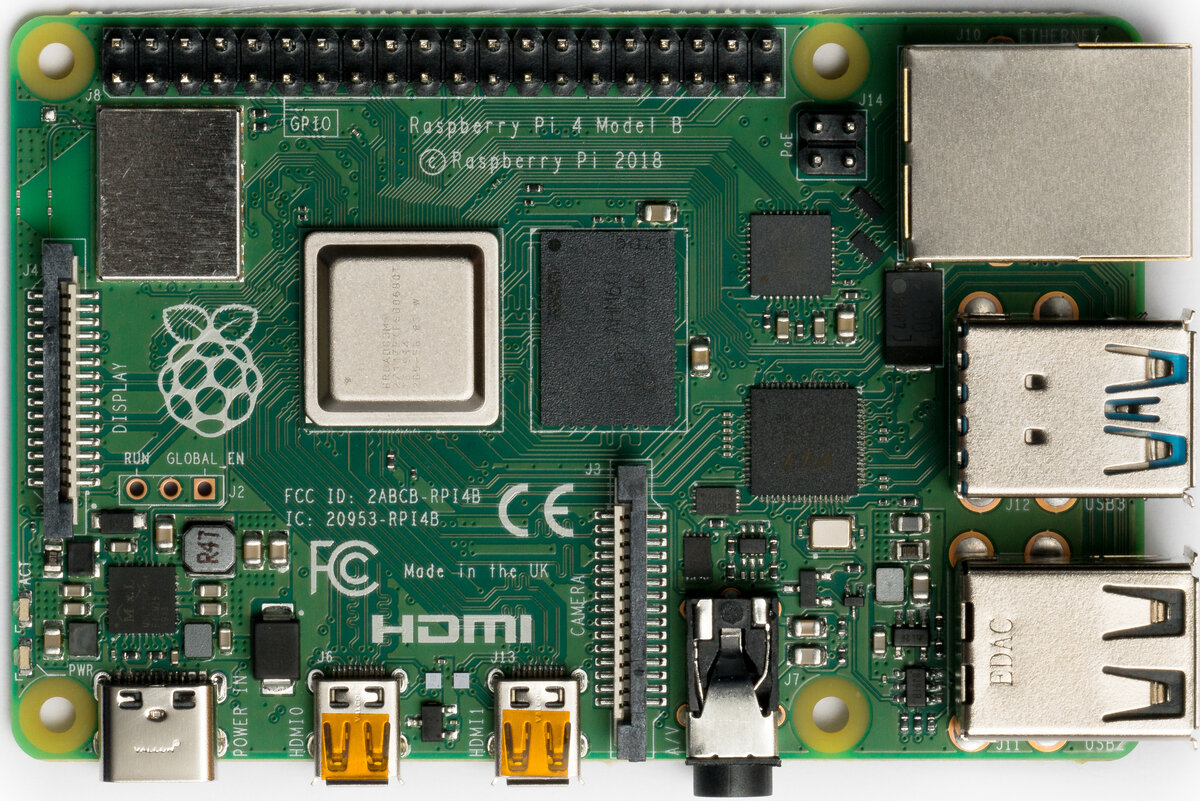
Raspberry Pi 4 Model B. Photo: Laserlicht / Wikimedia Commons, CC BY-SA 4.0.
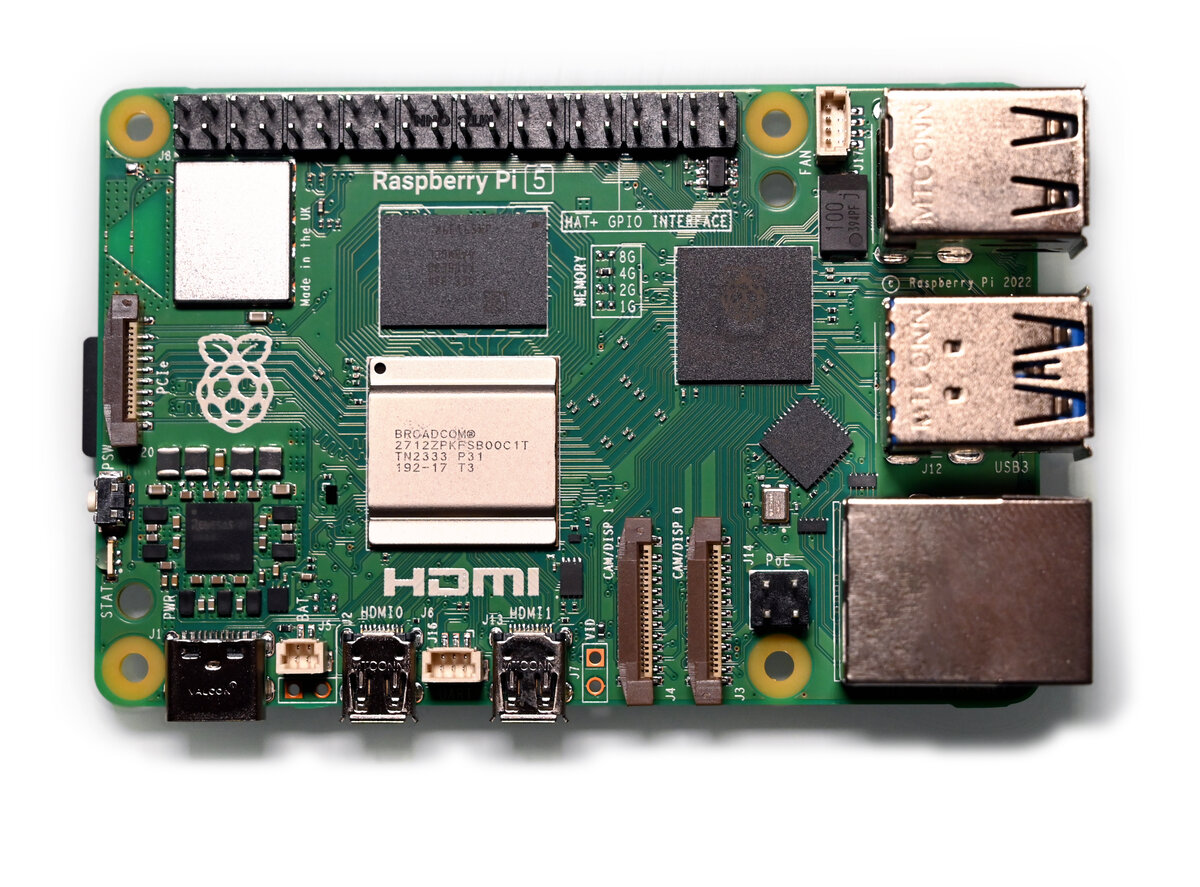
Raspberry Pi 5. Photo: SimonWaldherr / Wikimedia Commons, CC BY 4.0.
Running it on hardware
After yoe build --machine raspberrypi4 base-image (or raspberrypi5, or
whatever image you’ve picked), yoe produces a single disk image under
build/<image>.raspberrypi{4,5}/disk.img. The next steps are: write it to a
microSD card, connect serial + power, and power on.
Authoritative hardware reference for everything below: https://www.raspberrypi.com/documentation/. The notes here cover the yoe-specific bits and a quick start; for pinouts, mechanical layout, and silicon details, defer to the Foundation’s docs.
Writing the image to a microSD card
Two ways:
-
TUI — open
yoe(no arguments), highlight the image unit, pressf. The flash UI shows the candidate removable devices and you pick one. This is the fast path during development. -
CLI —
yoe flash <image-unit> <device>. List candidates first:yoe flash listThat prints the
/dev/sdN(or/dev/mmcblkN) entries with size and model so you can identify the card. Then write:yoe flash --machine raspberrypi4 base-image /dev/sdNSwap
base-imagefor whichever image unit you built andraspberrypi4forraspberrypi5as appropriate.--dry-runshows what it would do without touching the device;--yesskips the confirmation prompt for scripted flows.
Either path picks the right disk image from the build tree, refuses to write to anything mounted or anything that looks like an internal disk, and confirms before overwriting. If a partition on the target is mounted (most desktops auto-mount removable media on insert), the flash exits with a message — unmount the partitions and retry. Read the device path it’s about to write to; flashing the wrong block device will silently overwrite it.
Power
- RPi4 takes 5 V over USB-C. Plan for 5 V / 3 A in practice — the official 15 W USB-C supply or a class-compliant laptop / phone charger that negotiates 5 V / 3 A. Underpowering shows up as the lightning-bolt under-volt warning in dmesg, SD card corruption, WiFi disconnects under load, or the board silently rebooting once anything is plugged into USB.
- RPi5 takes 5 V over USB-C with USB-PD. The official 27 W supply negotiates
5 V / 5 A and is required for full peripheral current on the USB ports; a 5 V
/ 3 A PD supply boots fine but the firmware caps USB current unless you set
usb_max_current_enable=1inconfig.txt.
Serial console
The kernel and the GPU firmware both bring up a UART on the GPIO header when
enable_uart=1 is in config.txt. Settings are 115200 8N1, no flow
control, on three pins of the 40-pin header:
| Pin | Signal |
|---|---|
| 6 | GND |
| 8 | TXD |
| 10 | RXD |
The Linux device name differs between boards:
- RPi4 — mini-UART on
ttyS0(cmdline.txt’sconsole=ttyS0,115200) - RPi5 — PL011 on
ttyAMA0(cmdline.txt’sconsole=ttyAMA0,115200)
Raspberry Pi boards do not have an on-board USB-to-serial bridge. The header is wired in the standard Raspberry Pi USB-to-TTL serial cable pinout, so you’ll need an external 3.3 V adapter:
- Recommended: FTDI TTL-232R-RPi
(product page ·
Digi-Key).
Purpose-built for this header, 3.3 V signals, genuine FTDI silicon (so the
host’s
ftdi_siodriver picks it up reliably and you don’t fight knock-off CP210x / CH340 driver quirks). Plug-and-play with no wiring decisions. - Any other 3.3 V USB-TTL adapter (Adafruit 954, generic FTDI/CP210x/CH340 dongles) works too — connect three jumpers, leave the 5 V lead disconnected since the board has its own power.
Wiring is “cross-over”: the cable’s TX goes to the board’s RX (pin 10), and
the cable’s RX goes to the board’s TX (pin 8). GND to GND (pin 6).
Once wired, plug the USB end into the host; it enumerates as /dev/ttyUSB0
(FTDI / CH340 / CP210x) or /dev/ttyACM0 (some CDC ACM adapters). Open it with
tio, which defaults to 115200 8N1:
tio /dev/ttyUSB0
If nothing appears after power-on:
- Confirm
enable_uart=1made it intoconfig.txton the boot partition. - Swap RX/TX. The single most common mistake.
- Confirm the adapter is 3.3 V, not 5 V. A 5 V adapter on the SoC’s UART pins is the fastest way to brick that GPIO.
dmesg | tailon the host — the USB-TTL adapter should enumerate within a second or two of plugging in. If it doesn’t, the cable / dongle is the issue, not the board.
First boot
A successful boot prints (roughly, abbreviated):
[    0.000000] Booting Linux on physical CPU 0x...
[    0.000000] Linux version 6.12.x ...
...
Welcome to <hostname>
<hostname> login:
(The GPU firmware stage is silent on the UART — the first thing you see is the kernel’s earlycon output.)
The default credentials from base-files-* are root (no password) and user
/ password. Change them before connecting the board to any network you don’t
fully control — the OpenSSH unit defaults to enabled once the package lands in
the image.
If you get a rainbow splash and nothing else, the GPU firmware loaded but couldn’t find a kernel. See When something fails below.
The Raspberry Pi boot chain
Raspberry Pi boards do not use a conventional CPU-side bootloader. The boot sequence is GPU-first:
RPi4:  GPU ROM ─ reads ─→ bootcode.bin (SD) ─ loads ─→ start4.elf ─ reads ─→ config.txt + kernel + DTB ─ starts ARM cores
RPi5:  EEPROM  ────────────────────────────────────────────→ (same flow, no bootcode.bin, kernel_2712.img)
The VideoCore GPU is the first thing alive on the SoC. On RPi4, the on-board ROM
is minimal and reads bootcode.bin from the SD card to bring the rest of the
GPU firmware online. On RPi5, all that early code lives in an EEPROM on the
board, so there is no bootcode.bin on the SD — the GPU goes straight from
EEPROM to reading config.txt.
From there the flow is identical on both:
- GPU firmware (
start4.elfon RPi4, the EEPROM image on RPi5) parsesconfig.txt. - It loads the kernel image named by
config.txt’skernel=line plus the matching DTB. - It reads
cmdline.txtand passes it as the kernel command line. - It releases the ARM cores at the kernel entry point.
There is no U-Boot, no SPL, no TF-A in this chain by default. (You can chain-load U-Boot from the GPU firmware if you want EFI semantics, but yoe doesn’t.)
Shared units
rpi-firmware
unit(
    name = "rpi-firmware",
    source = "https://github.com/raspberrypi/firmware.git",
    tag = "1.20250305",
)
Prebuilt blobs only — no compilation. Installs the GPU firmware files the RPi family needs on the FAT boot partition:
| File | Used by | Purpose |
|---|---|---|
bootcode.bin | RPi4 | first-stage GPU loader (RPi5 in EEPROM) |
start4.elf | RPi4 | main GPU firmware (also start4x.elf, start4cd.elf, start4db.elf variants) |
fixup4.dat | RPi4 | memory split / DRAM tuning (matching 4x, 4cd, 4db variants) |
RPi5 doesn’t need any of these on the SD card (the EEPROM ships them), but yoe stages them anyway — installed packages are uniform across both boards and the extra ~10 MB on the FAT partition is harmless.
linux-rpi4 / linux-rpi5
Both kernels build from github.com/raspberrypi/linux on branch rpi-6.12.y —
the Raspberry Pi Foundation’s downstream tree carrying Broadcom GPU drivers, the
wireless stack, and out-of-tree patches that aren’t yet in mainline.
The two units differ in defconfig and output naming:
| Aspect | linux-rpi4 | linux-rpi5 |
|---|---|---|
| SoC | BCM2711 | BCM2712 |
defconfig | bcm2711_defconfig | bcm2712_defconfig |
| Kernel filename | kernel8.img | kernel_2712.img |
| DTBs installed | bcm2711-rpi-4-b.dtb, bcm2711-rpi-400.dtb, bcm2711-rpi-cm4.dtb | bcm2712-rpi-5-b.dtb |
Both run a defconfig merge step that folds in container.cfg — a small fragment
that enables overlayfs, cgroups v2, netfilter, namespaces, and the eBPF cgroup
hooks needed to make Docker / Podman / runc work out of the box. The same
fragment is also used by linux-beagleplay; see
BeaglePlay for the parallel.
Overlays go to /boot/overlays/*.dtbo. Kernel modules install into the rootfs
under /lib/modules/<kver>/, with DEPMOD=true skipping depmod at build time
(the build container doesn’t have it). Image assembly runs depmod -a against
the assembled rootfs — for every installed kernel, on both Alpine and Debian/
Ubuntu — so the modules.dep index ships in the image and modprobe works on
first boot without any on-target generation step.
rpi4-config / rpi5-config
Two-file boot config: config.txt for the GPU firmware, cmdline.txt for the
kernel.
config.txt (RPi4 / RPi5 differences):
# RPi4
arm_64bit=1
enable_uart=1
kernel=kernel8.img
dtoverlay=vc4-kms-v3d
disable_splash=1
# RPi5
arm_64bit=1
enable_uart=1
kernel=kernel_2712.img
dtoverlay=vc4-kms-v3d-pi5
disable_splash=1
arm_64bit=1flips the GPU firmware into 64-bit kernel mode (it defaults to 32-bit for legacy compatibility).enable_uart=1brings up the mini-UART on RPi4 / the PL011 on the GPIO header so you get a serial console.kernel=matches what the per-board kernel unit installed.dtoverlay=vc4-kms-v3dselects the modern KMS DRM driver for the VideoCore GPU (the-pi5variant on RPi5 targets VC6 / RP1).disable_splash=1skips the rainbow boot logo.
cmdline.txt:
RPi4: console=ttyS0,115200 root=/dev/mmcblk0p2 rootfstype=ext4 rootwait rw
RPi5: console=ttyAMA0,115200 root=/dev/mmcblk0p2 rootfstype=ext4 rootwait rw
- RPi4 uses the BCM2711 mini-UART, exposed as
ttyS0. - RPi5 routes the 40-pin header UART through the RP1 southbridge PL011, exposed
as
ttyAMA0— this is the port the kernel console binds to and where boot output appears. (The BCM2712 also has a separate dedicated debug UART that enumerates asttyAMA10; that is not the GPIO-header console.) - Both root from
/dev/mmcblk0p2— second partition on the SD card.
Image assembly
Both machines use the same partition layout:
partitions = [
    partition(label = "boot",   type = "vfat", size = "64M",
              contents = ["kernel", "dtbs", "firmware"]),
    partition(label = "rootfs", type = "ext4", size = "1G", root = True),
]
The contents patterns are name-based selectors that map to file globs under
/boot/ in the assembled rootfs:
| Selector | Matches |
|---|---|
kernel | kernel8.img / kernel_2712.img / etc. |
dtbs | *.dtb, *.dtbo (including overlays/) |
firmware | bootcode.bin, start4*.elf, fixup4*.dat |
The config.txt and cmdline.txt written by the per-board config unit land in
/boot/ too and are matched by the firmware/dtbs/kernel selectors as
appropriate.
SD card layout the GPU expects:
| Partition | Type | Contents |
|---|---|---|
| 1 | vfat | Firmware blobs, kernel, DTBs, overlays, config.txt, cmdline.txt |
| 2 | ext4 | Linux rootfs (musl + busybox + OpenRC + apps + modules) |
The GPU firmware doesn’t care about partition labels or GPT — it reads the first
FAT partition off the MMC. Linux mounts the same FAT at /boot and uses
partition 2 as /.
What’s the same and what differs across boards
Shared:
- Same upstream kernel tree, same branch, same container.cfg fragment.
- Same
rpi-firmwarepackage (RPi5 ignores the SD copies but they’re harmless). The machine’spackages = ["rpi-firmware", "rpiN-config"]list is the board’s distro-neutral boot requirement — the GPU firmware blobs plusconfig.txt/cmdline.txt— and merges into the image on every distro (Alpine, Debian, Ubuntu). Withoutconfig.txtthe Pi firmware never enables the UART or learns which kernel to load, so a board image that drops these packages comes up with a silent serial console. (A board whose bootloader genuinely differs per distro would use the machinedistro_packagesmap instead; the Pi’s does not.) - Same partition layout and root device.
- Same OpenRC / busybox / apk userspace.
Per-board:
linux-rpi4vslinux-rpi5(defconfig, kernel image name, DTBs).rpi4-configvsrpi5-config(kernel image name inconfig.txt, KMS overlay variant, serial console device).- The machine descriptor (which kernel unit to use, which config unit).
If you’re adding a Raspberry Pi 3 or Pi Zero 2 W, the work is mostly mechanical: clone the per-board kernel + config unit, swap defconfig and DTB names, and add a machine descriptor. The firmware unit and the partition layout don’t need to change.
Self-hosting yoe builds on the RPi5
The selfhost-image turns a Raspberry Pi 5 into a standalone yoe build host —
yoe CLI, Go, Docker, git, helix, and the rest of the dev image, all on one
bootable card or NVMe SSD. See Self-Host on RPi5 for the
build, flash, first-boot, and NVMe setup walkthrough.
When something fails
- Rainbow screen, no kernel boot. GPU firmware loaded but couldn’t find the
kernel. Check
config.txt’skernel=line and confirm the named file is on the FAT partition. - Black screen, never sees UART.
enable_uart=1missing fromconfig.txt, or the wrongconsole=incmdline.txtfor the board. - Kernel boots but no rootfs. SD card not the only block device the kernel
sees, or
rootwaitnot in the cmdline — partition probing can race the kernel. - WiFi / Bluetooth missing. The Foundation kernel pulls in
brcmfmacfirmware blobs that aren’t yet in this BSP. Add them via a separate unit if needed; thelinux-firmwaretree on the Foundation GitHub has them underbrcm/.
BeaglePlay BSP
This page documents the BeaglePlay board support in yoe: which units make up the BSP, how they cooperate at build time, and how the resulting artifacts are arranged on the SD card or eMMC.
The hardware is BeagleBoard.org’s BeaglePlay, built on TI’s AM625 SoC (quad Cortex-A53 application cores, a Cortex-R5F MCU island, and a Cortex-M4F dead-man core). The cores run with help from TI’s K3 security firmware (“TIFS” / “SYSFW”) and a small device-manager (“DM”) payload — both shipped as signed blobs by TI.
The machine descriptor lives at modules/module-bsp/machines/beagleplay.star;
everything below is built by units under modules/module-bsp/units/bsp/.
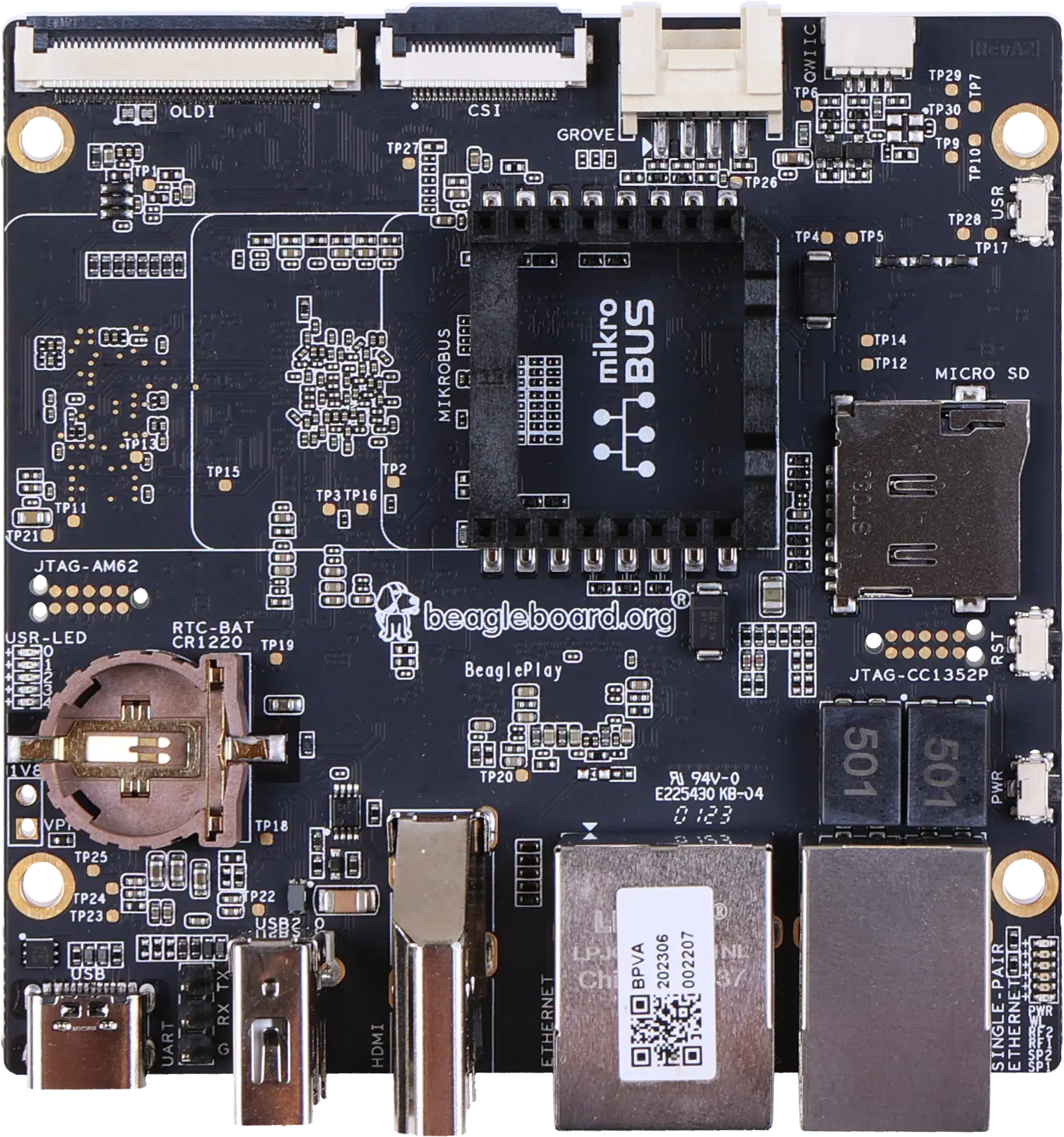
Photo: BeagleBoard.org, CC BY-SA 4.0.
Running it on hardware
After yoe build --machine beagleplay base-image (or whatever image you’ve
picked), yoe produces a single disk image under
build/<image>.beagleplay/disk.img (the exact path depends on the image’s
disk task). The next steps are: write it to a microSD card, connect serial
- power, and power on.
Authoritative hardware reference for everything below: https://docs.beagleboard.org/boards/beagleplay/. The notes here cover the yoe-specific bits and a quick start; for pinouts, mechanical layout, and silicon details, defer to BeagleBoard.org’s docs.
Writing the image to a microSD card
Two ways:
-
TUI — open
yoe(no arguments), highlight the image unit, pressf. The flash UI shows the candidate removable devices and you pick one. This is the fast path during development. -
CLI —
yoe flash <image-unit> <device>. List candidates first:yoe flash listThat prints the
/dev/sdN(or/dev/mmcblkN) entries with size and model so you can identify the card. Then write:yoe flash --machine beagleplay base-image /dev/sdNSwap
base-imagefor whichever image unit you built (jukebox-image, your own, …).--dry-runshows what it would do without touching the device;--yesskips the confirmation prompt for scripted flows.
Either path picks the right disk image from the build tree, refuses to write to anything mounted or anything that looks like an internal disk, and confirms before overwriting. If a partition on the target is mounted (most desktops auto-mount removable media on insert), the flash exits with a message — unmount the partitions and retry. Read the device path it’s about to write to; flashing the wrong block device will silently overwrite it.
Choosing boot media (SD vs eMMC)
The AM625 ROM checks boot sources in a sequence set by the SYSBOOT straps on the board. On BeaglePlay the default boot order looks at the on-board 16 GB eMMC first.
To boot from microSD instead, hold the USR button while applying power or
pressing reset. That overrides the ROM’s boot search to start at the SD slot.
Release the button once you see the SPL banner on the serial console (~1
second). The override is per-boot — power-cycling without the button reverts to
eMMC.
For development you typically want microSD boot: it’s easy to re-flash, hard to brick, and leaves the eMMC’s contents alone. For production you’d flash a known image into eMMC (either by booting an SD-based installer or over USB-DFU) and ship without an SD card.
The yoe image is identical for both paths — the boot chain on eMMC and on SD
comes from the same tiboot3.bin / tispl.bin / u-boot.img artifacts. yoe’s
uEnv.txt hardcodes root=/dev/mmcblk1p2 (eMMC); if you boot off SD without
re-flashing eMMC, the kernel will still try to mount the eMMC’s rootfs. Either
flash both, or edit bootargs to root=/dev/mmcblk0p2 for SD-only.
Power
BeaglePlay takes 5 V over USB-C on the dedicated power connector. A phone-class 5 V / 1 A supply is enough for the board itself idling. Plan for at least 3 A in practice — a class-compliant USB-C charger (a laptop / phone charger that negotiates 5 V / 3 A) is the cheapest path. Underpowering shows up as kernel crashes during DRAM stress, WiFi disconnects under load, or the board silently rebooting once anything is plugged into USB.
The power connector is not the same physical port as the debug serial-USB. Read the silkscreen.
Serial console
The kernel and U-Boot both use the SoC’s UART0 (Linux ttyS2) at 115200
8N1, no flow control. This is the same setting uEnv.txt expects and what
am62xx.inc upstream uses, so any client targeting “BeaglePlay serial console”
will be at 115200 by default.
BeaglePlay does not have an on-board USB-to-serial bridge. The debug UART is
brought out on a 3-pin header wired in the Raspberry Pi USB-to-TTL serial
cable pinout — the same GND / RXD / TXD layout the standard Pi debug
cables use. You’ll need an external adapter:
- Recommended: FTDI TTL-232R-RPi
(product page ·
Digi-Key).
Purpose-built for the Pi-style header, 3.3 V signals, genuine FTDI silicon (so
the host’s
ftdi_siodriver picks it up reliably and you don’t fight knock-off CP210x / CH340 driver quirks). Plug-and-play with no wiring decisions. - Any other 3.3 V USB-TTL adapter (Adafruit 954, generic FTDI/CP210x/CH340 dongles) works too — connect three jumpers, leave the 5 V lead disconnected since the board has its own power.
Wiring is “cross-over”: the cable’s TX goes to the board’s RX, and vice
versa. GND to GND. Check the silkscreen on the BeaglePlay header for RX /
TX markings — those refer to the board’s signals.
Once wired, plug the USB end into the host; it enumerates as /dev/ttyUSB0
(FTDI / CH340 / CP210x) or /dev/ttyACM0 (some CDC ACM adapters). Open it with
tio, which defaults to 115200 8N1:
tio /dev/ttyUSB0
If nothing appears after power-on:
- Swap RX/TX. The single most common mistake.
- Confirm the adapter is 3.3 V, not 5 V. A 5 V adapter on the AM625’s UART pins is the fastest way to brick the SoC’s UART block.
dmesg | tailon the host — the USB-TTL adapter should enumerate within a second or two of plugging in. If it doesn’t, the cable / dongle is the issue, not the board.
First boot
A successful boot prints (roughly, abbreviated):
U-Boot SPL 2025.10 ...                  ← R5 SPL (from tiboot3.bin)
Trying to boot from MMC1                 ← reading tispl.bin
U-Boot SPL 2025.10 ...                  ← A53 SPL (from tispl.bin)
NOTICE:  BL31: ...                       ← TF-A handoff
I/TC: OP-TEE version: 4.9.0 ...          ← OP-TEE handoff
U-Boot 2025.10 ...                       ← U-Boot proper
Hit any key to stop autoboot:
...
Booting Linux on physical CPU 0x...      ← kernel
...
Welcome to <hostname>
<hostname> login:
The default credentials from base-files-* are root (no password) and user
/ password. Change them before connecting the board to any network you don’t
fully control — the OpenSSH unit defaults to enabled once the package lands in
the image.
If the boot stops at U-Boot’s Hit any key prompt and never autoboots, either
uEnv.txt wasn’t found on the boot partition, or uenvcmd failed mid-way. Drop
to the U-Boot shell, ls mmc 1:1 to see what’s on the FAT partition, and re-run
the load commands one by one to see which one errors.
Analog input
BeaglePlay’s only analog inputs come from an on-board ADC102S051 — a two-channel
10-bit SPI ADC sitting on the SoC’s MCU_SPI1 bus at chip select 1. Channel 0
reaches the mikroBUS AN pin; channel 1 reaches the Grove connector’s analog
pin. Both accept 0–3.3 V, referenced to the board’s vdd_3v3 rail. Do not
exceed 3.3 V — the only thing between a connector pin and the ADC is a 1 kΩ
series resistor and a 100 pF cap (and, on the Grove pin, a ferrite bead and an
ESD clamp). That is an anti-alias filter and an ESD part, not overvoltage
protection.
Finding the pins
Hold the board the way BeagleBoard.org photographs it: USB-C, HDMI and the two
Ethernet jacks down the left edge, the expansion connectors down the right edge,
the mikroBUS silkscreen logo reading upright. Both analog inputs are then on
the right-hand half of the board.
      ┌───────────────────────────────────────────┐
      │  o                                     o  │
 USB-C┤                                           ├ OLDI
  UART┤                ┌───────────────┐          │
 USB-A┤                │               │          ├ CSI2
  HDMI┤                │   mikroBUS    │          │
      │                │    socket     │          ├ GROVE  ← analog
   Eth┤                │               │          │
   SPE┤                └───────────────┘          ├ QWIIC
      │        [ microSD ]                        │
      │  o                                     o  │
      └───────────────────────────────────────────┘
mikroBUS AN is the top pin of the socket’s left-hand row — the corner
nearest the CSI2 connector, diagonally opposite the two ground pins. Pin numbers
below are the board schematic’s (J21); the names are the mikroBUS standard’s.
                ┌────────────────────────────┐
  ADC ch 0 →  9 │ ● AN              PWM ●  8 │
             10 │ ● RST             INT ●  7 │
             11 │ ● CS               RX ●  6 │
             12 │ ● SCK              TX ●  5 │
             13 │ ● MISO            SCL ●  4 │
             14 │ ● MOSI            SDA ●  3 │
             15 │ ● +3V3            +5V ●  2 │
             16 │ ● GND             GND ●  1 │
                └────────── mikroBUS ────────┘
Grove’s analog pin is pin 1, the one the silkscreen triangle points at and
the one nearest CSI2. It is a 4-pin JST 2.0 mm right-angle header (J7), wired
to the Grove standard’s order:
            ┌──────────────┐
   ▲   1 ●  │  SCL / AIN   │ ← ADC ch 1
       2 ●  │  SDA         │
       3 ●  │  3V3         │
       4 ●  │  GND         │
            └── GROVE ─────┘
Each pin has a second job
Neither analog pin is analog-only, and that matters more on Grove than on mikroBUS:
mikroBUS AN (J21 pin 9)                          ADC102S051 (U11)
  ├── GPIO1_10 ......... main_gpio1 line 10      ┌─────────────────┐
  └── AIN1 ─ R68 1kΩ ─┬─────────────────────────►│ IN1 (pin 5)     │  in_voltage0
                      └── C235 100pF ── GND      │                 │
                                                 │                 │
Grove pin 1 (J7), behind ferrite bead FB27       │                 │
  ├── D20 ESD clamp ── GND                       │                 │
  ├── I2C1_SCL ......... /dev/i2c-1              │                 │
  └── AIN2 ─ R67 1kΩ ─┬─────────────────────────►│ IN2 (pin 4)     │  in_voltage1
                      └── C234 100pF ── GND      └─────────────────┘
                                                  VA = 3.3 V reference
On mikroBUS this is harmless: the device tree muxes AN as GPIO1_10
(MIKROBUS_GPIO1_10 in gpio-line-names) with the pad configured as a plain
high-impedance input, so nothing drives the pin and the ADC sees whatever the
click board puts there.
On Grove it is not. The same pin is I2C1_SCL, the device tree enables
main_i2c1 on it as /dev/i2c-1, and the pad is muxed PIN_INPUT_PULLUP. So
the pin idles pulled high — in_voltage1_raw on an otherwise idle bus reads
near full scale, not zero — and any I²C traffic on that bus shows up as noise in
the samples. Treat the Grove connector as either an I²C port or an analog input,
not both at once; if you want a quiet analog channel there, take main_i2c1 out
of the device tree.
The kernel exposes it through the industrial I/O (IIO) subsystem:
# cat /sys/bus/iio/devices/iio:device0/name
adc122s051
# cat /sys/bus/iio/devices/iio:device0/in_voltage_scale
0.805664062
# cat /sys/bus/iio/devices/iio:device0/in_voltage0_raw
2380
Multiply a channel’s _raw by the scale to get millivolts, so the reading above
is 1917 mV. Note that the scale attribute is in_voltage_scale, without a
channel index — the driver shares one scale across both channels rather than
publishing in_voltage0_scale and in_voltage1_scale separately.
The scale is a 12-bit figure because the driver binds the part as its 12-bit
sibling (see below); the hardware really is 10-bit, so the two low bits of every
reading come back zero. Note also that an unconnected mikroBUS AN pin floats
rather than reading zero — expect noise on a channel with nothing wired to it.
The Grove channel behaves differently for the reason given above: it idles high,
not floating.
The driver is a module, and the SPI controller it hangs off is built into the
kernel — the controller registers the ADC during early boot, before any
userspace exists to see the uevent. Two things make it load anyway.
beagleplay-config ships /usr/lib/modules-load.d/beagleplay-adc.conf naming
ti-adc128s052, which OpenRC’s modules service (and systemd-modules-load on
the Debian and Ubuntu images) processes at boot; the ADC is soldered to the
board, so naming it outright is the most direct thing to do and it holds even in
an image that carries no coldplug. Separately, the general mechanism described
under
Coldplug
would find this chip too, along with anything else plugged in.
For anything beyond reading raw counts, use libiio, which the development
image already carries: iio_info enumerates every device, channel and attribute
in one shot, iio_attr reads and writes them by name, and iio_readdev streams
sample buffers. To work with the board’s sensors from a development host
instead, add the iiod-init package — it runs the IIO network daemon, and it is
a separate package because that daemon has no authentication and grants any
client on the network read and write access to these channels.
Both connectors are documented, with schematics, on BeagleBoard.org’s BeaglePlay design page; the pin numbers and net names above come from those schematics.
The device tree names the part ti,adc122s051 rather than ti,adc102s051. The
driver (drivers/iio/adc/ti-adc128s052.c) carries only the 12-bit variants —
the 10-bit compatible strings that older kernels listed were removed upstream.
The parts are protocol compatible and the 10-bit result arrives left-aligned in
the 12-bit frame, which is why the 12-bit scale is the correct one to apply.
Boot chain at a glance
The AM625 boot ROM expects a multi-stage handoff. Each blob feeds the next, and most of the blobs are themselves FIT images that bundle code from several upstream projects.
ROM (AM625)
  └── tiboot3.bin                  ← U-Boot R5 SPL + TIFS + DM
        └── tispl.bin              ← U-Boot A53 SPL + BL31 (TF-A) + BL32 (OP-TEE) + DM
              └── u-boot.img       ← U-Boot proper (A53)
                    └── Image      ← Linux kernel (arm64) + DTB
                          └── init ← OpenRC (busybox PID 1)
Each arrow is “loads and jumps to”. Two CPU clusters take turns: the R5F brings the secure firmware up first, then hands the SoC over to the A53s for the rest of the chain.
The units
| Unit | Produces | Stage | Notes |
|---|---|---|---|
ti-linux-firmware | /lib/firmware/{ti-sysfw,ti-dm,...}/ | binman input | TI blobs, no compile |
u-boot-beagleplay-r5 | boot/tiboot3.bin | ROM → | R5F SPL, embeds TIFS + DM |
tfa-k3 | /lib/firmware/bl31.bin | binman input | EL3 secure monitor |
optee-k3 | /lib/firmware/bl32.bin | binman input | Trusted Execution Environment |
u-boot-beagleplay | boot/tispl.bin, boot/u-boot.img | tiboot3 → | A53 SPL + U-Boot proper |
linux-beagleplay | boot/Image, boot/k3-am625-beagleplay.dtb, kernel modules | u-boot.img → | Beagle’s 6.12 fork |
beagleplay-config | boot/uEnv.txt | u-boot reads | bootargs + boot script |
Sources and pinning:
ti-linux-firmware—git://git.ti.com/...branchti-linux-firmware, prebuilt blobs only. Cadence/PRU/etc. also ship through this unit so other rootfs units can pick what they need without re-cloning.tfa-k3—git.trustedfirmware.org/TF-Amaster. K3 platform support lives only on master (no per-release tag), and meta-ti pins to a master SRCREV; we follow the same branch so future syncs roll forward.optee-k3— upstreamOP-TEE/optee_osat tag4.9.0, mirroring meta-ti’soptee-os-ti-version.inc.u-boot-beagleplay/u-boot-beagleplay-r5— both build fromgithub.com/beagleboard/u-bootbranchv2025.10-Beagle. Same tree, two defconfigs (_a53_and_r5_), so they share the dep chain for build tools.linux-beagleplay—github.com/beagleboard/linuxbranchv6.12.43-ti-arm64-r54, the AM625 device tree + cape overlays that meta- beagle ships.beagleplay-config— local Starlark, generatesuEnv.txtonly.
All units build in the generic toolchain container with
container_arch = "target" — the resolver dispatches that to the toolchain
matching the image’s distro (Alpine’s musl toolchain for an Alpine image, the
glibc toolchain for Debian/Ubuntu), all running aarch64-native under QEMU
user-mode. There is no cross-compilation in the conventional sense — the build
sees the target ISA as native. The firmware these units emit is freestanding, so
it is identical regardless of which distro’s toolchain compiled it; the board
boots the same image on any backend. Build-time tools whose package names differ
across backends (Alpine’s py3-* vs the apt distros’ python3-*, bundled
-dev headers vs split lib*-dev) are expressed with distro_deps so each
backend pulls its own names. The R5 SPL is the one exception to “native”:
Cortex-R5F is armv7-R, an ISA the aarch64 toolchain can’t emit, so it pulls a
bare-metal gcc-arm-none-eabi cross toolchain from the build distro’s own feed.
Stage-by-stage walkthrough
Stage 0: ROM
The AM625 ROM is masked silicon. On power-up it reads tiboot3.bin from the
configured boot media (SD MMC0 / eMMC MMC1 / OSPI, selected by SYSBOOT straps).
The file is a FIT image: the ROM walks it, verifies signatures against TI’s keys
(or, on a GP — General-Purpose — part, accepts a self-signed blob), and starts
execution on the R5F.
Stage 1: R5F SPL — tiboot3.bin
Built by u-boot-beagleplay-r5. The output tiboot3.bin packs three things via
binman:
- R5 SPL — early U-Boot, runs on the Cortex-R5F.
- TIFS / SYSFW —
ti-sysfw/ti-fs-firmware-am62x-gp-acl.binfromti-linux-firmware. The R5 SPL hands the SoC over to TIFS; from that point on, every privileged operation (power, clock, security) is brokered through TIFS via the TI SCI mailbox protocol. - DM firmware —
ti-dm/am62xx/...xer5ffromti-linux-firmware. The “Device Manager” runs alongside TIFS on the R5 cluster and handles non-secure resource management once Linux is up.
The R5 SPL initializes DDR through the K3 DDR driver, sets up the first SD/eMMC controller, and loads the next stage off the FAT partition.
Stage 2: A53 SPL — tispl.bin
Built by u-boot-beagleplay. Another binman-assembled FIT, this time holding:
- A53 SPL — second-stage U-Boot, runs on Cortex-A53.
- BL31 —
tfa-k3’sbl31.bin, the Arm TF-A secure monitor (runs at EL3, owns SMCs, dispatches to OP-TEE). - BL32 —
optee-k3’sbl32.bin(=tee-pager_v2.bin), the OP-TEE OS running in the secure world (S-EL1). - DM firmware — same
ti-dmpayload, reused here because the A53 SPL re-loads it once it has full access to system memory.
These resolve through the merged sysroot — tfa-k3 and optee-k3 install their
outputs to /lib/firmware/bl{31,32}.bin, and u-boot-beagleplay’s make line
names them with BL31= / TEE= / TI_DM= / BINMAN_INDIRS=. binman then
sucks them into the FIT.
After loading, the A53 SPL parks BL31 at EL3 and BL32 in the secure world, then jumps to U-Boot proper at EL2.
Stage 3: U-Boot proper — u-boot.img
Same u-boot-beagleplay build, second output. This is the full U-Boot shell —
environment, distro_bootcmd, network, USB, FAT/EXT drivers. By default it
sources uEnv.txt from the FAT partition and runs uenvcmd.
Stage 4: Linux — Image + DTB
linux-beagleplay builds the BeagleBoard fork of 6.12 with defconfig plus a
small fragment that turns on container runtime support (cgroups v2, overlay,
namespaces — same fragment used by the Raspberry Pi units, kept in
linux-beagleplay/container.cfg).
The kernel and the BeaglePlay-specific DTB (k3-am625-beagleplay.dtb) land on
the FAT partition; modules go to the rootfs at /lib/modules/<ver>/.
Stage 5: userspace
The kernel pivots to /dev/mmcblk1p2, busybox init reads /etc/inittab,
which fires OpenRC’s sysinit → boot → default runlevels. See
libc, init, and the Rootfs Base for how that base shapes up.
Build-time dependency layering
Within the BSP, dep order matters because binman pulls inputs out of the merged per-unit sysroot:
ti-linux-firmware ─┐
                   ├─→ u-boot-beagleplay-r5  → tiboot3.bin
                   │
                   ├─→ u-boot-beagleplay    → tispl.bin, u-boot.img
tfa-k3 ────────────┤      (also embeds bl31, bl32, DM)
optee-k3 ──────────┘
linux-beagleplay   (independent — kernel + DTB)
beagleplay-config  (independent — generates uEnv.txt)
u-boot-beagleplay declares ti-linux-firmware, tfa-k3, and optee-k3 as
deps so their /lib/firmware/... outputs are visible in its sysroot at build
time. The R5 SPL declares only ti-linux-firmware (it doesn’t embed BL31 or
BL32).
Both U-Boot units also pull a substantial Python/host-tools chain from the build
distro’s feed — binman is a Python program with optional dependencies on
pyelftools, pyyaml, jsonschema, yamllint, and friends. Which ones get
exercised depends on the defconfig: the A53 build uses a smaller subset, the R5
build’s binman config invokes the ti-board-config entry type which drags in
the full schema-validation stack. The dep lists in the two .star files reflect
that — they intentionally differ. The distro-specific package names live in
distro_deps; depending on a metapackage like python3-dev pulls its whole
dependency closure (interpreter, libraries, headers) into the build sysroot, so
the build sees a complete Python regardless of backend.
Image assembly
The machine descriptor declares two partitions:
partitions = [
    partition(label = "boot",   type = "vfat", size = "128M",
              contents = ["tiboot3.bin", "tispl.bin", "u-boot.img",
                          "Image", "k3-am625-beagleplay.dtb",
                          "uEnv.txt"]),
    partition(label = "rootfs", type = "ext4", size = "1G", root = True),
]
Image assembly scans the assembled rootfs (built from all packages) and
matches each contents glob against /boot/. Every file listed lands in the
FAT partition at the root level (yoe’s vfat assembly flattens paths currently —
that’s why uEnv.txt is at the partition root, not under extlinux/).
The MMC layout the AM625 ROM expects:
| Partition | Type | Contents |
|---|---|---|
| 1 | vfat | tiboot3.bin, tispl.bin, u-boot.img, Image, DTB, uEnv.txt |
| 2 | ext4 | Linux rootfs (musl + busybox + OpenRC + apps) |
The kernel command line in uEnv.txt resolves root=/dev/mmcblk1p2, which is
the ext4 partition on the on-board eMMC (mmc 1 in U-Boot, mmcblk1 in Linux —
mmc 0 is the SD slot).
U-Boot environment
beagleplay-config writes uEnv.txt to /boot/:
bootargs=console=ttyS2,115200 earlycon=ns16550a,mmio32,0x02800000 \
  root=/dev/mmcblk1p2 rootfstype=ext4 rootwait rw
loadaddr=0x82000000
fdt_addr_r=0x88000000
uenvcmd=load mmc 1:1 ${loadaddr} Image; \
  load mmc 1:1 ${fdt_addr_r} k3-am625-beagleplay.dtb; \
  booti ${loadaddr} - ${fdt_addr_r}
ttyS2 is BeaglePlay’s debug UART (the same one meta-ti’s am62xx.inc names in
SERIAL_CONSOLES). The DRAM load addresses keep the kernel and DTB clear of the
SPL/U-Boot’s own footprint.
Notable build choices
A few things are non-obvious and worth knowing if you go to change a unit:
ARCH=arm, notARCH=arm64, for U-Boot and OP-TEE. Both upstreams keep all ARM code (32- and 64-bit) underarch/arm/in their source tree. The 64-bit secure world / kernel selection happens viaCONFIG_*orCFG_ARM64_core=y, not via the directory layout. yoe exportsARCH=arm64as the target arch in the build env, so each unit’s make line overrides it explicitly.- No
CROSS_COMPILEprefix in the A53 builds. Inside thetargetcontainer, plaingcc/ld/aralready target aarch64 (whether that’s the musl or glibc toolchain), so there is no triplet-prefixed binary to name. The R5 SPL is the exception because it needsarm-none-eabi-to emit armv7-R code. - TF-A overrides every per-tool variable. TF-A’s toolchain-detection
searches for
aarch64-none-elf-gcc/aarch64-linux-gnu-gccby default. Thetfa-k3unit passesCC=gcc LD=gcc AS=gcc AR=gcc-ar OC=objcopy OD=objdumpon the make line so detection finds the container’s native tools. It also passesCFLAGS= CPPFLAGS=empty, because TF-A’scflags.mkmerges the env values into its compile line and yoe’s-I/build/sysroot/usr/includewould trip-Werror=missing-include-dirs. - OP-TEE TAs restricted to 64-bit.
CFG_USER_TA_TARGETS=ta_arm64skips building 32-bit Trusted Applications. WithCFG_ARM64_core=ythe default would be both 32 and 64, which requires a separatearm-linux-gnueabihf-toolchain that we don’t carry. AM62x runs a 64-bit secure world so 32-bit TAs aren’t needed. - U-Boot’s host tools want a sysroot.
mkeficapsule(and other signing/binman helpers) link against gnutls/openssl. yoe’s env doesn’t reach U-Boot’sHOSTCC/HOSTLDpath, so both U-Boot units passHOSTCFLAGS="$CPPFLAGS"andHOSTLDFLAGS="$LDFLAGS"on the make command line — yoe’s own flags, which already point at the sysroot include and lib dirs (including the apt distros’ multiarch/usr/lib/<triplet>/paths). They also exportSWIG_LIBto redirect swig at the merged sysroot for pylibfdt generation. - The kernel’s host tools need a sysroot too.
certs/extract-certlinks libcrypto, solinux-beagleplaydepends on the OpenSSL headers (Alpineopenssl-dev, aptlibssl-dev) and passesHOSTCFLAGS="$CPPFLAGS" HOSTLDFLAGS="$LDFLAGS"on the make line — the aptlibcrypto.pcreportsprefix=/usr, so pkg-config alone misses the sysroot. The kheaders archive (CONFIG_IKHEADERS) also needscpio, which the unit pulls in as a dep. - The kernel carries a device tree patch for the ADC. BeagleBoard’s 6.12
tree ships
mcu_spi1disabled with no child node, so the on-board ADC102S051 is invisible and/sys/bus/iionever appears.linux-beagleplayapplies a patch that enables the bus, sets the MCU pinmux (CLK on ball D4, CS1 on E5, D0 on A6, D1 on B6), and adds the ADC as its only child. The node came from BeagleBoard’s 5.10 TI kernel, which had it and lost it on the way to 6.x.
When something fails
The boot chain is long and each stage is opinionated about exactly what it accepts from the previous one. Common breakage modes:
- ROM rejects
tiboot3.bin. Wrong TIFS variant for the silicon (GP vs HS-FS vs HS-SE), or the FIT signature is bad. Confirm theti-sysfw/...-gp-acl.binselection inu-boot-beagleplay-r5’s binman config matches the part you have. tispl.binloads but jumps into nothing. Usually BL31/BL32 didn’t land in the FIT — check thattfa-k3andoptee-k3actually built and their outputs exist under/build/sysroot/lib/firmware/.- DM firmware “not found”. binman’s
BINMAN_INDIRSresolution: make sure the path matches/build/sysroot/lib/firmware. The TI_DM filename embeds the silicon revision (am62xx) — if you bump SoC variant, that filename changes too. - Kernel boots but no console.
console=ttyS2and the matchingearlycon=inuEnv.txtmust reach the kernel. Older BeaglePlay docs usettyAMA0/ttymxc*/etc. — those are different SoCs.
Arduino UNO Q (QRB2210)
The Arduino UNO Q is a dual-processor board in the UNO form factor. Arduino calls the two processors “brains”:
- High-level brain — Qualcomm Dragonwing QRB2210, four Cortex-A53 cores at 2.0 GHz, Adreno 702 GPU, 2 GB or 4 GB LPDDR4, 16 GB or 32 GB eMMC. This runs Linux (Debian in Arduino’s stock image) and is the part yoe would target.
- Real-time brain — STM32U585, a Cortex-M33 at 160 MHz with 2 MB flash and 786 KB SRAM, running Zephyr. It owns the classic UNO headers.
A WCBN3536A module provides dual-band Wi-Fi 5 and Bluetooth 5.1 with onboard
antennas. Power comes in over USB-C at 5 V / 3 A, or through the VIN pin at
7–24 VDC.
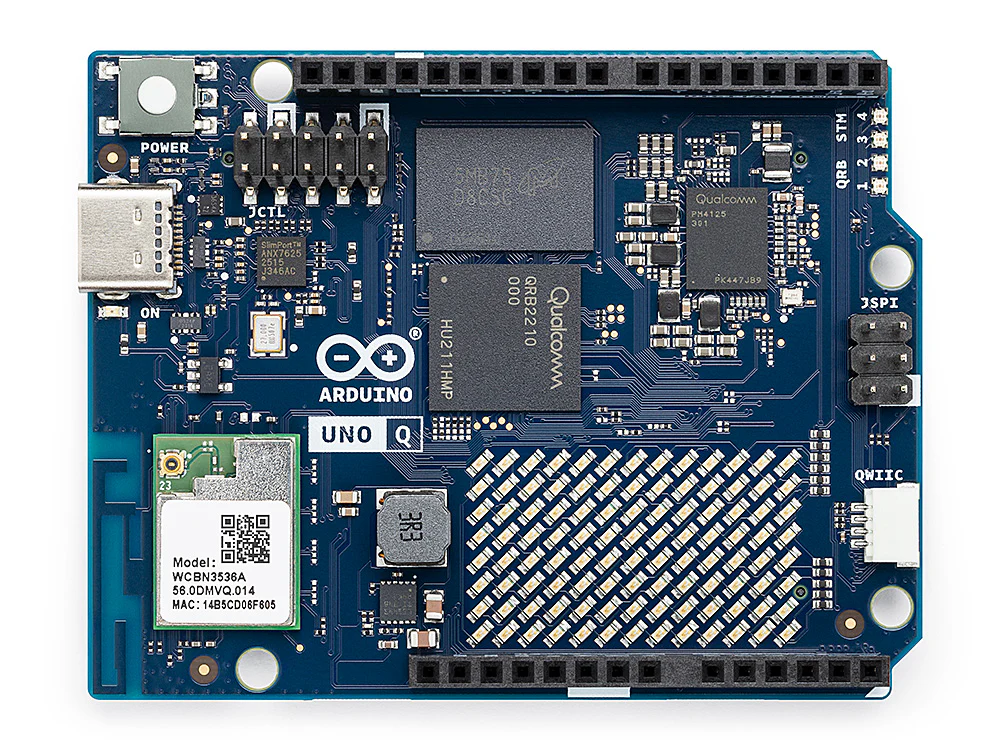
Arduino UNO Q. The JCTL debug header sits at the upper left, next to the USB-C port; the QRB2210 and the WCBN3536A radio module are labelled on the board. Photo: Arduino via Wikimedia Commons, CC BY 3.0.

Authoritative hardware reference: https://docs.arduino.cc/hardware/uno-q/. The notes below cover a quick start and the details that matter for building your own Linux image; for pinouts, mechanical layout, and silicon details, defer to Arduino’s documentation.
Getting a terminal
adb shell over USB-C
This is the everyday path, and the one to reach for first. The stock image runs an ADB daemon exposed over the USB-C data port, so a shell is one command away:
adb devices
adb shell
Install adb from your distribution (android-tools on Alpine and Arch,
android-tools-adb on Debian and Ubuntu). On Linux you also need a udev rule so
the device is reachable without root; Arduino’s documentation covers the rule
set for the board’s USB IDs.
adb gives you a shell, file transfer (adb push / adb pull), and port
forwarding — including the forward used to debug the STM32U585 (see
The real-time brain below). What it does not give you is
anything before userspace comes up: no bootloader prompt, no kernel log from a
boot that fails early, and no way in when networking or the ADB daemon itself is
broken. That is what the serial console is for.
Serial console on the JCTL connector
The QRB2210’s console UART is brought out on the 10-pin JCTL header (A1 /
JCTL1), which also carries the board’s boot-mode, reset, and low-power wake
signals. The console is the SoC’s SE4 UART, which appears in Linux as
ttyMSM0 at 115200 8N1, no flow control. Arduino reserves SE4 as the system
console — it is separate from the application UARTs and should not be
repurposed.
JCTL pinout
| Pin | Designation | Net / function | Domain | Notes |
|---|---|---|---|---|
| 1 | GND | Ground | Power | — |
| 2 | USB_BOOT | Boot strap | 1.8 V | Forced USB boot (EDL) |
| 3 | VOL_DOWN | GPIO_36 | 1.8 V | GPIO |
| 4 | SOC_SE4_TX | Console UART TX (SE4) | 1.8 V | System console |
| 5 | VOL_UP | GPIO_96 | 1.8 V | GPIO |
| 6 | SOC_SE4_RX | Console UART RX (SE4) | 1.8 V | System console |
| 7 | GND | Ground | Power | — |
| 8 | PMIC_RESET | PM4125 reset | 1.8 V | — |
| 9 | +1V8 OUT | VREG_L15A_1P8V | Power | 1.8 V reference |
| 10 | VBUS_DISABLE | VBUS power-switch disable | 1.8 V | Controls the VBUS path |
Source: UNO Q datasheet, §9.5.
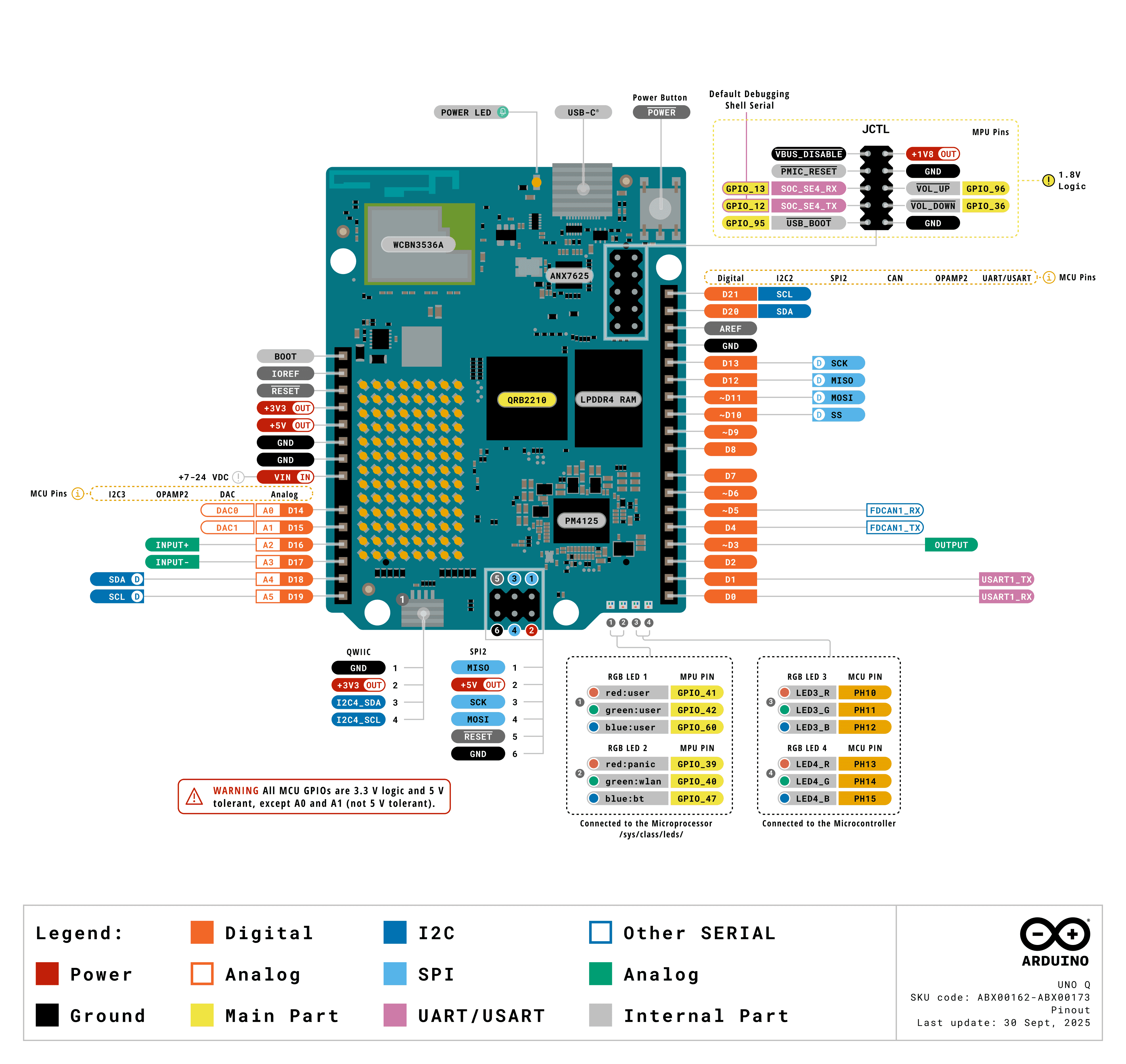
The full UNO Q pinout. The JCTL header is at the upper right; the “Default
Debugging Shell Serial” callout marks SOC_SE4_RX / SOC_SE4_TX, and the whole
header is flagged 1.8 V Logic. Image:
Arduino.
The signals are 1.8 V, not 3.3 V. A standard 3.3 V USB-TTL adapter — the kind that works on a BeaglePlay or a Raspberry Pi — can damage the SoC here. Use a 1.8 V-capable adapter, or one with a selectable
VCCIOreference you can tie to pin 9. Verify the level before connecting anything.
Choosing an adapter
- Recommended: Arduino BugHopper (product page · datasheet). Purpose-built for this board’s JCTL connector: a USB-C to UART bridge (FTDI FT230XQ) on a 1.27 mm 2×5 header that matches the JCTL pitch, so it mates directly with no jumper wires and derives its logic level from the target. This is the path of least resistance, and it removes any chance of putting a 3.3 V signal on a 1.8 V pin.
- Generic alternative: DSD TECH SH-U09C2
(Amazon).
A USB-to-TTL adapter built on a genuine FTDI FT232RL, with the logic level
jumper-selectable between 1.8 V, 3.3 V, and 5 V — set the jumper to 1.8
V before connecting anything to the JCTL header. The FTDI silicon means the
host’s
ftdi_siodriver picks it up cleanly. Wire onlyGND/RX/TXper the table below and leave the rest disconnected.
With a jumper-wired adapter, three wires are enough for a console:
| JCTL pin | Adapter |
|---|---|
1 or 7 (GND) | GND |
4 (SOC_SE4_TX) | RX |
6 (SOC_SE4_RX) | TX |
Wiring follows the usual cross-over: the board’s TX goes to the adapter’s RX,
and vice versa. Leave the adapter’s supply lead disconnected — the board has its
own power. Pin 9 is an output, so use it only as a VCCIO reference for a
level-shifting adapter, never as a supply to drive the board.
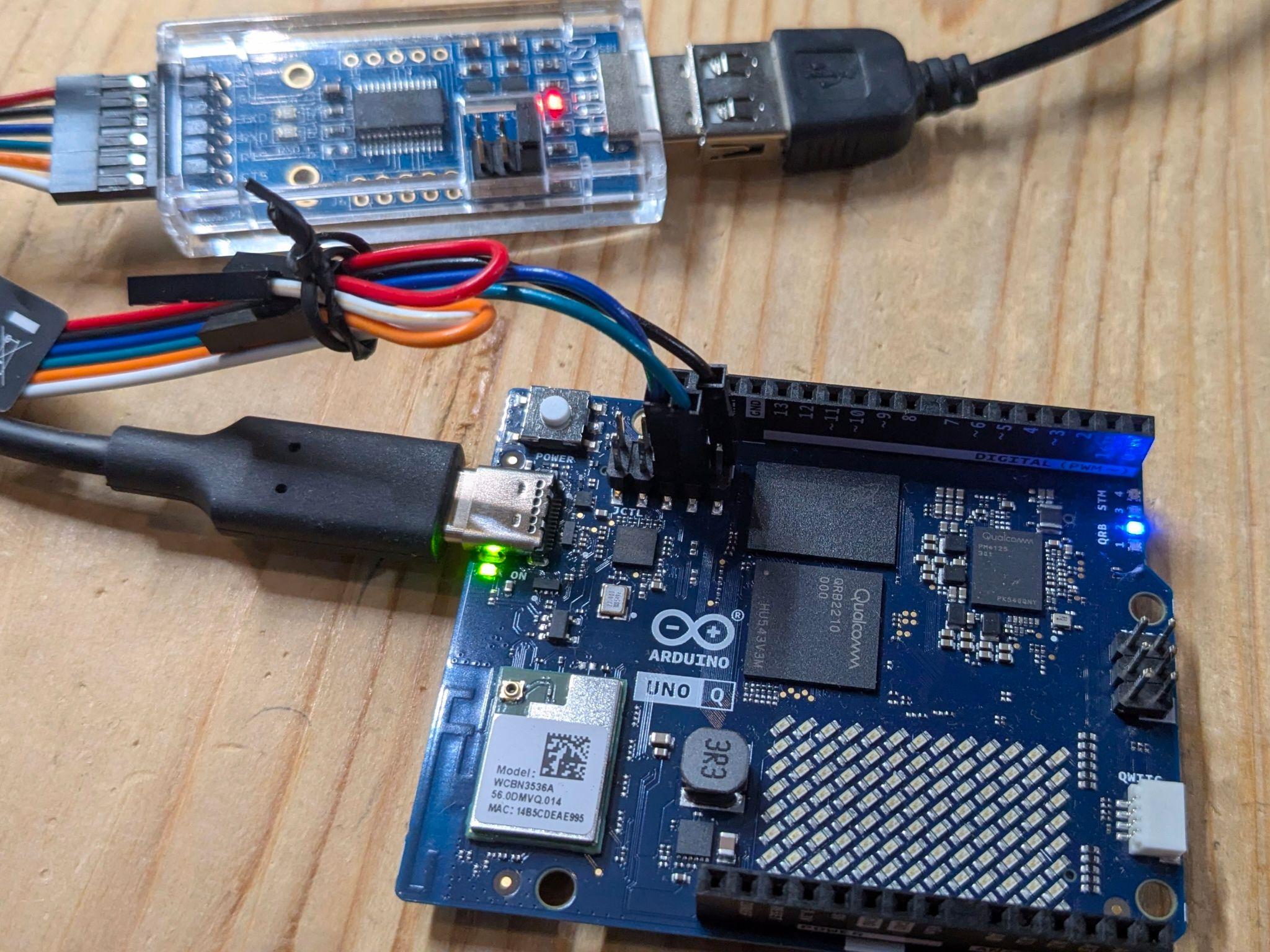
A jumper-wired console on the UNO Q. The SH-U09C2 adapter is at the top left,
with its level-select jumper on the board next to the USB connector — set that
to 1.8 V before making any connection. Only the GND, RX, and TX leads
reach the JCTL header just above the QRB2210; the remaining leads are tied back
and left unconnected. The board takes its own power from the USB-C port on the
left, so the adapter’s supply lead stays out of the circuit.
Once wired, the adapter enumerates on the host as /dev/ttyUSB0 (FTDI, CP210x,
CH340) or /dev/ttyACM0 (CDC ACM). Open it with
tio, which defaults to 115200 8N1:
tio /dev/ttyUSB0
If nothing appears after power-on:
- Swap RX and TX. This is the most common mistake.
- Confirm the adapter is running at 1.8 V.
- Check
dmesg | tailon the host — the adapter should enumerate within a second or two of being plugged in. If it does not, the problem is the cable, not the board.
Boot chain
The QRB2210 boots through Qualcomm’s standard multi-stage chain, with U-Boot taking the place of Qualcomm’s Android bootloader as the final firmware stage. U-Boot presents itself as UEFI firmware rather than using its own boot commands, so the tail of the chain is a conventional UEFI Linux boot:
PBL (masked ROM)
  └── XBL                             ← Qualcomm firmware, signed
        └── TrustZone / RPM / Hypervisor
              └── U-Boot              ← in the abl slot; presents UEFI 2.11
                    └── systemd-boot  ← ESP:/EFI/BOOT/BOOTAA64.EFI
                          └── Boot Loader Specification type#1 entry
                                └── vmlinuz + initrd
                                      └── init
On a stock board this reports itself as Das U-Boot 8230.256 providing
UEFI 2.110, chainloading systemd-boot 257.8.
Three consequences matter when building images for this board:
- The kernel is selected by a BLS entry, not a boot script. Entries live in
loader/entries/<machine-id>-<version>.confon the ESP, with the kernel and initrd under<machine-id>/<version>/. Debian’s stockkernel-installhooks generate all of this on a running system. Multiple kernel generations coexist, each with its own entry, which gives rollback for free. - The device tree comes from U-Boot, not from the BLS entry. There is no
devicetreeline in the entry. U-Boot loads/boot/efi/dtb/qcom/qrb2210-arduino-imola.dtboff the ESP, which is what makes the carrier-board overlay mechanism below work. - The GPT is large and mostly firmware. The table has 69 entries, of which a
Linux image owns three. Partition 67 is the EFI system partition mounted at
/boot/efi, 68 is the rootfs, and 69 isuserdata, mounted at/home/arduino. An image replaces the tail of the table, not the whole thing. The partition table section below accounts for the other 66.
Because the rootfs partition sits mid-table with a populated userdata
partition behind it, ordinary first-boot resize tooling tends to misbehave — it
expects free space after the filesystem it is growing. Expect to need a resize
step that understands this layout, or to size the rootfs correctly up front.
The partition table: why 69?
The layout is not Arduino’s. It is Qualcomm’s stock reference table for this SoC
family, inherited from the Android device model; Arduino swapped only the tail,
where an Android device carries system / vendor / product. Everything
ahead of partition 67 is as Qualcomm ships it, which is why the board looks
nothing like a two-partition SD-card target.
The count breaks down as 19 A/B pairs (38 partitions) plus 31 single-copy partitions.
Why so many firmware partitions. The QRB2210 does not have “a bootloader.” It has a chain of independently signed images, several of which run on different processors — the RPM is its own Cortex-M, TrustZone runs at EL3, and the modem and ADSP are separate DSPs. Each image is separately authenticated and separately updatable, so each gets a partition:
xbl, xbl_config, tz, rpm, hyp, abl, uefi, uefi_dtb, devcfg,
qupfw, ddr, imagefv, featenabler, keymaster, uefisecapp, mdtp,
mdtpsecapp, multiimgoem, boot
A few are less self-explanatory than the rest: ddr holds DDR training
parameters, qupfw the QUP serial-engine firmware, keymaster and uefisecapp
are TrustZone trusted applications, and devcfg is per-device hardware
configuration consumed very early in the chain. Each of these 19 is then doubled
_a/_b for seamless update and rollback — the mechanism behind the
A/B slot blessing
requirement below.
Why the 31 singletons are not duplicated. They hold per-device state that must survive a reflash:
| Group | Partitions |
|---|---|
| Modem NV and calibration | modemst1, modemst2, fsg, fsc, persist |
| Device identity, security | devinfo, secdata, storsec, keystore, frp, ssd, dip, apdp |
| Boot control and recovery | misc, misc_boot, recoveryinfo, cateloader, catefv, catecontentfv, toolsfv, multiimgqti |
| Diagnostics | rawdump, logfs, logdump, limits (thermal) |
| Firmware-owned state | uefivarstore, spunvm, splash |
| The OS | efi, rootfs, userdata |
misc is the bootloader control block — the conventional way a running system
asks the firmware to boot into fastboot on the next reset.
There are more than 69. Those are the GPT on the eMMC’s user area. The eMMC
also exposes two hardware boot areas with their own tables, carrying five
further labelled regions: bdaddr, wlanaddr, and a second persist on
boot0, plus CDT and last_grow on boot1. The Bluetooth and WLAN MAC
addresses live there, along with the Configuration Data Table that XBL reads
before DDR is trained. They sit in write-protectable areas precisely because
they are per-unit identity rather than software.
Why this shapes everything else. yoe cannot own this table. 38 partitions
hold signed blobs it does not build, and 28 more hold state whose loss would
cost the board its MAC addresses, modem calibration, or thermal limits. Writing
efi and rootfs and leaving the rest untouched is the only sane posture —
which is what the machine descriptor’s two-partition model and the
--allow-missing flash invocation encode.
A/B slots: a boot is provisional until userspace says otherwise
Every partition in the boot chain is paired (xbl_a/xbl_b, abl_a/abl_b, …
— the 19 bases listed above), and the Qualcomm boot firmware treats each boot as
provisional. Userspace has to mark the slot good, or the firmware exhausts its
retry count, switches to the other slot, and the board stops booting.
On a stock board qbootctl reports slot _a as
Active 1 / Successful 1 / Bootable 1 and _b as Successful 0; that
Successful flag is what the marking sets. It also notes that the cmdline
carries no androidboot.slot_suffix, so it reads the active slot from the
control block instead — a custom cmdline does not need to supply one.
qbootctl does that marking. Its service runs qbootctl -m after
boot-complete.target; Debian ships the package in trixie/main and its
postinst enables the service. The arduino-uno-q machine therefore carries
qbootctl as a board-essential package, alongside the firmware.
This failure mode is worth internalizing before building a custom image: it does
not appear on the boot that caused it. An image missing qbootctl comes up
fine, works normally, and then stops booting several reboots later — which
presents as a hardware brick rather than a packaging mistake. Recovery is EDL,
so it is recoverable, but the diagnosis is not obvious.
Carrier boards and device-tree overlays
The board composes its device tree at runtime rather than shipping one DTB per
hardware combination. arduino-linux-config carrier enable … merges the
selected .dtbo overlays onto qrb2210-arduino-imola-base.dtb with
fdtoverlay and writes the result to qrb2210-arduino-imola.dtb, taking effect
on the next boot. Overlays exist for the media carrier, IMX219 cameras on either
CSI port at two or four lanes, and 5/8/10-inch DSI touch panels.
Pending state is kept in /var/lib/arduino-linux-config/status, which is why
carrier show reports [current: …] and [next: …] separately. One image
therefore serves every carrier, camera, and panel combination — the variation is
resolved at runtime, with no per-carrier build fork.
Flashing a Linux image
The board flashes over EDL (Emergency Download Mode), Qualcomm’s ROM-level
recovery protocol, using the qdl tool. There is no removable boot medium — the
eMMC is the only boot storage, so EDL is both the normal install path and the
unbrick path.
Entering EDL mode
- Power the board off completely — disconnect USB-C.
- Place a jumper across JCTL pins 1 and 2 —
GNDandUSB_BOOT. Tying the boot strap low is what forces the ROM into USB download mode. The two pins sit at one end of the header, so a plain 2.54 mm jumper shunt works. - Connect USB-C to the host.
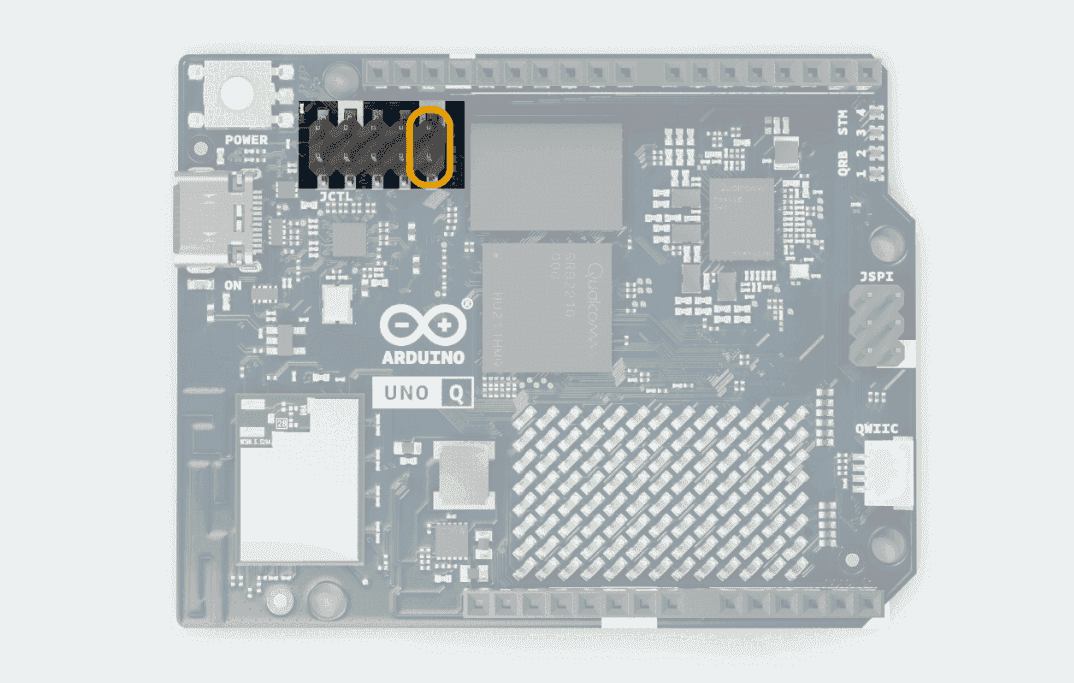
The two JCTL boot-strap pins to jumper for EDL, highlighted in orange. Image: Arduino.
The board should now enumerate as 05c6:9008 (Qualcomm HS-USB QDLoader 9008).
Confirm with lsusb. If you see the normal ADB device instead, the jumper is
not making contact or the board was not fully powered down.
Host setup
yoe flash supplies its own qdl — a version-pinned unit that runs inside a
container, so nothing needs installing on the host beyond the container runtime
yoe already requires. What follows applies when driving qdl by hand; the udev
rule and the ModemManager note apply either way.
Install qdl from your distribution — Debian and Ubuntu package the upstream
linux-msm/qdl as qdl:
sudo apt install qdl
Stop ModemManager before flashing. It claims the 05c6:9008 device and
makes the flash fail in ways that look nothing like the cause:
sudo systemctl stop ModemManager
qdl needs raw USB access. Without a udev rule you will see
qdl: unable to open USB device. Create
/etc/udev/rules.d/51-arduino-uno-q.rules:
SUBSYSTEM=="usb", ATTR{idVendor}=="05c6", ATTR{idProduct}=="9008", MODE="0666", GROUP="plugdev"
Then reload:
sudo udevadm control --reload-rules && sudo udevadm trigger
Writing a stock Arduino image
Arduino’s arduino-flasher-cli wraps the whole flow, including fetching the
image:
./arduino-flasher-cli flash latest
To drive qdl directly against an unpacked image directory:
cd arduino-images/flash
qdl --allow-missing --storage emmc prog_firehose_ddr.elf rawprogram0.xml patch0.xml
prog_firehose_ddr.elf is the signed programmer the ROM loads first; the
rawprogram*.xml and patch*.xml files describe the partition table and the
images that fill it. --allow-missing lets a partial image set flash without
every firmware partition present.
Writing a yoe image
yoe flash drives qdl for this machine rather than writing to a block device.
The board must already be in EDL:
yoe flash dev-image --programmer /path/to/prog_firehose_ddr.elf
yoe writes only the two partitions it owns — efi and rootfs. Vendor firmware
and userdata are left untouched, so a reflash preserves /home/arduino. The
confirmation prompt names the partitions before anything is written; --yes
skips it and --dry-run reports what would happen.
The programmer is a signed vendor blob and is not redistributed with yoe. Point at a copy from Arduino’s image bundle.
Updating a running board without reflashing
Reflashing is for when the rootfs changes shape. For package-level change,
yoe deploy installs a unit onto a running board over SSH:
yoe deploy my-unit bec-uno-q.local
That is a seconds-long loop against a multi-gigabyte rootfs rewrite, and it does not need EDL, a jumper, or a power cycle.
Afterwards
Remove the JCTL jumper and power-cycle the board. Leaving the jumper in place sends it straight back into EDL on the next boot, which reads as “the board no longer starts.”
Keep a known-good stock image on hand. Because EDL lives in masked ROM, a bad Linux image is always recoverable — but only if you have something to flash back.
The yoe BSP for this board
Board support lives in module-qcom, which is named for the SoC vendor
rather than the board — Qualcomm’s own RB1/RB2 and Arduino’s sibling Ventun Q
would reuse most of it.
The board runs stock Debian trixie. Everything board-specific comes from one
small vendor apt repo, apt-repo.arduino.cc, wrapped as a single feed:
| Piece | Where it comes from |
|---|---|
| Rootfs | Debian trixie, via @module-debian’s feeds |
| Kernel + device tree | linux-image-7.0.0-g122c2c22d838 from the vendor feed, carrying qrb2210-arduino-imola* |
| Qualcomm firmware | firmware-qcom-soc (Debian non-free-firmware) — adsp, modem, wlanmdsp, GPU zap |
| Wi-Fi / BT firmware | firmware-atheros, plus arduino-unoq-radio-firmware for per-PCB board data |
| Carrier overlays | arduino-linux-config |
| Audio | alsa-ucm-conf, vendor-patched for the QRB2210 audio path |
| A/B slot blessing | qbootctl (Debian main) — see above; omitting it eventually stops the board booting |
| Boot firmware | Factory-provisioned; yoe does not build or write it |
The machine descriptor is machines/arduino-uno-q.star. It models the two
partitions yoe owns — efi (vfat, 512M) and rootfs (ext4, 10G) — at the
factory GPT’s sizes, so each partition image can be written straight into its
slot. userdata is deliberately absent: it holds user data and is meant to
survive a reflash, so it is provisioned once and never image content.
Two kernel command-line arguments are mandatory rather than tuning:
clk_ignore_unused and pd_ignore_unused. TrustZone and the always-on firmware
hold clocks and power domains the kernel cannot refcount, and gating them at
late_initcall hangs the board.
The machine pins the kernel package by its exact versioned name, because the
vendor feed publishes no linux-image-arm64-style metapackage to track instead.
A kernel bump changes that name, so yoe update-feeds in module-qcom and the
machine descriptor move together.
Debian images only
The kernel and every board package come from a Debian-format feed, so this
machine boots Debian and nothing else. Its kernel(distro_unit = {"debian": …})
says so, and that declaration is what the rest of yoe reads: images targeting
any other distro are marked not buildable on this machine rather than resolved.
A project selecting arduino-uno-q may therefore still load @module-alpine
and any other module that defines images for other distros — those images
register inert and evaluation succeeds. Building one by name is refused with the
reason; a build that names no target skips them with a notice and builds the
rest. See
distro.md.
One consequence worth knowing: a project whose defaults.distro is not debian
needs --distro debian (or a local.star override) when building for this
board, or its images evaluate for the wrong distro and get marked:
yoe build --machine arduino-uno-q --distro debian base-image
Mainline
Mainline Linux support for the QRB2210 is progressing — the SoC boots to a login
shell on recent mainline kernels using the qrb2210-rb1 device tree, with GPU
and Bluetooth held back pending firmware packaging. Tracking mainline rather
than a vendor branch is the preferable target once the gaps close, and it would
remove the versioned-kernel-package pin above.
The real-time brain
The STM32U585 runs Zephyr, and the QRB2210 acts as its SWD debug adapter through
an openocd binary on the board. From a host with adb:
adb forward tcp:3333 tcp:3333
adb shell arduino-debug
That exposes OpenOCD on the host’s port 3333, so a normal Zephyr workflow applies:
west build -b arduino_uno_q samples/basic/blinky
Internal UART and SPI buses connect the two processors, which is how application code on the MCU reaches the Linux side. Zephyr’s board documentation is the reference here: https://docs.zephyrproject.org/latest/boards/arduino/uno_q/doc/index.html.
References
- UNO Q product documentation — Arduino
- UNO Q user manual — pinout, JCTL, ADB setup
- UNO Q datasheet (ABX00162 / ABX00173) — connector pin maps, power domains
- Arduino UNO Q in Zephyr
- Armbian UNO Q support — boot chain, partition layout, qdl flow
- Arduino BugHopper — JCTL debug adapter (datasheet)
- DSD TECH SH-U09C2 — FTDI USB-to-TTL adapter, jumper-selectable 1.8 / 3.3 / 5 V (Amazon)
Yoe and distributions
Every yoe image targets exactly one distro — alpine, debian, ubuntu, or (in the future) something else. The choice determines the package format, the libc family, the toolchain container, the on-target package manager, and which prebuilt packages are reachable from the image’s closure. This page is the orientation guide: what “distro” means inside yoe, when to pick which one, and how distros plug into the rest of the system. For per-distro detail, see module-alpine, module-debian, and module-ubuntu.
What a distro means in yoe
A distro in yoe is a runtime compatibility class, not a brand preference.
Choosing distro = "alpine" on an image means:
- Package format:
.apk. The image-time installer isapk-tools. - Libc family:
musl. The toolchain container istoolchain-musl; every binary in the image links against musl. - Userland conventions: OpenRC for init, busybox utilities,
alpine-baselayout for
/etcstructure, alpine signing keys for upstream packages.
Choosing distro = "debian" means the corresponding glibc / .deb /
systemd-or-sysvinit / dpkg-trust stack. The two are not mix-and-match within a
single image; a .deb won’t install in an alpine rootfs and musl-linked
binaries don’t run in a glibc rootfs.
Setting the distro
Each image(...) declaration can carry an explicit distro field:
image(
    name = "edge-image",
    distro = "alpine",
    artifacts = [...],
)
When unset, yoe resolves the effective distro through a three-level cascade:
- The image’s own
distrofield — highest priority. local.star’sdefault_distro_override— a per-developer override (not committed) for trying a different distro locally without editing project config.PROJECT.star’sdefaults.distro— the project-wide fallback.
If none of the three is set, image evaluation errors immediately. The distro choice is too consequential to pick silently.
yoe build and yoe run also accept a --distro flag that overrides the
default for a single invocation. It sits at the default_distro_override level
and takes precedence over local.star’s value for that one command (an image’s
own explicit distro still wins). The flag is applied while the image is
resolved, so the requested distro’s distro_artifacts branch and package format
are what actually build. This is how you build a multi-distro image — one
definition that carries a distro_artifacts map (see below) — as a specific
distro without editing local.star:
yoe build --distro alpine base-image
yoe build --distro debian base-image
Source-built units are typically distro-neutral, but can be tagged
A unit declared with unit(...) (in module-core or anywhere else) defaults to
distro-neutral: leave distro unset and the unit is visible to every consuming
image regardless of its distro. The same openssl or zlib source unit builds
against musl when consumed by an alpine image and against glibc when consumed by
a debian image, producing two distinct binaries cached under two distinct hash
keys. The unit’s definition is the same; the build context (which toolchain,
which libc) is different.
This is what lets a project share most of its source-built userland across
distros while still producing libc-correct binaries. It’s the common case for
module-core’s userland units.
But the distro field is available on every unit(...) declaration, including
source-built ones. Set it explicitly when the unit genuinely is distro-specific
— when the build assumes alpine’s patches or musl’s headers, when it ships
configuration that only makes sense on one libc family, when the upstream source
is hard- coded to one userland’s conventions:
# A unit whose configure flags assume musl's nsswitch shape;
# building it under glibc would produce a broken binary even if
# the toolchain were available.
unit(
    name    = "some-musl-only-thing",
    distro  = "alpine",
    source  = "https://...",
    tag     = "v1.2.3",
    ...
)
A tagged source unit becomes invisible to closures of other distros, exactly like a feed-materialized one. The same closure walker filter applies regardless of where the unit registered. The default is “no tag” because most source builds work fine against both libc families; the tag is an opt-in for the cases where they genuinely don’t.
Feed-materialized units (from alpine_feed / apt_feed) always carry a hard
distro affinity automatically — an alpine .apk literally is not a debian
.deb, and the synthetic module that produces them sets distro on every
materialized *Unit. You don’t write that tag; the feed builtin writes it for
you.
Per-distro dep additions
A source unit often works fine in both backends but needs different package
names for the same role. Alpine packages setuptools as py3-setuptools;
debian splits it across python3-setuptools and friends. Alpine bundles
headers + library in one apk (zlib); debian splits them (zlib1g-dev for
build, zlib1g for runtime). The unit’s behavior is the same; the dep names
aren’t.
distro_deps and distro_runtime_deps express that without resorting to two
tagged copies of the same unit or per-project conditionals that bake one
distro’s names in at registration time and break the other distro’s closure
walks:
unit(
    name = "meson",
    ...
    deps = ["samurai", "toolchain"],
    distro_deps = {
        "alpine": ["python3", "py3-setuptools"],
        "debian": ["python3.11", "python3-setuptools"],
    },
)
Effective deps at any consuming closure = deps + distro_deps[consumer_distro].
A unit with no distro_deps entry for the consumer’s distro just gets plain
deps — no error, no fallback to some other distro’s list. Same shape for
runtime_deps / distro_runtime_deps.
Reach for distro_deps when one source unit can satisfy both backends with
different dep names. Reach for the distro tag instead when the build itself
only makes sense for one libc family (musl-only configure flags, distro-
specific patches), or when the two backends warrant materially different build
recipes — then maintain two tagged units rather than one unit with branching
build steps.
Per-distro image artifacts
An image(...) often ships the same role across distros whose package names
differ entirely: Alpine boots busybox + OpenRC + apk, the apt distros boot
systemd + glibc + dpkg, and even a shared role like SSH is openssh on Alpine
and openssh-server on Debian. A single flat artifacts list can’t express
“this image, every distro,” so an image splits per distro via distro_artifacts
— the image-level analog of distro_deps:
image(
    name = "ssh-image",
    artifacts = ["linux", "bash"],          # distro-neutral entries
    distro_artifacts = {
        "alpine": ["busybox", "openrc", "apk-tools", "openssh", ...],
        "debian": ["systemd-sysv", "libc6", "dpkg", "openssh-server", ...],
        "ubuntu": ["systemd-sysv", "libc6", "dpkg", "openssh-server",
                   "nm-manage-ethernet", ...],
    },
)
Effective artifacts = artifacts + distro_artifacts[effective_distro]. Only the
branch matching the build’s effective distro is consulted; the others are inert
lists — never resolved, never forcing their feed module to load — so a shared
image carrying a debian branch builds fine in an Alpine-only project that
never loads module-debian. There is no closed-distro key check: the distro set
is open, and a typo’d key for a distro you never build is simply never reached.
This is what lets module-core define base-image, dev-image, and
ssh-image once, each targeting Alpine, Debian, and Ubuntu, rather than
maintaining three near-parallel copies per distro module.
Per-distro kernel selection
The kernel differs across distros — a from-source kernel on Alpine, the stock
feed meta-package (linux-image-amd64 / linux-image-arm64) on the apt distros
— so a machine declares its kernel per distro and images simply reference the
virtual name "linux":
machine(
    name = "qemu-x86_64",
    arch = "x86_64",
    kernel = kernel(
        distro_unit = {
            "alpine": "linux",
            "debian": "linux-image-amd64",
            "ubuntu": "linux-image-generic",
        },
        provides = "linux",
        cmdline = "console=ttyS0 root=/dev/vda1 rw",
    ),
)
An image’s "linux" artifact resolves to distro_unit[effective_distro] — the
resolution happens when the image is evaluated, the only point at which the
effective distro is known. A machine whose kernel is the same across distros
keeps the flat single-unit form
(kernel(unit = "linux-rpi5", provides = "linux", ...)): a Raspberry Pi 5
image, for instance, carries the same custom linux-rpi5 on Alpine and Debian
alike. Setting both unit and distro_unit on one kernel is an error.
A machine supports exactly the distros its kernel names
The distro_unit keys are also the machine’s declaration of which distros the
board can boot. Some boards support only one: the Arduino UNO Q’s kernel and
board packages ship from a Debian-format vendor feed, so its distro_unit
carries a debian key and nothing else.
Every image in every loaded module is evaluated against the one selected
machine, so a project targeting such a board still holds images for other
distros — module-alpine ships its own, and a shared dev-image may be built
on Alpine by someone else on the team. Those images are not buildable on this
machine, and that is a normal outcome rather than an error: their kernel is
never resolved, their machine packages are never merged, their closure is never
walked, and they register as inert units with no artifacts, no dependencies, and
no build tasks. Selecting a single-distro machine never breaks evaluation for
images it cannot boot.
Asking for one of those images is where it gets loud:
$ yoe build --machine arduino-uno-q bun-image
Error: image "bun-image" (distro "alpine") is not buildable on machine
"arduino-uno-q", whose kernel supports: debian
A build that names no target (yoe build with no image) sweeps every unit in
the selected distro’s graph, so a hard error there would make full builds
impossible in any mixed-distro project. Those images are skipped with a notice
instead, and the rest of the build proceeds:
$ yoe build --machine arduino-uno-q --distro alpine
note: skipping image "bun-image" (distro "alpine") — not buildable on machine
"arduino-uno-q", whose kernel supports: debian
yoe desc says the same thing on such an image, and qualifies its input hash —
nothing was resolved, so the hash is not a build key and must not be compared
against a real one. The TUI marks these images in the unit list rather than
hiding them: a project should not appear to hold fewer images depending on which
machine happens to be selected.
The flat single-unit form makes the opposite claim. A machine writing
kernel(unit = "linux-rpi5", ...) asserts that this kernel works on every
distro, so no image is ever skipped for it. When that assertion is false — the
named unit exists in only one distro’s feed — the closure walk fails loudly on
the unresolved kernel name and points at distro_unit as the fix.
Choosing a distro
The picks are bounded today:
| Distro | Status | Release cadence | Image assembly¹ | When it’s the right choice |
|---|---|---|---|---|
| Alpine | Production | New stable branch ~every 6 months; ~2-year security support per branch. edge rolls continuously. | ~10 s — a single apk extract, near-deterministic run to run. | Default for new projects. Small footprint, well-curated package set, all of yoe’s tooling exercised against it. Picks up module-alpine’s ~12k main + community packages via passthrough; source-built userland from module-core links musl cleanly. |
| Debian | Experimental | New stable ~every 2 years; ~5-year support including LTS. testing and unstable/sid roll between releases. | ~100 s — mmdebstrap plus per-package dpkg maintainer scripts (and QEMU for a foreign arch); roughly 10× alpine, and noisier run to run (90–120 s). | Reach for it when an image needs glibc (CUDA, vendor drivers, enterprise software that hasn’t been musl-ported), the broad apt ecosystem (debian main is ~50k packages), or compatibility with existing debian-based fleet management. End-to-end boot + SSH is exercised nightly in CI (QEMU, both arches), but production hardening is still light — treat it as experimental, not unproven. See module-debian.md for current limitations and workarounds. |
| Ubuntu | Experimental | LTS every 2 years (April of even years), interim releases every 6 months; 5-year LTS support, 10 with Ubuntu Pro / ESM. | ~100 s — same mmdebstrap + dpkg path as Debian (Ubuntu rides the shared apt/dpkg backend). | Reach for it over Debian when you need Ubuntu’s commercial hardware enablement (e.g. NVIDIA Jetson L4T is Ubuntu-based), certified-hardware driver stacks, or compatibility with an existing Ubuntu fleet. module-ubuntu wraps Ubuntu’s archive via apt_feed(distro = "ubuntu", ...) and ships its own keyring + glibc toolchain. End-to-end boot + SSH is CI-verified alongside Debian, with the same experimental caveat. See module-ubuntu.md for Ubuntu specifics and module-debian.md for the shared backend’s limitations. |
¹ Wall-clock to reassemble a working dev image on a qemu-x86_64 target with
the full dependency closure already built and cached, so the figure isolates the
image-assembly step — package install plus configure — rather than the source
builds behind it. Measured as a median over several runs; the gap reflects how
much each package format does at install time (apk extracts; dpkg also runs
maintainer scripts), so it widens with package count and on foreign-arch targets
where those scripts run under emulation.
Footprint. The two backends differ sharply in size. The minimal boot + SSH
image — the platform floor for a device you can log into, with no developer
tooling on either side (kernel, init, libc, shell, package manager, sshd,
DHCP, one login user) — is about 85 MB on Alpine and ~405 MB on Debian on a
qemu-x86_64 target (Debian trixie), roughly 4.8×. Most of the gap is the stock
linux-image-amd64 kernel, which ships a driver for every machine it might ever
run on; Alpine here boots a kernel yoe built from source and tailored to the
target, so its module tree is a few megabytes rather than ~107 MB. A production
Debian image can swap in a tailored kernel too — out of the box, the distro
kernel brings everything. The remainder is the platform itself: glibc and its
multiarch libraries, systemd, the full apt/dpkg stack, complete coreutils
instead of busybox applets. Alpine’s musl + busybox + OpenRC base is simply
lighter, and on a device that difference compounds.
If you don’t have a hard reason for debian — a vendor-supplied binary, a glibc-only library, a fleet already running debian — start with alpine. The defaults work, the cache hits land, and the boot-and-SSH path has miles on it.
If you do have a hard reason, debian’s plumbing is in place: feeds resolve,
packages mirror verbatim, the image assembler runs mmdebstrap against the
project’s local repo to unpack and configure the rootfs in a single pass, and
the project repo emits a signed InRelease. The assembled rootfs boots in QEMU
and accepts SSH — exercised nightly in CI on both arches — so the path works end
to end; what keeps the experimental label is production hardening (tailored
kernels, security review, a settled OTA story), not basic bring-up.
Mixing distros in one project
A project can define alpine images and debian images side-by-side. Each image’s effective distro is independent — yoe doesn’t enforce “one distro per project.”
Cross-distro coexistence is handled in three parallel layers that all keep distros separated:
- On-disk repos are per-distro.
repo/<project>/alpine/<arch>/holds apks;repo/<project>/debian/dists/<codename>/holds debs. Each on-target package manager sees only its own subtree. - On-disk build directories are per-distro:
build/<distro>/<unit>.<scope>/destdir/. A source-built unit consumed by both an alpine and a debian image has two separate destdirs, each holding a libc-correct binary. - The in-memory catalog stores every unit by
(module, name)and exposes per-distro views: an alpine image queriesDistroViews["alpine"]and gets alpine-tagged units (plus distro-neutral source units); a debian image queriesDistroViews["debian"]and gets debian-tagged units (plus the same source units). Same-named entries from different distro feeds live in differentUnitsByModulebuckets and differentDistroViewscells; they never clobber each other.
What this implies for builds — expected behavior, not a special case:
- Source-built units build once per consuming distro. A source-built
opensslconsumed by both an alpine and a debian image builds twice — once in each toolchain container — producing two binaries cached separately. Building the same unit more than once along the distro axis is normal: musl-built and glibc-built binaries cannot share at the ABI level, so a libc-correct artifact per distro is the correctness mechanism, not a bug. The unit stays the single definition of how the package is built; only the build context (toolchain, libc) differs. The cost is one cache entry per (unit, distro) pair, and every subsequent build hits the cache.
The primary multi-distro use case: alpine app containers on a debian host
The pattern that motivates mixing distros within a single project is building alpine-based application containers that get deployed inside a debian host image. The host image is debian for the reasons that drive picking debian in the first place — glibc compatibility for vendor drivers, broad apt ecosystem, an existing fleet management story. The application containers are alpine for the reasons that drive picking alpine: small footprint, fast startup, minimal attack surface, comprehensive musl-clean package wrapping.
A representative PROJECT.star shape:
# Host image: debian. Boots the device, runs vendor agents,
# manages the container runtime, handles OTA. The app container
# is in artifacts, so the image build embeds it into the host's
# container store at image-assembly time.
image(
    name = "device-host",
    distro = "debian",
    artifacts = [
        "apt", "openssh-server", "linux-image-amd64",
        "containerd",
        "app",                # the alpine container below
    ],
)

# App container: alpine. Holds the actual product workload.
# Built as a deployable OCI artifact, not as a bootable image.
container(                                          # (planned)
    name = "app",
    distro = "alpine",
    artifacts = ["busybox", "my-app", "my-app-config"],
)
Status (planned): the
container(...)form shown above — producing a deployable application-container artifact from anartifacts = [...]list, embeddable in a host image’s own artifacts — is not yet implemented. Today,container(...)exists only for declaring build containers (toolchain-musl,toolchain-glibc, …) from aDockerfile. The planned extension repurposes the same builtin name for deployable application containers: when called withartifacts = [...], the unit emits an OCI image rather than building a Dockerfile. See Deployable Containers spec for the spec and the current implementation status. The architectural shape this section describes — distros as orthogonal axes, multi-distro projects, three-layer separation — is current behavior; only the deployable-container form of thecontainer(...)builtin is future work.
Both build from the same PROJECT.star, share the same source-built userland
where applicable (a source unit consumed by both builds twice — once musl-linked
for the alpine container, once glibc-linked for the debian host — under separate
cache keys), and ship together as part of the same project release.
Other multi-distro shapes exist (a product line with a small alpine edge device and a larger debian gateway, both shipped from one repo) but the alpine-app-in-debian-host pattern is the one yoe’s distro mixing was designed to make ergonomic. For the practical current-state behavior of multi-distro projects on versions where catalog separation is still landing, see module-debian.md known limitations.
How distros plug in (high-level)
Each distro is delivered as a module that the project pulls in:
module-alpineregistersalpine.mainandalpine.communitysynthetic feeds, supplies thetoolchain-muslcontainer unit, and ships the upstream signing keys for verifyingAPKINDEX. Source: module-alpine.md.module-debianregistersdebian.mainsynthetic feed, supplies thetoolchain-glibccontainer unit, and ships the upstream signing keys for verifyingInRelease. Source: module-debian.md.module-ubunturegistersubuntu.mainsynthetic feed over Ubuntu’s split archive/ports mirrors, supplies its owntoolchain-glibccontainer unit, and ships the Ubuntu archive keyring. It rides Debian’s shared apt/dpkg/glibc backend. Source: module-ubuntu.md.
These modules use the same yoe primitives — module_info(), alpine_feed() /
apt_feed(), container(), and a small units/*-enable.star companion layer
for services the maintainer wants exposed at boot. The internal Go support —
internal/apkindex, internal/feeds/alpine, internal/dpkg,
internal/feeds/debian — is parallel by design: each distro has its own
format-named parser, its own materializer, its own update-feeds driver. No
special-case branching in the resolver beyond the distro field on Unit and the
per-distro views in the catalog.
For the resolver-side mechanics — how synthetic modules materialize lazily, how per-distro views resolve cross-distro collisions, how effective distro flows into cache keys — see Catalog and Materialization. For the apk-specific mirror-verbatim mechanism, see Alpine apk Passthrough. For the apk signing trust chain, see Package Signing.
Adding a new distro
The pattern is parallel across distros: a Go-side parser for the upstream
format, a feed builtin that registers a synthetic module with a Lookup
callback, a materializer that constructs *Unit objects from upstream entries,
a project repo emitter for republishing verified-mirror packages, and an image
assembler branch that knows how to install packages of the format. The two
existing distros are the reference templates:
- Alpine:
internal/apkindex/,internal/feeds/alpine/,internal/artifact/apk.go,internal/repo/index.go. - Debian:
internal/dpkg/,internal/feeds/debian/,internal/deb/,internal/repo/deb_emitter.go.
Ubuntu was the cheapest next distro and is already shipped — it’s .deb-format
with different upstream keys and URLs, so module-ubuntu mostly shims over
apt_feed() with a different keyring, release, and split archive/ports mirrors
(see module-ubuntu.md). Fedora / RHEL would need a new
format parser (.rpm, repodata), a new materializer, and a new
image-assembler branch (dnf --installroot instead of mmdebstrap); the
infrastructure is already factored to make this additive rather than invasive.
module-alpine — wrapping prebuilt Alpine packages
module-alpine is a yoe module that wraps prebuilt Alpine Linux .apk files as
yoe units. Where module-core builds packages from upstream source, this module
fetches a binary apk from a pinned Alpine release, verifies its integrity, and
repacks it as a yoe artifact. The unit’s “build” is just extracting the apk into
$DESTDIR.
It declares Alpine’s main and community repos as two alpine_feed(...)
calls in MODULE.star, rather than shipping a .star file per package. The
feed exposes every package in those repos; units materialize lazily as a
project’s runtime closure references them.
The module lives at https://github.com/yoebuild/module-alpine. Open it to
browse the checked-in feeds/**/APKINDEX, the alpine_feed declarations in
MODULE.star, or to send a PR adding a service-enable companion unit.
Implementation details: how Alpine apks pass through yoe’s pipeline (signature swap, noarch routing, lazy feed materialization, the docker-openrc punt) live in apk-passthrough.md. This doc is the “when to reach for it” rubric; the other is the “how it works end-to-end” reference.
When to reach for it
The policy yoe follows:
- Yoe builds the easy stuff. Small leaf libraries (
zlib,xz,expat,libffi,readline,ncurses, …) and small userland tools (less,htop,vim,procps-ng,iproute2, …) stay inmodule-coreeven though Alpine ships them too. Their build is cheap, and keeping them in yoe preserves the option to retarget glibc or a different init system later. module-alpineships Alpine-native and hard-to-build packages. Alpine-native meansmusl,apk-tools,alpine-keys,alpine-baselayout— things that only make sense from Alpine. Hard-to-build means packages where Alpine’s expertise (configure flags, security review, codec/license decisions, multi-language coupling) earns its keep:openssl,openssh,curl, eventuallypython,llvm,qt6-qtwebengine, and similar.- Keep building from source anything where the build defines the product.
Toolchain, kernel, bootloader,
busybox, init scripts,base-files— these are not packages, they are the distribution.
For the broader strategic context — why this rubric exists, where Alpine doesn’t fit (notably edge AI on Jetson), and how yoe expects to handle glibc/systemd targets in the future — see libc-and-init.md.
Alpine release coupling
The Alpine release pinned in MODULE.star and classes/alpine_pkg.star
(_ALPINE_RELEASE = "v3.21" at the time of writing) must match the
FROM alpine:<release> line in
@module-core//containers/toolchain-musl/Dockerfile. All currently point at
v3.21.
The coupling is not aesthetic. Three things tie them together:
- libc ABI. Anything compiled in the toolchain container links against the toolchain’s musl headers and libc. Anything the feed fetches was compiled against a specific Alpine release’s musl. Mix versions and you produce images that compile and link cleanly, then crash on first run when the dynamic linker resolves a symbol whose layout has changed.
- Signing keys. Every Alpine release ships with a build-host signing key.
Prebuilt apks are signed by that key, and
apk-toolsinside the target image verifies signatures against the keyring baked into the toolchain container at build time. A version skew means the keyring doesn’t recognise the signatures on the packages you’re trying to install. - Library co-versioning. Many Alpine packages declare
D:so:libfoo.so.Nruntime dependencies pinned to specific minor versions. Pullingpackage-Afrom one release andpackage-Bfrom another lands you with conflictingso:constraints thatapkwill refuse to install.
When bumping the Alpine release, do all three in lockstep across the yoe repo and the module-alpine repo:
- Update
FROM alpine:<release>inmodules/module-core/containers/toolchain-musl/Dockerfilein the yoe repo, then rebuild the toolchain container so its baked apk-tools keyring matches. - Update
_ALPINE_RELEASEinMODULE.star(thebrancheachalpine_feedpins) and inclasses/alpine_pkg.starin the module-alpine repo. - Run
yoe update-feedsin the module-alpine repo to refresh every checked-infeeds/**/APKINDEXto the new release, then review the diff and commit (see the maintainer playbook below). Every package’s version and integrity hash comes from the refreshed, signature-verified APKINDEX — there are no per-package files to hand-edit.
alpine_feed: declaring a whole repo as one module entry
alpine_feed(...) is a Starlark builtin that turns a checked-in directory of
APKINDEX files into a lazily-materialized synthetic module. One alpine_feed
call exposes thousands of packages from an upstream Alpine repo (main,
community, etc.) with a single declaration. Units materialize on demand as an
image’s runtime closure references them, so a project pulling 300 packages from
a 60k-entry feed pays for 300 unit allocations, not 60k. This is the normal way
packages come out of module-alpine — there are no per-package .star files.
The two declarations in module-alpine/MODULE.star:
module_info(name = "alpine")

_ALPINE_KEYS = [
    "keys/alpine-devel@lists.alpinelinux.org-6165ee59.rsa.pub",  # x86_64
    "keys/alpine-devel@lists.alpinelinux.org-616ae350.rsa.pub",  # aarch64
]

alpine_feed(
    name    = "main",                                # synthetic module is alpine.main
    url     = "https://dl-cdn.alpinelinux.org/alpine",
    branch  = "v3.21",                               # Alpine release tag
    section = "main",                                # repo section
    index   = "feeds/main",                          # dir holding <arch>/APKINDEX
    keys    = _ALPINE_KEYS,
)

alpine_feed(
    name    = "community",
    url     = "https://dl-cdn.alpinelinux.org/alpine",
    branch  = "v3.21",
    section = "community",
    index   = "feeds/community",
    keys    = _ALPINE_KEYS,
)
Alpine signs each arch’s APKINDEX with a separate key, so both are listed —
update-feeds accepts whichever the upstream mirror serves for a given arch.
The composed module name is <parent>.<feed-name> — alpine.main,
alpine.community. The resolver consults synthetic modules after every real
module so a from-source override (module-core/units/openssl.star, say) wins
against the feed automatically.
Maintainer playbook: yoe update-feeds
When Alpine cuts a new release or ships a security patch, the module-alpine maintainer refreshes the checked-in APKINDEX files with one command. Run it inside the module repo:
cd path/to/module-alpine
yoe update-feeds                    # refresh every alpine_feed for every existing arch
yoe update-feeds --arch x86_64      # restrict to one arch
yoe update-feeds --module-dir ../some/other/module
What it does, per alpine_feed() call, per arch:
- Fetch
<url>/<branch>/<section>/<arch>/APKINDEX.tar.gzover HTTP. - Verify the RSA-SHA1 signature against the keys declared in
alpine_feed(keys=[...]). Pure-Go verification — never consults/etc/apk/keys/on the maintainer’s host, so the trust list the module declares is the one that’s actually enforced. - Decompress the inner APKINDEX and atomically write it to
<module>/<index>/<alpine-arch>/APKINDEX.
yoe update-feeds writes only — it does not stage, commit, or push. The
intended workflow is:
yoe update-feeds                # refresh every feed
git diff feeds/                 # spot-check version bumps, new packages, removals
git add feeds/
git commit -m "module-alpine: refresh feeds to Alpine v3.21.2"
git push                        # ships to consumers on next `yoe build`
When the diff looks unexpected
- Lots of new packages or removals: confirm the Alpine release moved (a point release or branch flip).
- A signature failure: either Alpine rotated keys (see below) or the download was tampered. The failing key fingerprint is in the error message; cross-reference against Alpine’s release signing keys before adding a new key.
- HTTP 404: the upstream mirror dropped the branch (very old release) or the
section name in
alpine_feedis wrong.
Key rotation
When Alpine rotates its signing key (rare, but happens around major release
boundaries), commit the new public key alongside the old one and add it to
alpine_feed(keys=[...]):
alpine_feed(
    name    = "main",
    # ... other fields ...
    keys    = [
        "keys/alpine-devel@lists.alpinelinux.org-6165ee59.rsa.pub",  # old
        "keys/alpine-devel@lists.alpinelinux.org-5e69ca50.rsa.pub",  # new
    ],
)
Both keys verify during the transition period. Once every active Alpine release the module ships has rotated to the new key, drop the old one in a follow-up commit.
Hand-writing an alpine_pkg unit (rare)
Normally you never write a per-package unit — you name an Alpine package in
deps and the feed materializes it. Reach for the alpine_pkg class directly
only when you need to pin one specific apk the feed doesn’t expose: a revision
the live mirror has dropped, a package from a different release, or a unit you
want to hand-tune. The class is what the feed materializer produces under the
hood, so a hand-written unit and a feed-materialized one behave identically.
load("@module-alpine//classes/alpine_pkg.star", "alpine_pkg")

alpine_pkg(
    name = "sqlite-libs",
    version = "3.48.0-r4",
    license = "blessing",
    description = "SQLite shared library (Alpine v3.21)",
    runtime_deps = ["musl"],
    sha256 = {
        "x86_64": "...",
        "arm64":  "...",
    },
)
The version is Alpine’s full pkgver (e.g., 3.48.0-r4), not just the upstream
version. The sha256 dict keys are yoe canonical arches; the class maps them to
Alpine arch tokens (arm64 → aarch64).
To find the version + sha256 for a package:
# 1. Find the version in the APKINDEX:
curl -sLO https://dl-cdn.alpinelinux.org/alpine/v3.21/main/x86_64/APKINDEX.tar.gz
tar -xzOf APKINDEX.tar.gz APKINDEX | awk -v RS= '/(^|\n)P:sqlite-libs(\n|$)/ { print; exit }'

# 2. Fetch the apk and sha256 it:
curl -sLO https://dl-cdn.alpinelinux.org/alpine/v3.21/main/x86_64/sqlite-libs-3.48.0-r4.apk
sha256sum sqlite-libs-3.48.0-r4.apk
Repeat for each architecture you target.
How dependencies resolve
Alpine packages declare runtime dependencies via the D: field in APKINDEX,
including so:libfoo.so.N and cmd:foo tokens. The two paths handle these
differently:
- Feed-materialized units follow the
D:closure automatically. As the feed materializes a unit, it walks each dep token and resolves it through a project-wide providers table built from every feed’s APKINDEX — so acommunitypackage’sso:libcrypto.so.3findsmain’sopenssl-libswithout anyone listing it. Only the packages a runtime closure actually reaches are materialized. - Name shadowing keeps the import surface honest. Because the resolver
consults the feed after every real module, a dep that resolves to a bare
name yoe already ships from source (
busybox,musl, …) binds to that source unit, not the feed’s copy. Auto-following is safe precisely because the things yoe wants to own still win by name. - Hand-written
alpine_pkgunits listruntime_depsexplicitly. The Starlark class does not read theD:field — when you hand-write a unit (the rare case above), declare the deps you need inruntime_depsand leave out the ones you don’t.
Override with a from-source unit
Because units in module-alpine use the bare names (musl, sqlite-libs, …),
any later-priority module — including the project itself — can override them by
defining a unit with the same name. See
naming-and-resolution.md.
# PROJECT.star
modules = [
    module("https://github.com/yoebuild/module-alpine.git", ref = "main"),  # ships musl, sqlite-libs, …
    module("https://github.com/yoebuild/yoe.git", ref = "main", path = "modules/module-core"),  # source-built kernel, busybox, …
    module(..., path = "modules/my-overrides"),  # last → wins
]

# modules/my-overrides/units/musl.star
unit(name = "musl", source = "https://git.musl-libc.org/git/musl",
     tag = "v1.2.5", tasks = [...])
The override unit produces an apk under the same name. Consumers writing
runtime_deps = ["musl"] get the override automatically.
Alpine apk passthrough
How yoe consumes prebuilt Alpine packages through module-alpine, and the sharp
edges around metadata, noarch routing, and -dev subpackages. Read this before
adding a new feed, debugging a “no such package” install error, or expanding the
Alpine surface beyond module-core’s source-built userland.
See Catalog and Materialization for the resolver-side mechanics
that back the passthrough path — how alpine_feed registers a synthetic module,
when units actually materialize, and what the working set looks like. This page
focuses on what passes through and why.
Why this exists
Yoe started by treating every package as something it builds from source — each
unit produced a $DESTDIR of files and internal/artifact/apk.go packaged that
destdir into a fresh .apk with a yoe-generated PKGINFO and a project-key
signature. For module-alpine units (which fetch a prebuilt Alpine apk), the
same path applied: extract Alpine’s apk into $DESTDIR, then rebuild a
yoe-flavoured apk on top.
That works as long as Alpine’s PKGINFO is just a list of names — but Alpine’s
apks carry a lot more:
replaces = busyboxso two packages can both ship a path without apk failing the install.provides = so:libcrypto.so.3=3.5.4-r0so packages that link against a shared library find their dep cleanly.provides = cmd:sh=1.37.0-r14so file-deps like/bin/shresolve.triggers = /usr/lib/firmware*so kernel module updates re-fire hot-plug helpers..pre-install/.post-install/.triggershell scripts that run at install-time inside a chroot of the rootfs.
Regenerating PKGINFO from a hand-written .star drops every field the
generator didn’t enumerate. Most visibly: busybox’s .post-install is where
applet symlinks (/bin/sh, /sbin/init, …) get created via
/bin/busybox --install -s. Without it the kernel boots and finds no working
init.
The current architecture — passthrough — sidesteps all of this by publishing Alpine’s apk verbatim, only swapping the signature.
Passthrough, in two pieces
1. alpine_feed materializes synthetic units lazily
module-alpine/MODULE.star is two alpine_feed(...) calls — one per Alpine
repo section (main, community) — and a small units/*-enable.star companion
layer for service enablement. No per-package .star files; the ~3,700-entry
Alpine main catalog is checked in as one decompressed APKINDEX text file per
arch.
# module-alpine/MODULE.star (production shape)
alpine_feed(
    name    = "main",
    url     = "https://dl-cdn.alpinelinux.org/alpine",
    branch  = "v3.21",
    section = "main",
    index   = "feeds/main",                            # in-tree APKINDEX dir
    keys    = ["keys/alpine-devel@lists.alpinelinux.org-6165ee59.rsa.pub"],
)
Each alpine_feed call registers a SyntheticModule named
<parent>.<feed-name> (alpine.main, alpine.community). The resolver
materializes a *Unit on demand the first time a closure walk references the
package name — see
Catalog and Materialization for the cache +
lookup flow. The materialized unit carries
PassthroughAPK = "<pkgname>-<pkgver>.apk" and an install task constructed
from the upstream APKINDEX entry.
The companion layer is small and hand-written. Today: units/docker-enable.star
and units/navidrome-enable.star — units with no build steps that declare
services = ["docker"] / ["navidrome"] so the runlevel symlink lands in the
package’s data tar. See the “package-driven service enablement” decision in
CLAUDE.md for why service enablement is its own unit rather than
a flag on the feed.
2. The executor calls RepackAPK instead of CreateAPK
internal/build/executor.go branches on unit.PassthroughAPK:
- Empty →
artifact.CreateAPK(destDir, ...)— the original “build a fresh apk” path. Source-builtmodule-coreunits take this path. - Set →
artifact.RepackAPK(srcAPK, ...)— splits Alpine’s apk into its three concatenated gzip streams, drops the Alpine signature, re-signs the control stream (PKGINFO + install scripts) with the project key, and concatenates[new_sig, control, data]into the published apk.
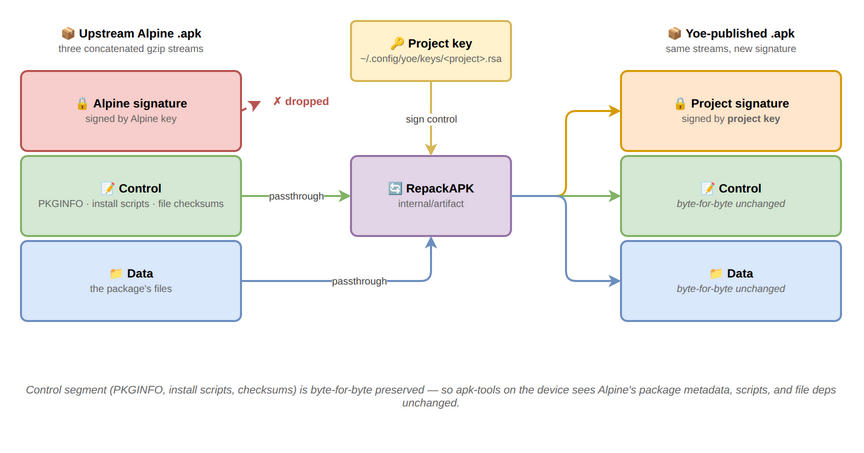
RepackAPK does not rewrite anything inside the control or data segments.
Alpine’s PKGINFO, replaces, provides, triggers, install scripts, file
checksums — all unchanged.
The destdir extraction (the materialized unit’s install task) is still useful:
yoe’s per-unit sysroots are built by hardlinking each dep’s destdir into
<unit>/sysroot/, so a unit that gcc -lfoos against a module-alpine library
finds headers and shared objects there. Image-time apk add reads the published
apk (passthrough) and never looks at the destdir.
Legacy: alpine_pkg class
classes/alpine_pkg.star is still in the module but no production unit uses it.
It was the pre-feed entry point — one hand-written .star file per package,
calling alpine_pkg(...) with hashes baked in. The class is preserved for
one-off external uses (a downstream module that wants to wrap a single upstream
apk without standing up a whole feed); for the in-tree module-alpine, feeds
replaced it. If you’re tempted to add a per-package .star calling
alpine_pkg, ask first whether the feed should have the package already —
adding a hand-written wrapper for a name the feed already exposes will produce a
conflicting registration.
Two metadata systems, two purposes
After passthrough, every unit has metadata in two places:
- The materialized
*Unit(Name,Version,RuntimeDeps,Provides,Replaces,Distro, …) drives yoe’s resolver: build-order DAG, runtime-closure walk for image artifacts, virtual-package routing (linux→linux-rpi4), TUI USED-BY/PULLS-IN trees, the per-image distro visibility filter (an alpine image’s closure doesn’t see debian-tagged units and vice versa). For feed-materialized units this view is constructed from the APKINDEX entry at lookup time (apkindex.MaterializeUnitininternal/apkindex/); for source-built and companion units, it’s whatever the.starfile declared. - Upstream
PKGINFO(inside the apk’s control segment) drives apk-tools at install time on the target: real shared-library deps, file-dep resolution, install-script execution, conflict checking.
These overlap conceptually but serve different stages. yoe’s resolver doesn’t
see so:libcrypto.so.3 because it’s not in the materialized unit’s
runtime_deps; apk-tools doesn’t see yoe’s virtual linux because that’s a yoe
concept, not an apk one.
The materialized unit therefore should mirror enough of upstream’s metadata
that yoe’s resolver makes the same decisions apk-tools would — without
duplicating every field. For feed-materialized units this happens at lookup
time: MaterializeUnit reads the APKINDEX entry’s dep list, runs each token
through the project-wide provides table (cross-feed siblings included via
multiFeedProviders), and produces a *Unit whose RuntimeDeps name yoe units
rather than apk virtuals. Hand-written companion units like docker-enable set
yoe-specific overrides (services = ["docker"]) that the feed couldn’t infer
from APKINDEX alone.
noarch routing — the four-part fix
apk-tools is unforgiving here: it constructs fetch URLs from PKGINFO’s arch
field, not from where it found the index entry. So a noarch apk has to
physically live at <repo>/noarch/<file> — putting it under <repo>/<arch>/
and listing it in <arch>/APKINDEX doesn’t make apk look there. Conversely,
apk’s solver only reads one arch’s APKINDEX per repository invocation, so noarch
entries also have to appear in the per-arch index.
The full design now in tree:
executor.goroutes noarch passthrough apks to<repo>/noarch/. The arch comes from upstream PKGINFO viaartifact.ReadAPKArch, not from the build arch.GenerateIndexscans the sibling<repo>/noarch/tree when building a per-arch index, so each arch’s APKINDEX advertises every noarch package asA:noarch. apk’s solver finds the entry from any per-arch index.Publishregenerates every per-arch APKINDEX after a noarch publish. Without this, the per-arch indexes go stale on every noarch unit rebuild.cacheValidlooks under<repo>/noarch/when the apk isn’t in the per-arch dir, so noarch passthrough units don’t rebuild on everyyoe buildinvocation.
Symptoms when one of these halves is missing:
package mentioned in index not found— usually file in arch dir but PKGINFO says noarch (apk fetches from<base>/noarch/, 404s).<name> (no such package): required by world[<name>]— file in noarch dir but per-arch APKINDEX doesn’t reference it.- noarch unit shows
[building]every run despite the published apk being unchanged —cacheValidwas checking the wrong directory.
Auto-emitted so: provides
For yoe-source-built units, internal/artifact/apk.go walks $DESTDIR, opens
every regular file with Go’s debug/elf, reads DT_SONAME, and emits one
provides = so:<soname>=<ver>-r<rel> line per shared library. This matches
Alpine’s abuild convention and lets Alpine prebuilts that declare
depend = so:libcrypto.so.3 resolve cleanly against a yoe-built openssl.
The mirror — auto-emit depend = so:<soname> from DT_NEEDED — is on the
roadmap (see docs/roadmap.md’s “Auto-depend from ELF DT_NEEDED”).
Auto-versioned provides
Explicit virtuals listed in a unit’s provides = [...] field are also stamped
with =<ver>-r<rel> on emit. So:
unit(name = "openssl", version = "3.4.1", provides = ["libssl3", "libcrypto3"])
emits provides = libssl3=3.4.1-r0 and provides = libcrypto3=3.4.1-r0 in the
package’s PKGINFO. Without the version, apk treats the provide as unversioned
and refuses to use it to satisfy consumer constraints like
depend = libssl3>=3.3.0 (which is what Alpine’s prebuilt python3 ships). If
the entry already carries a constraint (=, <, >, ~), it’s emitted
verbatim — useful when a unit needs to claim a specific older version’s API
contract.
Worked example: why we couldn’t use Alpine’s docker-openrc
Tested end-to-end during the OpenRC switch. Documenting because the same shape
of problem will recur with any Alpine package whose dep tree pokes deep enough
into module-core’s source-built userland.
The goal: wire dockerd into the OpenRC default runlevel using Alpine’s
docker-openrc package (which ships /etc/init.d/docker and a
/etc/conf.d/docker config template Alpine maintains).
The dep tree (drawn out from upstream PKGINFOs):
docker-openrc
└── log_proxy
    ├── musl
    └── glib
        ├── pcre2
        ├── libffi
        ├── libintl
        └── libmount
            └── libblkid
log_proxy is a tiny Alpine utility for capturing daemon stdout/stderr to
syslog. Glib is needed because log_proxy uses GIO. libmount/libblkid are in
glib’s transitive deps because GIO has mount-table integration.
The conflict. Yoe’s source-built util-linux (in module-core) ships
libmount.so.1 and libblkid.so.1 directly — it’s a monolithic build. Alpine
splits util-linux: libmount and libblkid are separate apks. When apk’s
solver tries to install both yoe’s util-linux and Alpine’s libmount/libblkid, it
fails because both packages own the same library paths.
First attempt: prefer_modules = {"alpine": {"util-linux": "alpine.main"}}.
Forces the Alpine prebuilt instead of yoe’s source-built version (pin syntax
names the synthetic module, not the parent — alpine.main rather than
alpine). Resolves the library conflict. But Alpine’s util-linux apk is a
meta package — it ships nothing on disk; the actual binaries live in
util-linux-misc, util-linux-login, the libraries in
libuuid/libmount/libblkid, and the headers + unversioned .so symlinks
needed at compile time live in util-linux-dev.
After pulling subpackages in via runtime_deps, the next layer: e2fsprogs
(yoe-source-built) needs libuuid headers + the unversioned libuuid.so
symlink to compile. Those live in util-linux-dev. Adding that pulls
libfdisk, liblastlog2, libsmartcols, sqlite-dev — none of which have yoe
units. Each one in turn pulls more.
The yak shave. To fully consume Alpine’s util-linux-dev, we’d need units
for at least a dozen Alpine subpackages, plus their -dev counterparts, plus
careful conflict bookkeeping where yoe-source-built packages still ship
competing files. That’s days of work and a much larger Alpine surface to
maintain.
The trade. A 30-line yoe-side OpenRC service script (in
modules/module-core/units/net/docker-init/) gives us the same boot behaviour
with no transitive deps. We give up Alpine’s /etc/conf.d/docker config
template and the log_proxy stdout-capture story; for a yoe image those costs are
minor.
The lesson generalizes: Alpine’s -dev subpackage convention is fundamentally
at odds with yoe’s monolithic source-built libraries. Picking off Alpine
packages one at a time is fine; widening the surface to consume Alpine’s whole
library-development ecosystem is a significant architecture decision, not a
one-off fix.
What’s still rough
Items where the architecture is “works for now” but obviously incomplete.
-
No support for
-devpackages. All the architectural reasons in the docker-openrc example. Until yoe has a story for splitting headers out of source-built libraries (or for systematically wrapping Alpine’s-devecosystem), pulling new Alpine packages in is a manual review for “does this transitively need any -dev subpackage.” -
No
triggersexecution. Alpine apks ship.triggerscripts that fire on path changes (e.g.udevre-runs hot-plug rules when a module is added). The passthrough copy includes them, but yoe’s image assembly doesn’t currently invoke them in any consistent way. apk’s on-target trigger machinery handles them after first boot, but image-build-time triggers (-tin apk) don’t happen. -
Auto-depend from
DT_NEEDED. Counterpart to the auto-so:-provides scan that already runs. Would catch the class of bug where a unit’s RuntimeDeps silently misses a transitive shared-lib dependency. Roadmap item; design indocs/roadmap.md. -
prefer_moduleswith subpackage expansion. When you push a monolithic source-built unit (util-linux) to Alpine’s split form, yoe’s resolver followsruntime_depsfrom the meta package — but build-time deps (unit.Deps) onutil-linuxdon’t pull subpackage destdirs into the build sysroot. Workaround: declare downstream units’ build deps on the subpackages directly. Long-term the resolver should walk runtime_deps for build-deps too, orunit.Depsshould accept the same expansion. -
RepackAPKre-sign vs upstream-keys passthrough. The current path strips Alpine’s signature and re-signs with the project key. An alternate design — keep Alpine’s keys + signature, ship Alpine’s keyring on-target as an additional trust anchor — is captured in docs/specs/2026-05-18-mirror-alpine-keep-keys.md (spec only, not implemented). The trade-off: re-signing means the on-target trust list stays “one key per project” but every passthrough requires cryptographic work; keeping upstream keys removes the re-sign cost but multiplies on-target trust anchors (one per distro the project consumes from). No decision yet on which way to land.
Reference
internal/artifact/apk.go—CreateAPK,RepackAPK,ReadAPKArch,scanSONAMEs.internal/feeds/alpine/builtin.go—alpine_feedbuiltin,SyntheticModuleregistration,populateBuildFields(setsPassthroughAPK,SourceURL,Distro = "alpine", install task with control-file exclusions). The pre-feed wrapper class lives attestdata/.../module-alpine/classes/alpine_pkg.starfor legacy / external one-off use.internal/apkindex/materialize.go—MaterializeUnit: APKINDEX entry →*Unit. WrapsmultiFeedProvidersfor cross-feed dep resolution.internal/build/executor.go— passthrough branch in the build loop;cacheValidfor the noarch lookup.internal/repo/local.go—Publish(with cross-arch reindex on noarch) andindex.go’sGenerateIndex(sibling-noarch scan).internal/feeds/alpine/update.go—yoe update-feedsdriver: fetches upstream APKINDEX, verifies RSA-SHA1 against declared keys, atomically writes to the in-tree feed index.docs/catalog.md— resolver-side mechanics (synthetic modules, lazy materialization, working-set sizes, invariants).docs/module-alpine.md— when to reach formodule-alpinevsmodule-core(rubric, not architecture); maintainer playbook foryoe update-feeds.
Package Signing
yoe signs the packages it produces and the repository index they are published into, so on-target installs run without an “untrusted” override. The signing mechanism follows the package format of the target:
- Alpine / musl targets (
.apk). yoe signs every.apkand theAPKINDEX.tar.gzat build time with an RSA-PKCS#1 v1.5 SHA-1 signature, matching what apk-tools 2.x verifies. Booted systems include the matching public key under/etc/apk/keys/, so on-targetapk add,apk upgrade, and image-time package installation all run without--allow-untrusted. This is the path described in detail below. - Debian / Ubuntu targets (
.deb). yoe builds its units as.debs and serves them from a project-signed apt repository, so on-targetapt install/apt upgradetrust the project’s feed. The apt/dpkg signing model differs from apk’s: apt verifies a signedInReleasefile over the repository metadata (re-signed each time the repo is regenerated, with a configurableValid-Untilwindow) rather than a per-package index signature, and the booted system trusts it via a per-project keyring at/etc/apt/keyrings/<project>.gpgreferenced from theSigned-Byof the project’ssources.list.dentry. See module-debian.md and module-ubuntu.md for the full trust chain.
The remainder of this page covers the apk signing chain in detail.
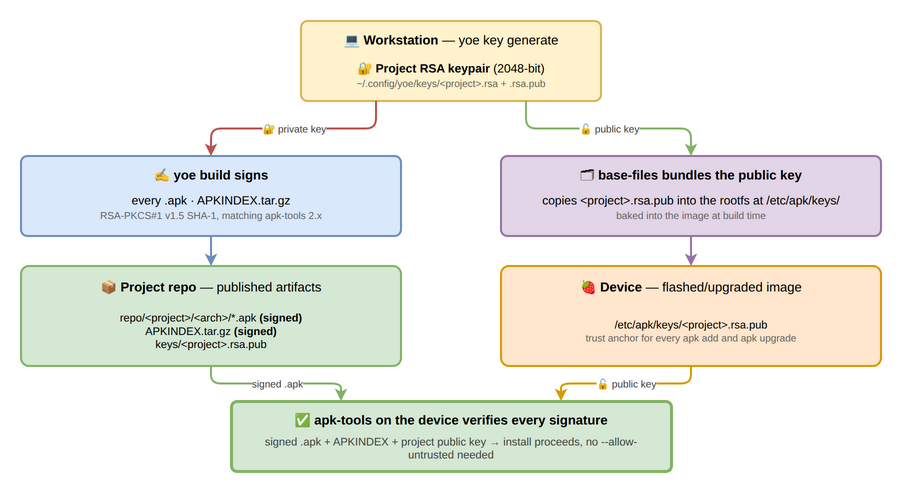
What you need to know
- yoe auto-generates a 2048-bit RSA keypair on first build and stores it at
~/.config/yoe/keys/<project>.rsa(private) and~/.config/yoe/keys/<project>.rsa.pub(public). - The matching public key is published into your local repo under
<projectDir>/repo/<project>/keys/<project>.rsa.puband into the rootfs at/etc/apk/keys/<project>.rsa.pub(viabase-files). - A different signing key per project is the default. Two projects with the same
namefield share keys; use unique project names if that isn’t what you want.
Inspecting the current key
$ yoe key info
Signing key: /home/you/.config/yoe/keys/myproj.rsa
Public key:  /home/you/.config/yoe/keys/myproj.rsa.pub
Key name:    myproj.rsa.pub
Fingerprint: 1f3a:c2:e0:9d:42:8c:b6...
Use the fingerprint to confirm two systems are talking about the same key without printing the full public key.
Generating a key explicitly
yoe key generate is a no-op when the configured key already exists; if not, it
creates a fresh 2048-bit RSA pair at the configured path. The build pipeline
does the same auto-generation lazily, so most users never need to run this.
$ yoe key generate
Signing key: /home/you/.config/yoe/keys/myproj.rsa
Public key:  /home/you/.config/yoe/keys/myproj.rsa.pub
Key name:    myproj.rsa.pub
Fingerprint: 1f3a:c2:e0:9d:42:8c:b6...
Pinning a key path explicitly
Override the default by setting signing_key on project() in PROJECT.star:
project(
    name = "myproj",
    version = "0.1.0",
    signing_key = "/secrets/myproj.rsa",
    ...
)
The configured path is treated the same way as the default — yoe loads it if it exists, generates a new keypair there if it doesn’t.
Key rotation
When you replace a key, every existing rootfs becomes unable to verify new packages until the new public key is shipped. The recommended flow is:
- Generate the new key (
yoe key generateafter deleting the old~/.config/yoe/keys/<project>.rsa.pub, or by settingsigning_keyto a fresh path). - Run
yoe build --forceso every cached apk gets re-signed with the new key. The build cache is content-addressed and doesn’t include the signing key in its hash, so a fresh build after a key swap will otherwise replay cached apks signed with the old key. - Build a new image so
base-filescarries the new public key. - Flash or upgrade devices with the new image.
- Once every device is rotated, retire the old key.
Because both keys can coexist under /etc/apk/keys/ on-target, you can also
stage a rollover: drop both .rsa.pub files into the rootfs (e.g., via an
overlay), let devices upgrade onto the new key over a period, and then strip the
old one in a later release.
What’s signed and what isn’t
Signed:
- Every
.apkproduced byyoe build. The signature covers the SHA-1 of the gzipped control stream; data integrity flows through the PKGINFOdatahashfield that the control stream carries. - The per-arch
APKINDEX.tar.gzregenerated on every publish.
Not signed:
- Bootstrap apks emitted by
yoe bootstrap. These exist only inside the build container and are never installed on a target. - Source archives, docker images, intermediate build artifacts. Only the final
.apkand the index are signed.
module-debian — wrapping prebuilt Debian packages
module-debian is a yoe module that wraps prebuilt Debian .deb files as yoe
units, mirroring the role module-alpine plays for Alpine. Where module-core
builds packages from upstream source, units in this module fetch a binary .deb
from a pinned Debian release, verify its SHA256 against the upstream-signed
Packages catalog, and republish it through yoe’s project repo. The unit’s
“build” is just extracting the deb’s data.tar into $DESTDIR.
The module lives at https://github.com/yoebuild/module-debian. Open it to
browse the bootstrap keyring, the in-tree Packages snapshots, or to send a PR
adding a new feed/component.
Implementation details: how Debian debs pass through yoe’s pipeline (
apt_feed, the InRelease verify path, mmdebstrap-driven image assembly, the project repo emitter) live indocs/specs/2026-05-25-module-debian.mdand the matching plan underdocs/plans/. This doc is the “when to reach for it” rubric.
When to reach for it
The same policy yoe follows for Alpine applies to Debian. The choice between the two is whether the image targets glibc (Debian) or musl (Alpine); the rest of the rubric — yoe builds the small stuff, the distro module ships the hard-to-build complexity — is identical.
- Yoe builds the easy stuff in
module-coreregardless of distro target. The samezlib,xz,expat, … source units compile against either toolchain via thecontainer = "toolchain"virtual reference. module-debianships Debian-native and hard-to-build packages. Debian-native meansdpkg,apt,debianutils,base-files,libc6/libc-bin. Hard-to-build means packages where Debian’s expertise earns its keep:openssl,openssh-server,curl,python3,clang, and the entirelinux-image-*lineage when running stock kernels makes sense.- Keep building from source anything where the build defines the product. Toolchain, kernel (when custom), bootloader, init scripts, board-specific firmware — these are not packages, they are the distribution.
Release branches
Each Debian release lives on its own branch in module-debian, named for the
release version. Pin one in PROJECT.star:
module("https://github.com/yoebuild/module-debian.git", ref = "13"),
| Branch | Debian release | Codename |
|---|---|---|
13 | Debian 13 | trixie |
12 | Debian 12 | bookworm |
Version-named branches keep the Debian pin in the same shape as module-alpine
(ref = "3.21") and module-ubuntu (ref = "26.04"), so a project’s module
list reads as a set of release pins rather than a mix of versions and branch
names. Inside the module, the codename stays wherever Debian’s archive expects
it: the codename kwarg on each feed, the dists/<codename>/ paths the feeds
fetch from, and the FROM debian:<codename> line in the toolchain container.
A branch tracks a release, not a point release — 13 follows Debian 13.1, 13.2,
and so on, the same way module-alpine’s 3.21 follows Alpine’s patch
releases.
Debian release coupling
The Debian release pinned in MODULE.star (_DEBIAN_CODENAME, feeding every
feed’s codename kwarg) must match the FROM debian:<release> line in
@module-debian//containers/toolchain-debian-13/Dockerfile.
The coupling matters for three reasons:
- glibc ABI. Source units that link against headers/libs from the toolchain
container produce binaries that need a matching glibc on the target rootfs.
Mixing
bookworm-slimheaders withtrixieruntime libs is a silent ABI mismatch. - Signing keys. Each Debian release has its own archive signing key, and the
in-tree
keys/debian-archive-keyring.gpgis whatyoe update-feedsverifies against. Bumping the release without rotating the bootstrap keyring produces anuntrusted keyerror at firstupdate-feedsafter the bump. - Cache invalidation. Source units cache by hash; switching the toolchain
container’s
FROMtag rolls every hash through it. Plan the bump for a full rebuild cycle.
Trust chain
sources.list.d/<project>.sources
  ├── Signed-By: /etc/apt/keyrings/<project>.gpg
  └── URIs: https://<host>/<project>/debian

apt fetch InRelease
  → gpg verify against /etc/apt/keyrings/<project>.gpg
  → REJECT if Valid-Until expired
apt fetch Packages
  → SHA256 verified against InRelease
apt fetch <pkg>.deb
  → SHA256 verified against Packages
  → install + run maintainer scripts via dpkg
The project repo is regenerated every time a unit changes; the InRelease is
re-signed each emit. Valid-Until defaults to 30 days, configurable per-project
— short enough to bound rollback windows, long enough for disconnected
development. Embedded fleets with strict security cadence may want a shorter
window; offline-tolerant fleets may want longer. The trade-off is
fleet-specific; pick a value that matches your update cadence and ability to
push fresh InRelease files when needed.
Repository URLs must be HTTPS. yoe validates this at project evaluation time; an
http:// URL in a apt_feed(...) call fails fast with a clear error. Plaintext
mirrors expose the trust chain to MITM injection — the bootstrap keyring’s job
is to verify what the mirror says, but the mirror can’t be trusted to deliver
bytes faithfully without TLS.
Maintainer playbook
The flow mirrors module-alpine’s. Inside a checked-out module-debian:
- Refresh in-tree
Packagessnapshots. Runyoe update-feedsinside the module directory. The command peeksMODULE.starfor everyapt_feed(...)call, fetches each declared suite’sInReleasefrom the pinned mirror, verifies it againstkeys/debian-archive-keyring.gpgwith Valid-Until enforcement, fetches per-archPackages.gz, decompresses, and atomically writes the result intofeeds/<component>/<arch>/Packages. Writes only — review withgit diff feeds/and commit when ready. - Push upstream. yoe’s external-module workflow (CLAUDE.md) fetches a
pinned ref on every build, so the new
Packagessnapshot needs to land on the canonical remote before the next consumer’syoe buildwill see it. - Key rotation. When Debian rotates a release signing key — typically when
a new stable ships —
yoe update-feedswill refuse the new key until its fingerprint is inkeys/allowed-fingerprints. Verify the fingerprint against https://ftp-master.debian.org/keys.html, then either editallowed-fingerprintsdirectly or useyoe update-feeds --allow-key-update=<fpr>to append it in one step.
Declaring a feed
In MODULE.star:
apt_feed(
    name = "main",
    url = "https://deb.debian.org/debian",
    suite = "trixie",       # the dists/<suite> path this feed fetches from
    codename = "trixie",    # the release these packages are built for
    component = "main",
    arches = ["amd64", "arm64"],
    index = "feeds/main",
    keyring = "keys/debian-archive-keyring.gpg",
)
suite and codename are different values
A feed declares both, and they answer different questions. suite is a path
segment: the <suite> in dists/<suite>/<component>/binary-<arch>/Packages.
codename is release identity: which upstream release the packages are built
against, and therefore which glibc ABI they carry.
They coincide for a base feed like the one above, but they are not
interchangeable. Debian publishes one release under several suites — its own
InRelease for dists/trixie reports Suite: stable and Codename: trixie,
dists/stable serves the identical tree, and dists/trixie-security is the
same release’s security pocket. A third-party repository is under no obligation
to use Debian’s vocabulary at all: the Arduino BSP repo publishes one channel at
dists/stable whose InRelease reports Origin: Arduino, Codename: stable,
with no claim about any Debian release.
So a vendor overlay feed declares the release its packages are ABI-coupled to, which the repository metadata cannot tell yoe:
apt_feed(
    name = "arduino",
    distro = "debian",
    url = "https://apt-repo.arduino.cc",
    suite = "stable",       # the vendor's own channel name
    codename = "trixie",    # what those packages are actually built against
    component = "main",
    ...
)
Because a symbolic suite name moves — dists/stable becomes the next release
the day it ships — a base feed should always name a codename in its suite
rather than an alias. Only codename is load-bearing for release identity.
Each call registers a SyntheticModule named <parent>.<component> (e.g.
debian.main, debian.contrib, debian.non-free) — matching alpine’s
alpine.main / alpine.community shape. Neither suite nor codename appears
in the module name: the suite selects which on-disk Packages file is parsed,
the codename is checked for agreement across feeds, and neither has a
disambiguating role at the module level. Units materialize lazily as the runtime
closure references them, so a project pulling in openssh-server parses about a
thousand entries on the way to its closure — not the full 60k-entry catalog. See
Catalog and Materialization for the resolver-side mechanics (how
synthetic modules differ from real modules, lazy-Lookup contract, and the
working-set sizes the resolver operates at).
Multiple feeds compose: declaring debian.main plus security and updates
overlays, or a vendor BSP repo (each with its own apt_feed(...) call, same
codename, differing freely in suite, component, and mirror) gives apt-equivalent
priority resolution on the project side. The closure walker consults each in
declaration order; first match wins.
Verifying a Debian image
End-to-end verification — does the image actually boot? — runs against the
debian-base-image fixture under testdata/e2e-project/. The fixture targets
the smallest closure that boots in QEMU and accepts SSH: kernel, init,
networking, openssh-server.
prefer_modules is scoped per consuming distro, so the alpine pins in the
e2e-project PROJECT.star (xz, zstd, util-linux, curl → alpine.main)
don’t bleed into the debian closure: a debian image build resolves those names
through their distro-neutral module-core equivalents. The fixture builds out of
the box on a mixed-distro project.
cd testdata/e2e-project

# 1. Refresh the in-tree Packages files if upstream has moved since the
#    cached snapshot was taken. Safe to skip on a clean check-out.
yoe update-feeds

# 2. Build the image. This pulls every artifact's .deb from the cached
#    bookworm feed, builds toolchain-debian-13 on first run, installs the
#    closure into the rootfs with `mmdebstrap` (apt + dpkg in one pass,
#    running maintainer scripts), stages the project APT keyring + deb822
#    sources file, and writes a bootable disk image. Expect ~5–10 min
#    on first run (toolchain build); subsequent runs hit the cache.
yoe build debian-base-image

# 3. Boot under QEMU. The fixture's machine config forwards host port
#    2222 → guest port 22 so SSH lands without extra flags.
yoe run debian-base-image

# 4. From another terminal, connect to the running image.
ssh -p 2222 root@localhost
If apt-get update and apt-get install work from inside the booted image
against the project’s own repo (https://<feed-host>/<project>/debian), the
verification has fully closed: project repo emission, on-device APT trust
staging, and the iterate–deploy–update loop all work end-to-end.
When the build fails or the image won’t boot, the failure usually surfaces in one of these places:
mmdebstrapinside the toolchain container — postinst error in the configure log; check whether the package needs network access (see Known limitations).- Bootloader install —
extlinux/syslinux-commonmust be present in the toolchain-debian-13 Dockerfile so_install_syslinux_debiancan find/usr/lib/SYSLINUX/mbr.bin. - Init startup — kernel and systemd-sysv pull in /sbin/init transitively; if the
kernel boots but init doesn’t run, check that
init(the symlink package) is in the closure. - SSH not running on first boot — Debian’s
openssh-serverpackage enables itself via systemd preset; verify withsystemctl status sshon the device console.
Known limitations
Three structural properties of the debian backend that users will encounter regardless of yoe version. None is a bug or a transitional gap — all are deliberate trade-offs that the architecture chose, and changing any one is a substantial follow-up rather than routine work.
-
mmdebstrap --variant=custominstalls the resolved closure, not Debian’s base system. To keep images content-addressed and minimal, yoe tellsmmdebstrapto install exactly the closure yoe resolved (--variant=custom) rather than the implicit Essential / Priority:required base thatdebootstrapand the stock mmdebstrap variants pull in. An image therefore contains only what its closure names plus apt’s hard-dependency expansion — there is no rescue userland, noPriority: standardset, unless an image lists it. Three consequences follow. All are handled automatically during assembly, but they are visible in the log and shape what an image must declare:- The Essential / required userland is seeded explicitly. Debian
maintainer scripts assume
sed,grep,awk,find,gzip,login, and the rest of the Priority:required toolset are present —libc6’s own preinst callssed. Custom variant pulls none of it implicitly, so the image class seeds a fixed Essential + required baseline into every Debian image’s closure. A package whose maintainer script reaches for a tool outside that baseline must add the tool to the image. The baseline also includesudevandkmod, which a systemd system needs but custom variant drops:systemdonly Recommendsudev, and assembly runs with Recommends disabled, so without seeding it the rootfs ships nosystemd-udevd. That leaves every.deviceunit perpetually inactive, and a serial console hangs ondev-<tty>.deviceinstead of reaching a login prompt;kmodsupplies/sbin/modprobefor runtime module loading. - usr-merge is established before extraction. Custom variant skips the
/bin→/usr/binmerge the normal variants set up. A setup-hook creates the merged-usr symlinks against the empty target before any package unpacks; without it theusrmergepackage’s post-hoc conversion fails inside the build chroot. - Configuration is one unordered
dpkg --install --force-dependspass. The whole closure unpacks and then configures, instead of the staged configure-essentials-first bootstrapdebootstrapperforms. The assembly log shows benignignoring pre-dependency problemwarnings (e.g. systemd Pre-Depends on alibc6that is unpacked but not yet configured) — dpkg proceeds and the configure pass resolves them. A tool provided throughupdate-alternatives(notablyawkviamawk) can be needed before its provider’s postinst registers the link, so the image class pre-stages those links. A finaldpkg-queryaudit fails the build loudly if any package is left half-configured, so a genuinely broken closure never ships as a subtly incomplete image.
- The Essential / required userland is seeded explicitly. Debian
maintainer scripts assume
-
Some upstream
.debpostinsts assume network access. yoe runsmmdebstrapunder--network=nonefor hash stability and reproducibility — a configure pass that reaches out to a DNS resolver, a metadata server, or a license-prompt download produces different output depending on what’s reachable when, which would break the content-addressed cache. Packages whose postinsts do this (cloud-initprovisioning, telemetry agents, license-prompt downloaders, a small set of enterprise-software installers) fail loudly during image assembly. The narrow set this affects isn’t appropriate for embedded images anyway; replace with a from-sourcemodule-coreunit if equivalent functionality is needed, or carry the package and provide the configuration it would have fetched via the project rootfs overlay. -
One Debian release per project, enforced at evaluation. Every
apt_feed(...)call for a distro must agree on itscodenamekwarg; the resolver errors at load time if it seesbookwormandtrixiedeclared in the same project, naming the two feeds that disagree. The constraint exists because the toolchain container (@module-debian//containers/toolchain-debian-13) pins one Debian release, and source units built against that toolchain’s headers/libs can’t safely mix with prebuilt packages from a different release’s libc. Feeds may still differ insuite, so pockets and vendor repos compose freely; it is only the release that is pinned. Multi-release support would require a release axis in the toolchain cache key and parallel toolchain containers — feasible but out of scope today. For most projects this is the correct constraint: a fleet runs one Debian release at a time.
module-ubuntu — wrapping prebuilt Ubuntu packages
module-ubuntu wraps prebuilt Ubuntu .deb files as yoe units, mirroring the
role module-debian plays for Debian and module-alpine plays for Alpine. A
unit fetches a binary .deb from a pinned Ubuntu release, verifies its SHA256
against the upstream-signed Packages catalog, and republishes it through yoe’s
project repo. The unit’s “build” is just extracting the deb’s data.tar into
$DESTDIR.
The module lives at https://github.com/yoebuild/module-ubuntu. Open it to
browse the bootstrap keyring, the in-tree Packages snapshots, or to send a PR
adding a new feed/component.
Ubuntu shares Debian’s apt/dpkg/glibc machinery, so this module is thin: it
declares feeds with the same apt_feed() builtin module-debian uses, ships an
Ubuntu/glibc build toolchain, and rides the shared mmdebstrap rootfs assembly,
.deb packaging, and on-device apt that yoe applies to the whole apt family.
Read module-debian for the apt-family mechanics that aren’t
repeated here; this page covers what is Ubuntu-specific.
When to reach for it
The same “yoe builds the small stuff, the distro module ships the hard-to-build
complexity” rubric from module-debian applies. The only axis
that picks Ubuntu over Debian is the target: choose module-ubuntu when an
image must match Ubuntu’s userland, ABI, or vendor BSP expectations. Source
units in module-core compile against either glibc toolchain through the
container = "toolchain" virtual reference, so most of a closure is shared
regardless of which apt distro the image targets.
Ubuntu is its own distro
apt_feed(distro = "ubuntu", ...) tags every materialized unit with
Distro = "ubuntu", and the images set distro = "ubuntu". That makes Ubuntu a
first-class distro in yoe’s resolver — an Ubuntu image’s closure sees only
Ubuntu-tagged units, so a single project can declare both module-debian and
module-ubuntu and the two never collide. Under the hood Ubuntu rides the
shared apt/dpkg/glibc backend; only the feed identity, release, and mirror
differ.
Ubuntu release coupling
The release pinned in MODULE.star (_UBUNTU_CODENAME, tracking Resolute
Raccoon / 26.04 LTS at the time of writing) must match the
FROM ubuntu:<release> line in containers/toolchain-ubuntu-26.04/Dockerfile.
The same three couplings Debian documents apply: the glibc ABI between toolchain
headers and target runtime libs, the per-release archive signing key in
keys/ubuntu-archive-keyring.gpg, and the full cache invalidation that a
release bump rolls through every source-unit hash. Plan a release bump for a
rebuild cycle. As on the Debian side, a feed’s suite is only the
dists/<suite> path it fetches from; codename is what pins the release.
The Ubuntu and Debian glibc toolchains are not interchangeable. apt is not
forward-compatible across releases, so Debian-trixie’s apt crashes when it reads
Ubuntu-resolute’s repository metadata — an Ubuntu rootfs must be assembled by
the Ubuntu toolchain, and vice versa. Because the container image tag is
yoe/<unit-name>:<version>-<arch>, each toolchain carries its release in its
name (toolchain-ubuntu-26.04, Debian’s toolchain-debian-13) so the two never
share a tag and overwrite each other’s image.
Split mirrors (amd64 + arm64)
Ubuntu serves its architectures from two hosts: amd64/i386 live on
http://archive.ubuntu.com/ubuntu, while arm64 and the other ports arches
live on http://ports.ubuntu.com/ubuntu-ports. A single apt_feed spans both
via the optional arch_urls map, which overrides the base url per
architecture — used both when yoe update-feeds fetches each arch’s Packages
and when the build downloads each .deb. The InRelease is fetched once from
url for signature verification; both mirrors ship an InRelease signed by the
same Ubuntu archive key. Debian’s single mirror serves every arch and needs no
such override.
Networking
Ubuntu images use NetworkManager as the connection manager, the same choice
the Debian images make. It self-enables via its postinst, integrates with the
systemd-resolved already in the image for DNS, and is the foundation for
adding wifi and cellular to a device image later.
Ubuntu needs one extra piece Debian does not. Ubuntu’s network-manager package
ships /usr/lib/NetworkManager/conf.d/10-globally-managed-devices.conf, which
restricts NetworkManager to wifi and cellular and delegates wired ethernet to
netplan. yoe images carry no netplan configuration, so out of the box the wired
NIC is brought up by nothing — NetworkManager sees the device and then ignores
it (nmcli device status shows it unmanaged). To restore the zero-config
wired-DHCP behavior Debian has by default, the Ubuntu images include the
nm-manage-ethernet unit. It lays down a higher-priority drop-in at
/etc/NetworkManager/conf.d/15-yoe-manage-ethernet.conf that re-includes
ethernet in NetworkManager’s managed set, so the wired NIC auto-DHCPs with no
connection profile.
If a custom Ubuntu image lists network-manager but has no connectivity,
confirm nm-manage-ethernet is also in its closure. On the device console,
nmcli device status should show the ethernet device connected (not
unmanaged), and ip addr should show a DHCP lease.
Verifying an Ubuntu image
End-to-end verification mirrors the Debian flow in
module-debian — build the ubuntu-base-image (or
ubuntu-dev-image) fixture under testdata/e2e-project/, boot it under QEMU,
and confirm SSH lands over the forwarded port. The image is reachable on first
boot with no connection profile because nm-manage-ethernet brings the wired
NIC up automatically.
Layout
MODULE.star                # apt_feed(distro="ubuntu", ...) declaration
feeds/main/<arch>/Packages # checked-in catalog snapshots (archive + ports)
keys/                      # bootstrap keyring + fingerprint allow-list
containers/toolchain-ubuntu-26.04  # Ubuntu/glibc build toolchain (provides "toolchain")
classes/kernel.star        # ubuntu_kernel() -> linux-image-generic
images/                    # base-image, ssh-image, dev-image
Glossary
This page defines the vocabulary of yoe: the core concepts, the fields you write
in unit .star files, the build-time environment variables your build steps can
rely on, and the Starlark builtins that tie them together. Terms are grouped by
what they describe rather than alphabetically, so related ideas sit together.
For the full format with worked examples, see
Unit & Configuration Format; for how names are looked up
and shadowed, see Naming and Resolution.
Core concepts
Unit. The single definition of how to build one piece of software, written
as a .star file. A unit declares its source, dependencies, and build steps;
yoe turns it into one or more packages. The unit is the one place a package’s
build is defined — its output is content-addressed and keyed by
(distro/libc, arch, machine scope), so every project and machine that lands on
the same key shares the same artifact. The same source unit therefore builds
more than once whenever those keys differ (most commonly: once for musl/Alpine
and once for glibc/Debian).
Package / artifact. The binary output of a build — an .apk on Alpine,
a .deb on Debian or Ubuntu. Units are the version-controlled inputs; packages
are the built outputs. A single unit may emit several packages where split
packages (-dev, -doc, -libs) apply, while remaining the single source of
truth for the build.
Class. A reusable build pattern expressed as a Starlark function (for
example autotools, cmake, go_binary, image). A class encapsulates the
common task sequence for a kind of software and ultimately calls unit(...)
with the right configuration. Classes live in a module’s classes/ directory
and are composed by forwarding **kwargs. See
Classes.
Image. A unit whose class is image. It assembles a root filesystem from a
set of packages and produces a bootable disk image. Images carry their own
distro, select packages through the artifacts field, and resolve
the full runtime closure of those packages at build time. An image — and any
deployable container — is the artifact that carries a distro.
Machine. A target board or platform definition (under
machines/<name>.star). It pins the architecture, kernel, bootloader, QEMU
settings, default packages, and partition layout. Machines drive target-specific
build selection, such as which kernel unit a given distro uses. Supported
machines include QEMU, the Raspberry Pi family, and BeaglePlay.
Distro. A distribution family that fixes the libc, init system, and
packaging format: alpine (musl + apk), debian (glibc + dpkg), ubuntu
(glibc + dpkg). The distro is chosen per image-bearing artifact through an
effective-distro cascade (image.distro → project default override → project
default). A unit tagged with a non-empty distro is only visible to closures of
that distro; an untagged unit is visible to all. See
Yoe and distributions.
Module. A git repository (or a subdirectory of one) that supplies units,
classes, and machine definitions. Modules are declared in PROJECT.star with
module(...) and evaluated in declaration order, which establishes priority for
unit shadowing and for resolving virtual-package providers. A module may carry a
MODULE.star manifest that names it and declares feeds.
Feed (synthetic module). A lazily materialized source for an upstream
distro’s package index — Alpine’s APKINDEX or Debian/Ubuntu’s Packages.
Declared with alpine_feed(...) or apt_feed(...) in a module’s MODULE.star,
one call per repository section. Units for individual packages materialize on
first reference during the closure walk, so working memory tracks closure size,
not catalog size. A distro module ships a feed plus hand-curated service-enable
companion units. See module-alpine.
Container. The OCI image in which build steps run. yoe provides only a
minimal bootstrap toolchain in its default container; everything else is built
by a unit. A unit (or an individual task) can override the container with the
container field. Cross-architecture builds run a foreign-arch container under
QEMU user-mode rather than a cross-compiler.
Sysroot. The per-unit, read-only build environment assembled from the unit’s
declared deps — the headers and libraries each dependency staged. Mounted at
/build/sysroot inside the container. An empty or incomplete sysroot when a
build fails on a missing header or library is itself the diagnosis: a build edge
was dropped or a dependency never materialized.
Destdir. The per-unit output staging directory, /build/destdir inside the
container and the value of $DESTDIR. Build steps install into it (the usual
make DESTDIR=$DESTDIR install); its contents become the package.
Unit fields
These are the keyword arguments accepted by unit(...) and image(...). Any
keyword not listed here is captured into the unit’s template context (and
participates in the cache hash) rather than mapping to a typed field.
Identity and versioning
| Field | Type | Meaning |
|---|---|---|
name | str | Unit identifier. Required; unique within its module in a flat namespace. |
version | str | Upstream version (e.g. "3.2.1"), used for changelog and package metadata. |
release | int | Packaging revision (the apk -r<N> field); bumped when repackaging the same upstream version. |
scope | str | Applicability of the build output: arch (per target arch, the default), machine (one machine), or noarch (shared across machines). |
unit_class | str | Overrides the class name. Set internally by image(...) to image. |
Metadata
| Field | Type | Meaning |
|---|---|---|
description | str | Human-readable summary, shown in the TUI and written to package metadata. |
license | str | SPDX license identifier(s), e.g. "Apache-2.0 OR MIT". Informational. |
distro | str | Distro compatibility tag. Empty means visible to all distros; otherwise the unit is only visible to matching-distro closures. |
Source
| Field | Type | Meaning |
|---|---|---|
source | str | A tarball URL or a git repository to fetch. Git sources are preferred (shallow clone with tag pinning). |
sha256 | str | Checksum for a tarball source. Mutually exclusive with apk_checksum. |
apk_checksum | str | The APKINDEX C: checksum for an upstream Alpine package. Mutually exclusive with sha256. |
tag | str | Git tag to check out, pinning the version. |
branch | str | Git branch to check out. |
patches | list[str] | Patch files (relative to the unit’s directory) applied after fetch and before build. |
passthrough_apk | str | An .apk filename to republish verbatim, used by Alpine feeds. |
Dependencies
| Field | Type | Meaning |
|---|---|---|
deps | list[str] | Build-time dependencies, resolved transitively and staged into the sysroot. |
runtime_deps | list[str] | Runtime dependencies recorded in package metadata and resolved by apk/apt at install time. |
distro_deps | dict[str, list[str]] | Per-distro additions to deps, keyed by distro name; merged in during the closure walk. |
distro_runtime_deps | dict[str, list[str]] | Per-distro additions to runtime_deps, same shape as distro_deps. |
Build execution
| Field | Type | Meaning |
|---|---|---|
container | str | Default container image for the unit’s tasks; individual tasks can override it. |
container_arch | str | Whether the container runs as the build host’s arch or the target arch. Container units set this explicitly. |
sandbox | bool | Run build steps under additional sandboxing inside the container. |
shell | str | Shell used for build commands: sh (default) or bash. |
tasks | list[task] | Named build phases, each a sequence of steps. Classes generate these; units may override. |
Virtual packages and file ownership
| Field | Type | Meaning |
|---|---|---|
provides | list[str] | Virtual package names this unit satisfies (e.g. ["linux"]), used for provider resolution. |
replaces | list[str] | Package names whose files this unit may legitimately overwrite at install time, declaring ownership of shared paths. |
Services, config, and environment
| Field | Type | Meaning |
|---|---|---|
services | list[str] | Init services (OpenRC scripts, systemd units) the package enables at boot by baking the runlevel/target symlink into itself. The unit — not the image — decides this. |
conffiles | list[str] | Config-file paths preserved across package upgrades. On Debian and Ubuntu these become the package’s conffiles list; on Alpine, apk preserves modified files on its own, so the field has no effect. |
environment | dict[str, str] | Environment-variable definitions embedded in the unit’s package metadata. |
cache_dirs | dict[str, str] | Build-time cache mounts: container path → host cache subdirectory. |
Image fields
These apply to units built with image(...).
| Field | Type | Meaning |
|---|---|---|
artifacts | list[str] | Packages to install into the root filesystem; expanded to the full runtime closure at build time. |
exclude | list[str] | Packages to keep out of the root filesystem. |
hostname | str | Default hostname written to /etc/hostname; defaults to the machine name. |
timezone | str | Timezone (e.g. "UTC"), symlinked to /etc/localtime. |
locale | str | Default locale, e.g. "en_US.UTF-8". |
partitions | list[partition] | Disk partition layout the image builder uses to lay out storage. |
Build environment variables
These are set in the build environment for every unit’s tasks, so build steps
and templates can reference them. Any names you declare in the environment
field are added alongside these.
| Variable | Value / meaning |
|---|---|
DESTDIR | /build/destdir — where build steps install files that become the package. |
PREFIX | /usr — the installation prefix. |
NPROC | CPU count, for parallel builds (make -j$NPROC). |
ARCH | Target architecture of this build. |
MACHINE | Target machine name. |
DISTRO | The consuming image’s effective distro, so a build-twice unit can branch on it. |
CONSOLE | The machine’s console device, derived from the kernel command line. |
REPO | Path to the project’s package repository for this distro. |
PKG_CONFIG_PATH, CFLAGS, CPPFLAGS, LDFLAGS, LD_LIBRARY_PATH, PYTHONPATH | Point compilation and linking at the unit’s sysroot (/build/sysroot), including Debian multiarch paths so feed-provided .pc files, headers, and libraries resolve. |
Starlark builtins
The functions available in .star files. Some declare entities (a unit, an
image, a machine); others are data constructors used to build up an argument; a
few run only inside build tasks.
Declaring entities
| Builtin | Purpose |
|---|---|
unit(...) | Define a package unit. The foundation every class builds on. |
image(...) | Define a root-filesystem image (a unit with class image). |
machine(...) | Define a target board or platform. |
project(...) | Declare top-level project metadata in PROJECT.star (name, version, defaults, cache, sources, modules). |
module_info(...) | Declare a module’s name, description, and dependencies in its MODULE.star. |
command(...) | Register a custom CLI subcommand from a commands/*.star file. |
alpine_feed(...) | Register a synthetic Alpine package feed (one per repo section) in a MODULE.star. |
apt_feed(...) | Register a synthetic Debian/Ubuntu package feed in a MODULE.star. |
Data constructors
These return a struct for use as an argument to one of the declarations above.
| Builtin | Used in | Purpose |
|---|---|---|
module(...) | project(modules=...) | A module reference (url, ref, path, or local override). |
defaults(...) | project(defaults=...) | Default machine, image, and distro for the project. |
cache(...) | project(cache=...) | Local build-cache location. |
kernel(...) | machine(kernel=...) | The unit providing the kernel, plus defconfig and command line. |
qemu_config(...) | machine(qemu=...) | QEMU machine, CPU, memory, firmware, and port settings. |
partition(...) | machine/image | A disk partition (label, type, size, contents, root flag). |
task(...) | unit(tasks=...) | A named build phase: a shell command, a Starlark function, or a list of steps. |
arg(...) | command(args=...) | A command-line argument descriptor for a custom command. |
Build steps and task-time helpers
| Builtin | Purpose |
|---|---|
install_file(src, dest, mode=...) | Install a static file into the destdir during a build task. |
install_template(src, dest, mode=...) | Render a Go-template file and install the result. |
run(command) | Execute a shell command; callable only inside a task function. |
dir_size_mb(path) | Measure a destdir subdirectory’s size in MB; callable only inside a task function. |
resolve_closure(artifacts, distro=...) | Walk the runtime-dependency graph and return the topologically ordered closure; used by image classes. |
Architecture
This page introduces yoe’s core concepts and traces a unit through its lifecycle — build, packaging, deployment, and development. Use it as a map before diving into the reference docs. For a quick definition of any single term, see the Glossary.
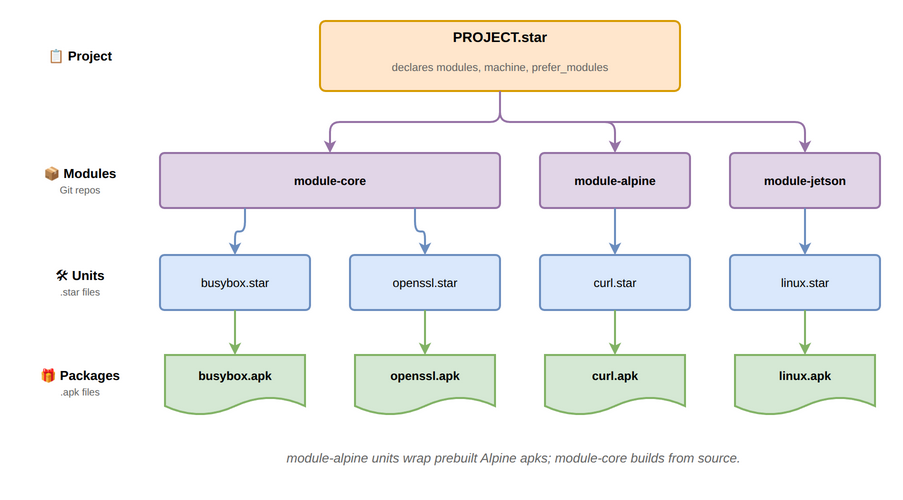
Core concepts
The four nouns at the heart of yoe: project, module, unit, and package.
Project
The project is the top of the tree. It is a directory containing a
PROJECT.star file, which declares:
- which modules the project uses (and at what Git ref),
- the machine to build for,
- any
prefer_modulesresolution pins, - project-local units under
units/and machines undermachines/.
A project is what you check into version control for a specific product. It is
what yoe init scaffolds and what the yoe CLI operates on from your working
directory.
See Unit & Configuration Format for the full
PROJECT.star surface and Naming and Resolution for
how module references and prefer-rules work.
Modules
A module is a Git repository (or a subdirectory of one) that provides reusable building blocks: classes, units, machine definitions, container definitions, and image definitions. Projects compose modules to get the pieces they need.
Typical modules:
module-core— base classes (autotools, cmake, go), common units (busybox, openssl, openssh, kernel), and reference images.module-bspandmodule-jetson— BSP modules with machine definitions (Raspberry Pi 4/5, BeaglePlay, NVIDIA Jetson) and the matching kernel / bootloader / firmware units.module-alpine— passthrough access to upstream Alpine.apkpackages.module-debian— passthrough access to upstream Debian.debpackages (experimental; see module-debian.md for current status and limitations).
Modules are referenced by URL and Git ref in PROJECT.star. The [yoe] CLI
clones them into the project’s cache. See
Naming and Resolution for module naming, directory
structure, and load-path semantics.
Units
A unit is a .star file describing how to build a single piece of
software. Units live in a module’s units/ directory (or the project’s own
units/), and they call into a class (autotools, cmake, go, …) that
encodes the build pattern.
A unit declares its source, version, dependencies, and any build-time
configuration. The [yoe] build system resolves the DAG of units, runs each in
its own sandboxed build environment, and installs results into the build sysroot
so downstream units can find them.
Units are inputs to the build system: developer-edited, version-controlled, and a CI concern. See Unit & Configuration Format for the unit, class, and machine API.
Packages
A package is the build output — an .apk for alpine-targeted units or a
.deb for debian-targeted units. Packages are content-addressed, cached,
signed, and published to a repository. They are consumed by apk (alpine
images) or dpkg / apt (debian images) at image-assembly time and by the
on-device package manager for over-the-air updates.
One unit produces one package today — .apk or .deb is chosen per the
consuming image’s distro, not per unit. A small set of subpackage splits
(-dev, -dbg) is planned for cases where the runtime image should not carry
headers or debug info. See
metadata-format.md#units-vs-packages for
the contract between units and packages, Package Signing for the
alpine pipeline, module-debian.md for the debian pipeline,
and Feed Server for how packages get published and deployed.
How they fit together
The build flow is unit → build → package (.apk/.deb) → repository → image
/ device. The conceptual flow is project references modules, modules provide
units, units produce packages, packages assemble into images:
| Concept | Lives in | Produced by | Consumed by |
|---|---|---|---|
| Project | Your product repo | You | The yoe CLI |
| Module | A Git repo | Module authors | Projects |
| Unit | A module or project | Module / project authors | The build system |
| Package | A package repo | The build system | apk / apt (image and on-device) |
For an explanation of why this split exists — versus Yocto’s recipe/layer model — see Comparisons. For the language used to express units and configuration, see Build & Configuration Languages.
Build
Building a unit means turning declared inputs into a packaged artifact. Three
angles matter: the environment the build runs in, the inputs that feed it, and
how an abstract name like linux finds a concrete provider.
The build environment
Builds run on the host through a tiered environment. The host provides only
yoe and a container runtime; everything else is nested inside the container
that yoe spawns:
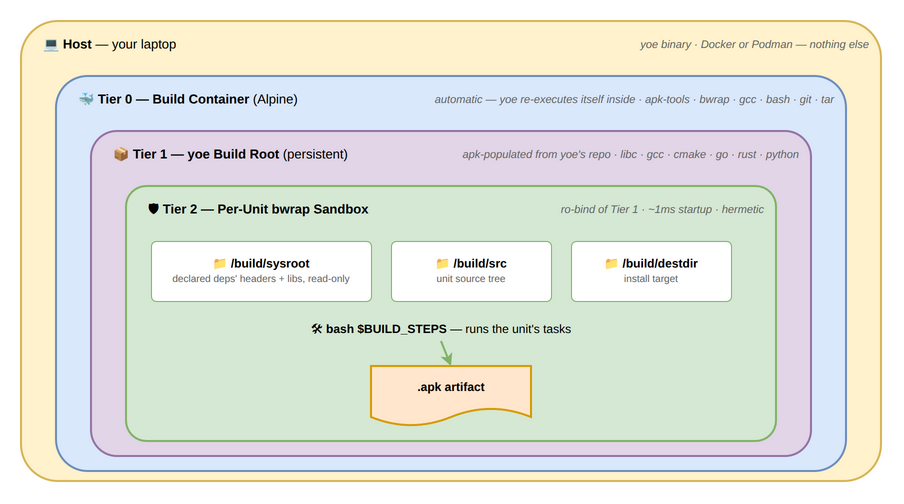
Each unit builds inside its own bwrap sandbox with only its declared deps visible. See Build Environment for the tier-by-tier details, the bootstrap process, and the rationale behind bwrap-over-Docker for per-unit isolation.
Dependency sources
A unit pulls inputs from four independent sources, each managed by the right tool for the job:
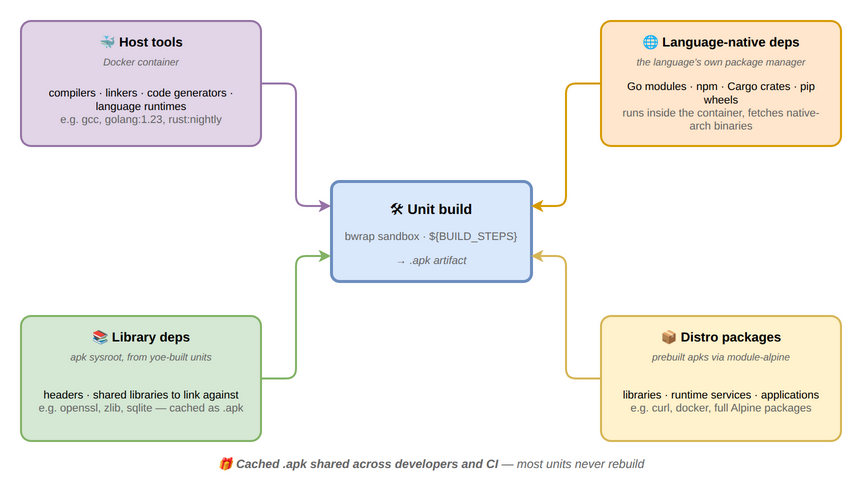
Host tools (compilers, language runtimes) come from Docker containers; library
deps from the sysroot built up by other yoe units; distro packages (full
libraries, runtime services, applications) come from prebuilt upstream packages
via module-alpine (apks) or module-debian (debs); and language-native deps
(Go modules, Cargo crates, pip wheels) are handled by each language’s own
package manager inside the container. See
Build Dependencies and Caching for why this
split exists and how it interacts with the build cache, and
Alpine apk Passthrough for the prebuilt-apk path.
Abstract-name resolution
An image’s artifacts list and a unit’s runtime_deps/build_deps can
reference abstract names like linux or init. The resolver matches each
abstract name against a registry of provides claims from every unit across
every module, with module declaration order in project() deciding ties:
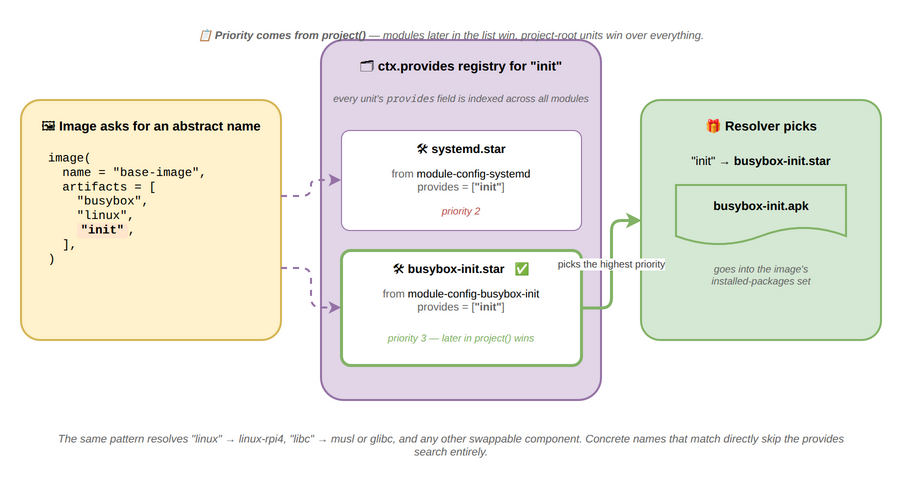
This is what makes images machine- and project-portable: an image asks for
linux, and a Raspberry Pi machine config points linux at linux-rpi4 while
a Jetson machine points it at a Tegra kernel — same image, different hardware.
Concrete names that match directly skip the registry.
For multi-distro projects, resolution is also distro-aware: a unit tagged for
one distro is invisible to images of another, and virtuals like toolchain
route to the matching toolchain unit (toolchain-musl for alpine,
toolchain-debian-13 for debian, toolchain-ubuntu-26.04 for ubuntu) via the
same provides mechanism. See Naming and Resolution
for collision rules, name shadowing, and the replaces mechanism, and
Catalog and Materialization for the in-memory data structures that
hold units while a project is being evaluated, how synthetic feed units
materialize lazily, the distro visibility filter, and the working-set sizes the
resolver operates at.
Packaging
Every artifact published by yoe — whether built from source or repacked from a
distro — flows through one of two parallel format pipelines, both signed by the
project key. The pipelines mirror each other: same content-addressed cache, same
source paths, same yoe build invocation; only the on-disk format and signing
mechanism differ to match the consuming image’s distro.
.apkpipeline — used by alpine images. Per-.apkRSA-SHA1 signature plus a signedAPKINDEX.tar.gzper arch. Verified on-device by apk-tools..debpipeline — used by debian images. Per-.debSHA256 in thePackagesfile plus a clearsign-GPGInReleaseper suite. Verified on-device by apt withSigned-By:scoped to the project keyring. Experimental — see module-debian.md for current status.
A single project can have both — one image targeting alpine and another targeting debian — and each lands in its own per-distro repository subtree.
Distro passthrough
module-alpine units don’t rebuild Alpine packages — they repack each upstream
.apk, swapping the signature so the device’s apk-tools verifies against the
project key like any other yoe-built package:
The control segment (PKGINFO, install scripts, file checksums) and data segment
pass through byte-for-byte, so apk-tools on the device sees Alpine’s metadata,
install behavior, and shared-library deps unchanged. Only the signature changes.
See Alpine apk Passthrough for the two-metadata-systems
story (.star fields drive the yoe resolver; PKGINFO drives apk-tools at
install time) and the noarch routing details.
module-debian follows a parallel but distinct pattern. Upstream .deb files
are mirrored verbatim (no repack), and only the project’s InRelease is
re-signed with the project’s GPG key. Each downloaded .deb’s SHA256 is
verified at mirror time against the upstream-signed Packages entry, and the
device’s apt trust is scoped to the project key via deb822 Signed-By: — so the
per-.deb upstream signature isn’t on the trust path at all, only the
project-signed InRelease and the per-.deb SHA256 inside it. See
module-debian.md for the verbatim-mirror rationale and the
Valid-Until posture.
Signing and trust
Each pipeline has its own signing primitive, but both anchor on the same
per-project key bootstrapped under ~/.config/yoe/keys/<project>/:
-
apk pipeline — RSA-SHA1 per-
.apksignature + signedAPKINDEX.tar.gz, public half shipped in the rootfs viabase-files. -
deb pipeline — clearsign-GPG
InReleaseper suite, public key staged at/etc/apt/keyrings/<project>.gpgand referenced from the deb822.sourcesfile’sSigned-By:field (scoping trust to the project source only, not the system-wide trust store). HTTPS-only URLs enforced at evaluation. Experimental status applies.
For both: the private key never leaves the workstation, and the public key travels through two independent channels (the project repo for inspection, the rootfs for verification). See Package Signing for the alpine key generation / rotation surface and the exact apk bytes that get signed. See module-debian.md for the deb trust details.
Deployment
A unit’s job ends when its package lands on a running device. The same per-distro repo and project signing key serve image-time installs, the dev loop, and on-device OTA, so there’s only one delivery mechanism to understand.
Reaching a running device
Built packages flow from the workstation to a running yoe device through a small set of orthogonal channels: mDNS for discovery, HTTP for the package pull, and SSH for orchestration. The delivery mechanism is one — the per-distro package format is two:
- Alpine images consume an apk repo at
repo/<project>/alpine/<arch>/with the project’s RSA-signedAPKINDEX.yoe device repo addwrites the matching/etc/apk/repositoriesentry;apk add/apk upgradethen work on-device against the project’s own feed. - Debian images consume a Debian-format repo at
repo/<project>/debian/dists/<codename>/. The project’s GPG key signs theInRelease; image assembly stages/etc/apt/sources.list.d/<project>.sources(deb822 format) referencing the keyring viaSigned-By:.apt updateandapt installon the device verify against the project key only, so other apt sources can’t smuggle packages into the project’s namespace.
Same project key, same HTTP transport, same mDNS + SSH channels — the apk vs apt split is on-device tooling, not on-workstation infrastructure.
yoe serve is the long-lived HTTP + mDNS server, yoe device repo add does the
one-time on-device repo setup (/etc/apk/repositories for alpine,
/etc/apt/sources.list.d/<project>.sources for debian), and yoe deploy
orchestrates the whole “build → ship → install” round trip. See
Feed Server and yoe deploy for the workflows, command
reference, and trust model, and module-debian for the apt
side end-to-end.
Development
When a unit needs local changes — a fix to upstream, a vendored patch, an experimental tweak — yoe leans on plain git rather than a separate “dev mode.”
Source modifications round-trip
Every unit’s build directory is a regular git repo, living under
build/<distro>/<unit>.<scope>/. The per-distro segment lets a source unit
consumed by both an Alpine and a Debian image keep two destdirs (one built
against musl, one against glibc) so each image gets the right libc without
clobbering its peer between builds. Upstream source is checked out at the
version pinned by the unit and tagged upstream; any patches the unit declares
are applied as commits on top; your local edits become further commits. There’s
no separate workspace, no mode to enter:
yoe dev extract turns the commits above upstream back into reviewable
.patch files in your project repo — git format-patch under the hood — so the
source of truth stays version-controlled even when iteration happens in the
build dir. See yoe dev for the command surface and the
upstream-rebase workflow.
Unit & Configuration Format
[yoe] uses Starlark — a
deterministic, sandboxed dialect of Python — for all build definitions. Units,
classes, machine definitions, and project configuration are all .star files.
See Build Languages for the rationale behind this choice.
The Glossary defines every field and builtin referenced below in
one place.
Units vs. Packages
These are distinct concepts in [yoe]:
- Units —
.starfiles in the project tree that describe how to build software. They live in version control and are a development/CI concern. - Packages — the
.apkor.debfiles that units produce. They are installable artifacts published to a repository and consumed byapk(alpine) orapt(debian/ubuntu) during image assembly or on-device updates.
The build flow is: unit → build → package (.apk/.deb) → repository → image
/ device.
Units are inputs to the build system. Packages are outputs. A developer edits units; a device only ever sees packages.
Sub-packages (planned)
Status: Today
[yoe]produces exactly one.apkper unit —internal/artifact/apk.gopackages$DESTDIRinto a single archive, and the Starlarksubpackages =field is not yet parsed. This section describes the intended future model so units and classes can be written with it in mind.
A single unit will be able to produce a small number of .apk packages from one
source build. The goal is targeted — keep runtime images lean — not exhaustive
like Yocto’s auto-split of every recipe into 7+ packages.
The only two splits [yoe] plans to support as subpackages:
| Sub-package | Contents | Why it’s a subpackage |
|---|---|---|
<name> | Binaries, runtime libs, default conf | The default artifact |
-dev | Headers, .a, .pc, CMake configs | Never wanted at runtime on a constrained device; needed on build hosts |
-dbg | Detached DWARF debug info | Installable after a field incident; should not occupy flash on the device |
What is deliberately not a subpackage:
- Docs, man pages, info pages, locale data, examples. Classes strip these
from
$DESTDIRby default (e.g.,autotoolsremoves/usr/share/{doc,man,info,locale,gtk-doc,bash-completion}and/usr/share/*/examples). A unit that genuinely needs man pages on the device can opt out of the strip; most don’t. -src,-staticdev,-locale-*,-bin/-commonstyle splits. Yocto produces these automatically;[yoe]does not. The cognitive cost (which-of-seven-packages-holds-this-file) and per-unit metadata surface isn’t worth it for yoe’s target audience.- Library SONAME splits (
libfoo0separate fromfoo). Debian splits these to allow multiple ABI versions to coexist;[yoe]is rolling and ships one ABI at a time, so the split is unnecessary.
Rationale. Yocto’s auto-split-everything model exists because recipe authors
cannot be trusted to strip docs/locale/staticdev consistently, so the build
system does it mechanically. That logic doesn’t apply to [yoe]: the class
library is small, AI-written units follow the class, and the image is already
targeting single-digit MB. A rm -rf $DESTDIR/usr/share/{doc,man,…} in the
class does what Yocto’s -doc subpackage does, with one package instead of two.
Planned unit surface:
load("//classes/autotools.star", "autotools")

autotools(
    name = "openssl",
    version = "3.2.1",
    source = "https://www.openssl.org/source/openssl-3.2.1.tar.gz",
    deps = ["zlib"],
    # Opt in to the two subpackages that matter on constrained devices.
    subpackages = ["dev", "dbg"],
)
With no subpackages field, the unit produces a single package (.apk or
.deb, per the consuming image’s distro) containing everything in $DESTDIR
after the class’s default strip. That is the expected case for most units.
Planned split rules:
-devclaims/usr/include/**,/usr/lib/*.a,/usr/lib/pkgconfig/**,/usr/lib/cmake/**,/usr/share/aclocal/**,/usr/share/pkgconfig/**,/usr/bin/*-config(e.g.,xml2-config).-dbgclaims/usr/lib/debug/**(produced by runningobjcopy --only-keep-debug/strip --only-keep-debugon ELF binaries in$DESTDIRbefore packaging).- Everything else stays in the main package.
For custom splits (e.g., separating openssh-server from openssh-client
because an image ships one but not both), the plan is to allow explicit file
lists:
autotools(
    name = "openssh",
    subpackages = ["dev", "dbg"],
    extra_subpackages = {
        "server": files(
            "/usr/sbin/sshd",
            "/etc/ssh/sshd_config",
        ),
        "client": files(
            "/usr/bin/ssh",
            "/usr/bin/scp",
            "/usr/bin/sftp",
        ),
    },
)
This path is lower priority; most services can be shipped as one package and enabled/disabled by the image.
In image units (planned consumption):
image(
    name = "production-image",
    artifacts = [
        "openssh",
        "networkmanager",
    ],
)

image(
    name = "dev-image",
    artifacts = [
        "openssh",
        "openssh-dev",          # headers for on-device development
        "gdb",
    ],
)
Alpine’s apk already supports subpackages natively (Alpine’s openssl APKBUILD
produces openssl, openssl-dev, openssl-dbg, etc.), so the plumbing in apk
is already proven — what [yoe] needs to build is the Starlark surface, the
split engine, and the default strip logic in the shared classes.
Dependency resolution at image time
There are two places dependency information lives in [yoe], and they serve
different phases:
- Unit metadata (
deps,runtime_depsin.starfiles) — drives the build graph. Tells the build executor what order to compile things in and what goes into each unit’s sysroot. - Package metadata (
.PKGINFOinside each.apk; aggregated into anAPKINDEX) — drives the install graph. Tells apk what to pull in when a package is added to a rootfs.
The unit author writes runtime_deps = [...] once; the build emits those into
.PKGINFO as depend = lines. From that point the package metadata is
authoritative for installation: image assembly invokes
apk add --root <rootfs> -X <local-repo> inside the build container, and
apk-tools resolves the install graph from APKINDEX. The Starlark-side
_resolve_runtime_deps is still used to flatten the artifact list for the build
DAG (so all required apks get built first), but apk-tools owns install-time
ordering, file-conflict detection, and /lib/apk/db/installed population.
Why this is the right split:
- Subpackages. When
opensslsplits intoopensslandopenssl-dev, the unit graph no longer has a node namedopenssl-dev. The depopenssl-dev → openssl = ${version}lives only in the generated PKGINFO. A unit-graph walker cannot see it; apk’s resolver can. provides:/replaces:/conflicts:. apk’s metadata supports virtual packages and alternatives (e.g., two SSH implementations bothprovides = ssh, onereplacesthe other). A Starlark-only walker would have to re-implement apk’s resolver to honor these.- External repositories compose cleanly. A project that pulls packages from an Alpine aports mirror or a vendor BSP repo has no Starlark unit to walk — only APKINDEX metadata. apk treats yoe-built packages and external-repo packages identically.
- Single source of truth on the device. What the image builder sees is what
the on-device
apk upgradesees: same metadata, same resolver.
Why Starlark
- One language — units, classes, machines, and project config are all
.starfiles. No TOML + shell + something-else stack. - Python-like syntax — most developers can read it immediately.
- Deterministic — no side effects, no mutable global state. Critical for content-addressed caching.
- Sandboxed — units cannot perform arbitrary I/O or network access.
- Go-native — the
go.starlark.netlibrary embeds directly in theyoebinary. - Composable — functions,
load(), and**kwargsprovide natural composition for modules and overrides. - Battle-tested — used by Bazel (Google), Buck2 (Meta), and Pants.
Unit Types
Machine Definition (machines/<name>.star)
Describes a target board or platform.
machine(
    name = "beagleplay",
    arch = "arm64",
    description = "BeaglePlay (AM625)",
    kernel = kernel(
        unit = "linux-beagleplay",
        provides = "linux",
        defconfig = "bb.org_defconfig",
        cmdline = "console=ttyS2,115200 root=/dev/mmcblk1p2 rootwait rw",
    ),
    packages = ["u-boot-beagleplay"],
)

The kernel and bootloader are ordinary units, named here rather than
described inline: the unit owns the source, the patches, and the build
steps, and the machine only says which one to use.
QEMU machines include emulation configuration:
machine(
    name = "qemu-x86_64",
    arch = "x86_64",
    kernel = kernel(
        unit = "linux-qemu",
        cmdline = "console=ttyS0 root=/dev/vda2 rw",
    ),
    qemu = qemu_config(
        machine = "q35",
        cpu = "host",
        memory = "1G",
        firmware = "ovmf",
        display = "none",
    ),
)
Image Unit (units/<name>.star)
An image is a unit that assembles a root filesystem from packages and produces a
disk image. Image units use the image() class function instead of unit().
They participate in the same DAG, use the same caching, and are built with
yoe build.
load("//classes/image.star", "image")

image(
    name = "base-image",
    version = "1.0.0",
    description = "Minimal bootable system",
    # Packages installed into the rootfs.
    # The base system (C library + busybox + init) is implicit unless excluded.
    artifacts = [
        "openssh",
        "networkmanager",
        "myapp",
        "monitoring-agent",
    ],
    # hostname defaults to ctx.machine (e.g. "raspberrypi4"); set to override.
    timezone = "UTC",
    locale = "en_US.UTF-8",
    services = ["sshd", "NetworkManager", "myapp"],
    partitions = [
        partition(label="boot", type="vfat", size="64M",
                  contents=["MLO", "u-boot.img", "zImage", "*.dtb"]),
        partition(label="rootfs", type="ext4", size="fill", root=True),
    ],
)
Image Composition and Variants
Image variants use plain Starlark variables and list concatenation — no special inheritance mechanism:
load("//classes/image.star", "image")

BASE_PACKAGES = [
    "openssh",
    "networkmanager",
    "myapp",
    "monitoring-agent",
]

BASE_SERVICES = ["sshd", "NetworkManager", "myapp"]

BBB_PARTITIONS = [
    partition(label="boot", type="vfat", size="64M",
              contents=["MLO", "u-boot.img", "zImage", "*.dtb"]),
    partition(label="rootfs", type="ext4", size="fill", root=True),
]

image(
    name = "base-image",
    version = "1.0.0",
    packages = BASE_PACKAGES,
    services = BASE_SERVICES,
    partitions = BBB_PARTITIONS,
    # hostname defaults to ctx.machine; pass an explicit string to override.
)

image(
    name = "dev-image",
    version = "1.0.0",
    description = "Development image with debug tools",
    packages = BASE_PACKAGES + ["gdb", "strace", "tcpdump", "vim"],
    exclude = ["monitoring-agent"],
    services = BASE_SERVICES,
    partitions = BBB_PARTITIONS,
)
Conditional packages per machine:
artifacts = ["openssh", "myapp"]
if machine.arch == "arm64":
    packages += ["arm64-firmware"]
Package Unit (units/<name>.star)
Describes how to build a system-level package (C/C++ libraries, system daemons,
etc.) and produce a package (.apk or .deb, per the consuming image’s
distro). Uses a class function like autotools(), cmake(), or the generic
unit().
load("//classes/autotools.star", "autotools")

autotools(
    name = "openssh",
    version = "9.6p1",
    description = "OpenSSH client and server",
    license = "BSD",
    source = "https://cdn.openbsd.org/pub/OpenBSD/OpenSSH/portable/openssh-9.6p1.tar.gz",
    sha256 = "...",
    configure_args = ["--sysconfdir=/etc/ssh"],
    deps = ["zlib", "openssl"],
    runtime_deps = ["zlib", "openssl"],
    services = ["sshd"],
    conffiles = ["/etc/ssh/sshd_config"],
)
Or using the generic unit() for custom build steps:
unit(
    name = "openssh",
    version = "9.6p1",
    source = "https://cdn.openbsd.org/pub/OpenBSD/OpenSSH/portable/openssh-9.6p1.tar.gz",
    sha256 = "...",
    deps = ["zlib", "openssl"],
    runtime_deps = ["zlib", "openssl"],
    build = [
        "./configure --prefix=$PREFIX --sysconfdir=/etc/ssh",
        "make -j$NPROC",
        "make DESTDIR=$DESTDIR install",
    ],
    services = ["sshd"],
    conffiles = ["/etc/ssh/sshd_config"],
)
Source mirrors
Some upstreams publish through a redirector that forwards each request to one of several volunteer mirrors. Whether a download succeeds then depends on which mirror happened to answer, which can fail a build for reasons unrelated to the project being reachable. A unit can list alternate locations for the same archive:
unit(
    name = "attr",
    version = "2.5.2",
    source = "https://download.savannah.nongnu.org/releases/attr/attr-2.5.2.tar.gz",
    mirrors = [
        "https://mirrors.ocf.berkeley.edu/nongnu/attr/attr-2.5.2.tar.gz",
        "https://mirror.csclub.uwaterloo.ca/nongnu/attr/attr-2.5.2.tar.gz",
    ],
    sha256 = "39bf67452fa41d0948c2197601053f48b3d78a029389734332a6309a680c6c87",
    ...
)
source is always tried first, and only after it exhausts its retries does each
mirror get a turn. Declare sha256 whenever you declare mirrors: the checksum
is what makes the fallback safe, since it holds every host to the same bytes
regardless of which one answered.
Mirrors do not participate in a unit’s input hash. They name other places to obtain identical content rather than a different build input, so adding or removing one leaves cached builds valid.
Project-wide mirrors
A mirrors list covers one unit. When a whole host is worth a fallback, the
project declares the rule once in PROJECT.star and every unit fetching from
that host picks it up:
project(
    name = "my-project",
    source_mirrors = [
        ("https://ftp.gnu.org/gnu", "https://mirrors.kernel.org/gnu"),
        ("https://ftp.gnu.org/pub/gnu", "https://mirrors.kernel.org/gnu"),
    ],
    ...
)
Each entry is a (prefix, replacement) pair. A unit whose source starts with
the prefix gains one more URL to try, with the rest of the path carried over
unchanged, so the rule above turns
https://ftp.gnu.org/gnu/bash/bash-5.2.37.tar.gz into
https://mirrors.kernel.org/gnu/bash/bash-5.2.37.tar.gz. Rules apply to archive
downloads; git sources are unaffected.
The full order a fetch tries is source, then the unit’s own mirrors, then
whatever the table rewrites source into. The unit author’s list comes first
because it names hosts chosen for that specific archive, while the table is a
blanket statement about a host. A rewrite that duplicates a URL already in the
list is dropped rather than retried twice.
Like per-unit mirrors, the table does not participate in any unit’s input hash.
Patches
Units can apply patches to upstream source after fetching and before building.
Patches are listed in order and applied with git apply or patch -p1:
unit(
    name = "busybox",
    version = "1.36.1",
    source = "https://busybox.net/downloads/busybox-1.36.1.tar.bz2",
    patches = [
        "busybox/fix-ash-segfault.patch",
        "busybox/add-custom-applet.patch",
    ],
    build = ["make -j$NPROC", "make DESTDIR=$DESTDIR install"],
)
Patch file paths are relative to the directory holding the unit’s .star file,
so a module ships its patches alongside the unit that uses them (e.g.,
modules/module-core/units/net/mdnsd/0001-…patch for a unit at
modules/module-core/units/net/mdnsd.star). Patch contents are included in the
unit’s cache hash — changing a patch triggers a rebuild.
Module overrides for patches work through the standard function composition pattern:
# upstream: @module-core/busybox.star
def busybox(extra_patches=[], **overrides):
    unit(
        name = "busybox",
        version = "1.36.1",
        source = "https://busybox.net/downloads/busybox-1.36.1.tar.bz2",
        patches = [
            "busybox/fix-ash-segfault.patch",
        ] + extra_patches,
        build = ["make -j$NPROC", "make DESTDIR=$DESTDIR install"],
        **overrides,
    )

# vendor module: adds a patch without modifying upstream
load("@module-core//busybox.star", "busybox")
busybox(extra_patches=["vendor-busybox-audit.patch"])
Alternatives to patches:
- Git-based sources — fork the repo, apply changes as commits, point the unit at your branch/tag. Cleaner history, easier to rebase on upstream updates.
- Overlay files — for config file changes on the target, the
overlays/directory is simpler than patching source.
Tasks and Per-Task Containers (planned)
Status:
task()and unit-levelcontainer =are shipped — every built-in class inmodules/module-core/classes/(autotools, cmake, go, container, image) already generatestasks = [task(...)]and the build executor (internal/build/executor.go) runs each task’s steps inside the unit’s resolved container. The per-taskcontainer=override described below is planned: the task struct in Starlark accepts the field but the executor currently ignores it and uses the unit-level container for every task in the unit. Wire-through is the remaining work.
Units can define named build tasks via task(), each with an optional Docker
container. This replaces the flat build = [...] string list with structured
steps that can each run in different environments.
Container resolution order: task container → package container → bwrap
(default).
# Simple — build list works as before (bwrap, no containers)
autotools(name = "zlib", source = "...", ...)

# Package-level container — all tasks inherit it
go_binary(
    name = "myapp",
    container = "golang:1.22-alpine",
    tasks = [
        task("build", run="go build -o $DESTDIR/usr/bin/myapp"),
        task("test", run="go test ./..."),
    ],
)

# Task-level override — codegen uses a different container
unit(
    name = "complex-app",
    container = "golang:1.22-alpine",       # default for all tasks
    tasks = [
        task("codegen",
             container="protoc:latest",     # overrides package default
             run="protoc --go_out=. api/*.proto"),
        task("compile",
             run="go build -o $DESTDIR/usr/bin/app"),  # inherits golang
        task("install",
             run="install -D app.service $DESTDIR/usr/lib/systemd/system/"),
    ],
)

# Mix of container and bwrap in one unit
unit(
    name = "hybrid-tool",
    tasks = [
        task("generate",
             container="codegen-tools:latest",
             run="generate-code --out src/"),
        task("compile", run="make -j$NPROC"),  # no container → bwrap
        task("install", run="make DESTDIR=$DESTDIR install"),
    ],
)
The build = [...] field remains for backward compatibility — internally
converted to unnamed tasks without containers. Classes generate tasks:
# classes/autotools.star generates three tasks
def autotools(name, version, source, configure_args=[], **kwargs):
    unit(
        name=name, version=version, source=source,
        tasks = [
            task("configure",
                 run="test -f configure || autoreconf -fi && "
                     "./configure --prefix=$PREFIX " + " ".join(configure_args)),
            task("compile", run="make -j$NPROC"),
            task("install", run="make DESTDIR=$DESTDIR install"),
        ],
        **kwargs,
    )
Extending a class’s tasks — when a unit passes tasks=[...] to a class
(autotools, cmake, go_binary), the class merges the overrides into its
default task list rather than replacing them entirely. Merge rules:
- Same name → replace at the existing position (the override’s
stepsfully replace the base’s; merging steps is not supported). - New name → append to the end.
task("name", remove=True)→ drop that task from the base list.
# Adds an init-script task without restating the class's default build task.
go_binary(
    name = "simpleiot",
    ...
    tasks = [
        task("init-script", steps = [
            "mkdir -p $DESTDIR/etc/init.d",
            install_file("simpleiot.init",
                         "$DESTDIR/etc/init.d/simpleiot", mode = 0o755),
        ]),
    ],
)
Merging is implemented by merge_tasks(base, overrides) in
modules/module-core/classes/tasks.star. Custom classes that want the same
behavior should load("//classes/tasks.star", "merge_tasks") and call it before
passing tasks to unit().
See per-unit containers plan for the full design.
Application Unit (units/<name>.star)
Applications built with language-native build systems use language-specific class functions that delegate to the language toolchain.
load("//classes/go.star", "go_binary")

go_binary(
    name = "myapp",
    version = "1.2.3",
    description = "Edge data collection service",
    license = "Apache-2.0",
    source = "https://github.com/example/myapp.git",
    tag = "v1.2.3",
    package = "./cmd/myapp",
    services = ["myapp"],
    conffiles = ["/etc/myapp/config.toml"],
    environment = {"DATA_DIR": "/var/lib/myapp"},
)
Language-specific classes handle the build details — go_binary() sets up
GOMODCACHE, runs go build, and packages the result.
Status: Only
go_binary()(inmodules/module-core/classes/go.star) is implemented today. Similar classes for Rust (rust_binary()), Zig (zig_binary()), Python (python_unit()), and Node.js (node_unit()) are planned but not yet shipped. Applications in those languages can still be built by usingunit()directly with explicit build steps.
Project Configuration (PROJECT.star)
Top-level configuration that ties everything together.
project(
    name = "yoe",
    version = "0.1.0",
    description = "`[yoe]` embedded Linux distribution",
    defaults = defaults(
        machine = "qemu-arm64",
        image = "base-image",
    ),
    cache = cache(
        path = "/var/cache/yoe/build",
    ),
    modules = [
        # Module in a subdirectory of a repo — path specifies where MODULE.star is
        module("https://github.com/yoebuild/yoe.git",
              ref = "main",
              path = "modules/module-core"),
        # Module at the root of its own repo
        module("git@github.com:vendor/bsp-units.git", ref = "main"),
    ],
)
Classes
Classes are Starlark functions that define build pipelines for different unit types. They encapsulate the how to build logic so that units only declare what to build.
Built-in Classes
These ship with the module-core module (at modules/module-core/classes/) or
are under the (planned) roadmap:
| Class | Status | Description |
|---|---|---|
unit() | shipped | Generic package — custom build steps as shell |
autotools() | shipped | configure / make / make install |
cmake() | shipped | CMake build |
go_binary() | shipped | Go application |
container() | shipped | Build a Docker/OCI container image |
image() | shipped | Root filesystem image assembly |
meson() | planned | Meson + Ninja build |
rust_binary() | planned | Rust application (Cargo) |
zig_binary() | planned | Zig application |
python_unit() | planned | Python package (pip/uv) |
node_unit() | planned | Node.js package (npm/pnpm) |
Class Composition
Classes compose through function calls. A unit can use multiple classes, and classes can wrap other classes:
load("//classes/autotools.star", "autotools")
load("//classes/systemd.star", "systemd_service")

# Use both autotools and systemd classes
autotools(
    name = "openssh",
    version = "9.6p1",
    configure_args = ["--sysconfdir=/etc/ssh"],
    deps = ["zlib", "openssl"],
)

systemd_service(
    name = "openssh",
    unit = "sshd.service",
    conffiles = ["/etc/ssh/sshd_config"],
)
Or create a combined class:
# classes/systemd_autotools.star
load("//classes/autotools.star", "autotools")
load("//classes/systemd.star", "systemd_service")

def systemd_autotools(name, unit, conffiles=[], **kwargs):
    autotools(name=name, **kwargs)
    systemd_service(name=name, unit=unit, conffiles=conffiles)
Custom Classes
Projects can define their own classes in classes/ for patterns specific to
their codebase:
# classes/my_go_service.star
load("//classes/go.star", "go_binary")
load("//classes/systemd.star", "systemd_service")

def my_go_service(name, version, source, **kwargs):
    """Standard pattern for our Go microservices."""
    go_binary(
        name = name,
        version = version,
        source = source,
        **kwargs,
    )
    systemd_service(
        name = name,
        unit = name + ".service",
        conffiles = ["/etc/" + name + "/config.toml"],
    )
Extensibility: Starlark and Go
Starlark is not a standalone language — it runs embedded inside the yoe Go
binary. Every built-in function (unit(), machine(), image(), etc.) is a Go
function registered into the Starlark environment. When Starlark code calls
unit(name="openssh", ...), it executes Go code that has full access to the
host runtime.
This means the system is extensible in two directions:
Go to Starlark (primitives): The yoe binary provides built-in functions
that Starlark code can call. These have capabilities Starlark alone cannot —
filesystem I/O, network access, executing system tools (apk, bwrap, git),
managing the build engine state. Adding a new built-in is a Go function with the
right signature:
// In Go: register a new built-in function
func (e *Engine) fnDeploy(thread *starlark.Thread, fn *starlark.Builtin,
    args starlark.Tuple, kwargs []starlark.Tuple) (starlark.Value, error) {
    target := kwString(kwargs, "target")
    // Full access to Go runtime — HTTP, filesystem, exec, etc.
    return starlark.None, nil
}

// Register it in builtins():
"deploy": starlark.NewBuiltin("deploy", e.fnDeploy),
Now any .star file can call deploy(target="production").
Starlark to Starlark (composition): Users define functions in .star files
that compose the Go-provided primitives. Classes, macros, and helpers are just
Starlark functions that call built-in functions:
# classes/my_service.star — user-defined class wrapping Go builtins
def my_service(name, version, **kwargs):
    go_binary(name=name, version=version, **kwargs)  # calls Go
    systemd_service(name=name, unit=name + ".service")  # calls Go
The architecture mirrors Bazel: Go provides the primitives (package
creation, image assembly, sandbox execution, cache management), Starlark
provides the composition layer (classes, conditionals, module overrides,
shared variables). Starlark code cannot perform arbitrary I/O — it can only call
the Go functions that yoe explicitly exposes, maintaining the sandboxed,
deterministic evaluation model.
Directory Structure
A typical [yoe] project layout:
my-project/
├── PROJECT.star
├── machines/
│   ├── beaglebone-black.star
│   ├── raspberrypi4.star
│   └── qemu-arm64.star
├── units/
│   ├── base-image.star         # image() class
│   ├── dev-image.star          # image() class, extends base
│   ├── openssh.star            # autotools() class
│   ├── zlib.star
│   ├── openssl.star
│   ├── myapp.star              # go_binary() class
│   └── monitoring-agent.star
├── classes/                    # reusable build rule functions
├── commands/                  # custom yoe subcommands
│   ├── my_go_service.star
│   └── ...
└── overlays/
    └── custom-configs/         # files copied directly into rootfs
        └── etc/
            └── myapp/
                └── config.toml
Build Flow
  units/*.star               (all unit types: package and image)
       │
       ▼
  yoe build                    (evaluate Starlark, resolve DAG, build)
       │
       ├─ unit() ──▶ compile source ──▶ *.apk / *.deb artifacts ──▶ repository/
       │
       └─ image()   ──▶ apk/apt install deps into rootfs
                        ──▶ apply overlays + config
                        ──▶ partition + format
                        ──▶ disk image (.img / .wic)
Modules
Modules are external Git repositories that provide units, classes, and machine definitions. They are the primary mechanism for reusing and sharing build definitions across projects — BSP vendors ship modules, and product teams compose them.
Declaring Modules in PROJECT.star
project(
    name = "my-product",
    version = "1.0.0",
    modules = [
        # Module in a subdirectory of a repo
        module("https://github.com/yoebuild/yoe.git",
              ref = "main",
              path = "modules/module-core"),
        # Module at the root of its own repo
        module("git@github.com:vendor/bsp-imx8.git", ref = "v2.1.0"),
    ],
)
Each module() call declares a Git repository URL and a ref (tag, branch, or
commit SHA). The optional path field specifies a subdirectory within the repo
where MODULE.star lives — this allows a single repo to contain multiple
modules or a module to be part of a larger project. The yoe tool fetches and
caches these repositories, making them available as @module-name in load()
statements. The module name is derived from the last component of path (if
set) or the URL.
Module Manifests (MODULE.star) (planned)
Status: The
module_info()Starlark builtin is wired up ininternal/starlark/builtins.goand theModuleInfostruct is populated when aMODULE.staris evaluated, but the module resolver ininternal/module/never reads those declareddeps. Transitive module resolution — both the v1 “error on missing” and v2 “auto-fetch” behaviors below — is planned. Today only the top-levelmodules = [...]list inPROJECT.staris fetched.
Modules can declare their own dependencies via a MODULE.star file in the
repository root. This enables BSP vendors to ship self-contained modules without
requiring users to manually discover transitive dependencies.
# In github.com/vendor/bsp-imx8/MODULE.star
module_info(
    name = "vendor-bsp-imx8",
    description = "i.MX8 BSP units and machine definitions",
    deps = [
        module("github.com/vendor/hal-common", ref = "v1.3.0"),
        module("github.com/vendor/firmware-imx", ref = "v5.4"),
    ],
)
Dependency Resolution Rules
Module dependencies follow the Go modules model — the root project has final authority over versions:
-
PROJECT.star always wins. If PROJECT.star and a MODULE.star both reference the same repository, the version in PROJECT.star takes precedence. This gives the project owner full control over the dependency tree.
-
Transitive deps are checked, not silently fetched (v1). In the initial implementation,
yoereads each module’sMODULE.starand errors if a required dependency is missing from PROJECT.star, rather than silently fetching it. The error message tells the user exactly what to add. This is explicit and debuggable. -
Automatic transitive resolution (v2). In a future version, transitive dependencies declared in
MODULE.starare fetched automatically when not overridden by PROJECT.star.yoe module listshows the full resolved tree so nothing is hidden. -
Diamond dependencies resolve to the highest version. If two modules depend on different versions of the same repository,
yoeselects the higher version (semver comparison) unless PROJECT.star pins a specific version.
Example — v1 behavior (missing transitive dep):
$ yoe build --all
Error: module "vendor-bsp-imx8" requires "github.com/vendor/hal-common" (ref v1.3.0)
       but it is not declared in PROJECT.star.

Add this to your PROJECT.star modules list:
    module("github.com/vendor/hal-common", ref = "v1.3.0"),
Example — PROJECT.star overriding a transitive version:
# PROJECT.star
modules = [
    module("github.com/yoe/module-core", ref = "v1.0.0"),
    module("github.com/vendor/bsp-imx8", ref = "v2.1.0"),
    # Override the version that bsp-imx8 requests (v1.3.0 → v1.4.0)
    module("github.com/vendor/hal-common", ref = "v1.4.0"),
]
Local Module Overrides
During development, you often want to work on a module locally instead of
fetching from Git. The local parameter overrides the remote URL:
modules = [
    # Local override — point at a checkout on disk instead of fetching
    module("https://github.com/yoebuild/yoe.git",
          local = "../yoe",
          path = "modules/module-core"),
    # Local override for a standalone module
    module("git@github.com:vendor/bsp-imx8.git", local = "../bsp-imx8"),
]
When local is set, yoe uses the local directory directly (no fetch, no ref
checking). If path is also set, it is appended to the local path. This is
equivalent to Go’s replace directive in go.mod.
Label-Based References
Inspired by Bazel’s label system and GN’s //path/to:target, [yoe] uses a
label scheme for referencing units and classes across repositories:
# Local references (within the current project)
load("//classes/autotools.star", "autotools")   # from project root
load("//units/openssh.star", "openssh_config") # load shared config

# External references (from modules)
load("@module-core//openssh.star", "openssh")
load("@vendor-bsp//kernel.star", "vendor_kernel")
Module names (@module-core, @vendor-bsp) map to the modules declared in
PROJECT.star. When yoe evaluates units, it fetches and caches external
modules, then resolves all load() references to concrete files.
Module Composition
Modules enable the vendor BSP / product overlay pattern without modifying upstream units:
# Module 1: @module-core/openssh.star — base unit as a function
def openssh(extra_deps=[], extra_configure_args=[], **overrides):
    autotools(
        name = "openssh",
        version = "9.6p1",
        deps = ["zlib", "openssl"] + extra_deps,
        configure_args = ["--sysconfdir=/etc/ssh"] + extra_configure_args,
        **overrides,
    )

# Module 2: @vendor-bsp/openssh.star — vendor extends it
load("@module-core//openssh.star", "openssh")
openssh(extra_deps=["vendor-crypto"])

# Module 3: product unit — further customization
load("@vendor-bsp//openssh.star", "openssh")
openssh(extra_configure_args=["--with-pam"])
Each module is explicit about what it modifies and where the base comes from. This is more traceable than Yocto’s bbappend system — you can grep for the function call to find all modifications.
Design Notes
- Starlark over TOML/YAML — pure data formats accumulate escape hatches (conditional deps, shell in strings, inheritance). Starlark makes the implicit explicit while remaining readable for simple cases. See Build Languages for the full analysis.
- Prefer git sources over tarballs — git sources give you upstream history,
clean
git rebasefor patch updates, naturalyoe devworkflow (edit, commit, extract patches), and no SHA256 to maintain. Usesource = "https://...git"with atagto pin the version. - One file per unit — each unit is its own
.starfile. This keeps diffs clean and makes it easy to add/remove components. - Units and packages are separate concerns — units are version-controlled
build instructions; packages are binary artifacts. This separation enables
building once and deploying many times, sharing packages across teams, and
on-device incremental updates via
apk(alpine) orapt(debian/ubuntu). - Classes as functions — build patterns (autotools, cmake, go) are Starlark functions, not a type system. Multiple classes compose through function calls. This is simpler and more flexible than Yocto’s class inheritance.
- Unified unit directory — system packages, application packages, and images
all live in
units/. The class function determines the output:unit()/autotools()/ etc. produce packages (.apkor.deb),image()produces disk images. One concept (unit), one directory, one DAG. - Native package manager for image assembly — image units declare their
packages as dependencies.
yoe build <image>creates a clean rootfs and runs the distro’s package manager (apk addfor alpine,apt/dpkgfor debian/ubuntu) to populate it from the repository, exactly like the upstream distro’s image builder. This leverages the package manager’s dependency resolution rather than reimplementing it.
Naming and Resolution
How modules, units, and dependencies are named, referenced, and resolved in
[yoe].
See metadata-format.md for the full unit/class/module Starlark API. See build-environment.md for how build isolation and caching work. The Glossary gives one-line definitions of the terms used here.
Modules
A module is a Git repository (or subdirectory of one) that provides units,
classes, machine definitions, and images. Modules are declared in
PROJECT.star:
project(
    name = "my-product",
    modules = [
        module("https://github.com/yoebuild/yoe.git",
              ref = "main",
              path = "modules/module-core"),
        module("https://github.com/vendor/bsp-imx8.git",
              ref = "v2.1.0"),
    ],
)
Module name is derived from the path field’s last component if set,
otherwise the URL’s repository name. Examples:
| URL | path | Derived name |
|---|---|---|
github.com/yoebuild/yoe.git | modules/module-core | module-core |
github.com/vendor/bsp-imx8.git | (none) | bsp-imx8 |
Module names are used in load() statements:
load("@module-core//classes/autotools.star", "autotools").
Module directory structure
<module-root>/
  MODULE.star         # module metadata and dependencies
  classes/            # build pattern functions (autotools, cmake, etc.)
  units/              # unit definitions (.star files)
  machines/           # machine definitions (.star files)
  images/             # image definitions (.star files)
Evaluation order
-
Phase 1 —
PROJECT.staris evaluated. Modules are synced (cloned/fetched). -
Phase 1b — Machine definitions from all modules are evaluated.
-
Phase 2 — Units and images from all modules are evaluated. A single
ctxstruct is predeclared, exposing the active build context:ctx.arch,ctx.machine,ctx.project_version,ctx.machine_config, andctx.provides(a callable dict — usectx.provides.get(name)to resolve a virtual to a concrete unit name).The closure walk that used to live in Starlark — and that needed
ctx.runtime_deps, a dict pre-populated with every unit’s deps — is now a Go-sideresolve_closure(artifacts)builtin. It walks the runtime-dep graph on demand and materializes synthetic-module units (see Feeds as synthetic modules) lazily, so the working set stays bounded by closure size rather than catalog size. Image classes call it directly:resolved = resolve_closure(explicit_artifacts).
Within each phase, modules are evaluated in declaration order. Within a module,
.star files are evaluated in filesystem walk order.
Units
A unit is a named build definition declared via unit(), image(), or a
class function like autotools() or cmake(). Each unit produces one or more
packages (.apk or .deb, per the consuming image’s distro).
Current naming model
Unit names are flat strings with no module namespace. Within a single module
the name must be unique — defining unit(name = "zstd", ...) twice in one
module is an error. Across modules, a same-named unit is a shadow: the
higher-priority unit wins and a notice is emitted on stderr. Priority follows
the project’s module list order (project root > last module > … > first module).
See Unit replacement via name shadowing
for the full rule and use cases.
Dependencies
Units declare two kinds of dependencies:
deps— build-time. The dependency’s output is available in the build sysroot during compilation. Resolved by theyoeDAG.runtime_deps— install-time. Recorded in the package metadata (.PKGINFOfor.apk,controlfor.deb) and resolved byapkoraptduring image assembly or on-device install.
Both reference units by name:
autotools(
    name = "curl",
    deps = ["openssl", "zlib", "zstd"],
    runtime_deps = ["openssl", "zlib", "zstd"],
)
Transitive dependencies
Build-time deps are resolved transitively by the DAG. If curl depends on
openssl and openssl depends on zlib, curl’s build sysroot includes both.
Runtime deps are resolved transitively by the on-device package manager (apk
or apt) at install time.
Load references
Starlark load() statements use three forms:
| Form | Resolves to | Example |
|---|---|---|
@module//path | Named module root | load("@module-core//classes/autotools.star", "autotools") |
//path | Current module root (context-aware) | load("//classes/cmake.star", "cmake") |
relative/path | Relative to current file | load("../utils.star", "helper") |
The // form is context-aware: if the file is inside a module, // resolves to
that module’s root. Otherwise it resolves to the project root. This means a unit
in module-core can load("//classes/autotools.star", ...) and it resolves
within module-core, not the project root.
Virtual packages (ctx.provides)
The ctx.provides dict maps virtual names to concrete unit names. This allows
images to reference abstract capabilities rather than specific units:
# Machine definition contributes:
machine(
    name = "raspberrypi4",
    kernel = kernel(unit = "linux-rpi4", provides = "linux"),
)

# Unit can also declare provides — apk-style list of virtual names:
unit(name = "linux-rpi4", provides = ["linux"], ...)

# Image uses the virtual name:
image(name = "base-image", artifacts = ["busybox", "linux", "init"], ...)
# "linux" resolves to "linux-rpi4" via ctx.provides
# "init" resolves to whichever init system the project includes
This pattern extends to any swappable core component. For example, the init system can be abstracted behind a virtual name, with thin configuration modules providing the concrete implementation:
# modules/config-systemd/units/init.star
unit(name = "systemd", ..., provides = ["init"])

# modules/config-busybox-init/units/init.star
unit(name = "busybox-init", ..., provides = ["init"])
The project selects which init system to use by including the appropriate module:
# projects/product-a.star
project(name = "product-a", modules = [
    module("...", path = "modules/module-core"),
    module("...", path = "modules/config-systemd"),
])

# projects/product-b.star
project(name = "product-b", modules = [
    module("...", path = "modules/module-core"),
    module("...", path = "modules/config-busybox-init"),
])
Images reference init in their artifacts — they don’t need to know whether the
product uses systemd or busybox init.
ctx.provides is populated in two stages:
- After phase 1 (machines) —
kernel.providesentries are added - After phase 2 (units) — unit
providesfields are added
See Collision Detection for scoping and priority rules.
Unit replacement via name shadowing
The simplest way to replace an upstream unit is to define one with the same name in a higher-priority module. The higher-priority unit shadows the upstream — only it is registered in the DAG; the lower-priority unit is discarded with a notice on stderr.
Priority follows declaration order in project(). The project root has the
highest priority overall; among modules, later in the list wins:
project(name = "product", modules = [
    module("https://github.com/yoebuild/module-alpine.git", ref = "main"),  # lowest priority
    module("...", path = "modules/soc-module"),    # overrides module-alpine
    module("...", path = "modules/som-module"),    # highest priority among modules
])
# Project root (units/ in the project directory) overrides all three.
Concrete example — replacing Alpine’s prebuilt musl with a from-source build:
# @module-alpine//units/musl.star
alpine_pkg(name = "musl", version = "1.2.5-r0", ...)

# @my-overrides//units/musl.star  (listed after module-alpine)
unit(name = "musl", source = "https://git.musl-libc.org/git/musl",
     tag = "v1.2.5", tasks = [...])
Every other unit’s deps = ["musl"] and runtime_deps = ["musl"] resolve to
the winner automatically — there is nothing to change in consumers when an
override happens. The build emits:
notice: unit "musl" from module "my-overrides" shadows the same name from module "module-alpine"
Use shadowing for 1:1 replacement — “my musl instead of yours.” It is the right tool whenever a module wants to swap an upstream unit for a different implementation while keeping consumers unchanged.
Unit replacement via provides
provides is for a different problem: N:1 alternative selection. Several
units in the same project can each satisfy a virtual role, and the project (or
machine) selects which one wins at evaluation time. The canonical case is a
kernel — a single module ships linux-rpi4 and linux-bb, both declaring
provides = ["linux"], and the active machine picks one.
# @module-core//units/kernels.star
unit(name = "linux-rpi4", provides = ["linux"], ...)
unit(name = "linux-bb",   provides = ["linux"], ...)

# machines/raspberrypi4.star
machine(name = "rpi4", kernel = kernel(unit = "linux-rpi4", provides = "linux"))

# machines/beaglebone.star
machine(name = "bbb",  kernel = kernel(unit = "linux-bb",  provides = "linux"))

# Images reference the virtual name; resolution picks the right kernel.
image(name = "base", artifacts = ["busybox", "linux"])
Both kernel units coexist in the namespace — they have distinct real names — and
ctx.provides["linux"] is set per machine. This is something shadowing can’t
express: shadowing requires identical real names, so multiple alternatives can’t
both be present.
The same module-priority rule applies when two modules each contribute a
provides for the same virtual name — the higher-priority module wins, with a
stderr notice. But for the common “override an upstream unit” case, prefer
shadowing: it requires no virtual-name layer, and reading the override file
tells the whole story.
When NOT to use provides
provides is powerful but has a hidden cost: the build cache hashes resolved
deps recursively, so a provides swap forks every transitive consumer into
a machine-specific package variant. Used carelessly it can turn a clean cross-
machine package repo into hundreds of near-identical packages.
The rule that keeps the package repo lean:
providesis for leaf artifacts referenced by other units only asruntime_deps— kernel, base-files, init, bootloader. It is not for build-time libraries, and not for runtime alternatives that can be selected at boot.
This means:
- Don’t
providesa build-time library. Swappingopenssl↔libresslviaprovideswould fan out everycurl,openssh,pythonpackage per selection. If you need a different crypto library, give it a different name and have consumers reference it explicitly. - Don’t put machine-flavored units in a generic library’s build-time
deps. A library should depend on other libraries, never onlinux,base-files, or any unit that varies by machine — otherwise the library’s package forks per machine even though its compiled output is identical. - Don’t use
providesfor runtime alternatives. For pairs likemdev(busybox) vseudev,udhcpc(busybox) vsdhcpcd, or busyboxntpdvsntp-client, install both packages and pick which daemon runs at boot from an init script. The init script lives in a config unit (e.g.,network-config) that’s already project- or machine-flavored, so the choice doesn’t propagate into generic library hashes.
In short: keep machine variability at the edges of the DAG (kernel, bootloader, machine config, init scripts). Generic libraries and tools should have one hash regardless of which machine the project targets.
Shadow files (REPLACES)
When two packages legitimately ship the same file path — most often a real
implementation overriding a busybox stub — the owning package needs to opt into
the shadow with replaces. apk refuses to install a package whose files
conflict with already-installed ones unless the installing package declares it’s
allowed to overwrite the loser.
# util-linux ships real /bin/dmesg, /bin/mount, /bin/umount, /sbin/fsck,
# /sbin/hwclock, /sbin/losetup, /sbin/switch_root, /usr/bin/logger,
# /usr/bin/nsenter, /usr/bin/unshare — all paths busybox also claims.
unit(
    name = "util-linux",
    ...
    replaces = ["busybox"],
)
Mechanics worth remembering:
- Direction is per-file: the package that overwrites is the one that
declares. If util-linux installs after busybox and overwrites busybox’s
stubs, util-linux declares
replaces = ["busybox"]. Declaring it on busybox would only help if busybox were the one installing later. - apk install order is set by the dep graph. ncurses precedes busybox in the
dev-image not because of the artifact list but because ncurses is a runtime
dep of util-linux, less, vim, htop, and procps-ng — apk has to install it
first. busybox is a dependency-graph leaf, so it lands later and is the one
whose
clear/resetoverwrite ncurses’. Hencebusyboxdeclaresreplaces = ["ncurses"]. replacesis not a package fork. The annotation lives on a single generic .apk that every project shares. apk uses it to decide who owns the file in/lib/apk/db/installed, so future operations on either package do the right thing.
When you see a “trying to overwrite X owned by Y” install error, the fix is one of:
- Add
replaces = ["Y"]to the unit that owns the overwriting package. - Stop the duplication at its source — e.g., split a package into a subpackage
that doesn’t ship the conflicting paths (subpackages are a future apk-compat
phase; until then
replacesis the lever). - Disable the offending applet in the loser via runtime config — only if it can be done without forking the unit’s build, which is rarely possible for fine-grained busybox knobs.
Keep units generic — resolve variation at runtime
The previous section is one expression of a broader principle: a unit produces
one package (.apk or .deb) that every project and every machine of its
distro shares. When two images need different behavior from the same package,
the answer is almost never “fork the package.” It’s “resolve the difference at
runtime, in a component that’s allowed to vary.”
This is about variation the artifact key does not already capture. A unit’s
output is keyed by (distro/libc, arch, machine scope), so a unit consumed by
both an Alpine and a Debian image already builds twice and already produces two
packages. Branching inside the build on $DISTRO or $ARCH — which the
executor exports to every build step, and which are already part of the unit
hash — forks nothing: it only decides what goes into artifacts that exist
separately either way. Prefer that to shipping every variant’s files into every
package and leaving the running system to ignore what does not apply. Service
files are the worked example — see
Shipping a service on both bases.
The rest of this section is about the other case: two projects or two machines wanting different behavior from one artifact. Concretely, when you reach for a per-project or per-machine variant of a generic unit, prefer instead:
- Init scripts that detect what’s installed. The
networkOpenRC service checkscommand -v dhcpcdand falls back to busyboxudhcpcwhen it’s missing — one network-config unit, two viable runtimes, no DHCP-client fork. - Conditional config files in a project- or machine-scoped config unit
(e.g.,
base-files-<project>,network-config). Those units are already flavored, so they’re the right place for choices that have to vary. replaces:annotations on the unit that owns the shadow. When busybox and ncurses both ship/usr/bin/clear, declaringreplaceson one of them lets the package manager pick a winner without touching either build. Both packages stay generic.- Runtime alternative selection at boot — install both candidates, start one from an init script.
Some axes leave no choice: kernel defconfig (the kernel binary literally
varies by machine), bootloader target, machine-specific firmware blobs. For
everything else — busybox config knobs, library build flags, optional features —
the bar is that the build-time split is the cleaner design, not that runtime
resolution is impossible. It rarely is, so in practice these stay one package
for every consumer.
The cost of forking generic units is real: build cache surface multiplies,
binary reuse across projects breaks, and complexity moves from a few clean
conditionals in one config unit into N parallel build configurations scattered
across the tree. The cost of runtime resolution is a small init script or a
one-line replaces annotation — pay that instead.
Module composition
Modules extend upstream units without modifying them by importing the unit as a callable function:
# @module-core provides openssh as a function with a default name
def openssh(name="openssh", extra_deps=[], **overrides):
    autotools(name = name, deps = ["zlib", "openssl"] + extra_deps, **overrides)

openssh()  # registers "openssh" — module-core works standalone

# @vendor-bsp extends it with a different name
load("@module-core//units/openssh.star", "openssh")
openssh(name = "openssh-vendor", extra_deps = ["vendor-crypto"])
The downstream unit has a distinct name (openssh-vendor), so there is no
collision with the upstream openssh. Images that need the vendor variant
reference openssh-vendor in their artifacts list. This is explicit and
traceable — grep for the function call to find all extensions. See
metadata-format.md for details.
Recursive module dependencies
A module’s MODULE.star can declare its own deps = [...] list of modules. The
loader walks this transitively — each declared module is synced, peeked for its
own deps, synced again, and so on until the dep set stabilizes:
# module-bsp-imx8/MODULE.star
module_info(
    name = "bsp-imx8",
    deps = [
        module("https://github.com/yoebuild/module-alpine.git", ref = "v1.2"),
        module("https://github.com/vendor/imx8-firmware.git", ref = "main"),
    ],
)
A project consuming module-bsp-imx8 doesn’t need to re-declare module-alpine
or imx8-firmware — they come along automatically.
Canonical identity and dedup
Two declarations of the same module collapse to one:
- Remote modules: same
(URL, ref, path)triple —.gitsuffix is stripped before comparing, sohttps://github.com/foo/barandhttps://github.com/foo/bar.gitare the same module. - Local modules: the absolute path after
filepath.EvalSymlinks— two relative paths that resolve to the same directory dedup.
Same-name conflicts
When two declarations name the same module (module_info(name = "shared")) but
resolve to different identities, the project-level declaration always wins — the
transitive declaration is silently overridden. Two transitive declarations at
incompatible refs error with both reference paths and a hint to pin one
explicitly at the project level.
Cycle detection
The loader runs DFS over the dep graph and surfaces any cycle as a clear path in
the error: module dep cycle: A → B → C → A. Self-loops report the same way
(A → A).
Feeds as synthetic modules
A feed is a third kind of module entry, alongside directory (local override)
and remote (git clone). It absorbs an upstream package repo as a single
declaration whose units materialize lazily on demand.
Two feed builtins exist: alpine_feed(...) for Alpine’s apk archive and
apt_feed(...) for the apt/dpkg family (Debian and Ubuntu share it, picked
apart by the distro kwarg):
# module-alpine/MODULE.star
module_info(name = "alpine")

alpine_feed(
    name    = "main",                    # synthetic module is alpine.main
    url     = "https://dl-cdn.alpinelinux.org/alpine",
    branch  = "v3.21",
    section = "main",
    index   = "feeds/main",              # dir holding <arch>/APKINDEX
    keys    = ["keys/alpine-devel@lists.alpinelinux.org-6165ee59.rsa.pub"],
)

# module-ubuntu/MODULE.star
module_info(name = "ubuntu")

apt_feed(
    name      = "main",                  # synthetic module is ubuntu.main
    distro    = "ubuntu",                # stamped on every materialized unit
    url       = "http://archive.ubuntu.com/ubuntu",
    arch_urls = {"arm64": "http://ports.ubuntu.com/ubuntu-ports"},
    suite     = "resolute",              # dists/<suite> path segment
    codename  = "resolute",              # release the packages target
    component = "main",
    arches    = ["amd64", "arm64"],
    index     = "feeds/main",            # dir holding <arch>/Packages
    keyring   = "keys/ubuntu-archive-keyring.gpg",
)
Each call registers a synthetic module named <parent>.<feed> (e.g.,
alpine.main, alpine.community). The resolver consults synthetics in priority
order alongside real modules, but synthetics always rank below every non-feed
module — a from-source override in module-core wins against the feed
automatically without prefer_modules.
The on-disk APKINDEX is checked into the module repo. yoe update-feeds
refreshes it from upstream, verifying the RSA-SHA1 signature against
alpine_feed(keys=[...]) before writing. See
module-alpine.md for
the maintainer workflow.
Lazy materialization
Synthetic units don’t allocate up front — SyntheticModule.Lookup(name) runs
only when the closure walk references that name. A project pulling 300 packages
from a 60k-entry feed allocates 300 *Unit pointers, not 60k. The on-disk
APKINDEX cache (header-versioned, content-keyed) keeps re-parse times under
~300ms even for the full Debian-class case.
See Catalog and Materialization for the internal data structures
and lifecycle that back this — the SyntheticModule contract, the closure
walker’s role as materialization driver, working-set sizes per feed, and the
allocation invariants the resolver depends on.
Companion units (the enable-service pattern)
A feed gives you every package’s .apk but doesn’t enable services — Alpine
ships init scripts disabled (apk’s setup-<pkg> is a human helper, and yoe has
no humans on the image-assembly path). The convention is one tiny companion unit
per service the maintainer wants to expose:
# module-alpine/units/docker-enable.star
unit(
    name = "docker-enable",
    version = "0.1.0",
    deps = ["docker-openrc"],           # stages the init script
    runtime_deps = ["docker-openrc"],   # ships /etc/init.d/docker on the device
    services = ["docker"],              # → /etc/runlevels/default/docker
    container = "toolchain-musl",
    container_arch = "target",
)
Both deps and runtime_deps name the package holding the init script, and
both are load-bearing. Before writing the symlink, the executor checks that
/etc/init.d/docker exists in this unit’s destdir or its sysroot, and refuses
to ship a dangling symlink otherwise. Only deps puts a package in the sysroot
— runtime_deps describes what the device needs, not what the build stages — so
a companion declaring only runtime_deps fails with
service "docker" declared but /etc/init.d/docker missing in destdir or sysroot.
The companion has no tasks. The build executor falls through to the apk-build
path when services = [...] is non-empty so the runlevel symlink lands in the
package’s data tar. A project that wants Docker running adds docker-enable to
its image’s artifacts list (alongside docker itself, which the unit’s
runtime_deps will pull in).
This keeps the policy where it belongs: the package author — not the image, not the project — decides whether installing the package also enables it. See CLAUDE.md “Key Design Decisions” → “Units declare their own services” for the rationale.
Collision Detection
Unit name duplicates
Within a single module (or within the project root), defining two units with the same name is a hard error at evaluation time:
unit "zstd" already defined (first defined in module "module-core")
Across modules, a same-named unit is treated as a shadow: the higher-priority unit wins, the lower-priority one is dropped from the unit map, and a notice is emitted to stderr. Priority is project root > last module in the list > … > first module in the list. See Unit replacement via name shadowing.
ctx.provides duplicates
If two units from the same module provide the same virtual name, the build
errors. If two units from different modules provide the same virtual name,
the higher-priority module (later in the module list) wins and a notice is
emitted to stderr. The active set is scoped to the selected machine — units from
unselected machines do not participate. This allows multiple machines to each
provide linux via different kernel units without conflict:
# machine/raspberrypi4.star — only active when this machine is selected
machine(name = "raspberrypi4",
    kernel = kernel(unit = "linux-rpi4", provides = "linux"))

# machine/beaglebone.star — only active when this machine is selected
machine(name = "beaglebone",
    kernel = kernel(unit = "linux-bb", provides = "linux"))

# base-image.star — "linux" resolves to whichever kernel the selected machine provides
image(name = "base-image", artifacts = ["busybox", "linux", "openssh"])
Images reference provides names directly — no prefix or namespace. The image declares what should be installed; resolution handles where it comes from.
Projects as module scoping
A project defines which modules are active for a build. Only units from included modules participate in the DAG. This is the primary mechanism for controlling which units can override or conflict with each other — if a module isn’t in the project’s module list, its units don’t exist for that build.
This reduces the collision problem: instead of needing replaces or shadow
semantics, a project simply includes only the modules it needs. A vendor module
that provides its own openssh-vendor with provides = ["openssh"] works
cleanly when the project doesn’t include a second module that also provides
openssh.
A single repository may define multiple projects (similar to KAS YAML files in yoe-distro), each selecting a different subset of modules for different products or build configurations:
# projects/dev.star
project(
    name = "dev",
    modules = [
        module("...", path = "modules/module-core"),
        module("...", path = "modules/dev-tools"),
    ],
)

# projects/customer-a.star
project(
    name = "customer-a",
    modules = [
        module("...", path = "modules/module-core"),
        module("...", path = "modules/vendor-bsp"),
        module("...", path = "modules/customer-a"),
    ],
)
The --project flag selects a project file:
yoe --project projects/customer-a.star build. It is available on all
subcommands. When omitted, yoe uses PROJECT.star at the repo root.
A default project (PROJECT.star at the repo root) can delegate to another
project using standard Starlark load(). Two cases:
Use a project as-is — load it for the side effect (its project() call
registers the project):
# PROJECT.star
load("projects/customer-a.star")
Extend a project with additional modules — load the exported module list and build on it:
# projects/customer-a.star
MODULES = [
    module("...", path = "modules/module-core"),
    module("...", path = "modules/vendor-bsp"),
    module("...", path = "modules/customer-a"),
]

project(name = "customer-a", modules = MODULES)

# PROJECT.star
load("projects/customer-a.star", "MODULES")

project(
    name = "default",
    modules = MODULES + [
        module("...", path = "modules/dev-tools"),
    ],
)
This lets a developer run yoe build without specifying --project while
keeping per-product project definitions separate. No new concepts needed —
Starlark’s load() handles composition naturally.
Per-project package repo
The package repo is scoped per project. If two projects share a single repo
(e.g., one uses systemd, the other busybox-init), switching projects would leave
stale packages in the repo index. Since the on-device package manager (apk or
apt) resolves runtime dependencies from the index, it could transitively pull
in packages from the wrong project.
Build output is scoped per project and per distro, e.g.:
repo/<project>/alpine/<arch>/APKINDEX.tar.gz     # apk repo
repo/<project>/debian/dists/<codename>/          # debian-format repo
Each project gets a clean repo containing only packages from its resolved module and unit set. Individual unit builds are still cached by content hash — if two projects build the same unit with the same inputs, the build runs once and the resulting package is placed into both project repos.
The build cache handles provides swapouts automatically: each unit’s cache key
includes the hashes of its resolved dependencies (recursively). When init
resolves to systemd in one project but busybox-init in another, any unit
that depends on init gets a different cache key because the resolved
dependency’s hash differs. No special virtual-name logic is needed in the hasher
— it just hashes the resolved unit, not the virtual name string.
Catalog and Materialization
This page describes yoe’s in-memory unit catalog — the runtime data structure that holds every unit a project knows about, how units enter that structure (eagerly or lazily), and how the catalog is queried during the build. It is the resolver’s address book: the closure walker and the build executor both ask the catalog the same question — “give me the Unit for this name in this context” — and the catalog’s design governs how that answer is computed.
For the user-facing surface (what unit(), image(), alpine_feed(), and
prefer_modules look like in Starlark) see
metadata-format.md and
naming-and-resolution.md. This page is the internals
view: storage shapes, lifecycle, allocation cost, and the invariants the
resolver relies on.
Terminology
A handful of terms recur throughout this page. They’re defined here so the body sections can use them without re-introducing each one.
Unit. The yoe representation of one buildable artifact — a *Unit struct
holding name, version, runtime/build deps, source URL, container choice, install
task, distro tag, and so on. Created either by a .star builtin (unit(...),
image(...), container(...), …) or by a synthetic feed’s materialization
callback.
Closure. The transitive runtime-dependency set of an image — the set of
every unit reachable from the image’s artifacts = [...] list by following
RuntimeDeps edges. If unit A runtime-depends on B and B on C, then C is in A’s
closure. Term borrowed from graph theory (the transitive closure of a binary
relation) and from the Nix/Guix package-manager tradition that uses it for the
same concept.
Synthetic module. A registration in the catalog that names a feed
(alpine.main, debian.main, …) and provides a Lookup(name) → *Unit
callback. The callback runs only when something asks for a name the feed exposes
— registration is eager (one call per alpine_feed() / apt_feed() in
MODULE.star), but per-name *Unit allocation is lazy.
Materialization. The act of allocating a *Unit for a name a synthetic
module exposes. A synthetic’s Lookup parses the upstream catalog entry (Alpine
APKINDEX or Debian Packages), builds dep tokens, constructs the *Unit, and
returns it. The walker then registers it into UnitsByModule and updates the
affected DistroViews entries.
BFS (breadth-first search). The traversal algorithm the closure walker uses:
maintain a queue, dequeue from the front, enqueue each visited unit’s
RuntimeDeps at the back, mark visited names in a seen set so cycles don’t
loop. Chosen over recursive depth-first because the queue keeps the working set
bounded by closure size, not dep-tree depth — a deeply nested transitive chain
can’t blow the call stack.
Provides resolution. Replacing a virtual name in a deps list (linux,
toolchain, init) with the concrete unit that satisfies it (linux-rpi4,
toolchain-debian-13, busybox-init). Driven by the project’s Provides map
plus per-distro filtering (a provides entry tagged for a different distro is
invisible to the lookup).
Distro view. A precomputed table DistroViews[distro][name] → *Unit
populated once at the end of the loader’s evaluation phase. Maps every name
reachable in any image’s closure to the winner of the per-distro resolution
(filter by distro tag → apply prefer_modules pin → apply module priority).
Consumers query through LookupUnit which reads this map in O(1).
Three classes of units
Every Unit in the catalog falls into one of three categories. They differ in when they enter the catalog and what the catalog actually stores.
Source-declared real units. A .star file in a module’s units/ directory
calls unit(...), image(...), machine(...), container(...). The builtin
handler allocates a *Unit, fills its fields from the call’s kwargs, and
registers it eagerly during evaluation. Source-declared units are present in the
catalog by the end of the loader’s evaluation phase, regardless of whether any
image references them.
Synthetic units (feed-materialized). A MODULE.star calls
alpine_feed(...) or apt_feed(...). The builtin does NOT allocate one *Unit
per upstream package; it registers one SyntheticModule with a
Lookup(name) → *Unit callback. The 60k-entry upstream index sits
parsed-but-unmaterialized on disk and in a single archCache struct. A *Unit
for a specific name appears in the catalog only when something asks for it (see
Lazy materialization).
Virtual references. A unit’s provides = ["toolchain"] registers the name
toolchain as an alias for the providing unit’s canonical name. Virtuals are
not separate *Unit entries — they’re entries in Project.Provides (a
map[string]string) that the resolver walks once at lookup time. A reference to
"toolchain" in a class’s container = "toolchain" resolves to whichever unit
currently provides it (see
virtual packages).
Storage shape
The catalog has two layers: a primary store keyed by source module, and a set of precomputed per-distro views that consumers actually query.
type Engine struct {
    unitsByModule    map[string]map[string]*Unit  // [module][name]*Unit
    syntheticModules []*SyntheticModule
    project          *Project
    ...
}

type Project struct {
    UnitsByModule    map[string]map[string]*Unit  // primary storage; shared with Engine
    DistroViews      map[string]map[string]*Unit  // [distro][name]*Unit; precomputed
    Provides         map[string]string
    SyntheticModules []*SyntheticModule
    ...
}
UnitsByModule is the primary store. Every Unit registration — eager from
.star evaluation, lazy from a SyntheticModule.Lookup return — lands under
its source module. Cross-module same-name registrations coexist; module-core’s
openssl and alpine.main’s openssl live in separate buckets and never
overwrite each other.
DistroViews is what consumers query. Built once at the end of the loader’s
evaluation phase via buildDistroViews(proj). For each distinct unit name
across the project and for each distro the project sees, the loader runs a
three-step resolution:
- Filter the candidate pool to units in
UnitsByModule[*][name]whoseDistrois""(visible to every distro) or matches the target distro. Cross-distro entries are eliminated structurally. - Pin — if
prefer_modules[name]names a module still among survivors, that module’s variant wins. Pins are hints, not guarantees: a pin that names a module the distro filter eliminated falls through to step 3 with a diagnostic. - Priority — pick the survivor from the highest-priority module. Project
root outranks every external module; later-declared external modules outrank
earlier-declared ones; every synthetic (feed-materialized) module ranks below
every real module. The “synthetics rank below reals” rule means a from-source
override in
module-coreautomatically beats a same-named feed entry, without needing aprefer_modulespin to make it so.
The result is DistroViews[distro][name] → *Unit. Read-only after construction.
The closure walker, build executor, and any other consumer with distro context
call:
func (p *Project) LookupUnit(distro, name string) *Unit {
    return p.DistroViews[distro][name]
}
— a single map access. Consumers without distro context (TUI list-all, source
workspace) iterate via AllUnits(), an iter.Seq2[string, *Unit] over
UnitsByModule that yields every registered unit. For same-name units across
modules, AllUnits() yields each separately; the caller decides what to do with
the collision.
Distro is a visibility filter; module is the priority axis. Two orthogonal
concerns. The catalog’s job is to keep them separate: storage keys by module
(the source-of-truth label), the views slice by distro (the
runtime-compatibility class). This preserves the “module-core wins by default”
semantics — module-core’s source-built openssl wins for any image’s
openssl lookup because module-core is the highest-priority module — while
letting alpine.main’s libcap2 and debian.main’s libcap2 coexist in
separate candidate pools, each visible only to closures of its own distro.
Diagnostics-not-mutation. Shadowing within a distro view is observable but
not visible in DistroViews itself: the loser is dropped from the view and the
collision is recorded in Project.Diagnostics.Shadows for the TUI to surface.
This is intentional — DistroViews is the resolved state; the journey is in
Diagnostics. The same applies to a prefer_modules pin that fell through
because its module was distro-filtered out: the diagnostic records the
fallthrough so the user can see why their pin didn’t take effect.
Lazy materialization
Where it starts
Materialization is triggered by image evaluation. The loader walks every
images/*.star file across the project root and every loaded module; each
image(...) call invokes resolve_closure(artifacts, distro=...) with its own
artifacts list and effective distro. So a project with five images defined
across its modules triggers five closure walks during load — not one per build,
but one per image found at evaluation time. A representative debian image:
image(
    name = "debian-base-image",
    distro = "debian",
    artifacts = ["apt", "openssh-server", "linux-image-amd64"],
)
invokes
resolve_closure(["apt", "openssh-server", "linux-image-amd64"], distro="debian").
The Go-side builtin takes the artifacts list as the roots of a breadth-first
walk through the runtime-dep graph; every name visited triggers a lookup, and
lookups that miss the catalog drive materialization.
Materializations don’t repeat across closures. If three alpine images all
reference openssh-server, the synthetic Lookup fires once (during the first
image’s walk); the other two walks read the cached *Unit from
DistroViews["alpine"]["openssh-server"]. The cost is union-of-closures, not
sum-of-closures.
What doesn’t trigger materialization:
- Modules listed in PROJECT.star but containing no images.
- Names that exist in upstream catalogs but aren’t reached from any image’s
closure (the 50,000-entry Debian
maincatalog parses to thearchCacheonce, but only the few hundred names reached by some image’s closure ever become*Unitobjects). - A feed type the project doesn’t use — a project that declares
module-debianbut defines no debian image (and no alpine image pulls in a debian-tagged name through provides) parses the debianPackagesfile the first time someLookupreferences it, which for a no-debian-image project never happens. The feed is registered eagerly; everything beyond registration is gated on actual use.
The materialization cycle, step by step
For each name dequeued from the BFS frontier:
- Resolve provides. If the name is a virtual like
toolchain,ResolveProvidesForDistro(distro, name)substitutes the concrete providing unit’s name (e.g.toolchain-debian-13for distro=debian). - Check the view.
LookupUnit(distro, resolved)readsDistroViews[distro][resolved]. Hit → return the existing*Unit, no allocation. (This is the common case after the first walk visits a name.) - Walk synthetics on miss. Visit each
SyntheticModulein priority order. For each, callsm.Lookup(resolved). - First synthetic that has the name materializes it. Inside
sm.Lookup:- Pick the active arch (e.g.
x86_64→ debian archamd64). - Load the
archCacheif it’s not loaded yet — this is the one-time~50–150msparse offeeds/<section>/<arch>/APKINDEXorfeeds/<section>/<arch>/Packagesfrom disk into a[]Entryplus abyNamemap. - Look up
resolvedin thebyNamemap. Miss → return nil; the walker continues to the next synthetic. Hit → continue. - Call
MaterializeUnit(entry, providers, moduleName). This parses the upstreamDepends:/depends:list, runs each token through the project-wide provides table (cross-feed viamultiFeedProvidersfor Debian), and constructs one*Unitwith itsRuntimeDeps,Provides,Replaces, etc. filled in. populateBuildFieldsadds the build-transport metadata: the upstream URL, thePassthroughAPK/PassthroughDebfilename, the toolchain container, the install task that extracts the archive into$DESTDIR, and the unit’sDistrotag.- Return the
*Unit.
- Pick the active arch (e.g.
- Register and update views. The walker stores the returned
*UnitunderUnitsByModule[<module>][resolved]and updates the affectedDistroViews[*][resolved]entries (only views for distros the unit is visible to — debian-tagged units land inDistroViews["debian"], untagged units land in every view). - Push runtime-deps onto the queue. Each name in the new unit’s
RuntimeDepsgoes onto the back of the BFS queue. Already-visited names (in aseenset) are skipped so cycles don’t loop.
Repeat until the queue is empty. Then topologically sort the visited set so deps come before dependents, and hand the result to the DAG builder.
Why “lazy”
The synthetic feeds are registered eagerly during module evaluation — one
alpine_feed() or apt_feed() call per repo section. But each call only
registers the SyntheticModule (a name + a Lookup callback + the in-tree
APKINDEX / Packages path); no *Unit structures exist yet. The 50,000-entry
Debian catalog is on disk as text and in the archCache after first parse, but
the resolver allocates *Unit objects only for names the closure actually
references.
This dual structure — module-keyed storage plus precomputed per-distro views — keeps the lookup-time path O(1) without sacrificing the laziness story. Materialization happens on first reference; disambiguation (which feed’s variant wins for which distro) is resolved once during view construction, not on every lookup.
Scale
The materialization pass gives the resolver a O(closure size) working set against an upstream index that can be much larger:
| Feed | Upstream entries | Materialized (units, e2e) |
|---|---|---|
Alpine main | ~12,000 | ~150 |
Alpine community | ~24,000 | 0–50 |
Debian main | ~50,000 | ~200 |
The archCache (per-arch, per-feed) parses the on-disk APKINDEX / Packages
once on first Lookup call (~150ms for Debian’s main; ~50ms for Alpine’s),
holds the parsed entries in a []Entry plus a name index (map[string]*Entry),
and serves every subsequent lookup from the cache. Per-process parse cost is
bounded by the number of active arches × feeds; allocation is paid only for
names actually consumed.
Allocation cost per materialization is the price of one MaterializeUnit
call: parse the upstream Depends: / depends: list into yoe’s dep tokens,
look up each token through the provides table (which crosses sibling feeds for
Debian — multiFeedProviders), construct one *Unit and its Tasks / Source
fields, return. This is the cost the resolver pays at first reference of each
name; the returned pointer is then catalog-stable.
The SyntheticModule contract
The Lookup callback the cycle calls is supplied by whichever feed builtin
registered the synthetic module (alpine_feed or apt_feed). The shape:
type SyntheticModule struct {
    Name     string             // composed name, e.g. "alpine.main"
    Parent   string             // owning module, e.g. "module-alpine"
    Priority int                // negative; below every real module
    Lookup   func(name string) (*Unit, error)
    Names    func() []string    // enumeration for diagnostics/TUI
}
The walker doesn’t know or care which format a synthetic wraps — APK indexes,
Debian Packages files, or anything else a future feed type adds. It just calls
Lookup and trusts the contract: return a fully-populated *Unit for known
names, return nil for misses, return an error only for genuine failures (corrupt
index, missing arch).
One Lookup per name is load-bearing. The materialization path allocates
fresh *Unit structures and triggers a Provides parse; calling Lookup for
every synthetic on every name — to probe for a tagged variant before falling
back — pays that cost for names the walker would discard. Multiplied across a
closure walker’s quadratic topological iteration, this allocates and throws away
*Unit structures unboundedly. The catalog’s precomputed-views design exists
specifically to avoid this: disambiguation lives in the view construction at
load time, where each name is resolved exactly once; the walker never
re-resolves the same name twice.
The closure walk as materialization driver
resolve_closure(artifacts, distro=...) is a Go-side Starlark builtin
(fnResolveClosure in internal/starlark/closure.go, registered as a builtin
in internal/starlark/builtins.go). Image classes call it from Starlark —
modules/module-core/classes/image.star invokes it with the image’s effective
distro and its artifacts = [...] list. The Go implementation drives lazy
materialization. For each invocation, the closure walker:
-
BFS the runtime-dep graph rooted at the artifact names. For each name dequeued:
- Resolve provides through
ResolveProvidesForDistro(distro, name). LookupUnit(distro, resolved)returns the*UnitfromDistroViews[distro][resolved]; on a miss, the synthetic walk fires and registers the result before returning.- Push the returned unit’s
RuntimeDepsonto the back of the queue.
- Resolve provides through
-
Topological sort of the visited set. Emits units in dependency order so the DAG builder can validate edges and the build executor can schedule producers before consumers.
By the time the closure walker returns its ordered name list,
DistroViews[distro] contains every name the image actually needs for its
closure. The DAG builder (internal/resolve/dag.go) walks these names again via
LookupUnit, constructs edges from Unit.Deps, Unit.Artifacts, and container
references, and hands the executor the topologically-sorted plan.
The closure walker runs once per image during evaluation. Its output is
cached for the build executor; it does not run again between yoe build and
yoe deploy. Mutation of UnitsByModule is bounded by the number of
synthetic-unit names actually referenced across all images; mutation of
DistroViews is bounded by the same set times the number of distinct distros
the project targets.
Hashing and the distro axis
Once units are in the catalog, each one’s build output is content- addressed by
a hash over (a) the unit’s metadata, (b) the hashes of its build-time
dependencies (recursively), (c) source inputs (commit sha / tarball digest), and
(d) the consuming image’s effective distro. The hash is computed in
internal/resolve/hash.go’s UnitHash, called per-image with the image’s
effective distro.
An image’s effective distro is resolved through a three-level cascade: the
image’s own distro = "..." field wins if set; otherwise the project’s
local.star default_distro_override (per-developer, not committed) wins if
set; otherwise the project’s defaults.distro in PROJECT.star is used; if
none of the three is set the image errors at evaluation. The cascade lets a
developer experiment with a different distro locally without editing committed
configuration.
Including effective distro in the hash gives every source-declared unit the
build-twice-along-the-libc-axis property: a single source unit
(module-core/openssl) builds once in toolchain-musl for an alpine image and
once in toolchain-debian-13 for a debian image, producing two distinct binary
outputs with two distinct cache entries. The catalog stores one *Unit (in
UnitsByModule["module-core"]["openssl"]); the build artifacts live under
per-distro paths on disk (build/alpine/openssl.target/ vs
build/debian/openssl.target/); the hash key disambiguates the cache entries so
a debian build never reads back a musl-linked binary the alpine build produced.
For feed-materialized units, the Distro field on the materialized *Unit is
set by the feed ("alpine" for alpine_feed, "debian" for apt_feed); the
unit’s hash naturally differs across distros because the unit itself differs.
For untagged source-built units, the consumer’s effective distro is what
disambiguates — the unit definition is the same, but the cache key isn’t.
Working set in practice
A representative measurement from the e2e-project (alpine-only, qemu-x86_64, base-image with the standard module set):
- Source-declared real units registered during load: ~80 across module-core
(busybox, openssl, openssh, kernel, etc.), module-bsp, module-jetson, and the
project root. These land in
UnitsByModule["module-core"],UnitsByModule["module-bsp"], etc. - Synthetic modules registered: ~5 (alpine.main, alpine.community, debian.main
when listed). Each is one
*SyntheticModulestruct plus a per-archarchCachethat’s loaded lazily. - Synthetic units materialized by the closure walk: ~150 from alpine.main, ~0 from alpine.community (community is registered but rarely consumed in the e2e closure).
- Total
*Unitentries acrossUnitsByModule[*][*]after evaluation: ~230. DistroViews["alpine"]size after view construction: ~230 (every visible unit is reachable in some closure).- Total Go heap held by
Enginepost-evaluation: low tens of MB (units + provides + synthetic module struct + per-archarchCachefor one arch + the precomputed views, which are pointer maps not unit copies).
The catalog is small enough that storage shape is not a memory or speed concern; the structural property the design buys is correctness of cross-distro disambiguation, not scale.
Lifecycle and persistence
The catalog lives entirely in memory and is rebuilt from scratch on every yoe invocation. Understanding what survives between processes and what doesn’t tells you when you can edit something and have it take effect, and when you have to restart.
Per-invocation: everything in memory is fresh
A yoe invocation — yoe build, yoe deploy, yoe dry-run, yoe tui,
yoe update-feeds, … — is a fresh process. The Engine struct, the
archCache, the materialized *Unit pointers, UnitsByModule, DistroViews,
the Provides map — all are constructed during loader evaluation and discarded
when the process exits.
So every invocation re-runs the loader in this order:
- Module discovery. Parse
PROJECT.star, resolvemodules = [...]to clone paths, evaluate eachMODULE.starin priority order. - Eager registration. Classes (
classes/*.star), source-declared units (units/*.star), machines (machines/*.star), and synthetic modules (eachalpine_feed(...)/apt_feed(...)call) all register during this phase. NoarchCacheparse yet — the feed builtin only stores the on-disk index path and the callback. - Image evaluation. Every
image(...)call in every module firesresolve_closure(artifacts, distro=...), which drives BFS through the runtime-dep graph. The first time a feed’sLookupruns, itsarchCacheparses the on-diskAPKINDEXorPackagesfile (~50–150ms one-time). Subsequent lookups against the same feed are cheap map accesses. - Distro views.
buildDistroViews(proj)runs once at the end of evaluation, filtering / pinning / priority-ranking per name per distro, producing the read-onlyDistroViewsmap. - The actual command. Build executor, deploy, TUI render — all read from
the now-frozen catalog through
LookupUnitandAllUnits.
What survives between invocations
The in-memory catalog rebuilds every time, but several on-disk caches make that rebuild cheap on the second-and-later invocations:
- Build cache.
build/<unit>.<scope>/destdir/plus the content-addressed apk/deb output per unit. The build executor hashes each unit’s inputs (source digest, dep hashes, effective distro) and re-uses any matching cache entry. A secondyoe buildwith no source changes finishes in seconds because nothing actually compiles. - Source cache. Downloaded tarballs and git clones under
cache/sources/. A unit’s source is fetched once per(URL, ref)tuple. - Module cache. External modules cloned under
cache/modules/. Ayoe builddoes agit fetchand resets to the pinned ref but doesn’t re-clone. - Feed indexes.
APKINDEXfor Alpine,Packagesfor Debian — both live as plain text inside the module repos (module-alpine/feeds/<section>/<arch>/APKINDEX,module-debian/feeds/<section>/<arch>/Packages). These are refreshed only byyoe update-feeds; ordinary builds read what’s checked in.
So every invocation re-parses these on-disk files into the in-memory
archCache, but the underlying data isn’t regenerated unless you explicitly run
update-feeds.
Reload semantics
There is no in-process reload API. The archCache and DistroViews are
computed once per process by design — making the in-memory state authoritative
for the lifetime of the process avoids race conditions between “what the
resolver thinks” and “what’s on disk.” If the resolver could re-read the catalog
mid-run, a build executor partway through a closure could find names resolving
differently than they did at the start of the build, a class of bug worth
avoiding structurally rather than handling explicitly.
For one-shot commands (yoe build, yoe deploy, yoe dry-run, etc.), each
invocation is a fresh process; any edit to any .star or feed index is picked
up on the next command automatically. For long-running surfaces (the TUI, or a
future daemon), a restart is required after any change that affects what the
catalog contains — see
Restarting after edits in the yoe-tool
guide for the change-vs-restart table.
Invariants the resolver relies on
The catalog’s contract to the rest of the system:
- Pointer stability after registration. Once a
*UnitentersUnitsByModule, the pointer doesn’t change. The DAG builder, the executor, the TUI, and the diagnostics layer all hold pointers into this map and assume they continue to point at the same Unit.DistroViewsentries are aliases of the same pointers, so view reads are pointer-stable too. - One Lookup per name per project. The lazy materialization path pays the
per-call cost (provides parse, dep parse, struct alloc) exactly once per name
across the entire project; subsequent references — from any closure walk, any
image — hit the cached pointer via
DistroViews. - Synthetic registration is module-priority-ordered. The first
SyntheticModuleregistered against an engine gets the highest synthetic priority (Priority = 0); each subsequent one is one step lower. All synthetics rank strictly below every real module. - View construction is single-pass.
buildDistroViewsruns once at the end of the loader’s evaluation phase, after every module has finished registering andprefer_moduleshas been validated. Mutation ofDistroViewsafter that point is bounded by lazy materialization registering new entries; the resolution rules used for the initial pass are the same rules used for late-materialized entries, so the view stays consistent. - Empty
Unit.Distromeans “compatible with every distro.” An untagged unit appears in the candidate pool for every distro’s view; tagged units appear only in their matching distro’s pool. This is what letsmodule-coresource builds serve both alpine and debian images from a single Unit definition while feed-materialized units stay scoped to their feed’s distro. - Distro is a property of the Unit; module is a property of the
registration. Two orthogonal axes the catalog deliberately keeps separate.
The Unit’s Distro field decides which views it appears in; the registering
module decides where it lives in
UnitsByModuleand its priority weight in view construction.
These invariants are what let the resolver run the closure walker with a single map access per name, hold a small working set, and support cross-distro coexistence without rebuilding storage on every lookup.
File Templates
Move inline file content out of Starlark units into external template files
processed by Go’s text/template. A unified map[string]any context serves as
both the template data and the hash input — one source of truth.
Problem
Units currently embed multi-line file content as heredocs inside shell step strings. This is hard to read, hard to edit, and prevents tools (syntax highlighters, linters) from understanding the embedded content.
Examples of inline content today:
base-files.star— inittab, os-release, extlinux.confnetwork-config.star— udhcpc default.script, OpenRCnetworkinit scriptimage.star— sfdisk partition tables, extlinux install scripts
Design
Template Files
Templates live in a directory named after the unit, alongside the .star file:
modules/module-core/
  units/
    base/
      base-files.star
      base-files/                # same name as the unit
        inittab.tmpl
        os-release.tmpl
        extlinux.conf.tmpl
    net/
      network-config.star
      network-config/
        udhcpc-default.script
        network                  # OpenRC service script
      simpleiot.star
      simpleiot/
        simpleiot.init
Files without .tmpl extension are copied verbatim via install_file(). Files
with .tmpl are processed through Go’s text/template via
install_template().
Unit Context (map[string]any)
A single map[string]any is used for both template rendering and hash
computation. The executor auto-populates standard fields, and any extra kwargs
passed to unit() are captured into the same map. No separate vars field —
just add fields directly to the unit:
unit(
    name = "my-app",
    version = "1.0.0",
    port = 8080,
    log_level = "info",
    debug = True,
    ...
)
Templates access all fields: {{.port}}, {{.log_level}}, {{.name}}.
Auto-populated fields (injected by the executor, not declared in the unit):
| Key | Source | Example |
|---|---|---|
name | unit name | "base-files" |
version | unit version | "1.0.0" |
release | unit release | 0 |
arch | target architecture | "x86_64" |
machine | active machine name | "qemu-x86_64" |
console | serial console from kernel cmdline | "ttyS0" |
project | project name | "my-project" |
project_version | project version from PROJECT.star | "0.1.0" |
base_distro | upstream backend the image builds on | "debian" |
base_version | upstream release (apt suite / Alpine branch) | "trixie" |
Unit kwargs override auto-populated fields if there’s a name collision (explicit wins).
Go implementation: registerUnit() captures all unrecognized kwargs into a
map[string]any on the Unit struct. The executor merges auto-populated fields
(lower priority) with unit fields (higher priority) to build the context map.
Classes pass **kwargs through to unit(), so custom fields flow naturally:
autotools(
    name = "my-lib",
    version = "1.0",
    source = "...",
    custom_flag = "enabled",  # flows through **kwargs to unit()
)
Template Syntax
Go text/template with the unit context map:
# inittab.tmpl
::sysinit:/sbin/openrc sysinit
::sysinit:/sbin/openrc boot
::wait:/sbin/openrc default
{{.console}}::respawn:/sbin/getty -L {{.console}} 115200 vt100
::ctrlaltdel:/sbin/reboot
::shutdown:/sbin/openrc shutdown
# os-release.tmpl
NAME=Yoe
ID=yoe
ID_LIKE={{.base_distro}}
PRETTY_NAME="Yoe Linux {{.project_version}} ({{.machine}})"
YOE_BASE_ID={{.base_distro}}
YOE_BASE_VERSION_ID={{.base_version}}
HOME_URL=https://github.com/yoebuild/yoe
# config.toml.tmpl (custom vars)
[server]
port = {{.port}}
log_level = "{{.log_level}}"
debug = {{.debug}}
Starlark API
Two new builtins are step-value constructors, not side-effecting calls. They return a value that the build executor recognises and dispatches when the task runs, in the same step list as shell strings and Starlark callables:
# install_file(src, dest, mode=0o644) -> InstallStep
# Copies src verbatim from the unit's files directory to dest.

# install_template(src, dest, mode=0o644) -> InstallStep
# Renders src through Go text/template with the unit's context map, then
# writes the result to dest.
They are used directly in task(..., steps=[...]), no fn=lambda: wrapper
required:
task("build", steps = [
    "mkdir -p $DESTDIR/etc $DESTDIR/boot/extlinux",
    install_template("inittab.tmpl", "$DESTDIR/etc/inittab"),
    install_template("os-release.tmpl", "$DESTDIR/etc/os-release"),
])
src paths are relative to the calling .star file’s template directory:
<dir(file)>/<basename(file) without .star>/. For a call written in
units/base/base-files.star, "inittab.tmpl" resolves to
units/base/base-files/inittab.tmpl. Paths that escape that directory
("../../etc/passwd") are rejected.
Resolving relative to the call site — not to the resulting unit’s unit() call
site — is what lets a helper function package its templates next to itself and
reuse them across many units. For example, base_files() in
units/base/base-files.star can be called from images/dev-image.star with
name = "base-files-dev"; the install steps it returns still find their
templates in units/base/base-files/, not in images/base-files-dev/.
dest has environment variables ($DESTDIR, $PREFIX, etc.) expanded from the
task’s build environment. Unknown variables expand to the empty string — there
is no fallback to the host process environment, to preserve reproducibility.
Install steps are pure data — install_template(...) can be bound to a name,
stored in a list, or generated from a helper function before being placed in
steps=[...]. They evaluate at unit-load time; execution happens later, in the
executor, when the step is reached.
Example: base-files with templates
Before (inline heredocs):
task("build", steps=[
    "mkdir -p $DESTDIR/etc",
    """cat > $DESTDIR/etc/inittab << INITTAB
::sysinit:/bin/mount -t proc proc /proc
::sysinit:/bin/hostname -F /etc/hostname
${CONSOLE}::respawn:/sbin/getty -L ${CONSOLE} 115200 vt100
::ctrlaltdel:/sbin/reboot
::shutdown:/bin/umount -a -r
INITTAB""",
    """cat > $DESTDIR/etc/os-release << OSRELEASE
NAME=Yoe
ID=yoe
PRETTY_NAME="Yoe Linux ($MACHINE)"
HOME_URL=https://github.com/yoebuild/yoe
OSRELEASE""",
])
After (external templates):
base-files/inittab.tmpl:
::sysinit:/sbin/openrc sysinit
::sysinit:/sbin/openrc boot
::wait:/sbin/openrc default
{{.console}}::respawn:/sbin/getty -L {{.console}} 115200 vt100
::ctrlaltdel:/sbin/reboot
::shutdown:/sbin/openrc shutdown
base-files/os-release.tmpl:
NAME=Yoe
ID=yoe
PRETTY_NAME="Yoe Linux ({{.machine}})"
HOME_URL=https://github.com/yoebuild/yoe
unit(
name = "base-files",
version = "1.0.0",
tasks = [
task("build", steps = [
"mkdir -p $DESTDIR/etc $DESTDIR/root $DESTDIR/proc $DESTDIR/sys"
+ " $DESTDIR/dev $DESTDIR/tmp $DESTDIR/run"
+ " $DESTDIR/boot/extlinux",
install_template("inittab.tmpl", "$DESTDIR/etc/inittab"),
install_template("os-release.tmpl", "$DESTDIR/etc/os-release"),
install_template("extlinux.conf.tmpl",
"$DESTDIR/boot/extlinux/extlinux.conf"),
]),
],
)
Example: simpleiot init script
simpleiot/simpleiot.init:
#!/sbin/openrc-run
command="/usr/bin/siot"
command_background="yes"
pidfile="/run/simpleiot.pid"
depend() {
need net
}
go_binary(
name = "simpleiot",
version = "0.18.5",
services = ["simpleiot"],
tasks = [
task("build", steps = [...]),
task("init-script", steps = [
"mkdir -p $DESTDIR/etc/init.d",
install_file("simpleiot.init",
"$DESTDIR/etc/init.d/simpleiot", mode = 0o755),
]),
],
)
Example: custom app with extra fields
unit(
name = "my-app",
version = "2.0.0",
port = 8080,
workers = 4,
enable_tls = True,
tasks = [
task("config", steps = [
"mkdir -p $DESTDIR/etc/my-app",
install_template("app.conf.tmpl", "$DESTDIR/etc/my-app/app.conf"),
]),
],
)
my-app/app.conf.tmpl:
# Generated by Yoe for {{.machine}}
listen_port = {{.port}}
workers = {{.workers}}
{{if .enable_tls}}tls_cert = /etc/ssl/certs/ca-certificates.crt{{end}}
Hashing
The unit context map (map[string]any) is JSON-serialized with sorted keys and
included in the unit hash. This means:
- Changing any unit field changes the hash and triggers a rebuild
- Auto-populated fields (arch, machine) already affect the hash through existing mechanisms, but including them in the context map makes it explicit
- No separate hash logic needed for template fields vs build fields
Additionally, all files in the unit’s files directory
(<DefinedIn>/<unit-name>/) are hashed by content. Changing a template file
changes the hash.
Path Resolution
Template paths resolve to <DefinedIn>/<unit-name>/<relPath>:
func resolveTemplatePath(unit *Unit, relPath string) string {
return filepath.Join(unit.DefinedIn, unit.Name, relPath)
}
This matches the existing container convention:
| Unit file | Associated directory |
|---|---|
containers/toolchain-musl.star | containers/toolchain-musl/ |
units/base/base-files.star | units/base/base-files/ |
units/net/network-config.star | units/net/network-config/ |
Go Implementation
Install steps are pure data values produced at Starlark evaluation time and executed by the build executor. There is no thread-local wiring, no placeholder builtins, and no “must be called inside a task fn” error path — they’re third-class steps alongside shell strings and Starlark callables.
New file: internal/build/templates.go
BuildTemplateContext— build the per-unitmap[string]anyfrom unit identity fields,Extra, and auto-populatedarch/machine/console/projectdoInstallStep— execute a resolvedInstallStepagainst a unit: read from<DefinedIn>/<unit-name>/<src>, render (if template) or copy, write to expanded destresolveTemplatePath— resolve<DefinedIn>/<unit-name>/<relPath>with escape protectionexpandEnv— expand$DESTDIRetc. in destination paths using the task’s build env (no host fallback, for reproducibility)
Custom Go template functions (e.g. sizeMB, sfdiskType) are out of scope for
this spec and belong to the starlark-packaging-images work that migrates
image.star partition templates.
Modified: internal/starlark/builtins.go
- Register
install_fileandinstall_templateas ordinary global builtins that return*InstallStepValue. No placeholder-delegate pattern needed — they have no side effects. - Capture unrecognized
unit()kwargs intoExtra map[string]anyon the Unit struct.
Modified: internal/starlark/types.go
- New
InstallStepValue— astarlark.Valueimplementation carrying(Kind, Src, Dest, Mode). Frozen on construction; implementsHashso tasks containing install steps are deterministic. - New
InstallStep— Go-native mirror of the above, referenced byStep. Stepgains anInstall *InstallStepfield.Unitgains anExtra map[string]anyfield.ParseTaskListrecognises*InstallStepValueentries insteps=[...]and converts each toStep{Install: &InstallStep{...}}.
Modified: internal/build/executor.go
- Build a per-unit
map[string]anytemplate context viaBuildTemplateContext. - Task step loop gains a third case:
step.Install != nil→doInstallStep(unit, step.Install, ctxData, env). Command and Fn cases are unchanged.
Modified: internal/resolve/hash.go
- JSON-serialize the context map (sorted keys) and include in the unit hash.
- Hash contents of all files in the unit’s files directory.
What is NOT needed (vs. an earlier side-effecting design)
- No thread-local
TemplateContextkey on the build thread - No
SetTemplateContexthelper - No placeholder/delegate builtins in
internal/starlark/builtins.go - No
BuildPredeclaredentries forinstall_file/install_template - No
fn=lambda: _install()boilerplate in unit files
What Stays in Go
Template rendering runs on the host (Go executor), not in the container. This keeps template data (machine config, unit metadata) accessible without passing it through environment variables. The rendered files are placed in the build directory, then the container mounts them.
Implementation Order
Extrafield on Unit — capture unrecognized kwargs inregisterUnit().InstallStepValue+ constructors — Starlark value type and theinstall_file/install_templateglobal builtins. Pure, side-effect-free.Step.Install+ParseTaskListdispatch — extend the GoSteptype and recognise install-step values insidesteps=[...].- Executor dispatch +
doInstallStep—BuildTemplateContext, executor case forstep.Install, anddoInstallStepI/O. This step also removes the earlier thread-local wiring (TemplateContextthread key,SetTemplateContext) now that it is dead. - Hashing — include context map JSON (sorted keys) and files-directory contents in the unit hash.
- Migrate base-files — inittab, os-release, extlinux.conf as install steps.
- Migrate network-config — udhcpc script and
networkinit script as install steps. - Migrate simpleiot — init-script task becomes a one-line install step.
Non-Goals
- Jinja2 or other template engines. Go
text/templateis in stdlib and sufficient. - Template inheritance or includes. Keep templates flat and simple.
- Build-time template rendering in the container. Templates are rendered by the Go executor on the host.
Language Choices: Go and Starlark
[yoe] makes two deliberate language decisions on two different axes, and the
split between them is itself part of the design:
- The engine is written in Go. The
yoebinary that resolves the unit graph, hashes inputs, drives containers, signs packages, and renders the TUI is a Go program. - Units, machines, images, and project config are written in Starlark. What
to build and how to build it is expressed in
.starfiles, never in Go.
This page explains why each language was chosen over its alternatives, and why keeping the two separate is a feature rather than an accident. For the full survey of configuration-language candidates (CUE, Nickel, Jsonnet, Lua, Nix), see Build & Configuration Languages; this page gives the holistic rationale and adds the engine-language comparison that the survey does not cover.
Simplicity
The overwhelming reason for using Go and Starlark is simplicity. While Rust and Nix are more powerful and capable, they come with a cost: complexity. They are harder to debug. We might argue that AI can do the debugging, but even AI is slower debugging a complex system than a simple one. Iteration speed is critical in a build system.
[yoe] targets small teams that may not have a Rust or Nix expert on staff.
Many of these developers are coming from application or microcontroller
development. Go and Starlark are comprehensible by anyone with any programming
experience.
Two languages, two jobs
A build system has two very different kinds of code in it. One kind decides things: which units are in the closure, whether a cache entry is still valid, which container to spawn, whether a signature verifies. The other kind declares things: this package is named openssh, it builds with autotools, it depends on zlib and openssl.
[yoe] keeps these in separate languages on purpose. Go holds the policy;
Starlark holds the data. Starlark has no I/O primitives of its own; it cannot
open a file, spawn a process, or reach the network except through a builtin that
the Go side chose to register. That boundary is what makes the system auditable:
the complete set of things any unit can cause to happen is the enumerable set of
Go builtins, and it does not grow when a user imports another module. The
Security and Threat Model page treats this “Starlark is data, Go
is policy” split as the single biggest leverage point in yoe’s security story.
A single-language design would give up that boundary. Embedding a general
scripting language for config (Python, JavaScript, Lua-with-os) hands every
unit author the host’s standard library as an attack surface; writing config as
Go plugins makes every unit a program that has to be compiled and trusted as
code. The two-language split is what lets simple units read like declarative
config while the engine stays a small, reviewable Go core.
The engine: why Go
What the engine actually does
The yoe binary is an orchestrator. Its work is to:
- resolve and validate the whole unit DAG before anything builds,
- compute content-addressed input hashes and check the cache,
- shell out to the real workers:
gitto fetch sources,docker/podmanto run per-unit builds (including foreign-arch builds under QEMU user-mode), andapk/apt/compilers inside those containers, - assemble root filesystems and bootable disk images,
- sign packages and repository indexes, serve them, and drive on-device updates,
- render an interactive TUI.
The wall-clock time of almost any real build is dominated by the child
processes the engine launches (gcc, the kernel build, mmdebstrap, rootfs
assembly), not by the engine’s own CPU work. The engine’s job is to coordinate
those processes correctly and quickly, not to crunch numbers.
Why Go fits that job
- It is an orchestrator, not a hot loop. Because runtime is spent inside spawned compilers and package tools, a garbage-collected language with a fast startup and excellent process and I/O handling is exactly right. The things a systems language buys you (no GC pauses, manual memory layout) buy almost nothing here.
- Concurrency matches the workload. Building a DAG with bounded parallelism
is the canonical goroutines-and-channels problem. Fan out the ready units, cap
the workers, cancel cleanly through
context. This is idiomatic, readable Go. - One static binary.
yoeships as a single static binary users drop onto a laptop, a build farm, or a CI runner, with no runtime to install. Build times for the engine itself are seconds, which keeps iteration onyoefast. - A lean, Go-native dependency set. The in-process work uses focused Go
libraries:
go.starlark.netfor evaluation, the Charm stack (bubbletea/bubbles/lipgloss) for the TUI,go-cryptoandgolang.org/x/cryptofor apt GPG and apk RSA signing, andzeroconffor mDNS device discovery. The heavy lifting (git, docker, package managers, compilers) is shelled out to the real tools rather than reimplemented against a library, so the dependency surface stays small in a mature ecosystem. - Good company. The closest cultural ancestors of a build orchestrator are
all Go: Bazel’s Go tooling, BuildKit, ko, and Chainguard’s melange/apko (an
apk-based image builder directly adjacent to module-alpine). Choosing Go keeps
[yoe]in the current of build and cloud-native tooling rather than swimming against it.
The alternatives
- Rust. Rust’s strengths (memory safety without a GC, zero-cost
abstractions) are real, but they target problems
[yoe]does not have. The engine spends its life waiting on child processes, so there is no hot path for zero-cost abstractions to accelerate, and a GC pause in an orchestrator is invisible. yoe’s actual correctness risks live in build and caching semantics (a dropped DAG edge, a hash that invalidates too much or too little, a dangling runtime-closure reference), and the borrow checker does not catch those. Rust’s async model (lifetimes across.await,Send/Syncbounds) also makes the same subprocess-plus-TUI fan-out harder to write and maintain. Rust would earn its place for a different component (a high-throughput content-addressed store daemon, or the compilers themselves), but not for the orchestration layer. - C / C++. Manual memory management and a weaker concurrency story for this
shape of work, with slower iteration and heavier dependency handling. The
systems
[yoe]aims to improve on (Yocto’s BitBake is Python over C) sit lower on this axis already; moving the engine down a level would trade away productivity for control yoe does not need. - Zig. Promising as a language, but the ecosystem an engine leans on (a mature embeddable config language, TUI toolkit, crypto and archive libraries) is not there yet. Zig’s best role here is as a target language for the things yoe builds, not as the engine.
- Python. The incumbent for build systems (BitBake, SCons) and the source of
the very pain
[yoe]exists to reduce: slow startup and execution, no single static binary, runtime-dependency packaging headaches, and a concurrency story constrained by the GIL. Starlark already gives users Python-shaped syntax without paying Python’s runtime costs in the engine.
Verdict: Go. It is the natural fit for an orchestrator that coordinates many processes, ships as one binary, and lives in a Go-native tooling ecosystem.
The configuration language: why Starlark
What it has to do
The configuration language expresses units, classes, machines, images, and project config. The hard requirements fall out of the rest of the system:
- Deterministic: the same inputs must always evaluate the same way, because the evaluated unit feeds a content-addressed cache key.
- Sandboxed: build definitions must not perform arbitrary I/O or network access, both for caching integrity and for the security boundary above.
- Go-embeddable: it has to run inside the
yoebinary with no subprocess or FFI. - Readable by humans and AI: units are meant to be written and reviewed by small teams and generated by AI assistants, so a familiar syntax matters.
- Expressive enough: conditionals, loops, and helper functions for the classes that encode real build logic.
Why Starlark fits
Starlark is a dialect of Python built for exactly this purpose, used by Bazel
and Buck2 at enormous scale. It is deterministic and hermetic by construction
(no import, no clocks, no randomness, bounded execution), it embeds directly
through the Google-maintained go.starlark.net library, and its Python-shaped
syntax is one most developers (and most AI models) read fluently on first sight.
Its restrictions are subtractive: you learn what you cannot do, not a new
paradigm. And because it carries no I/O of its own, it is the “data” half of the
data-versus-policy split that keeps the engine’s audit surface small.
The alternatives, in brief
The Build & Configuration Languages survey works through CUE, Nickel, Jsonnet, and Lua in detail; the short version is that each either cannot express imperative build logic (CUE, Jsonnet), is not Go-native (Nickel is Rust), or is not deterministic without manual sandboxing (Lua). Starlark is the only candidate that is build-proven, Go-native, deterministic by design, and familiar all at once.
Nix deserves a direct word because it is the most credible rival and the subject
of its own page, yoe and Nix. The Nix language has one genuine
advantage Starlark lacks: best-in-class build-time composition through overlays
and overrideAttrs, the cleanest way in existence to say “the same package, but
with this flag flipped.” That power cuts both ways, though. The same override
model is a leading reason Nix is hard to learn and harder to debug: overlays
modify any package’s attributes from a distance, so tracing which overlay set a
value means replaying evaluation order; .override, .overrideAttrs, and the
callPackage fixpoint operate at different layers you have to understand before
you can pick between them; and lazy evaluation tends to surface an override
mistake far from where it was made. The one capability Starlark gives up is also
the one that costs Nix the most in comprehensibility. Beyond that, the Nix
evaluator is a C++ application rather than a library, so embedding it would mean
shelling out to a full Nix installation, and the wider Nix model is rough for
small, hardware-bootable images. [yoe] handles build-time variation
differently: it reuses the binary across everything that shares a
(distro, arch, and sometimes machine) key and pushes the rest to runtime
resolution.
Verdict: Starlark. It is the only option that satisfies every hard requirement, and it is proven for precisely this use case.
Trade-offs
These choices are not free, and it is worth naming the costs.
- Go’s garbage collector is present, but irrelevant for an orchestrator whose latency is set by the compilers it launches.
- Starlark has no implicit merging or override system. Composition is
through explicit function calls and keyword arguments, which is more verbose
than a Nix overlay but far easier to trace: to learn why a unit gained a
dependency, you grep for the call rather than replay an overlay evaluation
order. This is the spot most worth watching as the unit set grows.
[yoe]’s answer today is to keep a unit the single definition of a build and resolve variation at runtime wherever possible (see Yoe and distributions); if build-time variation pressure ever outgrows that, the response would be a disciplined, Starlark-level override mechanism, not adopting Nix wholesale.
When we would revisit
These decisions are durable, but two concrete situations would reopen them:
- A throughput-bound component. If
[yoe]grew, say, a content-addressed store daemon serving thousands of requests per second, that specific component would be worth weighing in Rust, without moving the orchestrator off Go. - Override pressure. If runtime resolution and the single-definition rule stop covering real build-time variation, the config layer would gain an explicit override mechanism layered on Starlark, keeping the language while borrowing the one idea Nix does best.
Until then, Go for the engine and Starlark for configuration give [yoe] a
small auditable core, a single distributable binary, and units that humans and
AI can both read, which is exactly what a build system for small teams needs.
The constraints are what keeps it simple.
See also
- Build & Configuration Languages: the full configuration-language survey and comparison matrix.
- yoe and Nix: the deeper Nix comparison.
- Security and Threat Model: the data-versus-policy split as a security boundary.
- Comparisons: how
[yoe]relates to other build systems, including the “one language, end to end” axis.
Build & Configuration Languages
An analysis of embeddable languages for defining units, build rules, and project
configuration in [yoe]. This informs the choice of how users express what to
build and how to build it.
The Problem
[yoe] needs a way for users to define:
- Units — what to build, from what source, with what dependencies
- Classes/rules — how to build (autotools, cmake, go, image assembly)
- Project config — cache locations, remote repos, module references
- Machine definitions — architecture, kernel, bootloader, partitions
- Image definitions — package lists, services, hostname, partitions
The simplest approach is a data format (TOML/YAML) for all of these. But experience shows that pure data formats accumulate escape hatches as complexity grows: conditional dependencies, machine-specific overrides, image inheritance, shell commands embedded in strings. These are signs the data format wants to be a language.
Requirements
- Simple for the common case — defining a package unit should be as readable as a TOML file
- Composable — modules, overlays, and unit extensions without modifying originals
- Expressive when needed — conditionals, loops, helper functions for complex build logic
- Deterministic — same inputs always produce the same output (critical for content-addressed caching)
- Sandboxed — build definitions cannot perform arbitrary I/O or network access
- Go-native — embeddable in a Go binary without external dependencies
- Familiar syntax — low learning curve for developers
Language Survey
Starlark
Used by: Bazel (Google), Buck2 (Meta), Pants, Gazelle
Starlark is a dialect of Python designed specifically for build system
configuration. It is deterministic (no import os, no network, no randomness),
hermetic, and embeddable. The Go implementation
(go.starlark.net) is maintained by
Google.
Example unit:
load("//classes/autotools.star", "autotools")
autotools(
name = "openssh",
version = "9.6p1",
source = "https://cdn.openbsd.org/.../openssh-9.6p1.tar.gz",
configure_args = ["--sysconfdir=/etc/ssh"],
deps = ["zlib", "openssl"],
)
Strengths:
- Battle-tested at enormous scale (Google’s entire build, Meta’s mobile builds)
- Python-like syntax — most developers can read it immediately
- Deterministic by design — no side effects, no mutable global state
- Mature Go library with good documentation
- Functions and
load()provide natural composition - Built for exactly this use case
Weaknesses:
- No native data merging/overlay system (unlike Nix or CUE) — composition is through explicit function arguments
- Subtle differences from Python can trip up experienced Python developers (no
class, no exceptions, noimport, dict insertion order matters) - The
load()system adds a dependency resolution layer for build files themselves
Composability model: Function calls and macros. A base unit exports a configurable function; modules call it with overrides. Explicit but verbose:
# module-core/openssh.star — base unit as a function
def openssh(extra_deps=[], extra_configure_args=[], **overrides):
autotools(
name = "openssh",
version = "9.6p1",
deps = ["zlib", "openssl"] + extra_deps,
configure_args = ["--sysconfdir=/etc/ssh"] + extra_configure_args,
**overrides,
)
# vendor-bsp/openssh.star — vendor module extends it
load("//module-core/openssh.star", "openssh")
openssh(extra_deps=["vendor-crypto"])
CUE
Used by: Dagger, various Kubernetes tooling
CUE is a configuration language created by Marcel van Lohuizen (who also created
gofmt). Its defining feature is unification — you define partial
configurations in separate files and CUE merges them, checking constraints
automatically. Types and values exist on a single lattice; a type is just a
constraint on a value.
Example unit:
openssh: {
version: "9.6p1"
deps: ["zlib", "openssl"]
build: ["./configure --prefix=$PREFIX", "make -j$NPROC"]
}
Example overlay (separate file, merges automatically):
openssh: {
deps: ["zlib", "openssl", "vendor-crypto"]
configure_args: ["--with-vendor-crypto"]
}
Strengths:
- Closest to Nix-style composability — partial definitions in different files merge automatically without explicit imports
- Types-as-constraints provide built-in validation (
version: =~"^[0-9]") - Go-native implementation
- No Turing-completeness — guaranteed termination
- Excellent for data-heavy configuration
Weaknesses:
- Cannot express imperative build logic — no loops for generating targets, no calling external commands, no procedural steps
- Unusual paradigm (lattice-based unification) — steeper learning curve than expected for what looks like JSON
- Smaller ecosystem and community than Starlark
- Would need pairing with another language for class/rule logic
Composability model: Implicit merging via unification. Define parts in different files within the same package; CUE merges them and reports conflicts. This is the most Nix-like model available outside of Nix itself.
Nickel
Used by: Tweag projects, NixOS-adjacent tooling
Nickel is explicitly designed to be “Nix, but simpler.” It has contracts
(gradual typing), merge semantics (like Nix’s // operator), and a Python-like
syntax. It aims to be the configuration language Nix should have been.
Example unit:
{
openssh = {
version = "9.6p1",
deps = ["zlib", "openssl"],
build = fun arch =>
if arch == "arm64" then
["./configure --host=aarch64", "make"]
else
["./configure", "make"],
}
}
Strengths:
- Designed for Nix-style composition — record merging, overrides, and priority annotations
- Contracts provide validation without a separate type system
- More approachable syntax than Nix
- Deterministic evaluation
Weaknesses:
- Not Go-native — implemented in Rust; embedding in a Go binary requires FFI or running as a subprocess
- Young project — smaller ecosystem, less battle-testing
- Smaller community than Starlark or CUE
Composability model: Record merging with priority, very similar to Nix overlays. Define a base, merge overrides, and Nickel resolves conflicts using priority annotations.
Jsonnet
Used by: Grafana (dashboards), Tanka (Kubernetes), various config generation
A templating language that extends JSON with variables, conditionals, imports,
functions, and object composition via the + operator.
Example unit:
local base = import 'module-core/openssh.jsonnet';
base {
deps+: ['vendor-crypto'],
configure_args+: ['--with-vendor-crypto'],
}
Strengths:
- Simple mental model — “JSON with functions and imports”
- Object merging with
+:(append) and+(override) is intuitive - Go-native implementation (go-jsonnet)
- Deterministic
- Good for layered configuration
Weaknesses:
- Designed for data generation, not build systems — no concept of targets, dependencies, or build phases
- Verbose for complex logic
- Weaker validation than CUE (no constraint system)
- Less expressive than Starlark for imperative build logic
Composability model: Object inheritance with + operator. Import a base
object, override or append fields. Straightforward and explicit.
Lua / Luau
Used by: Neovim, Redis, game engines, Premake (build system)
Lightweight embeddable scripting language. Luau (Roblox) adds gradual typing.
Example unit:
autotools {
name = "openssh",
version = "9.6p1",
deps = {"zlib", "openssl"},
configure_args = {"--sysconfdir=/etc/ssh"},
}
Strengths:
- Extremely lightweight runtime (~200KB)
- Very fast (LuaJIT, Luau)
- Simple, well-understood language
- Good Go bindings (gopher-lua, go-luau)
- Tables provide natural composition via metatables
Weaknesses:
- Not deterministic by default — has
os.execute,io.open, etc. that must be sandboxed by removing from the environment - Not designed for build systems — no built-in
load()or module system suitable for build file composition - 1-indexed arrays (trivial but annoys developers)
- No built-in constraint/validation system
Composability model: Table merging via metatables or explicit merge functions. Powerful but requires convention — the language doesn’t enforce a composition pattern.
Nix Language
Used by: NixOS, Nixpkgs (100,000+ packages)
A pure, lazy, functional language designed for package management and system configuration.
Example unit:
{ stdenv, zlib, openssl }:
stdenv.mkDerivation {
pname = "openssh";
version = "9.6p1";
buildInputs = [ zlib openssl ];
configureFlags = [ "--sysconfdir=/etc/ssh" ];
}
Strengths:
- The gold standard for composability — overlays, overrides, and the fixpoint pattern enable arbitrary layered modification of any package
- Lazy evaluation means unused definitions have zero cost
- Proven at massive scale (100,000+ packages in Nixpkgs)
- Perfectly deterministic
Weaknesses:
- Not embeddable — the evaluator is a C++ application, not a library
- Steep learning curve — the language is deceptively complex (laziness,
fixpoints,
callPackagepatterns) - Error messages are notoriously poor
- Debugging “which overlay changed this attribute?” is difficult
- The very power of overlays is also a debuggability problem — implicit modification from anywhere makes tracing changes hard
Composability model: Overlays and the fixed-point pattern. A base package set is a function; overlays are functions that modify it. The system computes the fixed point, producing the final package set. Extremely powerful, but the indirection makes debugging non-trivial.
Comparison Matrix
| Feature | Starlark | CUE | Nickel | Jsonnet | Lua | Nix |
|---|---|---|---|---|---|---|
| Go-native | Yes | Yes | No (Rust) | Yes | Yes | No (C++) |
| Deterministic | By design | By design | By design | By design | Must sandbox | By design |
| Sandboxed | By design | By design | By design | By design | Must sandbox | By design |
| Build system proven | Bazel/Buck2 | Dagger | Young | No | Premake | NixOS |
| Composability | Functions | Unification | Merging | Object + | Tables | Overlays |
| Implicit merging | No | Yes | Yes | Partial | No | Yes |
| Imperative logic | Yes | No | Limited | Limited | Yes | No (functional) |
| Learning curve | Low (Python-like) | Medium | Medium | Low (JSON-like) | Low | High |
| Community size | Large | Medium | Small | Medium | Large | Large |
| Constraint validation | No | Built-in | Contracts | No | No | No |
Recommendation
Starlark is the recommended choice for [yoe].
Why:
-
Proven for exactly this use case. Bazel and Buck2 demonstrate that Starlark works for build system configuration at the largest scales. No other language on this list has been tested as thoroughly in the build system domain.
-
One language for everything. Units, classes, project config, machine definitions — all Starlark. No TOML + shell + something-else stack. Simple units read like declarative config; complex classes use real control flow.
-
Go-native. The
go.starlark.netlibrary embeds directly in theyoebinary. No FFI, no subprocess, no external runtime. -
Deterministic and sandboxed by design. Critical for content-addressed caching — if the build definition is deterministic, the cache key is reliable. Starlark guarantees this without any configuration.
-
Familiar syntax. Python-like syntax means most developers can read Starlark immediately. The restrictions (no classes, no exceptions, no I/O) are subtractive — you learn what you can’t do, not a new paradigm.
What we give up compared to Nix/CUE:
-
No implicit merging — composition is through explicit function calls and
**kwargs. This means module overrides are more verbose but also more traceable. When debugging “why does openssh have vendor-crypto in its deps?”, you can grep for the function call. In Nix, you’d have to trace overlay evaluation order. -
No built-in constraint validation — unit validation happens in Go code (the
yoeengine) rather than in the language itself. CUE’s constraint system is elegant, but adding a second language isn’t worth it.
Composability pattern for modules:
[yoe]’s module system (vendor BSP modules, product modules) works through
Starlark’s function composition:
# Module 1: module-core/openssh.star
def openssh(extra_deps=[], **overrides):
unit(
name = "openssh",
version = "9.6p1",
deps = ["zlib", "openssl"] + extra_deps,
**overrides,
)
# Module 2: vendor-bsp/openssh.star
load("//module-core/openssh.star", "openssh")
openssh(extra_deps=["vendor-crypto"])
# Module 3: product/openssh.star (further customization)
load("//vendor-bsp/openssh.star", "openssh")
openssh(extra_configure_args=["--with-pam"])
Each module is explicit about what it modifies and where the base comes from. This is less magical than Nix overlays but easier to debug.
What This Means for [yoe]
With Starlark as the single language, the project structure becomes:
my-project/
├── PROJECT.star # project config: name, caches, modules
├── machines/
│ ├── beaglebone-black.star
│ ├── raspberrypi4.star
│ └── qemu-arm64.star
├── units/
│ ├── openssh.star # package unit
│ ├── myapp.star # app unit (Go)
│ ├── base-image.star # image unit
│ └── dev-image.star # image unit (extends base)
├── classes/ # reusable build rule functions
│ ├── autotools.star
│ ├── cmake.star
│ ├── go.star
│ └── image.star
└── overlays/
TOML is eliminated entirely. Units, classes, machines, and project config are
all .star files. The Go yoe binary provides the built-in functions
(unit(), image(), machine(), project(), etc.) that Starlark code calls.
Starlark Ecosystem & Adoption
Understanding the breadth of Starlark adoption helps validate the choice and provides reference implementations to learn from.
Projects Using Starlark (the language)
These projects implement their own Starlark interpreter (typically in Java or C++):
- Bazel (Google) — the build system Starlark was originally designed for. Java-based Starlark interpreter. The largest and most mature Starlark deployment.
- Buck2 (Meta) — Meta’s next-generation build system, uses Starlark for
BUCKfiles. Rust-based interpreter. - Pants — a Python-ecosystem build system that uses Starlark for
BUILDfiles. Rust-based interpreter. - Copybara (Google) — a tool for transforming and moving code between repositories. Java-based.
Projects Using starlark-go (the Go library)
These projects embed the
go.starlark.net Go library — the same
library [yoe] would use:
- Tilt — microservice dev environment; uses Starlark for
Tiltfileconfiguration - Delve — the standard Go debugger; uses Starlark as a scripting language for automation
- Drone — CI/CD platform; supports Starlark as an alternative to YAML pipelines
- Isopod (Cruise Automation) — DSL framework for Kubernetes configuration
- Kurtosis — developer tool for packaging and running containerized service environments
- envd — CLI for building Docker images for ML development and production
- Bramble — a purely functional build system and package manager
- Gazelle (Bazel) — BUILD file generator for Go/Protobuf projects; uses starlark-go for evaluating directives
- AsCode — infrastructure-as-code using Starlark on top of Terraform
- AutoKitteh — developer platform for workflow automation and orchestration
- FizzBee — system design language for verifying distributed systems
Why This Matters for [yoe]
The starlark-go library is actively maintained by Google and used in production
by a diverse set of Go projects. The pattern of embedding starlark-go to provide
a sandboxed, deterministic configuration language in a Go CLI is
well-established — [yoe] would be following a proven approach, not blazing a
new trail.
Open Questions
- Class composition: Should multiple classes be applied via multiple
function calls (
autotools()+systemd_service()) or via a single wrapper macro (systemd_autotools())? Both work; the question is which to encourage as convention. - Machine-specific conditionals: Should machine properties be available as Starlark globals during unit evaluation, or passed explicitly? Globals are convenient but reduce hermeticity.
- REPL / interactive evaluation: Should
yoeprovide a Starlark REPL for debugging unit evaluation? Bazel hasbazel query; a similar introspection tool would help users understand how their units resolve.
Security and Threat Model
[yoe] is a build system. It runs arbitrary code that you and the modules you
import write — Starlark logic plus shell scripts inside a build container. This
page describes what that container actually protects you against, what it does
not, and how to think about trusting the code yoe will execute on your behalf.
The short version: treat every unit and every module the same way you treat a
curl | sh URL. If you import it, you are running it. The build container is
a convenience for hermetic toolchains, not a security boundary.
Threat model
[yoe] is designed for a developer or build operator running it on a machine
they control, against source code and modules they have chosen to import. It is
not designed to safely execute untrusted units.
In particular:
- Trusted. You. Your project’s
PROJECT.star, your project’s unit.starfiles, every module you list inmodules = [...], every upstream source URL and git remote those units pull from. - Untrusted. The booted target device, network traffic to/from on-device
package installs (
apk add/apt install,yoe deploy). These are protected by the package signing chain — see Package Signing. - Out of scope. Running other people’s
PROJECT.starfiles, hostingyoebuilds on a multi-tenant machine, sandboxing one project from another on the same host.yoedoes not attempt any of this today.
If the question is “can a rogue unit damage the host?”, the honest answer is yes, easily. The rest of this page explains why, what limits exist today, how this will be improved in the future.
Architecture: Starlark for declaration, Go for execution (planned)
Status: Planned. Today,
run(..., host=True)andrun(..., privileged=True)are accessible from Starlark and are used extensively by the in-tree classes (container.starshellsdocker buildon the host;image.starrunsdpkg --configure -awithprivileged=Trueto chown the rootfs). A rogue unit can therefore reach the host shell and root-in-container directly from a class body. The planned cutover restricts every host call and every privileged-container call to Go code paths, removing those kwargs from the Starlark surface. See docs/specs/2026-05-20-starlark-unprivileged-only.md for the spec and current implementation status.
The architectural rule yoe is converging on:
All host-shell execution and all privileged-container execution happens in Go code. Starlark declares what work to do; Go decides whether to run it, in which sandbox, and with what privileges.
Concretely:
- Starlark units declare data — name, version, source URL, runtime deps,
install task steps — and assemble that data into
*Unitstructs through builtins (unit(),image(),container(), …). - Go code consumes those structs and decides everything that actually
touches the host or runs privileged: which container to spawn, which sandbox
profile to apply, which paths to mount, which capabilities to drop, whether to
shell out to
docker buildxordpkg --configure -a. - The
run(...)Starlark builtin survives for unprivileged in-container shell steps — the install task body of a feed unit extracts a tarball, the build task of an autotools unit runs./configure && make. These run in the per-unit bwrap sandbox where the worst a rogue command can do is corrupt its own destdir.
Why this matters: a small Go audit surface for arbitrary Starlark
Starlark has no I/O primitives of its own. It can’t open files, can’t spawn
processes, can’t make network calls. Every operation that escapes the Starlark
interpreter does so through a Go-side builtin the embedding program registered.
yoe’s embedding registers a small, enumerable set: unit, image, container,
machine, task, run, alpine_feed, apt_feed, resolve_closure, and a
handful of supporting builders. The complete list lives in
internal/starlark/builtins.go.
Once every Go-side builtin is audited — does it sandbox the work it spawns? does it refuse to escape the build directory? does it drop privileges before running shell? — the answer for every possible Starlark unit is the same answer. A new module a user imports next year cannot expand the attack surface beyond what the existing Go builtins permit. The Starlark code is data; the policy lives in Go.
Contrast with Python or JavaScript embeddings, where the unit author can call
subprocess.run, os.system, fetch, eval, import os — the language’s
standard library is the attack surface, and there is no enumerable list of
escape hatches an auditor can walk to be sure they’ve seen everything. A
pure-data DSL like Starlark inverts this: a security review enumerates the
embedded builtins, audits each one in Go, and is done. Adding a new builtin is a
deliberate choice the maintainer makes; adding a new Starlark unit cannot expand
what the system is capable of.
This is the single biggest leverage point in yoe’s security model. The build
container, signing chain, repo trust, and on-target apk verification all sit on
top of “Starlark is data, Go is policy.” Once the transition is complete, the
threat model changes from “every imported module is curl | sh” to “every
imported module is data fed to an audited Go program” — still not zero-trust,
but the audit surface stops growing with the number of imports.
The remainder of this page describes the current state (where some of this is already true and some isn’t) and what the build container actually protects you against today.
How a build actually runs
Every yoe build step that needs a toolchain runs in a Docker (or Podman)
container launched by internal/container.go. The relevant flags are:
docker run --rm --privileged \
--user <host-uid>:<host-gid> \
-v <projectDir>:/project \
-v <srcDir>:/build/src \
-v <destDir>:/build/destdir \
-v <sysroot>:/build/sysroot:ro \
-v <cacheDir>:<containerPath> ... # per-unit cache_dirs
-w /project \
<image> sh -c '<build command>'
Two things in that command line dominate the security picture:
--privilegedis unconditional. Every container yoe launches is privileged. That means all Linux capabilities are granted, the host’s/devis exposed (or near-equivalent on Docker), AppArmor/SELinux profiles are not enforced, seccomp is off, and/sysis read-write. The container is not a sandbox in any meaningful sense — it is a chroot with a toolchain.--user uid:gidruns as you, except when it doesn’t. Most steps drop to the host user, so files written to mounted paths are owned by you and the container cannot directly write host devices that require root. But several paths run as root in the privileged container (see below), and at that point a hostile build step can write/dev/sda, load kernel modules, or pivot the mount namespace and escape.
Code paths that run as root in the privileged container
| Path | Why |
|---|---|
image-class units | apk extraction (preserves per-file uid/gid from package tar metadata), mkfs.ext4 -d, losetup, mount, extlinux |
Any run(..., privileged = True) in a unit | Same, exposed as a Starlark builtin |
QEMU device runner (internal/device/qemu.go) | Needs /dev/kvm |
Bootstrap stage 1 (createBuildRoot) | apk add --root builds the build root |
yoe cache clean and yoe build --clean | Removes the resulting root-owned files from build/ since the host user can’t rm them |
For these paths, container UID is root, all caps are present, and the host’s
/dev is reachable. There is no defense-in-depth layer beneath that.
The apk-extraction step on the image-class row deserves a short note: it runs
as root in the container so that chown(path, hdr.uid, hdr.gid) calls during
tar extraction actually succeed, which is what makes the assembled rootfs
contain (and the resulting ext4 image preserve) per-file ownership like
navidrome:navidrome for /var/lib/navidrome or postgres:postgres for
/var/lib/postgresql. The earlier workaround — chown -R 0:0 on the rootfs
followed by a chown-back-to-host at end-of-build — collapsed all ownership to
root and obscured what the booted system would see; the current path preserves
real ownership and accepts the cost that build/<image>.<arch>/destdir/rootfs/
is owned by root after a build. yoe cache clean and yoe build --clean route
cleanup through the same container so the host user doesn’t need sudo for
routine work. See
Comparisons § Rootfs Ownership
for why this is preferred over LD_PRELOAD (fakeroot/pseudo) or user-namespace
(bwrap) alternatives.
run(host = True) — there is no container at all
Units can ask Starlark to execute commands directly on the host:
run("docker build -t %s -f %s/%s %s" % (tag, name, dockerfile, name), host = True)
This is how modules/module-core/classes/container.star builds container images
on the host’s Docker daemon. The command runs through bash -c as your host
user, in cfg.HostDir (usually the unit’s .star directory). There is no
namespace, no mount restriction, no /project-only view. A unit that uses
host = True has a shell as you. It can read ~/.ssh, write
~/.config/yoe/keys/, or rm -rf ~.
The bwrap layer
Build steps that opt into sandbox = True are wrapped with bwrap inside the
container (internal/build/sandbox.go). The bwrap call binds / to /,
read-only-binds /proc and the sysroot, and tmpfs’s /tmp. This is sysroot
hygiene, not isolation — it prevents a unit from accidentally linking against
host libraries during a hermetic build. The whole bwrap invocation is inside the
same privileged container, so a unit that wants to escape can simply call exit
from bwrap and run anything it likes outside it, or call
run(privileged = True) to skip bwrap altogether.
What a rogue unit can do
Given the above, a unit author can — without warning, prompts, or visible side
effects in yoe build output:
- Read and modify the entire project tree.
/projectis mounted read-write. That includesPROJECT.star, every other unit, the build cache, the apk repo, signing public keys, build logs. - Read every source the build has pulled.
cache/sources/andcache/modules/typically map under the project, but a unit’scache_dirscan bind any directory the user has access to. - Read environment variables passed to the build. The Go process exports
them into the container via
-eflags. - Execute arbitrary host commands as you via
run(host = True). This bypasses the container entirely. There is no allowlist, no path restriction, no “are you sure?” prompt. The unit author has the full power of your shell. - Run as root in a privileged container via
run(privileged = True)or by declaringunit_class = "image". From there:- Overwrite
/dev/sda,/dev/nvme0n1, USB sticks, any block device the kernel exposes. - Load kernel modules into the host kernel (
insmod,modprobe). - Modify host firewall rules (
iptables,nft) — the privileged container shares the network namespace by default, so changes are host-wide. - Read
/proc/<host-pid>for every process on the host. - Mount any host filesystem and exfiltrate or modify it.
- Trigger any of the well-known privileged-container escapes
(
/sys/kernel/uevent_helper,core_pattern, cgrouprelease_agent, etc.) to spawn a process on the host as root.
- Overwrite
- Tamper with the package signing pipeline. The project’s apk signing key
lives under
~/.config/yoe/keys/(the RSA key at<project>.rsa); the apt repository served to Debian/Ubuntu targets is likewise signed by a per-project key. Arun(host = True)step trivially reads it. A privileged in-container step can read it if it lives under/projector any mounted cache dir; the default location is in your home, which the container does not see — butrun(host = True)does. - Poison the cache. A unit can plant files in
cache/sources/,cache/modules/, or per-unitcache_dirsmounts so the next build of another unit picks up tampered content.
What yoe does limit
The container does provide some friction. It is worth being precise about what:
- Unit builds that don’t go privileged see only
/projectand their mounts. A run-of-the-millmake && make installstep running as your host UID cannot reach$HOME, system files outside/project, or the apk private key in~/.config/yoe/keys/. It can still corrupt anything inside/projectand the configured cache dirs. - Most builds run as your host UID, not root. Even with
--privileged, a non-root container process cannot write block devices owned byroot:diskor callmount(2)directly. A unit has to deliberately escalate viaprivileged = True,unit_class = "image", orhost = Trueto escape this. - Packages are signed and verified. Output packages (
.apkon Alpine,.debon Debian/Ubuntu) are signed with the project key, the public key is published to the repo and embedded in the rootfs, and on-device installs (apk add/apt install,yoe deploy) reject unsigned or wrongly-signed packages. See Package Signing. This protects the device → repo channel; it does not protect the host that produces the packages. - Source archives can declare integrity hashes. Units that set
sha256 = "…"orapk_checksum = "…"get post-download verification ininternal/source/fetch.go. Units that omit both run whatever the upstream returned.
Trust model for code yoe executes
yoe does not validate the units it loads. The trust chain for a build is:
PROJECT.star— you wrote it (or you imported it from a project you trust). It declares modules withmodule(url = ..., ref = ...).- Modules are fetched with
git clone --depth 1 --branch <ref>intocache/modules/<name>/(internal/module/fetch.go).refis a branch or tag name — not a commit hash. A module upstream that retags a release ships you the new content on the nextyoe module sync. The cache also trusts whatever bytes are already on disk; once cloned, integrity isn’t re-checked. - Unit sources come from the URL in each unit’s
source = ...field, fetched via HTTPS, HTTP, or git. Integrity is verified if and only if the unit declaressha256orapk_checksum. Git sources rely on the tag pointing at the right commit at clone time. - The build container image is built from a Dockerfile in
module-core,module-alpine, or another module — i.e., from the same supply chain as the units. It is not a vendor-supplied vetted image.
There is no signature on modules, no commit-hash pinning, and no notion of “yoe-approved upstreams.” If you import a module, you are running it.
Practical guidance
- Only run
yoeon projects you control or that came from sources you trust. Read the modules list. Audit unit.starfiles the same way you’d audit a shell script. Theaudit-unitskill (docs/ai-skills.md) is a useful first pass. - Don’t run
yoe buildon a shared or production machine. A build step withhost = Trueorprivileged = Trueis one careless module pin away fromrm -rf ~or worse. - Don’t put secrets in the project tree.
/projectis fully readable and writable by every build step. Keep API keys, deployment credentials, and signing material outside the project directory, where the container’s default mount cannot see them. (host = Truecan still see them — see above.) - Pin modules to release tags you’ve reviewed, and re-review on upgrade. Until commit-hash pinning lands, the tag name is the trust anchor, and tags are mutable.
- Be careful with
yoe module dev. Putting a module into dev mode means yoe uses your local checkout. If you also have an unrelated branch checked out there, those unit definitions are what the build will run. - Declare
sha256orapk_checksumon every source archive you can. Even for sources you trust, an integrity check catches MITM, mirror compromise, and accidental retags. - Keep
~/.config/yoe/keys/permissions tight (mode 0600 on the private key) and use distinct project names to avoid signing-key reuse across unrelated projects.
Known weaknesses we’d accept patches for
These are explicit gaps, not unintentional bugs. PRs welcome.
- Drop
--privilegedfor the common case. Most build steps (gcc, make, Go, Python wheels) don’t needCAP_SYS_ADMIN. The flag is currently unconditional because image-class units need it; splitting the container invocation into privileged and non-privileged variants — and only escalating for the steps that genuinely need it — would dramatically reduce the host blast radius. - Remove
run(host = True)andrun(privileged = True)from Starlark. The two kwargs that make “rogue unit = host compromise” trivial today. Spec’d in Starlark unprivileged-only: delete both kwargs and move image-class and container-class privileged operations into Go drivers ininternal/. Only two.starfiles in the whole tree use the kwargs today, both yoe-shipped classes, so the migration is bounded. - Pin modules by commit hash, not by ref. A
module(ref = "v1.4.0", commit = "<sha>")form, verified at clone and fetch time, would close the “upstream retagged the release” hole. - Verify cached modules on reuse.
SyncIfNeededtrusts whatever bytes are incache/modules/<name>/. A simple manifest of expected commit hashes per module would detect tampering by other processes on the host. - Replace privileged loop/mount with a Go image assembler. Tracked in
Build Environment §“Reducing Dependence on Docker’s /dev”.
The same change removes
--privilegedfrom the image-assembly path. - Add a
--paranoidmode that refuseshost = Trueandprivileged = True. Useful for CI builds and for projects that want to fail loudly when a module tries to escape the container. - In-tree signing keys + APKINDEX share the same access-control gate.
module-alpine’skeys/directory andfeeds/*/APKINDEXlive in the same git repo under the same maintainer write access. A compromised maintainer account can add a new trusted key + an APKINDEX signed by it in one commit, with no second factor. The maintainer playbook (docs/module-alpine.md, when feeds-as-modules lands) should flag key additions as higher-trust than routine APKINDEX refresh; longer-term mitigations include consuming-project-level key declarations or a signed-off-by CI gate on key-file changes.
Where to look in the source
If you want to verify any of the claims above:
internal/container.go—containerRunArgsbuilds thedocker runline.--privilegedis at line 162.internal/build/sandbox.go— bwrap invocation and what it binds.internal/build/starlark_exec.go— therun()builtin, including thehost=Trueandprivileged=Truebranches.internal/build/executor.go—chownDirToHost, the root-recovery path.internal/image/disk.go— image-class unit’slosetup/mountflow.internal/module/fetch.go— module clone/fetch logic and lack of commit pinning.internal/source/fetch.go— source fetch and the SHA256 / apk_checksum verification.
Build Dependencies and Caching
Traditional embedded build systems maintain a sharp boundary between “building the OS” and “developing applications.” The OS team produces an SDK — a frozen snapshot of the sysroot, toolchain, and headers — and hands it to application developers. From that point on, the two worlds drift: the SDK ages, libraries diverge, and “it works on my machine” becomes “it works with my SDK version.”
[yoe] eliminates this boundary by recognizing that there are distinct kinds of
build dependencies, and they should be managed differently:
- Host tools (compilers, build utilities, code generators) — these come from
Docker containers. Every unit can specify its own container, so one team’s
toolchain requirements don’t constrain another. A kernel unit can use a
minimal C toolchain container. A Go application can use the official
golang:1.23image. A Rust service can pin a specific Rust nightly. - Library dependencies (headers, shared libraries your code links against) —
these come from a shared sysroot populated by packages (
.apkon Alpine targets,.debon Debian/Ubuntu targets). Each unit produces a package when it builds; that package is either built locally or pulled from a cache (team-level or global). Before a unit builds, its declared dependencies are installed from these packages into the sysroot — the same wayapt install libssl-devpopulates/usr/includeand/usr/libon a Debian system. Most developers never build OpenSSL themselves; they pull the cached package and get the headers and libraries they need in seconds. - Language-native dependencies (Go modules, npm packages, Cargo crates, pip
packages) — these are managed by the language’s own package manager, not the
sysroot. A Go unit runs
go buildand Go fetches its own modules. A Node unit runsnpm install. Cargo handles Rust crates. These ecosystems already solve dependency resolution, caching, and reproducibility —[yoe]doesn’t reimplement any of that. The container provides the language runtime (Go compiler, Node, rustc), and the language’s package manager handles the rest. When a language unit also needs a C library (e.g., a Rust crate linking against libssl via cgo or FFI), that C library comes from the sysroot as usual.
Caching is symmetric at the unit level. Every unit — regardless of language
— produces a package (.apk or .deb) that is cached and shared across
developers, CI, and build machines. Most people never rebuild a unit; they pull
the cached package.
The difference shows up when you do rebuild: a C unit finds its dependencies
already in the sysroot (from other units’ cached packages), while a Rust unit
has Cargo recompile its crate dependencies using its local cache. This is fine —
the person rebuilding a Rust unit is the developer actively working on it, and
their local Cargo cache handles repeat builds. Go builds so fast it does not
matter. Some ecosystems go further: PyPI distributes pre-compiled wheels
globally, so pip install pulls binaries for most packages without compiling
anything. [yoe] doesn’t need to replicate what these ecosystems already
provide.
Native builds unlock existing package ecosystems. This is especially clear
with Python. In traditional cross-compilation systems like Yocto or Buildroot,
PyPI wheels are useless — pip runs on the x86_64 host but the target is ARM, so
pre-compiled aarch64 wheels can’t be installed. Instead, every Python package
needs a custom recipe that cross-compiles C extensions against the target
sysroot, effectively reimplementing pip. In [yoe], pip runs inside a
native-arch container (real ARM64 or QEMU-emulated), so pip install numpy just
downloads the aarch64 wheel from PyPI and unpacks it — no compilation, no
custom recipe. The same advantage applies to any language ecosystem that
distributes pre-built binaries by architecture.
Note, there are risks with safety or mission-critical systems of using packages from a compromised global package system. We could force building of Python packages in some cases or verify the binaries via a hash mechanism. This point is for developers, we should be able to leverage all the conveniences modern language ecosystems provide.
Containers provide the tools to build. The sysroot provides C/C++ libraries
to link against. Language-native package managers handle everything else. For
any given unit, the developer, the system team, and CI all use the same
container — that’s how you stay in sync. A new developer clones the repo, runs
yoe build, and gets working build environments pulled automatically.
Docker containers are already the standard way teams manage development
environments. [yoe] leans into this rather than inventing a parallel universe
of SDKs.
Caching
Status: This document has two halves. The survey (how Nix, Bazel, Yocto, and others cache) is reference material. The Yoe cache design half is planned — it collects the direction we are converging on and the open questions, not shipped behavior. What yoe caches today is in the What Yoe caches today section below (the content-addressed object store and S3 levels); implementation status is in the content-addressed-cache plan.
Caching is the difference between an embedded build that takes minutes and one
that takes hours. It is also the concrete answer to the most common objection
yoe hears — “why rewrite packages when nixpkgs already has tens of thousands?”
A good cache means nobody rebuilds what someone else already built: the first
person (or CI, or a chip vendor) pays the build cost once, and everyone else
pulls the result. The goal for yoe is a cache that reaches project → company →
global scope, the way cache.nixos.org and PyPI wheels do, so that “build
from source” is the fallback, not the default.
This document surveys how the major build systems cache, extracts the shared vocabulary, and then lays out the Yoe cache design.
The shared vocabulary of build caches
Every build cache makes the same handful of decisions. Naming them makes the systems comparable.
- Granularity — the unit of caching. What is the smallest thing that gets a cache entry? A whole package? One build step within a package? A single compiler invocation? Finer granularity means smaller rebuilds on a change but more entries to key, store, and look up.
- Cache key — what the entry is addressed by. Two families:
- Input-addressed — the key is a hash of everything that goes into a build (source, dependencies, flags, environment). If the inputs match, the output is assumed valid. Simple; this is what yoe does today.
- Content-addressed — the key is a hash of what came out. Lets two different inputs that happen to produce identical output share one entry, and enables early cutoff (below).
- The store. Where blobs live, and the fallback chain from local disk → LAN mirror → remote object store. The store is almost always immutable, write-once, keyed by hash — which is why S3-style object storage fits so well.
- Source / fetch handling. Downloads are usually cached separately from builds. Separating fetch from build (pin and download inputs up front, then build offline against the pinned set) is what makes a build reproducible and immune to “a tag moved underneath me” failures.
- Early cutoff — stopping a rebuild cascade. When an input changes but the output of a build doesn’t (a comment-only patch to gcc, a whitespace edit), a pure input-addressed cache rebuilds everything downstream anyway. Systems that content-address outputs can notice “the output is identical” and reuse all downstream cache entries. This is the single biggest differentiator between the simple and the sophisticated caches.
- Trust & signing. When you pull a prebuilt binary from a shared cache, you are trusting whoever built it. Signing (and verifying on pull) is what makes a shared cache safe — and is increasingly a compliance requirement (SBOM / provenance under the EU Cyber Resilience Act).
- Garbage collection / eviction. Immutable stores grow without bound; every system needs a policy (reference roots, last-access TTL, S3 lifecycle rules).
Survey
Nix
- Granularity: per derivation (≈ per package). A derivation is one atomic build action producing one or more output store paths. For a typical nixpkgs package that is the whole configure→compile→install run. Nix does not cache intermediate phases within a derivation; change anything that affects the derivation and the whole thing rebuilds.
- Key: input-addressed by default. The derivation hash is computed from all inputs (sources, dependency store paths, build script, flags). A matching output in the local store or a substituter (binary cache) is reused.
- Source/fetch: cleanly separated. Fetches are fixed-output derivations keyed by the content hash of what they download. Fetch is structurally its own derivation, so builds run offline against already-pinned sources. This is the property the Lobsters thread kept pointing at.
- Store & remote:
/nix/storelocally;cache.nixos.org, Cachix, ornix-serveremotely. Remote entries are closures packaged as NARs and can be large (1GB+), because the unit shipped is “this output plus everything it references.” - Early cutoff: opt-in via content-addressed derivations (RFC 062 / CA derivations). With CA derivations, if a rebuild produces byte-identical output, dependents are not rebuilt. Classic input-addressed Nix lacks this.
- Trust: binary caches are signed (ed25519); clients verify against configured public keys before substituting.
Bazel (and remote execution)
- Granularity: per action — the finest of any system here. The cached unit
is a single action (one command with declared inputs and outputs): compile one
.o, link one binary, run one codegen. A single library is many actions. - Key: content-addressed action digest. Each action’s key is a hash of the command line, the content hashes of all declared input files, the environment, and the execution platform. Outputs are content-addressed blobs.
- Two cooperating caches:
- Action Cache (AC) — maps an action digest → an
ActionResult(metadata pointing at output blobs). - Content-Addressable Storage (CAS) — stores the actual output blobs keyed by content hash.
- Action Cache (AC) — maps an action digest → an
- Early cutoff: native. Because outputs are content-addressed, a change that produces an identical output blob lets downstream actions hit the AC unchanged. Bazel gets cascade-stopping “for free” from content addressing.
- Source/fetch: external repositories (WORKSPACE / bzlmod) are fetched and stored in a repository cache keyed by declared content hash, separate from the action cache. In-tree sources are just content-hashed input files.
- Store & remote: the Remote Execution API (REAPI) is a standard
protocol;
bazel-remote, BuildBuddy, BuildBarn, and BuildGrid all implement AC+CAS, and the same protocol drives remote execution, not just caching. - Hermeticity is the precondition. Caching is only sound because actions are sandboxed and must declare inputs; a non-hermetic action poisons the cache.
Yocto / BitBake sstate
- Granularity: per task. A recipe is decomposed into tasks (
do_fetch,do_unpack,do_patch,do_configure,do_compile,do_install,do_populate_sysroot,do_package,do_package_write_{deb,rpm,ipk}, …). Shared state (sstate) caches the outputs of the setscene-capable tasks — the ones that produce a stable, restorable artifact (sysroot population, packaged output, packagedata), not every task. - Key: task signature. Each task’s signature is a hash of every variable it references, file checksums of its inputs, and the signatures of the tasks it depends on. Change a variable gcc reads and gcc’s signature changes, which propagates to everything downstream.
- Early cutoff via the hash-equivalence server. This is Yocto’s clever
answer to the cascade problem: a
hashequivservice maps a task’s input signature to an output hash. If a change yields a different input signature but an equivalent output (e.g. a docs-only patch to a library), downstream tasks can reuse existing sstate instead of rebuilding. It is the same idea as Nix CA-derivations and Bazel content addressing, bolted onto an input-addressed system after the fact. - Source/fetch: downloads live in
DL_DIR, keyed by filename with.donestamps, fed byPREMIRRORS/MIRRORS. sstate outputs live inSSTATE_DIR, shared viaSSTATE_MIRRORS(file / HTTP / S3). - Cost: the power is real but the setup is heavy — sstate mirrors, the
hashequiv server, signature debugging (
bitbake-diffsigs) when a cache miss is unexpected. This is exactly the friction the HN thread’s “you haven’t enabled sstate” exchange was about: sstate works well but is non-trivial to stand up and share, especially for a small team.
Buildroot and ccache (the baseline and the compiler cache)
- Buildroot is the useful contrast: historically it has no shared
package/binary cache. It caches downloads (
BR2_DL_DIR) and supports ccache, but a configuration change generally means rebuilding from scratch. This is the “no early cutoff, no artifact reuse” baseline that makes the case for a cache in the first place. - ccache is orthogonal and composable: it caches compiler output, keyed by a hash of the preprocessed source plus compiler flags. It sits one level below any of the above (per compiler invocation) and several systems layer it under their own caching. Worth knowing as a building block, not a competitor.
Comparison
| System | Granularity | Key | Source/fetch | Early cutoff | Remote backend | Trust |
|---|---|---|---|---|---|---|
| Nix | Per derivation | Input-addressed (CA opt-in) | Fixed-output drv (content) | Only with CA derivations | cache.nixos.org, Cachix, S3 | ed25519 signed |
| Bazel | Per action | Content-addressed digest | Repository cache (content) | Native (content-addressed) | REAPI (bazel-remote, BB, …) | per-deployment |
| Yocto sstate | Per task | Task signature (inputs) | DL_DIR (by filename) | hashequiv server | SSTATE_MIRRORS (HTTP/S3) | optional GPG |
| Buildroot | Whole build | n/a (download cache only) | BR2_DL_DIR (by filename) | None | None (downloads only) | none |
| ccache | Per compile | Preprocessed source + flags | n/a | n/a | Local / shared dir | none |
| Yoe (today) | Per unit (package) | Input-addressed (SHA256) | Object store (content) | None yet (input cascade) | Any S3-compatible | optional ed25519 |
The reading: yoe today sits closest to Nix’s classic (input-addressed) model, at package granularity like Nix, with Bazel-style simple S3 object storage and a cleaner setup story than Yocto sstate. The one capability the sophisticated systems have that yoe does not yet is early cutoff — and all three solve it the same way, by addressing outputs by content (Nix CA, Bazel CAS, Yocto hashequiv).
What Yoe caches today
[yoe] uses a unified, content-addressed object store for both source archives
and built packages. The design is inspired by Nix’s /nix/store and Git’s
object database: immutable blobs keyed by cryptographic hashes, with a
multi-level fallback chain for local and remote storage. Implementation status
is in the content-addressed-cache plan
(local store working; full object store and remote pending).
Object store layout
All cached artifacts live under $YOE_CACHE (default: cache/):
$YOE_CACHE/
├── objects/
│ ├── sources/
│ │ ├── ab/cd1234...5678.tar.gz # tarball, keyed by content SHA256
│ │ ├── ef/01abcd...9012.tar.xz # another tarball
│ │ └── 34/567890...abcd.git/ # bare git repo, keyed by url#ref hash
│ ├── packages/
│ │ ├── x86_64/
│ │ │ ├── a1/b2c3d4...e5f6.apk # built package, keyed by unit input hash
│ │ │ └── 78/90abcd...1234.deb
│ │ └── aarch64/
│ │ └── ...
│ └── staged/ # (planned) extracted sysroot trees,
│ └── aarch64/ # keyed by package hash — see design below
│ └── a1/b2c3d4...e5f6/ # package extracted once, hardlink source
├── index/
│ ├── sources.json # URL → content hash mapping
│ └── packages.json # unit name+version → input hash mapping
└── tmp/ # atomic writes land here first
Key design points:
- Two-character prefix directories (like Git) prevent any single directory from accumulating millions of entries.
- Sources are keyed by content hash — the SHA256 of the actual file, which
units already declare in their
sha256field. Two different URLs serving identical tarballs share one cache entry. - Tarball downloads retry transient mirror failures. Many upstream archives
are served by volunteer mirror pools that redirect each request to a different
host, so an individual host returning a server error, a timeout, or a
rate-limit response is a routine occurrence rather than a real problem with
the source. A download that fails that way is retried a few times with a short
delay between attempts; a response that indicates the URL itself is wrong (for
example a 404) fails immediately instead of waiting through retries. A unit
that lists
mirrorsgets a second layer of protection: when the main URL is still failing after its retries, each mirror is tried in turn. Because the cache is keyed by content, whichever host answers produces the same cache entry. A project can also declaresource_mirrorsinPROJECT.starto give every unit fetching from one host the same fallback — see Project-wide mirrors. - Downloads arrive as the bytes the server stored, over HTTP/1.1 and without transparent decompression, which is what lets a content hash mean anything. See How yoe downloads below.
- Git sources are keyed by
sha256(url + "#" + ref)— since a git repo is a directory (not a single file), content-addressing isn’t practical. The URL+ref key ensures different tags/branches get separate clones. - A cache entry is only reused once it is complete. Two units can name the same repo at the same ref, and yoe builds them at the same time. A clone is published by landing it from a temporary directory, the fetch itself is serialized so the second unit waits rather than reading a half-populated entry, and a clone counts as complete only when the ref is actually present in it. An entry left behind by an interrupted run is re-fetched instead of trusted. The wait is reported in the build log, so a unit pausing on another unit’“’”’s clone is visible rather than looking stalled.
- Packages are keyed by unit input hash — the same hash computed by
internal/resolve/hash.gofrom unit fields, source hash, dependency hashes, and architecture. This is the Nix-like property: if the inputs haven’t changed, the cached output is valid. - Index files provide human-readable reverse lookups (hash → name) for
debugging and
yoe cache list. They are not authoritative — the object store is the source of truth.
How yoe downloads
Everything yoe fetches over the network goes through one shared HTTP client:
source archives, prebuilt packages, feed indexes read by yoe update-feeds, and
the release binary yoe update installs. It is configured for whole-file
transfers rather than general web traffic, and two settings differ from Go’s
default.
HTTP/1.1 only. Some content delivery endpoints reset the HTTP/2 stream instead of serving the file, and retrying cannot recover — every attempt opens a fresh connection and negotiates the same protocol. Avoiding the protocol is the only fix available to the client. Nothing is given up: one large file per request gains nothing from multiplexing, and sometimes transfers more slowly under it.
No transparent decompression. Go’s default client advertises
Accept-Encoding: gzip and inflates the response before the caller sees it.
That silently breaks yoe, because a decoded body is no longer the bytes upstream
published — a unit’s sha256 stops matching, a .tar.gz lands on disk as a
bare tar and fails extraction, and the alpine feed’s signature check runs
against the wrong bytes. This is not hypothetical: Savannah’s mirrors set
Content-Encoding: gzip on .tar.gz files, and its redirector chooses per
request which mirror answers, so the failure is intermittent.
Neither setting costs bandwidth in practice. Archives, packages, and feed
indexes are already compressed, so gzip transfer encoding has nothing left to
remove, and GitHub serves release assets uncompressed no matter what the client
asks for. Compression is still available per request where it would help, since
suppressing the automatic header does not prevent a caller from setting
Accept-Encoding and decoding the body itself.
A stalled download is abandoned; a slow one is not. A mirror that accepts the connection and then goes silent used to hang the build indefinitely — the read never returned, so the retry logic above it never ran. Capping the request with a total timeout would trade that for a worse failure, since it would also abandon a large archive downloading normally from a slow mirror. Instead each stage that should be quick regardless of file size is bounded on its own (connecting, the TLS handshake, waiting for response headers), and the transfer itself is watched for progress: it is abandoned only after a full minute without a single byte arriving. A download that keeps making progress runs as long as it needs to, and a dead one fails soon enough to be retried or to fall through to a mirror.
The same guard applies to git. Since units prefer git sources over tarballs,
clones and fetches carry much of yoe’s network traffic, and git hangs on a
silent remote exactly the way an HTTP download does — it ships the mechanism but
leaves it off by default. Every git command yoe runs now sets a floor
(http.lowSpeedLimit / http.lowSpeedTime), so a transfer averaging under 1
KB/s for a full minute is abandoned rather than waited on forever. This covers
git’s HTTP transport; clones over SSH rely on the user’s own ssh configuration.
Other build systems land in the same place by a different route. BitBake and
Buildroot both shell out to wget, which speaks only HTTP/1.1 and so has never
negotiated HTTP/2 for a download. Tools built on libcurl do negotiate it, and
Nix exposes an http2 setting to turn it off for exactly the failure described
above.
Build flow with cache
yoe build openssh
│
├─ 1. Resolve DAG, compute input hashes for all units
│ (internal/resolve/hash.go — already implemented)
│
├─ 2. For each unit in topological order:
│ │
│ ├─ Check local object store: objects/packages/<arch>/<hash>.{apk,deb}
│ │ Hit → publish to build/repo/, skip to next unit
│ │
│ ├─ Check remote cache: GET s3://bucket/packages/<arch>/<hash>.{apk,deb}
│ │ Hit → download to local object store, publish to repo, skip
│ │
│ ├─ Cache miss → need to build:
│ │ │
│ │ ├─ Check source cache: objects/sources/<hash>.<ext>
│ │ │ Hit → extract to build/<unit>/src/
│ │ │ Miss → download, verify SHA256, store in object store
│ │ │
│ │ ├─ Build unit (sandbox or direct)
│ │ │
│ │ ├─ Package output (.apk for Alpine, .deb for Debian/Ubuntu)
│ │ │
│ │ ├─ Store package in local object store under input hash
│ │ │
│ │ ├─ Push to remote cache (if configured): PUT s3://bucket/...
│ │ │
│ │ └─ Publish package to build/repo/ for image assembly
│ │
│ └─ Next unit
│
└─ 3. Assemble image (if target is an image unit)
The critical property: a cache hit on a package skips the entire build, including source download. This is why CI builds are fast — most packages come from the remote cache, and only the changed unit (plus anything that transitively depends on it) actually builds.
Cache key computation
The cache key for a unit is computed by internal/resolve/hash.go. It is a
SHA256 hash of:
- Unit identity: name, version, class
- Architecture
- Source: URL, SHA256, tag, branch, patches
- Build configuration: build steps, configure args, Go package
- Dependency hashes (transitive): the input hash of every dependency
The transitive dependency hashes are the key property. If glibc is rebuilt
(new version, new patch, new build flags), its hash changes. That propagates to
every package that depends on glibc, which all get new hashes, which all
become cache misses. This is automatic — there are no stale entries, only unused
ones.
For image units, the hash also includes the package list, hostname, timezone, locale, and service list.
New hash-participating fields must be gated on a non-empty/non-zero check so units that don’t set them stay cache-neutral (see the CLAUDE.md “Content-addressed caching” rule); an unconditional write invalidates every unit’s hash the moment the line lands.
Cache levels
┌──────────────────────────────────────────────────┐
│ Level 1: Local Object Store │
│ $YOE_CACHE/objects/ │
│ Fastest — no network. Populated by local builds │
├──────────────────────────────────────────────────┤
│ Level 2: LAN / Self-Hosted Cache (optional) │
│ MinIO or S3-compatible on local network │
│ ~1ms latency. Shared across team workstations │
├──────────────────────────────────────────────────┤
│ Level 3: Remote Cache (optional) │
│ AWS S3, GCS, R2, Backblaze B2, etc. │
│ Shared across CI runners and distributed teams │
└──────────────────────────────────────────────────┘
All levels use the same key scheme — the object path is the same locally and remotely. Pushing a local object to S3 is a direct upload of the file under the same key. Pulling is a direct download. No translation or repackaging needed.
Why S3-compatible storage
Content-addressed packages are immutable, write-once blobs keyed by their input hash. This maps directly to S3’s key-value object model:
- No coordination — multiple CI runners push/pull concurrently without locking. Two builders producing the same hash write the same content; last writer wins harmlessly.
- Widely available — AWS S3, MinIO (self-hosted), GCS, Cloudflare R2, and Backblaze B2 all speak the same API. No vendor lock-in.
- Built-in lifecycle management — S3 lifecycle policies handle cache eviction (e.g., delete objects not accessed in 90 days). No custom garbage collection needed.
- Right granularity — S3 GET latency (~50-100ms) is negligible at package-level granularity. A cache hit that avoids a 5-minute GCC build is worth 100ms of network overhead.
Self-hosted MinIO is the recommended starting point for teams that want shared
caching without cloud dependency. It runs as a single binary, supports the full
S3 API, and works in air-gapped environments. The key simplification over Yocto
sstate: no hash equivalence server, no sstate mirror configuration, no signing
key infrastructure to get started — point cache.url at a bucket and it works
(see the survey comparison above for the full contrast).
Language package manager caches
Language-native package managers (Go modules, Cargo crates, npm packages, pip
wheels) have their own download caches. [yoe] shares these across builds:
- Go —
GOMODCACHEis set to a shared directory; the Go module proxy (GOPROXY) can point to a local Athens instance or the publicproxy.golang.org. - Rust —
CARGO_HOMEis shared; a local Panamax mirror can serve as a registry cache. - Node.js —
npm_config_cacheis shared; a local Verdaccio instance can proxy the npm registry. - Python —
PIP_CACHE_DIRis shared; a local devpi instance can proxy PyPI.
These caches are not content-addressed by [yoe] — they are managed by the
language toolchains themselves. [yoe] ensures the cache directories persist
across builds and are shared across units that use the same language. Folding
their provenance into yoe’s own cache is an open question (see below).
Cache signing and verification
Packages pushed to a remote cache are signed with a project-level key. When
pulling from a remote cache, yoe verifies the signature before using the
cached package. This prevents cache poisoning — a compromised cache server
cannot inject malicious packages.
The signing key is configured in PROJECT.star (cache(signing=...)). For CI,
the private key is provided via environment variable; workstations can use a
read-only public key for verification only.
Sysroots are assembled, not cached
A unit builds against a per-unit sysroot — the staged headers and libraries
of its transitive dependencies. yoe builds this in two steps
(internal/build/sandbox.go):
StageSysroot— after a unit builds, its destdir (the full install output) is hardlinked intobuild/<unit>/sysroot-stage/.AssembleSysroot— before a downstream unit builds, thesysroot-stage/of every transitive dependency is hardlink-merged (cp -al) into a privatebuild/<unit>/sysroot/.
Assembly is therefore already cheap — a hardlink farm, not a re-extraction — but
the staged tree is a side effect of a local build that lives in build/, not
an object in the cache. The object store holds the packaged artifact (.apk
/ .deb); the staged sysroot form is not stored. So on a package cache hit
— where the build is skipped and the package is pulled from the store — there is
no destdir, and sysroot-stage/ must be re-derived by extracting the cached
package on every consumer machine. We cache the install output, not the staged
tree it becomes. Closing that is the
sysroot / staging caching design item below.
Current limitation
The limitation the survey isolates: keying is purely input-addressed, so any input change cascades a rebuild through every dependent even when the rebuilt output is identical. Closing that gap is the main open design decision below.
Yoe cache design (planned)
This section is direction, not shipped behavior.
Design goals
- Reuse beats rewriting. The cache is the mechanism that makes yoe’s small
package catalog a non-issue: pull prebuilt artifacts instead of building. The
target is a tiered cache — project, company, then a public global cache —
modeled on
cache.nixos.organd PyPI wheels. - Low setup cost stays a feature. “Point
cache.urlat a bucket and it works” is a deliberate advantage over sstate. Any new capability (early cutoff, signing) must not reintroduce hashequiv-level operational burden as a requirement; it can be an opt-in. - Frictionless and auditable are different axes. Approachability must not cost provenance. A yoe build should be reproducible and fully pinned when you want it, so the cache is a stronger CRA/SBOM story than either Yocto-LTS or a stock binary distro — answering the “friction = security” critique directly rather than trading one for the other.
Granularity: stay per-unit
Per-unit (per-package) is the right default and we should keep it:
- It matches the artifact users actually consume (
.apk/.deb), so a cache entry is a shippable package — the same property that makes nixpkgs and wheels globally reusable. - It keeps the store simple and the S3 mapping trivial (one immutable blob per key, no closure packing).
- Finer granularity (Bazel’s per-action) buys faster local incremental rebuilds
but explodes entry count and only pays off with a hermetic action graph yoe
doesn’t have. The roadmap’s “record completed tasks in
build.jsonand resume at the first incomplete task” item is the local incremental answer to that need and does not require action-level remote caching.
Open sub-question: multi-output units. As units grow to emit -dev / -doc
/ -libs subpackages (roadmap: “Units output multiple packages”), the cache
must key and store each output artifact, while the build still keys on the
unit input hash. This is the Nix multiple-outputs shape and should be designed
in, not bolted on.
Early cutoff: the main open design decision
This is the one real capability gap. Three options, in increasing cost:
- Do nothing (status quo). Accept rebuild cascades on any input change. Simplest; wastes work on no-op changes (the docs-only-patch case).
- Output content-addressing with an equivalence map — yoe’s analog to
Yocto’s hashequiv / Nix CA. After building a unit, hash its output
artifact; record
input_hash → output_hash. When a dependency’s input hash changes but its recorded output hash does not, reuse the dependent’s existing cache entry instead of rebuilding. This is the highest-leverage improvement and worth a spec on its own. - Full content-addressed derivations (Nix RFC 062 model). Maximally principled, maximally complex; almost certainly more than yoe needs.
Recommendation to explore first: option 2, scoped as an optional layer over the existing input-hash store so the simple path still “just works.”
Sysroot / staging caching
Today yoe caches the packaged artifact but reconstructs the staged sysroot
tree from a local build’s destdir (see
Sysroots are assembled, not cached). The
consequence: a package cache hit skips the build but must re-extract the package
into sysroot-stage/ on every consumer machine before downstream units can
assemble against it. The staging work is invisible to the cache.
The fix is the same one Nix and Yocto already use — treat the staged tree as a distinct cache layer, addressed by the package that produced it:
| Option | What it caches | Hit rate | Verdict |
|---|---|---|---|
| 1. Status quo | Nothing extra; extract package → stage on hit | n/a | Re-extract per machine |
| 2. Per-package staged tree | staged/<arch>/<pkghash>/, content-addressed | High (per package) | Recommended |
| 3. Whole per-unit assembled sysroot | The merged sysroot/, keyed by dep-closure hash | Low (unit-specific) | Skip |
- Option 2 is the Yocto
sysroot-componentsmodel. Extract each package once (anywhere), store the extracted tree as a cache object keyed by the package’s input hash. A package cache hit then yields a ready staged tree with no re-extraction;AssembleSysrootkeeps doing the cheap hardlink merge it does today. Storing the extracted form is redundant data (it is derivable from the.apk/.deb), so it can stay a local cache layer — there is little reason to push extracted trees to S3 when the package is already there and extraction is the only cost being saved. - Option 3 rarely pays. A per-unit sysroot is the union of one unit’s transitive deps, so two units almost never share an identical closure — the hit rate is poor, and assembly from option 2’s staged trees is already a hardlink farm. Not worth a cache entry.
- Nix’s alternative — no sysroot at all. Nix points the compiler directly at
store paths (
NIX_CFLAGS_COMPILE,-L<store-path>) instead of merging a sysroot. yoe deliberately assembles a single--sysrootdirectory because vanilla autotools/cmake builds expect one; the staged-tree cache keeps that ergonomics while recovering Nix’s “extract each input once” efficiency. - The real change is “derive the stage from the package, not destdir.” This
is what makes the staging cache possible at all: on a package cache hit there
is no destdir, only the pulled
.apk/.deb, so the staged tree must beextract(package). As a bonus it makes the sysroot identical on a hit and a miss — destdir and the packaged output can differ (packaging strips binaries, drops.lafiles, excludes paths). This canonicalization is independent of split packages. - Split packages are orthogonal, not a prerequisite. Per-package staging
caching works today against monolithic packages: extract the one package a
unit produces, key the tree on that package’s hash. Today a unit’s package
is its whole destdir —
CreateAPKtars destDir with no dev-file filtering — so it already carries the headers,.a,.sosymlinks, and.pcfiles the build sysroot needs; extracting that single package yields a complete staged tree. Splitting into-dev/-libslater is a separate refinement for image leanness (the runtime image would install onlymaininstead of shipping dev files to the device, while the build sysroot assemblesmain+-dev), not a caching requirement. When split lands, the staging layer simply keys on the subpackage artifacts — a one-time cache re-key, not a code migration. No need to couple the two or wait for one.
Fetch / build split and determinism
yoe already separates source fetching (content-addressed sources/) from
building, which is most of the win. To close the determinism gap the survey and
the Lobsters thread raised:
- Pin mutable refs. The roadmap already flags “warn if units specify Git branches.” Go further: support fetch-time resolution of a branch to an immutable commit + content hash, so a moved/recreated tag (senekor’s war story) is structurally impossible to silently consume.
- Offline build mode. A flag that forbids network during the build phase, building only against the pinned/fetched set — making “deterministic when you want it” a demonstrable claim, not an assertion.
Trust, signing, and provenance
- Sign on push, verify on pull (ed25519), already staged in the content-addressed-cache plan. This is the precondition for a shared cache to be safe, and the foundation of the CRA/SBOM story.
- Record provenance per cache entry — what inputs produced it, who/what built it, and (with option 2) the realized output closure. The roadmap’s “closure as a first-class output” item feeds directly into this: a verified, pinned closure per artifact is both an early-cutoff input and an SBOM source.
- Policy hooks for safety-critical builds — the ability to require building from source (no binary substitution) for designated units, mirroring the caution already noted in build-dependencies-and-caching.md about pulling binaries from global ecosystems.
The global cache vision
The endgame is a public yoe binary cache the way cache.nixos.org serves
Nix: a chip vendor or the yoe project builds the common BSP + base packages
once, signs them, and every downstream small team pulls them. Tiering:
- Project cache — per-repo, the default local + S3 object store today.
- Company cache — a shared MinIO/S3 bucket across a team’s CI and workstations (Level 2/3 today).
- Global cache — a public, signed, read-mostly cache of common artifacts. This is the structural answer to the Nix crowd’s “reuse beats rewriting”: yoe’s catalog can be small as long as the cache is large and shared.
Open questions
- Does early-cutoff (option 2) carry its weight before there is a large shared cache, or only after? (Cascade waste hurts most when rebuilds are common, i.e. before the global cache exists.)
- How are language-ecosystem caches (Go modules, Cargo, pip wheels) accounted for in provenance? They are reused today (build-dependencies-and-caching.md) but live outside the yoe object store.
- Garbage collection: lean on S3 lifecycle rules (current plan) indefinitely, or add reference-root-aware GC for the local store?
- Cache key stability across yoe versions — when
internal/resolve/hash.gochanges shape, every key moves. Do we version the key scheme to avoid mass invalidation on a yoe upgrade? - Sysroot staging: is the per-package staged-tree cache worth keeping
local-only, or does a slow extraction step (large
-devclosures) eventually justify pushing extracted trees remotely too? Measure extraction cost on a cache hit before deciding.
References
- build-environment.md — build containers, sandboxing, sysroot assembly, and multi-target builds (the caching architecture moved into this chapter).
- build-dependencies-and-caching.md — the three kinds of build dependency and why caching is symmetric at the unit level.
- content-addressed-cache plan — the implementation plan (Partial: local store working, full object store and remote pending).
- nix.md — deeper Nix comparison, including where yoe’s cache would become vestigial under a Nix-backed package layer.
- comparisons.md — broader tool-by-tool comparison.
Build Environment
How [yoe] manages host tools, build isolation, and the bootstrap process.
Architecture
[yoe] uses a tiered build environment with three tiers, nested inside the
container that yoe spawns on the host:
Tier 0: Bootstrap Module (Automatic Container)
All build operations run inside a Docker/Podman container. The host provides
ONLY the yoe binary and a container runtime. No build tools, no compilers, no
package managers — nothing from the host leaks into builds.
The yoe binary on the host detects that it’s not inside the build container
and re-executes itself inside one automatically. Developers never need to think
about this — they run yoe build and it works.
The only host requirements are:
- The
yoeGo binary (statically linked, runs anywhere) - Docker or Podman
On first use, yoe builds the versioned container image yoe:<version> from a
Dockerfile embedded in the binary itself. The yoe binary copies itself into
the container — no source checkout or Go toolchain is needed on the host.
Subsequent invocations reuse the cached image. When the container version
changes (i.e., a new yoe binary with updated container dependencies), the
image is rebuilt automatically.
The yoe CLI always runs on the host. The container is a stateless build worker
invoked only when container-provided tools (gcc, bwrap, mkfs, etc.) are needed.
Most commands (config, desc, refs, graph, source, clean) run
entirely on the host with no container overhead.
# All commands run on the host:
yoe init my-project
yoe version
yoe config show
yoe source fetch
yoe desc openssh
# Build commands invoke the container for compilation:
yoe build openssh # [yoe] container: bwrap ... make -j$(nproc)
# Manage the container image:
yoe container build # rebuild the container image
yoe container binfmt # register QEMU user-mode for cross-arch builds
yoe container status # show container image status
When the container is invoked, it mounts:
- Project directory →
/project(read-write) - Build source/dest →
/build/src,/build/destdir(per-unit mounts) - Sysroot →
/build/sysroot(read-only, deps’ headers/libraries)
Build output uses --user uid:gid so files created by the container are owned
by the host user, not root.
External Dependencies
Host requirements (the developer’s machine):
| Dependency | Purpose |
|---|---|
yoe binary | Statically linked Go binary |
docker/podman | Run the build container |
That’s it. Everything else is inside the container.
Container-provided tools (installed by containers/Dockerfile.build):
| Tool | Package | Used by | Purpose |
|---|---|---|---|
bwrap | bubblewrap | internal/build/sandbox.go | Per-unit build isolation (namespace sandbox) |
bash | bash | internal/build/sandbox.go | Execute unit build step shell commands |
git | git | internal/source/, dev.go | Clone/fetch repos, manage workspaces, apply/extract patches |
tar | tar | internal/source/workspace.go | Extract .tar.xz archives (.tar.gz/.bz2 handled by Go stdlib) |
nproc | coreutils | internal/build/sandbox.go | Detect CPU count for $NPROC build variable |
uname | coreutils | internal/build/sandbox.go | Detect host architecture for $ARCH variable |
make | make | Unit build steps | C/C++ builds |
gcc | gcc | Unit build steps | C compilation |
g++ | g++ | Unit build steps | C++ compilation |
patch | patch | Fallback for patch application | When git apply is not suitable |
Called indirectly (by user-defined build steps, not by yoe itself):
- Language toolchains (
go,cargo,cmake,meson,python3,npm) — installed into the Tier 1 build root as needed - Any command available in the build sandbox — unit build steps are arbitrary shell commands
ctx.shell()in custom commands can invoke any host tool
Tier 1: [yoe] Build Root
An environment populated from [yoe]’s own package repository. This is where
the actual compilers, toolchains, and language SDKs live. [yoe] supports both
musl (Alpine-based) and glibc (Debian/Ubuntu-based) targets; the libc choice is
a separate decision from the tier structure.
# yoe creates this automatically during build
apk --root /var/yoe/buildroot \
--repo https://repo.yoebuild.org/packages \
add gcc g++ make cmake go rust
This build root is:
- Built from
[yoe]’s own packages, not pulled from Alpine’s repos. - Persistent — created once, updated as needed. Not torn down between builds.
- Architecture-native — on an ARM64 machine, it’s an ARM64 build root. No cross-compilation.
- Managed by apk — adding or updating a host tool is just
apk add --root ... <tool>.
Tier 2: Per-Unit Isolation
Each unit builds in an isolated environment with only its declared dependencies. This ensures hermetic builds — a unit cannot accidentally depend on a tool it didn’t declare.
# yoe creates a minimal environment for each unit build
bwrap \
--ro-bind /var/yoe/buildroot / \
--bind /tmp/build/$RECIPE /build \
--bind /tmp/destdir/$RECIPE /destdir \
--dev /dev \
--proc /proc \
-- bash -c "$BUILD_STEPS"
Bubblewrap provides:
- Unprivileged isolation — no root or Docker daemon required.
- Read-only base — the build root is mounted read-only; units can’t modify host tools.
- Minimal overhead — bubblewrap is a thin namespace wrapper, not a full container runtime. Build performance is near-native.
- Declared dependencies only — the build environment is assembled from only
the packages listed in the unit’s
deps.
Why Not Docker for Builds?
Docker is used for Tier 0 (the toolchain container) but not for Tier 1/2 (the actual builds). This is deliberate:
| Docker | bubblewrap + apk | |
|---|---|---|
| Requires root/daemon | Yes (dockerd) | No (unprivileged) |
| Startup overhead | ~200ms per container | ~1ms per sandbox |
| Layering granularity | Image layers (coarse) | apk packages (fine) |
| Dependency management | Dockerfile (imperative) | apk (declarative) |
| Nested builds | Docker-in-Docker (fragile) | Just works |
| CI integration | Needs DinD or socket mount | Runs inside any container |
Docker is great for the “zero setup” onboarding story: docker run yoe/builder
and you have a working environment. But for the build system itself, bubblewrap
- apk is simpler, faster, and more granular.
Bootstrap Process (planned)
Status: Design only — the
yoe bootstrapsubcommand described below does not exist. Today the base toolchain comes from the container image the project’s classes select (container/container_archon each unit), and everything above it is an ordinary unit built from source. The staged bootstrap here describes how[yoe]would build its own base packages without depending on another distribution’s toolchain; nothing in it is wired up. Running[yoe]on a[yoe]-built device is a separate, shipped capability — see Self-Hosting, which uses the normal build path rather than anything on this page.
There is a chicken-and-egg problem: [yoe] needs glibc, gcc, and other base
packages in its repository before it can build anything inside a [yoe] chroot.
This would be solved with a staged bootstrap, the same approach used by Alpine,
Arch, Gentoo, and every other self-hosting distribution.
Stage 0: Cross-Pollination
Build the initial base packages using an existing distribution’s toolchain.
Alpine’s gcc (or any host gcc) builds the first generation of [yoe] packages.
# Inside Alpine (or any Linux with gcc)
yoe bootstrap stage0
# This builds:
# glibc → glibc-2.39-r0.apk
# binutils → binutils-2.42-r0.apk
# gcc → gcc-14.1-r0.apk
# linux-headers → linux-headers-6.6-r0.apk
# busybox → busybox-1.36-r0.apk
# apk-tools → apk-tools-2.14-r0.apk
# bubblewrap → bubblewrap-0.9-r0.apk
These packages are built with Alpine’s musl-based gcc targeting glibc. The
output is a minimal set of .apk files — enough to create a self-hosting
[yoe] build root.
Stage 1: Self-Hosting
Rebuild the base packages using the Stage 0 packages. Now the [yoe] build root
is building itself.
yoe bootstrap stage1
# Creates a `[yoe]` build root from Stage 0 packages, then rebuilds:
# glibc, gcc, binutils, etc. — now built with `[yoe]`'s own gcc + glibc
After Stage 1, the bootstrap is complete. All packages in the repository were
built by [yoe]’s own toolchain. The Alpine dependency is gone.
Stage 2: Normal Operation
From this point on, all builds use the [yoe] build root. New units build
inside Tier 2 isolated environments. The bootstrap is a one-time cost per
architecture.
# Normal development — no bootstrap needed
yoe build myapp
yoe build base-image
yoe flash base-image /dev/sdX
Pre-Built Bootstrap
For most users, the bootstrap is not needed at all. [yoe] publishes pre-built
base packages for each supported architecture:
x86_64— built in CIaarch64— built on ARM64 CI runnersriscv64— built on RISC-V hardware or QEMU
A new project pulls these from the [yoe] package repository and starts
building immediately. The bootstrap process is only needed by:
[yoe]distribution developers maintaining the base packages.- Users who need to verify the full build chain for compliance/traceability.
- Users targeting a new architecture.
Pseudo-Root via User Namespaces
Image assembly requires root-like operations — setting file ownership to
root:root, creating device nodes, setting setuid bits. Traditionally this is
solved with fakeroot or Yocto’s pseudo, both of which use LD_PRELOAD to
intercept libc calls. These approaches are fragile:
| Approach | Mechanism | Breaks with Go/static bins | Database corruption | Parallel safety |
|---|---|---|---|---|
| fakeroot | LD_PRELOAD | Yes | N/A | Fragile |
| pseudo (Yocto) | LD_PRELOAD + SQLite | Yes | Yes (known issue) | Better |
| User namespaces | Kernel | No | N/A (stateless) | Yes |
[yoe] uses user namespaces (via bubblewrap, already in the stack for build
isolation) for all operations that need pseudo-root access. Inside a user
namespace, the process sees itself as uid 0 and can perform all root-like
filesystem operations — no LD_PRELOAD, no daemon, no database.
How Image Units Use This
# Image assembly inside a user namespace
bwrap --unshare-user --uid 0 --gid 0 \
--bind /tmp/rootfs /rootfs \
--bind /tmp/output /output \
--dev /dev \
--proc /proc \
-- sh -c '
# Install packages — apk sets ownership to root:root
apk --root /rootfs add musl busybox openssh myapp
# Create device nodes
mknod /rootfs/dev/null c 1 3
mknod /rootfs/dev/console c 5 1
# Set permissions
chmod 4755 /rootfs/usr/bin/su
# Generate filesystem image with correct ownership
mksquashfs /rootfs /output/rootfs.squashfs
'
Because this is kernel-native:
- Works with everything — Go binaries, Rust binaries, statically linked tools, anything. No libc interception needed.
- Stateless — no SQLite database to corrupt, no daemon to crash. The kernel tracks ownership within the namespace.
- Fast — namespace creation is ~1ms. No overhead per filesystem operation.
- Already available — bubblewrap is already a Tier 0 dependency for build isolation. No new tools needed.
Disk Image Partitioning
For the final step of creating a partitioned disk image (GPT/MBR with boot and
rootfs partitions), yoe needs a partitioning tool on the host or inside the
build container.
systemd-repart
is a candidate if [yoe] ever ships systemd as part of the base system — its
declarative partition definitions align well with the partition definitions in
image units, it handles GPT/MBR/filesystem creation in one step, and it runs
unprivileged with user namespaces. Today, [yoe] does not use systemd, so
disk image assembly uses the standard sfdisk/mkfs.* tools from the build
container.
The combination is: bubblewrap for rootfs population (installing packages,
setting ownership, creating device nodes) and a partitioning tool (sfdisk +
mkfs.* today, systemd-repart as a future option) for disk image assembly
(partitioning, filesystem creation, writing the final .img).
Reducing Dependence on Docker’s /dev (planned)
Status: Today,
yoeuses option 5 below. Themknod /dev/loop0..31workaround is implemented inmodules/module-core/classes/image.star(_install_syslinux) and mirrored ininternal/image/disk.go. Options 1–4 are future directions — none are implemented yet.
Installing the bootloader on an x86 image currently runs
losetup/mount/extlinux inside the --privileged build container. This
depends on behavior that varies across container runtimes: Docker’s /dev is a
tmpfs and does not auto-populate /dev/loop* (recent Docker releases tightened
this further, requiring mknod inside the script), while Podman’s
--privileged bind-mounts host /dev and “just works”. The same fragility
surfaces with /dev/kvm, rootless mode, and various CI runners.
Options for decoupling image assembly from container-runtime /dev behavior,
ordered by how cleanly they sidestep the issue:
- Avoid loop devices entirely (preferred). Build the partition table,
populate ext4 with
mkfs.ext4 -d(already used), write MBR and VBR bytes directly, and installldlinux.sysby splicing bytes into the image — all in pure Go on the host. A Go library likego-diskfscovers partition tables and filesystems; the syslinux VBR layout is well-documented. This is what Buildroot’sgenimageand Yocto’swicdo. It removeslosetup,mount, and--privilegedfrom the image-assembly path entirely and aligns with[yoe]’s principles (no intermediate code generation, host runs Go / container runs compilation). - Host-side image assembly. Run
losetup/mount/mkfs/extlinuxon the host instead of in the container. Cleanest implementation, but breaks the “host needs only git + docker + yoe” promise — the host would needutil-linux,e2fsprogs, andsyslinux. - Purpose-built image tools.
genimage,wic,diskimage-builder, orguestfishconstruct disk images in userspace with no loop mounts. Adds a build-time dependency but avoids writing partition/filesystem code. - Make the assembly container less Docker-dependent. Prefer Podman
(rootful) for image assembly, or drive the step with
systemd-nspawn/ bubblewrap on the host. Both expose the real/devand work across runtimes. - Pin Docker behavior explicitly (current approach). Keep the existing
container flow but pre-create
/dev/loop0..31viamknodbeforelosetup. Still Docker-compatible, no longer dependent on Docker’s shifting defaults, but retains the loop/mount/privileged surface.
Direction: move toward option 1 — a Go image assembler — as the long-term answer. This removes a whole class of “works on my machine” failures across Docker versions, kernels, rootless setups, and CI runners, and fits the existing host-runs-Go / container-runs-compilation split.
Build Environment Lifecycle
First time setup (only requires yoe binary + git + docker/podman):
yoe init my-project ← runs on host, no container needed
cd my-project
yoe build --all ← auto-builds container on first run, then builds
Day-to-day development:
$EDITOR units/myapp.star
yoe build myapp ← builds in isolated bwrap sandbox
yoe build base-image ← assembles rootfs (apk on Alpine, apt on Debian/Ubuntu)
yoe flash base-image /dev/sdX
Adding a host tool:
$EDITOR units/cmake.star ← write a unit for the tool
yoe build cmake ← produces cmake package (.apk or .deb)
(cmake is now available as a build dependency for other units)
Updating the base toolchain:
yoe build --force gcc ← rebuild gcc unit
yoe build --all ← rebuild everything against new gcc
Caching Architecture
[yoe] uses a unified, content-addressed object store for both source archives
and built packages, with a multi-level local → LAN → remote fallback chain. The
full design — object store layout, build flow, cache key computation, cache
levels, the S3 rationale, language-package-manager caches, and cache signing —
now lives in its own chapter, alongside a survey of how Nix, Bazel, and Yocto
cache and the planned Yoe cache design:
See Caching.
Multi-Target Builds
A single [yoe] project can define multiple machines and multiple images,
building any combination from the same source tree. This is similar to Yocto’s
multi-machine/multi-image capability but with simpler mechanics.
How It Works
Machines and images are independent axes. A machine defines what hardware to build for (architecture, kernel, bootloader, partition layout). An image defines what software to include (package list, services, configuration). Any image can be built for any compatible machine.
machines/ images/
├── beaglebone-black.star ├── base-image.star
├── raspberrypi4.star ├── dev-image.star
└── qemu-arm64.star └── production-image.star
Build matrix:
yoe build base-image --machine beaglebone-black
yoe build dev-image --machine beaglebone-black
yoe build production-image --machine raspberrypi4
yoe build --all --type image ← builds all image units for all machines
Package Sharing Across Targets
Because units produce architecture-specific packages (.apk or .deb) that
live in a shared repository, packages built for one machine are reused by any
other machine with the same architecture. Building openssh for the BeagleBone
also satisfies the Raspberry Pi — both are aarch64 and produce identical
packages (same unit, same source, same arch flags → same cache key).
This means a multi-machine project does not rebuild the world for each board. Only machine-specific packages (kernel, bootloader, device trees) are built per-machine. Everything else comes from cache.
Build Output Organization
Build outputs are organized by machine and image:
build/output/
├── beaglebone-black/
│ ├── base/
│ │ └── base-beaglebone-black.img
│ └── dev/
│ └── dev-beaglebone-black.img
├── raspberrypi4/
│ └── production/
│ └── production-raspberrypi4.img
└── repo/
└── aarch64/ ← shared package repo for all aarch64 machines
├── openssh-9.6p1-r0.apk
├── myapp-1.2.3-r0.apk
└── ...
Architecture Isolation
When a project targets multiple architectures (e.g., aarch64 and x86_64),
each architecture gets its own Tier 1 build root and package repository.
Packages from different architectures never mix. The build roots are:
/var/yoe/buildroot/aarch64/ ← aarch64 compilers, libraries
/var/yoe/buildroot/x86_64/ ← x86_64 compilers, libraries
In practice, multi-architecture builds from a single workstation are uncommon
since [yoe] uses native builds. A developer typically builds for the
architecture of their machine. Multi-arch is more relevant in CI, where
different runners handle different architectures and share results via the
remote cache.
Supported Host Architectures
Since [yoe] uses native builds (no cross-compilation), the host architecture
is the target architecture. All three supported architectures have viable
build environments:
| Architecture | Alpine Container | CI Runners | Native Hardware |
|---|---|---|---|
| x86_64 | alpine:latest | GitHub Actions, all CI | Any x86_64 machine |
| aarch64 | alpine:latest (arm64) | GitHub ARM runners, Hetzner CAX | RPi 4/5, ARM servers |
| riscv64 | alpine:edge (riscv64) | Limited | SiFive, StarFive boards |
Cross-Architecture Builds via QEMU User-Mode
Any architecture can be built on any host using QEMU user-mode emulation (binfmt_misc). Yoe builds and runs a genuine foreign-arch Docker container — no cross-compilation toolchain needed:
# One-time setup (persists until reboot)
yoe container binfmt
# Build ARM64 on an x86_64 host
yoe build base-image --machine qemu-arm64
# Run it
yoe run base-image --machine qemu-arm64
Performance is ~5-20x slower than native, which is fine for iterating on individual packages. For full system rebuilds, use native hardware or cloud CI with architecture-matched runners.
Every build container is launched with an explicit --platform linux/<arch>,
even when the target architecture matches the host. Docker keeps only one image
per tag, so a shared external base image like golang:1.26 can hold a
foreign-arch copy left behind by an earlier cross build. Pinning the platform on
every run forces Docker to use (and, for a multi-arch tag, fetch) the variant
that matches the build, rather than silently reusing a mismatched cached image
that would otherwise fail with exec format error. A go build whose class sets
container_arch="host" runs the toolchain container at the host architecture
and cross-compiles with GOARCH, so it stays native even when the target arch
differs.
Build output is stored under build/<arch>/<unit>/ so multiple architectures
can coexist in the same project tree.
Development Environments (planned)
Status: Nothing in this document is implemented yet.
yoe shellandyoe bundledo not exist incmd/yoe/main.go, and there is no bundle export/import path in the build engine. This file describes the intended model so the no-SDK direction is discoverable.
[yoe] does not ship a separate SDK. The same tool that builds the OS is the
tool application developers use — yoe is small enough (single Go binary +
Docker) that the traditional “OS team hands an SDK to app developers” split
doesn’t need to exist.
This document describes two pieces that make the no-SDK model complete:
yoe shell— interactive access to the exact sandbox a unit builds in.yoe bundle— content-addressed export/import for air-gapped sites and CI pinning.
The No-SDK Model
Traditional embedded systems ship an SDK — a frozen sysroot + cross-toolchain tarball — because the build system is too heavyweight for app developers to run directly. The SDK drifts from the OS it was cut from, “it works on my machine” becomes “it works with my SDK version”, and the OS team spends real effort generating and distributing it.
[yoe] removes that split. An app developer installs yoe and Docker, clones
the project repo, and runs:
yoe build myapp # packages myapp (.apk or .deb) against target libs
yoe shell myapp # drops into the same sandbox for interactive work
yoe build base-image # folds myapp into the device image
The build environment, the dev environment, and CI are all the same yoe-managed container. There is no “SDK version” distinct from “OS version” because there is no SDK artifact.
What makes this work:
- Native arch everywhere.
[yoe]does not cross-compile. QEMU user-mode emulation (binfmt_misc) transparently runs the target-arch container on any host, so the app developer’s workstation runs the same toolchain the target device will run. - Per-unit containers. Each unit declares the container it builds in. An app
developer opening a shell for
myappgets the containermyappwas designed to build in, with the resolved-devdeps already installed via the target’s package manager (apk or apt) — no manual sysroot wrangling. - Cached packages, not cached environments. Heavy package artifacts (
.apkor.deb—qt6-dev,chromium-dev,glibc-dev) live in the build cache, content-addressed by input hash. An app developer pulls them on first build and never rebuilds them unless inputs change. The cache is the SDK’s sysroot, decomposed into reusable pieces.
Working on App Code
The no-SDK model gives every developer a uniform toolchain. The other half of the app-developer loop is editing source and seeing the change on a device. Three pieces make that work:
Local-path sources
Units can reference a working tree on disk instead of (or alongside) a git URL:
unit(
name = "myapp",
source = path("./"), # build from this repo's working tree
class = "go_binary",
...
)
path() sources are not cloned. yoe binds the working tree into the build
sandbox so edits land in the next build immediately, without a commit-tag-fetch
cycle.
Fast deploy
yoe deploy <unit> <host> builds the package for <unit>, exposes the
project’s repo over an HTTP feed (reusing a running yoe serve if one is up),
and installs <unit> on the device over SSH. It follows the project’s effective
distro: an Alpine target gets the feed written into /etc/apk/repositories and
an apk del+apk add to land the rebuild; a Debian target gets
/etc/apt/sources.list.d/yoe-dev.list plus a high-priority pin and an
apt-get install --reinstall --allow-downgrades. Combined with local-path
sources, the loop is:
edit code → yoe deploy myapp dev-pi → service running on the device
Pull, not push: the package manager on the device resolves transitive deps from
the same per-arch index production OTA uses, so adding a runtime dep to a unit
doesn’t require updating any deploy machinery. The dev-feed line is left in
place after the first deploy, so subsequent installs from the device work too.
Because dev rebuilds keep the same version string, the install side forces a
reinstall — apk del+apk add on Alpine, --reinstall --allow-downgrades
(backed by a Pin-Priority: 1001 preference) on Debian — so a rebuilt or
rolled-back package always lands. The Debian feed’s InRelease is unsigned
during development, so the sources line carries [trusted=yes]. See
feed-server.md.
Watch mode
yoe dev <unit> watches the source tree and rebuilds (and optionally redeploys)
on save. For app projects this is the inner loop; for upstream units, it’s the
patch-and-iterate workflow.
Three workflow shapes
The pieces above support three repo layouts:
Single-repo project. App code and yoe config live in one git repo. Add
PROJECT.star and a unit.star next to the source tree:
my-app/
├── PROJECT.star # references module-core for the base system
├── unit.star # source = path("./")
└── src/...
yoe build && yoe deploy runs from the repo root. Easiest onboarding;
yoe-specific files become part of the project.
Multi-repo (clean app). App stays untouched in its own repo. A separate “system” project references it via a sibling path:
~/projects/
├── my-app/ # plain app repo, no yoe files
└── my-system/
├── PROJECT.star
└── apps/
└── my-app.star # source = path("../../my-app")
The system project is what gets versioned for production. Mirrors how Rust workspaces and mono-repos handle service composition.
In-tree dev of an upstream unit. yoe dev openssh checks out an upstream
unit’s source into a working dir; subsequent builds use that dir until you
commit or revert. Distinct from app dev — this is the “patch upstream and try
it” workflow.
Editor integration
Run language servers and debuggers inside yoe shell (or a devcontainer pointed
at the toolchain image) so they see the same headers, libraries, and target arch
as the build:
- VSCode Remote / Dev Containers attaches naturally.
- Neovim’s
distant.nvimworks the same way. - JetBrains Gateway connects via SSH into the container.
There is no SDK to install, no environment-setup-* to source. The container
the build runs in is the container the LSP runs in.
yoe shell
yoe shell opens an interactive shell inside the build sandbox for a unit —
same container, same environment variables, same mounted sysroot that
yoe build uses, but attached to a TTY instead of running build steps.
# Drop into the sandbox for myapp (uses myapp's unit + machine defaults)
yoe shell myapp
# For a specific machine (e.g., cross-arch via QEMU)
yoe shell myapp --machine raspberrypi4
# Open a shell without targeting a specific unit — useful for quick experiments
yoe shell --machine beaglebone-black
Inside the shell the developer can:
- Edit source in
$SRCDIR(live-mounted frombuild/<arch>/<unit>/src/). - Run the unit’s build commands manually (
./configure && make,go build,cargo build) — exactly whatyoe buildwould run. - Add extra deps interactively with the target’s package manager
(
apk add <pkg>on Alpine,apt-get install <pkg>on Debian/Ubuntu) for probing; the nextyoe shellinvocation starts fresh so probes don’t pollute the recorded environment. - Use
yoe dev extract <unit>from inside the container to turn local commits into patch files for the unit.
Why this replaces an SDK shell: the SDK shell in Yocto
(environment-setup-*) is a static snapshot of environment variables.
yoe shell is a live attach to the sandbox that would run if you typed
yoe build <unit> right now — it cannot drift from the OS because it is the
OS build environment.
yoe bundle for Air-Gapped Distribution
Some environments cannot reach the internet: regulated sites, long-lifetime
industrial deployments, offline CI runners. For these, [yoe] exports a
bundle — a content-addressed archive containing everything needed to build
the declared targets without network access.
# Export a bundle for a specific image (includes everything transitively needed)
yoe bundle export base-image --out bundle-base-v1.0.tar
# Export everything reachable from PROJECT.star
yoe bundle export --all --out bundle-full.tar
# On the air-gapped machine
yoe bundle import bundle-base-v1.0.tar
yoe build base-image # all hits from cache — no network
A bundle contains:
| Piece | Source | What it’s for |
|---|---|---|
| Built packages | $YOE_CACHE/build/ | Pre-built .apk/.deb matching current hash |
| Source archives | $YOE_CACHE/sources/ | Tarballs + git bundles for rebuild-ability |
| Module checkouts | $YOE_CACHE/modules/ | Vendored external modules at their refs |
| Container images | OCI archives | Toolchain / build containers as tarballs |
| Project snapshot | PROJECT.star + units/* | Optional; for bundles that include source |
Everything is keyed by content hash, so importing the same bundle on two machines produces byte-identical build results.
Why Bundles Beat an SDK Image for Air-Gapped
A monolithic SDK image is a snapshot of what was convenient to pre-bake. A bundle is a subset of the cache that covers exactly the targets the air-gapped site needs, composed from the same cache layers the OS team already produces.
- Reproducible. Two bundle exports at the same project state produce the same bytes. An SDK image bakes in timestamps and layer ordering.
- Composable. A site that needs two products ships two bundles; shared packages dedupe automatically on import.
- No separate artifact to maintain. CI already produces the cache. A bundle
is
yoe bundle export <targets>— no separate SDK build. - Targeted. A Go-microservices team gets a bundle with
go,glibc-dev, and the libraries their units link against — not the 4 GB everything-image.
Signed Bundles
Bundles are signed with the project’s cache signing key (same key used for remote cache entries). Import verifies signatures before trusting hashes, so a tampered bundle is rejected rather than silently polluting the cache.
yoe bundle export base-image --sign keys/bundle.key --out bundle.tar
yoe bundle import bundle.tar --verify keys/bundle.pub
Devcontainers / Codespaces
For developers who want a one-click cloud or VS Code setup, point the
devcontainer at the project’s toolchain container — already a regular [yoe]
unit built by container():
{
"image": "registry.example.com/yoe/toolchain-musl:v1.0.0-arm64",
"mounts": ["source=${localWorkspaceFolder},target=/src,type=bind"]
}
CI produces this image by building the container unit and pushing it:
yoe build toolchain-musl --machine raspberrypi4
docker tag yoe/toolchain-musl:...-arm64 registry.example.com/yoe/toolchain-musl:v1.0.0-arm64
docker push registry.example.com/yoe/toolchain-musl:v1.0.0-arm64
The devcontainer isn’t an SDK — it’s the build container for the machine the
team is targeting, promoted to a registry image. The app developer inside the
container still runs yoe build and yoe shell against the project checkout.
What This Replaces
| Yocto concept | [yoe] equivalent |
|---|---|
populate_sdk / SDK tarball | (nothing) — app devs install yoe directly |
environment-setup-* shell script | yoe shell |
populate_sdk_ext extensible SDK | yoe itself (the tool is the extensible SDK) |
| Offline SDK installer | yoe bundle export / yoe bundle import |
oe-devshell | yoe shell <unit> |
| Cross-toolchain tarball | (not applicable) — [yoe] is native-only |
See Also
- The
yoeTool — reference foryoe shellandyoe bundleflags once implemented. - Build Environment — the container / bwrap sandbox
model that
yoe shellattaches to. - Unit & Configuration Format
— how per-unit and per-task container selection determines what
yoe shelldrops you into. - YPS 2024.12 — Rob Woolley — Workflows for App Development
— a Yocto Project Summit talk on app-development workflows; useful background
on the SDK-centric model
[yoe]aims to simplify.
Testing (planned)
Status: This document describes the intended shape of yoe’s test story. Today, yoe ships Go unit tests under
internal/*and a single end-to-end Go test atinternal/build/e2e_test.gothat loadstestdata/e2e-project/and exercises a dry-run build. CI (.github/workflows/) runsgo test ./..., ayoebuild, markdown formatting, and a full from-source build ofbase-imageviae2e-build.yaml. There is noyoe testsubcommand, no on-device test runner, and no image smoke-test framework. The sections below describe what’s planned; each one calls out what exists today vs. what’s future work.
Goals
Testing in yoe needs to cover six distinct levels, because regressions can hide at any of them:
- Compiler-level (Go): yoe’s own logic — DAG resolution, hash computation, Starlark evaluation, repo indexing.
- Build-time package QA: every built package passes a fixed set of sanity
checks (ownership, stripping, RPATH, host-path leaks, missing SONAMEs, etc.).
Failures fail the build. Yocto’s equivalent is
INSANE.bbclass. - Per-unit functional tests: a unit’s build produces the expected files, services, metadata, runtime deps. Destdir assertions, run inside the build sandbox.
- On-device upstream tests: a unit ships its own
make check(orcargo test, etc.) output as an installable test subpackage; the booted device runs them. Catches ABI / linkage regressions that destdir-level tests miss. Yocto’s equivalent isptest. - Image-level smoke tests: boot the image (QEMU or real hardware), run assertions over SSH — network up, services running, basic flows work.
- Hardware-in-loop (HIL): image-level tests against a flashed physical device, not just QEMU.
The yoe test command unifies levels 3–6 behind one driver so the same test
spec runs against a destdir, a QEMU image, or a physical device. Build-time QA
(level 2) is always-on and runs as part of every package build, not opt-in.
Today
Go unit tests
Standard go test coverage across internal/:
source envsetup.sh
yoe_test # go test ./...
Notable suites:
internal/build/*_test.go— sandbox, executor, templates, starlark exec.internal/starlark/*_test.go— loader, builtins, install steps.internal/source/source_test.go— git/tarball fetchers.internal/repo/*_test.go— APKINDEX generation, signing.internal/image/rootfs_test.go— rootfs assembly logic.
End-to-end Go test
internal/build/e2e_test.go loads testdata/e2e-project/ and runs a dry-run
build of dev-image. It validates:
- Project + module load.
- Unit registration (busybox, linux, zlib, base-image, etc.).
- DAG resolution and topological sort.
It does not actually build anything — it stops at the dry-run boundary. A real build inside CI would need a Docker daemon, the toolchain container, and several minutes of compute.
CI
Three workflows run under .github/workflows/:
ci.yaml— on every push tomainand every pull request:go test ./..., ayoebinary build, andprettier --checkon**/*.md.e2e-build.yaml— a full from-source build ofdev-image(bootstrap toolchain, libc, busybox, the kernel, image assembly) for every distro on both host architectures, followed by a QEMU boot test that waits for the login prompt, SSHes in, and runs a health command. Because it is expensive (Docker, tens of minutes per cell), it runs on a nightly schedule and via manual dispatch — not on pull requests.machine-build.yaml— the same from-source build ofdev-imagefor each supported hardware machine (Raspberry Pi 4 and 5, BeaglePlay), covering the board’s kernel, bootloader, and partition layout. Runs nightly and on manual dispatch. Raspberry Pi 5 and BeaglePlay build all three distros (Alpine, Debian, Ubuntu) so the glibc BSP paths get the same signal as the musl one; Raspberry Pi 4 stays Alpine-only because it shares its BSP units with the Pi 5. A board whose kernel and packages come from a vendor apt feed can only build the distro that feed is ABI-coupled to, so each cell carries its own distro rather than inheriting a default. There is no boot test: these images target physical boards, so each cell verifies the image artifact and reports its partition table. Each image is uploaded zstd-compressed and kept for seven days, so a nightly build can be downloaded from the run’s Artifacts section and flashed to hardware (unzstdit first;yoe flashtakes the decompressed.img).
Both nightly workflows reuse the content-addressed cache via actions/cache, so
an unchanged graph rebuilds incrementally.
Build-time Package QA (planned)
Status: Not implemented. Today the only built-in check is package-level path-conflict detection (a file installed by two packages without an explicit
replaces=annotation fails image assembly). No checks run against an individual unit’s destdir before packaging.
Every unit’s destdir is sanity-checked before it is packaged (into an .apk or
.deb). Failures fail the build. This is the cheapest tier of testing — runs on
every build with no opt-in — and catches the most common shipping bugs:
- File ownership and mode: all installed files must be owned by
0:0(root) with mode that matches the unit’s policy. Setuid binaries must be declared explicitly (no accidental setuid via upstreammake install). - ELF binary checks:
- Stripped (or has separate debug info).
- No
RPATH/RUNPATHpointing at the build-time sysroot (/build/sysroot/...baked into a target binary is the classic bug). - All
NEEDEDlibraries are satisfied by the unit’sruntime_deps(catches a unit linking libfoo without depending on it). - Architecture matches the target arch (no x86_64 binary in an arm64 package because the build slipped to host gcc).
- Path leaks: no absolute paths under
/build/,$DESTDIR,/tmp/build-*, or the host build user’s home directory in installed files (binaries, scripts, pkg-config files, libtool.lafiles). - Conffile sanity: any path declared in
conffiles=actually exists in the destdir; conffiles outside/etc/are flagged. - License:
license=is set, and a copy of the upstream license file lands at a known location.
Every check has a known-acceptable escape hatch on the unit (e.g.,
qa_skip = ["rpath"]) so a unit can opt out per-rule with a comment explaining
why, instead of being forced to vendor in workarounds.
yoe test <unit> (planned)
Status: Not implemented.
cmd/yoe/main.gohas notestcase in its command dispatch.
Run a unit’s tests against the appropriate target. The driver picks the right
mode based on the unit’s class and the --target flag:
# Unit-level: assert destdir contents after build
yoe test zlib
# Image-level: boot the image in QEMU and run smoke tests
yoe test dev-image
# Hardware-in-loop: SSH into a real device and run tests there
yoe test dev-image --target dev-pi.local
Unit-level tests
A unit declares tests inline:
unit(
name = "zlib",
version = "1.3.1",
...
tests = [
test("install-layout", steps = [
"[ -f $DESTDIR/usr/lib/libz.so.1.3.1 ]",
"[ -L $DESTDIR/usr/lib/libz.so ]",
"$DESTDIR/usr/bin/minigzip --version | grep -q 1.3.1",
]),
],
)
Tests run inside the same per-unit container the build used, against the already-built destdir. Failures are unit-build failures — no separate phase to forget.
On-device upstream tests
Most upstream projects (openssl, zlib, busybox, etc.) ship a real test suite —
make check, cargo test, pytest. Running it against the binary you just
built is the highest-confidence test you can run, because it exercises the
actual ABI / linkage / runtime behavior of the package on the target arch and
libc. Yocto calls this ptest.
A unit can declare an upstream test suite as an installable subpackage:
unit(
name = "openssl",
...
upstream_tests = task("ptest", steps = [
"make TESTS='*' check-only DESTDIR=$DESTDIR/usr/lib/yoe-tests/openssl",
]),
)
yoe build produces a separate openssl-tests package (.apk or .deb)
alongside the main package. On the booted device:
yoe test openssl --on-device dev-pi.local
# Alpine: ssh dev-pi.local 'apk add openssl-tests && /usr/lib/yoe-tests/openssl/run.sh'
# Debian: ssh dev-pi.local 'apt-get install openssl-tests && /usr/lib/yoe-tests/openssl/run.sh'
This catches regressions that destdir assertions cannot:
- A library that built but links against the wrong libc symbol.
- A binary that runs in QEMU user-mode but crashes on real hardware.
- An optimization flag that breaks a corner case the upstream covers.
Test packages stay out of the default image (dev-image does not list them) but
ship in the project’s package repo so they can be installed on-demand.
Image-level tests
An image declares smoke tests that run against a booted instance:
image(
name = "dev-image",
artifacts = [...],
tests = [
test("boots-and-network", steps = [
"ssh-with-retry root@$TARGET 'true'",
"ssh root@$TARGET 'ip -4 -o addr | grep -v 127.0.0.1'",
"ssh root@$TARGET 'getent hosts github.com'",
]),
test("services-up", steps = [
"ssh root@$TARGET 'pgrep sshd'",
"ssh root@$TARGET 'pgrep dhcpcd'",
]),
],
)
The driver:
- Builds the image (or reuses cache).
- Boots it in QEMU (or attaches over SSH for
--target=<host>). - Runs each test step. On failure, captures the serial console + journal.
- Shuts down the image.
HIL mode
--target=<host> skips the build/boot phase and runs tests directly against an
already-running device. Useful for testing real hardware without a separate test
harness.
CI Integration
Three CI tiers, in order of cost:
- Go tests —
go test ./...on every push and PR (ci.yaml). Cheap, catches the bulk of regressions. The dry-run image build lives here too:internal/build/e2e_test.goloadstestdata/e2e-project/and resolves the unit graph without building, catching Starlark-level and graph breakage. Implemented. - Full image build —
yoe build dev-imagefrom source, nightly and on demand, across every distro and host arch (e2e-build.yaml) and across every hardware machine (machine-build.yaml). Expensive (Docker, tens of minutes per cell) but catches actual build regressions, including board-specific kernel, bootloader, and partition breakage. Implemented. - Image boot test —
yoe run --boot-testwaits for the login prompt, SSHes in, runs a health command, and powers off. Runs after eache2e-build.yamlbuild. Hardware machines have no boot tier: QEMU cannot stand in for the board, somachine-build.yamlstops at verifying the image artifact. Implemented. - Image smoke tests — richer per-image assertions over SSH (the
yoe test <image>driver below). Planned; once it lands,e2e-build.yamlgains ayoe test dev-imagestep after the boot test.
Build History / Regression Tracking (planned)
Status: Not implemented. Yocto’s equivalent is
buildhistory.
Track per-build artifact metadata so a PR can show what changed in
machine-readable form: package sizes, file lists, RDEPENDS, image contents,
kernel config diff. Run as a CI job on main and on PRs; surface notable diffs
as a PR comment (“dev-image grew 4.2 MB”, “openssh.apk’s RDEPENDS gained
libfido2”).
This isn’t testing per se, but it occupies the same regression-detection slot — many regressions show up as “size of X grew unexpectedly” or “Y suddenly depends on Z” before they manifest as a functional failure.
Kernel QA (planned)
Status: Not implemented; mentioned as a TODO in containers.md.
For container-host images, run upstream moby/moby’s check-config.sh against
the kernel’s resulting .config to verify the required CONFIG_* options are
set. Failures should fail the build, not warn.
Comparison to Yocto
Yocto’s test infrastructure (oeqa) is the closest reference. The mapping:
| Yocto | yoe equivalent |
|---|---|
oe-selftest / bitbake-selftest | go test ./... (Go unit tests under internal/) |
INSANE.bbclass / QA_LOG | Build-time package QA (planned) |
ptest / ptest-runner | yoe test <unit> --on-device (planned) |
oeqa.runtime / testimage | yoe test <image> (planned) |
oeqa.sdk / testsdk | (no SDK product; yoe shell is the dev surface) |
testexport (run on hardware) | yoe test <image> --target <host> (planned) |
runqemu | yoe run (already shipped) |
buildhistory | Build history / regression tracking (planned) |
INHERIT += "create-spdx" | (license tracking lives in unit fields today) |
Where yoe diverges by design:
- No SDK product to test. Yocto’s
testsdkvalidates the cross-compiler tarball it produces; yoe ships no such artifact, so the tier doesn’t exist. Theyoe shellcontainer takes its place; treat shell entry as the SDK validation point. - One driver, several targets.
yoe testpicks unit / image / HIL mode from flags; Yocto splits intotestimage,testexport,ptest-runner, etc., each with its own configuration. Yoe collapses them so the same test spec runs in all three places. - QA fails the build, not warns. Yocto’s QA is configurable per-rule
(warning vs. error vs. skip) and many sites silence rules to keep builds
green. Yoe defaults all rules to error and exposes per-unit
qa_skip = [...]so the opt-out is explicit and grep-able.
See Also
- Build Environment — the container/bwrap sandbox that unit tests run inside.
- Containers — kernel QA discussion.
- Yoe Tool —
yoe testflags once implemented.
Self-Host Builds
selfhost-image turns a QEMU (and soon Raspberry Pi 5) into a standalone
[yoe] build host. Flash it to a microSD or NVMe SSD, power on, log in, and you
can yoe-init or git clone a yoe project and run yoe build on the device —
no workstation in the loop. The image includes the yoe CLI, Go, Docker, git,
bubblewrap, and the dev-image tool set (helix, yazi, zellij, openssh, bash,
htop, strace).
This is the developer’s dogfood path. The same yoe build flow that runs on an x86_64 workstation runs on the RPi5 on top of a yoe image, only natively: ARM64 builds without QEMU emulation.
Note, eventually we plan to deploy individual units to a remote ARM native
runner. For now, running the yoe build on an ARM system is the fastest way to
do ARM builds.
What’s in the image
yoeCLI — the build tool itself, installed as an apk. Upgrade later withapk upgrade yoeonce a feed is reachable.- Docker — engine, CLI, buildx, containerd, runc, libseccomp, iptables,
ca-certificates.
dockerdstarts at boot via OpenRC. - Go toolchain — for building yoe and any Go-based units.
- git, bubblewrap — clone modules and sources; bwrap is what yoe uses to sandbox per-unit builds inside the build container.
- Developer tools — helix (editor), yazi (file browser), zellij (terminal multiplexer), bash, htop, strace, less, file, curl, ssh.
- First-boot rootfs grow — partition 2 expands to fill the SD/NVMe on the first boot, then disables itself.
Recommended hardware
- Raspberry Pi 5, 8 GB or 16 GB. 4 GB will work but feels cramped once Docker images start filling memory.
- NVMe boot via the official PCIe HAT is the happy path. Builds run 10–20×
faster than from a microSD card. The image enables
dtparam=nvmeinconfig.txtso an NVMe HAT enumerates automatically. - microSD works for a quick demo. Plan to wait for builds.
- A 27 W USB-PD power supply is required for NVMe HAT users.
First flash
Build the image from a workstation (the cross-arch QEMU path makes this straightforward):
yoe build --machine raspberrypi5 selfhost-image
Flash it:
yoe flash --machine raspberrypi5 selfhost-image /dev/sdN
Or via the TUI: open yoe, highlight selfhost-image, press f, pick the
target device.
First boot
- Insert the card / NVMe, connect serial + power, power on.
- The serial console shows the kernel boot, then
dockerdstarting, then a login prompt. - Log in as
user/password. Change the password immediately, add an SSH public key, and disable password auth before connecting the device to any network you don’t fully control. The same security note applies as for the other RPi images. - The rootfs grows to fill the device on first boot.
df -h /shows the new size.
Booting from NVMe
After flashing to an NVMe drive (with the SSD installed via the PCIe HAT):
- Edit
/boot/cmdline.txton the NVMe’s boot partition, changeroot=/dev/mmcblk0p2toroot=/dev/nvme0n1p2. - Boot. The first-boot grow service expands the NVMe’s rootfs partition to fill the SSD.
dtparam=nvme is already in config.txt, so the PCIe controller is enabled
regardless of boot medium.
Day-to-day workflow
# In ~/projects on the RPi5
yoe init my-product
cd my-product
# Edit PROJECT.star and unit files with helix
yoe build base-image
The first build pulls module clones into cache/modules/ and the toolchain
Docker image (~1 GB). Subsequent builds hit the Docker image cache and the
per-unit content-addressed cache.
yoe build yoe rebuilds the yoe binary on-device; apk upgrade yoe from the
project’s own feed replaces the baked-in copy without a reboot.
yoe flash and yoe deploy work from the RPi5 the same way they work from a
workstation — flash an SD to a separate target device, or yoe deploy to a
running yoe device on the same network.
Storage and resource notes
- The rootfs partition is 2 GB at flash time, then grown to fill the underlying
device on first boot. (Kept tight at flash time so
yoe flashdoesn’t have to write 4 GB of mostly-zero blocks to a microSD card —flash_write.gois not sparse-aware yet.) - Docker’s storage (
/var/lib/docker) lives on the rootfs. No separate data partition. - The project tree, build cache, and per-unit Docker images all live on the same partition. An 8 GB SD will run out of room on non-trivial projects; an NVMe SSD with 64+ GB is the realistic target.
- RAM matters more than people expect — concurrent unit builds (kernel, llvm) push past 4 GB. 8 GB is the comfortable minimum; 16 GB is generous.
What’s not in v1
- No multi-arch builds from the RPi5. To build x86_64 or RISC-V on the
device, install
qemu-user-staticand registerbinfmthandlers yourself; baking this into the image is a follow-up. - No A/B partitions or atomic update/rollback.
- No headless installer or kiosk variant — serial console + ssh only.
- The same image is not yet validated on the RPi4, though the manifest should
work with a
linux-rpi4swap.
Related docs
- Raspberry Pi BSP — boot chain, flashing, serial console wiring, the underlying RPi4/RPi5 BSP details.
- Containers on yoe Images — kernel config prerequisites and the future source-built container stack design.
- Feed Server and yoe deploy — how
apk upgrade yoeworks once a feed is reachable. - Specification: 2026-05-21-selfhost-rpi5-builds
libc, init, and the rootfs base
Yoe’s default and most mature base is musl + OpenRC + Alpine-derived. It now also builds experimental glibc + systemd images on Debian and Ubuntu bases (see Yoe and distributions, module-debian.md, module-ubuntu.md). This document explains the musl/Alpine choice, what it implies for the products yoe serves, where the libc/init boundary lies, and how the glibc/systemd path closes it — most notably for edge-AI hardware where glibc and systemd are non-negotiable.
What yoe ships today
The default and most mature configuration is:
-
musl libc. All units build against musl. The build container (
toolchain-musl) is Alpine-based. Themodule-alpinemodule pulls prebuilt apks from Alpine, which are themselves musl builds. -
busybox + a curated GNU userland on top. The
replacesmechanism manages file conflicts where util-linux, coreutils, etc. shadow busybox applets that ship a real implementation. -
OpenRC service supervision. Yoe-specific units ship native OpenRC scripts (
#!/sbin/openrc-run) under/etc/init.d/<name>, and theservices = [...]declaration in a unit becomes a runlevel symlink at/etc/runlevels/default/<name>. busybox init remains PID 1;/etc/inittabtriggers OpenRC’ssysinit,boot, anddefaultrunlevels in order.A unit that also targets the Debian or Ubuntu bases writes a systemd unit alongside its OpenRC script; there
services = [...]becomes amulti-user.target.wantssymlink instead. See Shipping a service on both bases. -
apk packaging. On the Alpine base, all yoe units produce signed
.apkartifacts, installed with apk-tools at image-assembly time. (On the Debian and Ubuntu bases, units produce signed.debs installed with dpkg/apt instead — see below.)
This stack runs cleanly on x86_64, arm64, and (with limitations) riscv64. It boots on QEMU, Raspberry Pi, BeagleBone, and any board where an upstream mainline kernel + a sane bootloader handle the hardware.
Beyond the default (experimental). yoe also builds glibc + systemd images on
Debian and Ubuntu bases. These are selected per image via the distro axis
(distro = "debian" | "ubuntu"), pull their userland as native .debs through
apt_feed(...), and run systemd as PID 1. They build, boot in QEMU, and accept
SSH in the nightly CI matrix on both x86_64 and arm64, but are not yet
production-hardened. This is how the glibc/systemd boundary discussed below is
crossed today; the rest of this document explains why that boundary exists and
what the glibc path unlocks. See Yoe and distributions for the full
distro model, and module-debian.md /
module-ubuntu.md for the per-base specifics.
Shipping a service on both bases
A unit is evaluated once for every distro but built once per distro, so it cannot decide in Starlark which base it is packaging for. It describes the service for both and tags each task with the distros it applies to:
task("service-openrc", distros = ["alpine"], steps = [...]),
task("service-systemd", distros = ["debian", "ubuntu"], steps = [...]),
A task with no distros runs everywhere, which is the common case. The executor
skips the tasks that do not apply to the build’s effective distro, so only the
matching steps run and the package carries only what its init reads. The
effective distro is already part of the unit hash, so the two builds are
distinct cache entries and the choice is cache-correct:
| Alpine | Debian / Ubuntu | |
|---|---|---|
| service description | /etc/init.d/<name> | /lib/systemd/system/<name>.service |
| settings | /etc/conf.d/<name> | /etc/default/<name> |
enablement (from services) | /etc/runlevels/default/<name> | multi-user.target.wants/<name>.service |
| service account | created by the script’s start_pre | /usr/lib/sysusers.d/<name>.conf |
The settings file is authored once — plain KEY=VALUE lines, which OpenRC
sources directly and systemd reads through EnvironmentFile — and each task
installs it to the path its base expects, so a service behaves the same
whichever init starts it. Such a unit declares
conffiles = ["/etc/default/<name>"]; conffiles is read only when building a
.deb, so the Alpine path ignores it.
Both enablement checks refuse to write a symlink whose target is missing, so a
unit that declares services = [...] without shipping the matching description
fails the build rather than shipping a service that silently never starts.
Coldplug: modules for hardware already present at boot
A modular driver is normally loaded when the kernel registers its device and a
device manager turns the resulting uevent into a modprobe. That breaks for
anything sitting behind a controller built into the kernel: the child device is
registered during early boot, long before userspace exists to hear about it, so
the uevent is gone by the time anything could act on it. The driver never loads
and the hardware silently does not appear — no error, just a missing
/sys/bus/<bus> tree. The fix is a boot-time sweep of /sys for modalias
files, feeding each one to modprobe.
The two bases differ in whether they already do this:
| How coldplug happens | |
|---|---|
| Debian, Ubuntu | systemd-udev-trigger.service, enabled by udev itself — nothing to do |
| Alpine | the coldplug unit, enabled into the sysinit runlevel |
Alpine’s openrc package ships hwdrivers, which performs exactly this sweep,
but it cannot be used as-is: its depend() declares need dev, and nothing in
a yoe image provides dev. devfs provides dev-mount and orders itself
before dev, and yoe builds eudev from source without the OpenRC scripts
Alpine keeps in its separate udev-init-scripts package. rc_need in
/etc/conf.d only ever adds dependencies, so the need dev cannot be relaxed
from outside the script. Rather than pull a whole device manager into every
image’s boot to satisfy one dependency, the coldplug unit ships an equivalent
sweep whose dependencies a yoe image actually satisfies.
coldplug runs in sysinit rather than the default runlevel that
services = [...] writes to, because storage and network drivers have to be
loaded before the services that need them start. That is why the unit lays down
its own runlevel symlink, the way base-files does, instead of declaring
services. Boot with noautodetect on the kernel command line to skip the
sweep.
Add coldplug to an image’s Alpine artifact list to get this behavior; the
dev-image already carries it.
Where this stack works well
The musl/OpenRC/Alpine foundation is a fine choice — often the better choice — for products that share these properties:
- The developer controls the entire software stack. Custom apps, language runtimes the project picks, no closed-source vendor binaries in the critical path.
- Footprint, boot time, and simplicity matter. Alpine-derived images are typically half the size of a comparable Ubuntu image and boot in seconds. OpenRC is dramatically simpler than systemd.
- No regulatory dependence on a specific OS baseline. No Adaptive AUTOSAR, no FedRAMP/FIPS profile that names glibc, no telecom CNF spec that assumes RHEL.
- Hardware works with mainline drivers. No SoC vendor blob that was written against a specific Ubuntu LTS.
This covers a lot of real embedded territory: hobbyist SBC products, industrial gateways and edge controllers, networking equipment, custom IoT, industrial sensors, single-purpose appliances. It is a large and underserved market.
Where this stack does not work
Some products genuinely cannot ship on musl + OpenRC. The blockers are not theoretical — they are concrete proprietary binaries or specification requirements that yoe alone cannot work around.
Hard blockers (you must have glibc)
- SoC-vendor binary blobs. NVIDIA Jetson’s CUDA/cuDNN/TensorRT, Qualcomm display and camera HALs, NXP i.MX VPU and ISP blobs, Mali and Vivante GPU drivers. These are glibc-only proprietary binaries shipped by the silicon vendor with no plans to support musl.
- Commercial industrial-control runtimes. Codesys, ISaGRAF, vendor PLC stacks, fieldbus stacks (PROFINET / EtherCAT closed implementations).
- Vendor BSP ecosystems. Yocto BSPs from SoC vendors default to glibc + systemd and assume both throughout.
- Strict standards regimes. Adaptive AUTOSAR, telecom 5G CNF profiles, certain medical-device certifications.
- Enterprise Java app servers. WebSphere, WebLogic, some Oracle middleware — validated only on glibc.
Hard blockers (you must have systemd)
- Applications linking
libsystemddirectly (sd-bus, sd-journal). - Service hardening directives (
PrivateTmp,ProtectSystem, namespace policy) used as primary architecture rather than a sidecar. - Container runtimes configured with the systemd cgroup driver — many edge-AI inference deployments fall into this.
- Apps shipping systemd-only
.servicefiles, where porting to OpenRC means touching every app rather than the OS.
Soft blockers (workable but real)
- musl’s locale and i18n support is intentionally minimal.
- DNS resolver edge cases (musl historically did not do DNS-over-TCP for large responses by default).
- libstdc++ and a handful of glibc-specific extensions (
LD_AUDIT,nscd, certain printf format specifiers,getaddrinfoquirks). - Debug tooling —
gdb,perf, eBPF — has rougher edges on musl.
These are workable individually; in aggregate, on a complex product, they add up.
The case yoe should serve next: edge AI on Jetson
The natural next market for yoe is edge AI on Jetson-class hardware. This is where embedded budget is concentrated through 2026–2030, and it is where the existing tooling story is genuinely poor — NVIDIA’s SDK Manager hands you a stock Ubuntu image, customization is painful and non-reproducible, and meta-tegra (the Yocto path) is heavy and lags the official BSP.
It is also a market that yoe cannot serve in its current configuration, because Jetson forces glibc + systemd:
- CUDA, cuDNN, TensorRT, DeepStream, Triton, Argus, MMAPI — all glibc, all proprietary.
- L4T (Linux for Tegra) is an Ubuntu derivative; NVIDIA’s docs, support, reference designs, and customer projects all assume Ubuntu-shaped systems.
nvidia-container-runtimeintegrates with Docker/containerd configured against systemd’s cgroup driver.- Out-of-tree NVIDIA kernel modules must be built against L4T’s kernel tree with NVIDIA’s patches.
There is no clever way around this. A “musl Jetson” is a research project, not a product.
Strategic options
A. Stay where we are
Keep yoe aimed at the non-AI segment. Don’t pursue Jetson. This is the simplest path and the one the existing architecture serves cleanly. It is a smaller market than (C), but a real one.
B. Pivot fully to edge AI
Discard the Alpine-first foundation. Build yoe around Ubuntu/L4T as the default
rootfs source. The alpine_pkg work becomes mostly irrelevant. Different
foundation, different competition (SDK Manager, balenaOS, Foundries.io’s LmP,
meta-tegra), different positioning.
C. Make yoe agnostic about the rootfs base
Keep what we have, add a project-level abstraction that lets each project pick its own rootfs source. The same yoe DAG, dev loop, image assembly, signing, and OTA serve both “minimal Alpine gateway” and “CUDA-enabled Jetson edge AI box.”
This is yoe’s most defensible long-term identity. There is no other tool that
gives you a consistent embedded dev experience across heterogeneous distribution
bases. The work already done on shadowing, unit override, the alpine_pkg
class, and the apk-feed model is the right architecture for this future — the
base-source abstraction sits above it, not in place of it.
(C) is the recommended direction.
Rootfs-base abstraction (partially realized)
Status: Partially realized. yoe now builds glibc + systemd images on Debian and Ubuntu bases (experimental) — but via the distro axis (
distro = "debian" | "ubuntu") and per-distro modules, not thebase = …project field sketched below. Treat thebase = ubuntu_l4t(...)/alpine_rootfs(...)syntax here as illustrative of the goal, not the shipped API. The Jetson/L4T base specifically — CUDA, atoolchain-glibc-arm64, an L4T rootfs — is still forward design and does not exist yet.
The shape of the abstraction:
project(
name = "edge-ai-camera",
base = ubuntu_l4t(version = "36.4", flavor = "minimal"),
machines = [...],
modules = [
module("...", path = "modules/units-l4t"), # CUDA, TensorRT, DeepStream
module("...", path = "modules/my-app"), # the actual product
],
)
Or for the existing Alpine path:
project(
name = "industrial-gateway",
base = alpine_rootfs(version = "v3.21"),
machines = [...],
modules = [
module("https://github.com/yoebuild/module-alpine.git", ref = "main"),
module("https://github.com/yoebuild/yoe.git", ref = "main", path = "modules/module-core"),
],
)
Or for the from-source extreme:
project(
name = "minimal-bootloader-test",
base = yoe_native(), # build everything from source
...
)
A base is a tuple of
(libc, init, filesystem conventions, upstream feed format). The first three
are runtime properties of the target. The fourth is a conversion-time concern
handled by yoe, not something that propagates to the target.
The base provides:
- A starting rootfs. Tarball, deb-bootstrap, apk-bootstrap, or “build it yourself.”
- The libc and init choice. Implied by the base —
ubuntu_l4timplies glibc + systemd,alpine_rootfsimplies musl + OpenRC,yoe_nativeimplies whatever yoe builds explicitly. - Filesystem conventions. Multiarch lib paths under Debian-derived bases, flat paths under Alpine, etc.
- The “given” packages. Things the base distribution already ships, that yoe consumes rather than rebuilds (CUDA on Jetson, busybox on Alpine).
- The upstream feed format. apt/deb for Ubuntu/L4T bases, apk for Alpine bases. yoe is pragmatic about what it serves on the target: it matches the base’s native format rather than forcing a single one everywhere (see Package format follows the base below).
What yoe continues to own across every base:
- Image assembly: partition layout, bootloader install, signing, OTA.
- The DAG and content-addressed cache.
- The dev loop:
yoe build,yoe dev,yoe deploy,yoe run,yoe flash. - The unit format and the override/composition model.
- A single project-signed feed and a single project trust root on the target — whatever the package format underneath.
- The on-target installer appropriate to the base (apk-tools on musl/Alpine, dpkg/apt on glibc/Debian).
- The TUI and the project orchestration commands.
The bits that vary with the base:
- The toolchain container (
toolchain-muslfor Alpine,toolchain-glibc-arm64for Jetson, etc.). - The init system integration (OpenRC scripts vs systemd unit files).
- The
network-config-style yoe-defining units (would have a systemd-flavored variant for systemd bases). - The on-target package format and the mechanism that consumes upstream packages
(
alpine_feedon Alpine; native.debviaapt_feedon Debian/Ubuntu — see module-debian.md).
Package format follows the base
Status: Implemented for the Debian/Ubuntu bases. yoe builds its own units as native
.debs and serves a project-signed apt repo; upstream.debs mirror in verbatim viaapt_feed(...). The Alpine base uses apk as before. See module-debian.md and module-ubuntu.md for the shipped design.
yoe is pragmatic about the on-target package format: apk-everywhere is a default, not a hard requirement. An earlier version of this doc stated “apk always, convert everything at fetch time” as an invariant. That is the right call on the Alpine/musl base. On a Debian/glibc base it is one of two reasonable options, and probably not the better one — because a project picks exactly one base, the musl and glibc worlds never share an image, so a cross-base single format buys a uniformity little actually consumes while costing a conversion layer and dpkg-userland emulation. But that argument makes conversion less attractive, not forbidden; the choice stays open and can be per-project.
How each base resolves it:
- Alpine / musl base → apk + apk-tools, as today. Upstream apks are consumed
via
alpine_feed, re-signed with the project key. - Debian / glibc base → native deb end to end: yoe builds its units as
.debs and serves a signed apt repo, with upstream.debs mirrored verbatim and no conversion layer. (An early design also weighed converting.debs to project-signed apk; native deb won, since a project picks exactly one base and the musl/glibc worlds never share an image, so a cross-base single format buys little.)
What stays constant across bases is the part that matters: one project-signed
feed, one trust root on the target, the same DAG/cache, the same dev loop, and
the same yoe deploy. Upstream signing keys (NVIDIA’s apt key, Ubuntu’s
keyring) are used only at fetch/mirror time to verify what yoe pulls in; they
never reach the target.
Glibc binaries on a glibc base, systemd unit files on a systemd base, multiarch paths on a Debian-conventions base — all handled by the base. Once libc + init + conventions match what an upstream package was built for, its binaries run unchanged, delivered in the base’s native format with no repackaging.
The kernel-module problem (NVIDIA’s out-of-tree drivers built against L4T’s specific kernel ABI) is orthogonal to package format — it’s a Jetson-target problem, tracked separately.
See module-debian.md for the shipped Debian-base design: how the base rootfs is obtained, the signed apt-feed work, the verbatim upstream-mirror model, and the systemd image-assembly integration.
Base bootstrap
Yoe does not have a “bootstrap” phase in the debootstrap sense — there is no
separate first stage that builds a minimum environment before normal package
installation can run. The rootfs assembly is a single procedure that works the
same way across bases — Alpine today, and the glibc/systemd Debian and Ubuntu
bases today as well. The shape is the same; the installer and metadata layout
follow the base’s package format. On the Alpine base it runs as:
mkdir <rootfs>— the starting rootfs is an empty directory.- Create the apk DB skeleton:
mkdir -p <rootfs>/lib/apk/db && touch <rootfs>/lib/apk/db/installed. - Drop the project’s signing key into
<rootfs>/etc/apk/keys/. - Write
<rootfs>/etc/apk/repositoriespointing at the project’s signed feed (and any auxiliary feeds the base wants to consume directly, if the project opts in). apk add --root <rootfs> --initdb <package list>— run from inside the toolchain container, against the project’s feed.
That is the whole assembly. Everything in the rootfs lands via packages. The
first packages installed (base-files, musl or libc6, the userland shell,
the package tool, init system) carry the filesystem skeleton — /etc/passwd,
/etc/group, /dev, /proc mountpoints, default config files — inside their
data segments. The Debian and Ubuntu bases follow the equivalent steps with
dpkg/apt against a signed apt repo instead: initialize the dpkg admin dir,
trust the project key, point at the project’s apt feed, and install the
foundation set.
The only things that have to exist before this loop runs are the toolchain container (provides the package tool — apk-tools or dpkg/apt — as the orchestrator binary) and the project’s signed feed (provides the packages to install).
What varies by base
- The foundation package set. Alpine bases install
base-files,busybox,musl,apk-tools, OpenRC. A glibc/systemd base installs something likebase-files-systemd,libc6,bash(orbusybox-glibc),apk-tools-glibc,systemd,dbus. Each base declaration enumerates its foundation set. - The toolchain container.
toolchain-muslfor Alpine bases, a paralleltoolchain-glibc-arm64(or similar) for glibc bases. The container’s libc and the target’s libc are independent — apk-tools at install time just extracts files, it doesn’t dlopen them. - The signing key trusted in the rootfs. Always the project key. The upstream signing key (Alpine’s, NVIDIA’s, Ubuntu’s) is used during fetch and verification by the conversion class but never reaches the target.
Two source models for foundation packages
Option A: From-source (purist, fully reproducible). Every package, including
the essentials, is built from source by yoe and published in the project’s feed
in the base’s native format. The starting rootfs is empty; yoe owns the entire
chain. For a glibc/systemd base, that means building libc6, libstdc++6,
systemd, bash, etc. as .debs. More setup work, total reproducibility.
Option B: From-tarball (pragmatic, vendor-blessed). The project’s base()
declaration points at a vendor-supplied rootfs tarball — NVIDIA’s official L4T
sample rootfs for Jetson, ubuntu-base-<version>.tar.gz for generic Ubuntu, or
alpine-minirootfs-<version>.tar.gz for an Alpine shortcut. yoe extracts the
tarball as the starting rootfs, then overlays yoe-built packages on top using
the base’s native installer (apk add --root on Alpine, apt/dpkg --root on
Debian). The installer owns its own DB and ignores files it didn’t put there,
except where its package contents collide. Faster to set up because the wrapping
work for “every essential package” is replaced by trusting the tarball. Less
reproducible because the tarball is a black box.
For Jetson, most projects will pick Option B — NVIDIA tests the sample rootfs and supports it as the basis of L4T. Option A is the right answer when every byte must be audited, when no vendor tarball exists, or when a project wants the same provenance story across bases.
Why an empty starting rootfs works for any libc
A common confusion: if running glibc binaries requires glibc to be present, how does an empty rootfs get glibc onto itself?
The installer at assembly time (apk-tools on Alpine, dpkg/apt on Debian) is
a file extractor, not an executor. It reads each package’s data archive and
writes the files to the target rootfs; nothing ever calls into the binaries it’s
installing. The installer process doing the work runs in the toolchain
container, where its own libc is whatever the container provides — musl today,
glibc on a glibc-based toolchain container later. When it extracts the libc6
package’s data archive into the target rootfs, it places
/lib/aarch64-linux-gnu/libc.so.6 on disk; nothing tries to dlopen it until the
rootfs actually boots.
So the toolchain container’s libc and the target rootfs’s libc are independent.
A Jetson target rootfs (glibc) can be assembled from a toolchain container
that’s still musl-based, and a glibc-built dpkg/apt can land on the target
as just another package alongside libc6, ready to run on first boot.
The same principle is why on-target package installs after deployment work across bases: by then the rootfs has its own installer binary linked against its own libc, and the loop is just “extract files, update DB.”
What changes for yoe-defining units
Today, network-config, base-files, and similar units assume OpenRC service
scripts under /etc/init.d/ with runlevel symlinks in
/etc/runlevels/default/. In a base-agnostic future, those units gain a
base-aware code path or get split into init-system-specific variants. The
override model already in yoe (name shadowing, provides for alternative
selection) handles this cleanly: either the init-system-specific units-systemd
module shadows network-config with a systemd version, or network-config
itself detects the active base.
Either pattern works. The decision is local to each unit.
Practical roadmap
Status: Phases 1–3 have largely landed — the Alpine path is solid, the Alpine-coupled seams were made pluggable, and the Debian package path shipped as native deb (experimental Debian and Ubuntu bases). Debian and Ubuntu already coexist with Alpine via the distro axis — a second and third base — so the multi-base generalization (phases 5–6) is in practice already exercised; the remaining gap is the Jetson/L4T base and its toolchain (phase 4). Phases 4–6 stay forward design, conditional on demand.
-
Solidify the Alpine path — done. Ship enough that yoe is a viable choice for non-AI embedded products today. The same architecture carries forward; this is the foundation that proves the dev-loop and image-assembly value before a second base is introduced.
-
Identify the Alpine-coupled seams — done. Survey
module-coreand the internal Go code for assumptions that won’t survive a non-Alpine base: hardcoded apk-tool invocations, OpenRC-flavored init paths, busybox-shadow logic inreplaces, the toolchain container’s musl-only Dockerfile. Make these pluggable. (The distro axis is what these seams became.) -
Debian package path — done. Landed as a native
.debwriter + signed apt-repo generator, consumed throughapt_feed(...); Debian and Ubuntu bases build and boot experimentally today. See module-debian.md and module-ubuntu.md. -
First Jetson prototype. Pick a single Jetson SKU (Orin Nano dev kit is cheapest), get a yoe-assembled image booting with CUDA working end-to-end. Treat it as a learning project — the goal is to discover what abstraction breaks, not to ship Jetson support. Likely outputs: a
toolchain-glibc-arm64container, aubuntu_l4trootfs base, the chosen Debian package path, a systemd-flavorednetwork-config, the glibc on-device installer. -
Promote the abstraction. With one working Jetson example, generalize the project base configuration so the same yoe codebase serves both Alpine and Jetson cleanly. Whichever Debian package path is chosen earns its keep by being reused across Ubuntu generic, Debian, L4T, and any future Debian-derived base.
-
Second base, third base. Once the abstraction is proven on two distinct bases, additional bases (Ubuntu generic, Adelie’s glibc/musl mix, Yocto layers, custom rootfs tarballs) become incremental wraps rather than redesigns.
Decision rubric
yoe should still refuse to chase glibc/systemd compatibility through hacks (gcompat shims, dual-libc images, OpenRC-emulating-systemd layers) on the Alpine base. These produce brittle systems that look like they work and then fail at the worst moment. When a target genuinely needs glibc + systemd, the answer is to pick a Debian or Ubuntu base (experimental today) rather than bend the Alpine one — and for Jetson/L4T specifically, “yoe is not the right tool yet” remains honest until the L4T base lands.
For the Alpine path, the rubric stays as established in module-alpine.md:
- Yoe builds the easy stuff (small libraries, small userland tools) to preserve libc-portability.
module-alpineships Alpine-native (apk-tools, alpine-keys, musl) and hard-to-build packages (when added — openssl, curl, openssh, qtwebengine, python, llvm).- Project-level shadowing remains the override hook for any individual package the project wants to swap.
Summary
Today: musl + OpenRC + Alpine by default, serving non-AI embedded well, plus experimental glibc + systemd images on Debian and Ubuntu bases selected via the distro axis.
Tomorrow (planned): extend the same model to Jetson/L4T — a glibc base with CUDA, an arm64 glibc toolchain, and out-of-tree NVIDIA drivers — so one yoe experience spans Alpine gateways and edge-AI boxes.
Not on the menu: trying to make musl/OpenRC pretend to be glibc/systemd, or trying to make yoe pretend to be a single-base distribution like Alpine itself. Those are projects that have already been tried and have not aged well.
Running Containers on yoe Images
Status: Shipped on x86_64 QEMU and Raspberry Pi 5; kernel config also merged for Raspberry Pi 4 and BeaglePlay. Docker (engine + CLI + buildx + containerd + runc + libseccomp + iptables) ships via Alpine apk passthrough, started under OpenRC. A separate data partition, A/B atomic updates, and a source-built runtime are still on the roadmap; HAOS’s read-only-rootfs hardening is noted as reference prior art, not a direction yoe has committed to — see What is not yet shipped below.
Running container workloads on yoe-built devices turns a minimal embedded Linux into something people actually want to deploy. Two shipped images cover the common cases, and the kernel + apk + service plumbing they rely on is reusable for any other yoe image that wants to add a container runtime.
Shipped images
docker-image
A dev-image-style base plus the Docker userspace.
- Defined in
module-alpine/images/docker-image.star. - Adds
dockerand thedocker-initOpenRC service to the dev-image artifact list. The Alpinedockermeta-apk pulls indocker-engine,docker-cli,docker-cli-buildx,containerd,runc,libseccomp, andiptablestransitively. - Suitable for any machine whose kernel has the container config fragment merged
in (
linux,linux-rpi4,linux-rpi5,linux-beagleplay— see Kernel config below).
selfhost-image
docker-image plus the full yoe build-host toolchain — yoe, go, git,
bubblewrap, qemu-system-x86_64, and grow-rootfs for first-boot partition
expansion.
- Defined in
module-alpine/images/selfhost-image.star. - Targets the Raspberry Pi 5 self-host workflow described in
selfhost.md: flash, boot,
yoe buildon the device with no workstation in the loop. - The default
useris added to thedockergroup viabase-files, sodocker runand yoe’s per-unit container builds work withoutsudo.
Kernel config
The container-runtime kernel options live in a single config fragment:
modules/module-core/units/base/linux/container.cfg.
It is merged into the kernel .config via scripts/kconfig/merge_config.sh
during the linux unit’s build, and is referenced from each
container-host-capable kernel unit:
| Kernel unit | Path |
|---|---|
linux | modules/module-core/units/base/linux.star (x86_64 QEMU) |
linux-rpi4 | modules/module-bsp/units/bsp/linux-rpi4.star |
linux-rpi5 | modules/module-bsp/units/bsp/linux-rpi5.star |
linux-beagleplay | modules/module-bsp/units/bsp/linux-beagleplay.star |
What the fragment turns on, grouped:
- Namespaces:
PID,NET,IPC,UTS,USER,MNT. - Cgroups v2 plus the per-controller flags Docker enumerates at start
(
MEMCG,CPUSETS,PIDS,DEVICE,FREEZER,BLK_CGROUP,NET_PRIO,NET_CLASSID,CPUACCT,HUGETLB). - Storage:
OVERLAY_FSso dockerd usesoverlay2rather than falling back tovfs. - Networking:
BRIDGE,VETH,VLAN_8021Q,MACVLAN,IPVLAN,VXLAN; fullNETFILTER+NF_NAT+NF_TABLES+NFT_COMPATsurface so both the iptables-legacy and iptables-nft backends work. - Sandboxing:
SECCOMP,SECCOMP_FILTER. - eBPF:
BPF,BPF_SYSCALL,BPF_JITfor cgroup v2 device control and runc. - Misc:
KEYS,POSIX_MQUEUE.
Adding a new container-host kernel is one line plus a reference to the fragment
— see the linux-rpi5.star recipe for the pattern.
Userspace
Everything Docker needs at runtime ships via Alpine apk passthrough (see apk-passthrough.md for how that works):
| Package | Source | Role |
|---|---|---|
docker | community/docker (meta) | Pulls engine + CLI + tooling |
docker-engine | community/docker-engine | dockerd |
docker-cli | community/docker-cli | docker CLI |
docker-cli-buildx | community/docker-cli-buildx | docker buildx plugin |
containerd | community/containerd | Container runtime daemon, pulled in transitively |
runc | community/runc | OCI runtime |
libseccomp | main/libseccomp | Seccomp filtering for runc |
iptables | main/iptables | Required by dockerd for the default bridge network |
ca-certificates | main/ca-certificates | TLS for pulling images |
util-linux | main/util-linux | Mount options busybox mount does not handle |
kmod | main/kmod | Load overlay, bridge, and netfilter modules on demand |
e2fsprogs | main/e2fsprogs | Filesystem tooling |
Init integration
The docker service is wired into OpenRC by the
docker-init unit, which
installs /etc/init.d/docker and declares services = ["docker"] so yoe’s
image assembly drops a symlink into the default runlevel.
The default init is OpenRC on yoe images that ship Docker. Container
runtimes themselves do not require systemd (Alpine, Void, and Chimera have
shipped Docker on non-systemd inits for years), and OpenRC is the path of least
resistance because Alpine’s own docker-engine apk ships ready-to-use OpenRC
service scripts.
cgroups v2 is mounted at /sys/fs/cgroup at boot. No systemd glue is needed;
containerd and Docker handle the unified hierarchy directly.
Reference architecture: Home Assistant OS
Home Assistant OS (HAOS) remains the clearest production reference for “full Docker on an embedded device” and is where the long-term hardening pattern below is heading.
- Base: Buildroot
- Container runtime: Docker Engine (
dockerd+containerd+runc) - Orchestration: their privileged “Supervisor” container, talking to the host over D-Bus
- Rootfs: read-only squashfs + A/B partitions for atomic updates (RAUC)
- Data partition: separate ext4/btrfs for
/var/lib/docker - Init: systemd
- Networking: NetworkManager
HAOS images are ~350 MB compressed / ~1 GB installed and run on a Raspberry Pi 4 with 2 GB RAM. Source and kernel fragments are at https://github.com/home-assistant/operating-system.
The takeaway: Buildroot-with-Docker has been a proven path for years. yoe matches the basic shape today; a separate data partition and A/B atomic updates are where the bulk of the remaining engineering sits. HAOS’s read-only squashfs root is one hardening option in that space, but not a choice yoe has made.
Resource envelope
From running docker-image and selfhost-image and matching HAOS field
experience:
- Storage: Docker engine + CLI + containerd + runc + buildx land around
200–300 MB installed. Add image and volume storage on top —
/var/lib/dockergrows with whatever workloads run. For RPi5 self-host, an NVMe SSD (≥64 GB) is the practical target; a microSD fills up quickly once toolchain images cache. - RAM: 512 MB minimum to be non-miserable. 2 GB+ for comfortable multi-container workloads. The RPi5 self-host workflow wants 8 GB and benefits from 16 GB.
- Rootfs: writable
/vartoday./var/lib/dockerlives on the shared rootfs, so there is no second data partition to worry about.
What is not yet shipped
Separate data partition
Today /var/lib/docker is on the shared rootfs. Moving container state to a
dedicated writable data partition is a roadmap item; it touches the
image-assembly flow, the bootloader, and the update mechanism. HAOS pairs that
data partition with a read-only squashfs root, but whether yoe adopts an
immutable root is an open question — the project has not yet settled on a
deployment/immutability model.
A/B atomic updates
grow-rootfs handles first-boot expansion, but there are no A/B partitions and
no rollback on a failed update. An A/B layout plus signed update bundles is the
hardening goal here.
check-config.sh QA
The fragment is correct today, but if an upstream kernel change drops or renames
a CONFIG, the failure mode is “dockerd fails to start on the device.” Wiring
moby/moby’s check-config.sh into the kernel unit’s QA step so the build
fails noisily at integration time is the cheapest prevention.
Source-built Docker / containerd / runc
The Alpine apk passthrough was the right first move — it shipped a working container host on day one, on top of a glibc-free musl base. A source-built path is still useful for two cases that the passthrough cannot serve:
- A version newer or older than what is in Alpine’s repository at the time of build.
- Static or non-Alpine libc bases (e.g. a glibc-flavoured yoe image).
The component breakdown for a source build:
dockerCLI — pure Go,CGO_ENABLED=0, no system-library deps.containerd— mostly pure Go, builds withCGO_ENABLED=0.runc— cgo +libseccomprequired for serious use.dockerd— optional cgo paths for graphdrivers; all avoidable with overlay2 as the default storage driver.tini(docker-init) — small C program, trivial autotools build.
The Yoe-native shape is one C-library unit (libseccomp), four Go units
(runc, containerd, docker, dockerd), one trivial autotools unit
(tini). For cgo-using units like runc, the existing units/dev/go.star unit
installs Go into the build sysroot via deps, so a unit with
container = "toolchain-musl", deps = ["go", "libseccomp"] gets the
toolchain, the C compiler from the container, and the seccomp headers from the
sysroot all in one place. The pattern is reusable for any future cgo unit.
The wrinkle: classes/go.star::go_binary currently hardcodes
container = "golang:1.26" and CGO_ENABLED=0. Adding a cgo = True mode that
switches to toolchain-musl and relies on deps for the Go toolchain is the
right place to land this.
Alpine’s aports tree (community/docker, community/containerd,
community/runc) is the obvious reference for configure flags, ldflags, and
patches that work in practice — the apks we passthrough today come straight from
there.
Other runtimes
- Podman / nerdctl. No yoe units yet. Podman is daemonless and rootless-friendly; nerdctl is the minimal containerd-only path. Both are reasonable follow-ons; neither is required while Docker covers the primary use cases.
Container workload orchestration
Shipping a runtime is different from managing workloads on it. A managed-container story — declarative workload definitions, OTA-aware pull/restart, health checks — is not in scope here and is the obvious next layer.
Why this matters for yoe
- Enabling Docker on Buildroot is famously fiddly; on Yocto it requires the
large
meta-virtualizationlayer. yoe ships a clean, opinionated path that is smaller and more approachable than either, in two image recipes and a single kernel fragment. selfhost-imageis the dogfood proof: a yoe-built RPi5 builds yoe itself, natively, using the same Docker the device hosts for user workloads. The build host and the deploy host are the same image.- It turns yoe from “a nicer way to build a minimal Linux” into “a reasonable way to build a production-shaped device OS” — which is the audience that actually ships products.
Related docs
- Self-Host Builds — what
selfhost-imageis for and how to use it. - Alpine apk passthrough — how the Docker apks reach the image.
- Feed Server and
yoe deploy— the OTA + per-package update path that complements container workloads. - libc, init, and the Rootfs Base — why OpenRC on musl is the current base and what would change for glibc/systemd.
Comparisons
How [yoe] relates to existing embedded Linux build systems and distributions.
For each, we identify what [yoe] adopts, what it leaves behind, and where it
differs.
In Short: What Makes [yoe] Different
The detailed sections below compare [yoe] against one system at a time, but
the same handful of choices recur. In general terms, [yoe] differs from
existing solutions along these axes:
- One language, end to end. Units, machines, and images are all Starlark; the engine is Go. There is no second metadata format, no BitBake/Kconfig/Make layer underneath, and nothing requiring you to learn a bespoke expression language (contrast: Yocto’s BitBake, Nix’s expression language, Buildroot’s Kconfig, Gaia’s TS+Xonsh+Shell mix). This is also what makes units tractable for AI to generate.
- Native builds, no cross-compilation. Foreign architectures are handled by
running native toolchains inside foreign-arch containers under QEMU, never by
a cross-compile toolchain. Yocto, Buildroot, and Avocado all center on cross
toolchains;
[yoe]deliberately does not. - The build cache is the package feed. A unit’s content-addressed package
— an
.apkon an Alpine target, a.debon a Debian or Ubuntu target — lives in a plain S3-compatible bucket, the same bytes CI builds, the cache serves, and a device installs. There is no separate sstate, REAPI server, or artifact registry to stand up; the cache is a bucket URL. Caching is per-unit/per-package, not per-task (Yocto) or per-action (Bazel/Buck2). - Packages into a shared FHS root.
.apk(Alpine) or.deb(Debian/Ubuntu) packages install into a normal filesystem, not snap/sysext/SquashFS loopback mounts (contrast: Ubuntu Core, Avocado, distri) and not a/nix/storeclosure model. On the Alpine base this keeps the system in the single-digit-MB class; the runtime stays conventional on every target. - Embedded and BSP are first-class. Machine definitions, per-board kernel config and device trees, bootloader handling, and image/partition assembly are built in — the layer general-purpose distros (Alpine, Arch, Debian, NixOS) and meta-build systems (GN, Bazel, Buck2) simply do not have.
- Resolve-then-build, at unit grain. The whole unit DAG is resolved and validated before anything builds, so graph errors surface up front. This is the GN/Bazel discipline, applied at a coarse granularity where it costs almost nothing.
- Pre-1.0, open, no commercial gate. The repository, signing, and update tooling are part of the open project — no brand store, no paid OTA SaaS, self-hostable end to end.
- Sized for small teams, not platform organizations. Most systems above
assume an enterprise shape: a dedicated build/platform team to operate sstate
mirrors or a Remote Execution cluster, a vendor support contract for BSPs, or
a commercial OTA service.
[yoe]targets the opposite end — teams of one to a handful where the application is the product and nobody can be spared to babysit the build system. Every choice above trades enterprise-scale flexibility for an operational surface a small team can hold in their heads.
[yoe] is honest about where it does not yet compete: vendor BSP breadth,
from-source package coverage (dozens of source-built units vs. thousands of
Yocto recipes — though the prebuilt-distro module makes thousands of packages
directly consumable — Alpine plus experimental Debian and Ubuntu — so raw
availability is closer to a full distro’s), configuration UX, legal-compliance
tooling, and a production track record. The
Value Proposition section sets
out where [yoe] can win despite those gaps; the per-system sections below give
the specifics.
vs. Yocto / OpenEmbedded
Yocto is the industry standard for custom embedded Linux. It is extremely capable but carries significant complexity.
What [yoe] adopts from Yocto:
- Machine abstraction — a declarative way to define board-specific configuration (kernel defconfig, device tree, bootloader, partition layout).
- Image units — composable definitions of what goes into a root filesystem image and how it’s laid out on disk.
- Module architecture — the ability to overlay vendor BSP customizations on top of a common base without forking.
- OTA integration — first-class support for update frameworks (RAUC, SWUpdate).
What [yoe] leaves behind:
- BitBake and the task-level dependency graph.
- The unit/bbappend/bbclass metadata system.
- sstate-cache complexity — Yocto’s sstate is per-task and requires careful
configuration of mirrors, hash equivalence servers, and signing.
[yoe]’s cache is per-unit, stored in S3-compatible object storage, and needs only a bucket URL. - The
pseudoLD_PRELOAD layer and its SQLite ownership database. yoe takes Alpine’s “be real root in a container” approach instead — see Rootfs Ownership: How Each Project Handles It below for Yocto’s pseudo mechanism in depth and the reasoning behind yoe’s choice. - Cross-compilation toolchains.
- Python as the tooling language.
No conditional override syntax. Yocto’s
override system
(DEPENDS:append:raspberrypi4, SRC_URI:remove:aarch64, etc.) exists because
BitBake’s metadata model is variable-based — you set global variables and then
layer conditional string operations on top. The result is powerful but
notoriously hard to debug (you need bitbake -e to see what a variable actually
resolved to).
[yoe]’s model is function-based, which covers the same use cases more
explicitly:
| Yocto override | [yoe] equivalent |
|---|---|
DEPENDS:append:raspberrypi4 | if ctx.machine == "raspberrypi4": extra_deps = [...] |
SRC_URI:append:aarch64 | if ctx.arch == "aarch64": ... in the unit |
PACKAGECONFIG:remove:musl | Module scoping — musl project doesn’t include that module |
FILESEXTRAPATHS:prepend + append | load() the upstream function, call with different args |
Starlark has if with fields on the predeclared ctx struct (ctx.machine,
ctx.arch), and the function composition pattern handles the “extend from
downstream” case. When machine-specific behavior is needed, it’s right there in
the .star file — no hidden layering of string operations.
Two operational pain points stand out in day-to-day use and are a large part
of why [yoe] replaces BitBake rather than wrapping it:
- Network access only during
do_fetch. BitBake confines the network to the fetch task:do_fetchmay reach the internet, butdo_compileand the other tasks run network-isolated. Everything a build consumes must therefore be declared ahead of time as aSRC_URIentry and mirrored into the downloads directory first. For a self-contained C/C++ tarball that is routine, but it collides badly with modern language ecosystems whose toolchains expect to resolve dependencies themselves at build time: every cargo crate, Go module, npm package, or pip wheel has to be enumerated, pinned, and fetched up front instead. A single Rust application can pull in several hundred crates plus a dozen git dependencies (and their submodules), each of which has to be listed in the recipe and re-pinned on every upgrade — a large, brittle surface that exists only to satisfy the fetch/build network split.[yoe]allows network access during the build itself, so it hands off to the native toolchains (cargo,go, etc.) and lets them resolve and fetch dependencies the way they normally do — no enumerating or pre-pinning each transitive dependency in unit metadata. - BitBake is relatively slow. It is written in Python, and the cost lands
before any compilation begins: parsing the metadata across a full set of
layers and computing the task/signature graph takes from many seconds to
minutes on every invocation.
[yoe]’s engine is Go and resolves at the coarser unit grain, so the resolve-and-plan phase is comparatively cheap.
Key differences:
| Yocto | [yoe] | |
|---|---|---|
| Build system | BitBake (Python) | yoe (Go) |
| Package format | rpm / deb / ipk | apk / deb |
| Config format | BitBake units (.bb/.bbappend) | Starlark (Python-like) |
| Cross-compilation | Required, central design assumption | None — native builds only |
| Dependency model | Task-level DAG (do_fetch → do_compile → …) | Unit-level DAG (simpler, atomic per-unit) |
| Language ecosystems | Wrapped in units | Native toolchains (go modules, cargo, etc.) |
| Learning curve | Steep — weeks to become productive | Shallow — Starlark (Python-like) |
| Build caching | sstate (per-task, hash-based, complex setup) | Per-unit .apk/.deb hashes in S3-compatible cache |
| Multi-image support | Yes — multiple images from one project | Yes — image inheritance + machine matrix |
| On-device updates | Possible but complex (smart image) | Built-in via apk/apt repositories |
When to use Yocto instead: when you need extremely fine-grained control over every component, must support exotic architectures with no native build infrastructure, or are in an organization that already has deep Yocto expertise and tooling invested.
vs. Buildroot
Buildroot is the simplest of the established embedded Linux build systems. It
shares [yoe]’s preference for simplicity.
What [yoe] adopts from Buildroot:
- The principle that simpler is better.
- Minimal base system approach.
What [yoe] leaves behind:
- Kconfig as the configuration interface.
- Make as the build engine.
- The assumption that cross-compilation is required.
- Full-rebuild-on-config-change behavior.
Key differences:
| Buildroot | [yoe] | |
|---|---|---|
| Configuration | Kconfig (menuconfig) | Starlark files |
| Build engine | Make | yoe (Go) |
| Cross-compilation | Required | None — native builds only |
| On-device packages | None — monolithic image only | apk/deb — incremental updates |
| Incremental builds | Limited — config change triggers full rebuild | Content-addressed cache, only rebuild what changed |
| Modern languages | Wraps Go/Rust/etc. in Make, often poorly | Delegates to native toolchains |
| Build caching | ccache at best, no output caching | Content-addressed .apk/.deb cache, shareable across CI |
| CI/team sharing | Everyone rebuilds from scratch | Push/pull from shared package repo |
| Composable images | No — single image output | Yes — assemble different images from same packages |
The biggest structural difference is the unit/package split. Buildroot has no concept of installable packages — it builds everything into a monolithic rootfs. This means:
- You can’t update a single component on a deployed device without reflashing.
- You can’t share build outputs between developers or CI runs.
- You can’t compose different images from the same set of built packages.
Caching gap: Buildroot has no output caching at all — every developer and
every CI run rebuilds from source. ccache can help with C/C++ compilation but
doesn’t help with configure steps, language-native builds, or package assembly.
[yoe]’s S3-backed cache means a typical developer build pulls pre-built
packages for everything except the component they’re actively changing.
Multi-image gap: Buildroot produces a single image per configuration. To
build a “dev” variant and a “production” variant, you need separate build
directories with separate configs. With [yoe], both images share the same
package repository — only the package lists differ.
When to use Buildroot instead: when you want the absolute simplest build system for a truly minimal, single-purpose, static embedded system (firmware for a sensor, a network appliance with no field updates). If the device never needs a partial update and the image is small enough to rebuild in minutes, Buildroot’s simplicity is hard to beat.
vs. Alpine Linux
Alpine is the closest existing distribution to what [yoe]’s target runtime
looks like.
What [yoe] adopts from Alpine:
- apk as the package manager — adopted directly. Fast, simple, proven.
- busybox as coreutils — minimal userspace in a single binary.
- Minimal base image size — target single-digit MB base images before application payload.
- Security-conscious defaults — no unnecessary services, no open ports, no setuid binaries unless explicitly required.
- Fast package operations — install/remove measured in milliseconds.
- Minimal install scripts — Alpine packages do little or nothing in
postinst. Most ship with no install scripts at all; those that need them
typically run a handful of lines (
addgroup,adduser, maybe anrc-update). apk supports the full lifecycle (.pre-install,.post-install,.pre-upgrade,.post-upgrade,.pre-deinstall,.post-deinstall, plus triggers), but the culture is to keep them empty. This is a sharp contrast with Debian’s.debmaintainer-script tradition — preinst/postinst/prerm/postrm with debconf prompts, alternatives,dpkg-divert, and complex migrations — which is exactly what made EmDebian’s busybox replacement effort unsustainable (see Debian section below).
Alpine APKBUILDs are the reference implementation for [yoe] units. When
writing a new unit, the corresponding Alpine APKBUILD is the first place to
look. Alpine has already solved configure flags, build-time dependencies,
patches, and — most importantly — the install-script question (usually: nothing
to do). Following Alpine keeps [yoe] out of the Debian-style postinst trap,
where package install becomes imperative system mutation that’s hard to
reproduce, hard to sandbox, and hard to roll back. If Alpine doesn’t need a
postinst for it, [yoe] shouldn’t either.
Alpine’s prebuilt apks are also directly consumable. Beyond using APKBUILDs
as a from-source reference, [yoe] can wrap Alpine’s published binary .apks
as units via the alpine_pkg class: the upstream apk is fetched verbatim,
Alpine’s signature is stripped and the control stream re-signed with the
project’s key, and the package is exposed as an ordinary unit (pinned to one
Alpine release, ABI- and keyring-coupled to the build toolchain’s Alpine base).
Thousands of Alpine main/community packages are usable this way with no porting;
a hand-written from-source unit is only needed when a package must be built
under your control or with non-Alpine options. This two-tier model — source
where it matters, prebuilt Alpine for the long tail — is what makes the
package-count gap discussed in the
Value Proposition much narrower
than the source-built unit count implies. The *_pkg wrapper is deliberately
distro-agnostic; the same feed-based passthrough now covers Alpine plus
experimental Debian and Ubuntu (see the Debian section).
What [yoe] leaves behind:
- musl — planning to use glibc instead for maximum compatibility with
language runtimes and pre-built binaries (
[yoe]currently still inherits musl from Alpine’s toolchain; the move is pending). - Limited BSP/hardware story — Alpine doesn’t target custom embedded boards.
On the init system: Alpine uses OpenRC. [yoe] currently uses busybox init,
the same as Alpine’s minirootfs default. systemd may become an option in the
future — it’s the pragmatic choice for developer-facing systems with rich
service management, journal logging, and udev — but the project has not
committed to shipping it as part of the base. Today, service management is
whatever busybox init + plain scripts give you.
Key differences:
| Alpine | [yoe] | |
|---|---|---|
| C library | musl | musl (Alpine base); glibc (Debian/Ubuntu bases) |
| Init system | OpenRC | busybox init (Alpine); systemd (Debian/Ubuntu) |
| Target | Containers, small servers | Custom embedded hardware |
| BSP support | Generic x86/ARM images | Per-board machine definitions |
| Image assembly | alpine-make-rootfs | yoe build <image> with machine + partition support |
| Build system | abuild + APKBUILD shell scripts | yoe build + Starlark units |
| Prebuilt packages | builds its own (abuild) | reuses Alpine’s via alpine_pkg + source units |
| Kernel management | Generic kernels | Per-machine kernel config, device trees |
| OTA updates | Standard apk upgrade | apk/apt + full image update + rollback |
When to use Alpine instead: when you’re targeting containers or generic server hardware and don’t need custom BSP, kernel configuration, or image assembly tooling. Alpine is an excellent base for Docker containers and small VMs.
vs. Arch Linux
Arch is a philosophy as much as a distribution. Its commitment to simplicity and
transparency directly influences [yoe]’s design.
What [yoe] adopts from Arch:
- Rolling release model — no big-bang version upgrades; packages update continuously against a single branch.
- Minimal base, user-assembled — ship the smallest useful system and let the integrator compose what they need.
- PKGBUILD-style simplicity — build definitions should be concise, readable
shell-like scripts, not complex metadata.
[yoe]’s Starlark units aim for similar auditability — simple units read like declarative config. - Documentation culture — invest in clear, practical docs rather than tribal knowledge.
What [yoe] leaves behind:
- x86-centric assumptions.
- pacman (using apk instead).
- The expectation of interactive manual system administration.
- Lack of reproducibility guarantees.
Key differences:
| Arch | [yoe] | |
|---|---|---|
| Target | Desktop/server, x86-first | Embedded, multi-arch |
| Package manager | pacman | apk / apt |
| Package format | tar.zst + .PKGINFO | apk or .deb |
| Build definitions | PKGBUILD (bash) | Starlark units |
| Reproducibility | Not a goal | Content-addressed builds |
| Image assembly | Manual (pacstrap) | Automated (yoe build <image>) |
| Administration | Interactive (hands-on) | Declarative (config-driven) |
When to use Arch instead: when you’re building a desktop or server system for personal use and value having full manual control. Arch’s philosophy works well for power users on general-purpose hardware.
SteamOS and the Steam Deck
Arch’s reputation — rolling, hands-on, assemble-it-yourself — makes it an
unlikely base for a sealed consumer appliance. Valve’s SteamOS 3 (“holo”), the
OS on the Steam Deck, is exactly that, and a useful existence proof for choices
[yoe] is making.
SteamOS 1 and 2 were Debian-based; SteamOS 3, shipped with the Steam Deck in 2022, switched to an Arch foundation. The device a user actually runs, though, looks nothing like a hands-on Arch install:
- Immutable, read-only root. The system partition is mounted read-only.
pacmanis not the update path; the rootfs is sealed, andsteamos-readonly disable(plus reinitializing the pacman keyring) is the documented — and discouraged — escape hatch for developers. - A/B atomic image updates with rollback. SteamOS updates by downloading a
complete new rootfs image into the inactive half of an A/B partition pair and
switching over atomically; a failed or unwanted update rolls back to the other
slot. This is image-based updating, not
pacman -Syu. - Arch is the build-time ingredient, not the runtime model. Valve uses Arch’s packages and rolling base to build the OS image, then ships that image as an atomic unit. Users install applications as Flatpaks into a writable overlay, leaving the base untouched.
The relevance to [yoe]: SteamOS demonstrates that “rolling Arch-style base”
and “sealed, atomically-updated appliance” are not in tension — you take Arch’s
package freshness and simplicity at build time and impose immutability and A/B
rollback at the image layer. That is the split [yoe] draws too: a rolling,
content-addressed package set at build time, with image-level assembly and
(planned) atomic update plus rollback on the device.
It is also a caution. SteamOS’s immutability and update system are Valve-built
layers on top of Arch, specific to one device — not something a general Arch
user inherits. Reproducing that stack for a different board is exactly the
BSP-and-image work the note above says Arch does not provide. SteamOS is what it
looks like when a well-resourced team does that work themselves; [yoe] aims to
make it a property of the build system instead.
vs. Debian
Debian is the oldest and most conservative general-purpose Linux distribution. Many embedded projects start on Debian (or a derivative like Raspberry Pi OS) before hitting its limits on custom hardware.
What [yoe] adopts from Debian:
- Signed binary package repositories — apt’s approach to package
authenticity and repository signing is the model.
[yoe]’s apk/apt repositories follow the same principle. - Policy-driven package conventions — Debian Policy defines where files go,
how services are declared, and how packages relate.
[yoe]inherits this culture through Alpine’sabuildconventions. - Package metadata as data — control files (or APKBUILDs) are declarative, not imperative install scripts.
- Multi-arch awareness — Debian has long taken non-x86 architectures
seriously.
[yoe]does too, by design.
What [yoe] leaves behind:
- dpkg/apt in favor of apk — smaller, faster, designed for minimal systems.
- The stable/testing/unstable release model —
[yoe]is rolling by default; deployed devices pin to a known-good snapshot of the repo. - The maintainer-centric model — one maintainer per package, committee-
driven policy.
[yoe]units are part of the project; whoever changes the build changes the unit. - debconf and interactive post-install configuration — images are assembled from declarative Starlark, not from prompts during package install.
- Desktop/server default set — Debian’s standard install assumes a huge set
of tools are present.
[yoe]starts near zero and adds only what’s declared. - In-place
dist-upgrade—[yoe]prefers atomic image updates with rollback over mutating a running root filesystem.
Consuming Debian/Ubuntu prebuilt packages. [yoe] consumes prebuilt distro
binaries through a feed mechanism: alpine_feed(...) for Alpine apks and
apt_feed(...) for Debian/Ubuntu .debs, each fetched verbatim from a pinned
release and exposed as ordinary units. Debian and Ubuntu are wired today (via
module-debian and module-ubuntu, both experimental): upstream .debs mirror
in verbatim, are verified against the suite’s signed Packages index, and yoe
builds its own units as native .debs served from a project-signed apt repo.
This is the path for teams that need a specific Debian/Ubuntu binary (a
vendor-provided .deb, a package absent from Alpine) without porting it. The
.deb maintainer-script tradition (preinst/postinst/debconf) makes verbatim
Debian consumption more invasive than Alpine’s near-empty install scripts, so
the smoothest fit is still leaf packages rather than base-system pieces.
Key differences:
| Debian | [yoe] | |
|---|---|---|
| Target | General-purpose server/desktop | Embedded, custom hardware |
| Package manager | apt / dpkg | apk (Alpine) / apt (Debian/Ubuntu) |
| Package format | .deb (ar + tar) | apk or .deb |
| Release model | Stable/testing/unstable + LTS | Rolling, pinned snapshots |
| Build definitions | debian/ dir (rules + control) | Starlark units |
| Image assembly | debootstrap / live-build | yoe build <image> |
| BSP support | Generic kernels; no board tooling | Per-board machine definitions |
| Kernel management | Distro-provided kernel packages | Per-machine kernel config + DTs |
| OTA updates | apt upgrade (in-place) | apk/apt + atomic image + rollback |
| Footprint | Standard install ~1 GB+ | Target single-digit MB base |
Debian derivatives (Raspberry Pi OS, Ubuntu, etc.) inherit most of these properties. Teams often start on Raspberry Pi OS and hit three walls: (1) it’s not built from source under their control, (2) it’s difficult to trim below a couple hundred MB, and (3) there’s no clean story for deploying the same software to a custom board.
Minimum footprint
The smallest documented Debian install path is
debootstrap --variant=minbase, which
installs only Essential and Priority: required packages (base-files,
base-passwd, bash, dash, dpkg, apt, libc, perl-base, and a handful of others) —
no systemd, no standard utilities beyond the essential set. In practice minbase
produces a root filesystem in the ~150–250 MB range depending on release and
architecture. A default debootstrap (which also pulls Priority: important,
including systemd) lands closer to 300–500 MB, and a “standard” Debian install
is well over 1 GB.
Even minbase is one-to-two orders of magnitude larger than a minimal Alpine or
[yoe] base, which can reach single-digit MB before application payload. The
floor is set by the GNU userland itself: glibc + coreutils + perl-base + bash +
dpkg + apt are ~60–80 MB combined before anything application-specific is
installed. Dropping perl-base or coreutils breaks dpkg maintainer scripts (see
Emdebian, below), so this floor is structural, not a tuning problem.
Chisel and “chiselled” Ubuntu
Chisel is Canonical’s own response to
this size floor. It is a Go tool that carves prebuilt Ubuntu .debs into named
slices — YAML-declared subsets of a package’s files — and extracts only
those paths into a target root, talking directly to the Ubuntu archive (no
dpkg/apt on the host). The result is a “distroless”-style image several
times smaller than a standard Ubuntu base: no shell, no package manager, only
the runtime files a service needs. Slice definitions live in per-release
branches of chisel-releases,
curated by Canonical; chisel runs at build time (notably inside Rockcraft to
build OCI “rocks”) and is not shipped on the device.
Chisel is directly relevant to [yoe] because Alpine is where [yoe] starts,
not where it ends — experimental Debian and Ubuntu support has landed, via the
apt_feed consumption path described above. Now that [yoe] pulls Debian
binaries, the fat-.deb problem chisel attacks is [yoe]’s problem too:
Debian’s one-big-package layout bundles docs, headers, and locales an embedded
image does not want. Chisel is the proven prior art for trimming that —
file-level slicing of binary packages — and is worth studying as either
inspiration or a direct ingredient for a Debian-flavored [yoe] target.
The contrast is still instructive. Chisel reaches “small” by carving prebuilt
binaries after the fact: it never builds from source, depends on the Ubuntu
archive and Canonical-maintained slice definitions, and is .deb/Ubuntu-only
(no apk or RPM, none planned). [yoe]’s source-built apks — and Alpine’s
already granular -dev/-doc splits — reach small the other way, by only
building and packaging what is declared. The natural synthesis for a
Debian-based [yoe] target is to borrow chisel’s slicing idea while keeping
[yoe]’s content-addressed, fetch-at-build-time engine rather than adopting the
Ubuntu-archive coupling wholesale.
Embedded Debian efforts
EmDebian (2007–2014) was the most serious attempt at a minimal, embedded-focused Debian. It shipped two variants:
- Emdebian Grip — a binary-compatible subset of Debian with a smaller curated package set, still using GNU coreutils and glibc. “Debian, but smaller.”
- Emdebian Crush — a more aggressive variant that
replaced GNU coreutils with busybox,
dropped optional dependencies (LDAP from curl, etc.), and cross-built
packages. Closer in spirit to what
[yoe]does with Alpine-style apks.
The project posted an
end-of-life notice on 13 July 2014,
with Emdebian Grip 3.1 (tracking Debian 7 “wheezy”) as the last stable release.
The cited reasons were (1) embedded hardware had moved to expandable storage
where full Debian’s size was no longer painful, and (2) the maintenance burden
of tracking Debian upstream while patching maintainer scripts for a busybox
userland was unsustainable. Crush specifically documented recurring problems
replacing coreutils components with busybox because of .deb postinst scripts —
the exact ecosystem-level incompatibility that any “Debian + busybox” attempt
runs into. Someone has already taken that path to its natural conclusion.
debos is the modern Debian image
builder, created by Sjoerd Simons at Collabora (introduced in 2018, Go
codebase). It is the closest structural analogue to [yoe]’s image assembly in
the Debian ecosystem:
- Written in Go, like
yoe. - YAML recipes describe a sequence of actions (debootstrap, apt install, partition, mkfs, bootloader install, overlay files, export as tarball/OSTree/disk image).
- Runs actions without root via a
fakemachineVM helper — similar intent to[yoe]’s “container as build worker” model. - Targets ARM embedded boards as a first-class use case.
[yoe] and debos cover overlapping ground. Key differences: debos starts from
existing Debian .debs (inheriting the size and package-model properties
above), while [yoe] builds from source into content-addressed apks/debs; debos
recipes are flat action sequences, while [yoe]’s Starlark units form a
dependency graph with a shared, content-addressed build cache.
edi (source) is a Python tool for building customized Debian/Ubuntu images and matching development environments, maintained by Matthias Lüscher. Where debos is built around flat action sequences, edi’s distinguishing choice is configuration management as the customization layer:
- debootstrap + Ansible. edi bootstraps a Debian/Ubuntu rootfs and then runs Ansible playbooks against it to install packages and apply configuration, so customization is expressed as Ansible roles rather than image-builder actions. Project configuration is YAML with Jinja2 templating, layered through an overlay/plugin model.
- LXD/LXC as the build-and-test substrate. edi can bring the same
configuration up as an LXD container for development or apply it to a disk
image for the device, and uses
qemu-user/binfmt to bootstrap foreign-arch (e.g., arm64) rootfs on an x86 host — the native-under-emulation instinct[yoe]shares. - Pairs with an external updater. edi documents integrating Mender for OTA rather than shipping its own update engine.
Contrast with [yoe]: edi consumes Debian/Ubuntu apt directly (inheriting the
~150 MB .deb size floor and the maintainer-script model) and has no
from-source unit build or package feed of its own; its per-board story is
“whatever Debian/RPi provides” rather than a first-class
machine/kernel-config/device-tree/partition abstraction. The customization model
is the sharpest difference — edi layers Ansible over a Debian base, while
[yoe] resolves the same variation through a declarative Starlark unit graph
with a content-addressed cache and no configuration-management step.
When to prefer edi: when you want a Debian/Ubuntu device image plus a matching LXD development environment, are already comfortable with Ansible for configuration management, and are happy consuming apt directly with an external updater like Mender.
isar — “Integration System for Automated
Root filesystem generation,” maintained by ilbers GmbH — is the most
architecturally interesting Debian builder relative to [yoe], because it
shares [yoe]’s core bets while keeping a Debian userland:
- BitBake as the engine, Debian as the content. isar reuses Yocto’s BitBake
and its layer/recipe model, but recipes assemble Debian root filesystems from
.debs rather than cross-compiling everything from source. It is, in effect, BitBake without OpenEmbedded. - Native builds under QEMU, not cross-compilation. isar builds custom
packages with
dpkg-buildpackageinside an emulated foreign-arch chroot (binfmt_misc +qemu-user) rather than maintaining a cross toolchain — the same choice[yoe]makes. Yocto cross-compiles; isar and[yoe]both run native toolchains under emulation. - Prebuilt distro packages for the base, source only where needed. isar
bootstraps with
debootstrap/aptand reserves from-source builds for the packages a project actually customizes — the same two-tier “prebuilt for the long tail, source where it matters” split[yoe]gets fromalpine_pkgplus source units.
Contrast with [yoe]: isar still inherits Debian’s size floor (~150 MB+, .deb
maintainer scripts) and still requires learning BitBake’s metadata model and
layer system — the very things the Yocto section explains [yoe] set out to
replace. isar’s bet is “keep BitBake, swap OpenEmbedded’s from-source recipes
for Debian packaging”; [yoe]’s is “keep a binary package model, replace
BitBake with a single Starlark + Go engine.”
When to prefer isar: when you want a Debian userland on custom hardware, are comfortable with BitBake and the Yocto layer model, and want native-under-QEMU builds without cross-compilation — particularly if your team already knows Yocto tooling and would rather reuse it against Debian than learn a new system.
ELBE (“Embedded Linux Build Environment”,
source) is a mature, Python, GPLv3 image
builder maintained by Linutronix. It is the
longest-running of the embedded-Debian tools here and shares two of [yoe]’s
core bets while differing sharply on configuration:
- A single XML file describes the whole image. One project XML lists the
Debian suite, architecture, package set, partition layout, and finishing
steps. This is a declarative model like
[yoe]’s, but flat — a document, not a dependency graph — and the customization escape hatch is embedded shell (<finetuning>/<command>blocks) rather than a typed unit DAG. - Native builds under QEMU, not cross-compilation. ELBE runs the whole build
inside a privileged VM it calls the
initvm(QEMU, optionally via libvirt), bootstraps the rootfs withdebootstrap, and builds any custom source packages natively in aqemu-emulated chroot withpbuilder— the same native-under-emulation choice[yoe]and isar make, at VM rather than container granularity. - Prebuilt distro packages for the base, source only where needed. Standard
packages come straight from the Debian archive; only a project’s own
applications are built from source. This is the same two-tier split
[yoe]gets fromalpine_pkg/apt_feedplus source units. - Strong license and bill-of-materials reporting. ELBE’s standout feature is
compliance tooling: it emits a per-package source and licence manifest and can
archive the exact sources that went into an image. This is precisely the
legal-compliance tooling the introduction notes
[yoe]does not yet have, and ELBE is good prior art for it.
Contrast with [yoe]: ELBE inherits Debian’s size floor (~150 MB+ and the
.deb maintainer-script model), expresses an image as one flat XML document
with shell finetuning rather than a content-addressed Starlark unit graph, and
has no per-unit cache that doubles as the on-device package feed. Its build unit
is a whole-image VM run, where [yoe] caches and reuses at per-unit grain.
When to prefer ELBE: when you want a Debian/Ubuntu device image with first-class license and source-archive reporting for compliance audits, are comfortable describing the image in XML with shell finetuning, and value a mature tool with years of production use over a finer-grained from-source build graph.
aptly is the canonical tool for running a
private, pinned Debian/Ubuntu repository. For teams that do ship Debian-based
devices, aptly plays the role that [yoe]’s S3 package cache plays:
- Mirror remote Debian/Ubuntu repos, partial or full, filtered by component/architecture.
- Take immutable, dated snapshots of a mirror or local repo — fixing package versions at a point in time.
- Publish snapshots as apt-consumable repositories with signed metadata.
- CLI plus REST API for CI integration.
The snapshot model is what gives a Debian-based deployment the reproducibility
[yoe] gets from content-addressed apks/debs — different mechanism, same goal.
Gaia Build System is the most active modern example of a full build system (not just an image builder) layered on Debian. It ships three reference distributions:
- DeimOS — a base Debian-derived reference distro.
- PhobOS — a Torizon-compatible Debian derivative
that boots via OSTree, uses Aktualizr for OTA updates, bundles a Docker
runtime, and keeps native
apt-get installavailable on deployed devices. - PergamOS — a library of Debian-based container images used as build and application bases.
Architecturally:
- Cookbook model — a Yocto-inspired multi-repo structure where each
“cookbook” is a git repo and a
manifest.jsonties them together. - Container-based builds — each build runs inside a Debian Docker container,
matching
[yoe]’s “container as build worker” approach. - Multi-language recipes — the
gaiacore is TypeScript (running on Bun); cookbook logic is a mix of Xonsh (Python-flavored shell), plain shell, and JSON distro definitions.[yoe]consolidates to a single config language (Starlark) for units, machines, and images. - Targets — Raspberry Pi, NXP i.MX (e.g., iMX95 Verdin EVK via Toradex), and QEMU x86-64/arm64.
Contrast with [yoe]:
- Gaia inherits Debian’s size and package-model properties (huge archive,
.debmaintainer scripts, ~150 MB+ floor);[yoe]is apk/deb-based and targets single-digit MB bases. - Gaia’s deployment model is OSTree + Aktualizr (Torizon-compatible);
[yoe]uses apk/apt plus atomic image updates with rollback. - Gaia’s recipe surface is multi-language (TS + Xonsh + Shell + JSON);
[yoe]is Starlark end-to-end. - Both build inside containers, both target custom ARM hardware, both aim for reproducibility through pinned inputs.
When to prefer Gaia: when you specifically want a Debian userland with
apt-get install still functional on the device, and especially when targeting
Toradex/Torizon-adjacent hardware where OSTree-based deployment is already
established.
This doesn’t mean Debian is absent from embedded — it absolutely is present —
but the pattern is “Debian/Ubuntu-on-an-x86-or-Jetson-box,” not “Debian in a
consumer electronics device with a custom SoC.” That second case is where Yocto
and [yoe] live.
When to use Debian instead: when you’re targeting general-purpose hardware where the standard package archive is the product (“I need a server with Postgres, Nginx, and our application”), when long-term security support from a volunteer organization matters more than image size, or when your team already runs Debian in production and wants consistency between infrastructure and edge devices. For early prototyping on a Raspberry Pi before moving to custom hardware, Raspberry Pi OS is often the right starting point.
vs. Ubuntu Core
Ubuntu Core is Canonical’s IoT- and embedded-focused Ubuntu variant. Architecturally it’s a sharp departure from classic Debian/Ubuntu: every component on the device — kernel, board support, base OS, applications — is delivered as a snap package, mounted read-only via squashfs-over-loopback, and updated transactionally with rollback. Ubuntu Core 24 (the current LTS) carries a 12-year support commitment and targets production IoT, edge, and appliance devices.
How it’s customized for a board. Ubuntu Core is customized by assembling and
signing your own set of snaps rather than by editing a rootfs. A signed model
assertion names the components — architecture, base, kernel, gadget, and app
snaps — and ubuntu-image builds the bootable image from it. Board-level
customization lives in the gadget snap (partition layout, bootloader, kernel
command line, first-boot defaults), hardware bring-up lives in the kernel
snap (config, patches, DTBs, modules), and your software ships as strictly
confined app snaps that reach hardware through declared interfaces. For the
full customization workflow — including headless provisioning and the
development-versus-production signing path — see
Ubuntu Core for Embedded Devices.
What [yoe] adopts from Ubuntu Core:
- Gadget-snap-style board config — Ubuntu Core’s
gadget snap
bundles bootloader assets, partition layout, and device-specific defaults.
[yoe]’s machine definitions cover the same ground (kernel config, device tree, partition schema, bootloader choice). - Model assertion as device identity — UC’s signed model assertion declares
exactly which snaps constitute a device.
[yoe]’s image + machine Starlark is the structural analogue (which packages + which hardware = which shipping image). - Atomic updates with rollback — shared goal, different mechanism (snap
revisions plus a recovery seed system vs.
[yoe]’s apk/apt + atomic image update).
What [yoe] leaves behind:
- Snaps — the squashfs-per-app loopback model.
[yoe]uses.apk/.debpackages, which install into a shared FHS root. - snapd — UC’s always-running daemon mediating confinement, updates, and interfaces. Significant runtime footprint and attack surface.
- Brand store requirement — commercial UC deployments require a
Canonical-hosted dedicated snap store
to control what runs on devices. This is a commercial gate.
[yoe]ships its own signed apk/apt repository with no vendor lock-in. - Default-strict AppArmor confinement — UC apps run in a sandbox with explicit interfaces. Valuable for general-purpose appliances, often heavyweight for single-purpose embedded where the whole image is already curated.
- Canonical-centric tooling — ubuntu-image, snapcraft, Launchpad, Landscape.
[yoe]is self-hostable end to end.
Size: Ubuntu Core’s snap model has a floor
The snap delivery model has a real footprint cost. From Canonical’s own partition-sizing guidance, a minimum Ubuntu Core 24 installation with no additional application snaps lands at approximately 2,493 MiB (~2.5 GiB) of on-disk layout:
| Partition | Minimum size | Purpose |
|---|---|---|
system-seed | 457 MiB | Recovery boot loader plus recovery system snaps |
system-save | 32 MiB | Device identity and recovery data |
system-boot | 160 MiB | Kernel EFI image(s), boot loader state |
system-data | Variable | Writable — snaps, retained revisions, user data |
The 2.5 GiB floor is driven by the snap refresh model: UC keeps
refresh.retain + 1 old revisions of each snap plus a temporary copy during
updates — effectively 4× per-snap storage with the default
refresh.retain = 2. Each “revision” is a full squashfs image, not a delta. The
kernel snap alone is around 52 MiB and is retained four times over.
For comparison:
| Target | Minimum image size |
|---|---|
| Ubuntu Core 24 (no apps) | ~2,500 MiB |
Debian minbase rootfs | ~150–250 MiB |
| Alpine minimal rootfs | ~5–10 MiB |
[yoe] base target | Single-digit MiB |
Ubuntu Core is in a different footprint class. For devices with tens of GiB of storage this is irrelevant; for cost-sensitive embedded products with 128–512 MiB of flash it’s disqualifying before any application code is added.
Key differences
| Ubuntu Core | [yoe] | |
|---|---|---|
| Packaging format | Snaps (squashfs, loopback-mounted) | apk/deb (installed into shared rootfs) |
| Root filesystem | Composed read-only snap mounts | Standard FHS |
| Package daemon | snapd (always running) | apk/apt (run at build + update time only) |
| Board config | Gadget snap | Machine definition (Starlark) |
| Image metadata | Signed model assertion | Image + machine Starlark |
| Updates | Snap revisions + recovery seed system | Atomic image update + rollback |
| Confinement | AppArmor interfaces (default strict) | Standard Linux DAC; sandboxing per app |
| Distribution | Canonical brand store (hosted) | Self-hosted signed apk/apt repository |
| Size floor | ~2.5 GiB | Single-digit MiB |
| Build tool | ubuntu-image, snapcraft | yoe build <image> |
| Recipe language | YAML (snapcraft.yaml, model, gadget) | Starlark |
| LTS | 12 years (Canonical) | N/A — project is pre-1.0 |
When to use Ubuntu Core instead: when you want Canonical’s 12-year LTS commitment, when strict per-app confinement via snaps/AppArmor is a product requirement, when your team already operates a Canonical stack (Landscape for fleet management, brand store for distribution, Anbox Cloud, etc.), or when your device has ample storage (tens of GiB+) and the 2.5 GiB floor is an acceptable trade for the operational simplicity of signed transactional updates.
vs. Avocado OS
Avocado OS is an embedded Linux distribution
announced in April 2025 by
Peridio, a US-based company with roots in the
Elixir/Nerves OTA ecosystem. It is not a new build system — it is a curated
Yocto distro layer
(meta-avocado) plus a
Rust-written CLI (avocado-cli) layered on top of
systemd-sysext/confext semantics. The pitch is “production-grade Linux for
edge AI and physical AI” — heavy focus on NVIDIA Jetson Orin, NXP i.MX 8M Plus,
Rockchip, and Raspberry Pi. The project shipped with paying customers and is
backed by a commercial OTA SaaS
(Peridio Core).
What [yoe] adopts from Avocado OS:
- Ergonomic CLI on top of a build system — Avocado wraps Yocto in a Rust CLI
to hide BitBake’s rough edges.
[yoe]shares the diagnosis (the underlying tooling needs an ergonomic front door) but reaches a different conclusion: replace BitBake rather than wrap it. - Atomic updates with rollback as the deployment goal — Avocado builds on an
immutable root using btrfs +
systemd-sysextoverlays verified withdm-verity.[yoe]shares the goal of a robust, roll-back-on-failure update path, but has not yet decided either the update mechanism (apk/apt + atomic image, A/B, RAUC, etc.) or whether the root filesystem is immutable. - Binary extension feeds for the common case — Avocado bets that most teams
consume pre-built extensions rather than customizing the base.
[yoe]’s S3-backed package repository plays the same role: a CI build seeds the cache and most developers never compile from source. - Live development against the deployed image — Avocado’s NFS-mounted sysext
lets a developer iterate on an extension without reflashing.
yoe devaims at the same pain point from a different angle (edit a unit’s source git tree, rebuild the package, push to the device).
What [yoe] leaves behind:
- BitBake / Yocto — Avocado is still BitBake-bound for actual building.
Custom hardware support means writing Yocto layers on top.
[yoe]replaces the whole engine; see the Yocto section above for why. systemd-sysextas the runtime composition primitive — sysext is powerful but ties the OS tightly to systemd, dm-verity, and a particular filesystem layout.[yoe]installs.apk/.debpackages into a shared FHS rootfs; composition is at build time (image units), not runtime (overlay mounts).- glibc baseline — Avocado inherits Yocto’s glibc default.
[yoe]is musl-first via Alpine. - Cross-compilation toolchains — Avocado uses Yocto’s standard cross
toolchain.
[yoe]is native-only. - Commercial OTA tie-in — Avocado’s business model is “free OS, paid Peridio
Core for fleet management and OTA.”
[yoe]has no commercial gate; the repository, signing, and update tooling are part of the open project. - Multi-language tooling stack — Avocado mixes BitBake, Shell, and Rust
(
avocado-cli,avocadoctl,avocado-conn).[yoe]is Go + Starlark end to end.
Key differences:
| Avocado OS | [yoe] | |
|---|---|---|
| Build engine | Yocto / BitBake (Python) | yoe (Go) |
| Recipe language | BitBake (.bb/.bbappend) | Starlark |
| CLI language | Rust (avocado-cli) | Go (yoe) |
| Cross-compilation | Yes (Yocto default) | None — native builds only |
| C library | glibc | musl (Alpine); glibc (Debian/Ubuntu) |
| Package format | IPK/RPM internally; sysext DDI on device | apk / deb |
| Runtime composition | systemd-sysext overlays + dm-verity | apk/deb into shared FHS rootfs |
| Init system | systemd (required by sysext model) | busybox init (Alpine); systemd (Debian/Ubuntu) |
| Filesystem | btrfs root, immutable | ext4 today; mutability not yet decided |
| OTA mechanism | Peridio Core (commercial SaaS) | Self-hosted; mechanism TBD |
| Build caching | Yocto sstate | Content-addressed apk/deb in S3-compatible cache |
| Container model | SDK containers for dev | Container as build worker |
| Hardware focus | Edge AI: Jetson, i.MX, Rockchip, RPi | Generic embedded; RPi/BBB/QEMU first |
| Commercial backing | Peridio (VC-backed) | None — open project |
| Status | Production (April 2025+), paying customers | Pre-1.0 |
Structural distance. Avocado OS and [yoe] agree on the symptoms —
unwrapped Yocto is too sharp, embedded teams need atomic updates with rollback,
most users want to consume binaries rather than rebuild — but disagree on the
cure. Avocado keeps Yocto and bets that systemd-sysext + btrfs + dm-verity is
the modern way to ship and update a device. [yoe] replaces Yocto and bets that
a smaller, single-language, package-based stack with content-addressed caching
is enough, without taking on the systemd/btrfs/ dm-verity dependency.
When to use Avocado OS instead: when you’re shipping edge-AI hardware today
on the platforms Peridio supports (especially NVIDIA Jetson Orin), want a
vendor-backed OTA SaaS rather than running your own update infrastructure, are
comfortable with the systemd + btrfs + dm-verity baseline, and prefer to ride
Yocto’s BSP ecosystem rather than write machine definitions for new silicon. If
you need production deployment now and a paid support relationship is
acceptable, Avocado is several years ahead of [yoe] on maturity.
vs. Rugix
Rugix is an open-source suite for building and updating
embedded Linux devices, maintained by
Silitics (which also offers the Nexigon
fleet-management product and commercial support). It began life as Rugpi —
Raspberry Pi tooling — and was
renamed to Rugix at v0.8 to
signal that it had outgrown a single board. It is dual-licensed (MIT or
Apache-2.0) and written almost entirely in Rust (~98% of the repo). Unusually
for the systems compared here, Rugix is really two separable tools, and the
split is the most interesting thing about it relative to [yoe]:
- Rugix Bakery — the build system. It assembles a custom distribution from a binary base — ready-made integrations for Debian, Alpine, and Raspberry Pi OS — or drives a from-source Yocto/Poky build (offered as a proof of concept). Builds run container-based for reproducibility, and a single project can define multiple systems that share configuration.
- Rugix Ctrl — a single self-contained on-device binary for robust OTA updates and state management. It is deliberately build-system-agnostic: Silitics documents integrating it into existing Yocto or Buildroot workflows, and it ships meta-rugix Yocto layers to do so.
What [yoe] shares with Rugix:
- A first-class update-and-rollback story as a goal — both projects treat a
well-integrated, signed, roll-back-on-failure update path as table stakes for
shipping a product. The overlap is the goal, not the mechanism: Ctrl commits
to a specific design (read-only system partition, an A/B slot pair,
switch-and-roll-back on failure), whereas
[yoe]has deliberately not yet decided its update mechanism. Rugix is a concrete data point for the A/B-plus-immutable-root end of that design space, not a direction[yoe]has adopted. - Container as the build environment — Bakery runs its whole build inside a
privileged Docker container for reproducibility, the same instinct behind
[yoe]’s build container (with a granularity difference noted below). - Assemble from prebuilt distro packages for the common case — Bakery’s
default path layers Debian/Alpine/RPi OS binaries rather than compiling from
source, the same “prebuilt for the long tail” bet
[yoe]makes withalpine_pkg. - No cloud lock-in — Ctrl updates install from any plain HTTP server (it
uses HTTP range queries for its adaptive delta updates); there is no mandatory
SaaS, matching
[yoe]’s self-hosted-feed stance. Fleet management is a separate, optional product.
What [yoe] does differently:
- Imperative recipe steps vs. a declarative unit graph. A Bakery recipe is
a TOML file (
description,priority,dependencies, a[parameters]block) whose body is a sequence of numbered steps of three kinds:packages(apt/apk install lists),run(scripts in the host build environment), andinstall(scripts run inside the target via chroot). Steps are ordinary scripts in any language — bash, Python (.py), whatever has a shebang — with parameters passed in asRECIPE_PARAM_*environment variables. Layers are “collections of build outputs from a stage,” composed and reused like Docker image layers. This is closer to debos’s flat action sequences and Gaia’s multi-language recipes than to[yoe]’s Starlark units, which form a content-addressed dependency graph with no per-step shell scripting. Rugix resolves variation through imperative chroot steps;[yoe]resolves it through a declarative DAG and a single configuration language. - Image assembly vs. a package feed + cache. Bakery’s output is the image
(plus a Ctrl update bundle); it has no notion of a per-unit content-addressed
package (
.apkor.deb) that is simultaneously the build cache and the on-device package feed.[yoe]’s “the cache is the feed” property — the same bytes CI builds, the cache serves, and a device installs — has no direct Bakery analogue, because Bakery consumes upstream apt/apk feeds rather than producing its own. - One container + chroot vs. a container-per-unit with sysroots. Bakery runs
the whole build inside a single privileged Docker container and applies recipe
steps to the in-progress root filesystem in place —
installstepschrootinto that rootfs, so the environment a step sees is the system being built. There is no per-recipe or per-step container, and no separate “sysroot” of just-the-build-dependencies: because Bakery’s native path assembles prebuilt binaries rather than compiling from source, the only tree in play is the shipping rootfs (its layers are cached snapshots of that tree, Docker-layer style, not isolated containers).[yoe]goes the other way: each unit builds in its own container worker against a stagedsysroot/holding exactly the dependencies that unit declared, kept distinct from the rootfs that ships. The separation is what lets[yoe]build from source under isolation and cache per unit; Bakery’s in-place chroot model is simpler but conflates build environment and shipping tree. (Sysroots reappear only if you descend into Bakery’s Yocto passthrough — but those are Yocto’srecipe-sysroots, not a Bakery concept.) - From-source-by-default vs. binary-base-by-default. Bakery’s first-class
path is layering a binary distribution; its from-source story is Yocto,
carried as a proof of concept.
[yoe]builds its core from source into native packages (.apkon Alpine,.debon Debian/Ubuntu) and treats prebuilt-distro consumption as the long-tail supplement — the inverse default. - Rust throughout vs. Go + Starlark. Like Avocado’s CLI, Rugix is a Rust
codebase;
[yoe]is Go for the engine and Starlark for units, machines, and images.
Rugix Ctrl is a candidate ingredient, not just an alternative. Most systems
in this document are alternatives to [yoe] — you pick one. Ctrl is different,
in the same way Chisel is for the Debian side:
it is a well-scoped, build-system-agnostic component that solves precisely the
piece [yoe] has left as an open design decision. Ctrl asks only for an A/B
partition layout and one of a handful of supported bootloaders (U-Boot, GRUB,
systemd-boot, or Raspberry Pi’s tryboot); it drives the slot switch,
verifies signed bundles before writing, streams block-checked delta updates from
a dumb HTTP server, and manages the read-only-root-plus-overlay state model —
explicitly not building images, replacing bootloaders, or doing fleet
management. That boundary makes it adoptable: if [yoe] chose the
A/B-plus-immutable-root direction for its still-undecided update mechanism, an
image that ships that layout and a supported bootloader could carry Rugix Ctrl
as its update engine rather than [yoe] growing one from scratch. Worth
studying as prior art at minimum, and a plausible direct dependency should
[yoe]’s update design land in that part of the space.
Key differences:
| Rugix | [yoe] | |
|---|---|---|
| Core language | Rust (~98%) | Go engine + Starlark units |
| Shape | Two tools: Bakery (build) + Ctrl (update) | One tool: yoe (build + planned update) |
| Build inputs | Debian/Alpine/RPi OS binaries; Yocto (PoC) | Source-built apks/debs + Alpine/Debian/Ubuntu prebuilt |
| Recipe model | TOML + numbered shell/Python steps (chroot) | Starlark units in a content-addressed DAG |
| Config language(s) | TOML + arbitrary script languages | Starlark end to end |
| Build isolation | One privileged container; chroot per step | A build container per unit + staged sysroot |
| Build caching | Cached rootfs layers (Docker-layer-style) | Per-unit content-addressed .apk/.deb in S3 |
| Package feed | Upstream apt/apk (consumed) | Own content-addressed apk/apt feed (cache==feed) |
| Update mechanism | Ctrl: A/B atomic + adaptive delta, signed | Planned; mechanism undecided |
| Update engine reuse | Standalone; works with Yocto/Buildroot | Built-in; could adopt an engine like Ctrl |
| Bootloaders | U-Boot, GRUB, systemd-boot, RPi tryboot | Per-machine bootloader handling |
| Backing | Silitics (commercial support + Nexigon) | None — open project |
When to use Rugix instead: when you want a proven, turnkey OTA update engine today — A/B atomic updates, automatic rollback, bandwidth-efficient delta delivery over plain HTTP, and a read-only-root state model — especially on Raspberry Pi or any board with a U-Boot/GRUB/systemd-boot setup, and you are happy assembling images from Debian/Alpine/RPi OS binary packages. And even if you build images some other way, Rugix Ctrl is worth evaluating on its own as the update layer, since it is designed to drop into an existing build rather than replace it.
vs. ZethraOS
ZethraOS (source)
is an early-stage, AI-native mobile operating system built from scratch on the
Linux kernel — positioned as an Android alternative (“AI-Native OS for Every
Screen,” clean-room with zero AOSP code). It is less a build system than a
ground-up OS, but it is worth comparing because it shares two of [yoe]’s bets
— a Rust/Go-modern toolchain over a minimal Linux base, and AI as a first-class
participant in the workflow — while pushing the AI angle much further than
[yoe] does.
Where [yoe] and ZethraOS agree:
- AI as a first-class part of the system, not an afterthought. ZethraOS’s
headline feature is the ZethraAI daemon, which watches crash logs and CVE
feeds, sends diagnostics to a configured AI provider (local Ollama or a cloud
API), generates candidate patches with regression tests, validates them by
booting a QEMU image, and triggers an OTA release once confidence and risk
thresholds are met — autonomous self-healing with humans notified but not
required.
[yoe]shares the conviction that AI belongs in the loop, but applies it at a different layer: the design goal is that a unit is simple enough for an AI to author and audit (one Starlark file, Alpine APKBUILD as the reference), so the human-or-AI authoring a package is the integration point, not an on-device daemon shipping unattended patches to fleets. - A modern-language stack over upstream Linux. ZethraOS is Rust-first
userspace (a Rust PID 1 called
zethrad, a Smithay Wayland compositor) on an unmodified upstream kernel;[yoe]’s engine is Go with Starlark units. Both reject the older C-plus-shell-plus-bespoke-DSL toolchains. - Native/glibc target under QEMU for development. ZethraOS cross-compiles to
aarch64-unknown-linux-gnuand tests under QEMU;[yoe]runs native toolchains in foreign-arch containers under QEMU. Both treat QEMU as the development convenience and ARM64 hardware as the real target.
Where [yoe] differs:
- A build system vs. an OS product.
[yoe]is the tool you use to build and ship your product’s OS image, agnostic to what runs on top. ZethraOS is itself the product — a specific mobile OS with its own init, compositor, and app model. They occupy different layers: you could imagine building something ZethraOS-shaped with a tool like[yoe], but ZethraOS is not a build system others assemble their own distributions from. - Authoring-time AI vs. autonomous on-device patching.
[yoe]keeps the AI on the authoring side of the line — generating and auditing units a human reviews and a content-addressed build reproduces. ZethraOS’s daemon closes the loop on the device: it writes, tests, and ships patches to running fleets when a confidence score clears a threshold. That is a far more ambitious (and, for many regulated embedded products, far riskier) trust model than[yoe]takes on. - Mobile/handset focus vs. general embedded. ZethraOS targets phones and
screens (Wayland compositor, no Google Play Services, on-device inference);
[yoe]targets general custom embedded hardware with per-board machine definitions, kernel config, and device trees, and makes no assumption about a graphical app stack. - Maturity. ZethraOS is at the bootable-QEMU-image stage with a multi-phase
roadmap toward a v1.0 and reference-device ports;
[yoe]is also pre-1.0. Neither is a production choice today, but they are aiming at different destinations.
When to look at ZethraOS instead: when your goal is a de-Googled, AI-native mobile/handset OS as a finished platform — not a build system for your own embedded product — and the autonomous self-healing update model is something you want rather than something you need to keep out of the trust boundary.
vs. mkosi
mkosi (“make operating system image”) is the
systemd project’s image builder — a Python tool that assembles an OS image from
a distribution’s own packages. It is the closest mainstream tool to [yoe]’s
“assemble from prebuilt distro packages” path, but aimed at a very different
target: modern, systemd-centric, often immutable host/VM/container images rather
than embedded devices on custom silicon.
What [yoe] shares with mkosi:
- Build an image declaratively from distro packages. mkosi reads INI-style
mkosi.conffiles and pulls packages through the target distro’s native package manager (dnf,apt,pacman,zypper) — Fedora, CentOS Stream, Debian, Ubuntu, Arch, openSUSE, and more.[yoe]’s prebuilt-distro modules make the same bet that the common case is consuming an upstream feed, not compiling from source. - Build your own software into the image.
mkosi.build/mkosi.postinstscripts compile and install project code during the image build — the rough analogue of[yoe]’s from-source units, expressed as imperative scripts rather than a cached unit graph. - A fast boot-in-QEMU dev loop.
mkosi qemu/mkosi bootstart the freshly built image in QEMU or a container in one step, the same tight edit-build-boot loop[yoe]’syoe runprovides. - Foreign-arch via emulation. mkosi can build foreign-architecture images
using
qemu-user/binfmt — the same native-under-emulation instinct (rather than a cross toolchain) that[yoe]is built around.
What [yoe] does differently:
- General OS images vs. embedded/BSP. mkosi targets hosts, VMs, and
containers; its center of gravity is the modern systemd image stack — Unified
Kernel Images,
systemd-boot,systemd-repart, dm-verity, secure-boot signing, and system-extension (sysext/confext) images. It has no notion of a per-board machine, kernel defconfig, device tree, SoC bootloader, or partition layout for custom silicon.[yoe]is BSP-first: machines, kernels, device trees, bootloaders, and image/partition assembly are the core surface, and the base is Alpine-style musl + OpenRC rather than systemd + glibc by construction. - No package feed or content-addressed cache of its own. mkosi consumes
upstream distro repositories and caches packages and base images for
incremental rebuilds, but there is no per-package content-addressed artifact
that is simultaneously the build cache and the on-device feed.
[yoe]builds its core from source into content-addressed apks/debs where “the cache is the feed.” - systemd-coupled by design. mkosi’s most valuable features assume systemd
on the build host and in the image (
ukify,systemd-repart, credentials, measured boot).[yoe]deliberately avoids that coupling so the base stays in the single-digit-MB class and the runtime stays init-agnostic. - Config + scripts vs. a unit graph. mkosi is declarative
.conffiles plus shell build scripts;[yoe]is a Starlark unit DAG resolved and validated before anything builds, with no per-step shell scripting in the common path.
When to use mkosi instead: when you’re building a systemd-based OS image
for a server, VM, or container from a mainstream distribution — especially an
immutable, UKI / secure-boot / dm-verity image or a sysext overlay — and you
do not need embedded BSP support for custom SoC hardware. mkosi is also the
natural choice if you already live in the systemd image-based-OS world and want
the reference tool its maintainers use to build and test systemd itself.
vs. NixOS / Nix
Nix is the most intellectually ambitious of the systems [yoe] draws from. Its
ideas about reproducibility and declarative configuration are adopted wholesale;
its implementation complexity is not.
This section is the head-to-head comparison. For a deeper exploration of the
inverse question — whether [yoe] could build with Nix rather than against
it, letting Nix realize the package graph while [yoe] provides orchestration,
custom units, image generation, and BSPs — see yoe and Nix.
What [yoe] adopts from Nix:
- Content-addressed build cache — build outputs keyed by their inputs so identical builds produce cache hits regardless of when or where they run.
- Declarative system configuration — the entire system image is defined by configuration files; rebuilding from that config produces the same result.
- Hermetic builds — builds do not depend on ambient host state; inputs are explicit and pinned.
- Atomic system updates and rollback — deploy new system images atomically with the ability to boot into the previous version.
What [yoe] leaves behind:
- The Nix expression language.
- The
/nix/storepath model and its massive closure sizes. - The steep learning curve.
- The assumption of abundant disk space and bandwidth.
Key differences:
| NixOS | [yoe] | |
|---|---|---|
| Config language | Nix (custom functional language) | Starlark (Python-like) |
| Store model | Content-addressed /nix/store paths | Standard FHS with apk/dpkg |
| Closure size | Often 1GB+ for simple systems | Target single-digit MB base |
| Target | Desktop, server, CI | Embedded hardware |
| BSP support | Minimal | Per-board machine definitions |
| Package manager | Nix | apk / apt |
| Reproducibility | Bit-for-bit (aspirational) | Content-addressed, functionally equivalent |
| Rollback | Via Nix generations | Planned; mechanism TBD (apk/apt, A/B, RAUC, …) |
| Learning curve | Steep (must learn Nix language) | Shallow (Starlark, Python-like) |
Caching comparison: Nix’s binary cache (Cachix, or self-hosted with
nix-serve) is conceptually similar to [yoe]’s remote cache — both store
content-addressed build outputs in S3-compatible storage. The key differences:
Nix caches closures (a package plus all its transitive runtime dependencies),
which can be very large. [yoe] caches individual .apk/.deb packages, which
are smaller and more granular. Nix’s content addressing is based on the full
derivation hash (all inputs); [yoe] uses a similar scheme but at unit
granularity rather than Nix’s per-output granularity.
When to use Nix instead: when you need the strongest possible reproducibility guarantees, are building for desktop/server/CI, and are willing to invest in learning the Nix ecosystem. NixOS is unmatched for declarative system management on general-purpose hardware.
vs. GNU Guix
GNU Guix shares Nix’s core model — a functional,
content-addressed store (/gnu/store), declarative whole-system configuration,
and atomic rollback — so almost everything in the Nix comparison above applies
unchanged. Guix swaps the Nix expression language for Guile Scheme and adds a
strict free-software policy. Both of those distinctions push it further from
[yoe]’s goals, not closer.
What carries over from the Nix comparison: the /gnu/store closure model
and its closure sizes, the custom functional config language, channels pinned to
git refs ([yoe] already pins modules to git refs), and guix time-machine for
reproducing exact environments. None of these change the verdict reached against
Nix. If anything, Guile Scheme is a steeper onboarding cost for embedded
developers than the Nix language, which strengthens [yoe]’s choice of
Starlark.
The one genuinely distinctive idea — full-source bootstrap. Guix drives the
Bootstrappable Builds effort: it bootstraps the
entire toolchain from a tiny reduced binary seed (a few hundred bytes of hex0)
up to a working GCC, with no opaque prebuilt compiler in the trust path. That is
the reference design for toolchain supply-chain provenance, and the one place
Guix goes meaningfully beyond Nix. It cuts against [yoe]’s grain, though:
[yoe] deliberately targets functional equivalence rather than bit-for-bit
reproducibility and bootstraps from a container toolchain on purpose (see
Reproducibility). Worth knowing as the
reference if provenance ever becomes a goal; not something to adopt today.
The structural blocker — free-software-only policy. Guix mainline follows
the GNU Free System Distribution Guidelines and refuses proprietary firmware and
blobs. That is fatal for most embedded BSP work, where vendor firmware (Jetson,
many SoCs, common Wi-Fi/GPU parts) is unavoidable. [yoe] is vendor-neutral and
welcomes BSPs and blobs from any vendor; Guix’s identity rejects them. The
unofficial nonguix channel exists but is second-class and unsupported by the
project. This is a philosophical mismatch, not a gap a unit could close — which
is why the “could [yoe] build with it” question explored for Nix in
yoe and Nix has no Guix analog.
| GNU Guix | [yoe] | |
|---|---|---|
| Config language | Guile Scheme | Starlark (Python-like) |
| Store model | Content-addressed /gnu/store | Standard FHS with apk/dpkg |
| Bootstrap | Full-source from a tiny binary seed | Container toolchain (functional eq.) |
| Firmware / blobs | Refused upstream (FSDG) | Welcomed; vendor-neutral BSPs |
| Target | Desktop, server | Embedded hardware, multi-arch |
| Learning curve | Steep (Guile Scheme) | Shallow (Starlark, Python-like) |
When to use Guix instead: when you want Nix’s guarantees with a Scheme config language and a fully free-software, fully bootstrappable stack on general-purpose hardware — and your targets need no proprietary firmware. For embedded products that depend on vendor blobs, it is not an option.
vs. distri
distri is Michael Stapelberg’s research Linux
distribution,
announced in August 2019.
Stapelberg was a Debian Developer for roughly seven years (and is widely known
for the i3 window manager); distri is his vehicle for asking whether
architectural changes could make package management drastically faster and
whether mainstream distro complexity is avoidable. It is explicitly a
proof-of-concept — the project describes itself as “the simplest Linux
distribution that is still useful” and states it is not recommended for any
use except research. It is included here not as an alternative but because its
results validate several instincts [yoe] shares.
What [yoe] shares in spirit with distri:
- The diagnosis — mainstream package managers are needlessly slow and
complex, largely because of per-file extraction and serialized maintainer
hooks/triggers. distri’s headline result (package operations in milliseconds,
parallel installs, no hooks) is the same conclusion that drives
[yoe]’s adoption of Alpine’s near-empty-install-script culture and fast apk operations. - Atomic updates, no per-file extraction — distri’s images are immutable and
activated atomically.
[yoe]shares the interest in a fast, atomic update path (the update mechanism is still an open design decision), though it has not taken a position on shipping the OS read-only the way distri does. - Hermetic builds with explicit dependency views — distri builds see only
declared dependencies through a filtered package store;
[yoe]builds inside a container worker with declared inputs and content-addressed outputs.
What [yoe] leaves behind / where they differ:
- The
/roFUSE-mounted squashfs-per-package model. distri mounts each package as a read-only SquashFS image at/ro/<name-arch-version>via a FUSE daemon, with “exchange directories” union-merging the locations where multiple packages must contribute files (headers, shared data).[yoe]installs.apk/.debpackages into a shared FHS root — the same contrast drawn against Ubuntu Core’s snap-per-app loopback model. - Store addressing. distri’s store is versioned-name-addressed — image
names carry a monotonic distri revision, not a content hash. This is not
Nix-style content addressing.
[yoe]’s cache is input/content-addressed (a hash of a unit’s inputs selects its package). The two are different mechanisms for “don’t rebuild what hasn’t changed.” - Build definitions. distri’s package definitions are Go code under
pkgs/, compiled into thedistritool — programmatic, not a declarative DSL.[yoe]uses Starlark units loaded at runtime, with the build engine in Go and the package definitions outside it. - Hermeticity mechanism. distri pins ELF
--dynamic-linker/rpath to versioned package paths and usesexecvewrappers for environment, rather than mount/namespace sandboxing.[yoe]relies on the container worker. - Scope and maturity. distri targets x86_64 desktop/server (QEMU, GCE, a
Dell XPS 13) with no cross, ARM/RISC-V, or embedded story, and has been
effectively dormant for feature work since its 2020 “supersilverhaze” snapshot
— an intentionally frozen research artifact, not a build system you adopt.
[yoe]is embedded-first, multi-arch, and under active development.
Key differences:
| distri | [yoe] | |
|---|---|---|
| Nature | Research proof-of-concept | Embedded distro build system |
| Package model | Per-package SquashFS, FUSE-mounted | apk/deb into shared FHS root |
| Store addressing | Versioned-name (distri revision) | Input/content-addressed .apk/.deb |
| Build definitions | Go code compiled into the tool | Starlark units loaded at runtime |
| Build isolation | Path-pinning + execve wrappers | Container build worker |
| Target | x86_64 desktop/server (research) | Embedded, multi-arch, custom BSP |
| Status | Dormant since ~2020; research-only | Pre-1.0, active |
When to use distri instead: for production or embedded work, you wouldn’t —
that is not what it is for. Read distri for its ideas: fast, hook-free, parallel
package operations and a concrete demonstration that the slowness of mainstream
package managers is an architectural choice, not a law of nature. For the
shipping equivalents of its atomic-update and immutability properties, NixOS and
Ubuntu Core are the general-purpose options; the embedded-hardware gap is what
[yoe] aims to fill, with fast, hook-free apk operations and BSP support at its
core.
vs. Google GN
GN is not a Linux distribution — it’s a meta-build system used by Chromium and
Fuchsia. But several of its architectural ideas directly influenced [yoe]’s
tooling design.
What [yoe] adopts from GN:
- Two-phase resolve-then-build — GN fully resolves and validates the
dependency graph before generating any build files.
yoe builddoes the same: resolve the entire unit DAG, check for errors, then build. No partial builds from graph errors discovered mid-way. - Config propagation — GN’s
public_configsautomatically apply compiler flags to anything that depends on a target.[yoe]propagates machine-level settings (arch flags, optimization, kernel headers) through the unit graph. - Build introspection — GN provides
gn desc(what does this target do?) andgn refs(what depends on this?).[yoe]providesyoe desc,yoe refs, andyoe graphfor the same purpose. - Label-based references — GN uses
//path/to:targetfor unambiguous target identification.[yoe]uses a similar scheme for composable unit references across repositories.
What [yoe] leaves behind:
- Ninja file generation —
[yoe]’s unit builds are coarse-grained enough thatyoeorchestrates directly. - GN’s custom scripting language — Starlark serves the same purpose for
[yoe]. - C/C++ build model specifics — GN is deeply tied to source-file-level dependency tracking, which isn’t relevant for unit-level builds.
Key differences:
| GN | [yoe] | |
|---|---|---|
| Purpose | C/C++ meta-build system | Embedded Linux distribution builder |
| Output | Ninja build files | .apk/.deb packages and disk images |
| Config language | GN (custom) | Starlark (Python-like) |
| Dependency granularity | Source file / target | Unit (package) |
| Build execution | Ninja | yoe directly |
| Introspection | gn desc, gn refs | yoe desc, yoe refs, yoe graph |
GN is not an alternative to [yoe] — they solve different problems. But GN’s
approach to graph resolution, config propagation, and introspection are
well-proven patterns that [yoe] applies to the embedded Linux domain.
vs. Bazel
Bazel is Google’s general-purpose build system. Like GN it is not a Linux
distribution builder, but it shaped two of [yoe]’s foundational choices:
Starlark as the configuration language, and resolve-then-build as the execution
model.
What [yoe] adopts from Bazel:
- Starlark as the configuration language — adopted directly. Bazel
popularized Starlark as a safe, deterministic Python subset for build
definitions;
[yoe]uses the same language for units, machines, and images. - Hermetic, explicit-input builds — builds depend on declared inputs, not ambient host state.
- Two-phase resolve-then-build — analysis (construct and validate the graph)
before execution (run the work).
yoe buildresolves the full unit DAG and reports graph errors up front, exactly as in the GN section above. - Input-keyed shared cache — build outputs reused across machines when inputs match.
What [yoe] leaves behind:
- Action-graph granularity at the compiler-invocation level.
[yoe]’s graph is unit-grained — one package per node — not one node per compiler call. - The Java core and the large set of natively implemented rules.
- Modeling every build step in the build system.
[yoe]delegates intra-unit builds to native toolchains (go build,cargo,make).
Bazel fetches modules, but is not a distribution builder. A natural question
is whether Bazel — given how much it is associated with large monorepos — has
anything like Yocto’s or [yoe]’s ability to pull in many modules and assemble
a distribution. It has the first half, not the second.
Bazel has real external-fetch machinery: Bzlmod (MODULE.bazel plus the
Bazel Central Registry, with Minimal Version
Selection) is the modern dependency system that replaced the legacy WORKSPACE,
and repository rules (http_archive, git_repository, and ecosystem
fetchers like rules_go + gazelle, rules_rust crate_universe, rules_python
pip, rules_jvm_external) wire external source and dependencies into the build
graph. This is genuine multi-module resolution — the closest Bazel analogue to
“pull in many external modules.”
But that is dependency acquisition for a build, not a distribution. Bazel
has no notion of a curated package collection, a machine/BSP abstraction, a
kernel/bootloader/device-tree story, a rootfs assembler, a package feed, or OTA.
It produces artifacts and has no opinion about composing them into a bootable
embedded Linux image. Teams get partway there by bolting on add-on rules —
rules_pkg (emit .tar/.deb/.rpm), rules_oci (assemble OCI/container
images), and rules_distroless / bazeldnf (build minimal apt-/rpm-based root
filesystems, as KubeVirt does) — but these are container/appliance-image tools
that assume prebuilt distro packages or a base image. None build a
distribution from source with a curated unit/recipe collection, layered BSP
customization, kernel configuration, and a device-update workflow. That whole
layer — the part that makes Yocto “Yocto” and [yoe] “[yoe]” — is simply not
a Bazel concern.
| Capability | Yocto / [yoe] | Bazel |
|---|---|---|
| Fetch many external modules/deps | Yes (layers / units) | Yes (Bzlmod, repo rules) |
| Curated package/recipe collection | Yes (oe-core, units) | No — you bring your own |
| Machine/BSP, kernel, bootloader, DT | Yes | No |
| Rootfs/image assembly | Yes | Only via add-on rules, from prebuilt pkgs |
| Package feed + OTA/rollback | Yes | No |
The closest “research a radically different distribution model with a custom
tool” prior art is Michael Stapelberg’s distri — but that
is a research distro with its own tool, not Bazel, and its kinship with [yoe]
is on fast, hook-free package management, not on content-addressed caching
(distri’s store is versioned-name-addressed) or any BSP/image story. See the
distri section above.
Phase model. Classical Bazel runs loading → analysis → execution as
strict global phases: analysis of the requested graph completes, and
analysis-time Starlark cannot do I/O, before any action runs. Bazel 7+
(“Skymeld”) relaxes this by pipelining execution per target as each target’s
analysis finishes, but the two conceptual phases remain. [yoe] is deliberately
in the classical camp — resolve the whole unit DAG, validate, then build —
because at unit granularity a global resolve phase costs almost nothing and buys
“all graph errors reported before anything is built.”
Caching: action-grained CAS vs. unit-grained package cache. Both Bazel and
[yoe] cache build outputs keyed by a hash of their inputs, and both can share
that cache across developers and CI. The difference is everything else.
- Granularity. Bazel caches at the action level — one compiler invocation,
one link step, one codegen run. Its remote cache is a content-addressable
store (CAS) of blobs plus an action cache mapping each action key (command
line + input content hashes + environment + platform) to its result. Change
one source file and Bazel reuses every cached action except the handful that
transitively depend on it.
[yoe]caches at the unit level: one unit produces one package (.apkon Alpine,.debon Debian/Ubuntu), and its cache key is a hash of the unit’s declared inputs (internal/resolve/hash.go). Change anything a unit hashes and the whole unit rebuilds from source — intra-unit incrementality is delegated to the native toolchain underneath (go build,cargo,makedoing their own object-level caching inside the unit build). - What is cached. Bazel caches intermediate artifacts — object files,
generated headers, partial trees — in the CAS.
[yoe]caches the final distributable artifact: the same package bytes (.apkor.deb) that ship to and install on the device. The build cache and the package feed are the same S3-compatible store, so “what CI built,” “what the cache serves,” and “what a device pulls” are one thing, not three. - Correctness model. Bazel’s cache correctness depends on every action
declaring its inputs completely; an under-declared input silently poisons the
cache, which is why Bazel leans on sandboxing to enforce hermeticity at action
granularity.
[yoe]hashes a unit’s declared inputs too, but the blast radius of a hashing mistake is one package, the container worker bounds ambient inputs, and the project rule that every hash-participating field be added deliberately (and stay cache-neutral when unset) keeps the input set auditable by reading one unit rather than reasoning about an action graph. - Operational cost. A Bazel remote cache means running and securing a Remote
Execution API server (bazel-remote, Buildbarn, BuildBuddy), usually paired
with remote execution so actions run on a cluster.
[yoe]needs only a bucket URL; there is no remote execution — builds always run in the local container worker, and the cache only ever serves or stores whole packages. This is the same simplicity argument the Yocto section makes against sstate, applied to Bazel’s REAPI stack.
The trade is deliberate. Bazel’s fine grain extracts maximum reuse from a
million-node action graph but pays for it in input-declaration discipline and
cache infrastructure. [yoe]’s coarse grain rebuilds a whole package when any
of its inputs change, which is cheap because packages are the unit of
distribution anyway and the language toolchains cache within — and in exchange
the cache is a plain object bucket whose contents are exactly the artifacts
devices install.
Key differences:
| Bazel | [yoe] | |
|---|---|---|
| Purpose | General-purpose build system | Embedded Linux distribution builder |
| Output | Arbitrary build artifacts | .apk/.deb packages and disk images |
| Config language | Starlark | Starlark |
| Dependency granularity | Action / target | Unit (package) |
| Rule implementation | Java core + Starlark rules | Starlark units/classes |
| Phase model | Analysis then execution (phased) | Resolve then build (phased) |
| Build execution | Sandboxed action graph | yoe orchestrates unit builds |
| Cache granularity | Per action (compiler/link step) | Per unit (one package) |
| What is cached | Intermediate artifacts in a CAS | Final distributable .apk/.deb |
| Cache == package feed | No — separate from any artifact repo | Yes — same S3-compatible store |
| Remote cache infra | REAPI server (bazel-remote, etc.) | Plain object bucket (URL only) |
| Remote execution | Yes (action offload to a cluster) | No — always local container worker |
Bazel is not an alternative to [yoe] — it builds artifacts, [yoe] builds a
distribution and bootable images. But Starlark, resolve-then-build, and an
input-keyed shared cache are battle-tested Bazel patterns that [yoe] carries
into the embedded Linux domain.
vs. Buck2
Buck2 is Meta’s Rust rewrite of Buck, open-sourced
in 2023. Like Bazel and GN it is a general meta-build system, not a distribution
builder. Its relevance here is a sharp architectural contrast with Bazel that
sharpens a choice [yoe] also has to make.
Single graph vs. two phases. This is the core Buck2-vs-Bazel distinction, and the framing holds up — with one nuance:
- Bazel has a hard analysis/execution split. It builds and validates the action graph, then executes it; analysis-time Starlark cannot do I/O, so a rule cannot read a generated file to decide what to build next, which makes dynamic dependencies awkward. Bazel 7+ Skymeld pipelines this per target, but the two conceptual phases remain.
- Buck2 has no phases. Loading, configuration, analysis, and execution are
all nodes in one incremental computation graph (its DICE engine).
Different targets’ analysis and execution interleave and are recomputed
incrementally together, and a rule can produce an artifact, read it, then
declare further actions (
dynamic_actions/ dynamic outputs) — natural in a unified graph, hard across Bazel’s split. Buck2 also pushes all rules (even C++/Java) into a Starlark “prelude”; the binary carries zero built-in language knowledge, whereas Bazel still implements core rules in Java.
Where [yoe] sits: closer to Bazel/GN than to Buck2. [yoe] deliberately
runs a global resolve phase and then builds. That is the right trade at unit
granularity: a few hundred coarse package nodes resolve in well under a second,
so the whole-graph-analysis cost that Buck2’s unified graph exists to eliminate
barely registers, while the strict resolve phase buys clean “errors first, no
half-finished builds” behavior. Buck2’s single-graph model earns its complexity
at Meta-monorepo scale with millions of fine-grained action nodes; [yoe] does
not operate there, and adopting that model would be complexity without payoff.
What [yoe] adopts from Buck2:
- Validation that Starlark-everywhere is viable — Buck2 demonstrates a
serious build system can keep zero language knowledge in the core and put all
rules in Starlark. That is precisely
[yoe]’s unit/class model. - Precise incremental recomputation —
[yoe]’s per-unit content-addressed cache rebuilds only what changed, the same instinct as DICE’s change tracking, at coarser grain.
What [yoe] leaves behind:
- The single unified incremental graph (DICE).
[yoe]’s two-stage resolve-then-build is intentional at unit grain. - Action-level granularity, dynamic action graphs, and the remote-execution worker model.
Key differences:
| Bazel | Buck2 | [yoe] | |
|---|---|---|---|
| Core language | Java | Rust | Go |
| Graph model | Phased (analysis/exec) | Single incremental graph | Phased (resolve/build) |
| Dynamic dependencies | Awkward (phase split) | First-class (dynamic_*) | N/A — unit grain |
| Rule implementation | Java core + Starlark | All Starlark (prelude) | Starlark units/classes |
| Dependency granularity | Action / target | Action / target | Unit (package) |
| Scale target | Large monorepos | Meta-scale monorepos | Embedded distro graphs |
Buck2 is not an alternative to [yoe] — it solves a different problem at a
different scale. It is included because the single-graph-vs-two-phase contrast
clarifies why [yoe]’s phased resolve-then-build is a deliberate fit for
unit-grained embedded builds, not an unconsidered default.
vs. Pigweed
Pigweed is Google’s collection of embedded libraries
(“modules”) and developer tooling for microcontroller, bare-metal, and RTOS
firmware — embedded C++ and, increasingly, Rust on parts like Cortex-M, RP2350,
and STM32. It is not a Linux distribution or rootfs builder. It operates one
layer below where [yoe] lives — the MCU firmware on a board, not the Linux
application SoC — so it is a complement, not a competitor. A single product can
run [yoe]-built Linux on the application processor and Pigweed-built firmware
on a companion microcontroller.
What [yoe] shares in spirit with Pigweed:
- Per-module consumption — Pigweed is explicitly designed so you take only
the modules you need into an existing project rather than adopting a monolith.
[yoe]’s unit and module composition shares this instinct. - Ergonomic single front-door CLI — the
pwcommand aggregates per-module subcommands as plugins, andpw_env_setupbuilds a hermetic toolchain environment without mutating the host.[yoe]’s singleyoeCLI plus container-as-build-worker chase the same goal: one tool to drive everything, no changes to the developer’s machine.
What’s different:
- Target layer — Pigweed produces bare-metal/RTOS firmware libraries;
[yoe]produces a full Linux userspace with BSP, image, and update tooling. Their outputs do not overlap. - Build system — Pigweed historically used GN, with
Bazel now the strategic direction and
the recommendation for new projects and the Pigweed SDK; GN remains the
primary build system for upstream Pigweed development as of 2025.
[yoe]is its own Go engine plus Starlark. Pigweed consumes GN/Bazel;[yoe]replaces that layer for its own domain.
When to use Pigweed instead — or alongside: if the target is an MCU running
bare-metal or an RTOS, Pigweed is the right toolbox and [yoe] simply does not
apply. On a mixed design (Linux SoC plus companion MCU), use both: [yoe] for
the Linux side, Pigweed for the firmware side. They meet at the board, not in
the build.
vs. Container Image Builders (planned)
Status:
[yoe]does not emit OCI container images today. Build outputs are.apk/.debpackages plus bootable disk images (seemodules/module-core/classes/image.star). This section describes the design question: if aformat = "oci"mode were added to the image class — assembling the same content-addressed package set into an OCI manifest plus layers — how would it compare to dedicated container image builders? The intent is to clarify when the feature would earn its keep, so it is added for the right audience rather than as default scope creep.
Modern container image building is dominated by four patterns: multi-stage
Dockerfile, Chainguard’s apko + melange, Bazel with rules_oci, and Nix
with dockerTools. The question for [yoe] is whether a fifth path — assemble
existing [yoe] units into an OCI image — adds value, and for whom.
Strict scope: this section is about producing OCI images from sources
[yoe] already builds, not about replacing those tools for teams that have no
other use for [yoe]. The conclusion is calibrated accordingly.
The four alternatives, in brief
- Multi-stage
Dockerfile— one build stage per app, a final stage thatCOPY --from=...s binaries onto a small base (alpine,debian:slim,distroless). Universal, zero new tooling, build logic lives inRUNshell. apko+melange— the architectural closest match.melangebuilds source-built.apks from a YAML recipe in a QEMU-sandboxed environment;apkodeclaratively assembles a set of apks into a minimal, layered OCI image with noDockerfileand no shell. Used by Chainguard to produce the Wolfi container images.- Bazel +
rules_oci— proper compiler-grain dependency graph throughrules_go/rules_rust/rules_jvm_external, thenoci_imageassembles the layers. Strong remote caching via REAPI. See the Bazel section above for the broader comparison. - Nix +
dockerTools.streamLayeredImage— each app is a Nix derivation;dockerToolssnaps them into a deterministic layered image with automatic cross-image layer dedup.
What changes once [yoe] units exist for the apps
The four alternatives above exist to bridge “source code” to “container image.”
If [yoe] is already that bridge for the embedded side, the same unit produces
the binary that ships to a device and the binary that ships in a container —
one source of truth, one cached package, two delivery shapes. The structural win
is not technical superiority on any axis; it is eliminating a parallel build
definition that teams running both embedded and container deployments
otherwise maintain (and watch drift).
| Property | Multi-stage Docker | apko + melange | Bazel + rules_oci | Nix + dockerTools | [yoe] (with OCI output) |
|---|---|---|---|---|---|
| Config language | Dockerfile + shell | YAML | Starlark (BUILD) | Nix expression | Starlark (unit) |
| Build cache shared across team | Buildx remote cache (extra) | per-apk CAS (Wolfi) | REAPI cluster | Cachix / nix-serve | Same S3 bucket as device |
| Cache shared between device and container | No | No | No | No | Yes |
| Multi-arch | buildx per-platform | QEMU usermode | rules_oci platforms | Nix cross | Already done, QEMU usermode |
| Reproducibility | Weak | Good | Strong | Bit-perfect | Strong (content-addressed) |
| Onboarding for a team already writing units | Learn Dockerfile idioms | Learn melange YAML | Learn Bazel + N rule sets | Learn Nix | Zero — same unit syntax |
The “cache shared between device and container” and “zero onboarding” rows are
the only two where [yoe] has a structural edge. They only matter to teams that
are already in the unit-writing flow for other reasons.
Where each alternative still wins
apko+melange— OCI-native niceties are first-class today: SBOMs, Sigstore signatures, in-toto attestations, distroless-style hardening, cosign integration.[yoe]would have to build all of this. For a team publishing to a security-conscious registry that enforces attestations on every push,apkois years ahead and the gap is not closing soon.- Bazel + rules_oci — compiler-invocation-grain incrementality.
[yoe]is unit-grain; touch one.cfile and the whole unit rebuilds. For most app codebases the unit is the right grain (one Go service = one unit, andgo buildreuses its own object cache inside the unit container), but a monorepo with thousands of fine-grained build targets genuinely benefits from Bazel’s action graph. - Nix +
dockerTools— bit-perfect reproducibility and aggressive layer dedup across many images. If you produce dozens of container images that share most of their userspace, Nix’s layer dedup is hard to beat. - Multi-stage
Dockerfile— disappears as soon as the team is fluent in Starlark units. Its only advantage was “every dev already knows it,” which the assumption invalidates.
Where the assumption breaks and the recommendation flips back
- The polyglot gap is the real risk. Source-built
[yoe]units for the long tail of Java / JavaScript / Python-with-binary-wheels packages is a lot of work.apkoleans on Wolfi’s full archive;[yoe]leans on Alpine’s viaalpine_pkgpassthrough. As long as passthrough covers most of your stack, the gap is small. The day you need a container with a Python app whose dependencies pull half of PyPI’s C extensions, that pressure shows up. - OCI layer design discipline.
[yoe]’s current image assembler is shaped for bootable rootfs (one small base + payload). A good container image has its layers ordered for registry cache friendliness: rarely-changing apks low, frequently-changing app on top. That is a deliberate design step inapkoand it would need to be a deliberate design step in[yoe]’s OCI exporter too — not a side effect of reusing the rootfs assembler. - A team that isn’t doing embedded. The prerequisite “units exist for the
apps you ship” is itself the whole investment. If you are not getting
embedded value out of
[yoe], paying that cost just to build containers is the wrong trade —apkois right there, focused on exactly that.
Net call
For a team that ships both embedded and containers, [yoe]-with-OCI-output
becomes the clearly best option once the unit ecosystem covers their apps. The
wins — one source of truth, no parallel build definitions, shared cache across
artifact types — are unique to [yoe] and structural, not incremental
improvements over what apko or Bazel already do.
For a team that ships only containers, apko + melange remains the right
answer — and [yoe]’s value proposition for them is the embedded story, not the
container output. The honest framing of the long-term view is not “[yoe]
replaces apko” — it is “[yoe] makes apko unnecessary for teams that have
[yoe] for other reasons.”
This is the same shape as the audience argument in the Value Proposition section: a feature added to serve a population that is already in the project, not a land grab for a population that has better-aimed tools.
Value Proposition and Strategic Positioning
The Core Thesis
Yocto’s model of wrapping every dependency in a unit made sense when C/C++ was the only game in town and there was no dependency management beyond “whatever headers are on the system.” Modern languages have solved this:
- Go:
go.sumis a cryptographic lock file. Builds are already reproducible. - Rust:
Cargo.lockpins every transitive dependency. - Zig: Hash-pinned dependencies.
- Node/Python: Lock files are standard practice.
Yocto’s response is to re-declare every dependency the language toolchain
already knows about — SRC_URI with checksums for each crate,
LIC_FILES_CHKSUM for each module. This is busywork that duplicates what
Cargo.lock and go.sum already guarantee.
[yoe]’s position: let the language package manager do its job. A Go unit
should declare what to build, not how to resolve every transitive
dependency. Content-addressed caching hashes the output — if inputs haven’t
changed, the output is the same. You get reproducibility without micromanaging
the build.
Enterprise vs. Small Teams
The sharpest dividing line between [yoe] and the established systems is not a
technical capability — it is the organizational shape each one assumes.
Yocto, Bazel/Buck2, Ubuntu Core, and Avocado are calibrated for enterprises. They assume there is headcount to operate complexity (a platform team running sstate mirrors and hash-equivalence servers, or a Remote Execution cluster), a vendor relationship to lean on (a silicon vendor’s supported BSP layer, a Canonical brand store, a Peridio OTA contract), and a multi-year support horizon. In return they offer breadth, fine-grained control, and a deep ecosystem. At that scale the operational weight is a worthwhile trade — the org already has the people, and the flexibility pays for itself across hundreds of products and engineers.
The trap is assuming the enterprise problem set is universal. It usually isn’t: the problems a startup or ten-person product team faces are not a smaller version of the problems a thousand-engineer platform org faces — they are often different problems entirely. A team without a platform group doesn’t need hash-equivalence servers or a Remote Execution cluster; it needs to not think about the build system at all. Adopting tools built for a scale you don’t have imports their operational cost without their payoff — the You Are Not Google point, and the reason so many small teams end up running Kubernetes to deploy three containers.
[yoe] inverts the calibration. It optimizes for the team of one to ten
building a product where the application is the differentiator and the base OS
is plumbing — a team that cannot spare an engineer to become the in-house Yocto
or Bazel expert and cannot justify standing up build infrastructure. For that
team the right system is one that is near-zero-maintenance (a cache that is a
bucket URL), learnable in an afternoon (one language, no metadata stack
underneath), and self-hostable with no commercial gate. The cost of that
calibration is real and acknowledged below: fewer packages, no vendor BSP moat,
less tooling maturity.
This is deliberately not “[yoe] is a smaller Yocto.” A team that already
has a platform group, a Yocto BSP from its silicon vendor, and products shipping
on that stack should keep it — [yoe] is not trying to win that team, and
porting away from a working enterprise build system is rarely worth it. The
opportunity is the large population of small embedded-product teams for whom the
enterprise systems are overkill and Buildroot is too limited — the same way
Alpine never displaced Debian but became the obvious default for containers (see
The Alpine Linux Precedent below).
Where [yoe] Cannot Compete (Yet)
Be honest about the gaps:
Vendor BSP support is Yocto’s real moat. Every major SoC vendor (NXP, TI, Qualcomm, Intel, Renesas, MediaTek) ships Yocto BSP layers and supports them. This is not a technology problem — it’s an ecosystem problem that Linux Foundation backing solves. No amount of technical superiority overcomes “the silicon vendor gives us a Yocto BSP and supports it.”
Source-built package count. Yocto has ~5,000 recipes across oe-core +
meta-openembedded, Buildroot has ~2,800 packages, Alpine has ~36,000, Debian has
~35,000, and Nixpkgs has ~142,000. [yoe] builds dozens from source. The
raw-availability gap is smaller than that number suggests: the Alpine module
(alpine_pkg) wraps Alpine’s prebuilt .apks as units — thousands of
main/community packages, fetched verbatim, re-signed with the project key, and
pinned to a single Alpine release — so most of “I just need dbus/python3/
ffmpeg on the device” is a one-line dependency, not a porting task. The honest
gap is narrower and more specific: a package only Alpine ships as a binary is
consumed, not built from source under your control, and anything Alpine does
not carry (or carries with the wrong build options) still needs a written unit.
The prebuilt-wrapper pattern is deliberately distro-agnostic — a feed fetches
upstream packages and exposes them as units; Alpine (alpine_feed) plus
experimental Debian and Ubuntu (apt_feed) are all wired today, so the
binary-availability tier already spans multiple upstreams rather than a single
one. Yocto’s value is that everything is from source by default; [yoe]’s bet
is that prebuilt-distro packages plus source-where-it-matters covers most real
products with far less work.
Configuration UX. Buildroot’s make menuconfig is a killer feature —
visual, discoverable, searchable. You can explore what’s available without
reading unit files. [yoe] requires editing Starlark by hand.
Documentation and community. Yocto has comprehensive manuals, Bootlin
training materials, and years of mailing list archives. Buildroot has a
well-maintained manual and active list. Problems are googleable. [yoe] has
design docs; community knowledge and third-party support are still thin.
Legal compliance tooling. Yocto’s do_populate_lic and Buildroot’s
make legal-info generate license manifests and source archives. This is
required for shipping products in many industries. [yoe] has nothing here yet.
Proven production track record. Thousands of products ship with Yocto.
Buildroot runs on millions of devices. [yoe] is a prototype.
Where [yoe] Can Win
Target audience: Teams building Go/Rust/Zig services for embedded Linux — edge computing, IoT gateways, network appliances. Teams where the application is the product, not the base OS. Teams that want “Alpine + my app on custom hardware” not “custom Linux distro with 200 hand-tuned units.”
These teams currently use Buildroot, hack together Docker-based builds, or cross-compile manually. They would never adopt Yocto because the overhead is absurd for their use case.
First-class modern language support. Go/Rust/Zig unit classes should be
trivial to use. The build system should get out of the way and let go build,
cargo build, and zig build do their jobs. This is where Yocto is most out of
touch.
Custom hardware without desktop distro limitations. Desktop distros (Debian,
Fedora, Alpine) have great package management but no story for custom kernels,
device trees, bootloaders, board-specific firmware, or flash/deploy workflows.
This is the entire reason Yocto and Buildroot exist. [yoe] should provide BSP
tooling (machine definitions, kernel units, yoe flash, yoe run) that is
simpler than Yocto’s but more capable than anything desktop distros offer.
Incremental builds and shared caching. Buildroot rebuilds everything from
scratch. Yocto’s sstate is powerful but complex to set up. [yoe]’s
content-addressed package cache (.apk/.deb) in S3-compatible storage is
conceptually simpler: push packages to a bucket, pull them on other machines. CI
builds once, developers reuse the output.
AI-assisted unit generation. With prebuilt distro packages already consumable via feeds (Alpine, plus experimental Debian and Ubuntu), the gap is from-source coverage. If an AI can generate a working Starlark unit from a project URL faster than porting a Yocto unit, even that gap stops mattering. Starlark is far more tractable for AI than BitBake’s metadata format.
The Alpine Linux Precedent
Alpine didn’t supplant Debian — it became the default for containers because it
was radically smaller and simpler for that specific use case. [yoe] doesn’t
need to replace Yocto for automotive or aerospace. It needs to be the obvious
choice for a specific class of embedded product where Yocto is overkill and
Buildroot is too limited.
What to Focus On
-
Modern language unit classes — Go, Rust, Zig should be first-class, not afterthoughts. These are the differentiator. A Go developer should go from “I have a binary” to “I have a bootable image on custom hardware” in minutes.
-
BSP tooling — machine definitions, kernel/bootloader units,
yoe flash,yoe run. This is what desktop distros lack and what justifies[yoe]’s existence as a build system rather than just another distro. -
Shared build cache — the S3-backed package cache is a major advantage over Buildroot. Make it trivial to set up so teams see the value immediately.
-
Size discipline. The summary matrix shows
[yoe]’s single-digit-MB base as a structural advantage against Ubuntu Core (~2,500 MB), NixOS (~1,500 MB), and Debian (~150 MB minbase). That floor bloats silently — one “convenient default,” one “might as well include it” at a time. Every new feature, class, and base-system addition should survive an explicit size review. Losing the size story means losing the most defensible position on the matrix. -
Atomic update + rollback story. Ubuntu Core’s pitch is “signed transactional updates with rollback”; Gaia’s is “OSTree + Aktualizr”; Yocto’s is RAUC/SWUpdate.
[yoe]needs an equivalent first-class, opinionated, documented update workflow — not a “you can wire this up yourself” footnote. The underlying mechanism is still an open design decision — candidates include apk upgrade with snapshot/rollback, A/B partition swap, RAUC-style bundle updates, and OSTree-style file trees. The commitment is to some well-integrated shippable story, not to any specific mechanism. For any team shipping a product, this is table stakes. -
Prebuilt-distro consumption + AI unit generation + aports conversion. The
alpine_pkgmodule already closes most of the binary-availability gap — thousands of Alpine packages consumable as prebuilt.apks with no porting — and the same*_pkgpattern is meant to extend to other distros so that tier is not Alpine-bound. The remaining work is the from-source tier: packages that must be built under your control or with non-distro options. Lean into the AI-native angle there — generating a from-source unit from a project URL should be a conversation, not a manual porting exercise — and also ship a mechanical APKBUILD → Starlark converter, since Alpine’s ~36,000 APKBUILDs are the most predictable path to broad from-source coverage. AI for novel cases, mechanical conversion for the long tail, prebuilt-distro*_pkgfor everything that just needs to be present. -
Board support — start with popular, accessible boards (Raspberry Pi, BeagleBone, common QEMU targets). Every board that works out of the box is a potential user who doesn’t need Yocto.
-
Don’t chase Yocto’s or Canonical’s tails. Resist adding Yocto-like features (task-level DAGs, unit splitting, bbappend equivalents) to win Yocto users, and equally resist Canonical-style add-ons (brand store, snap-style confinement, a Landscape clone) to win Ubuntu Core users. Both directions lead away from the minimal, single-language, AI-tractable design that is
[yoe]’s actual positioning. Make the simple path so good that teams choose[yoe]because it fits their workflow, not because it mimics something they already have.
Rootfs Ownership: How Each Project Handles It
A recurring problem when building an embedded image unprivileged: the installed
rootfs needs files owned by root:root (and sometimes by specific service
users), but the build itself ideally does not run as real root. mkfs.ext4 -d
copies ownership straight out of stat(), so whatever the filesystem says at
image-pack time is what the booted system sees. Every serious build tool has had
to solve this.
There are only three real options, and the industry has converged on them:
1. Real root (sudo). Traditional flow. sudo debootstrap, apk add on an
Alpine host, a container running as root — the simplest approach, but needs
privileges on the build host.
2. fakeroot (LD_PRELOAD). A small library that intercepts chown, stat,
and friends. chown updates an in-memory database instead of the kernel; later
stat calls return the faked ownership. Files on disk stay owned by the build
user, but tar / mkfs.ext4 / dpkg-deb see the virtual ownership and pack
that into the archive or image. Invented by Debian; now standard.
3. User namespaces (unshare -U). Linux kernel feature. Inside the
namespace the build process sees itself as uid 0; subuid/subgid mapping
translates writes back to a range owned by the build user on the host. No
LD_PRELOAD tricks, no real root — but requires subuid configuration on the host
kernel.
How specific projects apply these
Alpine Linux — by far the simplest answer of any distribution: it just
requires real root. apk-tools is a C program that, during package extraction,
reads each tar header’s uid/gid (and uname/gname strings) and calls
chown(path, hdr.uid, hdr.gid) (or lchown for symlinks) directly. chown
requires CAP_CHOWN, which means the process must actually be uid 0 — there is
no LD_PRELOAD, no SQLite database, no negotiation. If the process isn’t root,
chown returns EPERM and the file is left owned by the caller; apk
historically warned and continued, modern versions fail harder.
Two halves of the Alpine story:
- Package build (
abuild) wraps the whole build infakerootso that ownership is preserved into the resulting.apktar headers regardless of who ran abuild. This is the same problemdpkg-buildpackagesolves the same way. fakeroot is fine here because the whole build runs in one process; the in-memory database doesn’t need to survive across invocations. Important: this is solving package creation, not package extraction — abuild’s fakeroot is not what makes ownership work at install time. The two sides are independent. - Rootfs assembly (
apk add,alpine-make-rootfs,mkimage.sh, Alpine’s Docker base images) runs as real root, full stop. There is no unprivileged rootfs-assembly path in the official Alpine toolchain. Thealpine-make-rootfsREADME literally says “must run as root or in a way that allows it to use chroot.”alpine-chroot-installdocumentssudoas a requirement. The official Docker images build their rootfs inside a container that the Docker daemon launches as uid 0.
The mechanics of how ownership gets correct at install time:
- apk reads the .apk’s data tar header for each entry. Headers carry both
numeric and string forms — e.g.
uid=100, uname=navidrome, gid=100, gname=navidrome— in POSIX ustar/PAX format. - Before any file extraction, apk runs
.pre-installif the package ships one. Service packages typically use.pre-installto calladduser -S/addgroup -S, which allocate a system uid in the 100–999 range and write entries into the rootfs being built’s/etc/passwdand/etc/group— not the host’s. For navidrome this creates uid/gid 100 inside the target. - apk then extracts each file (
open/creat/mkdir/symlink) and callschown(path, hdr.uid, hdr.gid). Because the process is root and the target rootfs now has anavidromeentry at uid 100, the chown succeeds andvar/lib/navidrome/lands correctly owned..post-installruns last for any final fixups.
Alpine gets away with the “just be root” answer for two reasons Yocto can’t: extraction is a single short-lived process (no need for cross-process state persistence), and Alpine doesn’t promise unprivileged rootfs builds from arbitrary host distros (whereas Yocto explicitly does). The lesson for any embedded-Linux builder is that once you have a privileged execution context of some kind — live root, a chroot, a container, a user namespace — the ownership problem becomes uninteresting. The complexity of fakeroot and pseudo is the price of refusing to require any of those.
Debian / Ubuntu — historically real root; modern tooling offers all three:
- Package build —
dpkg-buildpackageruns underfakeroot(fakeroot debian/rules binary). This is universal — essentially every.debon the planet has its ownership laundered through fakeroot. - Rootfs assembly — the original
debootstraprequiressudo. Its successormmdebstrapexplicitly exposes the full menu via--mode=root,--mode=fakeroot,--mode=fakechroot,--mode=unshare(user namespaces),--mode=proot, and--mode=chrootless.--mode=unshareis the recommended modern unprivileged default.
Buildroot — wraps image packaging in plain fakeroot. Works, but fakeroot’s
in-memory database doesn’t persist across process invocations, so Buildroot does
the whole image pack in one fakeroot session.
Yocto / OpenEmbedded — uses pseudo
instead of fakeroot. Mechanically, pseudo is an LD_PRELOAD shim that
intercepts a wide set of file-related libc calls — chown, chmod, lchown,
lstat/stat/fstatat, mknod, link, rename, setxattr/lgetxattr,
open/openat with O_CREAT, getuid/geteuid, and so on — and stores
intended ownership, mode, xattr, and inode-number state in a SQLite database
under ${PSEUDO_LOCALSTATEDIR} (typically
tmp/sysroots-components/.../pseudo). When a build step later reads the
filesystem through any pseudo-aware process, it sees the database-recorded
values; the on-disk inode actually stays owned by the build user. Yocto ships
pseudo as the pseudo-native recipe — it’s built as a host tool early in the
build and reused throughout.
Tasks opt into pseudo via the fakeroot = "1" task flag in a recipe, which
tells BitBake to launch that task with LD_PRELOAD=libpseudo.so and the right
environment (PSEUDO_PREFIX, PSEUDO_LOCALSTATEDIR, PSEUDO_NOSYMLINKEXP).
do_install, do_package, and the image-construction tasks (do_rootfs,
do_image_*) all carry this flag because each one writes files that need
ownership the build user cannot directly grant — /etc/shadow as root:root,
/var/lib/postgresql as postgres:postgres, setuid bits on /usr/bin/su, and
so on. When mksquashfs/mkfs.ext4 -d/tar later read the staged sysroot,
they’re also running under the same pseudo session, so they see the recorded
ownership and pack it into the final image.
Why SQLite instead of fakeroot’s in-memory hash table: Yocto’s task graph spawns
each task as a separate process, and a single recipe may run dozens of tasks
across hours of wallclock time. Ownership state set in do_install must survive
until do_package and do_image_ext4 read it, possibly from a different
BitBake invocation entirely. fakeroot’s in-memory database can’t span process
lifetimes; pseudo’s SQLite file can. This is also why a corrupted pseudo DB
(interrupted build, disk full, parallel tasks racing) typically forces a full
bitbake -c cleansstate and rebuild — there’s no way to reconstruct the
intended ownership of a half-staged sysroot. Heavier tooling, but it’s the price
of running an unprivileged multi-process build that produces correctly-owned
root filesystems.
NixOS — builds entirely under a sandboxing daemon (nix-daemon) running as
root; individual builders drop privileges. Image assembly for NixOS system
closures happens inside the daemon’s controlled environment with proper root, so
the ownership problem doesn’t surface the same way.
Google GN / Bazel / Buck2 / Pigweed — out of scope; none build Linux rootfs images as a first-class concern.
How [yoe] applies these
-
APK build —
internal/artifact/apk.gonormalizes every tar header toroot:rootdirectly in Go’sarchive/tarwriter. This is the structural equivalent of what Alpine’sabuildgets fromfakerootand what Debian gets fromdpkg-buildpackageunder fakeroot — just implemented in the build tool rather than via LD_PRELOAD, because Go writes the tar anyway. -
Rootfs assembly (
modules/module-core/classes/image.star) currently runs inside the Docker build container, which is already privileged. The image classchown -R 0:0s the assembled rootfs beforemkfs.ext4 -d, and chowns$DESTDIRback to the host build user at the end so the next build’s host-side cleanup works. This is roughly Alpine’s “run as real root” path, adapted to our docker-with-host-ownership cache model. -
Direction: stay with container-as-root. Earlier design notes (
docs/plans/host-image-building-bwrap.md) proposed migrating image assembly to host-sidebwrap --unshare-user. After working through the tradeoffs we picked the other path. Two reasons drove the decision:- Debug visibility. With container-as-root,
ls -la build/<image>.<arch>/destdir/rootfs/var/lib/navidromeon the host showsnavidrome:navidromedirectly — the same uid/gid the booted system sees. With bwrap + subuid, the samelswould show an opaque host uid (e.g. 100100) from the build user’s subuid range, and recovering the real value would require either mental math, a yoe-sideinspecthelper that re-enters the namespace, or reading inodes back out of the final ext4 image withdebugfs. Several debug sessions in this repo’s own history relied on directlsof the rootfs; preserving that workflow is worth the cleanup-step inconvenience. - CI portability. Container-as-root works on every CI system that supports privileged Docker — essentially all of them, including hosted GitHub Actions, GitLab, CircleCI, Buildkite, Jenkins, AWS CodeBuild. bwrap-with-subuid would need bubblewrap preinstalled on the runner (hosted GitHub Actions doesn’t ship it), unprivileged user namespaces enabled in the kernel (disabled in some hardened distros and locked-down Kubernetes runners), and per-runner subuid configuration. Container-as-root has none of those requirements — if Docker works, it works.
Security baseline is unchanged from yoe’s existing model. The build container already runs
--privilegedand several paths run as root inside it (mkfs.ext4 -d,losetup,mount,extlinux, the bootstrap stage, the QEMU device runner) — see Security and Threat Model for the full table. Adding apk extraction (installPackages) to that set extends the existing pattern rather than introducing a new class of privileged execution. A unit that wanted to abuse root in the container already had several ways in.The actual code change is small and lives entirely in
modules/module-core/classes/image.star’s_assemble_rootfs/_create_disk_imagetask functions.apk add --rootalready runs withprivileged = Trueinside the container — that’s been the case for as long as image-class units have existed, and it’s what gives apkchown(path, hdr.uid, hdr.gid)rights at extract time. The fix is to stop throwing the result away:- Drop the post-apk
chown -R $(stat -c %u:%g /project) $DESTDIR/rootfsthat normalizes everything to the host build user so subsequent host-side walks (dir_size_mb) can enter the tree. - Drop the pre-mkfs
chown -R 0:0 $DESTDIR/rootfsthat collapses everything to root. - Drop the trailing
chown -R $(stat -c %u:%g /project) $DESTDIRthat hands things back to the build user so plain hostrm -rf build/works.
With those three gone, per-file ownership from apk tar metadata flows straight through to ext4 inodes —
/var/lib/navidromelands asnavidrome:navidrome,/etc/shadowasroot:root, setuid bits intact. On-disk ownership inbuild/<image>.<arch>/destdir/rootfs/reflects what the booted image will see; that’s the visibility win. The cost is that cleanup needs to be container-mediated rather than a plainrm -rf build/.yoe cache cleanandyoe build --cleanroute the rm through the same container so the host user doesn’t needsudofor routine work.One downstream fix is needed:
dir_size_mb(the preflight that walks the rootfs on the host to check whether contents will fit in the partition) now encounters dirs the build user can’t enter (mode 700 root-owned dirs like/root, or service-user-owned dirs the build user isn’t a member of). The fix is to make the walk fail-soft on EACCES — silently skip what it can’t read. The preflight then under-estimates by a few KB to a few MB; the existing 25 MB headroom margin absorbs the inaccuracy, andmkfs.ext4 -d(which runs as root in the container) remains the authoritative backstop.bwrap with user namespaces remains a sensible direction for security-sensitive deployments that want a stronger isolation boundary than privileged Docker provides — at the cost of the visibility and CI-portability properties above. The plan doc stays on disk as a record of that alternative; it isn’t on yoe’s current roadmap.
- Debug visibility. With container-as-root,
The short version: we match Alpine’s tar-ownership convention for packages, and we use Alpine’s container-as-root mechanism for rootfs assembly. The visibility cost of bwrap’s subuid mapping and the CI-portability cost of requiring bubblewrap + unprivileged-userns turned out to outweigh the incremental isolation it would provide above privileged Docker, which is already yoe’s documented baseline.
Summary Matrix
| Feature | Yocto | Buildroot | Alpine | Arch | Debian | UC | NixOS | [yoe] |
|---|---|---|---|---|---|---|---|---|
| Embedded focus | Yes | Yes | Partial | No | No | Yes | No | Yes |
| Simple config | No | Moderate | Moderate | Yes | Moderate | No | No | Yes |
| Native builds | No | No | Yes | Yes | Yes | Yes | Yes | Yes |
| On-device packages | Optional | No | Yes | Yes | Yes | Yes | Yes | Yes |
| Content-addressed cache | Partial | No | No | No | No | No | Yes | Yes |
| Remote shared cache | Complex | No | No | No | No | No | Yes | Yes |
| Pre-built package cache | No | No | Yes | Yes | Yes | Yes | Yes | Yes |
| Declarative images | Yes | Partial | No | No | Partial | Yes | Yes | Yes |
| Multi-image support | Yes | No | No | No | No | Partial | Yes | Yes |
| Image inheritance | Partial | No | No | No | No | No | Yes | Yes |
| Custom BSP support | Yes | Yes | No | No | Minimal | Yes | Minimal | Yes |
| Incremental updates | Complex | No | Yes | Yes | Yes | Yes | Yes | Yes |
| Hermetic builds | Partial | No | No | No | No | Partial | Yes | Yes |
| Fast package ops | N/A | N/A | Yes | Moderate | Moderate | Slow | Slow | Yes |
| Min base image size | ~15 MB | ~5 MB | ~5 MB | ~500 MB | ~150 MB | ~2,500 MB | ~1,500 MB | ~5 MB |
| Packages available | ~5,000 | ~2,800 | ~36,000 | ~15,000 | ~35,000 | ~10,000 | ~142,000 | Dozens from source + Alpine/Debian/Ubuntu prebuilt |
UC = Ubuntu Core. “Min base image size” is the approximate on-disk footprint of
the smallest practical bootable/usable root filesystem (core-image-minimal for
Yocto, minbase debootstrap for Debian, minirootfs for Alpine, a minimal Ubuntu
Core 24 model with no app snaps, a minimal NixOS closure). Actual sizes vary
with architecture, kernel, and configuration. “Packages available” is the rough
count of ready-to-use packages/recipes in the standard/common repositories;
Yocto counts typical oe-core + meta-openembedded, Arch excludes the ~90,000 AUR
packages, UC counts snaps in the public store — a different delivery model that
is not directly comparable. [yoe]’s entry is two-tier: dozens of packages
built from source in module-core, plus thousands of distro packages consumed
as prebuilt binaries via feed modules (Alpine via alpine_feed, plus
experimental Debian and Ubuntu via apt_feed, each pinned to one upstream
release) — so the practical availability ceiling is close to the upstream
distro’s, while the from-source set is intentionally small. Sources: project
documentation, repology.org.
Ubuntu Core for Embedded Devices
Status: This page is background reference on how Ubuntu Core is built and customized for embedded hardware. It describes Canonical’s system, not a
[yoe]feature —[yoe]does not build Ubuntu Core images and has no roadmap to. It exists so readers evaluating the two can understand Ubuntu Core’s customization model on its own terms. The closing section, How[yoe]could assemble Ubuntu Core images, is a forward-looking design exploration — it sketches a feasible implementation seam to make the boundary concrete, but no such code exists and the project has not committed to building it. For the shipped head-to-head comparison, see the Ubuntu Core section of Comparisons.
Ubuntu Core is Canonical’s snap-based, immutable, transactionally-updated variant of Ubuntu, aimed at IoT, edge, and appliance devices. Customizing it for a board is almost entirely about assembling and signing your own set of snaps — there is no “edit the rootfs” step the way there is with a classic distribution. Everything read-only on the device is a snap, and the image is generated from a signed model assertion. This page walks through the pieces people actually touch when bringing Ubuntu Core up on custom hardware.
The model assertion is the image
The model is a signed JSON document that is the definition of an image. It names the components that constitute a device:
architecture—amd64,arm64, orarmhfbase— the root snap (core20/core22/core24)kernel— the kernel snapgadget— the board-support snapsnaps[]— application and extra snaps, each pinned to a channel or revision
You sign the model with a brand key, then build the bootable image with
ubuntu-image:
$ ubuntu-image snap my-model.json
So “customizing Ubuntu Core” reduces to customizing the snaps the model points at — gadget, kernel, and your apps — then re-signing the model. The base snap is rarely touched.
The four customization surfaces
1. Gadget snap — the board vehicle
The
gadget snap
is where almost all board-level customization lives. You typically fork a
reference gadget — pi-gadget for
Raspberry Pi, pc-amd64-gadget for PC-class hardware — and edit its
gadget.yaml:
- Partition and volume layout, sizes, filesystem types
- Bootloader choice and assets (
grub,u-boot,lk,piboot) - Kernel command-line additions
defaults:— first-boot snap configuration keyed by snap-id (for example, disablingconsole-conf, or setting default system options)connections:— interface auto-connections wired in ahead of time
2. Kernel snap — kernel, DTBs, modules, initramfs
Board bring-up — a new SoC, a custom carrier board, extra peripherals — happens
in the kernel snap. You fork the reference kernel snap (for example
pi-kernel), adjust the kernel config
or defconfig, add patches and out-of-tree drivers, and ship your device-tree
blobs and overlays. It is built with snapcraft’s
kernel plugin.
3. Base snap — rarely customized
Most devices use the stock core22 / core24 base. A custom base is only
warranted when you need a non-standard libc or runtime layer, which is unusual.
4. Application snaps — your software
Apps ship as strictly confined snaps. To reach hardware you declare
plugs/slots against Ubuntu Core’s
interfaces (gpio,
serial-port, network, and so on), and use
hooks (install, configure,
prepare-device) for lifecycle and configuration. Apps are listed in the model
so they are seeded into the image.
First-boot and headless provisioning
Embedded devices are usually headless, so common customizations are:
- Bypass
console-conf— the interactive first-boot setup is disabled via the gadgetdefaults. - Auto-create a user — ship a system-user assertion so an account is created at first boot without interaction.
- Limited cloud-init — Ubuntu Core restricts the available datasources, but
a gadget can embed a
cloud.conffor grub-based images. - Offline seeding — pre-seed all snaps so the device boots fully provisioned with no network.
Development versus production
- Development: build and sign with your own key in dangerous mode, pull
snapd with
--snapd-from-edge, use unasserted ordevmodesnaps, and iterate withsnap try. No store is required. - Production: register a brand account, create a signing key
(
snapcraft create-key/register-key), and — for fleet delivery and controlled updates — set up a brand store / dedicated snap store. Updates are transactional with automatic rollback; you control cadence withrefresh.timer/refresh.holdand channel pinning in the model.
Constraints on cost-sensitive hardware
Two properties matter most when weighing Ubuntu Core for low-end embedded:
- The store gate. Serious fleet management — private snaps, controlled rollout, device assertions at scale — effectively wants a dedicated or brand store, which is a commercial relationship with Canonical.
- The size floor. A minimum Ubuntu Core install lands around 2.5 GiB before any application code — see below for the breakdown. That rules out the small-flash, 128–512 MiB class of device.
Why the base image is so large
No single component is large. Ubuntu Core multiplies copies of the boot-critical components to guarantee transactional rollback and factory recovery, and four factors compound:
-
Sealed snaps, no cross-snap sharing. The base ships as four squashfs snaps —
core24(~70 MB), the kernel snap (~100+ MB: kernel image, all modules, firmware, and the initramfs in one),snapd(~40 MB), and the gadget (a few MB). Each is self-contained, so a library shared between them is not deduplicated the way it would be in a shared FHS root. -
Revision retention, full copies not deltas. snapd keeps
refresh.retain + 1revisions of every snap (defaultretain = 2, so three copies) plus a temporary fourth during a refresh — roughly 4× per snap. Each revision is a complete squashfs; there is no on-disk delta. The ~100 MB kernel snap is therefore budgeted at ~400 MB. -
A recovery seed that duplicates the boot snaps. The
system-seedpartition holds a second complete copy of the kernel, base, snapd, and gadget snaps plus their assertions, so the device can reinstall or factory-reset — another full set of the core snaps. -
Several partitions, each with reserve. The layout is four partitions, each carrying filesystem overhead and headroom snapd reserves for the next refresh’s temporary copy. From Canonical’s partition-sizing guidance:
Partition Minimum Holds system-seed~457 MiB recovery bootloader, recovery snap copies, assertions system-boot~160 MiB kernel EFI image(s), boot state system-save~32 MiB device identity and recovery data system-datavariable run-mode snaps, retained revisions, writable data
The structural reason is the architecture itself: everything is a read-only snap that is never modified in place, so atomic update, rollback, and factory recovery all require keeping whole alternate copies — current, next, a few old, and a recovery duplicate — rather than mutating files or storing deltas. The size buys those guarantees.
These two points are exactly where [yoe] makes different choices — .apk /
.deb packages into a shared FHS root, self-hosted signed repositories, and
atomic image updates rather than snap revisions. The
Comparisons page covers that trade-off in full,
including the side-by-side table and the per-partition size breakdown.
Where Ubuntu Core is the right call
Ubuntu Core is a strong fit when you want Canonical’s 12-year LTS commitment,
when strict per-app confinement via snaps and AppArmor is a product requirement,
when your team already operates a Canonical stack (Landscape for fleet
management, a brand store for distribution), or when the device has ample
storage and the size floor is an acceptable trade for signed transactional
updates with rollback out of the box. If your target instead has tight flash, a
custom SoC, and a single-purpose image, a build system such as [yoe] or Yocto
is usually the better match.
How [yoe] could assemble Ubuntu Core images
This section is a design exploration, not a plan.
[yoe]does not build Ubuntu Core images today. The point here is to show that the gap is a deliberate product choice rather than a technical wall: a snap-assembled, immutable image is files — squashfs blobs, partitions, a bootloader, and a chain of signed assertions — and[yoe]already builds partitioned, bootable disk images. What follows is the seam an implementation would most likely use.
The precedent: orchestrate, don’t reimplement
[yoe] does not reimplement dpkg to build a Debian rootfs — it shells out to
mmdebstrap, which drives
apt and dpkg in a single pass. The image assembler picks the rootfs builder by
distro family: _is_apt_distro(effective_distro) selects
_assemble_debian_rootfs() (mmdebstrap) over _assemble_rootfs() (apk), and
_create_disk_image_debian() over _create_disk_image()
(modules/module-core/classes/image.star).
An Ubuntu Core path would follow the same shape. The hard, UC-specific work —
fetching the snaps, validating them against the model, and writing the recovery
seed plus its assertion chain — is already implemented in
snapd’s image package
(image.Prepare(), backed by seedwriter), and Canonical’s
ubuntu-image is a thin wrapper
over it. The implementation move is to invoke ubuntu-image (or
snap prepare-image) as a subprocess, not to re-derive the seed format —
exactly as the Debian path shells out to mmdebstrap.
The subprocess boundary is deliberate, and it is a licensing decision as much as
an architectural one. [yoe] is Apache-2.0; snapd and ubuntu-image are
GPL-3.0. Importing snapd/image as a Go library would static-link GPL-3 code
into the [yoe] binary and make the distributed binary a GPL-3 combined work —
incompatible with keeping [yoe] Apache-2.0. Running the GPL-3 tool as a
separate process is mere aggregation, so the copyleft does not reach into
[yoe]. This is the same firewall [yoe] already relies on when it shells out
to mmdebstrap, mksquashfs, and apk-tools rather than linking them, and a
from-source .snap emitter stays clean the same way (mksquashfs as a
subprocess plus a meta/snap.yaml it writes directly).
This is also [yoe]’s strongest piece of prior art for the idea. ubuntu-image
demonstrates the seam end to end: a single binary builds both snap-based (Ubuntu
Core) and classic deb-based images, and the two builders share one
disk-assembly path — load gadget.yaml, size the rootfs, populate the boot
filesystem, write the partitions — branching only on how the rootfs is filled
(seed snaps vs. a chroot of packages). That is exactly the rootfs_fn-varies /
disk-assembly-is-common split [yoe] already uses, which is why the UC path is
additive rather than a rewrite.
The new pieces
Two new building blocks, both analogues of things [yoe] already has:
- A
snap_feed(...)— the counterpart toapt_feed(...). It pulls prebuilt snaps (base, kernel, gadget, snapd, apps) and their store assertions from a snap store, the same wayapt_feedmirrors.debpackages and their signedPackagescatalogs. Snaps that a project builds from source would come from units whose emitter writes a squashfs plusmeta/snap.yaml(a.snapemitter, sibling to the existing.deband.apkemitters). - A model input — the project supplies a model assertion (or
[yoe]generates an unsigned/“dangerous” one for development). This is the one genuinely new concept in the signing model: UC keys an image to a signed model and a brand key, where[yoe]today keys a repo to a project signing key.
The parallel assembly path
With those in place, the image assembler gains a third branch alongside the apk
and apt paths. An image declared distro = "ubuntu-core" would resolve its
rootfs_fn/disk_fn to functions that:
- Resolve the snap set from the
snap_feed(and any from-source.snapunits). - Invoke
ubuntu-image(orsnap prepare-image) as a subprocess in a container, the waymmdebstrapruns today, to fetch and validate the snaps and write the seed and its assertion chain — theubuntu-seed/ubuntu-boot/ubuntu-save/ubuntu-datacontent and the managed bootloader. - Emit the disk image through
[yoe]’s existing partition/image plumbing — the same step the apk and apt paths already use, sinceubuntu-imageshows the disk-assembly stage is independent of the packaging model.
The result slots into [yoe]’s model the way the Debian backend slots in beside
Alpine: a new distro family with its own assembler, sharing the unit graph,
content-addressed cache, and image front-end. The snap target is effectively
another distro/libc key in the existing fan-out (target = core24), so
from-source app snaps reuse [yoe]’s Ubuntu glibc backend to match the base
snap’s ABI.
What stays genuinely different
The mechanics are tractable; the reason [yoe] does not ship this is that the
path imports the parts of the snap model [yoe] was designed to avoid:
- A second update model. UC’s read-only-base-plus-writable-overlay root,
per-snap revision retention, and the resulting size floor are the whole point
of snaps — and the thing
[yoe]’s content-addressed packages plus atomic whole-image updates were built to do without. Adopting the assembly path means adopting that runtime model on the device. - Assertions and brand keys. Production UC images are gated on a signed
model and, for fleet delivery, a brand or dedicated store — a signing and
distribution model distinct from
[yoe]’s self-hosted project-key repository.
yoe and Nix
Status: This page is a forward-looking design exploration. None of the mechanisms it describes (
module-nixpkgs, anix_feed, a Nix build backend, Nix-driven image assembly) exist in the code today, and the project has not committed to building them. It exists to map the design space honestly so the trade-offs are clear before any of it is attempted. For the shipped head-to-head comparison of the two systems, see the NixOS / Nix section of Comparisons.
Nix and yoe answer the same question — how do you build a reproducible system from a declarative description and cache the results so you never rebuild what hasn’t changed? — and they answer it with the same core idea: input-addressed, hermetic builds backed by a binary cache. That shared foundation is why “yoe vs. Nix” is the obvious framing, and it’s covered in Comparisons.
This page asks the less obvious question: rather than compete with Nix, could yoe build with Nix — letting Nix realize the package graph while yoe supplies the orchestration, custom units, image generation, and board support that Nix does least well? The short answer is that one integration shape is genuinely attractive, but it asks yoe to give up things it currently considers core, and it’s worth being precise about which.
The same niche
Both systems already implement the part of each other that matters most:
| Concern | Nix | yoe |
|---|---|---|
| Cache key | hash of a derivation’s inputs | UnitHash — unit definition + transitive dependency hashes |
| Build isolation | the derivation sandbox | container worker + read-only buildroot + per-unit sysroot |
| Binary cache | cache.nixos.org / Cachix (caches closures) | S3-compatible object store (caches .apk / .deb) |
| Output unit | a /nix/store/<hash>-name path | a .apk / .deb installed into a standard FHS root |
The honest consequence: yoe already adopted Nix’s best idea — content-addressed caching of hermetic builds. So for the package layer, “integrate with Nix” is not additive; it largely means choosing one content-addressed engine instead of running two. The interesting question is whether Nix’s package breadth and binary cache are worth running yoe’s orchestration on top of, given what that costs.
The same mechanism, different reuse model
The shared foundation hides where the two systems actually diverge — and it is
not “Nix compiles, yoe downloads.” In practice neither compiles much: a Nix user
pulls prebuilt closures from cache.nixos.org, and a yoe user pulls prebuilt
.apk / .debs from a distribution’s mirrors. Both reuse binaries someone else
already built and cached. The divergence is whose binaries, and in what
model.
Nix reuses nixpkgs — one large, self-contained package universe, built
inside Nix’s own model and delivered as /nix/store/<hash>-name paths. nixpkgs
is effectively a distribution, so Nix does reuse a distribution’s work; it
reuses exactly one, expressed end to end in the Nix store model.
yoe reuses mainstream distributions in their native form — Alpine, Debian,
Ubuntu — through its feeds (alpine_feed, apt_feed). Each is an independent
project with its own maintainers, security response, release cadence, and FHS
layout, and yoe consumes their packages as shipped rather than re-expressing
them. It builds from source only the units a project needs to own.
So the split is not source-versus-binary; it is one self-contained universe
versus several mainstream distributions consumed in their own packaging. Nix’s
payoff is control: everything lives in one model, pinned and reproducible to the
last path. yoe’s payoff is leverage: a small team borrows the packaging,
security response, and release engineering of established distributions — and
can mix more than one in a single image — instead of adopting one universe
wholesale. This is the distinction that matters when weighing the integration
shapes below: building with Nix means adopting nixpkgs and its store model,
not consuming mainstream distributions in FHS, so it is a model switch and not
only a tooling one. The /nix/store-versus-FHS mismatch in the next section is
the runtime symptom of that split.
The load-bearing mismatch: /nix/store vs. FHS
Everything downstream hinges on one fact: a Nix-built binary is not
relocatable into a normal filesystem. Its ELF interpreter points at
/nix/store/…-glibc/lib/ld-linux.so, and its RPATH entries point back into
/nix/store/…. That is not an accident to be patched away — it is how Nix
achieves hermeticity and lets multiple versions of a library coexist.
yoe’s runtime thesis is the opposite: install into a shared FHS root, keep the base in the single-digit-MB class, resolve variation at runtime rather than by versioned paths. The two models cannot share at the binary level. Anything that consumes Nix outputs therefore has to either:
- ship the whole
/nix/storeclosure into the image — at which point you’ve imported NixOS’s runtime model wholesale, including its closure sizes, or patchelfevery binary back onto the FHS interpreter and library paths — fragile, and it throws away the hermeticity that was the reason to use Nix in the first place.
This single fact is what makes the three plausible integration shapes play out so differently.
Three ways to “build with Nix”
Nix as a package feed
The natural instinct: yoe already consumes upstream distro binaries through
feeds (alpine_feed(...) for apks, apt_feed(...) for .debs — see
module-alpine and module-debian), so add
a nix_feed that pulls prebuilt artifacts from a Nix binary cache.
This is where the store-path mismatch hurts most. The existing feeds work
because Alpine and Debian packages install into FHS — fetch the artifact,
re-sign, extract into the destination root. Nix closures are
/nix/store-anchored and do not. A nix_feed could not be the drop-in the
other feeds are; it would import Nix’s runtime model, not just its artifacts.
Lowest payoff, highest friction — this is the shape to avoid.
Nix as a per-unit build backend
A unit whose build step is nix build .#foo, with the result extracted into the
unit’s staging directory. This fits yoe’s task model fine — it’s just commands
in a container worker. But it runs straight into the patchelf problem above,
and it stacks two content-addressed caches that know nothing about each other:
Nix hashes the derivation’s inputs, while yoe’s UnitHash sees only an opaque
nix build task and caches on the unit definition. It works; it buys little.
yoe orchestrating Nix to produce an image
This is the shape worth taking seriously, and the one this page is really about. Here the roles invert: Nix realizes the package graph and provides the binary cache; yoe owns the layer Nix does poorly — the build DAG above the packages, custom units, machine/BSP definitions, and disk-image assembly.
Taken to its conclusion, this means yoe stops being a distro below the image line and becomes a NixOS image and BSP builder with a friendlier front-end. That is not a criticism — it’s the precise shape, and it’s an appealing product: NixOS’s runtime guarantees plus yoe’s embedded ergonomics.
The orchestration model in depth
The technical heart: classes are already nixpkgs builders
What makes this shape cheap rather than a rewrite is that yoe’s class system is nearly isomorphic to nixpkgs’s builder functions. A yoe class (build-languages) is a Starlark function that turns a unit’s declarative fields into build phases; a nixpkgs builder does the same in the Nix language:
| yoe class | nixpkgs builder |
|---|---|
autotools | stdenv.mkDerivation (default phases) |
cmake | mkDerivation + cmakeFlags |
python | buildPythonPackage |
nodejs | buildNpmPackage |
binary | runCommand / file-copy derivation |
A unit’s fields map almost one-to-one onto a derivation’s: source + tag →
src (fetchgit), patches → patches, configure_args → configureFlags,
deps → buildInputs. So a custom unit would not need a hand-written
derivation — the class is the translator. autotools(name = "myapp", …)
emits stdenv.mkDerivation { pname = "myapp"; … }. That delivers the entire
“custom units” value proposition for nearly free, and it is meaningfully better
ergonomics than asking an embedded engineer to learn the Nix language and
overlays.
The “feed” concept collapses to almost nothing in this world: referencing a
package by name resolves to pkgs.<name> against a flake-pinned nixpkgs
revision. No mirroring, no re-signing — the upstream binary cache already serves
it. The nixpkgs revision pin plays the role that a feed’s release pin plays
today.
The boundary
PROJECT.star → flake inputs (the pinned nixpkgs revision = the "feed" pin)
units/*.star (custom) → stdenv.mkDerivation, via the class layer
units (upstream ref) → pkgs.<name>
machines/<m>.star → kernel package + defconfig + device tree + bootloader target
images/<i>.star → the system closure to realize + partition / fs / boot layout
── Nix owns ───────────────────┼── yoe owns ──────────────────────────────────
the derivation graph + build │ the DAG above Nix (custom + upstream, one view)
the closure (nix path-info -r) │ reading the closure, laying it into a rootfs
the binary cache │ partitioning, mkfs, bootloader install, .img
the kernel/bootloader build │ kernel/bootloader config + selection (machine.star)
The closure walk that today resolves an image’s runtime dependencies
(resolve_closure in the image class, see architecture)
would become nix path-info -r over the system derivation — Nix computes the
closure, yoe consumes it for assembly. yoe’s image-assembly path (partition
layout, filesystem creation, bootloader install, disk image) is exactly the part
nixpkgs’ own image tooling handles least gracefully for embedded targets, and it
is where yoe’s differentiation would live. Board support is the strongest
pillar of the whole idea — cross-and-embedded support is a long-standing rough
edge in the Nix ecosystem, and yoe’s per-machine model (native builds under
emulation, a clean machine.star config surface) is a real improvement. In this
shape the kernel and bootloader still build via Nix; yoe contributes their
configuration and selection, which is the right division of labor.
Consequences to weigh
This shape is attractive, but it asks for three concessions that are easy to underprice.
The device runs Nix — you cede the on-device runtime model
Because Nix outputs are /nix/store-anchored at the ELF level, building with
Nix means the device carries /nix/store and Nix-style activation. In practice
the running system has NixOS semantics: generations, atomic rollback,
declarative activation, systemd. That is a genuine win on-device — it’s what
embedded fleets want. But it means yoe’s current runtime identity dissolves
above first boot: the musl small base, apk on the target
(on-device-apk), OpenRC services, the convention that
services follow their packages (architecture). yoe would keep
the build, image, and BSP layers and inherit NixOS for everything past boot.
Many of yoe’s existing design decisions — the ones about apk, service ownership,
and resolving runtime variation — simply become moot in this mode. That’s a
coherent trade, but it should be made with eyes open.
The size of /nix/store on the device
The most tangible cost of carrying /nix/store is footprint. A minimal NixOS
system closure lands around 1–1.5 GB uncompressed — versus yoe’s
single-digit-MB base, two to three orders of magnitude more. For context against
the other systems in Comparisons:
| Target | On-device floor (no app payload) |
|---|---|
| yoe / Alpine (musl + busybox, FHS) | ~5 MB |
Debian minbase (glibc, no systemd) | ~150 MB |
| NixOS minimal closure (glibc + systemd) | ~1,500 MB (~400–600 MB compressed) |
| Ubuntu Core (snaps, 4× retention) | ~2,500 MB |
The useful question is where that comes from, because most of it is not Nix-specific:
- The dominant cost is the userland choice, not the store model. glibc + full GNU coreutils/util-linux + bash + perl + systemd is roughly the same floor Debian and Avocado pay; systemd’s closure alone (dbus, kmod, util-linux, pam, lvm2, …) is ~100–200 MB. Swap that against yoe’s musl + busybox (one multiplexed binary, single-digit MB) and you have already explained most of the gap — and it is the same gap Comparisons draws against Debian, not something unique to Nix.
- The genuinely Nix-specific surcharge is modest — tens of percent on top.
Three store-model properties add weight beyond the userland choice: store
paths are atomic, so you cannot file-slice them the way Canonical’s Chisel
carves a
.debor Alpine splits-doc/-dev(multi-output derivations recover much of this, not all); multiple library versions coexist whenever the dependency graph is not perfectly unified; and cross-package sharing happens only through exact-file hardlink dedup (nix-store --optimise), never the natural FHS sharing of a single/usr/lib/libfoo.so. - Compression and trimming soften it but cannot reach Alpine territory. A
read-only squashfs/erofs root cuts the closure ~2–3×, and aggressive embedded
trimming (
environment.noXlibs, dropping perl from activation, trimming locales, a minimal systemd) can reach ~200–400 MB — but that is real work that fights the ecosystem, and glibc + systemd are structural, not tunable away. - One place the Nix model genuinely wins: rollback history is nearly free. Each retained generation is mostly shared through hardlink dedup, so keeping N rollback points costs about one closure plus deltas — far cheaper than Ubuntu Core’s 4× full-squashfs retention or a naive A/B scheme’s 2× full-image copies. Once you have accepted the ~1 GB floor, keeping history is cheap.
The bottom line: adopting Nix on the device means accepting roughly a Debian-with-systemd floor plus a store-model surcharge, and trading away yoe’s single-digit-MB thesis entirely below the image line. For a board with tens of GB of storage this is a non-issue; for a cost-sensitive product with 128–512 MB of flash it is disqualifying before any application code is added — the same line the Ubuntu Core comparison draws.
yoe’s content-addressed cache becomes vestigial for the package layer
The UnitHash engine and the S3 object store
(build-dependencies-and-caching) are core
pieces of yoe today. In this shape, Nix’s store is the cache for everything
Nix builds; yoe’s own cache would cover only final image artifacts, and the
binary cache story would defer to cache.nixos.org plus a project-local cache
for custom packages. That is a real subtraction — not an addition. Nix’s cache
is excellent, so it’s a reasonable thing to defer to, but it means retiring most
of yoe’s caching layer rather than extending it.
The front-end collides with “no intermediate code generation”
The natural implementation is for yoe to generate a flake or NixOS module and
shell out to nix build. That is precisely the pattern this project’s design
principles push back on: when it breaks, the user ends up debugging
machine-generated Nix instead of the Starlark they wrote. There are two honest
ways through, and choosing between them is the decision that determines whether
this is a few months of work or a research project:
- Accept the generation and treat the emitted derivation as an interface boundary (like a compiler’s intermediate representation) rather than a user-facing artifact — but then invest in first-class “show me the generated derivation” tooling so the debugging story doesn’t regress.
- Link Nix’s evaluation/store API directly from Go and instantiate and realize derivations programmatically. This honors the principle, but Nix’s evaluator is not a clean library and the C API is young, so realistically this is the much heavier path.
What’s worth borrowing regardless
Even if yoe never builds with Nix, two Nix ideas are worth taking on their own
terms — implemented natively, not via /nix/store:
- Generations and atomic rollback. Nix’s most compelling property for embedded is atomic system generations with rollback. yoe lists atomic image updates with rollback as a goal but has not committed to a mechanism (roadmap). The concept is worth adopting; the implementation would be yoe-native (A/B slots, or an apk-based scheme), not the Nix store.
- Closure as a first-class output. Nix records a build’s runtime closure explicitly; yoe resolves the closure at assembly time from declared runtime dependencies. Nix’s model catches under-declared dependencies that yoe’s can miss. A verification pass that pins down the realized closure is worth a look independent of any Nix integration.
Where this could go
The most coherent version of “yoe builds with Nix” is a clear and appealing product: NixOS’s runtime guarantees, yoe’s embedded BSP and image ergonomics, and a Starlark front-end that’s friendlier than the Nix language. The class-to-builder isomorphism makes the build side surprisingly cheap. The price is that yoe gives up its own distro identity below the image line and most of its caching layer, and the front-end’s implementation runs into the project’s code-generation principle.
That trade may well be worth making for a Nix-flavored target someday — and nothing about it forecloses yoe’s apk-based path, which can stand alongside it the same way the Alpine and Debian targets stand alongside each other (distro). For now this page is a map of the terrain, not a route chosen across it. If and when the idea is taken up, the first questions to settle are the front-end implementation strategy above and a concrete test of the class-to-builder isomorphism against a real unit.
Roadmap
About this document: the individual roadmap items now live as GitHub issues labeled
roadmap. That is the list to browse, search, claim, and close. This page keeps only the framing that does not belong to any single item: why a theme matters, and what has already landed. Design discussion belongs in the relevantdocs/*.md— link to it from the issue.
Developer Experience
The biggest leverage area: making yoe pleasant for the developer writing apps that run on yoe-built devices, not just for the author of a distro.
Source can directly embed units
A .star file living in the application’s own source tree, declaring its
dependencies and included directly from a PROJECT.star. This is what lets yoe
serve as an application build tool as well as a system build tool.
Build & Deploy Loop
Goal: app developers work directly in their app’s git repo, not against an extracted SDK. The build container is the SDK. See dev-env.md for the design.
Needed Units
Existing units can be found via yoe list or by browsing
modules/units-core/units/. Units still wanted are filed individually.
Testing
Today: Go unit tests under internal/* and a single dry-run e2e test. No
on-device tests, no image smoke tests, no build-time package QA, no CI workflow
that runs builds. Design and intended shape in testing.md, which
also compares to Yocto’s oeqa / INSANE.bbclass / ptest / buildhistory.
Self-Hosting
The ultimate dogfood test: develop yoe on a yoe-built device. Forces the distro to be capable enough for real engineering work, not just demo targets, and surfaces gaps in container hosting, editor experience, and the build cache all at once.
The first cut shipped as selfhost-image for the Raspberry Pi 5 — see
selfhost.md. It bundles yoe, Go, Docker, git, bubblewrap, and the
dev-image tool set.
Already landed
Kept here because the roadmap is where these were last tracked; the detail lives in the linked docs.
- glibc target. yoe builds glibc/
.debimages via the Debian and Ubuntu backends (apt_feed), in addition to the musl/.apkAlpine path. Both Debian and Ubuntu are CI boot- and SSH-verified on arm64 and x86_64. This enables workloads whose binaries require glibc (some cgo, prebuilt vendor SDKs, the upstream Helix release, etc.). yoe serve/yoe deploy <unit> <host>/yoe device repo {add,remove,list}. See feed-server.md.- Source download retries and mirrors. A transient upstream failure is
retried, and a unit that lists
mirrorsfalls back to them once the primary URL is exhausted. See caching.md.
See yoe-tool.md for design notes on (planned) CLI sections, and
metadata-format.md for the unit and configuration format.
Changelog
All notable changes to this project will be documented in this file.
The format is based on Keep a Changelog, and this project adheres to Semantic Versioning.
[Unreleased]
- Ubuntu images build again. Adding
libiioto an image asked for an XML library under a name Ubuntu 26.04 no longer uses, so any Ubuntu image containing it stopped before the build started.
[0.14.10] - 2026-09-02
- Mark a disk as do-not-use in the flash page. Press
ion a device to exclude it from flashing. It stays in the list, greyed out and not selectable, so an internal eMMC or a backup drive cannot be picked by accident. Pressiagain to allow it. A mark follows the physical device, so it still applies after a reboot renames the disk or you move it to another port. The marks are saved per developer. See Flash page. - BeaglePlay’s analog inputs now work. The board’s on-board ADC appears
under
/sys/bus/iio/devices, so you can read the mikroBUSANpin and the Grove connector’s analog pin from a running image. See Analog input. - Alpine images now load drivers for hardware that is present at boot. A new
coldplugpackage sweeps/sysearly in boot and loads the matching modules, so onboard sensors and other built-in peripherals show up without anyone runningmodprobe. The development image includes it; the Debian and Ubuntu images already did this through udev. See Coldplug. - New
libiiopackage for working with IIO sensors.iio_infolists every sensor, channel and attribute on a board,iio_attrreads and writes them, andiio_readdev/iio_writedevstream sample buffers. The development image now includes it. See Analog input. - New
iiod-initpackage serves a board’s sensors over the network. Add it to an image to runiiod, which lets a development host work with the board’s sensors remotely. It is a separate package because the daemon has no authentication and lets any client on the network read and write those devices — including driving outputs — so only add it on a network you trust.
[0.14.9] - 2026-09-01
yoe module syncno longer overwrites work in a dev-mode module. A module you have switched to dev mode is now pulled forward along the branch it is on rather than checked out onto the project’s declared ref, and the sync listing names it as a dev module. When your own commits or uncommitted edits mean the pull cannot fast-forward, yoe says so and leaves the clone alone instead of moving it. Seeyoe module.- The HTTPS and SSH choices now describe the right URLs. A module whose
clone was already using SSH offered an HTTPS option showing the SSH address
and an SSH option greyed out as unavailable, which is the state a module lands
in after switching to dev mode and back. Each option now shows its own
address, marks the one in use, and picking HTTPS moves the clone back to
HTTPS. See
yoe module. - Press
pto pull a module you are working in. The modules tab picks up a pull key that fast-forwards the module under the cursor along the branch its clone is on, so picking up upstream changes no longer means leaving the TUI. It applies to modules in dev mode, and leaves the clone untouched when your own commits or edits mean the pull cannot fast-forward. See source state.
[0.14.8] - 2026-08-27
- A module in dev mode now sees every branch on its remote. Switching a
module to dev mode previously left the clone able to fetch only the branch the
project pins, so a branch you pushed never appeared as
origin/<branch>andgit log origin/<branch>had nothing to show. Dev mode now tracks the whole remote. Modules already in dev mode pick this up the next time you toggle them. Seeyoe module. - Debian is now pinned by version number, matching Alpine and Ubuntu. New
projects reference
module-debianwithref = "13"rather thanref = "trixie"; existing projects should update their pin. See Release branches for how Debian version numbers map to codenames.
[0.14.7] - 2026-08-26
- Two packages built from the same repository no longer fail intermittently. When a build reached two packages that share a source repository at the same time, the second could try to use the download while the first was still fetching it and stop with a message about a missing tag. The second now waits for the first to finish, and the build log says so while it waits.
- A project can name backup download locations for a whole site. A single
entry in
PROJECT.starcovers every package fetched from that site, so an outage at one host no longer has to be worked around package by package. See Source mirrors. - The ext filesystem tools download more reliably.
e2fsprogsnow falls back to two alternate hosts when kernel.org drops the connection partway through, which had been failing otherwise healthy nightly builds.
[0.14.6] - 2026-08-26
- Grafana, VictoriaMetrics, and Simple IoT are available as units. Adding
grafana,victoria-metrics, andsimpleiot-binto an image gives a gateway a metrics store, dashboards, and device management, each installed from the release its authors publish rather than compiled from source. All three work on the Alpine base and on the Debian and Ubuntu bases, and each enables its own service and keeps its settings in one file under/etc/conf.d. See Monitoring and Telemetry. - Simple IoT starts at boot on Debian and Ubuntu images. The package described its service only in the form the Alpine base reads, so an image on either of the other bases stopped during the build. It now carries both descriptions, and its settings live in one file that either init reads.
- module-core’s OpenSSH is now marked as belonging to the Alpine base. Debian and Ubuntu images have always taken SSH from their own archive; asking for this one there used to fail partway through the build with a message about a missing service file, and now says plainly that the package is not part of that base.
- The monitoring units can now wire themselves together. Adding
simpleiot-configandgrafana-configto an image gives a device that comes up already collecting metrics, storing them in VictoriaMetrics, and able to draw them in Grafana, with nothing to configure by hand first. - A unit’s task can name the distros it applies to. Writing
task(..., distros = ["alpine"])runs that task only for those builds, which is how a package describes its service to OpenRC and to systemd without carrying both descriptions everywhere. A task that names no distro runs for every build, as before. - Service files land where each base expects them. A package carrying a
service now ships only the description its init reads — an OpenRC script with
its settings in
/etc/conf.don Alpine, a systemd unit with its settings in/etc/defaulton Debian and Ubuntu — instead of carrying both everywhere. - Guidance on when a unit may vary by distro is clearer. The “resolve variation at runtime” rule was read as discouraging any build-time branch, including along the distro axis where a unit already builds separately. It now says plainly that such a branch costs nothing, so packages carry what belongs on their base rather than a copy of everything.
- Downloads published without a file extension now install. A program offered as a plain release asset, which is how many projects ship, was read as a compressed archive and stopped the build with an “invalid header” error. yoe now identifies a download by its contents.
- Prebuilt bundles no longer carry yoe’s own bookkeeping into the package. A unit that installs an unpacked release tree was shipping the version-control directory yoe creates alongside it, which on a large bundle was bigger than the release itself. The Grafana package is a third of its former size and the Go toolchain package is smaller as well.
[0.14.5] - 2026-08-24
- A download or clone that stops responding no longer hangs the build. When a server accepted a connection and then went silent, the build would wait forever with no way to recover. Such a transfer is now abandoned and retried, while downloads that are merely slow continue as before.
[0.14.4] - 2026-08-24
- Downloads work on networks where HTTP/2 is unreliable. Some content delivery endpoints reset the connection partway through serving a file instead of delivering it, which stopped builds that were otherwise fine. Everything yoe downloads now uses HTTP/1.1, which those endpoints serve normally.
[0.14.3] - 2026-08-21
- Units can list alternate download locations. When the usual URL for a package’s source stays unreachable, the build now falls back to the mirrors the unit names instead of stopping, so an outage at a single host no longer decides whether a build gets its source.
[0.14.2] - 2026-08-21
- A single mirror outage no longer fails a build. Source archive downloads now retry when a mirror returns a server error or times out, so a build that happened to land on a briefly unavailable mirror recovers on its own instead of stopping.
- Nightly board builds now cover Debian and Ubuntu. Raspberry Pi 5 and BeaglePlay images are built for all three distros each night, so a glibc-only break in a board’s kernel, bootloader, or partition layout shows up without waiting for someone to try it.
- Extended attribute tools build again on Alpine. The
attrpackage failed to compile against musl, which stopped any image carrying getfattr/setfattr orcp --preserve=xattrsupport before it finished. - BeaglePlay images build on Alpine. The readline library was built without its terminal-handling support, so any program that loaded it — including the Python that BeaglePlay’s secure-world firmware build runs — failed to start on Alpine images.
[0.14.1] - 2026-08-18
- Switching machine or distro keeps your target image. The TUI reloaded the
project and fell back to the image named in
PROJECT.star, so the header, the cursor, and anything you built or ran next pointed at the wrong image until you restarted. Yourlocal.starimage now survives the reload. - The unit list returns to the target image when you leave Setup. Picking a new machine or default distro, or simply backing out of the page, left the cursor at the top of the list; it now lands on the target image, as it does at startup.
- See how long a unit has been building. The detail page now counts up from the moment a build starts, so it is clear a long compile is still making progress. The elapsed time is replaced by the total build time when it finishes.
[0.14.0] - 2026-08-18
This release is a large refactor/simplification of the code base. … may containe some regressions.
- Parallel builds no longer drop packages from the Alpine package index. Two
units finishing at the same time could each regenerate the index and leave out
the other’s package, so
apk addintermittently failed to find something that had just been built. The index is now written once per build, after everything has been published. conffilesnow does what it says on Debian and Ubuntu. Config files a unit declares are recorded in the package, so a locally edited copy survives a package upgrade instead of being overwritten. Declaring a path the unit does not install is now reported as an error. On Alpine, apk already preserves modified config files on its own.- A build no longer reports success when another yoe process is already building the same unit. It skipped the unit but still recorded it as built, so the next unit that depended on it failed with a confusing missing-header error. The situation is now reported directly.
yoe descprints the same hash a build uses. It previously computed the hash without the distro, machine, and source state, so the value never matched the one in the build cache.- The TUI’s
status:searches keep up with a running build. A filter likestatus:buildingnow updates as units start and finish instead of showing whatever matched when it was typed. - The TUI shows
cachedonly for units the next build will actually reuse. It previously trusted a cache marker even when the package it stood for was gone. - Unit build logs in the TUI are no longer interleaved or truncated. The TUI and the build engine were both writing to the same file.
yoe devaccepts every source a build treats as a git repository. A unit sourced from a baregithub.com/...path was fetched as git but rejected byyoe devas a non-git source.yoe config show,yoe source,yoe module list, andyoe devwork in projects that use package feeds. They loaded the project without the feed extensions and failed withundefined: alpine_feed.yoe config showalso now reads local settings from the project root rather than the current directory.- Removed the unimplemented
yoe bootstrapsubcommand. It could not run; building yoe on a yoe-built device is unaffected and continues to work through the normal build path. - A unit with a misspelled
scopeis now rejected instead of silently built for the wrong target. An unrecognized value fell through to per-architecture scoping, so the package was built and published somewhere nobody expected. Valid values arearch,machine, andnoarch; leaving it out still meansarch. - Removed
sources(...),s3_cache(...), anduboot(...), along with thekernel(...)source fields. All of them accepted their arguments and discarded them, so a project configuring a Go proxy, a shared cache, or a bootloader through them got no effect and no warning. Machines name a kernel and bootloader unit instead, which is how every in-tree machine already works. - Removed
yoe clean --locks. Builds no longer write lock files, so there is nothing left for it to clean up. A build that is interrupted leaves nothing behind that a later build has to be told to ignore. - A unit that runs one privileged build step no longer loses its own root-user setting for every step after it.
- Image units get a one-time rebuild: a display-only field was being folded into their cache key.
[0.13.1] - 2026-07-29
- Debian and Ubuntu projects can now pull in a vendor package repository alongside the base distro feeds. A board support repo publishes under its own channel name, which is unrelated to the Debian release it targets, and yoe previously rejected the combination as a mix of two releases. Feeds now declare the release their packages are built for separately from the archive path they are fetched from, so vendor repos and the base distro compose in one image.
- Selecting a board that only runs one distro no longer breaks the rest of your project. Picking a machine whose kernel exists for a single distro (the Arduino UNO Q is Debian-only) used to fail the whole project the moment any other module defined an image for a different distro. Those images are now marked not buildable on that machine — naming one in a build tells you why, a full build skips it with a notice, and everything the board can boot builds normally.
- CI builds every supported board nightly. Raspberry Pi 4 and 5 and BeaglePlay get a full from-source build, so a change that breaks a board’s kernel, bootloader, or partition layout surfaces the next morning rather than the next time someone flashes hardware. Each night’s images stay downloadable for a week, so you can flash a recent build without building locally.
[0.13.0] - 2026-07-06
- The TUI now shows every package an image pulls in, including deep transitive
dependencies. Library packages reached only through another package’s
runtime dependencies (for example
libexpatviapython3) were sometimes missing from thein:<image>view and from a unit’s “pulls in” tree, even though the image installs them. The unit list and dependency trees now reflect the full closure. - Debian/Ubuntu dev images keep correct time and announce themselves on the
LAN.
dev-imagenow includessystemd-timesyncd(NTP) andavahi-daemon(mDNS) on the apt distros, both enabled at boot — so the clock syncs once the network is up (no more “Release file is not valid yet” errors from a stale clock) and the device is reachable as<hostname>.local. This brings the apt images to parity with the Alpine image’s NTP + mDNS.
[0.12.11] - 2026-06-26
- Grab a package straight from the upstream distro on a dev device. Dev
images now ship a
yoe-enable-upstream-feedscommand; run it on the booted device to pull experimentation packages (htop,strace, …) directly from the upstream Alpine or Debian/Ubuntu mirror withapk add <pkg>@upstream/apt install -t <suite> <pkg>. The feed is held back so it never replaces your source-built base, and it stays absent from images that don’t ship the enabler. - Debian/Ubuntu devices no longer error on
apt update. The device’s/etc/apt/sources.listis no longer left pointing at a build-time mirror path that doesn’t exist on the device, so a routineapt updateruns clean. /etc/os-releasenow records the base distribution and version. Alongside yoe’s own identity, images stampID_LIKEplusYOE_BASE_ID/YOE_BASE_VERSION_IDwith the upstream backend the image was built on (e.g.debian/trixie,ubuntu/resolute,alpine/v3.21), so a booted system reports what it’s based on. Templates can use the newbase_distroandbase_versionvariables.
[0.12.10] - 2026-06-26
- Go and other builds no longer fail with “exec format error”. The build
container’s architecture is now pinned explicitly on every run, so a build
always uses a matching-arch image even when a different-architecture copy of a
shared base image (such as
golang) is already cached locally. Previously a same-arch build could silently pick up the wrong image and fail. - Change a machine’s QEMU port forwards from the TUI. The Setup → QEMU
settings Ports list is now fully editable: highlight any forward — including a
machine-declared one like
8080:8080— press Enter, and move it to a free host port when the default collides. Previously the machine’s forwards were read-only and you could only add extras, so a busy host port blockedyoe runwith no way to fix it in the UI.
[0.12.9] - 2026-06-25
- The BeaglePlay kernel builds on Debian and Ubuntu. Like the bootloader and
firmware, the kernel now builds against the target distro — its host tools get
the OpenSSL headers and
cpiothey need from that distro’s packages. - Builds find architecture-specific headers from apt
-devpackages. Debian and Ubuntu split some headers (such as OpenSSL’sopensslconf.h) into a per-architecture directory; the build environment now searches it, so units that compile against those packages no longer fail with a missing header. - BeaglePlay firmware now builds on Debian and Ubuntu, not just Alpine. The board’s bootloader and firmware (U-Boot, OP-TEE, TF-A, TI firmware) build natively against whichever distro an image targets, using that distro’s own toolchain and packages. Building a Debian or Ubuntu image no longer pulls in the Alpine toolchain.
- Build dependencies on apt metapackages now stage their full contents. A
unit that build-depends on a package like
python3orpython3-devon a Debian/Ubuntu image now gets the real interpreter, libraries, and headers staged into its build sysroot, instead of only the (often empty) metapackage. - libffi now builds on Ubuntu images. The Ubuntu toolchain ships a newer libtool that dropped a macro libffi’s build configuration still referenced, so its build failed during autoreconf; libffi no longer relies on that macro and builds on Ubuntu as it already did on Alpine.
- Image builds now fail loudly if the boot files don’t fit the boot
partition. Previously a
/bootthat overflowed the FAT boot partition was silently ignored, producing an image whose boot partition was missingconfig.txtor the kernel — so the board showed nothing on serial with no hint why. The build now stops with the copy error instead.
[0.12.8] - 2026-06-22
- Debian and Ubuntu images now boot on real boards. Board firmware and boot
configuration (the Raspberry Pi GPU blobs and
config.txt, BeaglePlay’s U-Boot stages) declared by a machine now land in the image on every distro, not just Alpine. Previously an apt image on a Pi came up with a silent serial console becauseconfig.txtwas missing, so the firmware never enabled the UART or loaded the kernel. - Debian and Ubuntu images now give you a serial login and load kernel
modules. systemd’s device manager (
udev) andkmodare now part of every apt image, so the serial console reaches a login prompt instead of hanging on the tty device, and module loading works. modprobeworks on Debian and Ubuntu images. Apt images now ship themodules.depindex thatmodprobeneeds, so kernel modules load by name instead of failing until you manually rundepmodon the board. Alpine images were already correct.
[0.12.7] - 2026-06-20
- arm64 QEMU images boot again. A machine that selects its kernel per distro
(such as
qemu-arm64) no longer launches with a blank serial console; the direct-kernel-boot path now recognizes per-distro kernels and passes the image’s kernel and initramfs to QEMU as expected. - Units that build in an upstream base image work again. Builds that run in an external container image (for example the Go toolchain image) can pull it from the registry again; only yoe’s own locally-built toolchain images are required to be present already.
[0.12.6] - 2026-06-20
yoe build --distroandyoe run --distronow select the right distro again. The flag took effect too late, so a--distro debianbuild could resolve and build the Alpine (or yourlocal.star) package set into the Debian output directory, producing no bootable image. The requested distro is now honored when the image is resolved, so each distro builds its own closure.yoe cleanno longer fails trying to pull a toolchain image. Cleaning root-owned build files now uses whichever toolchain image is already on your machine instead of a fixed version, so it works after toolchain bumps and across distros, and never reaches out to a registry for an image that only exists locally.
[0.12.5] - 2026-06-19
- One image definition can now target multiple distros. Set
distro_artifactson animage(...)to give Alpine, Debian, and Ubuntu their own package lists from a single definition, and referencelinuxso each machine picks the right kernel per distro. yoe’sbase-image,dev-image, andssh-imagenow ship this way — one definition each instead of a separate copy per distro.
[0.12.4] - 2026-06-11
yoe skills installadds yoe’s AI skills to your project. The skills that power/new-unit,/diagnose,/audit-unit, and friends now ship inside theyoebinary; runyoe skills installto drop editable copies into your project’s.claude/skillsso Claude Code picks them up. They’re yours to edit, andyoe skills updaterefreshes them to the latest versions when you upgradeyoe. New projects fromyoe initget them installed automatically.- The skills are also available as a Claude Code plugin. If you’d rather
Claude Code manage updates for you, add the marketplace with
/plugin marketplace add yoebuild/yoeand installyoe@yoe— the same skills, delivered the standard plugin way. - New projects ignore the right files out of the box.
yoe initnow writes a.gitignorethat also covers the local apk repository (repo/) and your per-developerlocal.star, so a fresh project stays clean in Git without you curating ignores by hand.
[0.12.3] - 2026-06-09
- Ubuntu arm64 images boot under software emulation too. When QEMU has no
KVM acceleration (an x86 host, or an arm64 host without
/dev/kvm), Ubuntu’s EFI-only arm64 kernel now boots instead of aborting QEMU, so the boot test andyoe runwork the same with or without hardware acceleration.
[0.12.2] - 2026-06-09
- Ubuntu arm64 images now reach a login prompt in QEMU. Ubuntu’s arm64
kernel needs UEFI firmware to boot, which the QEMU launcher now supplies
automatically (from the host’s
qemu-efi-aarch64/edk2-aarch64package) instead of hanging with a blank console; if the firmware isn’t installed, the run now fails with a clear message naming the package to install.
[0.12.1] - 2026-06-08
- Ubuntu arm64 images now boot in QEMU. The launcher no longer trips over an unused initramfs reference Ubuntu leaves behind, so arm64 Ubuntu images start cleanly instead of failing with “could not load initrd.”
[0.12.0] - 2026-06-05
Ubuntu support is ready to use in this version.
- Building Ubuntu images no longer runs the machine out of memory. Large Ubuntu builds could grow to tens of gigabytes and get killed; they now stay flat at a few hundred megabytes and complete reliably.
- Fresh Debian and Ubuntu image builds are faster. The package index is now built once when it is needed instead of being rebuilt after every package, so build time no longer grows sharply with the number of packages.
- The attr library builds reliably across architectures. It no longer intermittently fails to build from a build-system timestamp race that showed up on arm64.
[0.11.7] - 2026-06-04
- Ubuntu images now bring up the wired network automatically. NetworkManager manages and DHCPs the ethernet port out of the box, so the image is reachable over SSH on first boot with no connection profile — matching Debian.
- Passwordless root SSH login now works on Ubuntu dev images. Root could log in on the serial console but SSH rejected the empty password; Ubuntu images now get the same permissive dev-login drop-in Debian already had.
- Ubuntu images build correctly in projects that also use Debian. The two distros’ build toolchains no longer share an identity, which previously could crash an Ubuntu image build; each distro now builds with its own toolchain.
[0.11.6] - 2026-06-04
- The unit list now shows cached status the moment yoe opens. Cached units no longer render as blank lines until the first build; their status is correct on startup.
- Ubuntu packages now reuse the cache instead of rebuilding every run.
Building an Ubuntu image no longer re-fetches and re-extracts every package on
each
yoe build; unchanged packages are reused from the cache, the same as Debian and Alpine. - ncurses now builds on Ubuntu. The terminal library no longer fails to compile under Ubuntu’s newer toolchain, so Ubuntu images that pull in ncurses build successfully.
- bash now builds on Ubuntu. The shell no longer fails to compile under Ubuntu’s newer toolchain, so Ubuntu images that pull in bash build successfully.
[0.11.5] - 2026-06-04
- Ubuntu is now a selectable distro alongside Alpine and Debian. Point a
project at
module-ubuntuand set the distro toubuntu(per image, or via the default-distro override) to build images from Ubuntu’s package archive. Ubuntu and Debian images can live side by side in one project without their packages colliding. (Still debugging, not ready for use). - The
debian_feed(...)builtin is nowapt_feed(...)and takes adistro. One builtin serves every apt-based distro; passdistro = "debian"ordistro = "ubuntu". It also accepts an optionalarch_urlsmap so a single feed can pull amd64 from one mirror and arm64 from another — needed for Ubuntu, whose ports architectures live on a separate host. - Build failures now name the unit and task that broke. When a build fails,
the output leads with a clear
❌ FAILED: <unit> task: <task>line before the log, so you can tell at a glance which unit failed even when several are building in parallel. - Build status lines now carry icons for quick scanning. Each unit reports with an at-a-glance marker — ⚡ cached, 🔨 building, ✅ done, ❌ failed — and freshly packaged artifacts are flagged with 📦.
- Fixed source units failing to build in projects that mix two distros. When
a project combined distros that share image names (such as Debian and Ubuntu,
which both ship
dev-image), a source unit’s build-time-devdependencies could be silently dropped for one of the distros, leaving it to build against an empty sysroot and fail (for example, “zlib support requested but not found”). Both distros’ build dependencies now resolve correctly. - Boot smoke test output now carries status emojis. A
--boot-testrun flags each stage at a glance — 🚀 launch, 🔑 reaching the login prompt and connecting over SSH, 🩺 health check, and a final ✅ pass or ❌ fail.
[0.11.4] - 2026-06-04
yoe runnow boots arm64 images correctly. On arm64 (and other direct-kernel-boot targets) the launcher looked for the kernel at the wrong path, so QEMU started with nothing to boot and sat at a blank console. It now takes the kernel — and, for Debian, the initramfs — straight from the image’s own/boot, so arm64 images boot the same kernel they ship. This also makesyoe run --boot-testpass for arm64 images.
[0.11.3] - 2026-06-04
yoe run --boot-testboots an image and verifies it came up. It boots headless, waits for the login prompt, SSHes in to run a health check, then powers off — a one-command pass/fail smoke test for CI or a quick local sanity check.--timeoutbounds it;--distropicks which distro’s image to run when the name exists in several.
[0.11.2] - 2026-06-04
- Build failures now show the unit’s log right where they happen. When a unit fails to build, yoe prints the tail of that unit’s build log inline instead of only pointing at a file on disk, so you can see the actual error without opening anything — and so failures are diagnosable from CI output where the log file is thrown away with the runner.
- Per-task build lines now name their unit. During parallel builds the task progress lines from different units interleave; each line now leads with the unit name so you can tell which build it belongs to.
- Units with patches build on machines that have no git identity configured.
Applying a unit’s patches no longer depends on a global git
user.name/user.email, so builds succeed out of the box on fresh machines and CI runners instead of failing with “empty ident name not allowed.”
[0.11.1] - 2026-06-04
- Source downloads no longer fail intermittently with “gzip: invalid
header.” Some download mirrors serve a
.tar.gzin a way that made yoe save an already-decompressed archive under a compressed name, so a build would break or succeed depending on which mirror you happened to reach. Downloads are now fetched verbatim, so a unit that builds once builds every time.
[0.11.0] - 2026-06-03
- Debian Trixie support. yoe can now build Debian images alongside Alpine.
Set
defaults.distro = "debian"to target a whole project at Debian, or tag an individualimage(...)withdistro = "debian", and yoe builds it through the Debian backend — glibc toolchain,.debpackaging, a signed apt repo, and a fully configured, bootable rootfs.base-imageanddev-imageare available for Debian out of the box. yoe deploy,run, andflashwork for Debian targets. Deploy wires the project’s dev feed into apt and installs withapt-get(Alpine still installs over apk);runandflashlocate Debian images.apt-get installandapt-get upgradework offline against your project repo, which apt verifies with the project’s own GPG key. The edit-deploy loop is identical on both distros. (not fully tested yet)yoe buildtakes a--distroflag. When the same image name exists in more than one distro (say abase-imagefrom both the Alpine and Debian modules), pick which one to build for a single command —yoe build --distro debian base-image— instead of editinglocal.star.- The TUI shows and selects the default distro. The status header displays
the active distro, and TUI Setup (press
s) has a Default Distro picker that persists tolocal.starand re-walks the build cache immediately so status reflects the chosen backend. yoe logandyoe diagnosework on feed-based projects again. They no longer fail with anundefined: alpine_feederror and now find the build log for images and other machine-specific units.- Repository and build layout are now split by distro. So Alpine and Debian
artifacts can coexist, APK repos moved to
repo/<project>/alpine/<arch>/, Debian repos live underrepo/<project>/debian/, and build output moved tobuild/<distro>/<unit>.<scope>/. Update any hardcoded repo URLs and/etc/apk/repositoriesentries; oldrepo/<project>/<arch>/andbuild/<unit>.<scope>/directories are stranded and can be removed.prefer_modulesis now keyed by distro:prefer_modules = {"alpine": {"xz": "alpine.main"}, "debian": {...}}— rewrap any existing flat pins under their distro key.
[0.10.15] - 2026-05-26
- TUI Setup gained a QEMU settings sub-screen. Press
sthen Enter on “QEMU settings” to adjust the guest’s RAM with ←/→, toggle the graphical display, and add or remove host:guest port forwards foryoe run. Choices persist tolocal.starand apply automatically the next time you launch the guest — no need to remember--memory,--display, or--portflags for routine work. - The QEMU settings screen shows the equivalent qemu command. A live preview
at the bottom of the sub-screen renders the exact
qemu-system-*invocationyoe runwould emit with the current Memory / Display / Ports values, so you can confirm what each tweak changes before launching — and copy-paste the line to drive QEMU directly. - New
qt-imageboots straight into a Qt 6 Quick demo on the framebuffer. Build withyoe build qt-imageand run withyoe run qt-image --display; QEMU opens a window showing the demo scene (a “Hello from yoe!” message rendered through the linuxfb platform plugin and the software scene graph). Useful as a quick end-to-end check that a yoe-built image’s graphical stack works on hardware that ships virtio-gpu, Bochs, or a plain VESA/EFI framebuffer. yoe run --displaynow actually opens a QEMU window. Previously the flag dropped-nographicbut didn’t tell QEMU what to display with; running an image showed only an empty terminal. The launcher now attaches a virtio-vga adapter and keeps the serial console muxed onto host stdio (-serial mon:stdio) so kernel logs stay visible alongside the framebuffer window. Headlessyoe run(no--display) is unchanged.- The kernel ships framebuffer and DRM drivers for QEMU and common PC GPUs out
of the box.
linuxnow merges agraphics.cfgfragment that enables virtio-gpu, Bochs, vesafb, efifb, and DRM fbdev emulation, so every yoe image exposes/dev/fb0on first boot without per-image configuration.
[0.10.14] - 2026-05-26
- Modules tab no longer scrolls the title off the top. When a project declared one or more feeds, the FEEDS section pushed the body past the terminal height and you’d lose the title, tab bar, and column header. The viewport now sizes itself to leave room for the FEEDS section.
- The edit shortcut is hidden for feed-supplied units. Units coming from a
feed (e.g.
alpine_feed()) have no.starfile to open, so the Units tab no longer advertisese editwhen the cursor is on one, and pressingeon such a unit is a silent no-op.
[0.10.13] - 2026-05-26
alpine_feed()declares a feed directly in a module’s MODULE.star. A module can now expose thousands of upstream Alpine packages as yoe units with a single declaration — pointalpine_feed()at a checked-in directory of APKINDEX files and the named packages become available to image artifacts with no per-package.starfile. Package units materialize lazily as the image’s runtime closure needs them, so working memory stays bounded by the closure size rather than the catalog size.- The Modules tab shows declared feeds. Each
alpine_feed()call appears in a FEEDS section under the regular module list with its parent module and the total package count. yoe update-feedsrefreshes feed APKINDEX files from upstream. Run inside a module repo, the new subcommand fetches everyalpine_feed()’s APKINDEX for every active arch, verifies the upstream RSA signature against the keys the module declared, and writes the new indices to disk for the maintainer to review withgit diffand commit. Signature verification is pure-Go and never consults the host’s/etc/apk/keys/— the trust list the feed declares is the one that’s actually enforced.
[0.10.12] - 2026-05-22
- CI builds
base-imagefrom source on every push tomain. A full end-to-end build — bootstrap toolchain, kernel, and image assembly — now runs in CI, so build regressions surface immediately instead of at the next release. yoe runworks inside a QEMU guest (qemu-in-qemu). When no/dev/kvmis available,yoe runnow falls back to TCG software emulation instead of failing with a KVM error, so you can launch a guest from within a guest. It prints a one-line note that emulation is in use.yoe run --portcan remap a machine’s default forwards. A--portentry whose guest port matches a machine forward now replaces it instead of adding a second, colliding one — so a nestedyoe runcan move its host-side ports off the ones the outer guest already holds.yoe runflags work after the image name.yoe run base-image --port …previously ignored every flag that followed the image name; flags and the image name may now appear in any order.yoe runexplains a port conflict instead of failing cryptically. When a QEMU guest is already running,yoe run(and the TUIrkey) now report which host port is taken and that an earlier run is probably still up, rather than an opaqueexit status 1. Other QEMU launch failures now include the reason QEMU printed.yoe runremembers the QEMU guest memory. Pass--memory 8Gonce and the value is saved tolocal.star, so later runs reuse it without the flag. Set it without a run viayoe config set qemu-memory 8G, or on the TUI Setup page with ←/→. Clear it with an empty value to fall back to the machine default.- QEMU can now be installed into an image. Adding QEMU pulled in filesystem
libraries that conflicted with the bundled
e2fsprogs, aborting the image build; that conflict is now resolved. - QEMU machines now default to 4 GB RAM. The old 1 GB default was too small
for memory-heavy unit builds run inside the guest — a self-hosted
yoe buildof the Linux kernel was OOM-killed at the link step. Bump thememoryfield in your machine file if you need more or less. - TUI clean (
candC) now works on image units. Previously failed with permission errors on the root-owned files left by image builds; now routes through the same container-sidermthatyoe cleanuses. selfhost-image. Bootable image that bundlesyoe, Go, Docker, git, and the dev-image tool set (tested on QEMU, soon native ARM systems).
[0.10.11] - 2026-05-20
beagleplaymachine. New target for the TI AM625 BeaglePlay. Build with--machine beagleplay.jukebox-image. Music server image running Navidrome (Subsonic API).- Image rootfs preserves per-file ownership from packages. Services like
Navidrome and Postgres that need a specific data-dir owner now start cleanly.
Side effect:
rm -rf build/fails because some files are root-owned — useyoe cleaninstead. - New “Security and Threat Model” doc. What the build container does and
doesn’t protect against. Short version: treat units like
curl | sh. - Files tab for image units shows rootfs contents, not the whole
destdir/. Now matches the unit’s SIZE column. - Filtering the Units tab to no matches no longer scrolls the tab bar off the screen.
module-rpirenamed tomodule-bsp. Common boards live in one module.- New “Boards” section in the docs. Dedicated pages for BeaglePlay, Raspberry Pi, and QEMU.
- SD-card images boot on BeaglePlay (and other K3 boards). Previously hung in ROM with no serial output.
[0.10.10] - 2026-05-15
- Building a prebuilt package no longer fails on a fresh checkout. Building
an Alpine prebuilt package (or any image that pulls one in) on a clean tree,
or after a toolchain version bump, failed with
Unable to find image 'yoe/toolchain-musl:...'/pull access deniedbecause nothing built the toolchain container first. yoe now builds the container automatically before the units that run inside it, the same way it already did for source-built packages.
[0.10.9] - 2026-05-15
- The TUI home header is easier to scan. Field names (Machine, Image, Query, Units, feed, Modules, Diagnostics) now render in plain white and their values in a bright accent color, so the data stands out from the labels at a glance. The search expression keeps its own coloring.
- The TUI tab bar now sits on the top line next to
[yoe]. The Machine/Image line and the build progress bar moved down a row, so the tabs are the first thing you see and the layout reads top-to-bottom. - Image builds now resolve virtual packages the same way every run. When
several packages claimed the same virtual name (for example the providers of
ifupdown-any), which one an image picked could change from one build to the next — so a package would drift in and out of the image, never staying cached and sometimes silently dropping out entirely. Resolution is now stable, so the same project always produces the same image and the cache holds. - The TUI Setup page can now adjust how many units build in parallel. A “Parallel builds” row sits below Machine and Image; press ←/→ (or h/l) to raise or lower the count. The choice is saved per project and used by the next build.
yoe buildnow builds independent units in parallel. Units whose dependencies are ready build concurrently instead of one at a time, so a full build finishes much faster. Up to 5 units build at once by default; change it withyoe build -j N,yoe config set parallel-builds N, or aparallel_buildsline inlocal.star. The value is remembered per project, andyoe config showreports the one in effect.uon the unit list toggles a unit’s source between pin and dev mode. The same dev-mode prompt the detail view offers is now one keypress away from the list, acting on the unit under the cursor.g/Gjump to the top / bottom of the unit list. The keys were documented and worked on the Modules and Diagnostics tabs but were a no-op on the Units list itself; they now move the cursor there too.- Press
?on any TUI page for a keyboard cheat sheet. A centered help box lists every shortcut for the page you’re on — navigation, build, inspect, filter, and the page-specific actions — with plain-language descriptions. When the list is taller than your terminal it scrolls (↑/↓, PgUp/PgDn, g/G) with the title and footer pinned; any other key dismisses it. - The TUI tab bar now uses zellij-style ribbon tabs. Each tab is a rounded colored banner sitting on a dark bar, with the active one highlighted in amber so the selected tab is obvious at a glance. Needs a powerline-patched terminal font to render the rounded tab edges.
yoe deploynow actually installs your dev-mode rebuilds. Iterating in dev mode and deploying used to silently drop your edits when the version number hadn’t changed; deploy now reliably installs the rebuilt package. Restart the service from$to pick up the new binary.- Dev mode can track an upstream branch automatically. A unit that declares
both a tag and a branch flips to tracking that upstream branch when toggled
into dev mode, so
git pull,git push, andgit log @{u}..just work. The SRC column showsdev-modwhen your checkout is past the pin, and the detail page shows how many commits ahead you are. Ppins the current HEAD with no picker. PressingPrecords the checked-out tag (or commit SHA) as the unit’s pin — no popup. Available indevanddev-mod; a dirty tree prompts you to commit or stash first.- The SRC column shows
pinfor yoe-managed checkouts instead of leaving the cell blank, so you can tell at a glance which units are pinned. - Toggling
dev → pinno longer looks like data loss. It resets the existing checkout to the pin in place and keeps the clone’s full history instead of deleting the source tree and re-cloning on the next build.
[0.10.8] - 2026-05-13
-
Fix patch application when the cache path is relative.
applyPatchesbuilt the patch path relative to the project root (e.g.cache/modules/.../*.patch) but invokedgit amwithcmd.Dir = srcDir, so git looked for the file inside the source tree and failed withcould not open '...patch'. The path is now resolved to absolute before exec. The bug was masked in long-lived build dirs becausesrc/already had the patches committed and the prep step short-circuits via the “commits beyond upstream” check; fresh builds (or any project withYOE_CACHEunset and modules pulled from cache) hit it. -
Language runtimes move out of the toolchain container.
nodejs,npm,python3,py3-setuptools, andpy3-pipare no longer baked intotoolchain-musl’s Dockerfile.nodejs_appandpython_venvnow add the matching apks todeps, so the same Alpine prebuilt the device runs is also what builds the unit. Projects that don’t use Python or Node.js stop paying for them entirely; bumping a runtime version is now a unit edit rather than a Dockerfile change. Matches the bun setup and CLAUDE.md’s “no installing packages in the container” rule. Migration: any unit that invokespython3,node, ornpmin its build steps without using the corresponding class now needs the runtime in itsdeps(mesonandca-certificatesare updated in this release as examples). Thetoolchain-muslcontainer version bumps to 19 so the leaner image rebuilds on first use.
[0.10.7] - 2026-05-12
- Bun apps can ship as part of an image. A new
bun_appclass packages a Bun project plus itsnode_modulestree as a regular yoe unit, so apps that need a specific set of npm packages get them baked into the apk. Bun runs TypeScript natively, so the entry point can be a plain.tsfile with no compile step.bun-imageships abun-hellodemo — log in and runbun-hello "..."to see the bundledfigletdependency render an ASCII-art greeting. - New
bun-image. A ready-to-boot image with thebunruntime (andbunx) plus the dev-image diagnostic userland, sobun install <pkg>andbun runwork on first login without a separateapk add. - npm dependencies can ship as part of an image. A new
nodejs_appclass packages a Node.js app plus itsnode_modulestree as a regular yoe unit, so apps that need a specific set of npm packages get them baked into the apk instead of installed at first boot. Drop a normalpackage.json(and optionallypackage-lock.json) next to your unit and the class runsnpm install/npm ciagainst it at build time.nodejs-imageships anodejs-hellodemo — log in and runnodejs-hello "..."to see the bundledfigletdependency render an ASCII-art greeting. - New
nodejs-image. A ready-to-boot image withnode,npm, and the dev-image diagnostic userland, sonpm install <pkg>works on first login without a separateapk add. yoe initprojects now pinzstdto Alpine. Source-builtzstdshipslibzstd.so.1at a different soversion than Alpine’szstd-libs, so any image that mixes source consumers (curl, file) with Alpine prebuilts that link against Alpine’s libzstd (nodejs, bun) used to fail with an apk conflict over the shared.so. New projects get the pin out of the box; existing projects can copy the"zstd": "alpine"entry into theirprefer_modulesblock.- Patches live next to the unit, not under a separate
patches/tree. A unit’spatches = [...]paths are now relative to the unit’s own directory with nopatches/prefix — e.g.,patches = ["mdnsd/0001-….patch"]next tomdnsd.star.yoe dev extractwrites patches into<unit-dir>/<unit>/alongside the.starfile, so a module’s patches travel with the module that defines them. Migration: drop the leadingpatches/from existingpatches = [...]entries and move the files to match. yoe dev statusworks through project errors. It now walks the build directory directly instead of evaluating the project, so unrelated issues like a duplicate-provides collision in a module no longer block you from seeing which units have uncommitted local edits.
[0.10.6] - 2026-05-12
- TUI help bar stays pinned to the bottom of the screen on the Units tab, even when only a handful of units are visible. The unit list pads with blank rows so the keyboard shortcuts and the cursor-name strip don’t float up under a short query result.
yoe module syncworks even when modules have errors. The command now reads onlyPROJECT.starand re-syncs the declared modules, so a broken module that’s blocking the rest of the build can be re-fetched as soon as the upstream fix lands — no more chicken-and-egg.- One
ctxstruct in.starfiles instead of five separate globals. Unit and image definitions now referencectx.arch,ctx.machine,ctx.project_version,ctx.machine_config,ctx.provides, andctx.runtime_deps— what used to beARCH,MACHINE,PROJECT_VERSION,MACHINE_CONFIG,PROVIDES, andRUNTIME_DEPS. One named entry point is easier to discover and reason about than five floating predeclared names. External modules that referenced the old globals need a one-line rename. - Pip dependencies can ship as part of an image. A new
python_venvclass packages a Python virtualenv plus its pip dependencies as a regular yoe unit, so apps that need a specific set of PyPI packages get them baked into the apk instead of installed at first boot.python-imageships apython-hellodemo — log in and runpython-hello "..."to see the bundledpyfigletdependency render an ASCII-art greeting. - New
python-image. A ready-to-boot image withpython3,pip, and the dev-image diagnostic userland, sopip install <pkg>works on first login without a separateapk add. yoe deploy python3(and other openssl consumers) now installs onto a running device. Previously apk rejected the install with alibssl3>=3.3.0conflict against the source-built openssl. Source units that declare virtualprovidesnow publish them with this unit’s version, so>=constraints resolve the way they do on Alpine.<hostname>.localnow resolves over IPv4. On DHCP networks mdnsd was announcing only the IPv6 link-local address, sossh user@host.localfailed on plain IPv4 LANs. The host’s A record is now published as soon as the lease arrives.
[0.10.5] - 2026-05-09
- Build progress bar. While a build is in flight the feed banner at the top of the screen swaps out for a live progress bar showing the percentage done, how many units have finished, and how many are still to build. The bar disappears and the feed banner returns once the build settles.
[0.10.4] - 2026-05-08
- Search bar clears with
Ctrl+U. Readline’s kill-line shortcut wipes the query input back to a blank bar in one keystroke — faster than holding Backspace or pressing\to snap to the saved default. Live-applied like a backspace, so the unit list updates to “showing all” immediately. - Tab completions show up under the query bar. When the search input can’t be advanced further (multiple equally-good matches), the candidate list now renders as a vertical column directly under the query bar — closer to the cursor than the previous horizontal blob at the bottom of the screen, and easier to scan for the next character to type. Long lists truncate with a “(N more — type a letter to narrow)” hint.
- Fresh projects from
yoe initbuild out of the box. The generated PROJECT.star now pinsxzto the Alpine module, matching the canonical e2e-project template. Without this, kmod’s depmod failed at image-assembly time because module-core’s xz is static-only and doesn’t ship liblzma.so.5. - Switching a unit/module to dev mode transfers far less data. The
depth-limited fetch (
last 100 / 1000 commits,last year,last month) now narrows to the unit’s pinned ref instead of fanning out across every branch the upstream tracks, and adds--filter=blob:noneso file content comes down on demand instead of all at once. For a Linux-kernel-sized repo that’s the difference between a multi-gigabyte fetch and tens of megabytes;git logandgit blamestill work, and missing blobs are fetched lazily when needed. - TUI
/makes refining an existing query faster. When you press/and the active query is non-empty, the bar opens with a trailing space so you can immediately type the next term — no need to press End or space first. A blank query still opens empty. - Toggle any unit or module between pinned and dev mode from the TUI. A new
SRC column on the units and modules tabs surfaces whether each source dir is
yoe-managed (
pin), tracking upstream (dev), has commits beyond upstream (dev-mod), or has uncommitted edits (dev-dirty). Pressuon a unit’s detail page (or a module row) to switch between pin and dev — yoe asks whether to rewrite origin to SSH, then how much history to fetch (full / last 1000 commits / last 100 commits) so the Linux kernel’s full history doesn’t have to come down every time. A spinner runs while the fetch is in flight so you can see something is happening. Once you’re happy with adev-modHEAD,Pcaptures it back into the.starpin so other people building the project pick it up. Adev*unit is left untouched at build time, soyoe buildwon’t overwrite your working tree or undo in-flight changes. - TUI size column no longer overflows on big artifacts. Sizes like a 1003
KiB kernel image render as
1003Kinstead of1003.4K, keeping the column aligned. The decimal still shows for small values (e.g.9.9K,1.2M) where it carries useful precision. - Device hostname now matches the machine, not the image. A fleet of
raspberrypi4s flashed with
dev-imageno longer all answer toyoe-dev.local; each board comes up as<machine>.local(e.g.raspberrypi4.local,qemu-x86_64.local) so they’re distinguishable on the LAN out of the box. Sethostname = "..."on an image to override (e.g. a branded kiosk image). - TUI help bar reflects the active mode. While typing in the search bar, the
bottom help row swaps to the keys that actually work there (
type filter,tab complete,⌫ delete,enter apply,esc cancel) instead of pretendingb build,q quit, etc. still fire. Out of search-edit it shows the navigation shortcuts as before. - Tab in the search bar always shows progress. When Tab can’t advance the input (multiple candidates with no common prefix to extend — most visibly when you’ve just opened the bar, or typed a single ambiguous letter), the candidate list now flashes in place of the help bar instead of silently doing nothing. Single-candidate completions still splice in. Empty pool flashes “no completions”.
[0.10.3] - 2026-05-07
docker-imagestarts dockerd at boot. Pulls in Alpine’sdocker-openrcpackage (which ships/etc/init.d/dockerand the/etc/conf.d/dockerconfig template upstream maintains) and adds the default-runlevel symlink at packaging time, sodockerdis supervised on a fresh boot without manualrc-update add.prefer_modulesonproject()pins a unit to a specific module. Setprefer_modules = {"xz": "alpine"}inPROJECT.starand thexzunit registers only frommodule-alpine, regardless of which module wins the default last-module shadowing. Use it whenmodule-core’s source-built version of a package is broken or under-configured and the Alpine prebuilt is the right answer; the shadow appears on the Diagnostics tab the same way an ordinary cross-module shadow does.modprobeworks on the booted system. Image assembly now runsdepmodinside the rootfs afterapk add, so/lib/modules/<ver>/carries a realmodules.depindex instead of just bare.kofiles. The kernel build still skips depmod (the toolchain container has no copy of it); the rootfs’s ownkmodsupplies it via chroot.- Kernel ships container-runtime CONFIG by default. A
container.cfgfragment (overlayfs, bridge/veth, the full netfilter chain includingNFT_COMPATso iptables-nft works, IPv4 + IPv6 NAT, namespaces, seccomp, cgroup BPF, eBPF) is merged into the kernel’s defconfig during the build of the upstreamlinuxunit and the Raspberry Pilinux-rpi4/linux-rpi5units, sodockerdandcontainerdstart cleanly on every supported board without per-image kernel customisation. The cost on non-container images is a few hundred KB of kernel modules that nothing references. - TUI flash remembers the last device. Picking and confirming a flash target
writes
flash_device = "/dev/sdX"tolocal.star, and re-entering the flash view positions the cursor on that device when it shows up in the candidate list. Reflashing the same SD card or USB stick is nowf→ Enter →y. /etc/os-releasenow reports the project version.VERSION,VERSION_ID, andPRETTY_NAMEcome fromversion = "..."inPROJECT.star, so tools that read/etc/os-release(and humans on the device) can tell which build is running. Templates can reach the value as{{.project_version}}.- Image rows in the TUI show the project version. The
image()class defaults each image unit’sversiontoPROJECT_VERSION(fromPROJECT.star), so the VERSION column in the units table — which used to be blank for image rows — now shows the version the resulting.imgrepresents. - OpenRC replaces the old rcS startup script. Services now boot under
Alpine’s OpenRC service manager, so they get dependency ordering, supervised
start/stop, and proper status/restart commands (
rc-service sshd restart,rc-status) instead of the silent run-everything-in-/etc/init.d/S*pattern. Units declareservices = ["sshd"](plain names, noS40prefix) and the resulting apk drops the script in/etc/init.d/plus a runlevel symlink in/etc/runlevels/default/. - Source-built libraries auto-declare what they ship. Each
.apkyoe builds from a destdir now listsprovides = so:<soname>=<ver>-r<rel>for every shared library in the package, matching Alpine’s convention. Alpine prebuilt packages whose upstream PKGINFO declaresdepend = so:libcrypto.so.3or similar now resolve cleanly against yoe-source-builtopenssl,zlib, etc. — no manual SONAME bookkeeping in the.starfile. module-alpinepackages now ship with their upstream metadata intact. Prebuilt Alpine apks pass through yoe’s pipeline verbatim — only the signature is swapped for the project’s key — soreplaces,provides,triggers, and post-install hooks (busybox applet symlink creation, sshd privsep user adds, …) reach the on-target system the way Alpine intended. Image assembly drops--no-scriptsso those hooks actually run; this fixes the no-/sbin/initkernel panic that hit when relying on Alpine’s busybox.- Alpine packages no longer end up with doubled-
-rfilenames.alpine_pkgsplits upstream pkgver like1.2.5-r11into yoe’s separate version + release fields, so the published apk ismusl-1.2.5-r11.apkinstead ofmusl-1.2.5-r11-r0.apk. Apk’s solver finds the file at the URL it constructs from the index, fixing “package mentioned in index not found” on every module-alpine package. - noarch passthrough packages route correctly across the repo. apk-tools
constructs fetch URLs from PKGINFO’s
arch =field (always<base>/noarch/<file>for noarch packages), but its solver only reads one arch’s APKINDEX per repo. Three coordinated fixes:- Passthrough alpine_pkg units with
arch = noarchpublish under<repo>/noarch/(where apk fetches them from). - Each per-arch
APKINDEXnow scans the siblingnoarch/tree at generation time, so the solver sees noarch packages from any arch’s perspective. - A noarch publish refreshes every per-arch
APKINDEX(since each one references those noarch entries). - Cache validation also looks under
noarch/for the published apk, so noarch units don’t rebuild on every invocation.
- Passthrough alpine_pkg units with
- base-files ships an Alpine-style runlevel baseline. OpenRC services
cgroups,devfs,dmesg(sysinit),bootmisc,hostname,modules,sysctl(boot), andmount-ro,killprocs(shutdown) are now wired into the rootfs via/etc/runlevels/<level>/<svc>symlinks, so a fresh image boots with the hostname set, kernel modules loaded, the cgroup hierarchy mounted (so container runtimes don’t trip on “Devices cgroup isn’t mounted”), and shutdown that unmounts cleanly. - TUI SIZE column for images shows installed content, not partition size. An
image whose machine reserves a 600 MB rootfs partition now reports the ~50 MB
actually populated by
apk add, so you can see what your image contains rather than how big the partition was sized. - New
docker-image. Builds a dev-image-style rootfs that also ships Docker (engine, CLI, buildx, containerd, runc) so you can poke at the docker userspace on a yoe-built system. Kernel and init still need the container pieces beforedockerdcan actually launch a container — that’s the next step. - Files tab on the unit detail page. Tab into a sortable list of every file the unit installs and its on-disk size — easy to spot the biggest payloads or confirm a binary actually landed where you expected without leaving the TUI.
- Drop into a shell on the source. Press
$in the units tab or detail page to open a shell in the unit’s checked-out source directory, or in the Modules tab to open a shell in a module’s clone — handy forgit status, spot-edits, or running an out-of-tree command without leaving the TUI. VERSIONcolumn in the unit table. Each row now shows the unit’s declared version next to its module, sortable from theocycle, and the same version appears next to the unit name on the detail page — so spotting a stale pin or confirming what’s about to build is a glance, not a file open.- TUI auto-follow no longer yanks the cursor mid-navigation. The units list
scrolls to whatever is actively building only when you’re idle — pressing j/k
or typing a query keeps the cursor where you put it, while
bstill hands control back to the build so you can watch what’s compiling.
[0.10.2] - 2026-05-05
yoe initlists module-core last so it wins shadowing. New projects now order modules so module-core’s source-built units (busybox, openssl, …) take precedence over Alpine prebuilts and over module-rpi, avoiding image-assembly path collisions. Existing projects can movemodule-coreto the end of theirmodules = [...]list inPROJECT.starto get the same behavior.- Images with
network-configand busybox build again. A path collision on/usr/share/udhcpc/default.script(busybox ships an example script there; network-config installs the real one) was abortingapk addat image-assembly time.
[0.10.1] - 2026-05-05
- TUI flash offers
sudo chownon permission denied. Previously the flash view just showed “permission denied” and dead-ended — matching the CLI’s behavior, the TUI now prompts to runsudo chown $USER /dev/...and retries the write automatically. - TUI home screen has tabs. Press
tabto cycle between Units (the existing list), Modules (declared modules with git status), and Diagnostics (shadowed units and duplicateprovides). The diagnostics tab carries a count badge so issues are visible from any tab. --allow-duplicate-providesis on by default. No more passing the flag on every yoe invocation while thelinux-firmware-*fan-out keeps tripping the strict check.- Modules renamed:
units-*→module-*.units-core,units-rpi,units-alpine, andunits-jetsonare nowmodule-core,module-rpi,module-alpine, andmodule-jetson. Updatemodule(...)URLs and anypath = "modules/units-..."entries in yourPROJECT.star. helixactually runs on the device. Was previously bundled as a glibc-linked binary that failed silently withhx: not found; now uses Alpine’s musl build.- Images that include
apk-toolsorlibcurlbuild again. A collision between the source-builtca-certificatesand Alpine’sca-certificates-bundlewas abortingapk addat image-assembly time. SIZEcolumn in the TUI updates as each unit finishes. No more waiting for the whole image to complete before transitive deps show their size, and partial sizes survive a mid-build failure.- Modules show their declared name. The TUI’s
MODULEcolumn and any diagnostic that names a module now use the name set inMODULE.star’smodule_info(name = ...)instead of the path basename — so a module referenced viapath = "modules/units-core"displays ascoreif that’s what it calls itself. Falls back to the path basename when nomodule_infois declared. dev-imageshipshelixinstead ofvim. Drops the editor entry that was unintentionally resolving to Alpine’sgvim(and its X11/GTK runtime closure), keeping the image lean.- Unit detail shows what uses it and what it pulls in. The detail page now
opens with two new sections above the build log: USED BY traces back
through runtime_deps to show which packages you wrote in
image()pulled this unit in, e.g.dev-image → yazi → libpango → cairo, so you can answer “why is this on my device?” at a glance. PULLS IN shows the unit’s runtime-deps as a tree. Drilling into an image starts from exactly the packages you wrote inimage()(plus machine packages), then expands each one to show what it drags in transitively. - TUI layout overhaul. Title and banners stay put when the list is long, the
help bar is always the last line, status messages flash in its place, and
pressing
/turns theQuery:header itself into the search input. Long unit names get an ellipsis instead of breaking column alignment. - Sort columns from the keyboard. Press
oto cycle the unit table throughNAME → CLASS → MODULE → SIZE → DEPS → STATUS;Oflips direction. The active column shows↑or↓next to its label. - Help bar highlights shortcut keys. Each shortcut letter renders in amber
matching
[yoe], so you can scan keys without reading every word. - Cursor follows the work. The TUI opens with the cursor on the default image, jumps to whatever unit is currently building, and the cursor’s full unit name is always visible just above the help bar.
- Configure the default image per developer.
local.staracceptsimage = "..."to overridedefaults.image. Pick an image from the new Image entry in Setup (s) and the choice is saved — and the active search re-anchors toin:<image>. Flows throughyoe run,yoe config show, and the TUI. - More columns in the unit table. Each row now also shows the module that
owns the unit (after shadow resolution), its install size after build (
.imgsize for images), and how many units it pulls into a runtime closure — so bloat is easy to spot before flashing. yoe --helpworks and lists global options.--help,-h, andhelpall print usage, including--project,--show-shadows, and--allow-duplicate-provides.
[0.10.0] - 2026-05-05
Errata: due to an issue in the alpine module, you must currently run with:
yoe --allow-duplicate-provides.
- BREAKING CHANGE This project has been moved to a new Github org:
https://github.com/yoebuild.
yoe updatefrom previous versions will not work and you will need to download and manually install the 0.10.0 binary. - TUI search is now a query language; defaults to your image’s working set.
Press
/to filter bytype:,module:,status:, orin:(closure of any unit), in addition to plain substring search.Tabcompletes field names and values. The TUI starts filtered toin:<your-default-image>, so a project with thousands of units shows just what your image needs. PressSto save the current query tolocal.staras the new default; press\to snap back to it. The header showsQuery: … Units: N/Mso you always know how many of the project’s units the current filter is showing. - Use
apk-toolsfrom alpine layer for now. It is built with docs. yoe repo cleandrops stale.apkfiles. Removes any.apkin the project’s local repo whose name+version no longer matches a current unit (unit deleted, version bumped, release suffix changed) and re-signs the regenerated APKINDEX. Without this,apk addhappily picks the highest- versioned candidate even when that candidate is leftover from a since-deleted unit — which is how aLUA=no-builtapk-tools(“apk has been built without help”) could keep winning over Alpine’s prebuilt long after the source unit was removed.- Source-built
opensslno longer collides with Alpine’slibcrypto3/libssl3. Theopensslunit inunits-corenow declaresprovides = ["libcrypto3", "libssl3"], so any package whoseruntime_depsreachlibcrypto3orlibssl3(e.g.units-alpine’sapk-tools) routes back to the source-built openssl instead of pulling Alpine’s split libcrypto3 /libssl3 packages alongside. Without this, image-timeapk addaborted withtrying to overwrite usr/lib/libcrypto.so.3 owned by openssl-3.4.1-r0. units-alpinenow lives in its own repo.yoe initand the e2e project pullunits-alpineandunits-jetsonfromgithub.com/yoebuild/instead of carrying units-alpine inside this repo. Existing projects withpath = "modules/units-alpine"should switch to a remotemodule(...)ref.- Shadow notices are off by default. Cross-module unit shadowing and
providesoverrides no longer print a stderr notice on every load. Pass--show-shadowsto see them when you actually want to audit which module won. --allow-duplicate-provideslets multiple units share a virtual. When set, units in the same module may declare the sameprovides(apk-style “any of these satisfies”); the first one wins forPROVIDESlookup. Needed forunits-alpine’slinux-firmware-*fan-out, where ~100 packages all providelinux-firmware-any.patches=resolves relative to the unit’s own .star file directory. A unit can now ship its patches alongside its definition (e.g.units/bsp/foo/patches/0001-fix.patchnext tounits/bsp/foo.star), and the samepatches=["patches/foo/0001-fix.patch"]works whether the unit is loaded from a local module override or a fetched remote module. Previously patches were resolved against the project root, which meant module-shipped patches couldn’t be found unless every consumer copied them.
[0.9.1] - 2026-05-01
yoe deploy <unit>now installs the package’s runtime deps too. Previously it only built and published the named unit, so deploying a package withruntime_depsoutside what the device already had on disk failed with a crypticapk adderror likesqlite (no such package). Deploy now walks the full runtime closure (the same expansionimage()does at image-build time), so every transitive dep ends up in the feed beforeapk addruns.- Deploy refreshes the device’s apk index every time. The on-device
apk updatestep now usesapk --no-cache update, forcing a refetch of every repo’sAPKINDEXinstead of trusting whatever is in/var/cache/apk/. apk-tools 2.x can otherwise hold onto a stale index across a yoe-dev rebuild and silently miss packages you just published. - Added sqlite unit
[0.9.0] - 2026-05-01
- New design doc on libc and init choice.
docs/libc-and-init.mdlays out why yoe is musl + OpenRC + Alpine today, where that stack works (gateways, IoT, networking gear), where it doesn’t (Jetson, vendor BSPs, Adaptive AUTOSAR), and the planned rootfs-base abstraction that would let a single yoe codebase serve both Alpine and Ubuntu/L4T projects. Establishes the invariant that yoe stays apk-native on every target — Debian-derived bases get adeb_pkgconversion class, not dpkg/apt on the device. - Pull packages straight from Alpine. A new
units-alpinemodule wraps prebuilt Alpine.apkfiles as yoe units via thealpine_pkg()class — no source build, no patches, just fetch + verify + repack.muslandsqlite-libsship today; add more by pinning a version and sha256. muslnow comes from Alpine. The hand-rolled musl unit that copied the dynamic linker out of the build container is gone;muslis now an Alpine apk wrapped byalpine_pkg(). Output is byte-identical to the Alpine package other projects already ship..apkURLs work as a source type. Yoe’s source workspace now recognises.apkextensions and bare-copies them so the unit’s install task can extract the multi-stream gzip with GNU tar. Bare-copied sources also keep their URL filename, so install steps can reference the file by name instead of by cache hash.- Override an upstream unit by name. Define a unit with the same name in a
higher-priority module (or in the project itself) and it shadows the upstream
one — no
providesboilerplate needed. The project root beats every module, and later modules beat earlier ones. A notice on stderr tells you which one won. - Deploy from the TUI. Press
Don a non-image unit to deploy it to a running yoe device — host prompt is pre-filled from the last-used target, build + ssh + apk add output stream into the view, and the host is saved back tolocal.staron success. - Deploy actually updates the device’s apk index.
yoe deployandyoe device repo addpreviously wrote to/etc/apk/repositories.d/yoe-dev.list, which apk-tools 2.x ignores. They now append a marker block to/etc/apk/repositoriesso the nextapk updateactually fetches the dev feed andapk add <unit>finds the freshly built package. - TUI starts a feed automatically. When you launch
yoe, it brings up the project’s apk feed (or reuses one already running on the LAN), so devices configured withyoe device repo addcan pull packages without any extra setup. Status is shown in the header. - SSH target shorthand.
yoe deployandyoe device repo {add,remove,list}accept[user@]host[:port]— e.g.yoe device repo add localhost:2222for a QEMU vm oryoe deploy myapp pi@dev-pi.local:2200. The--ssh-portflag is gone. - APK live deployment tooling.
yoe deploy <unit> <host>builds and installs a unit on a running yoe device with full apk dependency resolution. Pair withyoe serveandyoe device repo addto keep a device pointed at your dev feed for ad-hocapk addfrom the device. See docs/feed-server.md.
[0.8.6] - 2026-04-30
- Container runtime build path documented.
docs/containers.md now walks through what it takes to
ship Docker, containerd, and runc on a musl yoe rootfs — why prebuilt “static”
binaries don’t work, the per-component build breakdown, and how cgo units like
runc plug into yoe’s existing Go toolchain and
toolchain-muslcontainer viadepsinstead of needing a new Go+GCC container image. - Rename
debugunits todev. - Expand roadmap. Reorganized as a pointer index into the design docs, with new sections for the app-developer build/deploy loop, hardware access, testing, self-hosting, and distribution variants.
- New testing design doc at docs/testing.md covers the
planned
yoe testdriver, build-time package QA, on-device upstream tests (Yoctoptestanalog), image smoke tests, and CI integration. - Kernel modules now ship in images — the
linux,linux-rpi4, andlinux-rpi5units previously built only the in-tree kernel image, so drivers compiled as loadable modules (Wi-Fi, USB, sound, many filesystems) were silently dropped. Modules are now built and installed to/lib/modules/<kver>/in the rootfs, somodprobefinds them at runtime. - Fix rPI4 builds package arch did not match what apk was expecting.
[0.8.5] - 2026-04-30
- `Yazi, Zellij, and Go units added.
- Clear error when an image’s rootfs won’t fit the partition. Yoe points at
the partition size to bump instead of failing mid-
mkfs.ext4with a cryptic ext2 error. - SSH works out of the box on
dev-image.sshdstarts on boot with per-device host keys;ssh -p 2222 user@localhost(passwordpassword) just works, and passwordless root SSH matches the serial console. - Image rebuilds recover from prior failed builds. A previous failure no longer wedges the next run on “Permission denied” — yoe reports the real error and cleans up automatically.
- New
binaryclass for prebuilt binaries. Units can ship upstream release binaries with SHA256 verification, no rebuild from source. Used bygo,helix, andyazi. apk addworks against the signed repo. Image-time and on-targetapkcommands no longer fail with “BAD signature” or need--allow-untrusted/--keys-dir.apk addandapk upgradework on yoe-built devices.dev-imageshipsapk-toolsand the project’s signing key, so OTA-style updates use stockapkcommands. Seedocs/on-device-apk.md.- Signed apks and APKINDEX. Every artifact is RSA-signed at build time and
verified by stock
apkon the target.yoe key generate/yoe key infomanage the project key; seedocs/signing.md. - Rootfs builds with APK. Much faster.
providesis now a list. Useprovides = ["a", "b"]; the string formprovides = "x"no longer parses.replacesis documented. New “Shadow files” section indocs/naming-and-resolution.mdcovers when to use it and how to read apk’s “trying to overwrite” errors.- “One .apk per unit” principle, documented. Image-to-image variation
belongs at runtime, not in build-flag forks. See
docs/naming-and-resolution.md. - SSH configured to autostart and work with blank passwords for dev builds.
[0.8.4] - 2026-04-29
- Networking picks the better DHCP client when available. The default
S10networkrunsdhcpcdif it’s onPATH(IPv6 SLAAC, DHCPv6, IPv4LL fallback) and falls back to busyboxudhcpcotherwise — so an image that shipsdhcpcdgets the modern client without changing the init script. - File conflicts in image builds now fail loudly. Units can declare
replaces = ["pkg", ...]to opt into shadowing another package’s files (e.g.util-linuxover busybox’s/bin/dmesg); apk honors that at install time and rejects any conflict that wasn’t declared. Image assembly no longer passes--force-overwrite, so a new shadow becomes a real error instead of a buried warning. - Unit edits no longer get masked by stale cache hits. Editing a unit’s
description, license, runtime deps, replaces, conffiles, build environment,
scope, image partitions, image excludes, or install-step files now invalidates
the cache as it should — previously these silently kept the old apk. A new
test in
internal/resolvefails if a future Unit field is added without being incorporated into the cache key. ipworks again ondev-image. iproute2 no longer pulls in libelf at link time, so/sbin/ipruns without “Error relocating /sbin/ip: elf_getdata: symbol not found” on images that don’t ship elfutils.- Boot no longer hangs when DHCP fails. The default network init script
waits briefly for the link to come up before starting udhcpc, runs udhcpc in
the background, and limits its retries — so
dev-imagereaches a login shell even when no DHCP server is reachable, instead of looping on “Network is down”. - Image rootfs is assembled by upstream
apk add. yoe no longer loopstar xzfover each apk; image builds runapk addagainst the project’s local repo, getting real dependency resolution, file-conflict detection, and an installed-package database in/lib/apk/dbfor free. On-target you can nowapk info,apk verify, and (once apk-tools ships as a unit)apk addandapk upgradeagainst the same repo. - Service symlinks ship inside the apk. A unit’s
services = [...]declaration is materialized as real/etc/init.d/SXX<name>symlinks inside the package’s data tar at build time. On-targetapk add <pkg>produces the same rootfs as image-time assembly — yoe never patches the rootfs after install. - Repo layout switched to Alpine-native —
repo/<project>/<arch>/<pkg>-<ver>-r<N>.apkplus a per-archAPKINDEX.tar.gz..apkfilenames no longer carry a scope suffix. Existingrepo/directories are obsolete; the next build repopulates the new layout. - Yoe-built apks install with upstream Alpine apk-tools.
.apkfiles andAPKINDEXproduced by yoe now round-trip through stockapk add --allow-untrusted: no checksum errors, no format warnings, and package metadata (name, version, arch, deps, origin, commit, install size) matches whatapk indexitself would emit. - Nine new units in
dev-image—e2fsprogs(mkfs.ext4 / fsck.ext4 / tune2fs on the target),eudev(full udev for dynamic /dev),iproute2(fullip/tc),dhcpcd(a DHCP client beyond busybox udhcpc),bash,less,file,procps-ng(realps/top/free/vmstat), andhtopare now built and included indev-imageso they’re available out of the box on a booted dev system.gperfis also added as a build-time dependency for eudev. - Updated units roadmap —
util-linux,kmod, andca-certificatesare marked done;dropbearis dropped (the project standardizes onopenssh); remaining work is nownftables(blocked on libmnl/libnftnl/gmp deps) anddbus. - Documented when NOT to use
provides—docs/naming-and-resolution.mdnow spells out thatprovidesis for leaf artifacts only (kernel, base-files, init, bootloader). Using it for build-time libraries or runtime alternatives forks every transitive consumer into a per-machine apk. Runtime alternatives likemdevvseudevshould ship side-by-side and be selected at boot from init scripts. - Image rootfs assembly now warns on path collisions — when two packages
install to the same path (e.g., busybox’s
/sbin/ipsymlink vs iproute2’s full binary), the later package silently overwrote the earlier one with no trace. Image assembly now emits awarning:line per collision naming the surviving package and the shadowed ones, plus a total count. The warnings appear in the image’sbuild.log(and on terminal whenyoe build -vis used). Existing dev-image builds surface 27 expected shadows of busybox applets by full alternatives — no behavior change, just visibility.
[0.8.3] - 2026-04-28
- mDNS via new
mdnsdunit — the dev-image now answers<hostname>.localon the LAN, sossh user@yoe-dev.localworks without knowing the device’s IP. Uses troglobit/mdnsd (a small dbus-free mDNS responder) and ships a default_ssh._tcpservice record so the host A record is advertised and SSH discovery works for Bonjour-aware tools. - NTP at boot via new
ntp-clientunit — boards without a battery- backed RTC (e.g., Raspberry Pi) booted at 1970, which broke TLS with “certificate is not yet valid”.ntp-clientdoes a blocking initial sync at S20 (retried a few times to cover DNS settling right after udhcpc) so subsequent services start with real time, then leaves a busyboxntpddaemon running to discipline drift over uptime. Added todev-imageby default.base-filesalso gets/var/runso daemons that write a pidfile have a place to put it. - Fix
simpleiotfailing to start at boot — the unit installed the binary as/usr/bin/simpleiotbut its init script invoked/usr/bin/siot, so booting the dev image showedsiot: not foundand the service never ran. The binary now installs assiotto match upstream.go_binarygains abinarykwarg for cases where the installed command name should differ from the apk package name. - Per-developer machine override via
local.star— when you switch machines from the TUI’s setup view, yoe now writeslocal.starat the project root with your selection. Subsequentyoecommands use that machine without you re-passing--machineevery time. The file is gitignored so each developer can pin their own target.--machineon the command line still wins. yoe flash listand TUI device picker —yoe flash listenumerates removable USB sticks and SD cards (filtered against the disk hosting the running system). In the TUI, pressingfon an image unit opens a device picker with a live progress bar during the write.yoenever invokessudoitself; if the device isn’t writable, it prompts once for consent and runssudo chown <you> /dev/....- Honest flash progress —
yoe flashnow opens the target device withO_DIRECTso writes bypass the kernel page cache and the progress bar tracks actual device throughput. Previously the bar could hit 100% with hundreds of MB still buffered in RAM, freezing the UI for tens of seconds during the final flush. WithO_DIRECTthe wait is paid out across the write itself, and “Flash complete” appears when the data is really on the card. - Fix
yoe flashrejecting non-system disks —flashpreviously refused to write to/dev/sda,/dev/nvme0n1, and/dev/vdaregardless of the actual layout. It now detects which disk hosts the running system (/,/boot,/boot/efi,/usr) and refuses only that disk, so flashing to a USB or external SATA drive named/dev/sdaworks on machines whose root is on NVMe. - Fix images silently shipping without packages — if an artifact’s apk was
missing from the local repo (e.g., its build was cancelled), the image used to
build anyway with a
warning: package X not found, skippingand produce a kernel-panicking rootfs. Image assembly now hard-fails with a clear message naming the missing package. The build cache now also treats a unit as out-of-date when its apk has gone missing, and rebuilding any unit invalidates its dependents — so reruns auto-recover instead of reusing stale outputs.
[0.8.2] - 2026-04-24
- Fix extlinux install under Docker 29 —
--privilegedcontainers no longer auto-populate/dev/loop*, solosetup --findfailed during image assembly. Pre-create/dev/loop0..31withmknodbefore callinglosetup.
[0.8.1] - 2026-04-24
- Fix rootfs ownership on booted systems — files under
/,/bin,/etc,/usr, etc. are now owned byroot:rooton the booted system instead of showing up as whatever user built the project. - Compare rootfs ownership handling across projects —
docs/comparisons.mdnow has a section explaining how Alpine, Debian, Buildroot, Yocto, and NixOS handle root ownership during image builds, and where[yoe]fits.
[0.8.0] - 2026-04-24
- Class task merge semantics — units passing
tasks=[...]to a class (autotools,cmake,go_binary) no longer fully replace the class’s default task list. Instead, overrides are merged by name: a same-named task replaces in place (preserving position and using the override’sstepsfully), a new-named task is appended, andtask("name", remove=True)drops a base task. This lets units add a new task (e.g.,init-script) without restating the class-generatedbuildtask. The merge is implemented in a newclasses/tasks.starhelper (merge_tasks(base, overrides)) shared by the three classes. Thesimpleiotunit dropped its duplicatedbuildtask as a result; existing units that overridebuildare unaffected (replace-in-place yields the same result as the previous full-replacement semantics). - Fix install_template/install_file path resolution for helper functions —
template paths now resolve relative to the
.starfile containing theinstall_template()/install_file()call, not to the file that ultimately callsunit(). Previously, a helper likebase_files(name = "base-files-dev")inunits/base/base-files.starinvoked fromimages/dev-image.starlooked for templates underimages/base-files-dev/instead ofunits/base/base-files/, breaking thedev-imagebuild. The base directory is now captured at install-step construction time from the Starlark caller frame; existing units that define and use install steps in the same.starfile are unaffected. - File templates — units can declare external template files (
.tmpl) and static files in a directory alongside the.starfile and install them via newinstall_template()andinstall_file()step-value constructors placed directly intask(..., steps=[...])alongside shell strings. Templates render through Gotext/templatewith a unifiedmap[string]anycontext auto-populated withname/version/release/arch/machine/console/projectand any extra kwargs passed tounit(). The context map and the contents of the unit’s files directory are hashed so template edits and extra-kwarg changes invalidate the cache. Install steps run on the host (not inside the sandbox), so$DESTDIR/$SRCDIR/$SYSROOTin install paths expand to host paths rather than the container bind-mount paths.base-files,network-config, andsimpleiotmigrated off inline heredocs. Seedocs/file-templates.md. - CLI flag parsing with flag.NewFlagSet — refactored all subcommands
(
build,run,flash,init,clean,log,refs,graph) from manual switch-based parsing to Go’sflag.NewFlagSet. Adds free--helpfor every subcommand, consistent-flag/--flagsupport, and repeatable flags (e.g.,--port). Net reduction of ~70 lines. - Go module cache — Go units now persist module and build caches across
builds via
cache_dirs = {"/go/cache": "go"}. The executor mountscache/go/from the project directory into the container, andGOMODCACHEandGOCACHEpoint to it. Subsequent builds skip module downloads. - Fix service enablement for S-prefixed init scripts — services declared
with an
S<NN>prefix (likeS10network) no longer get a symlink created on top of the actual script, which was causing a symlink loop and breaking networking at boot. - Unit environment field — units can declare
environment = {"KEY": "VAL"}which the executor merges into the build environment for all tasks. The Go class uses this forGOMODCACHE/GOCACHEso custom tasks (like simpleiot) get the cache env vars automatically. - QEMU port forwarding in machine config —
qemu_config()now accepts aportsfield (e.g.,ports = ["2222:22", "8118:8118"]) for default port forwarding. CLI--portflags extend these. Fixed a bug where multiple ports created duplicate QEMU netdevs. Fixed hostfwd syntax to use QEMU’shost-:guestformat. QEMU machines default to SSH (2222:22), HTTP (8080:80), and SimpleIoT (8118:8118). - Service enablement moved to units — units now declare
services = ["sshd"]to indicate which init scripts they provide. The image assembly auto-enables services by readingservicemetadata from installed APKs and creatingS50<name>symlinks (or custom priority likeS10network). Theservicesparameter onimage()is removed. - Design specs — added
docs/starlark-packaging-images.md(move packaging and image assembly to composable Starlark tasks) anddocs/file-templates.md(external template files using Gotext/template, replacing inline heredocs in units). - Go class uses golang container —
go_binary()now defaults to thegolang:1.24external container image instead oftoolchain-musl. Cross-compilation is handled viaGOARCH/GOOSenvironment variables withCGO_ENABLED=0for static binaries, so the container always runs at host architecture (no QEMU overhead). - Per-unit sandbox and shell selection — units now have
sandbox(bool, default false) andshell(string, default “sh”) fields. The autotools, cmake, and image classes setsandbox=True, shell="bash"for bwrap isolation. External containers (likegolang:1.24) use the defaults — no bwrap, POSIX sh — since they don’t ship bwrap or bash. - simpleiot unit — new
go_binaryunit for SimpleIoT v0.18.5, an IoT application for sensor data, telemetry, and device management. - ca-certificates unit — Mozilla CA bundle for TLS verification. Added to dev-image alongside simpleiot.
- Per-task container resolution — tasks can override the unit-level
container via
task(container = "..."). The executor resolves the container per-task, falling back to the unit default. - TUI: amber
[yoe]title — the top-left title in the TUI now renders[yoe]in amber on black, matching the project logo. - Fix module URLs in
initgenerated project file.
[0.7.1] - 2026-04-06
- Unit
releasefield — units can now specifyrelease = Nfor packaging revisions (apk-rNsuffix). Defaults to 0. Bump when the unit definition changes but the upstream version doesn’t. - Build metadata — each unit’s build directory now contains a
build.jsonwith status, start/finish times, duration, build disk usage, installed size (destdir/apk), and input hash. The TUI detail view shows build time and sizes alongside the unit name. - Persistent build output — executor output (
executor.log) is now written for both CLI and TUI builds, so the TUI detail view shows build output regardless of how the build was triggered.
[0.7.0] - 2026-04-06
- Container units — build containers are now Starlark units
(
toolchain-musl) instead of an embedded Dockerfile. Containers participate in the DAG, caching, and versioning. Classes setcontainerandcontainer_archexplicitly.run(host = True)enables host-side execution for container builds. The embedded Dockerfile andEnsureImage()are removed. Container images are tagged with arch for explicitness (yoe-ng/toolchain-musl:15-x86_64). Cross-arch containers usedocker buildxautomatically. - Container image prefix renamed — Docker image prefix changed from
yoe-ng/toyoe/(e.g.,yoe/toolchain-musl:15-x86_64). Arch is always included in the tag for explicitness. Cross-arch containers usedocker buildxautomatically. - TUI: detail view log search — press
/in the unit detail view to search build output and logs. Matching lines are highlighted in yellow;n/Njump to next/previous match. Firstescclears the search, second returns to the unit list. - TUI: color-coded unit types — unselected units are now subtly colored by
class: blue for regular units, magenta for images, cyan for containers.
Selected unit uses a brighter green for visibility. Search (
/) also matches unit class, so typing “image” or “container” filters to units of that type. - E2E build test scripts — added
yoe_e2e,yoe_e2e_x86_64, andyoe_e2e_arm64shell functions inenvsetup.shthat buildbase-imagefrom the e2e test project for x86_64 and arm64 (cross-build via QEMU user-mode).
[0.6.0] - 2026-04-03
- TUI: ctrl+f/ctrl+b page scrolling — added vim-style page-forward and page-back keybindings in both the unit list and detail views, alongside the existing PgUp/PgDn keys.
- Heavy development notice — GitHub releases and
yoe updatenow remind users to clean their build directory and re-create projects with each new release. - Updated plan/spec indexes — all specs and plans marked with current implementation status; added plans INDEX.
- Remove
repository()builtin — therepository(path = "...")config inPROJECT.staris removed. APK repos are now always atrepo/<project-name>/, derived from the project name. This eliminates a confusing override that defeated per-project repo scoping. - TUI: show all units — removed the filter that only showed units reachable from image definitions. The TUI now lists all units in the project.
- README: “Is Yoe-NG Right for You?” — new section clarifying when to use Yocto vs Yoe-NG. Added container workloads on the target device to the roadmap in Design Priorities.
- Fix
yoe updatedownload URL — binary name now matches goreleaser’s naming convention (yoe-Linux-x86_64) instead of incorrectly including the version (yoe-v0.1.0-Linux-x86_64), which caused 404 errors. - Unit name collision detection — duplicate unit names now error at evaluation time with a clear message showing which module first defined the unit.
- PROVIDES collision detection — two units providing the same virtual name in the same module now error. Units from higher-priority modules (later in the module list) override lower-priority ones with a notice.
--projectflag —yoe --project projects/customer-a.star buildselects an alternate project file. Available on all subcommands.- Per-project APK repo — package repositories are now scoped per project
name (
repo/<project>/) to prevent stale packages across project switches. - README: Principles section — added six core design principles covering leveraging existing infrastructure, aggressive caching, custom containers per unit, no intermediate formats, one tool for all levels, and tracking upstream closely.
- README: Build dependencies and caching — new section explaining the three kinds of build dependencies (host tools via containers, library deps via sysroot/apk, language-native deps via their own package managers), symmetric caching at the unit level, and how native builds unlock existing package ecosystems (e.g., PyPI wheels on ARM).
- README: Cross-compilation is optional — updated from “no cross compilation” to “cross compilation is optional,” acknowledging that Go and some C/C++ packages cross-compile easily while fussy packages can avoid it.
- Raspberry Pi in yoe init — rpi machine added to the project initialization template.
- Fix false “old build layout” warning —
warnOldLayoutwas written for the oldbuild/<arch>/<unit>/directory structure but the current layout isbuild/<unit>.<scope>/, causing every build directory to trigger a spurious warning.
[0.5.1] - 2026-04-02
- Remove version from release binary name to fix stable download URL.
[0.5.0] - 2026-04-02
BASE-IMAGE boots on RPI4
- Tasks replace build steps —
build = [...]replaced bytasks = [...]with named build phases. Each task hasrun(shell string),fn(Starlark function), orsteps(mixed list). Classes (autotools, cmake, go) are now pure Starlark. run()builtin — Starlark functions can execute shell commands directly during builds. Errors show.starfile and line number, not generated shell.run(cmd, check=False)returns exit code/stdout/stderr for conditional logic.run(cmd, privileged=True)runs directly in the container as root for operations like losetup/mount that bwrap can’t do.- Unit scope — units declare
scope = "machine","noarch", or"arch"(default). Machine-scoped units (kernels, images) build per-machine. Build directories are flat:build/<name>.<scope>/. Repo is flat with scope in filenames:repo/<name>-<ver>-r0.<scope>.apk. - Machine-portable images — images no longer hard-code machine-specific
packages or partitions.
MACHINE_CONFIGandPROVIDESinject machine hardware specifics automatically.base-imageworks across QEMU x86, QEMU arm64, and Raspberry Pi without changes. PROVIDESvirtual packages — units and kernels declareprovidesto fulfill virtual names.provides = "linux"onlinux-rpi4means images that list"linux"get the RPi kernel when building forraspberrypi4.- Image assembly in Starlark — disk image creation moved from Go to
classes/image.starusingrun(). Fully readable, customizable, forkable. - Raspberry Pi BSP module (
units-rpi) — machine definitions, kernel fork units, GPU firmware, and boot config for Raspberry Pi 4 and 5. - Runtime dependency resolution — image assembly now resolves transitive
runtime dependencies automatically.
RUNTIME_DEPSpredeclared variable available after unit evaluation. Three-phase loader: machines → units → images. - Layers renamed to modules —
layer()→module(),LAYER.star→MODULE.star,yoe layer→yoe module,layers/→modules/. Aligns terminology with Go modules model used for dependency resolution.
[0.4.0] - 2026-03-31
ARM BUILDS ON X86 NOW WORK
- TUI global notifications — the TUI now shows a yellow banner for background operations like container image rebuilds. Previously these events were only visible in build log files.
- cmake added to build container — cmake is now available as a bootstrap tool in the container (version bump to 14), enabling units that use the cmake build system.
- xz switched to cmake — the xz unit now uses the cmake class instead of autotools with gettext workarounds, simplifying the build definition.
- TUI reloads .star files before each build — editing unit definitions or classes no longer requires restarting the TUI. The project is re-evaluated from Starlark on each build, picking up any changes to build steps, deps, or configuration.
- Fix xz autoreconf failure — xz’s
configure.acusesAM_GNU_GETTEXTmacros which require gettext’s m4 files. The xz unit now provides stub m4 macros and skipsautopoint, allowingautoreconfto succeed without gettext installed in the container. - Cross-architecture builds — build arm64 and riscv64 images on x86_64 hosts
using QEMU user-mode emulation. Target arch is resolved from the machine
definition. Run
yoe container binfmtfor one-time setup, thenyoe build base-image --machine qemu-arm64works transparently. - Arch-aware build directories — build output is now stored under
build/<arch>/<unit>/and APK repos underbuild/repo/<arch>/, supporting multi-arch builds in the same project. Note: existing build caches underbuild/<unit>/will need to be rebuilt (yoe clean --all). yoe container binfmt— new command to register QEMU user-mode emulation for cross-architecture container builds. Shows what it will do and prompts for confirmation.- Multi-arch QEMU —
yoe runnow auto-detects cross-architecture execution and uses software emulation (-cpu max) instead of KVM. Container includesqemu-system-aarch64andqemu-system-riscv64. - TUI setup menu — press
sto open a setup view for selecting the target machine. Shows available machines with their architecture and highlights the current selection. Designed to accommodate future setup options.
[0.3.4] - 2026-03-30
- Build lock files — a PID-based
.lockfile is written during builds so otheryoeinstances can detect in-progress work instead of marking active builds as failed. Builds are skipped if another process is already building the same unit. yoe clean --locks— removes stale lock files left behind by crashed or killed builds.- TUI edit for cached layers — pressing
eon a unit now also searches the layer cache, so editing works for units from layers cloned viayoe layer sync.
[0.3.3] - 2026-03-30
- HTTPS layer URLs —
yoe initnow uses HTTPS URLs for the units-core layer instead of SSH, removing the need for SSH key setup to get started.
[0.3.2] - 2026-03-30
- TUI scrolling — both the unit list and detail log views are now
scrollable. The unit list shows
↑/↓overflow indicators when there are more units than fit on screen. The detail view supportsj/k,PgUp/PgDn,g/Gnavigation through the full build output and log, with auto-follow during active builds. - Auto-sync layers —
yoe buildand other commands that load the project now automatically clone missing layers on first use, matching the lazy container-build pattern. Existing cached layers are not fetched/updated, so there is no added latency on subsequent runs. Explicityoe layer syncis still available to update layers. - TUI confirmation prompts — quitting (
q/ctrl+c) and cancelling a build (x) now prompt for confirmation when builds are active, preventing accidental loss of in-progress builds. Declining a prompt clears the message cleanly. - Fix build cancellation not stopping containers — cancelling a build (via
TUI quit or
ctrl+con the CLI) now explicitly stops the Docker container (docker stop) instead of only killing the CLI client, which left containers running in the background. - Fix stale cache after cancelled builds — the cache marker is now removed before building so a cancelled or failed rebuild no longer appears cached from a previous successful build.
[0.3.1] - 2026-03-30
ALL UNITS ARE NOW BUILDING
- Per-unit sysroots — each unit’s build sysroot is assembled from only its
transitive
deps, not every previously built unit. Fixes busybox symlinks shadowing container tools (e.g., musl-linkedexprbreaking autoconf). - Run from TUI — press
ron an image unit to launch it in QEMU. - Log writer plumbing — container stdout/stderr in image assembly and source fetch/prepare output now route through the build log writer instead of os.Stdout. Fixes TUI alt-screen corruption during background builds.
- Autotools maintainer-mode override —
makeinvocations passACLOCAL=true AUTOCONF=true AUTOMAKE=true AUTOHEADER=true MAKEINFO=trueto prevent re-running versioned autotools (e.g.,aclocal-1.16) that aren’t in the container. Fixes gawk and similar packages. - rcS init script —
base-filesnow includes/etc/init.d/rcSwhich runs all/etc/init.d/S*scripts at boot. - network-config unit — new unit that configures a network interface via an init script.
- Build failure context — when a unit fails, the output now lists all downstream units blocked by the failure. The TUI shows cached units in blue and displays the full build queue (waiting/cached) before work begins.
- dev-image — added
kmodandutil-linuxto the development image. - Image rootfs dep fix — image assembly now follows only
runtime_depswhen resolving packages, not build-timedeps. Fixes build-only packages (e.g., gettext via xz) being installed into the rootfs and overflowing the partition.
[0.3.0] - 2026-03-30
THIS RELEASE DOES NOT WORK - this release is only to capture rename and TUI updates. Wait for a future one to do any work.
BREAKING CHANGE - due to rename, recommend deleting any external projects and starting over.
- Terminology rename — “recipe” is now “unit” and “package” is now
“artifact” throughout the codebase. The Starlark
package()function is nowunit(), the image fieldpackagesis nowartifacts, and therecipes/directory in layers is nowunits/. Therecipes-corelayer is nowunits-core. The Gointernal/packagingpackage is nowinternal/artifact. yoe log— view build logs from the command line. Shows the most recent build log by default, or a specific unit’s log withyoe log <unit>. Use-eto open the log in$EDITOR.yoe diagnose— launch Claude Code with the/diagnoseskill to analyze a build failure. Uses the most recent build log by default, or a specific unit’s log withyoe diagnose <unit>.- TUI rewrite —
yoewith no args launches an interactive unit list with inline build status (cached/waiting/building/failed). Builds run in-process viabuild.BuildUnits()with real-time status events — dependencies show as yellow “waiting”, then flash green as they build. Features: background builds (b/B), edit unit in$EDITOR(e), view build log (l), diagnose with Claude (d), add unit with Claude (a), clean with confirmation (c/C), search/filter (/), and a split detail view showing executor output and build log tail. Theyoe tuisubcommand has been removed. - Build events —
build.Options.OnEventcallback notifies callers (e.g., the TUI) as each unit transitions through cached/building/done/failed states.
[0.2.10] - 2026-03-30
yoe container shell— interactive bash shell inside the build container with bwrap sandbox, sysroot mounts, and the same environment variables recipes see during builds. Useful for debugging build failures and sandbox issues.
[0.2.9] - 2026-03-30
- Bash for build commands — switched build shell from busybox sh to bash.
Avoids autoconf compatibility issues (e.g.,
AS_LINENO_PREPAREinfinite loop) and matches what upstream build scripts expect. Removed per-recipe bash workaround from util-linux. - User account API — new
classes/users.starprovidesuser()andusers_commands()functions for defining user accounts in Starlark.base-filesis now a callablebase_files()function that accepts ausersparameter — image recipes can override it to add users (e.g., dev-image adds auseraccount with passwordpassword).
[0.2.8] - 2026-03-30
- meson build system support — added samurai (ninja-compatible build tool),
meson, and kmod recipes. Container updated to v11 with python3 and
py3-setuptools for meson. Build environment now sets
PYTHONPATHto the sysroot so Python packages installed by recipes are discoverable. - Container versioning note — CLAUDE.md now documents that both
Dockerfile.buildandinternal/container.gomust be bumped together. - gettext recipe — builds GNU gettext from source as a recipe instead of
relying on the container. Provides
autopointneeded by packages like xz that use gettext macros in their autotools build. - Sysroot binaries on PATH —
/build/sysroot/usr/binis now prepended toPATHduring builds, so executables from dependency recipes are discoverable. - Autotools class respects explicit
buildsteps — no longer prepends default autoreconf/configure when a recipe provides its own build commands. - Claude Code plugin — added
.claude/plugin with AI skills for recipe development:diagnose(iterative build failure analysis),new-recipe(generate recipes from URLs/descriptions),update-recipe(version bumps),audit-recipe(review against best practices and other distros). --cleanbuild flag — deletes source and destdir before rebuilding.--forcenow only skips the cache check without cleaning.--force/--cleanscoped to requested recipes — dependency recipes still use the cache, only explicitly named recipes are force-rebuilt.- Fixed
YOE_CACHEhelp text — was~/.cache/yoe-ng, actually defaults tocache/in the project directory.
[0.2.7] - 2026-03-27
- Per-recipe build logs — build output written to
build/<recipe>/build.log. Console is quiet by default; on error the log path is printed. Use--verbose/-vto stream build output to the console. - Fixed QEMU machine templates — removed UEFI firmware (
ovmf/aavmf/opensbi) incompatible with MBR+syslinux boot, fixed root devicevda2→vda1.
[0.2.6] - 2026-03-27
- base-files recipe — provides filesystem skeleton:
/etc/passwd(root with blank password),/etc/inittab(busybox init + getty),/boot/extlinux/(boot config), and essential mount point dirs (/proc,/sys,/dev, etc.). Moved from hardcoded Go to a recipe so users can customize via overlays. - Serial console uses
gettyfor proper login prompt.
[0.2.5] - 2026-03-27
Added
- musl libc recipe — copies the musl dynamic linker from the build container into the image so dynamically linked packages work at runtime.
- Automatic package dep resolution — image assembly now resolves transitive build and runtime deps from recipe metadata. e.g., openssh automatically pulls in openssl and zlib without listing them in the image recipe.
- Recipes without source — recipes with no
sourcefield (e.g., musl) skip source preparation instead of erroring.
Fixed
- Disable ext4 features (
64bit,metadata_csum,extent) incompatible with syslinux 6.03 so bootloader can load kernel from any partition size. - Image package dep resolution walks both
depsandruntime_depsso shared libraries are included. - OpenSSL recipe uses
--libdir=libso libraries install to/usr/libinstead of/usr/lib64— fixes “Error loading shared library libcrypto.so.3”. - Inittab no longer tries to mount
/dev(already mounted by kernel viadevtmpfs.mount=1). - Skip
TestBuildRecipes_WithDepsin CI — GitHub Actions runners don’t support user namespaces inside Docker. - Most stuff in
dev-imagenow works.
[0.2.4] - 2026-03-27
- update BL config
[0.2.3] - 2026-03-27
Changed
- Container as build worker —
yoeCLI always runs on the host. The container is now a stateless build worker invoked only for commands that need container tools (gcc, bwrap, mkfs, etc.). Eliminates container startup overhead for read-only commands (config,desc,refs,graph,clean). - File ownership — build output uses
--user uid:gidso files created by the container are owned by the host user, not root. - QEMU host-first —
yoe runtries hostqemu-system-*first, falls back to the container if not found. --forcescoped to requested recipes —--forceand--cleanonly force-rebuild the explicitly requested recipes; dependencies still use the cache for incremental builds.- Busybox init — images use busybox
/sbin/initwith a minimal/etc/inittabinstead ofinit=/bin/sh. Shell respawns on exit, clean shutdown viapoweroff.
Fixed
- Shell quoting in bwrap sandbox commands — semicolons in env exports no longer split the command at the outer shell level.
- Package installation in image assembly — always extracts
.apkfiles viatarinstead of gating onapkbinary availability. - Rootfs mount points (
/proc,/sys,/dev,/tmp,/run) now included in disk images via.keepplaceholder files. devtmpfs.mount=1added to kernel cmdline so/devis populated before init.
Removed
YOE_IN_CONTAINERenvironment variable — no longer needed.ExecInContainer/InContainer/HasBwrapAPIs — replaced byRunInContainer.- Container re-exec pattern — the yoe binary is no longer bind-mounted into the container.
[0.2.2] - 2026-03-27
Added
- Layer
pathfield — layers can live in a subdirectory of a repo viapath = "layers/recipes-core". Layer name derived from path’s last component. - Project-local cache — source and layer caches default to
cache/in the project directory instead of~/.cache/yoe-ng/ .gitignoreinyoe init— new projects get a.gitignorewith/buildand/cache- Autotools
autoreconf— autotools class auto-runsautoreconf -fiwhen./configureis missing (common with git sources) - SSH URL support for source fetching (
git@host:user/repo.git) - Design: per-recipe tasks and containers — planned support for named
task()build steps with optional per-task Docker container images. Container resolves: task → package → bwrap. Seedocs/superpowers/plans/per-recipe-containers.md.
Changed
- Default layer in
yoe inituses SSH URL (git@github.com:YoeDistro/yoe-ng.git) withpath = "layers/recipes-core" - Container no longer mounts a separate cache volume — cache/ is accessible through the project mount
- Container runs with
--privileged(needed for losetup/mount during disk image creation and /dev/kvm for QEMU)
[0.2.1] - 2026-03-27
Added
- Dev-image with 10+ packages — new
dev-imagebuilds end-to-end with sysroot, including essential libraries (openssl, ncurses, readline, libffi, expat, xz), networking (curl, openssh), and debug tools (strace, vim) - Remote layer fetching —
yoe layer syncclones/fetches layers from Git - Sysroot + image deps in DAG — build sysroot and image dependencies resolved as part of the dependency graph
yoe_sloc— source lines of code counter usingscc
Fixed
- Correct partition size for
losetup, ensure sysroot dir exists - Recipe fixes for end-to-end dev-image builds
Changed
- Moved design docs into
docs/directory - Expanded build-environment and comparisons documentation
[0.2.0] - 2026-03-26
Added
- Bootable QEMU x86_64 image — end-to-end flow from recipes to a partitioned disk image that boots to a Linux kernel with busybox
- Starlark
load()support — class imports and@layer//pathlabel-based references across layers,//resolves to layer root when inside a layer - Recursive recipe discovery —
recipes/**/*.stardirectory traversal recipes-corelayer — autotools/cmake/go/image classes, busybox/zlib/ syslinux/linux recipes, base-image, qemu-x86_64 machine- APKINDEX generation —
APKINDEX.tar.gzfor apk dependency resolution - Bootstrap framework —
yoe bootstrap stage0/stage1/status - Container auto-enter — host
yoebinary bind-mounted into container, Dockerfile embedded in binary, versioned image tags
Fixed
- Build busybox as static binary (no shared lib dependency on rootfs)
- APKINDEX uses SHA1 base64 as required by apk
- Handle git sources in workspace (tag upstream without re-init)
- bwrap sandbox inside Docker with
--security-opt seccomp=unconfined - Mount git root for layer resolution
Changed
- Prefer git sources with shallow clone over tarballs
- Move build commands to
envsetup.sh(yoe_build,yoe_test)
[0.1.0] - 2026-03-26
Initial release of yoe-ng — a next-generation embedded Linux distribution builder.
Added
- CLI foundation —
yoe init,yoe config show,yoe clean,yoe layercommands with stdlib switch/case dispatch (no framework) - Starlark evaluation engine — recipe and configuration evaluation using
go.starlark.net with built-in functions (
project(),machine(),package(),image(),layer_info(), etc.) - Dependency resolution — DAG construction, Kahn’s algorithm topological
sort with cycle detection,
yoe desc,yoe refs,yoe graph - Content-addressed hashing — SHA256 cache keys from recipe + source + patches + dep hashes + architecture
- Source management —
yoe source fetch/list/verify/cleanwith content-addressed cache and patch application - Build execution —
yoe buildwith bubblewrap per-recipe sandboxing, automatic container isolation via Docker/Podman - Package creation — APK package creation,
yoe repocommands, local repository management - Image assembly — rootfs construction, overlay application, disk image generation with syslinux MBR + extlinux
- Device interaction —
yoe flashwith safety checks,yoe runfor QEMU with KVM - Interactive TUI — Bubble Tea interface for browsing recipes and machines
- Developer workflow —
yoe dev extract/diff/statusfor source modification - Custom commands — extensible CLI via
commands/*.star - Patch support — per-recipe patch files applied as git commits