Package Signing
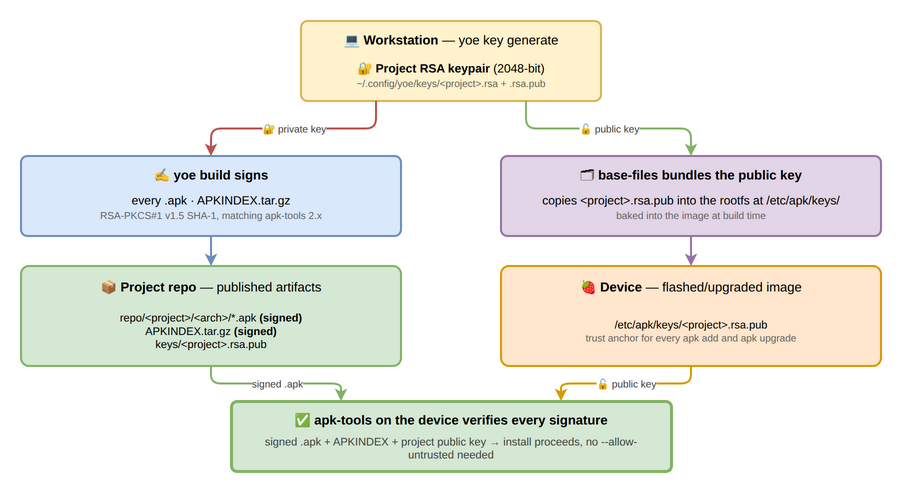
yoe signs the packages it produces and the repository index they are published into, so on-target installs run without an “untrusted” override. The signing mechanism follows the package format of the target:
- Alpine / musl targets (
.apk). yoe signs every.apkand theAPKINDEX.tar.gzat build time with an RSA-PKCS#1 v1.5 SHA-1 signature, matching what apk-tools 2.x verifies. Booted systems include the matching public key under/etc/apk/keys/, so on-targetapk add,apk upgrade, and image-time package installation all run without--allow-untrusted. This is the path described in detail below. - Debian / Ubuntu targets (
.deb). yoe builds its units as.debs and serves them from a project-signed apt repository, so on-targetapt install/apt upgradetrust the project’s feed. The apt/dpkg signing model differs from apk’s: apt verifies a signedInReleasefile over the repository metadata (re-signed each time the repo is regenerated, with a configurableValid-Untilwindow) rather than a per-package index signature, and the booted system trusts it via a per-project keyring at/etc/apt/keyrings/<project>.gpgreferenced from theSigned-Byof the project’ssources.list.dentry. See module-debian.md and module-ubuntu.md for the full trust chain.
The remainder of this page covers the apk signing chain in detail.
What you need to know
- yoe auto-generates a 2048-bit RSA keypair on first build and stores it at
~/.config/yoe/keys/<project>.rsa(private) and~/.config/yoe/keys/<project>.rsa.pub(public). - The matching public key is published into your local repo under
<projectDir>/repo/<project>/keys/<project>.rsa.puband into the rootfs at/etc/apk/keys/<project>.rsa.pub(viabase-files). - A different signing key per project is the default. Two projects with the same
namefield share keys; use unique project names if that isn’t what you want.
Inspecting the current key
$ yoe key info
Signing key: /home/you/.config/yoe/keys/myproj.rsa
Public key:  /home/you/.config/yoe/keys/myproj.rsa.pub
Key name:    myproj.rsa.pub
Fingerprint: 1f3a:c2:e0:9d:42:8c:b6...
Use the fingerprint to confirm two systems are talking about the same key without printing the full public key.
Generating a key explicitly
yoe key generate is a no-op when the configured key already exists; if not, it
creates a fresh 2048-bit RSA pair at the configured path. The build pipeline
does the same auto-generation lazily, so most users never need to run this.
$ yoe key generate
Signing key: /home/you/.config/yoe/keys/myproj.rsa
Public key:  /home/you/.config/yoe/keys/myproj.rsa.pub
Key name:    myproj.rsa.pub
Fingerprint: 1f3a:c2:e0:9d:42:8c:b6...
Pinning a key path explicitly
Override the default by setting signing_key on project() in PROJECT.star:
project(
    name = "myproj",
    version = "0.1.0",
    signing_key = "/secrets/myproj.rsa",
    ...
)
The configured path is treated the same way as the default — yoe loads it if it exists, generates a new keypair there if it doesn’t.
Key rotation
When you replace a key, every existing rootfs becomes unable to verify new packages until the new public key is shipped. The recommended flow is:
- Generate the new key (
yoe key generateafter deleting the old~/.config/yoe/keys/<project>.rsa.pub, or by settingsigning_keyto a fresh path). - Run
yoe build --forceso every cached apk gets re-signed with the new key. The build cache is content-addressed and doesn’t include the signing key in its hash, so a fresh build after a key swap will otherwise replay cached apks signed with the old key. - Build a new image so
base-filescarries the new public key. - Flash or upgrade devices with the new image.
- Once every device is rotated, retire the old key.
Because both keys can coexist under /etc/apk/keys/ on-target, you can also
stage a rollover: drop both .rsa.pub files into the rootfs (e.g., via an
overlay), let devices upgrade onto the new key over a period, and then strip the
old one in a later release.
What’s signed and what isn’t
Signed:
- Every
.apkproduced byyoe build. The signature covers the SHA-1 of the gzipped control stream; data integrity flows through the PKGINFOdatahashfield that the control stream carries. - The per-arch
APKINDEX.tar.gzregenerated on every publish.
Not signed:
- Bootstrap apks emitted by
yoe bootstrap. These exist only inside the build container and are never installed on a target. - Source archives, docker images, intermediate build artifacts. Only the final
.apkand the index are signed.