Build Environment
How [yoe] manages host tools, build isolation, and the bootstrap process.
Architecture
[yoe] uses a tiered build environment with three tiers, nested inside the
container that yoe spawns on the host:
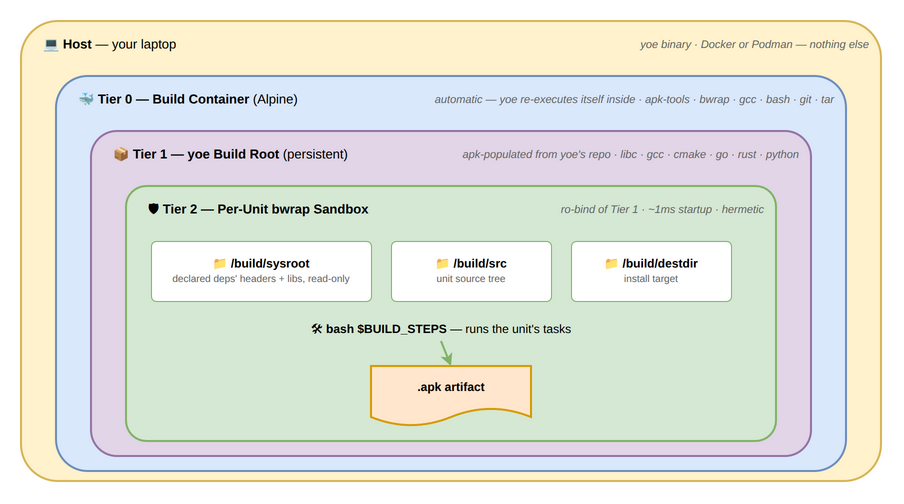
Tier 0: Bootstrap Module (Automatic Container)
All build operations run inside a Docker/Podman container. The host provides
ONLY the yoe binary and a container runtime. No build tools, no compilers, no
package managers — nothing from the host leaks into builds.
The yoe binary on the host detects that it’s not inside the build container
and re-executes itself inside one automatically. Developers never need to think
about this — they run yoe build and it works.
The only host requirements are:
- The
yoeGo binary (statically linked, runs anywhere) - Docker or Podman
On first use, yoe builds the versioned container image yoe:<version> from a
Dockerfile embedded in the binary itself. The yoe binary copies itself into
the container — no source checkout or Go toolchain is needed on the host.
Subsequent invocations reuse the cached image. When the container version
changes (i.e., a new yoe binary with updated container dependencies), the
image is rebuilt automatically.
The yoe CLI always runs on the host. The container is a stateless build worker
invoked only when container-provided tools (gcc, bwrap, mkfs, etc.) are needed.
Most commands (config, desc, refs, graph, source, clean) run
entirely on the host with no container overhead.
# All commands run on the host:
yoe init my-project
yoe version
yoe config show
yoe source fetch
yoe desc openssh

# Build commands invoke the container for compilation:
yoe build openssh          # [yoe] container: bwrap ... make -j$(nproc)

# Manage the container image:
yoe container build        # rebuild the container image
yoe container binfmt       # register QEMU user-mode for cross-arch builds
yoe container status       # show container image status
When the container is invoked, it mounts:
- Project directory →
/project(read-write) - Build source/dest →
/build/src,/build/destdir(per-unit mounts) - Sysroot →
/build/sysroot(read-only, deps’ headers/libraries)
Build output uses --user uid:gid so files created by the container are owned
by the host user, not root.
External Dependencies
Host requirements (the developer’s machine):
| Dependency | Purpose |
|---|---|
yoe binary | Statically linked Go binary |
docker/podman | Run the build container |
That’s it. Everything else is inside the container.
Container-provided tools (installed by containers/Dockerfile.build):
| Tool | Package | Used by | Purpose |
|---|---|---|---|
bwrap | bubblewrap | internal/build/sandbox.go | Per-unit build isolation (namespace sandbox) |
bash | bash | internal/build/sandbox.go | Execute unit build step shell commands |
git | git | internal/source/, dev.go | Clone/fetch repos, manage workspaces, apply/extract patches |
tar | tar | internal/source/workspace.go | Extract .tar.xz archives (.tar.gz/.bz2 handled by Go stdlib) |
nproc | coreutils | internal/build/sandbox.go | Detect CPU count for $NPROC build variable |
uname | coreutils | internal/build/sandbox.go | Detect host architecture for $ARCH variable |
make | make | Unit build steps | C/C++ builds |
gcc | gcc | Unit build steps | C compilation |
g++ | g++ | Unit build steps | C++ compilation |
patch | patch | Fallback for patch application | When git apply is not suitable |
Called indirectly (by user-defined build steps, not by yoe itself):
- Language toolchains (
go,cargo,cmake,meson,python3,npm) — installed into the Tier 1 build root as needed - Any command available in the build sandbox — unit build steps are arbitrary shell commands
ctx.shell()in custom commands can invoke any host tool
Tier 1: [yoe] Build Root
An environment populated from [yoe]’s own package repository. This is where
the actual compilers, toolchains, and language SDKs live. [yoe] supports both
musl (Alpine-based) and glibc (Debian/Ubuntu-based) targets; the libc choice is
a separate decision from the tier structure.
# yoe creates this automatically during build
apk --root /var/yoe/buildroot \
    --repo https://repo.yoebuild.org/packages \
    add gcc g++ make cmake go rust
This build root is:
- Built from
[yoe]’s own packages, not pulled from Alpine’s repos. - Persistent — created once, updated as needed. Not torn down between builds.
- Architecture-native — on an ARM64 machine, it’s an ARM64 build root. No cross-compilation.
- Managed by apk — adding or updating a host tool is just
apk add --root ... <tool>.
Tier 2: Per-Unit Isolation
Each unit builds in an isolated environment with only its declared dependencies. This ensures hermetic builds — a unit cannot accidentally depend on a tool it didn’t declare.
# yoe creates a minimal environment for each unit build
bwrap \
    --ro-bind /var/yoe/buildroot / \
    --bind /tmp/build/$RECIPE /build \
    --bind /tmp/destdir/$RECIPE /destdir \
    --dev /dev \
    --proc /proc \
    -- bash -c "$BUILD_STEPS"
Bubblewrap provides:
- Unprivileged isolation — no root or Docker daemon required.
- Read-only base — the build root is mounted read-only; units can’t modify host tools.
- Minimal overhead — bubblewrap is a thin namespace wrapper, not a full container runtime. Build performance is near-native.
- Declared dependencies only — the build environment is assembled from only
the packages listed in the unit’s
deps.
Why Not Docker for Builds?
Docker is used for Tier 0 (the toolchain container) but not for Tier 1/2 (the actual builds). This is deliberate:
| Docker | bubblewrap + apk | |
|---|---|---|
| Requires root/daemon | Yes (dockerd) | No (unprivileged) |
| Startup overhead | ~200ms per container | ~1ms per sandbox |
| Layering granularity | Image layers (coarse) | apk packages (fine) |
| Dependency management | Dockerfile (imperative) | apk (declarative) |
| Nested builds | Docker-in-Docker (fragile) | Just works |
| CI integration | Needs DinD or socket mount | Runs inside any container |
Docker is great for the “zero setup” onboarding story: docker run yoe/builder
and you have a working environment. But for the build system itself, bubblewrap
- apk is simpler, faster, and more granular.
Bootstrap Process (planned)
Status: Design only — the
yoe bootstrapsubcommand described below does not exist. Today the base toolchain comes from the container image the project’s classes select (container/container_archon each unit), and everything above it is an ordinary unit built from source. The staged bootstrap here describes how[yoe]would build its own base packages without depending on another distribution’s toolchain; nothing in it is wired up. Running[yoe]on a[yoe]-built device is a separate, shipped capability — see Self-Hosting, which uses the normal build path rather than anything on this page.
There is a chicken-and-egg problem: [yoe] needs glibc, gcc, and other base
packages in its repository before it can build anything inside a [yoe] chroot.
This would be solved with a staged bootstrap, the same approach used by Alpine,
Arch, Gentoo, and every other self-hosting distribution.
Stage 0: Cross-Pollination
Build the initial base packages using an existing distribution’s toolchain.
Alpine’s gcc (or any host gcc) builds the first generation of [yoe] packages.
# Inside Alpine (or any Linux with gcc)
yoe bootstrap stage0

# This builds:
#   glibc         → glibc-2.39-r0.apk
#   binutils      → binutils-2.42-r0.apk
#   gcc           → gcc-14.1-r0.apk
#   linux-headers → linux-headers-6.6-r0.apk
#   busybox       → busybox-1.36-r0.apk
#   apk-tools     → apk-tools-2.14-r0.apk
#   bubblewrap    → bubblewrap-0.9-r0.apk
These packages are built with Alpine’s musl-based gcc targeting glibc. The
output is a minimal set of .apk files — enough to create a self-hosting
[yoe] build root.
Stage 1: Self-Hosting
Rebuild the base packages using the Stage 0 packages. Now the [yoe] build root
is building itself.
yoe bootstrap stage1

# Creates a `[yoe]` build root from Stage 0 packages, then rebuilds:
#   glibc, gcc, binutils, etc. — now built with `[yoe]`'s own gcc + glibc
After Stage 1, the bootstrap is complete. All packages in the repository were
built by [yoe]’s own toolchain. The Alpine dependency is gone.
Stage 2: Normal Operation
From this point on, all builds use the [yoe] build root. New units build
inside Tier 2 isolated environments. The bootstrap is a one-time cost per
architecture.
# Normal development — no bootstrap needed
yoe build myapp
yoe build base-image
yoe flash base-image /dev/sdX
Pre-Built Bootstrap
For most users, the bootstrap is not needed at all. [yoe] publishes pre-built
base packages for each supported architecture:
x86_64— built in CIaarch64— built on ARM64 CI runnersriscv64— built on RISC-V hardware or QEMU
A new project pulls these from the [yoe] package repository and starts
building immediately. The bootstrap process is only needed by:
[yoe]distribution developers maintaining the base packages.- Users who need to verify the full build chain for compliance/traceability.
- Users targeting a new architecture.
Pseudo-Root via User Namespaces
Image assembly requires root-like operations — setting file ownership to
root:root, creating device nodes, setting setuid bits. Traditionally this is
solved with fakeroot or Yocto’s pseudo, both of which use LD_PRELOAD to
intercept libc calls. These approaches are fragile:
| Approach | Mechanism | Breaks with Go/static bins | Database corruption | Parallel safety |
|---|---|---|---|---|
| fakeroot | LD_PRELOAD | Yes | N/A | Fragile |
| pseudo (Yocto) | LD_PRELOAD + SQLite | Yes | Yes (known issue) | Better |
| User namespaces | Kernel | No | N/A (stateless) | Yes |
[yoe] uses user namespaces (via bubblewrap, already in the stack for build
isolation) for all operations that need pseudo-root access. Inside a user
namespace, the process sees itself as uid 0 and can perform all root-like
filesystem operations — no LD_PRELOAD, no daemon, no database.
How Image Units Use This
# Image assembly inside a user namespace
bwrap --unshare-user --uid 0 --gid 0 \
    --bind /tmp/rootfs /rootfs \
    --bind /tmp/output /output \
    --dev /dev \
    --proc /proc \
    -- sh -c '
        # Install packages — apk sets ownership to root:root
        apk --root /rootfs add musl busybox openssh myapp

        # Create device nodes
        mknod /rootfs/dev/null c 1 3
        mknod /rootfs/dev/console c 5 1

        # Set permissions
        chmod 4755 /rootfs/usr/bin/su

        # Generate filesystem image with correct ownership
        mksquashfs /rootfs /output/rootfs.squashfs
    '
Because this is kernel-native:
- Works with everything — Go binaries, Rust binaries, statically linked tools, anything. No libc interception needed.
- Stateless — no SQLite database to corrupt, no daemon to crash. The kernel tracks ownership within the namespace.
- Fast — namespace creation is ~1ms. No overhead per filesystem operation.
- Already available — bubblewrap is already a Tier 0 dependency for build isolation. No new tools needed.
Disk Image Partitioning
For the final step of creating a partitioned disk image (GPT/MBR with boot and
rootfs partitions), yoe needs a partitioning tool on the host or inside the
build container.
systemd-repart
is a candidate if [yoe] ever ships systemd as part of the base system — its
declarative partition definitions align well with the partition definitions in
image units, it handles GPT/MBR/filesystem creation in one step, and it runs
unprivileged with user namespaces. Today, [yoe] does not use systemd, so
disk image assembly uses the standard sfdisk/mkfs.* tools from the build
container.
The combination is: bubblewrap for rootfs population (installing packages,
setting ownership, creating device nodes) and a partitioning tool (sfdisk +
mkfs.* today, systemd-repart as a future option) for disk image assembly
(partitioning, filesystem creation, writing the final .img).
Reducing Dependence on Docker’s /dev (planned)
Status: Today,
yoeuses option 5 below. Themknod /dev/loop0..31workaround is implemented inmodules/module-core/classes/image.star(_install_syslinux) and mirrored ininternal/image/disk.go. Options 1–4 are future directions — none are implemented yet.
Installing the bootloader on an x86 image currently runs
losetup/mount/extlinux inside the --privileged build container. This
depends on behavior that varies across container runtimes: Docker’s /dev is a
tmpfs and does not auto-populate /dev/loop* (recent Docker releases tightened
this further, requiring mknod inside the script), while Podman’s
--privileged bind-mounts host /dev and “just works”. The same fragility
surfaces with /dev/kvm, rootless mode, and various CI runners.
Options for decoupling image assembly from container-runtime /dev behavior,
ordered by how cleanly they sidestep the issue:
- Avoid loop devices entirely (preferred). Build the partition table,
populate ext4 with
mkfs.ext4 -d(already used), write MBR and VBR bytes directly, and installldlinux.sysby splicing bytes into the image — all in pure Go on the host. A Go library likego-diskfscovers partition tables and filesystems; the syslinux VBR layout is well-documented. This is what Buildroot’sgenimageand Yocto’swicdo. It removeslosetup,mount, and--privilegedfrom the image-assembly path entirely and aligns with[yoe]’s principles (no intermediate code generation, host runs Go / container runs compilation). - Host-side image assembly. Run
losetup/mount/mkfs/extlinuxon the host instead of in the container. Cleanest implementation, but breaks the “host needs only git + docker + yoe” promise — the host would needutil-linux,e2fsprogs, andsyslinux. - Purpose-built image tools.
genimage,wic,diskimage-builder, orguestfishconstruct disk images in userspace with no loop mounts. Adds a build-time dependency but avoids writing partition/filesystem code. - Make the assembly container less Docker-dependent. Prefer Podman
(rootful) for image assembly, or drive the step with
systemd-nspawn/ bubblewrap on the host. Both expose the real/devand work across runtimes. - Pin Docker behavior explicitly (current approach). Keep the existing
container flow but pre-create
/dev/loop0..31viamknodbeforelosetup. Still Docker-compatible, no longer dependent on Docker’s shifting defaults, but retains the loop/mount/privileged surface.
Direction: move toward option 1 — a Go image assembler — as the long-term answer. This removes a whole class of “works on my machine” failures across Docker versions, kernels, rootless setups, and CI runners, and fits the existing host-runs-Go / container-runs-compilation split.
Build Environment Lifecycle
First time setup (only requires yoe binary + git + docker/podman):
  yoe init my-project        ← runs on host, no container needed
  cd my-project
  yoe build --all            ← auto-builds container on first run, then builds

Day-to-day development:
  $EDITOR units/myapp.star
  yoe build myapp            ← builds in isolated bwrap sandbox
  yoe build base-image       ← assembles rootfs (apk on Alpine, apt on Debian/Ubuntu)
  yoe flash base-image /dev/sdX

Adding a host tool:
  $EDITOR units/cmake.star ← write a unit for the tool
  yoe build cmake            ← produces cmake package (.apk or .deb)
  (cmake is now available as a build dependency for other units)

Updating the base toolchain:
  yoe build --force gcc      ← rebuild gcc unit
  yoe build --all            ← rebuild everything against new gcc
Caching Architecture
[yoe] uses a unified, content-addressed object store for both source archives
and built packages, with a multi-level local → LAN → remote fallback chain. The
full design — object store layout, build flow, cache key computation, cache
levels, the S3 rationale, language-package-manager caches, and cache signing —
now lives in its own chapter, alongside a survey of how Nix, Bazel, and Yocto
cache and the planned Yoe cache design:
See Caching.
Multi-Target Builds
A single [yoe] project can define multiple machines and multiple images,
building any combination from the same source tree. This is similar to Yocto’s
multi-machine/multi-image capability but with simpler mechanics.
How It Works
Machines and images are independent axes. A machine defines what hardware to build for (architecture, kernel, bootloader, partition layout). An image defines what software to include (package list, services, configuration). Any image can be built for any compatible machine.
machines/                    images/
├── beaglebone-black.star    ├── base-image.star
├── raspberrypi4.star        ├── dev-image.star
└── qemu-arm64.star          └── production-image.star

Build matrix:
  yoe build base-image --machine beaglebone-black
  yoe build dev-image --machine beaglebone-black
  yoe build production-image --machine raspberrypi4
  yoe build --all --type image   ← builds all image units for all machines
Package Sharing Across Targets
Because units produce architecture-specific packages (.apk or .deb) that
live in a shared repository, packages built for one machine are reused by any
other machine with the same architecture. Building openssh for the BeagleBone
also satisfies the Raspberry Pi — both are aarch64 and produce identical
packages (same unit, same source, same arch flags → same cache key).
This means a multi-machine project does not rebuild the world for each board. Only machine-specific packages (kernel, bootloader, device trees) are built per-machine. Everything else comes from cache.
Build Output Organization
Build outputs are organized by machine and image:
build/output/
├── beaglebone-black/
│   ├── base/
│   │   └── base-beaglebone-black.img
│   └── dev/
│       └── dev-beaglebone-black.img
├── raspberrypi4/
│   └── production/
│       └── production-raspberrypi4.img
└── repo/
    └── aarch64/           ← shared package repo for all aarch64 machines
        ├── openssh-9.6p1-r0.apk
        ├── myapp-1.2.3-r0.apk
        └── ...
Architecture Isolation
When a project targets multiple architectures (e.g., aarch64 and x86_64),
each architecture gets its own Tier 1 build root and package repository.
Packages from different architectures never mix. The build roots are:
/var/yoe/buildroot/aarch64/    ← aarch64 compilers, libraries
/var/yoe/buildroot/x86_64/     ← x86_64 compilers, libraries
In practice, multi-architecture builds from a single workstation are uncommon
since [yoe] uses native builds. A developer typically builds for the
architecture of their machine. Multi-arch is more relevant in CI, where
different runners handle different architectures and share results via the
remote cache.
Supported Host Architectures
Since [yoe] uses native builds (no cross-compilation), the host architecture
is the target architecture. All three supported architectures have viable
build environments:
| Architecture | Alpine Container | CI Runners | Native Hardware |
|---|---|---|---|
| x86_64 | alpine:latest | GitHub Actions, all CI | Any x86_64 machine |
| aarch64 | alpine:latest (arm64) | GitHub ARM runners, Hetzner CAX | RPi 4/5, ARM servers |
| riscv64 | alpine:edge (riscv64) | Limited | SiFive, StarFive boards |
Cross-Architecture Builds via QEMU User-Mode
Any architecture can be built on any host using QEMU user-mode emulation (binfmt_misc). Yoe builds and runs a genuine foreign-arch Docker container — no cross-compilation toolchain needed:
# One-time setup (persists until reboot)
yoe container binfmt

# Build ARM64 on an x86_64 host
yoe build base-image --machine qemu-arm64

# Run it
yoe run base-image --machine qemu-arm64
Performance is ~5-20x slower than native, which is fine for iterating on individual packages. For full system rebuilds, use native hardware or cloud CI with architecture-matched runners.
Every build container is launched with an explicit --platform linux/<arch>,
even when the target architecture matches the host. Docker keeps only one image
per tag, so a shared external base image like golang:1.26 can hold a
foreign-arch copy left behind by an earlier cross build. Pinning the platform on
every run forces Docker to use (and, for a multi-arch tag, fetch) the variant
that matches the build, rather than silently reusing a mismatched cached image
that would otherwise fail with exec format error. A go build whose class sets
container_arch="host" runs the toolchain container at the host architecture
and cross-compiles with GOARCH, so it stays native even when the target arch
differs.
Build output is stored under build/<arch>/<unit>/ so multiple architectures
can coexist in the same project tree.