Naming and Resolution
How modules, units, and dependencies are named, referenced, and resolved in
[yoe].
See metadata-format.md for the full unit/class/module Starlark API. See build-environment.md for how build isolation and caching work. The Glossary gives one-line definitions of the terms used here.
Modules
A module is a Git repository (or subdirectory of one) that provides units,
classes, machine definitions, and images. Modules are declared in
PROJECT.star:
project(
    name = "my-product",
    modules = [
        module("https://github.com/yoebuild/yoe.git",
              ref = "main",
              path = "modules/module-core"),
        module("https://github.com/vendor/bsp-imx8.git",
              ref = "v2.1.0"),
    ],
)
Module name is derived from the path field’s last component if set,
otherwise the URL’s repository name. Examples:
| URL | path | Derived name |
|---|---|---|
github.com/yoebuild/yoe.git | modules/module-core | module-core |
github.com/vendor/bsp-imx8.git | (none) | bsp-imx8 |
Module names are used in load() statements:
load("@module-core//classes/autotools.star", "autotools").
Module directory structure
<module-root>/
  MODULE.star         # module metadata and dependencies
  classes/            # build pattern functions (autotools, cmake, etc.)
  units/              # unit definitions (.star files)
  machines/           # machine definitions (.star files)
  images/             # image definitions (.star files)
Evaluation order
-
Phase 1 —
PROJECT.staris evaluated. Modules are synced (cloned/fetched). -
Phase 1b — Machine definitions from all modules are evaluated.
-
Phase 2 — Units and images from all modules are evaluated. A single
ctxstruct is predeclared, exposing the active build context:ctx.arch,ctx.machine,ctx.project_version,ctx.machine_config, andctx.provides(a callable dict — usectx.provides.get(name)to resolve a virtual to a concrete unit name).The closure walk that used to live in Starlark — and that needed
ctx.runtime_deps, a dict pre-populated with every unit’s deps — is now a Go-sideresolve_closure(artifacts)builtin. It walks the runtime-dep graph on demand and materializes synthetic-module units (see Feeds as synthetic modules) lazily, so the working set stays bounded by closure size rather than catalog size. Image classes call it directly:resolved = resolve_closure(explicit_artifacts).
Within each phase, modules are evaluated in declaration order. Within a module,
.star files are evaluated in filesystem walk order.
Units
A unit is a named build definition declared via unit(), image(), or a
class function like autotools() or cmake(). Each unit produces one or more
packages (.apk or .deb, per the consuming image’s distro).
Current naming model
Unit names are flat strings with no module namespace. Within a single module
the name must be unique — defining unit(name = "zstd", ...) twice in one
module is an error. Across modules, a same-named unit is a shadow: the
higher-priority unit wins and a notice is emitted on stderr. Priority follows
the project’s module list order (project root > last module > … > first module).
See Unit replacement via name shadowing
for the full rule and use cases.
Dependencies
Units declare two kinds of dependencies:
deps— build-time. The dependency’s output is available in the build sysroot during compilation. Resolved by theyoeDAG.runtime_deps— install-time. Recorded in the package metadata (.PKGINFOfor.apk,controlfor.deb) and resolved byapkoraptduring image assembly or on-device install.
Both reference units by name:
autotools(
    name = "curl",
    deps = ["openssl", "zlib", "zstd"],
    runtime_deps = ["openssl", "zlib", "zstd"],
)
Transitive dependencies
Build-time deps are resolved transitively by the DAG. If curl depends on
openssl and openssl depends on zlib, curl’s build sysroot includes both.
Runtime deps are resolved transitively by the on-device package manager (apk
or apt) at install time.
Load references
Starlark load() statements use three forms:
| Form | Resolves to | Example |
|---|---|---|
@module//path | Named module root | load("@module-core//classes/autotools.star", "autotools") |
//path | Current module root (context-aware) | load("//classes/cmake.star", "cmake") |
relative/path | Relative to current file | load("../utils.star", "helper") |
The // form is context-aware: if the file is inside a module, // resolves to
that module’s root. Otherwise it resolves to the project root. This means a unit
in module-core can load("//classes/autotools.star", ...) and it resolves
within module-core, not the project root.
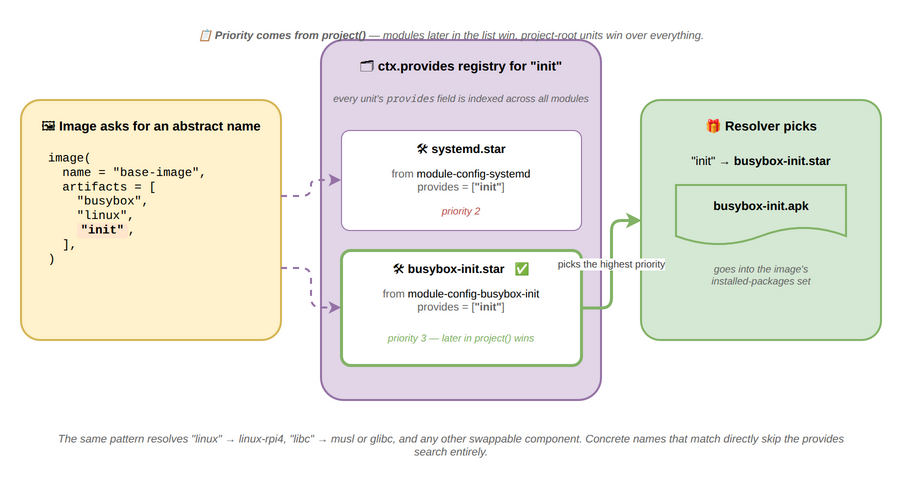
Virtual packages (ctx.provides)
The ctx.provides dict maps virtual names to concrete unit names. This allows
images to reference abstract capabilities rather than specific units:
# Machine definition contributes:
machine(
    name = "raspberrypi4",
    kernel = kernel(unit = "linux-rpi4", provides = "linux"),
)

# Unit can also declare provides — apk-style list of virtual names:
unit(name = "linux-rpi4", provides = ["linux"], ...)

# Image uses the virtual name:
image(name = "base-image", artifacts = ["busybox", "linux", "init"], ...)
# "linux" resolves to "linux-rpi4" via ctx.provides
# "init" resolves to whichever init system the project includes
This pattern extends to any swappable core component. For example, the init system can be abstracted behind a virtual name, with thin configuration modules providing the concrete implementation:
# modules/config-systemd/units/init.star
unit(name = "systemd", ..., provides = ["init"])

# modules/config-busybox-init/units/init.star
unit(name = "busybox-init", ..., provides = ["init"])
The project selects which init system to use by including the appropriate module:
# projects/product-a.star
project(name = "product-a", modules = [
    module("...", path = "modules/module-core"),
    module("...", path = "modules/config-systemd"),
])

# projects/product-b.star
project(name = "product-b", modules = [
    module("...", path = "modules/module-core"),
    module("...", path = "modules/config-busybox-init"),
])
Images reference init in their artifacts — they don’t need to know whether the
product uses systemd or busybox init.
ctx.provides is populated in two stages:
- After phase 1 (machines) —
kernel.providesentries are added - After phase 2 (units) — unit
providesfields are added
See Collision Detection for scoping and priority rules.
Unit replacement via name shadowing
The simplest way to replace an upstream unit is to define one with the same name in a higher-priority module. The higher-priority unit shadows the upstream — only it is registered in the DAG; the lower-priority unit is discarded with a notice on stderr.
Priority follows declaration order in project(). The project root has the
highest priority overall; among modules, later in the list wins:
project(name = "product", modules = [
    module("https://github.com/yoebuild/module-alpine.git", ref = "main"),  # lowest priority
    module("...", path = "modules/soc-module"),    # overrides module-alpine
    module("...", path = "modules/som-module"),    # highest priority among modules
])
# Project root (units/ in the project directory) overrides all three.
Concrete example — replacing Alpine’s prebuilt musl with a from-source build:
# @module-alpine//units/musl.star
alpine_pkg(name = "musl", version = "1.2.5-r0", ...)

# @my-overrides//units/musl.star  (listed after module-alpine)
unit(name = "musl", source = "https://git.musl-libc.org/git/musl",
     tag = "v1.2.5", tasks = [...])
Every other unit’s deps = ["musl"] and runtime_deps = ["musl"] resolve to
the winner automatically — there is nothing to change in consumers when an
override happens. The build emits:
notice: unit "musl" from module "my-overrides" shadows the same name from module "module-alpine"
Use shadowing for 1:1 replacement — “my musl instead of yours.” It is the right tool whenever a module wants to swap an upstream unit for a different implementation while keeping consumers unchanged.
Unit replacement via provides
provides is for a different problem: N:1 alternative selection. Several
units in the same project can each satisfy a virtual role, and the project (or
machine) selects which one wins at evaluation time. The canonical case is a
kernel — a single module ships linux-rpi4 and linux-bb, both declaring
provides = ["linux"], and the active machine picks one.
# @module-core//units/kernels.star
unit(name = "linux-rpi4", provides = ["linux"], ...)
unit(name = "linux-bb",   provides = ["linux"], ...)

# machines/raspberrypi4.star
machine(name = "rpi4", kernel = kernel(unit = "linux-rpi4", provides = "linux"))

# machines/beaglebone.star
machine(name = "bbb",  kernel = kernel(unit = "linux-bb",  provides = "linux"))

# Images reference the virtual name; resolution picks the right kernel.
image(name = "base", artifacts = ["busybox", "linux"])
Both kernel units coexist in the namespace — they have distinct real names — and
ctx.provides["linux"] is set per machine. This is something shadowing can’t
express: shadowing requires identical real names, so multiple alternatives can’t
both be present.
The same module-priority rule applies when two modules each contribute a
provides for the same virtual name — the higher-priority module wins, with a
stderr notice. But for the common “override an upstream unit” case, prefer
shadowing: it requires no virtual-name layer, and reading the override file
tells the whole story.
When NOT to use provides
provides is powerful but has a hidden cost: the build cache hashes resolved
deps recursively, so a provides swap forks every transitive consumer into
a machine-specific package variant. Used carelessly it can turn a clean cross-
machine package repo into hundreds of near-identical packages.
The rule that keeps the package repo lean:
providesis for leaf artifacts referenced by other units only asruntime_deps— kernel, base-files, init, bootloader. It is not for build-time libraries, and not for runtime alternatives that can be selected at boot.
This means:
- Don’t
providesa build-time library. Swappingopenssl↔libresslviaprovideswould fan out everycurl,openssh,pythonpackage per selection. If you need a different crypto library, give it a different name and have consumers reference it explicitly. - Don’t put machine-flavored units in a generic library’s build-time
deps. A library should depend on other libraries, never onlinux,base-files, or any unit that varies by machine — otherwise the library’s package forks per machine even though its compiled output is identical. - Don’t use
providesfor runtime alternatives. For pairs likemdev(busybox) vseudev,udhcpc(busybox) vsdhcpcd, or busyboxntpdvsntp-client, install both packages and pick which daemon runs at boot from an init script. The init script lives in a config unit (e.g.,network-config) that’s already project- or machine-flavored, so the choice doesn’t propagate into generic library hashes.
In short: keep machine variability at the edges of the DAG (kernel, bootloader, machine config, init scripts). Generic libraries and tools should have one hash regardless of which machine the project targets.
Shadow files (REPLACES)
When two packages legitimately ship the same file path — most often a real
implementation overriding a busybox stub — the owning package needs to opt into
the shadow with replaces. apk refuses to install a package whose files
conflict with already-installed ones unless the installing package declares it’s
allowed to overwrite the loser.
# util-linux ships real /bin/dmesg, /bin/mount, /bin/umount, /sbin/fsck,
# /sbin/hwclock, /sbin/losetup, /sbin/switch_root, /usr/bin/logger,
# /usr/bin/nsenter, /usr/bin/unshare — all paths busybox also claims.
unit(
    name = "util-linux",
    ...
    replaces = ["busybox"],
)
Mechanics worth remembering:
- Direction is per-file: the package that overwrites is the one that
declares. If util-linux installs after busybox and overwrites busybox’s
stubs, util-linux declares
replaces = ["busybox"]. Declaring it on busybox would only help if busybox were the one installing later. - apk install order is set by the dep graph. ncurses precedes busybox in the
dev-image not because of the artifact list but because ncurses is a runtime
dep of util-linux, less, vim, htop, and procps-ng — apk has to install it
first. busybox is a dependency-graph leaf, so it lands later and is the one
whose
clear/resetoverwrite ncurses’. Hencebusyboxdeclaresreplaces = ["ncurses"]. replacesis not a package fork. The annotation lives on a single generic .apk that every project shares. apk uses it to decide who owns the file in/lib/apk/db/installed, so future operations on either package do the right thing.
When you see a “trying to overwrite X owned by Y” install error, the fix is one of:
- Add
replaces = ["Y"]to the unit that owns the overwriting package. - Stop the duplication at its source — e.g., split a package into a subpackage
that doesn’t ship the conflicting paths (subpackages are a future apk-compat
phase; until then
replacesis the lever). - Disable the offending applet in the loser via runtime config — only if it can be done without forking the unit’s build, which is rarely possible for fine-grained busybox knobs.
Keep units generic — resolve variation at runtime
The previous section is one expression of a broader principle: a unit produces
one package (.apk or .deb) that every project and every machine of its
distro shares. When two images need different behavior from the same package,
the answer is almost never “fork the package.” It’s “resolve the difference at
runtime, in a component that’s allowed to vary.”
This is about variation the artifact key does not already capture. A unit’s
output is keyed by (distro/libc, arch, machine scope), so a unit consumed by
both an Alpine and a Debian image already builds twice and already produces two
packages. Branching inside the build on $DISTRO or $ARCH — which the
executor exports to every build step, and which are already part of the unit
hash — forks nothing: it only decides what goes into artifacts that exist
separately either way. Prefer that to shipping every variant’s files into every
package and leaving the running system to ignore what does not apply. Service
files are the worked example — see
Shipping a service on both bases.
The rest of this section is about the other case: two projects or two machines wanting different behavior from one artifact. Concretely, when you reach for a per-project or per-machine variant of a generic unit, prefer instead:
- Init scripts that detect what’s installed. The
networkOpenRC service checkscommand -v dhcpcdand falls back to busyboxudhcpcwhen it’s missing — one network-config unit, two viable runtimes, no DHCP-client fork. - Conditional config files in a project- or machine-scoped config unit
(e.g.,
base-files-<project>,network-config). Those units are already flavored, so they’re the right place for choices that have to vary. replaces:annotations on the unit that owns the shadow. When busybox and ncurses both ship/usr/bin/clear, declaringreplaceson one of them lets the package manager pick a winner without touching either build. Both packages stay generic.- Runtime alternative selection at boot — install both candidates, start one from an init script.
Some axes leave no choice: kernel defconfig (the kernel binary literally
varies by machine), bootloader target, machine-specific firmware blobs. For
everything else — busybox config knobs, library build flags, optional features —
the bar is that the build-time split is the cleaner design, not that runtime
resolution is impossible. It rarely is, so in practice these stay one package
for every consumer.
The cost of forking generic units is real: build cache surface multiplies,
binary reuse across projects breaks, and complexity moves from a few clean
conditionals in one config unit into N parallel build configurations scattered
across the tree. The cost of runtime resolution is a small init script or a
one-line replaces annotation — pay that instead.
Module composition
Modules extend upstream units without modifying them by importing the unit as a callable function:
# @module-core provides openssh as a function with a default name
def openssh(name="openssh", extra_deps=[], **overrides):
    autotools(name = name, deps = ["zlib", "openssl"] + extra_deps, **overrides)

openssh()  # registers "openssh" — module-core works standalone

# @vendor-bsp extends it with a different name
load("@module-core//units/openssh.star", "openssh")
openssh(name = "openssh-vendor", extra_deps = ["vendor-crypto"])
The downstream unit has a distinct name (openssh-vendor), so there is no
collision with the upstream openssh. Images that need the vendor variant
reference openssh-vendor in their artifacts list. This is explicit and
traceable — grep for the function call to find all extensions. See
metadata-format.md for details.
Recursive module dependencies
A module’s MODULE.star can declare its own deps = [...] list of modules. The
loader walks this transitively — each declared module is synced, peeked for its
own deps, synced again, and so on until the dep set stabilizes:
# module-bsp-imx8/MODULE.star
module_info(
    name = "bsp-imx8",
    deps = [
        module("https://github.com/yoebuild/module-alpine.git", ref = "v1.2"),
        module("https://github.com/vendor/imx8-firmware.git", ref = "main"),
    ],
)
A project consuming module-bsp-imx8 doesn’t need to re-declare module-alpine
or imx8-firmware — they come along automatically.
Canonical identity and dedup
Two declarations of the same module collapse to one:
- Remote modules: same
(URL, ref, path)triple —.gitsuffix is stripped before comparing, sohttps://github.com/foo/barandhttps://github.com/foo/bar.gitare the same module. - Local modules: the absolute path after
filepath.EvalSymlinks— two relative paths that resolve to the same directory dedup.
Same-name conflicts
When two declarations name the same module (module_info(name = "shared")) but
resolve to different identities, the project-level declaration always wins — the
transitive declaration is silently overridden. Two transitive declarations at
incompatible refs error with both reference paths and a hint to pin one
explicitly at the project level.
Cycle detection
The loader runs DFS over the dep graph and surfaces any cycle as a clear path in
the error: module dep cycle: A → B → C → A. Self-loops report the same way
(A → A).
Feeds as synthetic modules
A feed is a third kind of module entry, alongside directory (local override)
and remote (git clone). It absorbs an upstream package repo as a single
declaration whose units materialize lazily on demand.
Two feed builtins exist: alpine_feed(...) for Alpine’s apk archive and
apt_feed(...) for the apt/dpkg family (Debian and Ubuntu share it, picked
apart by the distro kwarg):
# module-alpine/MODULE.star
module_info(name = "alpine")

alpine_feed(
    name    = "main",                    # synthetic module is alpine.main
    url     = "https://dl-cdn.alpinelinux.org/alpine",
    branch  = "v3.21",
    section = "main",
    index   = "feeds/main",              # dir holding <arch>/APKINDEX
    keys    = ["keys/alpine-devel@lists.alpinelinux.org-6165ee59.rsa.pub"],
)

# module-ubuntu/MODULE.star
module_info(name = "ubuntu")

apt_feed(
    name      = "main",                  # synthetic module is ubuntu.main
    distro    = "ubuntu",                # stamped on every materialized unit
    url       = "http://archive.ubuntu.com/ubuntu",
    arch_urls = {"arm64": "http://ports.ubuntu.com/ubuntu-ports"},
    suite     = "resolute",              # dists/<suite> path segment
    codename  = "resolute",              # release the packages target
    component = "main",
    arches    = ["amd64", "arm64"],
    index     = "feeds/main",            # dir holding <arch>/Packages
    keyring   = "keys/ubuntu-archive-keyring.gpg",
)
Each call registers a synthetic module named <parent>.<feed> (e.g.,
alpine.main, alpine.community). The resolver consults synthetics in priority
order alongside real modules, but synthetics always rank below every non-feed
module — a from-source override in module-core wins against the feed
automatically without prefer_modules.
The on-disk APKINDEX is checked into the module repo. yoe update-feeds
refreshes it from upstream, verifying the RSA-SHA1 signature against
alpine_feed(keys=[...]) before writing. See
module-alpine.md for
the maintainer workflow.
Lazy materialization
Synthetic units don’t allocate up front — SyntheticModule.Lookup(name) runs
only when the closure walk references that name. A project pulling 300 packages
from a 60k-entry feed allocates 300 *Unit pointers, not 60k. The on-disk
APKINDEX cache (header-versioned, content-keyed) keeps re-parse times under
~300ms even for the full Debian-class case.
See Catalog and Materialization for the internal data structures
and lifecycle that back this — the SyntheticModule contract, the closure
walker’s role as materialization driver, working-set sizes per feed, and the
allocation invariants the resolver depends on.
Companion units (the enable-service pattern)
A feed gives you every package’s .apk but doesn’t enable services — Alpine
ships init scripts disabled (apk’s setup-<pkg> is a human helper, and yoe has
no humans on the image-assembly path). The convention is one tiny companion unit
per service the maintainer wants to expose:
# module-alpine/units/docker-enable.star
unit(
    name = "docker-enable",
    version = "0.1.0",
    deps = ["docker-openrc"],           # stages the init script
    runtime_deps = ["docker-openrc"],   # ships /etc/init.d/docker on the device
    services = ["docker"],              # → /etc/runlevels/default/docker
    container = "toolchain-musl",
    container_arch = "target",
)
Both deps and runtime_deps name the package holding the init script, and
both are load-bearing. Before writing the symlink, the executor checks that
/etc/init.d/docker exists in this unit’s destdir or its sysroot, and refuses
to ship a dangling symlink otherwise. Only deps puts a package in the sysroot
— runtime_deps describes what the device needs, not what the build stages — so
a companion declaring only runtime_deps fails with
service "docker" declared but /etc/init.d/docker missing in destdir or sysroot.
The companion has no tasks. The build executor falls through to the apk-build
path when services = [...] is non-empty so the runlevel symlink lands in the
package’s data tar. A project that wants Docker running adds docker-enable to
its image’s artifacts list (alongside docker itself, which the unit’s
runtime_deps will pull in).
This keeps the policy where it belongs: the package author — not the image, not the project — decides whether installing the package also enables it. See CLAUDE.md “Key Design Decisions” → “Units declare their own services” for the rationale.
Collision Detection
Unit name duplicates
Within a single module (or within the project root), defining two units with the same name is a hard error at evaluation time:
unit "zstd" already defined (first defined in module "module-core")
Across modules, a same-named unit is treated as a shadow: the higher-priority unit wins, the lower-priority one is dropped from the unit map, and a notice is emitted to stderr. Priority is project root > last module in the list > … > first module in the list. See Unit replacement via name shadowing.
ctx.provides duplicates
If two units from the same module provide the same virtual name, the build
errors. If two units from different modules provide the same virtual name,
the higher-priority module (later in the module list) wins and a notice is
emitted to stderr. The active set is scoped to the selected machine — units from
unselected machines do not participate. This allows multiple machines to each
provide linux via different kernel units without conflict:
# machine/raspberrypi4.star — only active when this machine is selected
machine(name = "raspberrypi4",
    kernel = kernel(unit = "linux-rpi4", provides = "linux"))

# machine/beaglebone.star — only active when this machine is selected
machine(name = "beaglebone",
    kernel = kernel(unit = "linux-bb", provides = "linux"))

# base-image.star — "linux" resolves to whichever kernel the selected machine provides
image(name = "base-image", artifacts = ["busybox", "linux", "openssh"])
Images reference provides names directly — no prefix or namespace. The image declares what should be installed; resolution handles where it comes from.
Projects as module scoping
A project defines which modules are active for a build. Only units from included modules participate in the DAG. This is the primary mechanism for controlling which units can override or conflict with each other — if a module isn’t in the project’s module list, its units don’t exist for that build.
This reduces the collision problem: instead of needing replaces or shadow
semantics, a project simply includes only the modules it needs. A vendor module
that provides its own openssh-vendor with provides = ["openssh"] works
cleanly when the project doesn’t include a second module that also provides
openssh.
A single repository may define multiple projects (similar to KAS YAML files in yoe-distro), each selecting a different subset of modules for different products or build configurations:
# projects/dev.star
project(
    name = "dev",
    modules = [
        module("...", path = "modules/module-core"),
        module("...", path = "modules/dev-tools"),
    ],
)

# projects/customer-a.star
project(
    name = "customer-a",
    modules = [
        module("...", path = "modules/module-core"),
        module("...", path = "modules/vendor-bsp"),
        module("...", path = "modules/customer-a"),
    ],
)
The --project flag selects a project file:
yoe --project projects/customer-a.star build. It is available on all
subcommands. When omitted, yoe uses PROJECT.star at the repo root.
A default project (PROJECT.star at the repo root) can delegate to another
project using standard Starlark load(). Two cases:
Use a project as-is — load it for the side effect (its project() call
registers the project):
# PROJECT.star
load("projects/customer-a.star")
Extend a project with additional modules — load the exported module list and build on it:
# projects/customer-a.star
MODULES = [
    module("...", path = "modules/module-core"),
    module("...", path = "modules/vendor-bsp"),
    module("...", path = "modules/customer-a"),
]

project(name = "customer-a", modules = MODULES)

# PROJECT.star
load("projects/customer-a.star", "MODULES")

project(
    name = "default",
    modules = MODULES + [
        module("...", path = "modules/dev-tools"),
    ],
)
This lets a developer run yoe build without specifying --project while
keeping per-product project definitions separate. No new concepts needed —
Starlark’s load() handles composition naturally.
Per-project package repo
The package repo is scoped per project. If two projects share a single repo
(e.g., one uses systemd, the other busybox-init), switching projects would leave
stale packages in the repo index. Since the on-device package manager (apk or
apt) resolves runtime dependencies from the index, it could transitively pull
in packages from the wrong project.
Build output is scoped per project and per distro, e.g.:
repo/<project>/alpine/<arch>/APKINDEX.tar.gz     # apk repo
repo/<project>/debian/dists/<codename>/          # debian-format repo
Each project gets a clean repo containing only packages from its resolved module and unit set. Individual unit builds are still cached by content hash — if two projects build the same unit with the same inputs, the build runs once and the resulting package is placed into both project repos.
The build cache handles provides swapouts automatically: each unit’s cache key
includes the hashes of its resolved dependencies (recursively). When init
resolves to systemd in one project but busybox-init in another, any unit
that depends on init gets a different cache key because the resolved
dependency’s hash differs. No special virtual-name logic is needed in the hasher
— it just hashes the resolved unit, not the virtual name string.