The [yoe] Tool
yoe is the single CLI tool that drives all [yoe] workflows — building
packages and images from units, managing caches and source downloads, and
flashing devices. It is a statically-linked Go binary with no runtime
dependencies.
Installation
Prerequisites: Linux or macOS with Git and Docker installed. Windows users: install WSL2 and use the Linux binary (Linux x86_64/Docker is the most tested configuration). Claude Code is highly recommended, but not required.
# Download the yoe binary (Linux x86_64)
curl -L https://github.com/yoebuild/yoe/releases/latest/download/yoe-Linux-x86_64 -o yoe
# For other platforms, download from https://github.com/yoebuild/yoe/releases/latest

chmod +x yoe
mkdir -p ~/bin
mv yoe ~/bin/
# Make sure ~/bin is in your PATH (add to ~/.bashrc or ~/.zshrc if needed)
export PATH="$HOME/bin:$PATH"
Since yoe is a Go binary, it cross-compiles trivially — build on your x86
workstation, run on an ARM build server.
Command Overview
yoe                 Launch the interactive TUI
yoe init            Create a new `[yoe]` project
yoe build           Build units (packages and images)
yoe shell           Open an interactive shell in a unit's build sandbox  [planned]
yoe dev             Manage source modifications (extract, diff, status)
yoe flash           Write an image to a device/SD card
yoe run             Run an image in QEMU
yoe serve           Serve the project's package repo over HTTP+mDNS
yoe deploy          Build and install a unit on a running yoe device
yoe device          Manage repo configuration on a target device
yoe module          Manage external modules (fetch, sync, list)
yoe repo            Manage the local package repository
yoe cache           Manage the build cache (local and remote)  [planned]
yoe bundle          Export/import content-addressed bundles (air-gapped)  [planned]
yoe source          Download and manage source archives/repos
yoe config          View and edit project configuration
yoe desc            Describe a unit, package, or target
yoe refs            Show reverse dependencies
yoe graph           Visualize the dependency DAG
yoe log             Show build log (most recent or specific unit)
yoe diagnose        Launch Claude Code to diagnose a build failure
yoe skills          Install/update yoe's Claude Code skills in this project
yoe clean           Remove build artifacts
yoe container       Manage the build container (build, binfmt, status)
All commands except init, version, skills, and container run inside an
Alpine build container automatically. The container is built on first use from
containers/Dockerfile.build. See
Build Environment
for details.
Commands
yoe init
Scaffolds a new [yoe] project directory with the standard layout.
yoe init my-project
Creates:
my-project/
├── PROJECT.star
├── .gitignore          # ignores build/, cache/, repo/, local.star
├── .claude/skills/     # yoe's Claude Code skills (committed)
├── machines/
├── units/
├── classes/
└── overlays/
Optionally specify a machine to start with:
yoe init my-project --machine beaglebone-black
yoe init also installs [yoe]’s Claude Code skills into the new project’s
.claude/skills directory (the same set yoe skills install provides), so
Claude Code is ready to help the moment you open the project. See
yoe skills.
yoe build
Builds one or more units. Package units (unit(), autotools(), etc.) produce
packages (.apk for Alpine/musl targets, .deb for Debian/Ubuntu/glibc
targets) and publish them to the local repository. Image units (image())
assemble a root filesystem and produce a disk image. The class function used in
the .star file determines the behavior — the command is the same for both.
# Build a single package unit
yoe build openssh

# Build multiple units
yoe build openssh zlib openssl

# Build an image unit (assembles rootfs, produces disk image)
yoe build base-image

# Build an image for a specific machine
yoe build base-image --machine raspberrypi4

# Build for ARM64 on an x86_64 host (uses QEMU user-mode emulation)
yoe build base-image --machine qemu-arm64

# Build all units (packages and images)
yoe build --all

# Build all image units for all machines (full matrix)
yoe build --all --class image             # planned: --class filter

# Build a unit and all its dependencies
yoe build --with-deps myapp               # planned: --with-deps flag

# Build up to 8 units in parallel (saved to local.star for next time)
yoe build -j 8 --all

# Rebuild even if the cache is fresh
yoe build --force openssh

# Skip remote cache — only check local cache
yoe build --no-remote-cache openssh       # planned: remote cache

# Skip all caches — force build from source
yoe build --no-cache openssh

# Dry run — show what would be built and why
yoe build --dry-run --all

# List available image/machine combinations
yoe build --list-targets                  # planned
What happens during a build:
Inspired by Google’s GN, yoe build uses a two-phase resolve-then-build
model. The entire dependency graph is resolved and validated before any build
work starts. This catches missing dependencies, cycles, and configuration errors
up front rather than mid-build.
- Sync modules — fetch or update external modules declared in
PROJECT.star(skipped if already up to date). Seeyoe module sync. - Evaluate Starlark — load and evaluate all
.starunit files (including those from modules) to produce the set of build targets. Each class function call (unit(),autotools(),image(), etc.) registers a target. - Resolve dependencies — topologically sort the build order from declared dependencies. Validate that all referenced units exist and the graph is acyclic. If any errors are found, stop here — no partial builds.
- Check cache — compute a content hash of the unit + source + build
dependencies. If a cached package (
.apkor.deb) with that hash exists (locally or in a remote cache), skip the build. - Fetch source — download the source archive or clone the git repo (see
yoe sourcebelow). Sources are cached in$YOE_CACHE/sources/. - Prepare build environment — set up an isolated build root with only
declared build dependencies installed via the target’s package manager (
apkfor Alpine,aptfor Debian/Ubuntu). This ensures hermetic builds. - Execute build steps — run the build commands defined by the class
function in the build root. The environment provides:
$PREFIX— install prefix (typically/usr)$DESTDIR— staging directory for installed files$NPROC— number of available CPU cores$ARCH— target architecture
- Package — collect files from
$DESTDIR, generate the package metadata from the unit fields, and create the package archive (.apkfor Alpine/musl targets,.debfor Debian/Ubuntu/glibc targets). - Publish — add the package to the local repository and update the repo index.
For image units (image() class), steps 5-9 are replaced with image
assembly:
- Sync modules — same as above.
- Evaluate Starlark — same as above.
- Resolve dependencies — same as above.
- Check cache — same as above.
- Read machine definition — evaluate
machines/<name>.starfor architecture, kernel, bootloader, and partition layout. - Create empty rootfs — set up a temporary directory.
- Install packages — install all declared packages into
<rootfs>from the[yoe]repository using the target’s package manager (apk add --rootfor Alpine,apt/dpkgfor Debian/Ubuntu). The package manager handles dependency resolution. - Apply configuration — set hostname, timezone, locale, and enable services per the image unit’s configuration (via the active init system — busybox init today, systemd a possible future option).
- Apply overlays — copy files from
overlays/into the rootfs. - Install kernel + bootloader — build (or fetch from cache) the kernel and bootloader per the machine definition, install into the rootfs/boot partition.
- Generate disk image — partition the output image per the partition layout and populate each partition.
Output format can be specified with --format:
yoe build base-image --format sdcard    # raw disk image with partitions
yoe build base-image --format rootfs    # tar.gz of the rootfs only
yoe build base-image --format squashfs  # squashfs for read-only roots
Parallel builds: yoe build walks the dependency DAG and builds units
concurrently — as soon as a unit’s dependencies are all built (or cached), it
can start, so independent branches of the graph build at the same time. The
concurrency limit defaults to 5 units at once. Set it however suits your
machine:
yoe build -j 12 --all                 # this run, and remembered afterward
yoe config set parallel-builds 12     # set it without starting a build
Either form writes parallel_builds to local.star, so the setting is
per-developer and persists across builds (including builds started from the
TUI). The TUI Setup page (s) also exposes it: select Parallel builds and
press ←/→ (or h/l) to adjust the count, which writes the same local.star
value. yoe config show prints the value currently in effect. -j 1 forces a
fully sequential build, which is handy when reading interleaved verbose output.
Precedence is -j flag → local.star → the built-in default of 5.
When a build fails: the failing unit’s build log is the record of what its
build steps actually did. yoe prints the tail of that log inline at the point of
failure, so the underlying error (a configure rejection, a compiler message, a
missing header) is visible directly in the output — including when the build ran
somewhere ephemeral like CI, where the log file does not survive the run. The
full log path is printed alongside the tail; yoe log <unit> reprints it, and
yoe log <unit> -e opens it in $EDITOR. In verbose mode (-v) the log is
streamed to the terminal as the build runs, so only the path is noted on
failure.
yoe flash
Writes a built image to a block device or SD card.
# Flash to SD card (auto-detects the most recent image build)
yoe flash /dev/sdX

# Flash a specific image unit's output
yoe flash base-image /dev/sdX

# Flash for a specific machine
yoe flash base-image --machine beaglebone-black /dev/sdX

# Dry run — show what would happen
yoe flash --dry-run /dev/sdX
Safety: yoe flash requires explicit confirmation before writing and refuses to
write to mounted devices or devices that look like system disks. The TUI’s flash
page adds a per-developer do-not-use list on top of that, described under
Flash page.
yoe run
Launches a built image in QEMU for development and testing. When the host and target architecture match, QEMU uses KVM hardware virtualization for near-native speed. For cross-architecture images (e.g., ARM64 on x86_64), QEMU runs in software emulation mode automatically.
# Run the most recently built image (auto-detects machine/image)
yoe run

# Run a specific image unit
yoe run dev-image --machine qemu-x86_64

# Run an ARM64 image on an x86_64 host (software emulation)
yoe run base-image --machine qemu-arm64

# Forward an extra host port (default qemu machines already forward 2222→22,
# 8080→80, and 8118→8118 — `--port` adds to that list)
yoe run --port 9000:9000

# Allocate more memory — also saved to local.star and reused next time
yoe run --memory 8G

# Run with graphical output (default is serial console). Opens QEMU's
# native window with a virtio-vga adapter; serial stays multiplexed onto
# this terminal via `-serial mon:stdio`, so kernel logs are still
# visible alongside the framebuffer.
yoe run qt-image --display

# Run headless in the background
yoe run --daemon

# Run the Debian build of an image that exists in several distros
yoe run dev-image --distro debian

# Boot smoke test: boot headless, wait for the login prompt, SSH in and run
# a health check, then power off — exits non-zero on any failure
yoe run --boot-test dev-image
yoe run --boot-test --timeout 90s --machine qemu-arm64 dev-image
When an image name exists in more than one distro (e.g. dev-image ships in
both the Alpine and Debian modules), --distro selects which built image to
run, mirroring yoe build --distro. Without it the project’s effective distro
(the local.star override, then defaults.distro) decides.
What happens:
- Detect architecture — read the machine definition to determine the target architecture (x86_64, aarch64, riscv64).
- Select QEMU binary — map to the correct
qemu-system-*binary. - Configure machine — for x86_64, use the
q35machine type with UEFI firmware (OVMF). For aarch64, usevirtwith UEFI (AAVMF). For riscv64, usevirtwith OpenSBI. - Enable KVM — hardware virtualization is always used since host and guest architectures match.
- Attach image — use the built disk image as a virtio block device.
- Route console — by default, connect the serial console to the terminal
(
-nographic). The guest kernel must haveconsole=ttyS0(x86) orconsole=ttyAMA0(aarch64) in its command line. - Set up networking — use QEMU user-mode networking with port forwarding.
The qemu-x86_64 and qemu-arm64 machines forward
2222:22(SSH),8080:80, and8118:8118by default, so SSH to the guest works without any extra flags.--portadds to that list.
QEMU machine definitions:
Projects can define QEMU-specific machines alongside hardware ones:
# machines/qemu-x86_64.star
machine(
    name = "qemu-x86_64",
    arch = "x86_64",
    kernel = kernel(
        unit = "linux-qemu",
        cmdline = "console=ttyS0 root=/dev/vda2 rw",
    ),
    qemu = qemu_config(
        machine = "q35",
        cpu = "host",
        memory = "4G",
        firmware = "ovmf",
        display = "none",
    ),
)
When yoe run is given a machine with a qemu configuration, it uses those
settings directly. When given a hardware machine without qemu configuration,
it falls back to a reasonable default QEMU configuration for the machine’s
architecture.
Guest memory follows this precedence: the --memory flag, then
qemu_memory in local.star, then the machine’s own qemu memory. Passing
--memory also writes the value to local.star, so later runs (and the TUI)
reuse it without re-passing the flag — the same persistence -j uses for
parallel-builds. Set it without a run via yoe config set qemu-memory 8G, or
clear it with yoe config set qemu-memory "" to fall back to the machine
default. The TUI Setup page (s) exposes it under QEMU settings (see
below).
Graphical display follows the precedence: the --display flag, then
qemu_display in local.star ("on" / "off"), then off. The TUI sub-screen
is the editor for the persisted value.
Port forwards layer over the machine’s declared qemu.ports like this:
local-overrides (qemu_ports in local.star) come first, then --port flags
on the command line. In both lists, an entry whose guest port matches one in the
machine’s defaults replaces that default instead of adding a duplicate — the
same rule --port already follows for qemu-in-qemu.
Boot smoke test (--boot-test). This turns yoe run into a non-interactive
pass/fail check, for CI or a quick local sanity test. yoe boots the image
headless, watches the serial console until it reaches the login prompt, then
SSHes into the guest over the 2222→22 forward (as root, which dev images
leave passwordless), runs a health command, and powers the guest off. It exits
0 only if every stage succeeds; a boot that never reaches the prompt, a guest
that exits early, or an unreachable SSH all fail the run. --timeout bounds the
whole sequence (default 5 minutes — generous so an unaccelerated TCG boot still
finishes); the boot uses KVM when /dev/kvm is available and falls back to TCG
otherwise. The test requires qemu-system-* on the host PATH: it runs QEMU on
the host so the guest’s SSH forward lands on the host loopback where the probe
can reach it, rather than inside the build container.
QEMU settings sub-screen. Open Setup with s, move to QEMU settings,
press Enter. The sub-screen lays out three sections:
- Memory — ←/→ steps a preset ladder (machine default, then 128M doubling up to 16G).
- Display — ←/→ cycles
default (off)/off/on. - Ports — each row is an effective forward (the machine’s declarations with
any
local.staroverrides already merged in), taggedmachineorlocal. Press Enter on a row to edit itshost:guestmapping — including a machine-declared forward like8080:8080, which the edit moves off a busy host port by writing alocal.staroverride for that guest port. Pressa/+to add a brand-new forward, andd(or-) to revert an overridden forward to its machine default (or remove a purely local one). A machine forward with no override can’t be removed — edit its host port instead. Every change writes through tolocal.star.
yoe serve
Runs an HTTP server rooted at the project’s repo/ tree and advertises it on
mDNS as _yoe-feed._tcp.local. so devices and yoe deploy discover it
automatically.
# Serve at the default port (8765) with mDNS advertisement
yoe serve

# Bind to a specific interface or change the port
yoe serve --bind 192.168.1.10 --port 9000

# Skip mDNS (e.g., inside a container without host networking)
yoe serve --no-mdns
The default port is pinned (8765) so the URL written by yoe device repo add
on a target survives yoe serve restarts. Packages and the repo index
(APKINDEX.tar.gz for apk, the Packages/Release files for apt) are already
signed by the project key, so plain HTTP transport is fine for development. See
feed-server.md for the full dev-loop guide.
yoe deploy
Builds a unit, exposes the project’s repo as a feed (reusing a running
yoe serve if one is up, otherwise spinning up an ephemeral feed on the same
pinned port), then ssh’s to the device and installs the unit with the device’s
package manager (apk add --upgrade <unit> on Alpine, apt install on
Debian/Ubuntu). Transitive dependencies resolve on the device against the same
repo index production OTA uses.
# Build myapp and install it on dev-pi over the LAN
yoe deploy myapp dev-pi.local

# Deploy to a QEMU vm started with `yoe run` (default 2222→22 forward)
yoe deploy myapp localhost:2222

# Non-root ssh user
yoe deploy myapp pi@dev-pi.local

# Cross-subnet or mDNS-hostile network — advertise an explicit IP
yoe deploy myapp 10.0.5.42 --host-ip 10.0.5.1
The dev-feed repo entry (under /etc/apk/repositories.d/ on Alpine,
/etc/apt/sources.list.d/ on Debian/Ubuntu) is left in place after deploy, so
the device stays configured to pull from the dev host on any future install from
the device. Use yoe device repo remove <host> to tear it down. Image targets
error with a pointer to yoe flash.
yoe device
Configures the device’s package sources (/etc/apk/repositories.d/ on Alpine,
/etc/apt/sources.list.d/ on Debian/Ubuntu) so an install from the device pulls
from your dev feed. Useful standalone (without an immediate yoe deploy) to set
up a fresh device, configure several devices for a multi-device QA bench, or
inspect what’s currently configured.
# Auto-discover the running yoe serve on the LAN, configure dev-pi
yoe device repo add dev-pi.local

# Same, plus push the project signing pubkey to the device's trusted-key
# store — needed if the device was flashed before the project key existed
yoe device repo add dev-pi.local --push-key

# Configure a QEMU vm started with `yoe run` (default 2222→22 forward)
yoe device repo add localhost:2222

# Explicit feed URL (colleague's serve, or non-mDNS network)
yoe device repo add 192.168.4.30 --feed http://laptop.local:8765/myproj

# Tear down
yoe device repo remove dev-pi.local

# Inspect the device's configured package sources
yoe device repo list dev-pi.local
After yoe device repo add, run the device’s index-refresh-then-install
(apk update && apk add htop on Alpine, apt update && apt install htop on
Debian/Ubuntu — or any unit your project builds) directly on the device.
yoe deploy writes the same dev-feed entry by default, so the first deploy
doubles as the persistent feed config.
yoe module
Manages external modules — the Git repositories declared in PROJECT.star that
provide units, classes, and machine definitions.
Status:
yoe module syncandyoe module listare implemented.yoe module info,yoe module check-updates, andyoe module list --tree(transitive tree output) are planned — the CLI dispatches them today with a “not yet implemented” stub message.
# Fetch/update all modules to the refs declared in PROJECT.star
yoe module sync

# List all modules with status (fetched, local override, version)
yoe module list

# Show the full resolved module tree (including transitive deps from MODULE.star)
yoe module list --tree        # planned

# Show details for a specific module
yoe module info @vendor-bsp   # planned

# Check for updates — show if upstream has newer tags
yoe module check-updates      # planned
What happens during yoe module sync:
- Read PROJECT.star — parse the
moduleslist. - Read MODULE.star from each module — discover transitive dependencies.
- Resolve versions — PROJECT.star versions override transitive deps. If a required transitive dep is missing, error with an actionable message.
- Fetch/update — clone or update each module’s Git repo into
$YOE_CACHE/modules/. Checkout the declared ref, or fast-forward the module’s own branch when it is in dev mode (see below). - Verify — confirm that each module’s
MODULE.star(if present) is valid Starlark.
Module caching: Modules are cached in $YOE_CACHE/modules/ as bare Git
repositories with worktree checkouts at the pinned ref. yoe module sync
performs incremental fetches — only downloading new objects.
Automatic sync: yoe build automatically runs module sync if any module is
missing or if PROJECT.star has changed since the last sync. You rarely need to
run yoe module sync manually.
Dev mode: Switching a module to dev mode turns its cache clone into one you
can work in directly. yoe sets origin to whichever of HTTPS or SSH you pick,
converting from whichever the clone uses now, so a clone left on SSH by an
earlier session returns to HTTPS when you ask for it. It also downloads the
history git log and git blame need, and configures the clone to track every
branch on the remote rather than only the pinned one, so a branch you push shows
up as origin/<branch> on the next fetch. From there the clone is yours: yoe
sets up the connectivity and leaves your working tree alone.
yoe module sync respects that. A module in dev mode is fast-forwarded along
the branch it is on — the equivalent of git pull --ff-only — instead of being
checked out onto the declared ref, and the sync listing names each module it
handled this way. When the pull cannot fast-forward because you have commits of
your own or edits in the tree, yoe reports the reason and leaves the clone
untouched; sync continues with the remaining modules. To go back to the declared
ref, switch the module out of dev mode, which prompts before discarding
anything.
Local overrides: Modules with local = "..." in PROJECT.star skip fetching
entirely and use the local directory. yoe module list shows these as
(local: ../path).
Example output of yoe module list:
Module                             Ref        Status
@module-core                      v1.0.0     up to date
@vendor-bsp-imx8                   v2.1.0     up to date
  └─ @hal-common                   v1.3.0     up to date (transitive)
  └─ @firmware-imx                 v5.4       up to date (transitive)
@my-local-module                   main       (local: ../my-module)
yoe repo
Manages the local package repository.
Status:
yoe repo list,yoe repo info, andyoe repo removeare implemented.yoe repo pushandyoe repo pull(S3-compatible remote repository sync) are planned — there is no S3 backend yet.
# List all packages in the repository
yoe repo list

# Show details of a specific package
yoe repo info openssh

# Remove a package from the repository
yoe repo remove openssh-9.5p1-r0

# Push local repository to a remote (S3-compatible)
yoe repo push                 # planned

# Pull packages from a remote repository
yoe repo pull                 # planned
The local repository lives at repo/<project-name>/ within the project
directory. It’s a standard distro-native repository (apk-format for Alpine,
apt-format for Debian/Ubuntu) — you can point the matching package manager on a
running device at it directly.
yoe cache (planned)
Status: Not implemented.
cmd/yoe/main.gohas nocachecase in its command switch — invokingyoe cacheprints “Unknown command”. Content addressing and a local build cache exist inside the build executor, but there is no user-facing cache subcommand, no remote/S3 cache, no signing, and noyoe cache stats/gc/push/pull. The surface below describes the planned design.
Manages the local and remote build caches.
# Show cache status — local size, remote config, hit rate
yoe cache status

# List cached packages (local)
yoe cache list

# Show what's cached for a specific unit
yoe cache list openssh

# Push locally-built packages to the remote cache
yoe cache push

# Push specific packages
yoe cache push openssh zlib

# Pull packages from the remote cache into local
yoe cache pull

# Remove local cache entries older than retention period
yoe cache gc

# Remove all local cache entries
yoe cache gc --all

# Verify integrity of cached packages (check hashes and signatures)
yoe cache verify

# Show cache hit/miss statistics for the last build
yoe cache stats
Cache push/pull vs. repo push/pull: yoe repo manages the package
repository (the repo index the device’s package manager consumes during image
assembly). yoe cache manages the build cache (content-addressed build
outputs keyed by input hash). In practice, both store package files (.apk or
.deb), but the cache is keyed by build inputs while the repo is indexed by
package name/version. Pushing to the cache shares build avoidance with
CI/team. Pushing to the repo shares installable packages with devices.
yoe source
Manages source downloads. Sources are cached locally to avoid repeated downloads.
# Download sources for a unit
yoe source fetch openssh

# Download sources for all units
yoe source fetch --all

# List cached sources
yoe source list

# Verify source integrity (check sha256)
yoe source verify

# Clean stale sources
yoe source clean
Sources are stored in $YOE_CACHE/sources/ with content-addressed naming. For
git sources, bare clones are cached and updated incrementally.
yoe config
View project configuration and set the per-developer settings stored in
local.star.
# Show current configuration (includes parallel-builds and qemu-memory)
yoe config show

# Set how many units build in parallel (written to local.star)
yoe config set parallel-builds 12

# Set the RAM `yoe run` gives the QEMU guest (written to local.star)
yoe config set qemu-memory 8G

# Clear it so the machine's own qemu memory applies again
yoe config set qemu-memory ""
yoe config show reads PROJECT.star and reports the project name, default
machine and image, cache path, the parallel-build concurrency in effect, and the
QEMU guest memory in effect (each annotated default, machine default, or
local.star).
yoe config set only writes settings that live in the yoe-generated
local.star: parallel-builds and qemu-memory. Project configuration
(defaults.machine, defaults.image, etc.) lives in hand-authored
PROJECT.star and is edited there directly — config set does not patch
Starlark.
yoe config set defaults.* / yoe config resolve (planned)
Status: Not implemented.
yoe config setcurrently accepts onlyparallel-builds <n>;defaults.machine/defaults.imageare edited inPROJECT.starby hand, andyoe config resolvedoes not exist yet. Useyoe desc <unit> --configto inspect resolved configuration in the meantime.yoe config set defaults.machine raspberrypi4 # planned yoe config set defaults.image dev # planned yoe config resolve --machine beaglebone-black --image base # planned
yoe desc
Describes a unit, showing its resolved configuration, dependencies, build inputs
hash, and package output. Inspired by GN’s gn desc.
# Show full details of a unit
yoe desc openssh

# Example output:
#   Unit:       openssh
#   Version:      9.6p1
#   Source:       https://cdn.openbsd.org/.../openssh-9.6p1.tar.gz
#   Build deps:   zlib, openssl
#   Runtime deps: zlib, openssl
#   Input hash:   a3f8c2...
#   Cached .apk:  yes (openssh-9.6p1-r0.apk)
#   Config:       CFLAGS=-O2 -march=armv8-a (propagated from machine)

# Show only the resolved config for a unit
yoe desc openssh --config

# Show the build inputs that contribute to the hash
yoe desc openssh --inputs
For an image the selected machine’s kernel cannot boot, desc says so and
qualifies the hash — nothing was resolved, so the value is not a build key and
must not be compared against a real one:
#   Buildable:    no — machine "arduino-uno-q", whose kernel supports: debian
#   Input hash:   4c1e90... (not a build key — nothing was resolved)
#   Artifacts:    (not resolved for machine "arduino-uno-q")
yoe refs
Shows reverse dependencies — what units or images depend on a given unit.
Inspired by GN’s gn refs.
# What depends on openssl?
yoe refs openssl

# Example output:
#   Build deps:
#     openssh (build + runtime)
#     curl (build + runtime)
#     python (build)
#   Images:
#     base (via openssh, curl)
#     dev (via openssh, curl, python)

# Show only direct dependents
yoe refs openssl --direct

# Show the full transitive tree
yoe refs openssl --tree
This is essential for answering “if I update openssl, what needs to rebuild?”
yoe graph
Visualizes the dependency DAG.
# Print the dependency graph as text
yoe graph

# Output DOT format for graphviz
yoe graph --format dot | dot -Tpng -o deps.png

# Show graph for a single unit and its deps
yoe graph openssh

# Show only units that need rebuilding
yoe graph --stale
yoe TUI (no args)
Running yoe with no arguments launches an interactive terminal UI showing all
units with their build status. The home screen has three tabs (tab /
shift+tab to cycle): Units, Modules, and Diagnostics.
  `[yoe]`  Machine: qemu-x86_64  Image: base-image

  Query: in:base-image                            Units: 9/142

  NAME           CLASS      MODULE     VERSION    SRC         SIZE  DEPS  STATUS
→ base-files     unit       core       1.0.0                12 KiB    0  ● cached
  busybox        unit       core       1.37.0    pin        1.2 MiB    2  ● cached
  linux          unit       core       6.6.87    dev       42.1 MiB    1  ▌building...
  musl           unit       core       1.2.5     dev-mod    650 KiB    0  ● waiting
  openssl        autotools  core       3.4.1     dev-dirty  5.4 MiB    2  ● cached
  zlib           autotools  core       1.3.1                120 KiB    0  ● cached

  b build  $ shell  e edit  l log  s setup  / search  \ home  S save  q quit
Status indicators
| Indicator | Color | Meaning |
|---|---|---|
| (none) | — | Never built |
● cached | dim/gray | Built and cached |
● waiting | yellow | Queued, deps building first |
▌building... | flashing green | Actively compiling |
● failed | red | Last build failed |
⊘ n/a | gray | Image the selected machine’s kernel can’t boot |
When you build a unit, its dependencies appear as “waiting” (yellow), then transition to “building” (flashing green) as the executor reaches them. Multiple deps can flash green simultaneously.
⊘ n/a marks an image whose distro the selected machine cannot boot — the
machine’s kernel names a different set of distros, so the image was never
resolved and has no build status to report. Its detail view opens with a NOT
BUILDABLE block naming the machine and the distros it does support. Such images
are marked rather than hidden, so the unit list doesn’t appear to shrink when a
single-distro machine is selected. See
distro.md.
Source state (SRC column)
The SRC column on the units and modules tabs shows whether the on-disk source
checkout is yoe-managed or under your control. The same vocabulary applies to
both units (build/<unit>/src/) and modules (<cache>/modules/<name>/).
| Token | Color | Meaning |
|---|---|---|
| (blank) | — | Never built / no source dir / image or container unit |
pin | blue | Yoe-managed clone at the .star’s declared ref |
dev | green | Tracking upstream, work tree clean, at the dev anchor |
dev-mod | yellow | Tracking upstream + commits beyond the dev anchor (clean) |
dev-dirty | red | Tracking upstream + uncommitted edits in the work tree |
local | dim | Module overridden via module(local = "...") |
Toggle a unit’s source between pin and dev with u on its detail page (or
on the cursor row in the modules tab). When a dev or dev-mod checkout is
ready to ship, P rewrites the unit’s .star tag field — to HEAD’s tag name
when one exists, otherwise to the 40-char SHA. P never writes the branch
field; branch tracking is declared by the unit author. The SRC column flips back
to dev the next time the row renders.
On the modules tab, p pulls the module under the cursor forward along the
branch its clone is on, the same fast-forward yoe module sync performs. It
applies to modules in a dev state only; a pinned module says so and points you
at u. When your own commits or uncommitted edits mean the pull cannot
fast-forward, yoe reports why and leaves the clone untouched.
While a unit is in any dev* state, yoe build reuses your working tree
without re-fetching, re-extracting, or re-applying patches. A warning is logged
so you know .star source/tag/patches edits won’t apply until you toggle the
unit back to pin.
Tracking an upstream branch in dev mode
Units can opt into automatic branch tracking by declaring a branch field
alongside tag:
unit(
    name = "busybox",
    source = "https://git.busybox.net/busybox",
    tag = "1_36_1",      # the pin — what `pin` mode builds
    branch = "master",    # dev-mode tracking ref
)
tag and branch are orthogonal. Without branch, pin and dev build the same
commit (today’s behavior). With branch set, toggling pin → dev fetches
upstream and checks out origin/<branch> HEAD — the working tree advances to
whatever branch HEAD has accumulated past the pinned tag. The detail-page SOURCE
line shows tracking origin/<branch> (N commits past <tag>) so the move is
visible. Press P to capture the new HEAD as the new pin.
Key bindings (unit list)
| Key | Action |
|---|---|
b | Build selected unit in background |
B | Build all visible units in background |
x | Cancel an in-progress build for the selected unit |
r | Run an image unit (boot in QEMU) |
f | Flash a built image to a removable device |
D | Deploy a non-image unit to a host over SSH |
e | Open unit’s .star file in $EDITOR (hidden for feed units) |
$ | Open $SHELL in the unit’s checked-out source dir |
u | Toggle the unit’s source between pin and dev mode |
l | Open unit’s build log in $EDITOR |
d | Launch claude diagnose for the unit |
a | Launch claude /new-unit |
s | Open Setup (machine / image / parallel builds / QEMU settings) |
/ | Edit the active query (substring + type: module: in:) |
\ | Snap query back to the saved default in local.star |
S | Save the current query as the new default |
o / O | Cycle sort column / toggle direction |
tab | Switch to the next home-screen tab (Units → Modules → …) |
Enter | Open detail view for the selected unit |
j/k ↑/↓ | Navigate up/down |
g/G | Jump to top / bottom |
? | Show the keyboard cheat sheet for this page |
q | Quit |
The cursor auto-follows whatever unit is actively building, but only when you’ve
been idle for a couple of seconds — pressing j/k or typing into the query bar
suppresses the follow so the cursor stays where you put it. Pressing b or B
re-arms the follow so the build cascade is visible.
Leaving the Setup page returns the cursor to the target image, whether you
changed a setting or just looked around — the same place it sits when the TUI
starts. The target image is the one recorded in local.star (the Setup page’s
Image picker writes it there), and it stays selected as you switch machines
and distros.
Flash page
Pressing f on a built image unit opens the flash page, which lists the
removable devices yoe considers safe to write. Move with ↑/↓, press Enter
to reach the confirmation step, and Esc to go back.
| Key | Action |
|---|---|
j/k ↑/↓ | Choose a device |
Enter | Continue to the confirm step |
i | Mark the device do-not-use, or allow it again |
Esc · q | Back to the unit list |
Some devices are worth excluding for good — an internal eMMC, a card reader that
holds a permanent card, a USB drive used for backups. Press i on such a device
to mark it do-not-use. It stays in the list, greyed out and labelled
(do not use), and Enter declines to select it. Press i again to allow it.
Keeping the device visible rather than hiding it means an excluded disk reads as
a deliberate choice, and lets you reverse the choice from the same page. The
marks are per developer: they are saved as ignored_flash_devices in
local.star, which is not checked in, so each person’s machine keeps its own
list.
A mark identifies the physical device, not the path it happened to get this
boot, so it holds when /dev/sdb and /dev/sdc trade places or a drive moves
to another port. The identity comes from what the kernel exposes: a WWID, a
serial number, or the vendor, product, and serial of the enclosing USB device.
Entries in local.star look like this:
local(
    ignored_flash_devices = [
        "wwid:naa.5000c500b07a66d1",
        "serial:0x1234abcd",
        "usb:0781:5575:04017711101522123217:0",
    ],
)
A few devices expose nothing identifying — some USB bridges report no serial at
all. Those fall back to matching on the path, and their entries read /dev/sdb.
A path can move between boots, so a mark on one of these devices is worth a
glance at the size, vendor, and model on the confirmation step.
Detail view
Pressing Enter on a unit opens a detail view with two tabs (tab / shift+tab
to cycle): Info and Files.
A summary line under the unit name reports the unit’s build status along with its build-directory and installed sizes. While the unit is building, that line shows a timer counting up from the moment the build started, so a long compile is visibly making progress; once the build finishes the timer is replaced by the total wall-clock time it took.
The Info tab shows the unit’s place in the project plus its build streams:
- USED BY (upstream) — which explicit picks in the default image pull this unit in, and the runtime-dep chain that bridges them
- PULLS IN (downstream) — what this unit pulls in transitively
- BUILD OUTPUT — executor progress: dependency resolution, cache hits, build status for each dep
- BUILD LOG — tail of the unit’s
build.log, updated in real time during a build
The Files tab lists every file the unit installed into its destdir (what
gets packaged into the unit’s .apk or .deb) with its on-disk size. Sortable
by path or size — handy for spotting the biggest payloads or confirming a binary
actually landed where you expected. Symlinks are dimmed; directories are
omitted. Empty until the unit has been built at least once.
For image units the tab walks destdir/rootfs/ rather than destdir/, so the
listing reflects the same content that drives the units-page SIZE column
(BuildMeta.InstalledBytes) and the on-target install footprint. The assembled
<image>.img artifact is intentionally not shown — its apparent size is the
machine’s partition size (e.g. 600 M of reserved free space for qemu-x86_64),
so including it would dwarf every other row without describing anything the user
installed.
| Key | Action |
|---|---|
tab | Switch between Info and Files tabs |
Esc | Return to unit list |
b | Build this unit in background (Info tab) |
r | Run (image units) — boot in QEMU (Info tab) |
$ | Open $SHELL in the unit’s checked-out source |
u | Toggle source between pin and dev mode |
P | Pin current HEAD into the unit’s .star tag |
d | Launch claude diagnose (Info tab) |
l | Open build log in $EDITOR (Info tab) |
/ | Search the build log (Info tab) |
o / O | Cycle sort column / toggle direction (Files tab) |
j/k ↑/↓ | Scroll the log / file list |
g/G | Jump to top / bottom |
? | Show the keyboard cheat sheet for this page |
Help overlay
Press ? on any page — the unit list, a detail tab, Setup, Flash, Deploy, the
Modules and Diagnostics tabs, or a dev-mode prompt — to open a centered box
listing every shortcut that page accepts, grouped by purpose (navigation, build,
inspect, filter, …) with a plain-language description for each. The overlay is
page-aware: it shows exactly the keys the current page handles. When the list is
taller than the terminal it scrolls — ↑/↓ j/k, PgUp/PgDn Ctrl+B/Ctrl+F,
and g/G for the ends — with the page title and footer pinned and a
lines a–b of N position indicator. Any other key closes it. ? is suppressed
only while you’re typing into the Deploy host field, where it would be a literal
character.
Search
Press / to edit the active query. The query bar accepts plain substrings plus
field filters: type:image, module:rpi, status:failed, and in:<unit> —
the last expands to the runtime closure of that unit, so in:dev-image shows
only what your image needs. When the active query is non-empty, / opens the
bar with a trailing space so you can immediately type an additional term. Tab
completes field names and values; when there are multiple equally-good matches
the candidate list renders as a vertical column directly under the query bar so
you can see the next character to type. Press Ctrl+U to clear the input back
to a blank bar in one keystroke. Press Enter to accept, Esc to revert. The TUI
starts filtered to your default image’s closure; press \ to snap back to the
saved default and S to save the current query as the new default.
Builds call build.BuildUnits() directly (in-process, no subprocess). The
executor sends events to the TUI as each unit starts and finishes building.
The TUI is built with Bubble Tea.
Restarting after edits
The TUI loads the project once at startup and holds the resolved unit catalog in
memory for the lifetime of the process. There is no in-process reload — if you
change something that affects what the catalog contains, exit (q) and
re-launch.
Restart is fast. Module-cache clones, build outputs, source tarballs, and
APKINDEX / Packages files all stay on disk between runs — only the in-memory
structures rebuild. A typical project’s TUI launches in well under a second; a
large multi-feed project might take a second or two on the first launch (cold OS
file-cache), warming up to a fraction of a second afterward. The exit/relaunch
loop is a routine workflow step, not something to dread.
| What changed | Restart needed? |
|---|---|
A .star file: unit, image, class, MODULE.star, PROJECT.star | Yes |
local.star (default-distro override, QEMU settings) | Yes |
prefer_modules pin in PROJECT.star | Yes |
Synced module repo (git pull in a cache/modules/<mod>/) | Yes |
Refreshed feed index (yoe update-feeds ran in another shell) | Yes |
| A unit’s upstream source (the tarball or git repo it points at) | No — next build re-fetches if the unit’s ref changes |
A unit’s build output (you ran yoe build in another shell) | No — TUI sees new build state on next refresh |
The “no in-process reload” stance is deliberate: making the in-memory catalog authoritative for the process lifetime avoids races between “what the resolver thinks” and “what’s on disk.” If a long build were partway through a closure when the catalog mutated under it, names could resolve differently mid-walk than at the start — a class of bug worth avoiding structurally rather than handling explicitly. For the architectural shape of what gets loaded and when, see Catalog and Materialization.
One-shot commands (yoe build, yoe deploy, yoe dry-run, …) sidestep this
entirely: every invocation is a fresh process, so any edit to any .star or
feed index is picked up on the next command automatically.
yoe log
Shows a build log. With no arguments, shows the most recently modified build log. Specify a unit name to view that unit’s log.
yoe log                  # show most recent build log
yoe log openssl          # show openssl build log
yoe log openssl -e       # open openssl build log in $EDITOR
The -e / --edit flag opens the log in your editor (defaults to vi).
The log is located under the project’s effective distro (the same cascade
yoe build uses — an image’s own distro, then your local.star selection, then
the project default), so it finds the right log in a multi-distro project. It
also works for images and other machine-specific units, not just architecture-
wide libraries and tools.
yoe diagnose
Launches Claude Code to diagnose a build failure. With no arguments, diagnoses the most recent build failure. Specify a unit name to diagnose that unit.
yoe diagnose             # diagnose most recent failure
yoe diagnose util-linux  # diagnose util-linux build failure
Requires claude to be in your PATH. Claude Code reads the build log and
iteratively identifies root causes, applies fixes, and rebuilds until the unit
succeeds.
yoe skills
Installs [yoe]’s Claude Code skills — the workflows behind /new-unit,
/diagnose, /audit-unit, /update-unit, and /pull-alpine — into your
project’s .claude/skills directory, where Claude Code discovers them.
The skills are baked into the yoe binary, so installing them needs no network
access and the versions always match the tool you’re running.
# Copy the skills into ./.claude/skills (run from anywhere in the project)
yoe skills install

# List the skills embedded in this binary
yoe skills list

# Refresh the yoe-managed skills to this binary's versions after `yoe update`
yoe skills update
install is conservative: a skill whose directory already exists is left
untouched so your local edits survive, and the command reports it as skipped.
Pass --force to overwrite, or use update, which always refreshes the
yoe-managed skills to the binary’s versions. Either way, only the skills [yoe]
ships are touched — any skills you authored under .claude/skills are never
read or modified.
The installed copies are plain Markdown files that belong to your project. Edit
them to fit your workflow; the next yoe skills update will overwrite your
changes to the yoe-managed skills, so keep heavily customized variants under a
different name. When run inside a project (a directory with PROJECT.star,
found by walking up from the current directory), the skills land at the project
root; otherwise they land in the current directory.
Custom Commands
Projects can define custom commands in commands/*.star that become first-class
yoe subcommands. This is similar to Zephyr’s west extensions but uses
Starlark instead of Python classes.
# commands/deploy.star
command(
    name = "deploy",
    description = "Deploy image to target device via SSH",
    args = [
        arg("target", required=True, help="Target device hostname/IP"),
        arg("--image", default="base-image", help="Image to deploy"),
        arg("--reboot", type="bool", help="Reboot after install"),
    ],
)

def run(ctx):
    img = ctx.args.image
    target = ctx.args.target
    ctx.log("Deploying", img, "to", target)
    ctx.shell("scp", "build/output/" + img + ".img", "root@" + target + ":/tmp/update.img")
    ctx.shell("ssh", "root@" + target, "rauc", "install", "/tmp/update.img")
    if ctx.args.reboot == "true":
        ctx.shell("ssh", "root@" + target, "reboot")
Usage:
yoe deploy 192.168.1.100 --image production-image --reboot
Custom commands show up alongside built-in commands. If yoe doesn’t recognize
a command, it checks commands/*.star before printing “unknown command”.
The context object provides:
| Method | Description |
|---|---|
ctx.args.<name> | Parsed command-line arguments |
ctx.shell(cmd, ...) | Execute a shell command (returns output) |
ctx.log(msg, ...) | Print a message |
ctx.project_root | Path to the project root |
Commands from modules:
Vendor BSP modules can ship custom commands (e.g., flash-emmc, enter-dfu)
that become available when the module is added to the project.
Key difference from unit evaluation: Unit .star files are sandboxed — no
I/O, deterministic. Command .star files have full I/O access via ctx.shell()
because they are actions, not build definitions.
yoe dev
Work with unit source code directly. Every unit’s build directory is a git repo
— upstream source is committed with an upstream tag, and existing patches are
applied as commits on top. Local edits are just git commits.
There is no “dev mode” to enter or exit. If the build directory has commits
beyond upstream, yoe build uses them directly instead of re-fetching source.
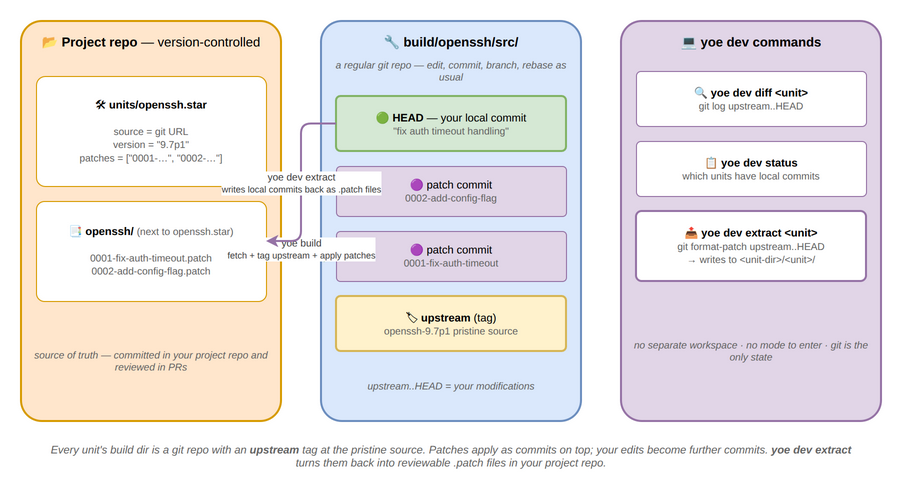
# After building, edit source in place
yoe build openssh
cd build/openssh/src
vim auth.c
git commit -am "fix auth timeout handling"

# Rebuild uses your local commits
yoe build openssh

# See what you've changed
yoe dev diff openssh

# Extract commits as patch files
yoe dev extract openssh
# Writes <unit-dir>/openssh/0001-fix-auth-timeout-handling.patch
# (alongside openssh.star, so the patches ship with the module that defines it)
# Prints updated patches list for your unit

# Check which units have local modifications
yoe dev status
Subcommands:
| Subcommand | Description |
|---|---|
yoe dev extract <unit> | Run git format-patch upstream..HEAD, write to <unit-dir>/<unit>/ next to the unit’s .star file, print updated patches list |
yoe dev diff <unit> | Show git log upstream..HEAD — your local commits |
yoe dev status | List all units with commits beyond upstream |
Rebasing on upstream updates:
# Update unit version
$EDITOR units/openssh.star   # bump version to 9.7p1

# Rebuild fetches new source, applies patches via rebase
yoe build openssh

# If patches conflict, resolve in the git repo
cd build/openssh/src
git rebase --continue
yoe dev extract openssh         # re-extract clean patches
Why this is simpler than Yocto’s devtool:
- No separate workspace — the build directory is the workspace
- No mode to enter/exit — local commits are automatically detected
- No state files — git is the only state
- Extracting patches is
git format-patch— a command developers already know - Each patch = one git commit, so the patch series is the git log
yoe shell (planned)
Status: Not implemented. The command below describes the intended interactive entry point into a unit’s build sandbox — the piece that makes the no-SDK model (see Development Environments) complete.
Opens an interactive shell inside the build sandbox for a unit. The shell
attaches to the same container, environment variables, and mounted sysroot that
yoe build uses — but with a TTY and no automatic build steps.
# Shell into the sandbox for a unit (uses the unit's container + default machine)
yoe shell myapp

# For a specific machine (cross-arch via QEMU)
yoe shell myapp --machine raspberrypi4

# Shell without targeting a unit — uses the machine's default toolchain container
yoe shell --machine beaglebone-black
Inside the shell, $SRCDIR, $DESTDIR, $PREFIX, $ARCH, and $NPROC are
set exactly as yoe build would set them, and the unit’s resolved -dev
dependencies are already installed into the sandbox via the target’s package
manager (apk or apt). Exiting the shell tears down the sandbox — it is not
persistent, so probing with apk add <pkg> / apt install <pkg> for
exploration does not pollute subsequent builds.
This replaces the traditional SDK shell (Yocto’s environment-setup-*). See
Development Environments for the full model.
yoe bundle (planned)
Status: Not implemented. The
yoe bundlesubcommand below is the air-gapped distribution story described in Development Environments. Today there is no export/import path, no bundle format, and no signing.
Exports and imports content-addressed bundles — the subset of the build cache, source cache, module checkouts, and container images needed to reproduce a set of targets without network access.
# Export a bundle for a specific image (includes all transitive deps)
yoe bundle export base-image --out bundle-base-v1.0.tar

# Export everything reachable from PROJECT.star
yoe bundle export --all --out bundle-full.tar

# Sign the bundle with the project's cache signing key
yoe bundle export base-image --sign keys/bundle.key --out bundle.tar

# Import on an air-gapped machine (verifies signatures if present)
yoe bundle import bundle-base-v1.0.tar --verify keys/bundle.pub

# Show the contents of a bundle without importing
yoe bundle inspect bundle.tar
A bundle contains built packages (.apk or .deb), source archives, module
checkouts, and toolchain container OCI archives — all keyed by content hash.
After yoe bundle import, subsequent yoe build runs resolve everything from
the local cache with no network access required.
yoe clean
Removes build artifacts.
# Remove build intermediates (keep cached packages)
yoe clean

# Remove everything (build dirs, packages, sources)
yoe clean --all

# Remove only packages for a specific unit
yoe clean openssh
Image rootfs builds deliberately leave per-file ownership (e.g.
/var/lib/navidrome:navidrome:navidrome) on disk so that
build/<image>.<arch>/destdir/rootfs/ inspects with the same uid/gid the booted
system sees — see Security and Threat Model. A plain shell
rm -rf build/ will fail with permission errors on those files. yoe clean
handles the cleanup correctly: it tries a host-side rm first and, on EACCES,
falls back to running the rm inside the build container where it has the
privilege to remove root- and service-user-owned files. You don’t need sudo.
Environment Variables
| Variable | Default | Description |
|---|---|---|
YOE_PROJECT | . (cwd) | Path to the [yoe] project root |
YOE_CACHE | cache/ | Cache directory for sources, builds, packages |
YOE_JOBS | nproc | Parallel build jobs |
YOE_LOG | info | Log level (debug, info, warn, error) |
YOE_CACHE_SIGNING_KEY | (none) | Path to private key for signing cached packages |
YOE_NO_REMOTE_CACHE | false | Disable remote cache lookups |
AWS_ACCESS_KEY_ID | (none) | S3 credentials for remote cache |
AWS_SECRET_ACCESS_KEY | (none) | S3 credentials for remote cache |
AWS_ENDPOINT_URL | (none) | S3 endpoint override (for MinIO / non-AWS) |
Dependency Resolution
yoe resolves dependencies at two levels:
-
Build-time — unit
depsentries form a DAG.yoe build --with-depstopologically sorts this graph and builds in order, parallelizing where the DAG allows. -
Install-time — unit
runtime_depsentries are written into the package’s metadata (.PKGINFOfor.apk, the control file for.deb). When the package manager (apkorapt) runs during image assembly, it pulls in runtime dependencies automatically.
This means:
- Build dependencies are resolved by
yoe(it knows the unit graph). - Runtime dependencies are resolved by the package manager (
apkorapt, which knows the package graph). - The unit author declares both; the tools handle the rest.
Config Propagation (planned)
Status: Not implemented. There is no
public_configfield on units, no machine-to-unit CFLAGS/optimization propagation, and no resolved-config view inyoe desc. Units today receive architecture via the build environment and nothing else is automatically propagated through the DAG. The section below describes the planned GN-inspired design.
Inspired by GN’s public_configs, machine-level configuration automatically
propagates through the dependency graph. When you build for a specific machine,
settings like architecture flags, optimization level, and kernel headers path
flow to every unit without each unit declaring them:
machine (beaglebone-black)
  → arch = "arm64"
  → CFLAGS = "-O2 -march=armv8-a"
  → KERNEL_HEADERS = "/usr/src/linux-6.6/include"
      ↓ propagates to
  unit (zlib)        → builds with arm64 flags
  unit (openssl)     → builds with arm64 flags
  unit (openssh)     → builds with arm64 flags + sees kernel headers
Units can also declare public_config settings that propagate to their
dependents. For example, a zlib unit might export its include path so that
openssh (which depends on zlib) automatically gets -I/usr/include without
the unit author specifying it.
This is resolved during the graph resolution phase (phase 1) so the full
resolved config for every unit is known before any build starts. Use
yoe desc <unit> --config to inspect the resolved configuration.
Design note: unit-level, not task-level dependencies. Unlike BitBake, which
models dependencies between individual tasks across units (e.g.,
B:do_configure depends on A:do_install), yoe treats each unit as an atomic
unit — unit A depends on unit B means B must be fully built before A starts.
This is a deliberate simplicity trade-off. BitBake’s task-level graph enables
fine-grained parallelism (start fetching C while B is still compiling) and
per-task caching (sstate), but it is also the primary source of Yocto’s
debugging complexity. Unit-level dependencies are easier to reason about, and
the parallelism loss is minor since independent units still build concurrently
across the DAG. Per-unit caching via content-addressed package hashes (.apk or
.deb) provides sufficient granularity for fast incremental rebuilds.
Caching Strategy
Builds are cached at multiple levels:
- Source cache — downloaded tarballs and git clones in
$YOE_CACHE/sources/. Keyed by URL + hash. - Build cache — content-addressed by hashing the unit, source, and all
build dependency package hashes. If the combined hash matches, the build is
skipped and the cached package (
.apkor.deb) is used. - Package repository — built package files (
.apkor.deb) in the local repo. Once published, packages are available for image assembly and on-device updates. - Remote cache (planned — optional) — push/pull packages to an S3-compatible store so CI and team members share build results. Not yet implemented: there is no remote cache backend, no S3 integration, and no cache signing today. See Caching for the object store, the planned S3 configuration, cache signing, and the multi-level fallback chain.
Cache invalidation is hash-based, not timestamp-based. Changing a unit, updating
a source, or rebuilding a dependency all produce a new hash and trigger a
rebuild. Use yoe build --dry-run to see what would be rebuilt and why, or
yoe cache stats to review hit/miss rates from the last build.
Example Workflow
# Start a new project
yoe init my-product --machine beaglebone-black

# Add a unit for your application
$EDITOR units/myapp.star

# Build everything (packages and images)
yoe build --all

# Flash to an SD card
yoe flash base-image /dev/sdX

# Later, update just your app and rebuild the image
$EDITOR units/myapp.star  # bump version
yoe build myapp
yoe build base-image         # only myapp's package changed, fast rebuild

# Or update the device directly (Alpine target shown; on Debian/Ubuntu copy the
# .deb and `dpkg -i` / `apt install` it instead)
scp repo/myapp-1.3.0-r0.apk device:/tmp/
ssh device apk add /tmp/myapp-1.3.0-r0.apk