Architecture
This page introduces yoe’s core concepts and traces a unit through its lifecycle — build, packaging, deployment, and development. Use it as a map before diving into the reference docs. For a quick definition of any single term, see the Glossary.
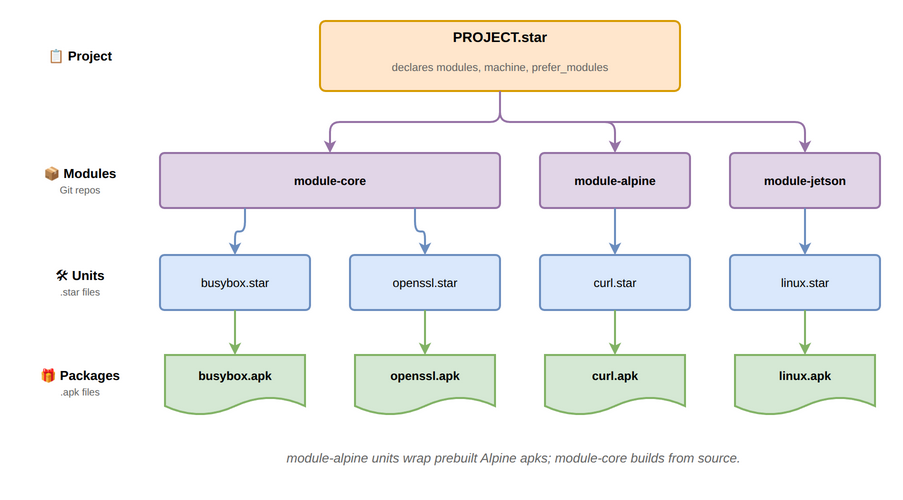
Core concepts
The four nouns at the heart of yoe: project, module, unit, and package.
Project
The project is the top of the tree. It is a directory containing a
PROJECT.star file, which declares:
- which modules the project uses (and at what Git ref),
- the machine to build for,
- any
prefer_modulesresolution pins, - project-local units under
units/and machines undermachines/.
A project is what you check into version control for a specific product. It is
what yoe init scaffolds and what the yoe CLI operates on from your working
directory.
See Unit & Configuration Format for the full
PROJECT.star surface and Naming and Resolution for
how module references and prefer-rules work.
Modules
A module is a Git repository (or a subdirectory of one) that provides reusable building blocks: classes, units, machine definitions, container definitions, and image definitions. Projects compose modules to get the pieces they need.
Typical modules:
module-core— base classes (autotools, cmake, go), common units (busybox, openssl, openssh, kernel), and reference images.module-bspandmodule-jetson— BSP modules with machine definitions (Raspberry Pi 4/5, BeaglePlay, NVIDIA Jetson) and the matching kernel / bootloader / firmware units.module-alpine— passthrough access to upstream Alpine.apkpackages.module-debian— passthrough access to upstream Debian.debpackages (experimental; see module-debian.md for current status and limitations).
Modules are referenced by URL and Git ref in PROJECT.star. The [yoe] CLI
clones them into the project’s cache. See
Naming and Resolution for module naming, directory
structure, and load-path semantics.
Units
A unit is a .star file describing how to build a single piece of
software. Units live in a module’s units/ directory (or the project’s own
units/), and they call into a class (autotools, cmake, go, …) that
encodes the build pattern.
A unit declares its source, version, dependencies, and any build-time
configuration. The [yoe] build system resolves the DAG of units, runs each in
its own sandboxed build environment, and installs results into the build sysroot
so downstream units can find them.
Units are inputs to the build system: developer-edited, version-controlled, and a CI concern. See Unit & Configuration Format for the unit, class, and machine API.
Packages
A package is the build output — an .apk for alpine-targeted units or a
.deb for debian-targeted units. Packages are content-addressed, cached,
signed, and published to a repository. They are consumed by apk (alpine
images) or dpkg / apt (debian images) at image-assembly time and by the
on-device package manager for over-the-air updates.
One unit produces one package today — .apk or .deb is chosen per the
consuming image’s distro, not per unit. A small set of subpackage splits
(-dev, -dbg) is planned for cases where the runtime image should not carry
headers or debug info. See
metadata-format.md#units-vs-packages for
the contract between units and packages, Package Signing for the
alpine pipeline, module-debian.md for the debian pipeline,
and Feed Server for how packages get published and deployed.
How they fit together
The build flow is unit → build → package (.apk/.deb) → repository → image
/ device. The conceptual flow is project references modules, modules provide
units, units produce packages, packages assemble into images:
| Concept | Lives in | Produced by | Consumed by |
|---|---|---|---|
| Project | Your product repo | You | The yoe CLI |
| Module | A Git repo | Module authors | Projects |
| Unit | A module or project | Module / project authors | The build system |
| Package | A package repo | The build system | apk / apt (image and on-device) |
For an explanation of why this split exists — versus Yocto’s recipe/layer model — see Comparisons. For the language used to express units and configuration, see Build & Configuration Languages.
Build
Building a unit means turning declared inputs into a packaged artifact. Three
angles matter: the environment the build runs in, the inputs that feed it, and
how an abstract name like linux finds a concrete provider.
The build environment
Builds run on the host through a tiered environment. The host provides only
yoe and a container runtime; everything else is nested inside the container
that yoe spawns:
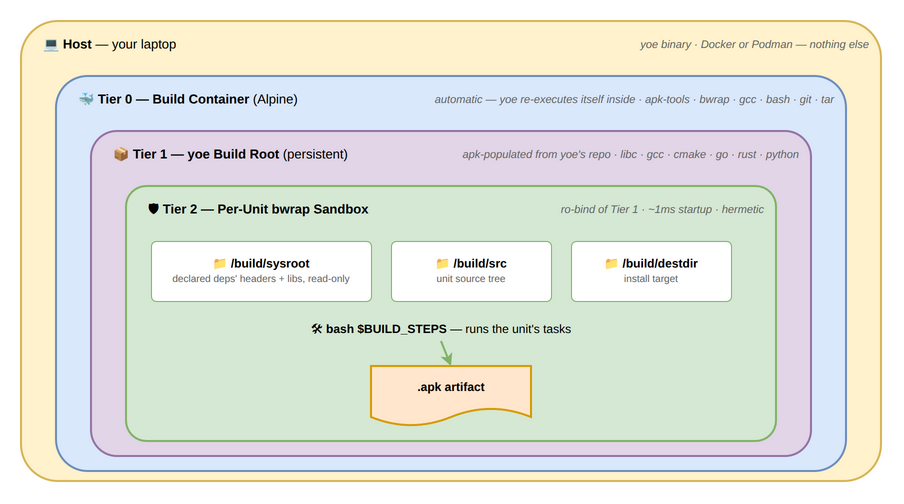
Each unit builds inside its own bwrap sandbox with only its declared deps visible. See Build Environment for the tier-by-tier details, the bootstrap process, and the rationale behind bwrap-over-Docker for per-unit isolation.
Dependency sources
A unit pulls inputs from four independent sources, each managed by the right tool for the job:
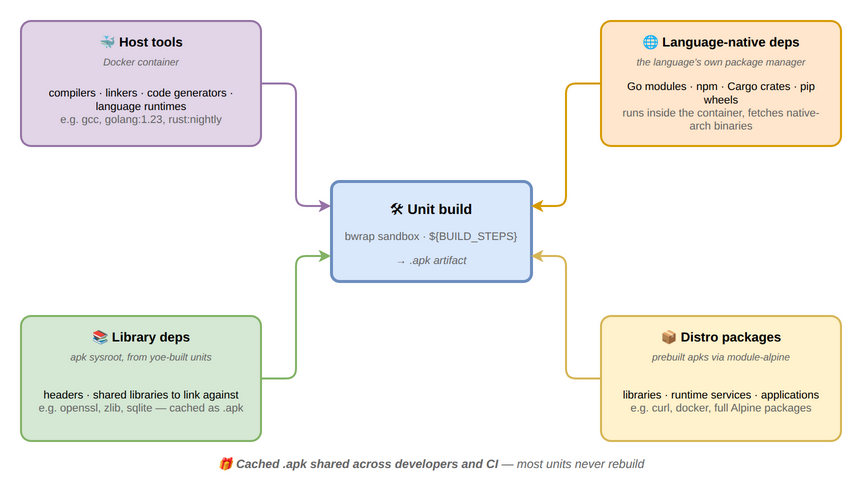
Host tools (compilers, language runtimes) come from Docker containers; library
deps from the sysroot built up by other yoe units; distro packages (full
libraries, runtime services, applications) come from prebuilt upstream packages
via module-alpine (apks) or module-debian (debs); and language-native deps
(Go modules, Cargo crates, pip wheels) are handled by each language’s own
package manager inside the container. See
Build Dependencies and Caching for why this
split exists and how it interacts with the build cache, and
Alpine apk Passthrough for the prebuilt-apk path.
Abstract-name resolution
An image’s artifacts list and a unit’s runtime_deps/build_deps can
reference abstract names like linux or init. The resolver matches each
abstract name against a registry of provides claims from every unit across
every module, with module declaration order in project() deciding ties:
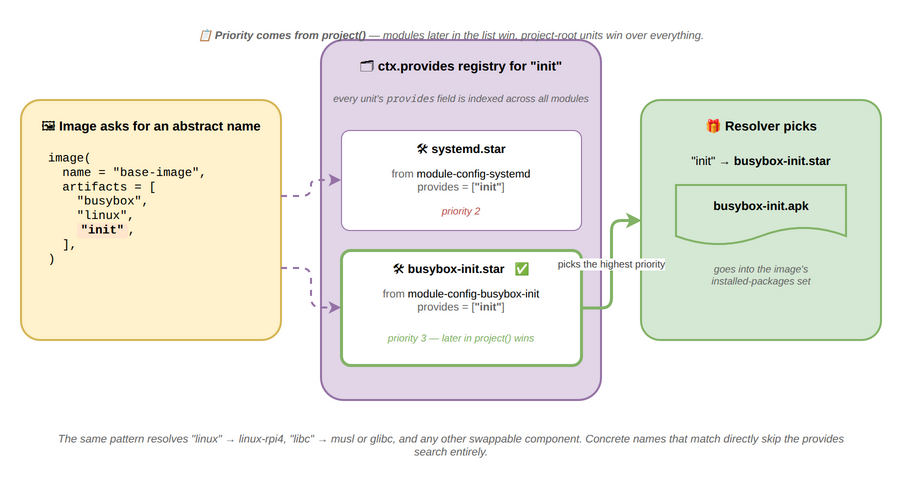
This is what makes images machine- and project-portable: an image asks for
linux, and a Raspberry Pi machine config points linux at linux-rpi4 while
a Jetson machine points it at a Tegra kernel — same image, different hardware.
Concrete names that match directly skip the registry.
For multi-distro projects, resolution is also distro-aware: a unit tagged for
one distro is invisible to images of another, and virtuals like toolchain
route to the matching toolchain unit (toolchain-musl for alpine,
toolchain-debian-13 for debian, toolchain-ubuntu-26.04 for ubuntu) via the
same provides mechanism. See Naming and Resolution
for collision rules, name shadowing, and the replaces mechanism, and
Catalog and Materialization for the in-memory data structures that
hold units while a project is being evaluated, how synthetic feed units
materialize lazily, the distro visibility filter, and the working-set sizes the
resolver operates at.
Packaging
Every artifact published by yoe — whether built from source or repacked from a
distro — flows through one of two parallel format pipelines, both signed by the
project key. The pipelines mirror each other: same content-addressed cache, same
source paths, same yoe build invocation; only the on-disk format and signing
mechanism differ to match the consuming image’s distro.
.apkpipeline — used by alpine images. Per-.apkRSA-SHA1 signature plus a signedAPKINDEX.tar.gzper arch. Verified on-device by apk-tools..debpipeline — used by debian images. Per-.debSHA256 in thePackagesfile plus a clearsign-GPGInReleaseper suite. Verified on-device by apt withSigned-By:scoped to the project keyring. Experimental — see module-debian.md for current status.
A single project can have both — one image targeting alpine and another targeting debian — and each lands in its own per-distro repository subtree.
Distro passthrough
module-alpine units don’t rebuild Alpine packages — they repack each upstream
.apk, swapping the signature so the device’s apk-tools verifies against the
project key like any other yoe-built package:
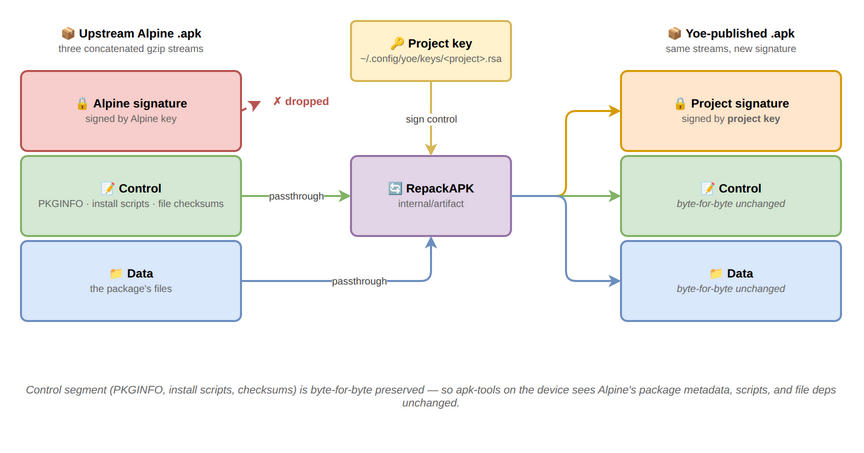
The control segment (PKGINFO, install scripts, file checksums) and data segment
pass through byte-for-byte, so apk-tools on the device sees Alpine’s metadata,
install behavior, and shared-library deps unchanged. Only the signature changes.
See Alpine apk Passthrough for the two-metadata-systems
story (.star fields drive the yoe resolver; PKGINFO drives apk-tools at
install time) and the noarch routing details.
module-debian follows a parallel but distinct pattern. Upstream .deb files
are mirrored verbatim (no repack), and only the project’s InRelease is
re-signed with the project’s GPG key. Each downloaded .deb’s SHA256 is
verified at mirror time against the upstream-signed Packages entry, and the
device’s apt trust is scoped to the project key via deb822 Signed-By: — so the
per-.deb upstream signature isn’t on the trust path at all, only the
project-signed InRelease and the per-.deb SHA256 inside it. See
module-debian.md for the verbatim-mirror rationale and the
Valid-Until posture.
Signing and trust
Each pipeline has its own signing primitive, but both anchor on the same
per-project key bootstrapped under ~/.config/yoe/keys/<project>/:
-
apk pipeline — RSA-SHA1 per-
.apksignature + signedAPKINDEX.tar.gz, public half shipped in the rootfs viabase-files.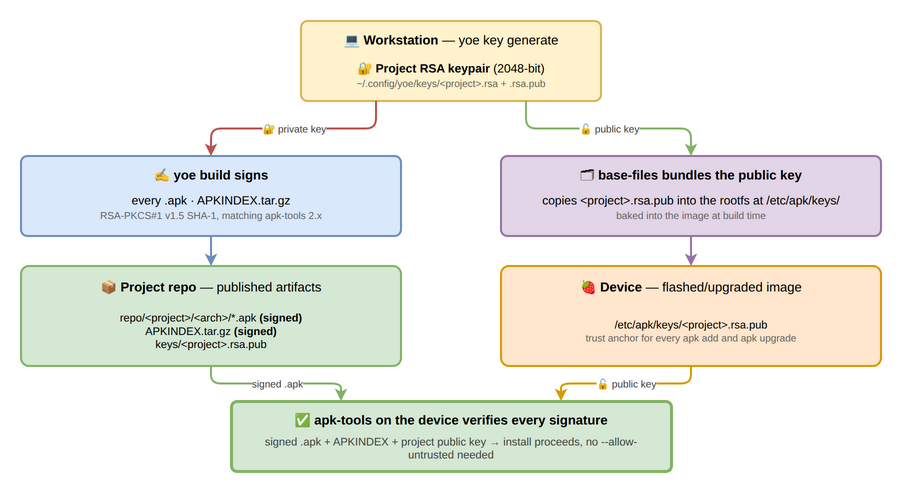
-
deb pipeline — clearsign-GPG
InReleaseper suite, public key staged at/etc/apt/keyrings/<project>.gpgand referenced from the deb822.sourcesfile’sSigned-By:field (scoping trust to the project source only, not the system-wide trust store). HTTPS-only URLs enforced at evaluation. Experimental status applies.
For both: the private key never leaves the workstation, and the public key travels through two independent channels (the project repo for inspection, the rootfs for verification). See Package Signing for the alpine key generation / rotation surface and the exact apk bytes that get signed. See module-debian.md for the deb trust details.
Deployment
A unit’s job ends when its package lands on a running device. The same per-distro repo and project signing key serve image-time installs, the dev loop, and on-device OTA, so there’s only one delivery mechanism to understand.
Reaching a running device
Built packages flow from the workstation to a running yoe device through a small set of orthogonal channels: mDNS for discovery, HTTP for the package pull, and SSH for orchestration. The delivery mechanism is one — the per-distro package format is two:
- Alpine images consume an apk repo at
repo/<project>/alpine/<arch>/with the project’s RSA-signedAPKINDEX.yoe device repo addwrites the matching/etc/apk/repositoriesentry;apk add/apk upgradethen work on-device against the project’s own feed. - Debian images consume a Debian-format repo at
repo/<project>/debian/dists/<codename>/. The project’s GPG key signs theInRelease; image assembly stages/etc/apt/sources.list.d/<project>.sources(deb822 format) referencing the keyring viaSigned-By:.apt updateandapt installon the device verify against the project key only, so other apt sources can’t smuggle packages into the project’s namespace.
Same project key, same HTTP transport, same mDNS + SSH channels — the apk vs apt split is on-device tooling, not on-workstation infrastructure.
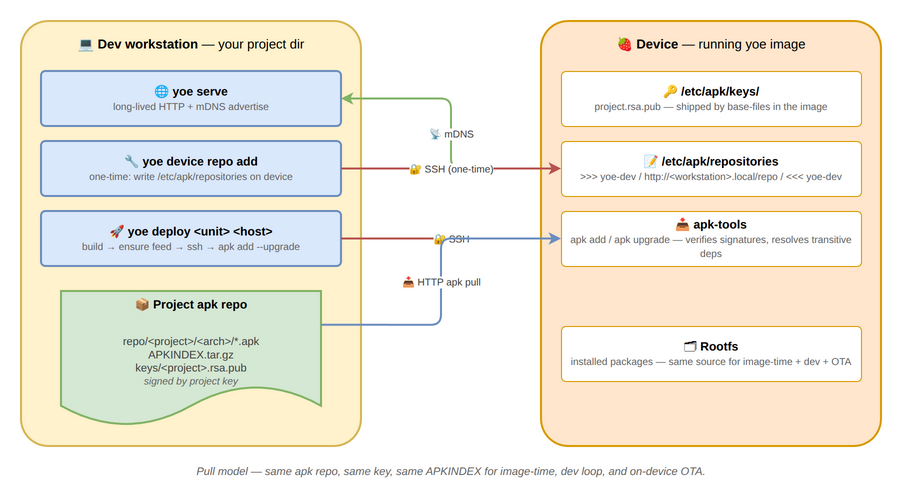
yoe serve is the long-lived HTTP + mDNS server, yoe device repo add does the
one-time on-device repo setup (/etc/apk/repositories for alpine,
/etc/apt/sources.list.d/<project>.sources for debian), and yoe deploy
orchestrates the whole “build → ship → install” round trip. See
Feed Server and yoe deploy for the workflows, command
reference, and trust model, and module-debian for the apt
side end-to-end.
Development
When a unit needs local changes — a fix to upstream, a vendored patch, an experimental tweak — yoe leans on plain git rather than a separate “dev mode.”
Source modifications round-trip
Every unit’s build directory is a regular git repo, living under
build/<distro>/<unit>.<scope>/. The per-distro segment lets a source unit
consumed by both an Alpine and a Debian image keep two destdirs (one built
against musl, one against glibc) so each image gets the right libc without
clobbering its peer between builds. Upstream source is checked out at the
version pinned by the unit and tagged upstream; any patches the unit declares
are applied as commits on top; your local edits become further commits. There’s
no separate workspace, no mode to enter:
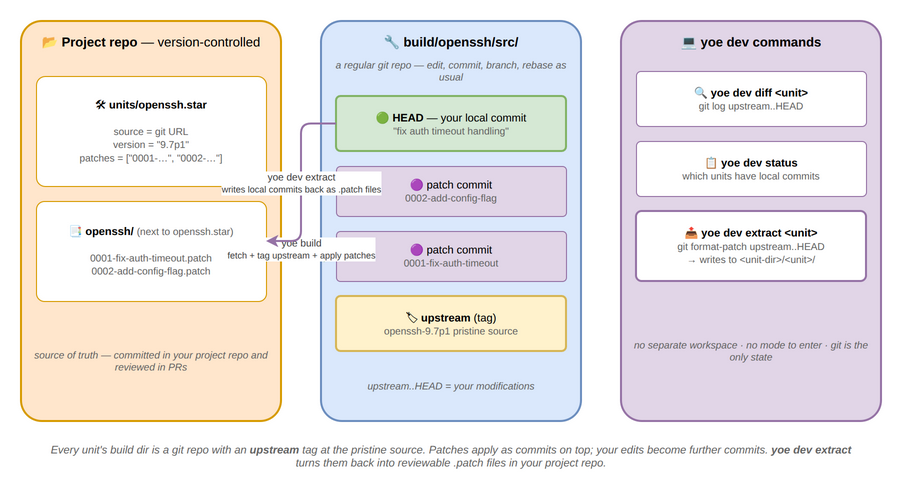
yoe dev extract turns the commits above upstream back into reviewable
.patch files in your project repo — git format-patch under the hood — so the
source of truth stays version-controlled even when iteration happens in the
build dir. See yoe dev for the command surface and the
upstream-rebase workflow.